

Description
TapToLink lets you link anything while you write, without leaving the sentence you are in.
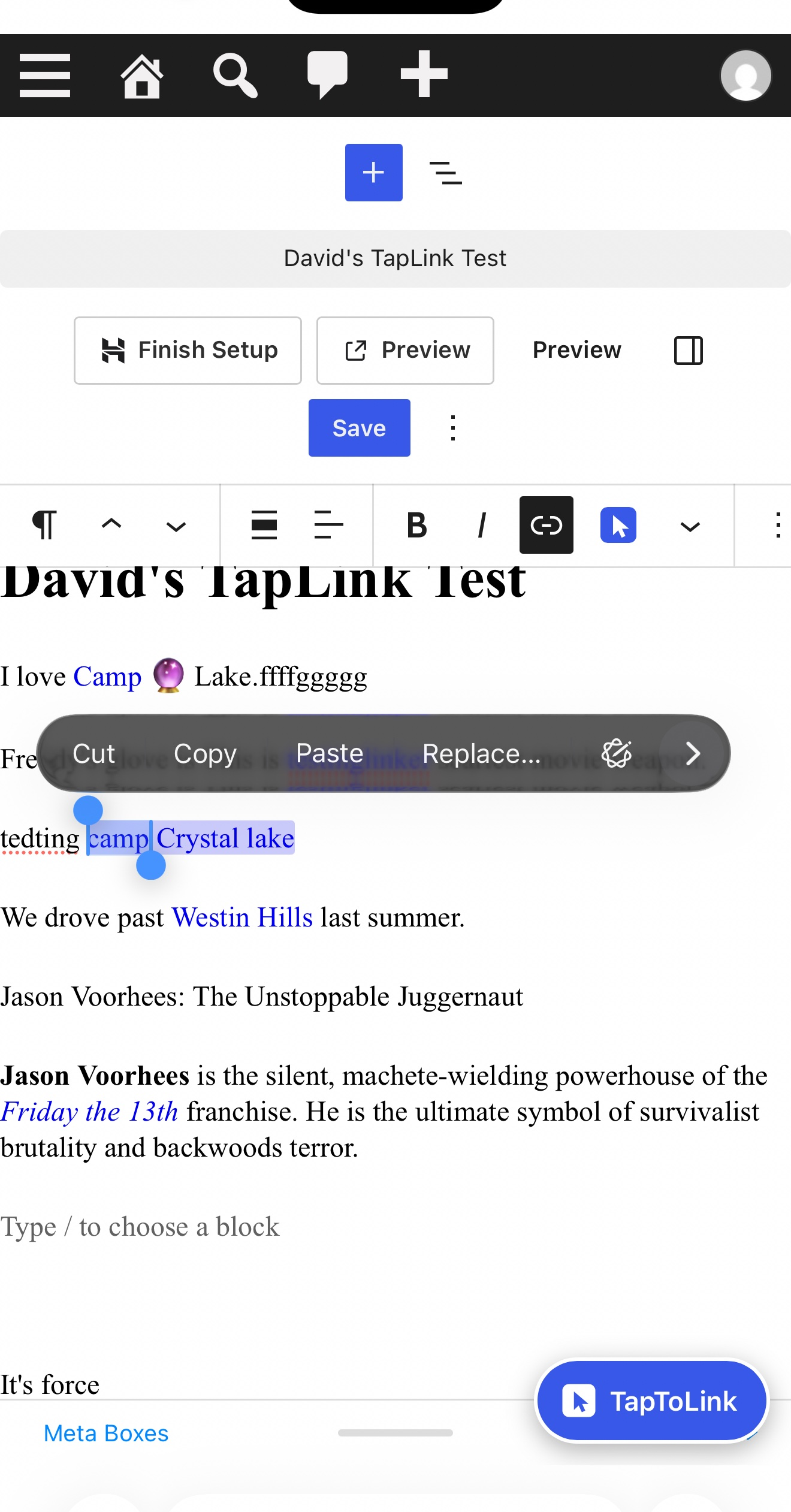
- Highlight a phrase in a post or page.
- Tap the TapToLink button that appears right next to your selection, or the TapToLink button next to Link in the toolbar (or press Ctrl+Shift+L, Cmd+Shift+L on a Mac).
- Tap a suggestion. The highlight becomes a link.
There is nothing to set up: no rules, no keyword lists, no CSV files.
Suggestions from your own site. TapToLink looks at your published posts and pages and ranks them in this order: an exact title match first, then titles that contain the phrase, then tag or category matches, then posts that mention the phrase in their text. Newer posts win ties, and the post you are editing never suggests itself. It understands everyday writing: capital letters, straight and curly apostrophes, possessives (“Freddy’s glove” suggests the Freddy page), a missing “The” or “A”, and years (“Halloween 2018” finds “Halloween (2018)”). Each row shows the title, the type (post or page) and the date, and the top suggestion is marked “Best match” (screen readers hear it too). Only published posts and pages are ever suggested, never drafts, pending, private, scheduled or trashed ones, even if another plugin widens WordPress’s queries.
Forgiving. A typo or an extra letter doesn’t leave you with an empty box: if no title or tag matches, TapToLink shows the closest titles instead (“Freddyy” still finds “Freddy Krueger”), clearly labelled as closest matches. This reuses the posts it already looked at, so it costs no extra searching.
Search and paste in the same box. If the suggestions aren’t what you want, type a word or two to search your posts and pages, or paste any address (on your site or anywhere else). TapToLink checks that it looks like a real link before it applies it. Pasted links open in a new tab by default (with rel="noopener noreferrer"); untick “Open in new tab” under the paste field for a same-tab link. If nothing matches, the box opens with search and paste instead of an error.
Edit a link you already made. Put the cursor in a link (or select its words) and open TapToLink: the paste field shows the link’s current address and “Open in new tab” shows how it opens now. Change either and press Link, and TapToLink updates that same link in place. Pick another suggestion to point it somewhere else. To remove a link, use My Links (the picker says so: “To remove a link later, use TapToLink -> My Links.”)
Phone-first. As soon as you select words, a TapToLink button appears near the selection (beside the text column on a desktop, so it never covers the next line); on a phone it sits just above the on-screen keyboard, so it is there even when the editor toolbar has scrolled out of view. On small screens the picker slides up from the bottom as a sheet and keeps your highlighted words visible above it. When the keyboard is open, the whole picker (search field, results and buttons) lifts into the space above the keyboard, and the results list scrolls inside it. Tap targets are big (44px or more). On some phones — iPhones especially — a single tap only places the cursor: double-tap the word to select it, and the button appears.
Both editors. A format button in the block editor; a toolbar button in the classic editor’s Visual tab and a Quicktags button in its Text tab. With nothing selected, TapToLink opens search-first and inserts the page title as the link text.
Accessible. Keyboard shortcut, arrow keys to move through results, Enter to apply, Escape to close. Results are announced to screen readers.
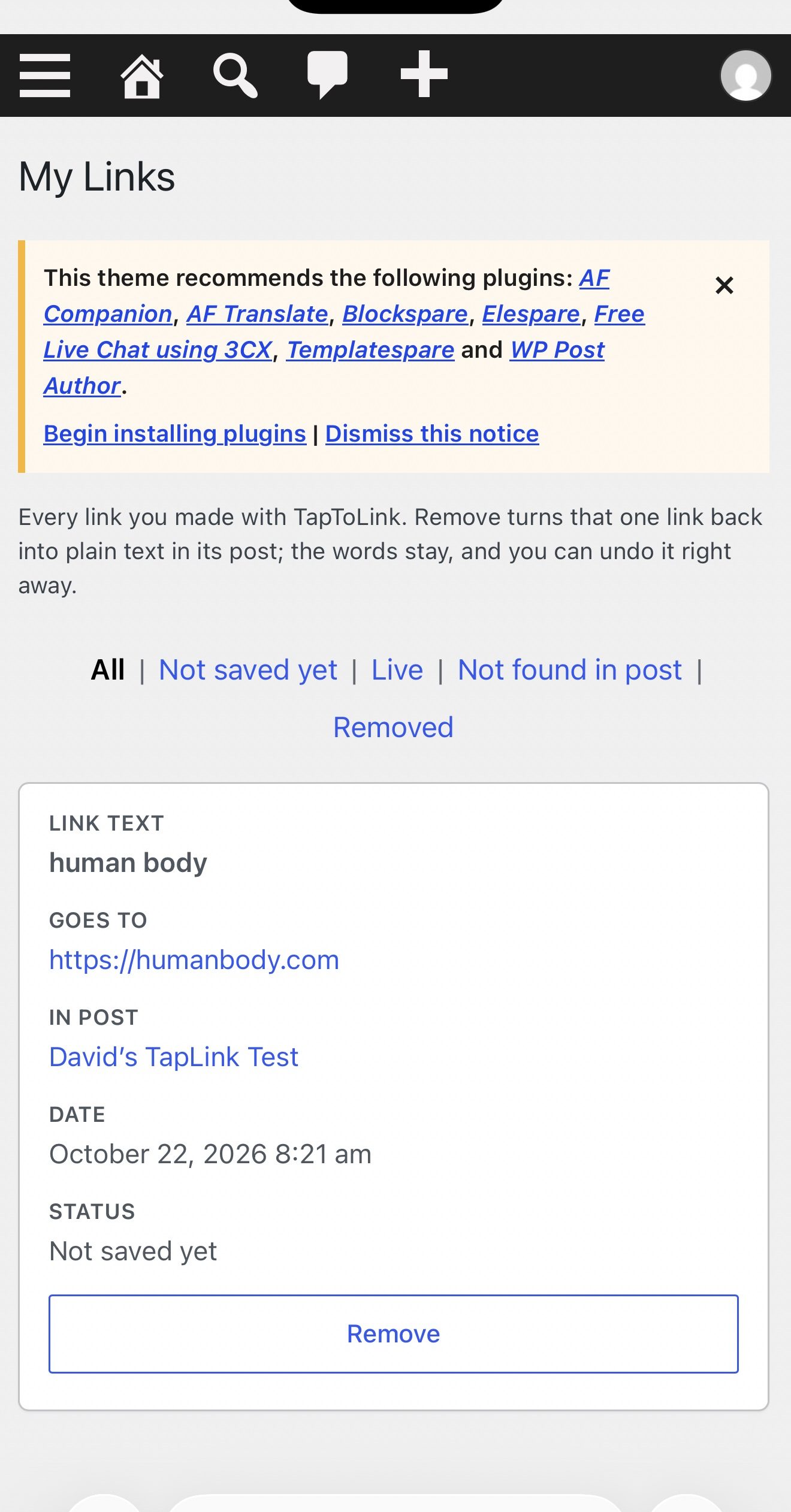
Your links, in one place. Every link TapToLink makes is listed under TapToLink > My Links with its post, text, address, date and status. Remove turns that one link back into plain text in its post: the words stay, only the link goes, and the notice has an Undo link that puts it back exactly as it was. If the passage was edited by hand and the link can’t be found, TapToLink says so and links you to the post. It never guesses and never changes anything else. Never track down a stupid link again.
Light. TapToLink loads nothing on your public site. It only runs in the editor and its own admin screens. Searches use WordPress’s own post search and return in milliseconds even on large sites.
Links stay standard. TapToLink makes exactly the link WordPress would make. Links to suggested posts and pages open in the same tab with no extra rel attributes; only pasted links get the new-tab attributes, and only while “Open in new tab” is ticked. Your existing content, links and editor tools are never changed or removed, except a link you reopen in TapToLink and update yourself.
TapToLink Pro
Linking is free forever. TapToLink Pro is a separate add-on plugin, sold through our store at https://lockerforge.com/ — it is not an unlock inside this plugin, and this plugin contains no locked or disabled features. Pro removes repetitive work and reports on your whole site:
- Smart outside links: TapToLink fetches the page title for link text and applies your saved defaults (new tab, nofollow, sponsored).
- Link library and favorites: your most-used links in two taps, with affiliate tags added automatically.
- Orphan finder and stats: pages nothing links to yet, and your most-linked pages.
- Link health: a warning when a page you linked to is deleted, unpublished or renamed.
- Bulk link pass: scan a whole draft and approve suggested links one by one.
Privacy. This plugin makes no external HTTP requests and has no tracking or telemetry. It stores only the link log described above.
Screenshots

Installation
- Upload the
taptolink-highlight-link-finderfolder to/wp-content/plugins/, or install the zip from Plugins > Add New > Upload Plugin. - Activate the plugin.
- Open any post, highlight some words and tap the TapToLink button.
FAQ
-
Do I have to configure anything?
-
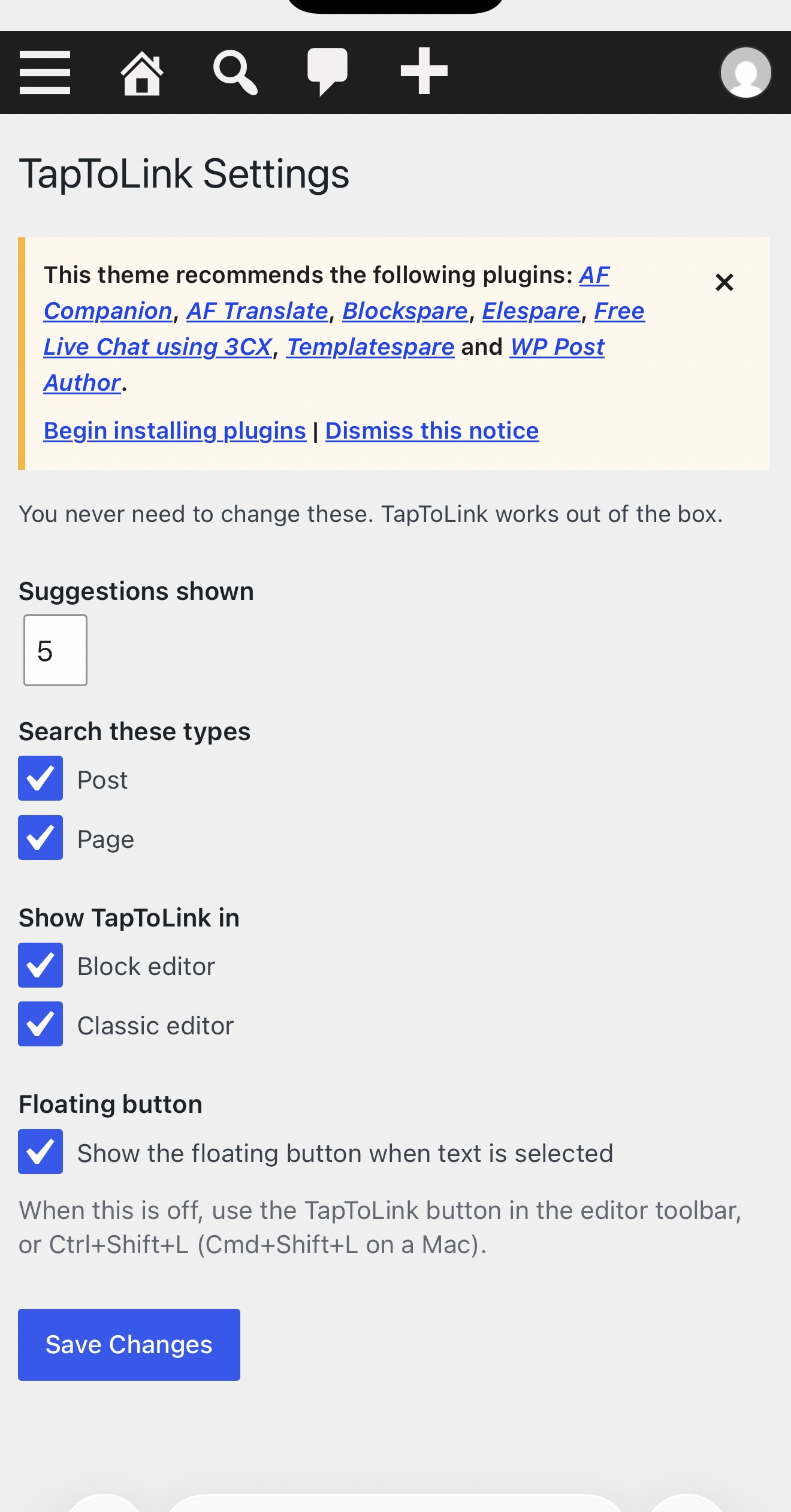
No. The one settings screen (TapToLink > Settings) only holds the number of suggestions (5 by default), which post types are searched, whether TapToLink appears in the block editor and the classic editor, and whether the floating button shows when you select text (on by default).
-
TapToLink has its own icon: a solid badge with a tap pointer, in your admin colour, so it is easy to tell apart from the chain-link Link button. In the block editor it sits next to the Link button in the formatting toolbar that appears when you select text. In the classic editor it is next to the Link button on the Visual tab and labelled “taptolink” on the Text tab. In both editors, a floating TapToLink button also appears next to any text you select. On some phones — iPhones especially — a single tap only places the cursor: double-tap the word to select it, and the button appears. If you prefer the toolbar only, untick “Show the floating button when text is selected” in TapToLink > Settings; the toolbar button and Ctrl+Shift+L keep working.
-
What support is included?
-
The free version includes this documentation and the community support forum on WordPress.org, answered on a best-effort basis. Priority email support is included with TapToLink Pro (the separate add-on): if you have purchased Pro, you get direct help from the TapToLink team. Bug reports are welcome from everyone in the forum.
-
What happens with JavaScript turned off?
-
The standard WordPress editing and link tools work exactly as before. TapToLink never removes or changes existing editor features, content or links.
-
How does the link log know what I kept?
-
When you apply a link, the editor records it as “not saved yet”. When the post is saved, TapToLink checks the saved content: links that are there become “Live”, links you undid before saving are dropped, and links that later disappear (for example, edited by hand) are marked “Not found in post”.
-
What does Remove change?
-
Only the one link: the
<a>tag around those words is removed and the words stay. Everything else in the post, including block markup, is left byte-for-byte as it was. The success notice has an Undo link (valid for an hour) that puts the link and its My Links entry back exactly as they were; WordPress also keeps a revision. If the same link appears more than once, TapToLink leaves the post alone and tells you, rather than guessing which one you meant.If the post has not been saved since the link was added, the link only exists in the editor. Remove then takes it out of the editor: an open editor removes it as soon as you switch back to it (and tells you), and it stays out when the post is saved.
-
Does it slow my site down?
-
No. Nothing loads on the public site. In the editor the picker only loads its small script and asks the server when you open it; typed searches are debounced.
-
Developer hooks
-
taptolink/search_post_types(array) filters the post types that are searched.taptolink/tip_urland theTAPTOLINK_TIP_URLconstant set the optional Tip Jar link.
Reviews
There are no reviews for this plugin.
Contributors & Developers
“TapToLink — Highlight Link Finder” is open source software. The following people have contributed to this plugin.
Contributors
Translate “TapToLink — Highlight Link Finder” into your language.
Interested in development?
Browse the code, check out the SVN repository, or subscribe to the development log by RSS.
Changelog
1.0.6
- Security: the admin notice shown after removing or restoring a link is now signed with a nonce, and a post’s title is only shown to users who may edit that post.
1.0.5
- The WordPress.org edition is now free-only: the Pro code that previously shipped locked inside this plugin has been removed entirely. TapToLink Pro continues as a separate add-on plugin from our store; the free features are unchanged.
- Fixed: the text domain now matches the plugin slug, so translations load correctly.
- Fixed: the readme described a picker web search that is not part of this edition; that text has been removed.
1.0.4
- Renamed: TapLink is now TapToLink. A new name for the same plugin — highlight, tap, linked.
1.0.3
- Improved: reopening TapToLink with the cursor or selection inside an existing link (pasted or suggested) now shows that link. The paste field holds its current address and “Open in new tab” shows whether it opens in a new tab. Pressing Link updates that same link in place (address, new tab and rel) instead of adding a new one, so links are never nested or doubled. A link to a suggested post is marked “Current link” in the list. A selection that reaches past the link works as before.
- New: a quiet line under the paste area: “To remove a link later, use TapToLink -> My Links.”
1.0.2
- New: “Open in new tab” checkbox under the paste field, ticked by default. Pasted links open in a new tab with
rel="noopener noreferrer"; untick it for a same-tab link. Links to suggestions are unchanged. - New: setting “Show the floating button when text is selected” (on by default). When off, the toolbar button and Ctrl+Shift+L still open TapToLink.
- New: Undo in the Remove notice in My Links. It restores the link and its log entry exactly as they were.
- New: the top suggestion is marked “Best match”, visibly and for screen readers.
- New: forgiving partial matches. When no title or tag matches (a typo, an extra letter, stray punctuation), TapToLink shows the closest titles instead of an empty box. No heavy extra queries.
- Fixed: drafts, pending, private, scheduled, trashed posts and revisions could be suggested when another plugin or theme widened post queries (pre_get_posts, posts_where or posts_results). Every suggestion is now re-checked to be published.
- Fixed: on a desktop the floating button could sit over the next line, so double-clicking a word there opened the picker for the previous selection. The button now sits beside the text column, a double-click that lands on it selects the word underneath, and the space a double-click picks up after a word is no longer linked.
- Improved: Remove on a post that hasn’t been saved since the link was added now says so plainly, takes the link out of the open editor and keeps it out when the post is saved.
1.0.1
- New: TapToLink has its own icon (a solid badge with a tap pointer) in the block editor toolbar, the classic editor and the new floating button, so it can’t be mistaken for the core Link button.
- New: a floating TapToLink button appears as soon as you select text in the block editor or the classic Visual editor. On phones it docks just above the on-screen keyboard and stays clear of the native Cut/Copy/Paste bubble. It hides again when the selection collapses.
- Improved: with the on-screen keyboard open, the whole picker lifts into the clear space above the keyboard with a gap, and the results list is sized to fit and scrolls inside itself.
- Improved: My Links on phones (782px and narrower) shows each link as a stacked card with each label on its own line above its value.
- Fixed: the link-log table now repairs itself. It is created or upgraded on admin_init when its version is missing or out of date, and recreated on first use if it is missing. My Links shows a friendly empty state instead of a database error. Zero-date column defaults that strict MySQL modes reject were also removed.
1.0.0
- Initial release.