Description
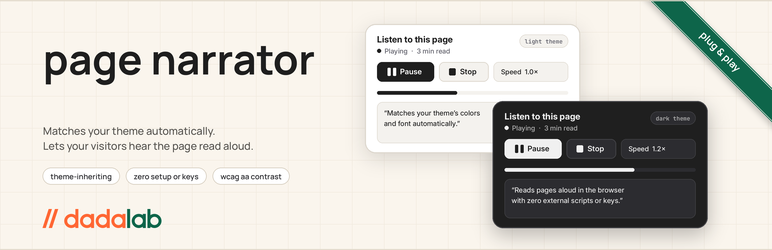
// dadalab page narrator adds a small, unobtrusive player to your posts and pages so visitors can have the content read aloud. Install it, activate it, and it works.
There is nothing to sign up for and nothing to configure. Speech comes from the visitor’s own browser, so no text or personal data ever leaves their device.
What it does
- Reads the main content of a post or page aloud
- Play, pause, stop, and adjust speed from 0.5x to 2x
- Skips navigation, headers, footers, sidebars, and comments
- Pauses naturally after headings and list items
- Works with keyboard and screen readers: real buttons, visible focus, Escape to close
Matches your theme
The player takes its colors from your theme’s own palette when the theme provides one, so it looks like it belongs. On themes that don’t, it uses a neutral light or dark look that follows the visitor’s system setting. Typography is inherited from your site.
There are no color presets, skins, or styling options. That is deliberate.
Settings
Under Settings page narrator you can choose:
- Whether the narrator is on
- Which post types and the front page show it
- Bottom-right or bottom-left corner
- Whether to send playback events to Google Analytics, if your site already loads it (off by default)
Privacy
No external service is contacted. Speech is generated locally by the browser. The optional analytics setting only calls your site’s existing gtag() function and is off unless you turn it on.
Installation
- Upload the
dadalab-page-narratorfolder to/wp-content/plugins/, or install the zip through Plugins Add New Upload Plugin. - Activate the plugin.
- Visit a post or page. The player appears in the bottom corner.
- Optionally adjust Settings page narrator.
FAQ
-
Does it need an account or API key?
-
No. It uses the Web Speech API built into modern browsers.
-
Will it match my theme?
-
If your theme defines a base and contrast color (most modern block themes do), the player uses them. Otherwise it uses a neutral palette that follows the visitor’s light or dark system setting.
-
Can I change the colors?
-
Not from the settings screen. The plugin is designed to inherit your theme rather than carry its own look. Developers can override the
--dlpn-bgand--dlpn-fgcustom properties in CSS. -
Does it send any data anywhere?
-
No. Speech is produced in the browser. If you turn on the analytics setting, playback events are passed to your site’s existing Google Analytics, and nothing else.
-
Which browsers support it?
-
Current versions of Chrome, Edge, Safari, and Firefox on desktop and mobile. Voices vary by browser and operating system.
Reviews
There are no reviews for this plugin.
Contributors & Developers
“// dadalab page narrator” is open source software. The following people have contributed to this plugin.
Contributors
Translate “// dadalab page narrator” into your language.
Interested in development?
Browse the code, check out the SVN repository, or subscribe to the development log by RSS.
Changelog
1.1.0
- Rebuilt for general release.
- Colors now inherit from the active theme, with neutral light and dark fallbacks.
- Removed color presets and styling options.
- Simplified settings to on/off, placement, post types, and optional analytics.
- Replaced inline styles and scripts with properly enqueued assets.
- Accessibility: native buttons, visible focus, Escape to close, status announcements.
- Stops speech when the visitor leaves the page.
- Added uninstall cleanup.
1.0.1
- Original release on dadalab.com.