

Description
Aiolos Checkout replaces the WooCommerce checkout page with a clean, conversion-focused checkout in three steps (or on one page), and adds a side cart that opens the moment a product is added. It is light, accessible, and built so that the payment gateways you already use keep working exactly as before.
Checkout
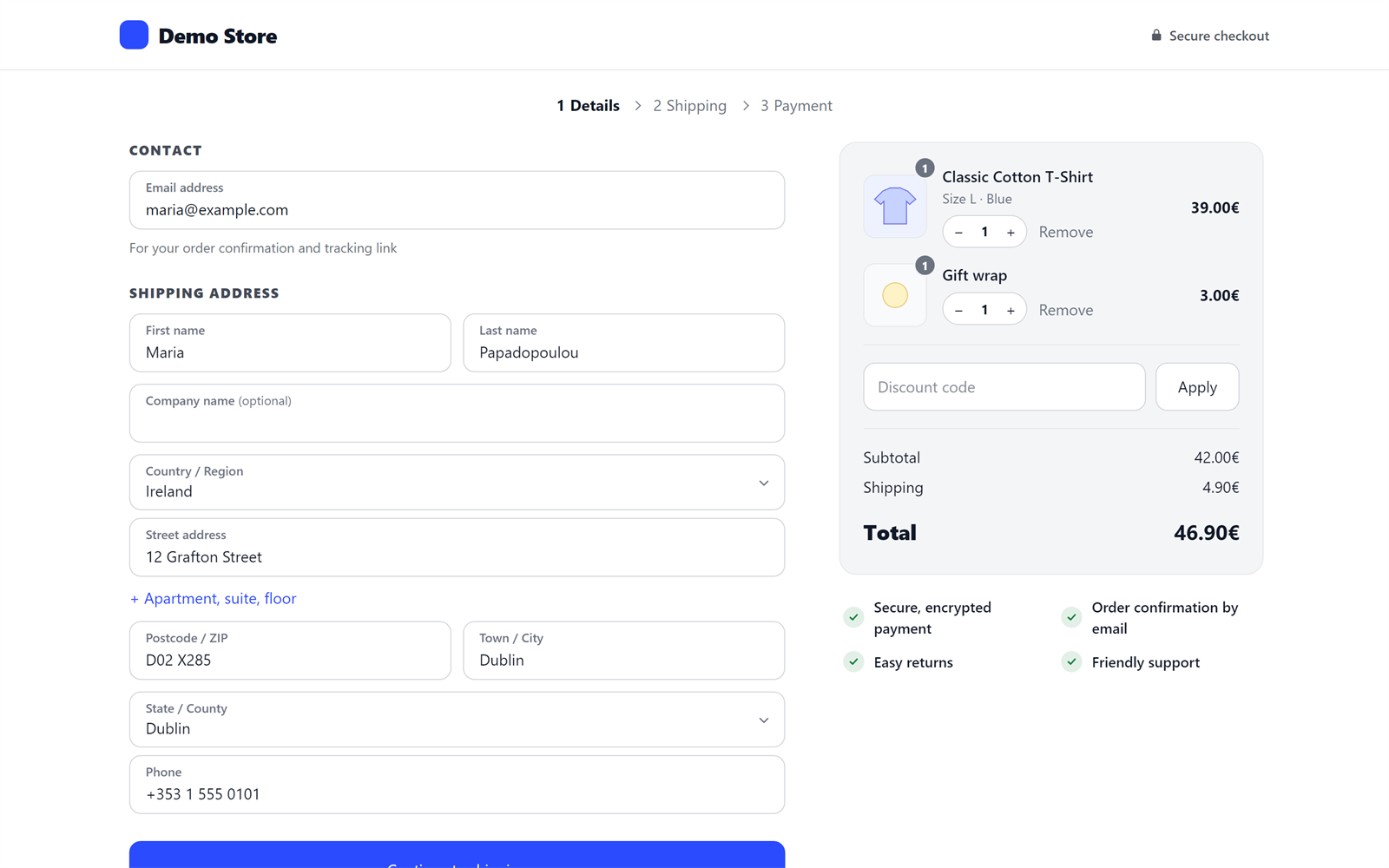
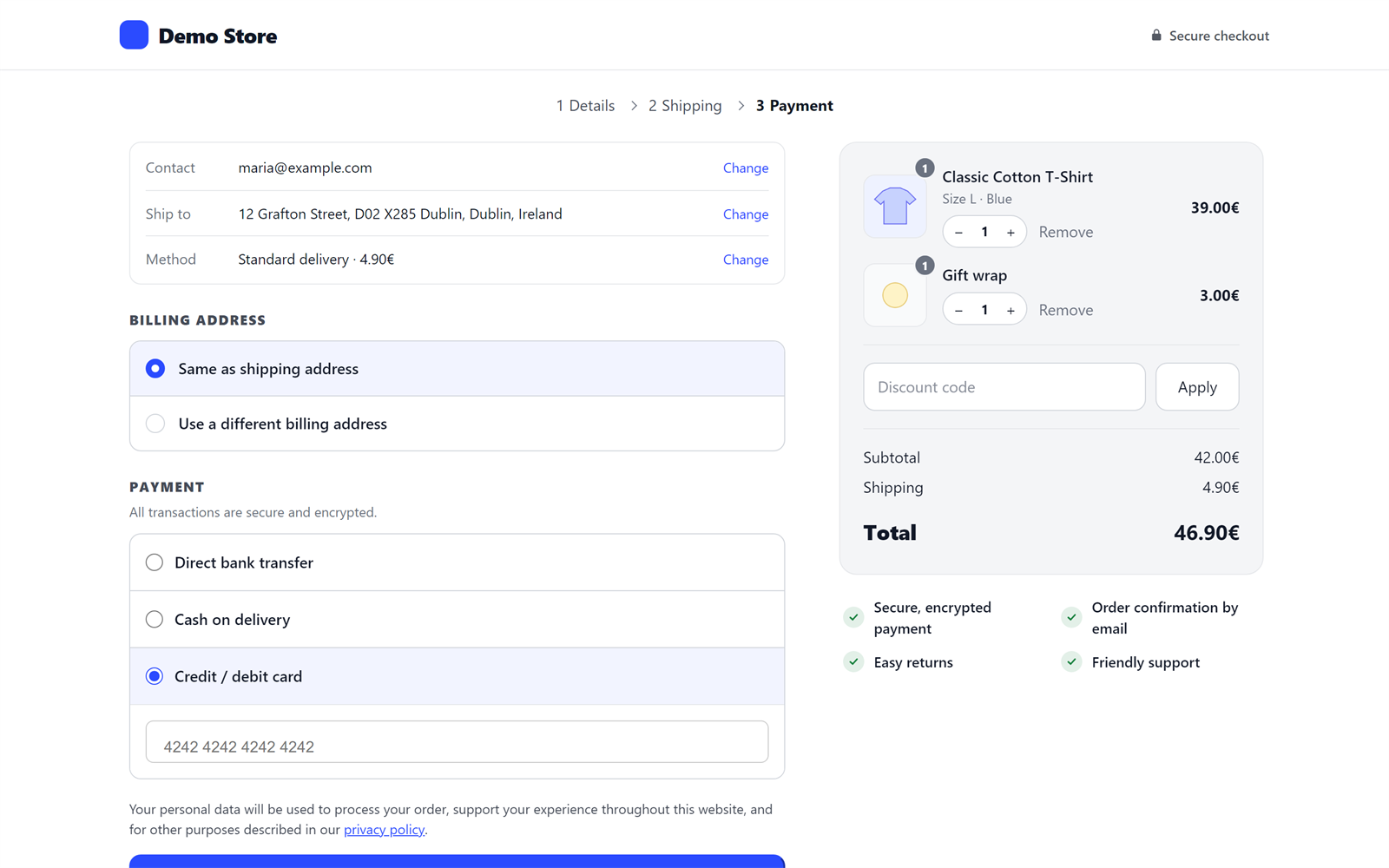
- Three steps: Details, Shipping, Payment, or one page. A recap of what was entered, with “Change” links, and the order summary always in view.
- Change the order without leaving. Plus, minus and remove buttons on the products of the order summary.
- Typos caught. “gmial.com” gets a “Did you mean gmail.com?”, so order confirmations reach the customer.
- Returning customers. When the email entered belongs to an account, a “Log in” link appears under it.
- Every payment gateway. The payment section is WooCommerce’s own, untouched, and WooCommerce’s checkout script still places the order. Stripe, WooPayments, PayPal Payments, Mollie, Revolut, Viva, Klarna Payments, bank transfer and cash on delivery work as on the classic checkout.
- Express checkout area. Apple Pay, Google Pay and PayPal buttons from your gateways show at the top, and only when a gateway actually shows one.
- The address is asked once. Billing is “same as shipping” unless the customer says otherwise; one phone number fills both.
- Errors where they belong. Inline validation on each step; an error from WooCommerce or a gateway takes the customer to the field to fix, even on an earlier step.
- Pickup points. Lockers and pickup points of courier plugins (BOX NOW, ACS, DPD and others) show under their shipping rate and are checked before the payment step.
- Fields from other plugins (VAT number, invoice type, gift message, consent boxes) appear in the right step and keep their values.
- Back from a payment page (a cancelled card or bank payment): the customer returns to the step they were on, with everything filled in.
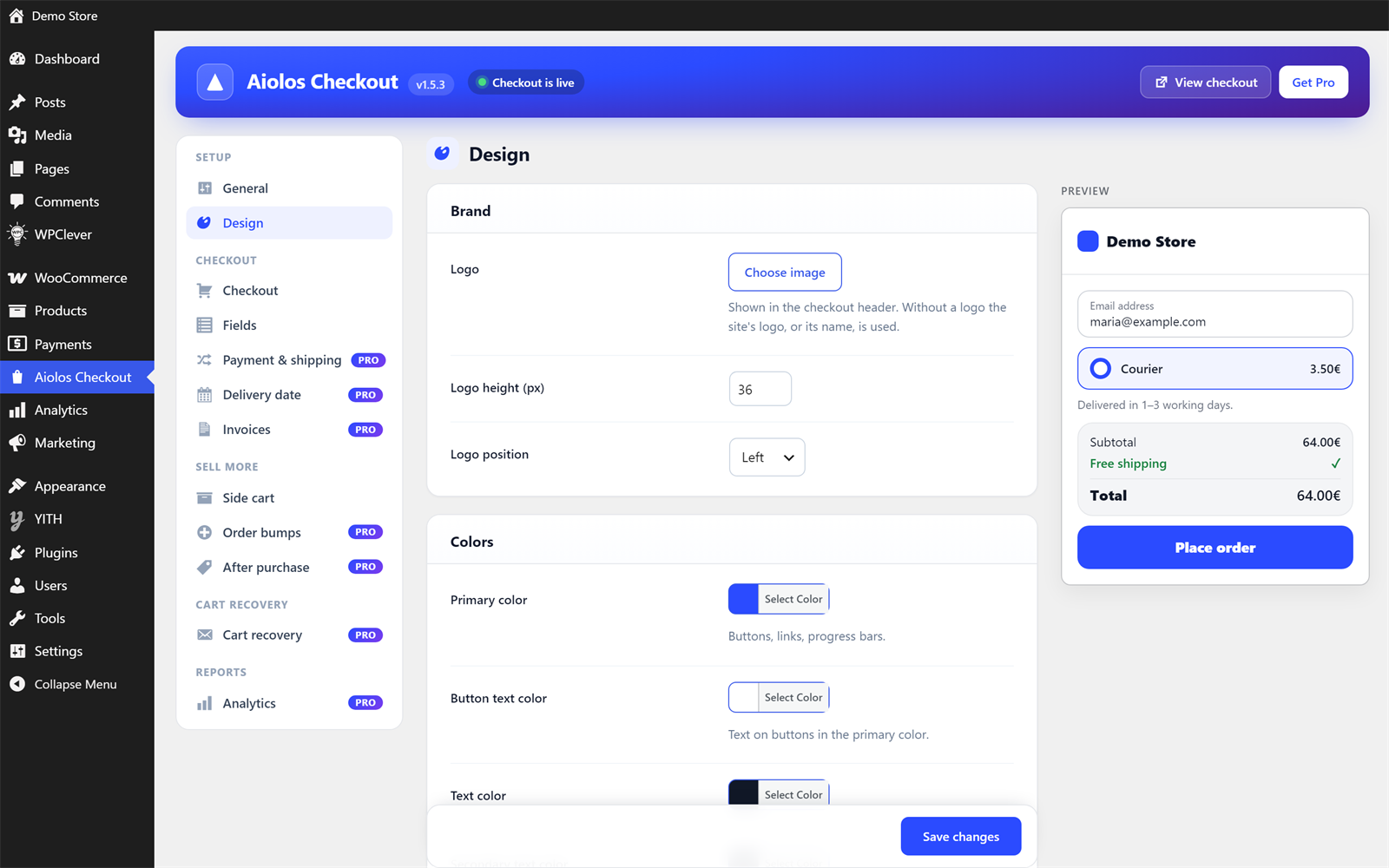
- Your brand. Your logo (left or centered) and every color: buttons and their text, text, page, header, order summary, fields and borders, plus corner radius and font, with a live preview as you choose. Every template can be overridden from your theme (yourtheme/aiolos-checkout/).
- Field editor. Show or hide, make required or optional, rename, give a placeholder and reorder WooCommerce’s checkout fields. Works on WooCommerce’s own checkout too.
- Discount links. A link ending in ?coupon=CODE applies the code (it waits for the first product when the cart is empty), also on pages served from a cache.
- Free shipping, simply. Optionally hide the paid shipping rates once free shipping is offered.
- Analytics events. GA4’s begin_checkout, add_shipping_info, add_payment_info and purchase (with products, value and coupon) for Google Tag Manager, Google Analytics and the Meta Pixel your site already loads.
- Light. No frameworks; about 15 KB (gzipped) of CSS and JavaScript on the checkout, and the theme’s assets are left off the page.
Thank-you page
- A confirmation with the order’s progress (placed, paid, preparing, on its way; “awaiting payment” for bank transfers, “payment on delivery” for cash on delivery) and the order’s key details.
- Guests can turn their order into an account with one password: addresses and earlier guest orders included, logged in at once.
- Payment instructions, order details and conversion tracking that hook into WooCommerce’s thank-you page keep working.
Side cart
- Slides in when a product is added, also on product pages (simple, variable and grouped products, without a reload; product add-on fields are sent along).
- Quantity changes and removal with Undo; sale and low-stock badges.
- A discount code field, and applied codes can be removed.
- Free shipping progress bar computed exactly like WooCommerce’s free shipping method (minimum amount, before or after coupons, coupon requirements).
- Opens from your theme’s cart icon: the cart links of popular themes and page builders are recognized, and you can add your own (CSS selectors).
- Safe with page caches: the cart is always fetched fresh, never from a cached page.
Works with
- Caching and optimization: the checkout is never cached or optimized, and the side cart’s script is kept out of “delay JavaScript”. WP Rocket, LiteSpeed Cache, W3 Total Cache, WP Super Cache, WP Fastest Cache, SiteGround Speed Optimizer, Autoptimize, Perfmatters, FlyingPress and Hummingbird are handled.
- Multicurrency: Price Based on Country, WPML / WooCommerce Multilingual, Aelia Currency Switcher, CURCY and WOOCS / FOX, without converting twice.
- Languages: translation ready, Greek included, right-to-left languages, WPML and Polylang for the texts you type in the settings.
- WooCommerce: High-Performance Order Storage (HPOS), product bundles, composite products and product add-ons.
- Accessibility: checked against WCAG 2.1 AA (axe); keyboard and screen reader friendly steps and side cart.
Pro
Aiolos Checkout Pro adds:
- Design: ready-made styles (Minimal, Soft, Bold, Elegant, Dark), nine fonts with Greek letters served from your own site (no Google requests), and custom CSS.
- Payment and shipping rules: a fee or discount per payment method (cash on delivery +2€), payment or shipping methods hidden by cart value, country, shipping method or category.
- Delivery date and time slots with preparation days, cut-off time, closed dates and a limit of orders per day or slot.
- Your own checkout fields (text, choices, a date, a checkbox…) shown only for some countries, shipping methods, categories or cart values, saved on the order and shown in the emails.
- Bot protection with Cloudflare Turnstile, so bots cannot test stolen cards through your checkout.
- Invoices: an “I need an invoice” choice with the tax number named and checked for every country (ΑΦΜ, USt-IdNr., Partita IVA…), confirmed by VIES and, for Greece, AADE (tax office and profession filled in), with the EU reverse charge if you want it.
- Order bumps: one-click offers before payment, at a special price and with conditions.
- Cart recovery: up to three reminder emails with a link back to the cart and an optional single-use code, with consent and privacy tools.
- Address suggestions as the customer types (Google Places).
- Checkout analytics in your own database: the funnel, revenue, and what bumps and reminders brought in.
- Spend-to-unlock rewards (free shipping, amount or percent off, a free gift), “Complete your order” suggestions in the side cart, a code for the next order and suggestions on the thank-you page, and premium trust badges.
External services
This plugin connects to aiolosweb.com, the site of its author, to show news about the plugin (new features, offers) to shop managers in the WordPress admin.
- What is sent: once a day, a request to https://aiolosweb.com/wp-json/aiolos-license/v1/notices with the plugin’s edition (free or pro) and version, the site’s language, and the WordPress and WooCommerce versions. The site’s address, its users, orders and customers are never sent.
- When: daily, in the background (WP-Cron), only while “Show news and offers” is on (Aiolos Checkout > General). Switching it off stops the requests and removes the stored news.
- The answers are signed by aiolosweb.com and shown as plain text; links only lead to aiolosweb.com.
- Terms of use: https://aiolosweb.com/license-terms/ — Privacy policy: https://aiolosweb.com/privacy-policy/
Screenshots



Installation
- Install and activate WooCommerce.
- Install and activate Aiolos Checkout (Plugins > Add New > search for “Aiolos Checkout”).
- Go to Aiolos Checkout in the admin menu. Turn on Test mode to try the checkout as a shop manager before customers see it, then switch it off.
If your checkout page is built with the Checkout block, it is switched to the classic checkout shortcode by itself while Aiolos Checkout is on (so every payment gateway works), and the block comes back by itself if you turn Aiolos Checkout off.
FAQ
-
Does it work with my payment gateway?
-
Yes, for gateways that support the classic WooCommerce checkout, which is nearly all of them. The plugin does not change the payment section; it only moves it to the last step. Gateways that replace the whole checkout with their own (Klarna Checkout, Nets Easy embedded) take over the page when they are chosen.
-
Does it work with the Checkout block?
-
Yes, both ways. Aiolos Checkout itself runs on the classic checkout, which every gateway supports: a checkout page built with the block is switched to the shortcode by itself while it is on, and gets its block back when it is off. If you keep WooCommerce’s Checkout block (Aiolos Checkout off), the field editor and the analytics events still work there, and Pro’s invoices, fields, delivery date, payment fees, order bumps, bot protection and cart recovery too.
-
Will my caching plugin break it?
-
No. The checkout page tells caching and optimization plugins to leave it alone, and the side cart never shows a cart from a cached page.
-
Can I change the design?
-
Logo, every color, corner radius and font are in Aiolos Checkout > Design, with a live preview. The fields themselves are in Aiolos Checkout > Fields. For more, copy a template from the plugin’s templates folder to yourtheme/aiolos-checkout/ and edit it.
-
Can I try it without customers seeing it?
-
Yes: Aiolos Checkout > General > Test mode shows the new checkout only to logged-in shop managers.
-
Is it translated?
-
Greek is included. Other languages can be added through translate.wordpress.org. Texts you type in the settings can be translated with WPML or Polylang.
Reviews
There are no reviews for this plugin.
Contributors & Developers
“Aiolos Checkout for WooCommerce” is open source software. The following people have contributed to this plugin.
Contributors
Translate “Aiolos Checkout for WooCommerce” into your language.
Interested in development?
Browse the code, check out the SVN repository, or subscribe to the development log by RSS.
Changelog
1.5.3
- Changed: the one-time move of settings from versions before 1.5.0 touches only this plugin’s own options.
- Changed: quantities sent by the checkout and the side cart are sanitized before WooCommerce reads them.
- Changed: cart item names, images, prices and the logo are escaped where they are printed; what other plugins print under a shipping rate (pickup points, notes) is printed by WooCommerce’s own hook, as in WooCommerce’s checkout.
1.5.2
- Fixed: requests with a list where text belongs (an email, a password, a payment method, an address or note field) no longer end in an error 500. A visitor whose session already held such a value gets a working checkout again.
- Fixed: a damaged setting (a list where text belongs) falls back to its default instead of causing warnings.
- Fixed: when adding to the side cart gets an unexpected answer, the cart is shown as it is instead of the product being added a second time.
- Improved: the checkout page check runs only on admin screens for people who may edit pages, not on every background request.
- Improved: removing the plugin on a multisite network with more than 100 sites cleans up every site.
1.5.1
- Improved: a checkout or side cart left open for hours (or shown from a page cache) no longer says “Your session expired” when the customer changes a quantity: it gets a new security token and sends the change again. If WooCommerce’s own totals refresh is refused for the same reason, the page reloads once.
- Improved: an email address typed into a first or last name box is pointed out before the next step (some payment gateways refuse such orders).
1.5.0
- Changed: every name the plugin uses (options, hooks, scripts, AJAX actions, constants) now starts with “aiolos”. Saved settings are moved over by themselves on the first load. Developers: the acw_* hooks and filters are now aiolos_*.
- Changed: “Show news and offers” is off until you turn it on; nothing is fetched from aiolosweb.com before that, and the news appear on the plugin’s settings screen only.
- Changed: translations come from translate.wordpress.org.
- Needs Aiolos Checkout Pro 1.5.0 or newer, if you use Pro.
1.4.0
- New: a checkout page built with the Checkout block is switched to the shortcode by itself while Aiolos Checkout is on, and back when it is off.
- New: the field editor (show, required) and the analytics events also work on WooCommerce’s Checkout block.
- New: a redesigned settings screen, with grouped navigation, cards and a save bar that tells you about unsaved changes.
- New: a notice when another checkout plugin (CheckoutWC, Fluid Checkout, FunnelKit, CartFlows…) is active too.
- Improved: the checkout keeps its own layout with any theme. The theme’s code on WooCommerce’s checkout hooks and its copies of the checkout templates are left out on this page (tested with Blocksy, Hello Elementor, Astra, Kadence, OceanWP, GeneratePress, Storefront and Twenty Twenty-Five).
- Fixed: with Blocksy the checkout fields could be hidden.
- Fixed: saving one settings tab could put the other tabs back to their defaults on sites with an object cache.
- Fixed: a box ticked next to “Place order” while the totals were refreshing could be unticked.
1.3.0
- New: discount codes from links (?coupon=CODE), kept for the first product when the cart is empty and applied on cached pages too.
- New: guests can create an account from the thank-you page with one password.
- New: “Hide paid shipping when shipping is free”.
- New: a hook under the shipping methods (aiolos_after_shipping_methods).
1.2.0
- New: every color of the checkout and side cart can be set (buttons and their text, page, header, summary, fields, borders, secondary text), the logo can be centered, and a live preview shows the result while you choose.
- New: field editor for WooCommerce’s checkout fields (show, required, label, placeholder, order).
- New: GA4 / Tag Manager / Meta Pixel checkout events, the purchase sent once per order.
- Improved: header text turns light on a dark header.
1.1.0
- New: one-page layout, as an alternative to the three steps.
- New: plus, minus and remove buttons in the checkout’s order summary.
- New: “Did you mean…?” for mistyped email addresses.
- New: “Log in” offer for returning customers (limited lookups per visitor).
- New: discount code field in the side cart.
- New: redesigned thank-you page with the order’s progress.
- Improved: changes made at checkout wait for the totals refresh in flight, so they are never overwritten.
1.0.0
- New: three-step checkout that keeps WooCommerce’s payment section.
- New: side cart with undo, badges and a free shipping progress bar.
- New: compatibility with caching, optimization and multicurrency plugins.
- New: Greek translation.