

Description
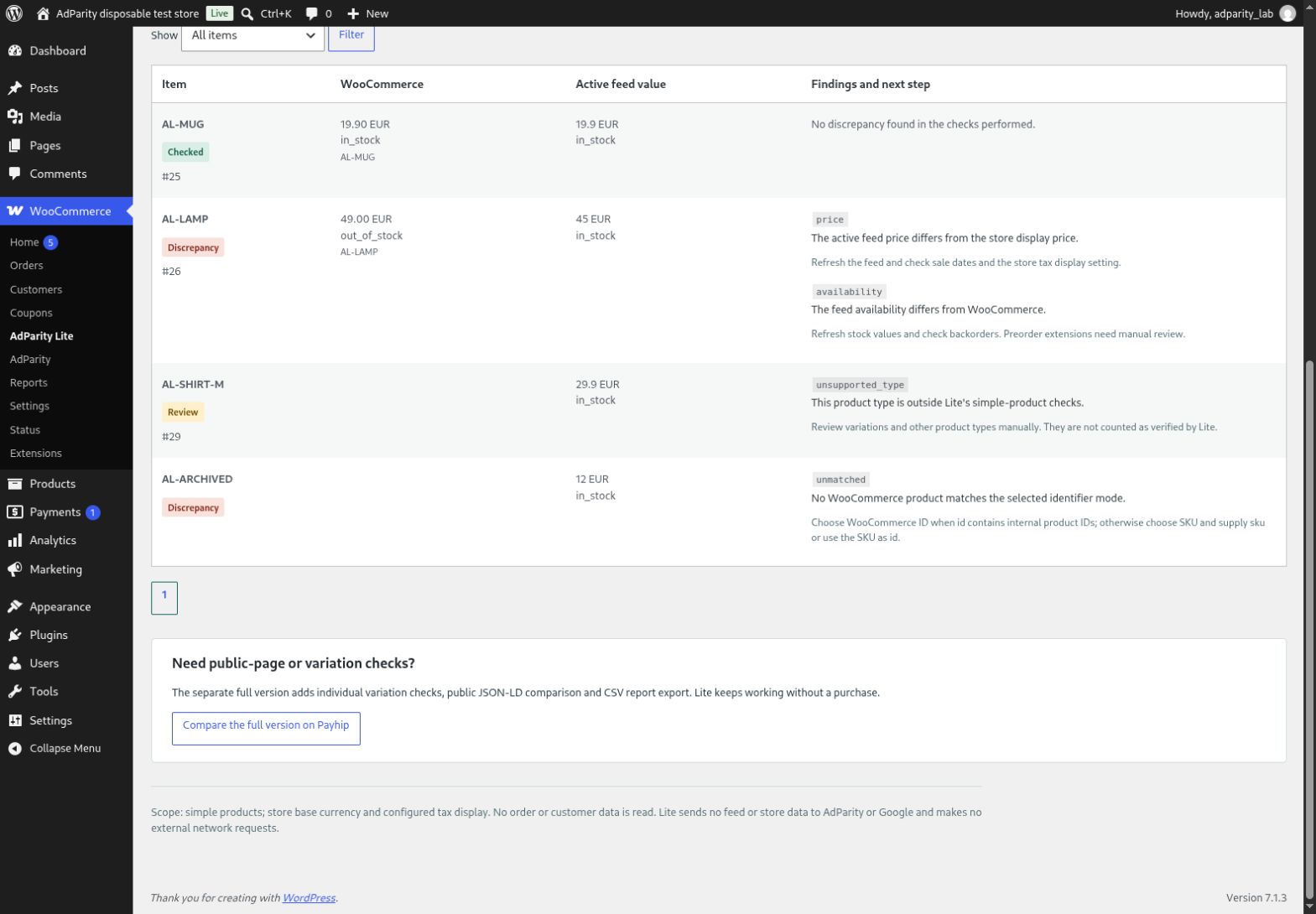
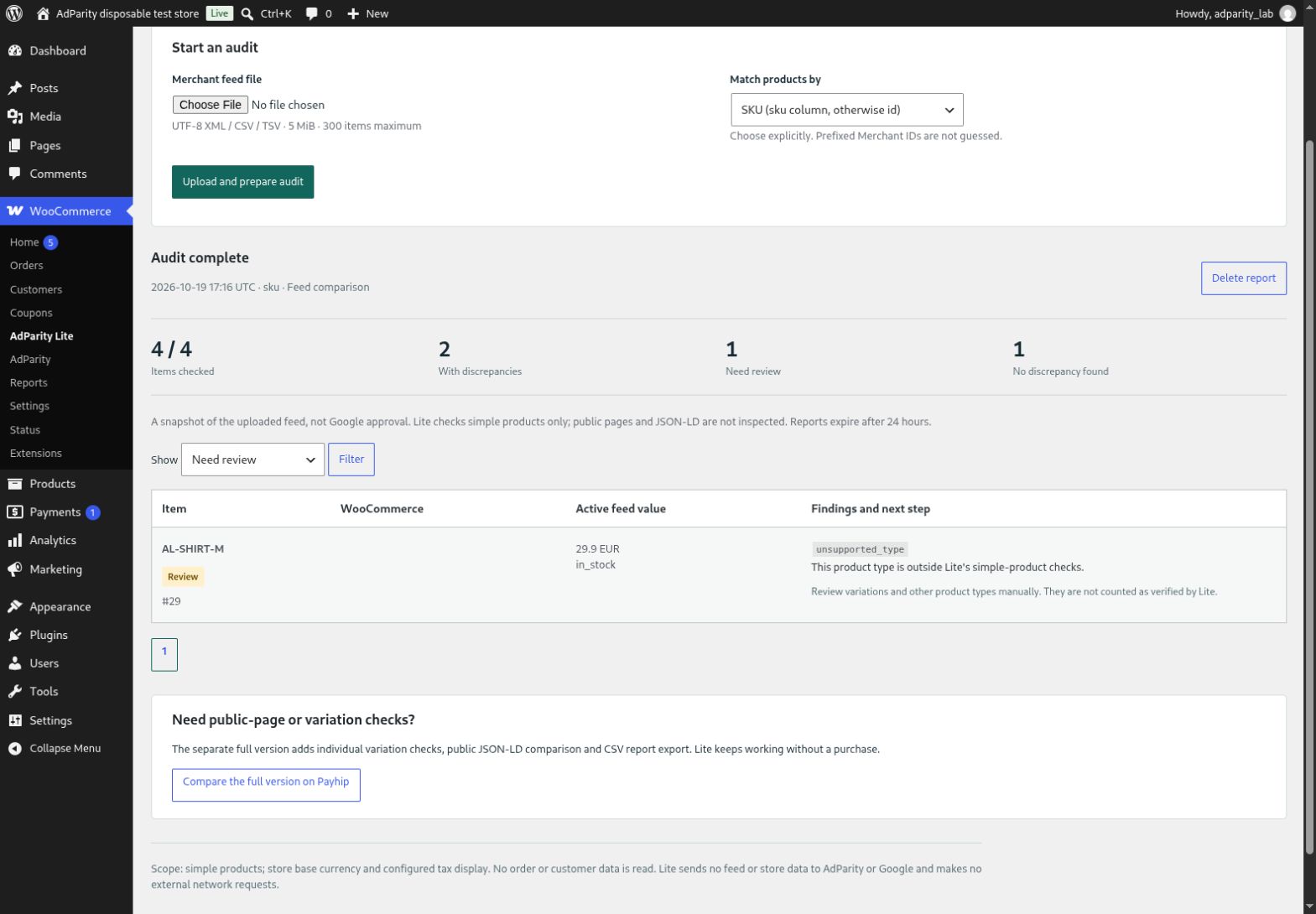
AdParity Lite helps you investigate differences between a product-feed snapshot and your WooCommerce simple products. Upload a UTF-8 Merchant RSS/Atom XML, CSV or TSV file, choose exact SKU or internal product ID matching, and run a local audit. Findings show the feed and store values with practical next steps.
Checks include empty or duplicate feed IDs, product matching, published status, supplied SKU, active price, sale-date intervals, currency, availability and canonical product URLs. Store prices use WooCommerce’s configured tax display and base currency.
Lite is useful on its own. It has no subscription, activation key, trial expiry or purchase requirement. You may run repeated audits. Each file is limited to 300 rows and 5 MiB for resource safety; split larger files. No premium audit, public-page-fetching or CSV-export code is bundled or unlocked by payment.
Privacy
Lite makes no external network requests and does not fetch feed URLs or public product pages. No Google account, API, telemetry or remote licence service. Audit data is not sent to AdParity or Google. Standard WordPress/WooCommerce network behaviour is independent of this plugin.
The upload is read from PHP temporary storage and is not moved to the public Media Library. One report per store manager is kept in an expiring transient for 24 hours from upload. It contains supported feed fields, product IDs and findings. Delete report removes it immediately. Expired database rows follow WordPress cleanup; external caches and backups follow their own retention. Uninstall removes only Lite’s options, reports and locks.
Languages
The source interface is English and supports WordPress.org translations. Language availability depends on community translations and distribution; French is not bundled with this directory build.
Scope and requirements
WordPress 7.0+, WooCommerce 11.0+, PHP 8.1+, single-site. XML requires PHP DOM and XMLReader. At least 32 MiB of free PHP memory; 256 MiB total is recommended for WooCommerce. Files: UTF-8, 5 MiB, 300 rows, 64 CSV columns, 64 KiB per row, supported fields 200 bytes (URLs 2048 bytes).
Simple products only. Variations, variable parents and other product types are marked for manual review. Lite does not inspect JSON-LD, Google account status, policies, shipping, GTIN correctness, products missing from your uploaded file, multi-currency or personalised pricing. It does not fix data or promise Google approval or advertising results. “No discrepancy found” covers only the local checks performed.
Optional full version
The separate full AdParity version adds individual variation checks, identity-bound public JSON-LD comparison and CSV report export. Lite works independently. Purchase and installation are separate; Lite does not download, install or activate paid software. Full-version support is provided through the seller’s contact channel. The full version currently uses manual ZIP updates.
Screenshots
Installation
- Install and activate WooCommerce 11.0 or later.
- Upload this ZIP through Plugins > Add New > Upload Plugin and activate.
- Open WooCommerce > AdParity Lite as an administrator or shop manager.
- Upload your Merchant XML, CSV or TSV and choose SKU or WooCommerce product ID.
- Select Run / continue audit, filter findings, and delete the report when finished.
FAQ
-
Does Lite connect to Google or change products?
-
No. It compares your uploaded snapshot with local product data and changes no catalog, order or customer data.
-
Which CSV columns are required?
-
Unique id, price, availability and link headers. Optional sku, currency, sale_price and sale_price_effective_date. Comma, semicolon and tab separators are supported. Use 19.90 EUR or 19.90 with currency EUR; decimal commas are not inferred.
-
How do identifiers work?
-
SKU uses the sku column if supplied, otherwise id. Product ID uses the exact internal WooCommerce ID in id. Arbitrary Merchant prefixes are never guessed.
-
Are variations checked?
-
No. Lite flags non-simple products for manual review. Their offers are not counted as verified.
-
Does Lite expire or require the full version?
-
No. The file-size and row limits protect resources and apply equally on every audit. No time-based or cumulative usage quota is imposed.
-
How do updates work?
-
This build contains no external updater. WordPress.org provides updates for directory-installed versions. Back up your store before updates.
-
Can Lite coexist with the full version?
-
Yes. They use separate menus, PHP namespaces, actions, nonces and stored reports. Audits are separate; no automatic report migration or plugin activation is performed. You may deactivate Lite manually if you prefer the full version.
-
Where can I get help?
-
For Lite, use this plugin’s WordPress.org support forum or the seller contact form. Describe the plugin/PHP/WooCommerce versions, selected identifier mode and issue code. Do not send store passwords, customer data or private product files publicly.
Reviews
There are no reviews for this plugin.
Contributors & Developers
“AdParity Lite for WooCommerce” is open source software. The following people have contributed to this plugin.
Contributors
Translate “AdParity Lite for WooCommerce” into your language.
Interested in development?
Browse the code, check out the SVN repository, or subscribe to the development log by RSS.
Changelog
1.0.0
- First standalone Lite release: local simple-product feed audits, filters, per-user reports and cleanup.