Description
Crawlsure looks after the technical SEO of your WordPress site, for Google, Bing and AI tools such as ChatGPT, Perplexity and Gemini.
What it does, free:
- SEO title and meta description for every post, page and product, with templates for every page type
- SEO fields for categories, tags and author pages
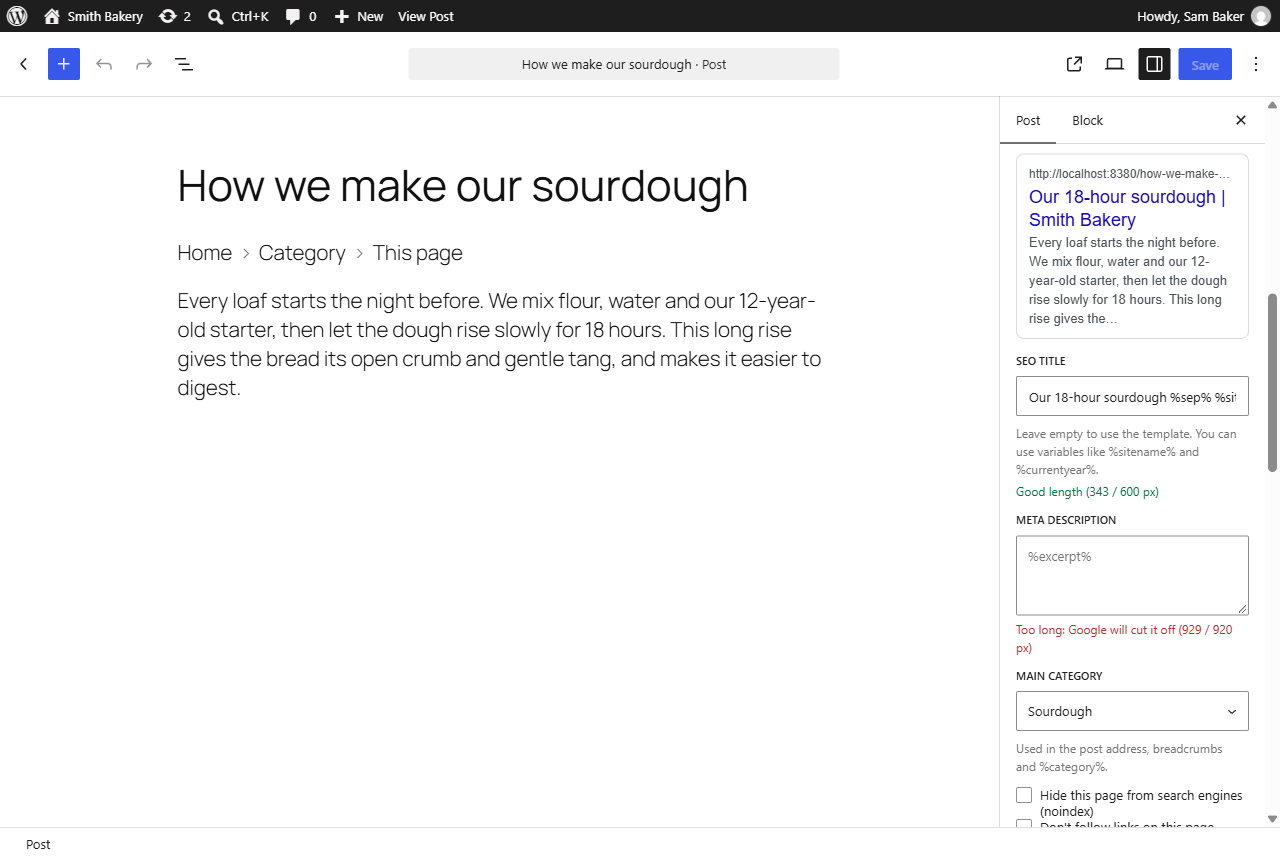
- Crawlsure panel in the block editor sidebar with a Google preview and length checks
- SEO title and description in the Posts and Pages lists, editable with Quick Edit
- Main category for posts in several categories, used in post addresses and %category%
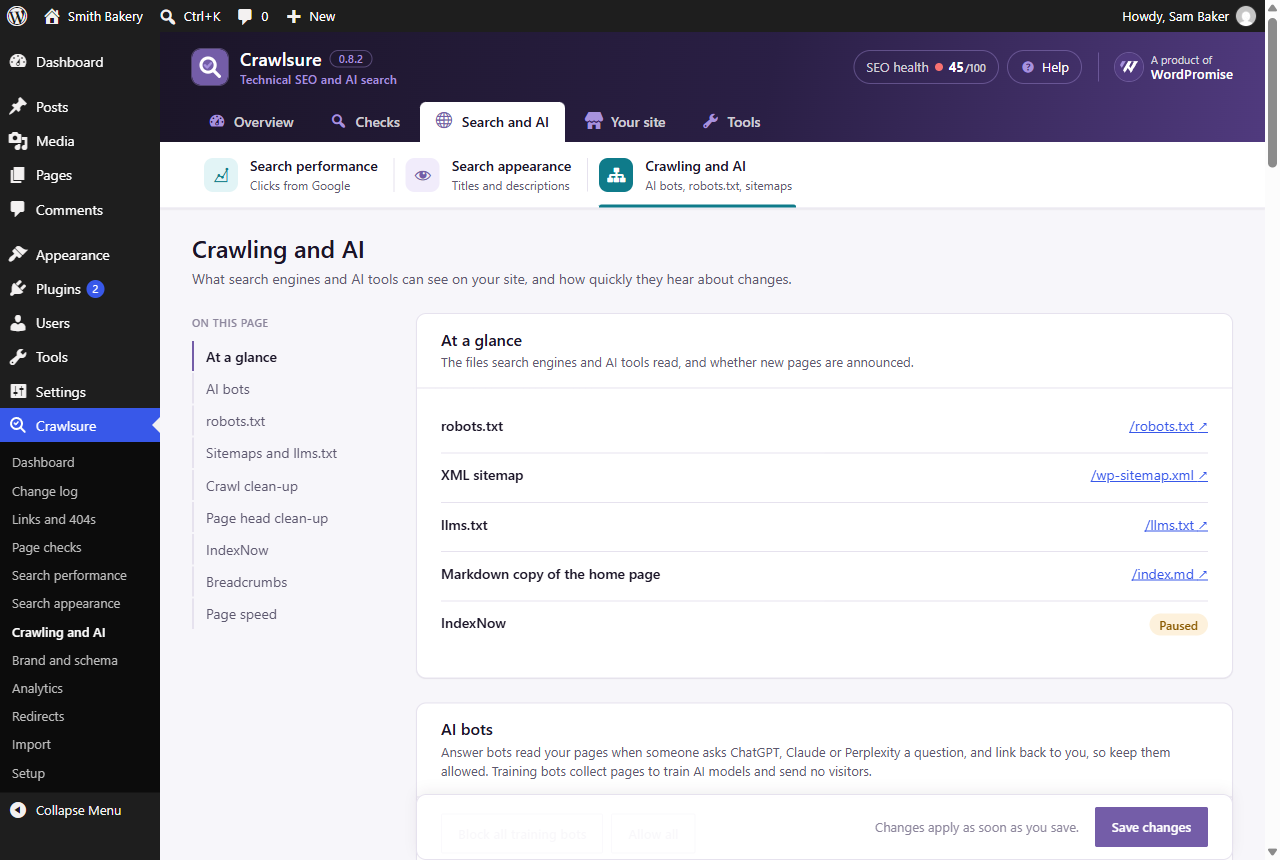
- AI bot controls: block AI training bots while keeping the bots that cite you in ChatGPT, Claude and Perplexity answers
- robots.txt editor that refuses rules which would stop Google reading your main pages
- XML sitemap cleaned up: hidden pages left out, last-changed dates added, /sitemap.xml works
- llms.txt and llms-full.txt for AI tools
- Markdown copies of your pages for AI tools (add .md to any address), linked from the page head and llms.txt
- AI readiness score for every page, live in the editor, with the weakest pages listed
- Crawl clean-up (attachment pages, date archives, empty categories, single-author pages, ?replytocom) and page head clean-up
- IndexNow: new and changed pages reach Bing and others within a minute
- Breadcrumbs block, shortcode and theme function, with BreadcrumbList schema
- Staging copies hidden from search engines; warnings when a live site blocks search engines
- Canonical and robots tags, with noindex and nofollow per page
- Search results and “page not found” pages kept out of search engines by default
- Stays quiet while another SEO plugin is active, so your pages never get duplicate tags
- Brand profile and schema: organisation, local business (address, opening hours) or person, website, pages, articles, authors, breadcrumbs and FAQs, as one connected graph
- Social sharing tags for Facebook, LinkedIn, WhatsApp and X, with a share title, description and image per page
- Google Analytics 4 with Google consent mode v2 and enquiry tracking for popular form plugins
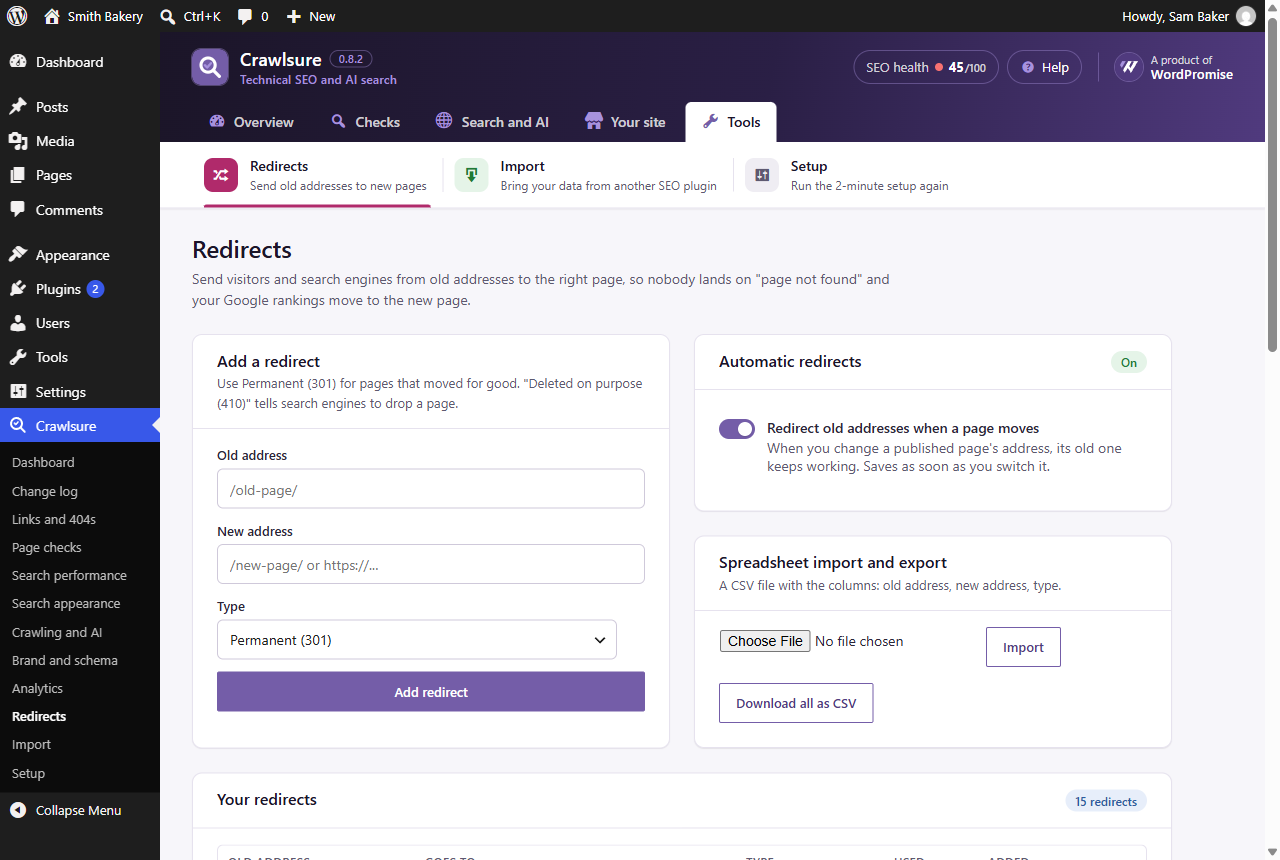
- Redirect manager, with automatic redirects when a page’s address changes, and “deleted” (410) pages
- Quick answer, FAQ and Table of contents blocks
- 2-minute setup wizard
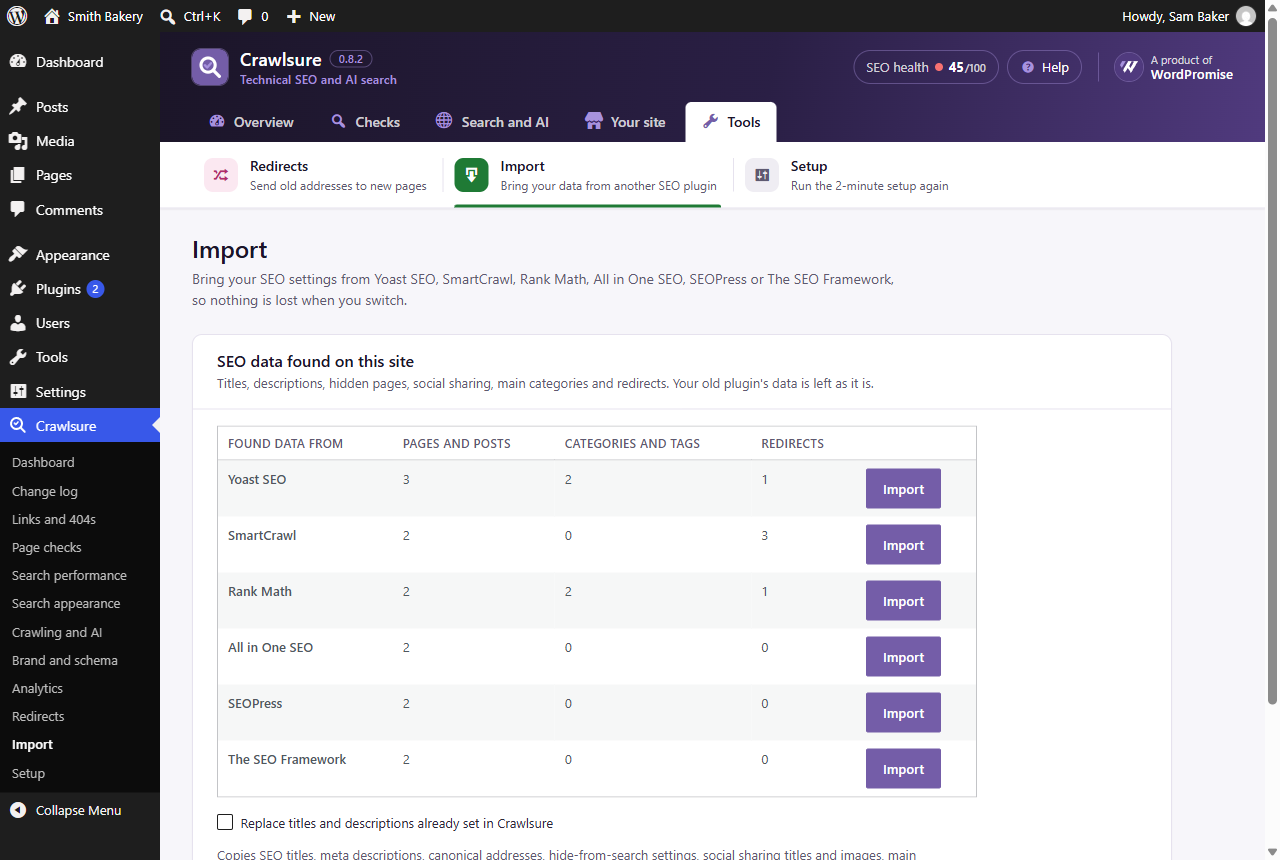
- One-click import from Yoast SEO, Rank Math, All in One SEO, SEOPress, SmartCrawl and The SEO Framework: titles, descriptions, canonicals, noindex, social sharing, main category, category and tag SEO, and redirects
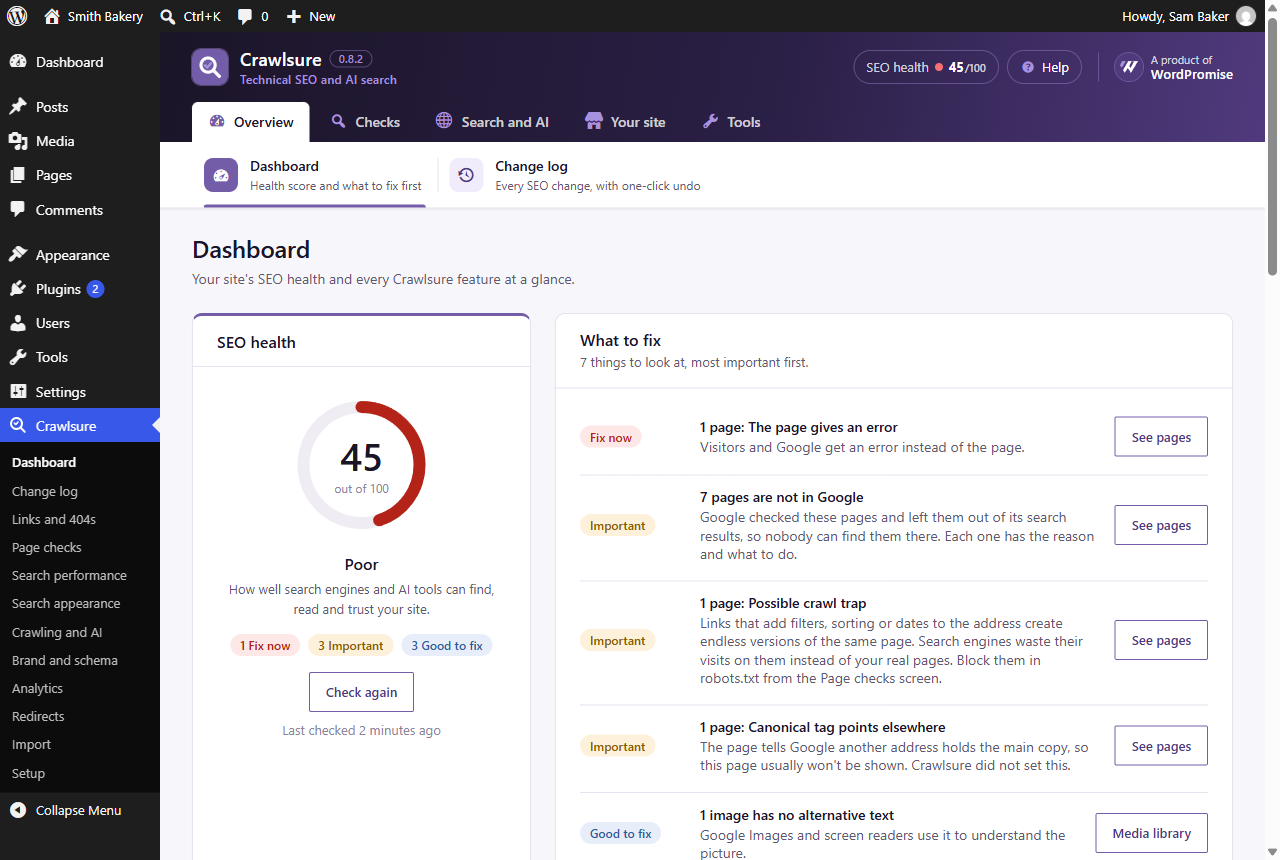
- SEO health score with plain-English explanations and one-click fixes
- Conflict detector: finds titles, descriptions and canonical tags printed twice by your theme or another plugin
- SEO fields in Elementor’s page settings
- Redirects import and export as a spreadsheet (CSV)
- Link checker: finds broken links in your content in the background, with one-click redirect, remove or ignore
- 404 log: missing addresses people and search engines still visit, with one-click redirects (no personal data stored)
- Old address finder: deleted pages and addresses Google still asks for, with suggested redirects
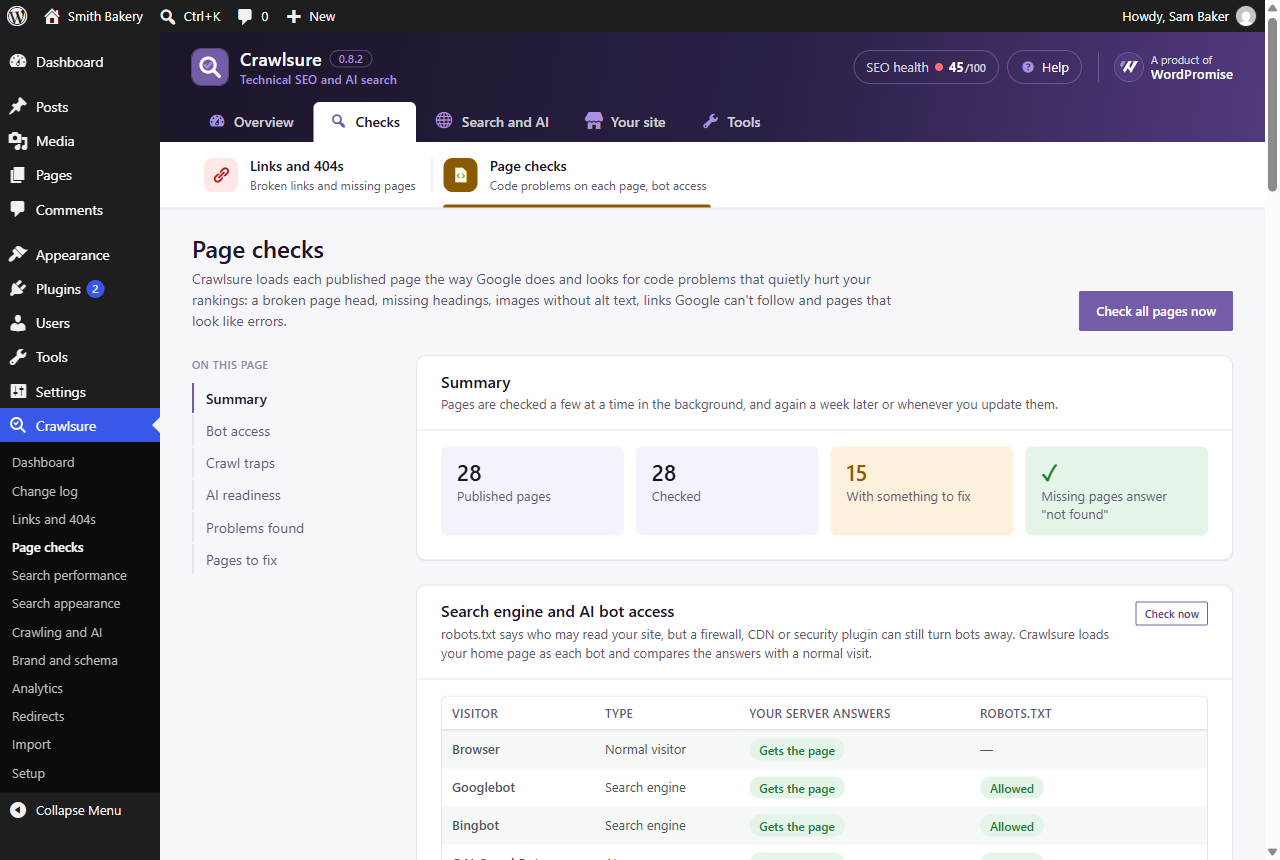
- Page checks: SEO tags pushed out of the page head, missing or extra main headings, images without alt text or too large, links Google can’t follow, pages hidden by something other than Crawlsure, error pages that answer “200 OK”, very little text, vague link text and missing page language
- AI crawler check: finds pages whose text only appears with JavaScript, which ChatGPT, Claude and Perplexity can’t read
- Bot access check: finds firewalls or security plugins that turn away Googlebot or AI bots your robots.txt allows
- Crawl traps: finds sorting, filter and calendar links that create endless page versions, and blocks them in robots.txt in one click
- Change log with one-click undo for every SEO change
- Safe-publish checks in the editor before a page goes live
- Light speed fixes: no emoji script, only the block styles a page uses, optional featured image preload
- WP-CLI commands: wp crawlsure health, scan, links, pages, redirects, changes, undo and import
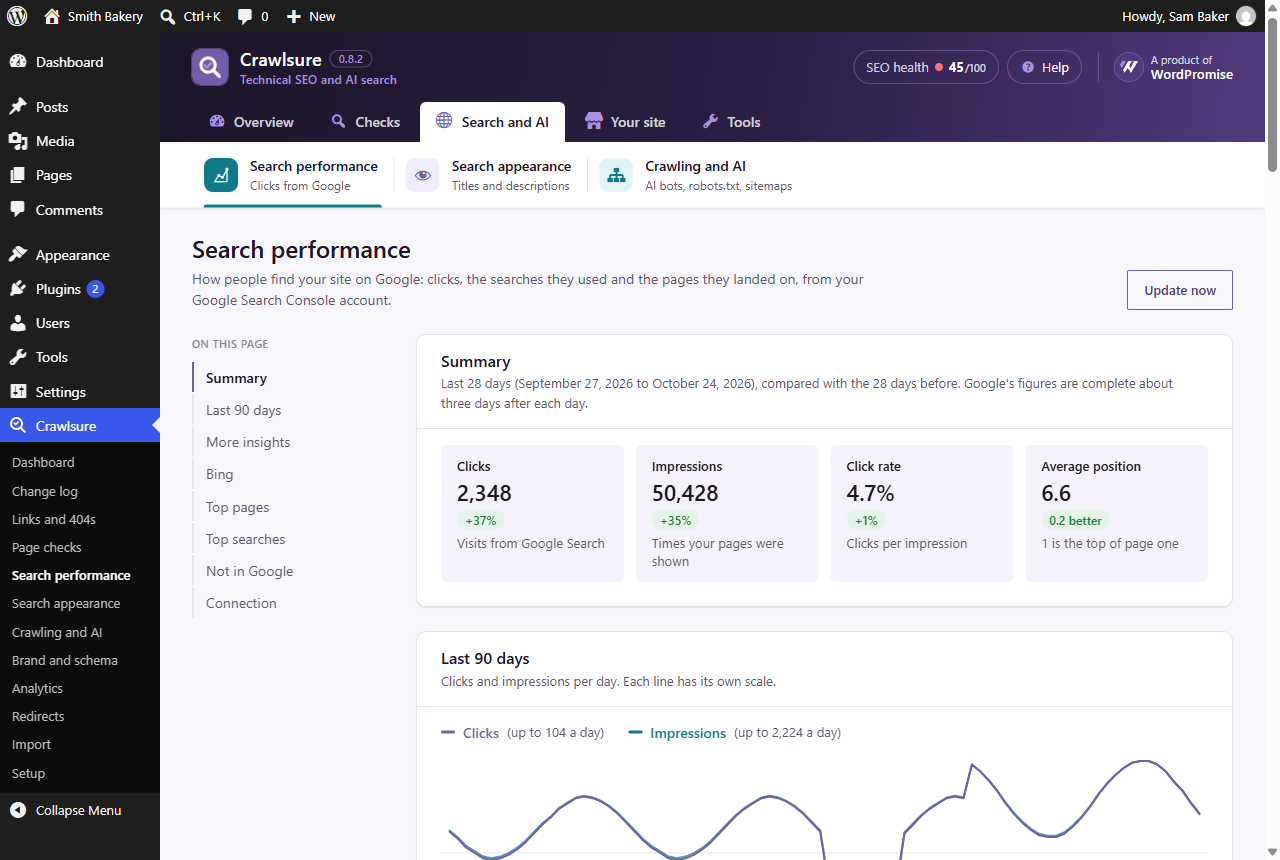
- Search performance: connect Google Search Console (read-only) and get its Performance report inside WordPress: clicks, impressions, click rate and position over 7 days to 16 months, compared with the period before, by search, page, country, device and date, with filters
- Bing Webmaster Tools (optional): clicks, impressions and top searches from Bing, which ChatGPT search relies on, and links from other sites
- Not in Google: which of your pages Google has left out and why, with what to do (also shown in the Posts and Pages lists)
Crawlsure Pro, a paid add-on from WordPromise (https://www.wordpromise.com/crawlsure/), adds search opportunities (quick wins, low click rates, pages losing clicks, competing pages), a traffic-drop detective, Google Analytics and speed for real visitors. Everything listed above is free.
External services
When you enter a Google Analytics 4 measurement ID in Crawlsure Analytics, your site loads Google’s tag (https://www.googletagmanager.com/gtag/js) for visitors, which sends visit data to Google Analytics. Nothing is loaded until you enter an ID. Google’s terms: https://marketingplatform.google.com/about/analytics/terms/us/ and privacy policy: https://policies.google.com/privacy
IndexNow is off until you switch it on (Crawlsure Crawling and AI). When it is on and the site is live, the addresses of new, changed and removed pages are sent to https://api.indexnow.org, which shares them with Bing, Yandex, Seznam, Naver and other search engines. No visitor data is sent. Terms: https://www.indexnow.org/terms
When the link checker checks links to other websites (Crawlsure Links and 404s, on by default, can be switched off), your site asks each linked website whether the linked page still exists. Only the page address is requested; nothing about your site’s visitors is sent. A few addresses are checked at a time, and each one again after two weeks.
The page checks and the bot access check load pages of your own site from your own server. No outside service is used.
When you connect Google Search Console (Crawlsure Search performance Connect to Google, off until you click it), two services are used:
- WordPromise connection service (https://www.wordpromise.com/wp-json/crawlsure-connect/v1): shows a page naming your site, sends you to Google’s sign-in, hands Google’s one-time code back to your site, and swaps it for access keys (and renews them) using WordPromise’s Google client. It receives your site’s admin address and, while passing them on, the code and access keys. It stores and logs none of them. Terms: https://www.wordpromise.com/terms-condition/ and privacy policy: https://www.wordpromise.com/privacy-policy-2/
- Google (accounts.google.com, oauth2.googleapis.com, www.googleapis.com and searchconsole.googleapis.com): your site asks Google Search Console, read-only, for the list of your properties and the search performance of the property you choose (pages, searches, countries, devices, clicks, impressions, position), once a day and when you open the report with a date range or filter it has not downloaded, and sends the addresses of your published pages to Google’s URL Inspection service (about 40 an hour) to learn whether each one is in Google. Disconnecting asks Google to cancel the access. Google’s terms: https://policies.google.com/terms and privacy policy: https://policies.google.com/privacy
When you connect Bing (Crawlsure Search performance Bing, off until you paste a key), your site uses your own Bing Webmaster Tools API key to read, once a day, your verified sites, the clicks and impressions from Bing, your top Bing searches and the number of links to your site that Bing has found, from Bing Webmaster Tools (https://ssl.bing.com/webmaster/api.svc). The key is sent with each request, as Bing requires. Microsoft’s terms: https://www.microsoft.com/servicesagreement and privacy statement: https://privacy.microsoft.com/privacystatement
Privacy
The 404 log stores only the missing address, how many times it was visited (by people, by bots and by search engines) and the page the visitor came from without its query string. No IP addresses, user agents or other personal data are stored. The change log stores which logged-in user made each SEO change.
If you connect Google Search Console, the access keys (encrypted with your site’s secret keys) and the downloaded search data, and each page’s indexing status are stored in your own site’s database only, and the search data is deleted after 16 months (figures fetched for a report view are kept for 12 hours). A Bing key is stored the same way, encrypted, with the Bing figures; “Disconnect Bing” deletes them. Disconnecting, or deleting the plugin, deletes them and asks Google to cancel the access. Crawlsure’s use and transfer of information received from Google APIs adheres to the Google API Services User Data Policy, including the Limited Use requirements.
Screenshots
Blocks
This plugin provides 4 blocks.
- Breadcrumbs (Crawlsure)
- Quick answer (Crawlsure)
- FAQ (Crawlsure)
- Table of contents (Crawlsure)
FAQ
I use Yoast SEO, Rank Math or another SEO plugin. Will I lose my work?
No. Go to Crawlsure Import and click Import next to your old plugin. Your SEO titles, descriptions, hidden pages, social sharing settings and redirects come across. Crawlsure stays quiet until you switch the old plugin off, so your pages never get duplicate tags.
What happens to my data if I delete Crawlsure?
Its settings are removed. SEO titles and descriptions on your pages and your redirects are kept, so old links keep working and everything comes back if you reinstall.
Reviews
There are no reviews for this plugin.
Contributors & Developers
“Crawlsure” is open source software. The following people have contributed to this plugin.
Contributors
Translate “Crawlsure” into your language.
Interested in development?
Browse the code, check out the SVN repository, or subscribe to the development log by RSS.
Changelog
0.10.0
- Search performance now looks and works like Google Search Console’s own Performance report: clicks, impressions, click rate and average position as switchable lines on one chart (point at a day to see its figures), date ranges from 7 days to 16 months, “Compare with the period before” (dashed lines and changes in every row), and tabs for Searches, Pages, Countries, Devices and Dates. Click a search, page, country or device to see the whole report for it alone; sort any column and search within the table.
- Countries and devices are now downloaded with the daily Search Console update (16 months back on the first one).
0.9.0
- New: SEO editor (Search and AI). Every page and post on one screen with its SEO title, meta description and how it looks when shared (title, description, image). Length bars, a Google and social media preview per page, and filters for pages with no description, text that is too long, the same title as another page, or no share image of their own. Save once; every change goes in the Change log.
- New: Sitemaps screen (Search and AI). What is in your sitemap with the number of addresses per part, which kinds of pages, categories and author pages go in, and, with Google connected, which sitemaps Google has, when it last read them and any errors. Step-by-step instructions to give your sitemap to Google. /sitemap-index.xml now also leads to the sitemap.
- Classic editor and Elementor: live Google (computer and phone) and social media previews next to the SEO fields, with length bars, plus fields for the title, description and image shown when the page is shared.
- Crawlsure screens show an “Update ready” bar when a newer Crawlsure is available.
0.8.5
- Page-builder templates (Elementor templates, saved layouts, headers and footers and the like) are no longer treated as pages: they are left out of the link checker, the page checks and the “In Google” check, and old results for them are cleared. Crawlsure now checks the same content types WordPress puts in its sitemap.
- Links and 404s: when nothing can be removed in one go, a short note explains why and what to do instead.
0.8.4
- Simpler menu: the WordPress sidebar now shows one line per section (Overview, Checks, Search and AI, Your site, Tools, Settings) instead of every page; the Crawlsure header leads to the pages of each section. Setup and Import moved to the new Settings section.
- New: Site verification on Search performance. Step-by-step instructions with links for adding your site to Google Search Console, and boxes for the Google and Bing verification codes (paste the whole tag; Crawlsure keeps only the code and adds it to your home page).
- New: “Remove all dead links” on Links and 404s. Removes, in one go, links to other websites whose page or whole website is gone (seen on two checks a day apart). The link text stays and each page keeps a revision.
- Links and 404s: “Remove link” is now a clear button on each page.
- Pages built with Elementor: links are now read from the Elementor layout visitors actually see, not from the old copy WordPress keeps, so no more false broken links; such pages get an “Edit in Elementor” button instead of “Remove link”.
0.8.3
- Change log: clearer names for changes made by Crawlsure Pro’s agency features (settings templates, client report, autopilot and alerts).
0.8.2
- New AI readiness score for every page and post (out of 100): a short answer near the top, question headings, lists or tables, enough text, a named author, how recently it was updated, links to sources, and whether search engines may show it. Shown live in the editor while you write, with the weakest pages on the Page checks screen.
- New Markdown copies for AI tools: every public page can also be read as plain text by adding .md to its address (for example /about.md), and AI tools that ask for Markdown get it at the normal address. Linked from the page head and llms.txt, kept out of search results, and switchable on Crawling and AI.
- Brand and schema: room for the new Crawlsure Pro cards (shop details, share images).
0.8.1
- If you do not use Crawlsure Pro, the Dashboard shows what Pro would do on your site (with real numbers from your site), and Search performance shows the search opportunities Pro has found. Both have a “Try Pro free for 14 days” button. Nothing is shown elsewhere in WordPress.
0.8.0
- WooCommerce shops: the cart, checkout and account pages are left out of the sitemap (WooCommerce hides them from search engines).
- Search performance also shows traffic from Bing (optional, with your own Bing key) and “Not in Google”: Google’s own indexing answer for each published page, with the reason and what to do (also in the Posts and Pages lists and the SEO health score).
- New Search performance screen: connect Google Search Console (read-only) and see the last 28 days against the 28 before, a 90-day chart, top pages and top searches. Data is downloaded daily into your own database and kept for 16 months. Disconnect deletes it.
0.7.0
- New Links and 404s screen: link checker, 404 log and old address finder, with one-click redirects.
- New Page checks screen: code problems on every page (page head, headings, images, links Google can’t follow, hidden pages, soft 404s, thin pages, accessibility), plus AI crawler, bot access and crawl trap checks.
- New Change log with one-click undo for every SEO change.
- Safe-publish checks in the block and classic editors.
- Page speed card: emoji script removal, per-block styles, featured image preload; the health score recommends a page cache when none is found.
- WP-CLI commands.
- New header and menu: five section tabs with icons (Overview, Checks, Search and AI, Your site, Tools), the pages of each section with their own icon and a line saying what each is for, the SEO health score always in view, and the WordPromise logo.
0.6.2
- IndexNow is now off until you switch it on in Crawlsure Crawling and AI.
- Scripts and styles are loaded the standard WordPress way (no inline script or style tags).
- The “search engines are blocked” and staging warnings only show on Crawlsure screens, the Dashboard and Settings Reading.
0.6.1
- Redirects: a chain of redirects (A to B to C) now always sends visitors to the final page in one step, and a redirect that would loop back is refused.
- Import from SmartCrawl: redirects saved by SmartCrawl 3 now come across with the right destination.
- Tested with PHP 7.4 and WordPress 6.5, WooCommerce, the Astra theme, and the current versions of Yoast SEO, Rank Math, All in One SEO, SEOPress, SmartCrawl and The SEO Framework.
0.6.0
- New look for every Crawlsure screen: a dashboard with the health score, what to fix and every feature’s status at a glance; settings grouped into cards with an “On this page” menu, on/off switches and a save bar that stays in view.
- Menu grouped into Overview, Search and AI, Your site and Tools. “Titles and descriptions” is now “Search appearance”; “Crawling” is now “Crawling and AI”.
0.5.0
- Setup wizard.
- Import from Yoast SEO, Rank Math, All in One SEO, SEOPress, SmartCrawl and The SEO Framework.
- SEO health score with one-click fixes, and a conflict detector for duplicate tags.
- Elementor page settings panel.
- Redirects CSV import and export.
- The sitemap address works again straight after the sitemap is switched back on.
- Google’s tag now loads through WordPress’s script queue.
0.4.0
- Brand and schema screen, connected schema graph, social sharing tags.
- Analytics screen: GA4 with consent mode v2 and enquiry events.
- Redirects screen with automatic redirects.
- Quick answer, FAQ and Table of contents blocks.
0.3.0
- Crawling screen: AI bot controls, robots.txt editor with Google check, sitemaps, llms.txt, crawl and head clean-up, IndexNow, breadcrumbs.
- Staging guard and site visibility warnings.
0.2.0
- SEO fields for categories, tags and authors.
- SEO title and description column in content lists, with Quick Edit.
- Main category picker.
0.1.0
- First development version: titles, descriptions, canonical and robots tags, templates and the per-page SEO box.