

Description
WordPress search only looks at a post’s title, excerpt and content. MWT Search Steer gives you three controls, post by post:
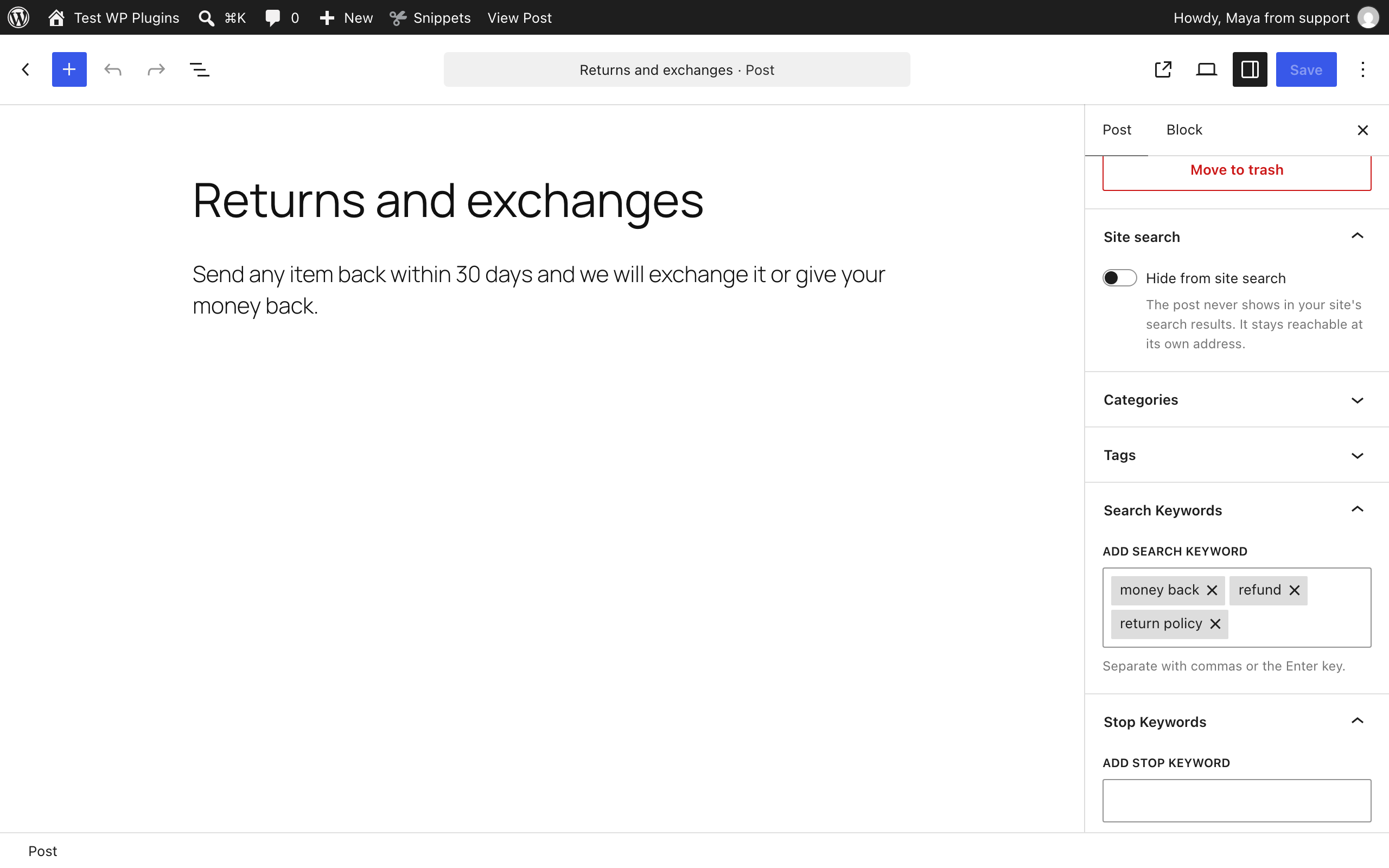
- Hide from site search keeps a post out of every search. Use it for thank-you pages, landing pages, old announcements and anything else visitors should not find by searching.
- Search keywords bring a post into the results. Give “Returns and exchanges” the keywords refund and money back, and a search for “refund” finds it, even though the word is nowhere in the post.
- Stop keywords keep a post out of the results for some searches only. Give an old “Refund policy (2019)” the stop keyword refund, and a search for “refund” never shows it, even though its title matches.
Set them in the editor sidebar, in quick edit, or for many posts at once with bulk edit and the “Hide from site search” bulk action. A Search column and a filter on the post lists show which posts have search settings.
Moving from another plugin
MWT Search Steer imports the posts that Search Exclude, Hide from Search and Hide Posts hide from search, with one click under Settings > MWT Search Steer. The other plugin’s data is not changed, so you can import, check, and then deactivate it.
Built to stay out of the way
- Only the search query is changed. Menus, archives, widgets, related posts and every other query on the page are left alone.
- Nothing is hidden in wp-admin. Hidden posts stay in the post lists and in admin searches, so editors can always find them.
- No search index, no custom tables, no migrations. Settings live in post meta and private taxonomy terms that WordPress already indexes, so they scale to thousands of posts and nothing is lost on update.
- No ads, no dashboard widgets, no upsells, no outside service.
- Safe SQL. Every column is qualified with its table, so search keeps working when another plugin joins post meta.
- Private. Visitors never see a post’s keywords or that it is hidden: no archive pages, feeds, sitemaps or CSS classes, and the REST API only shows them to people who can edit posts.
Settings
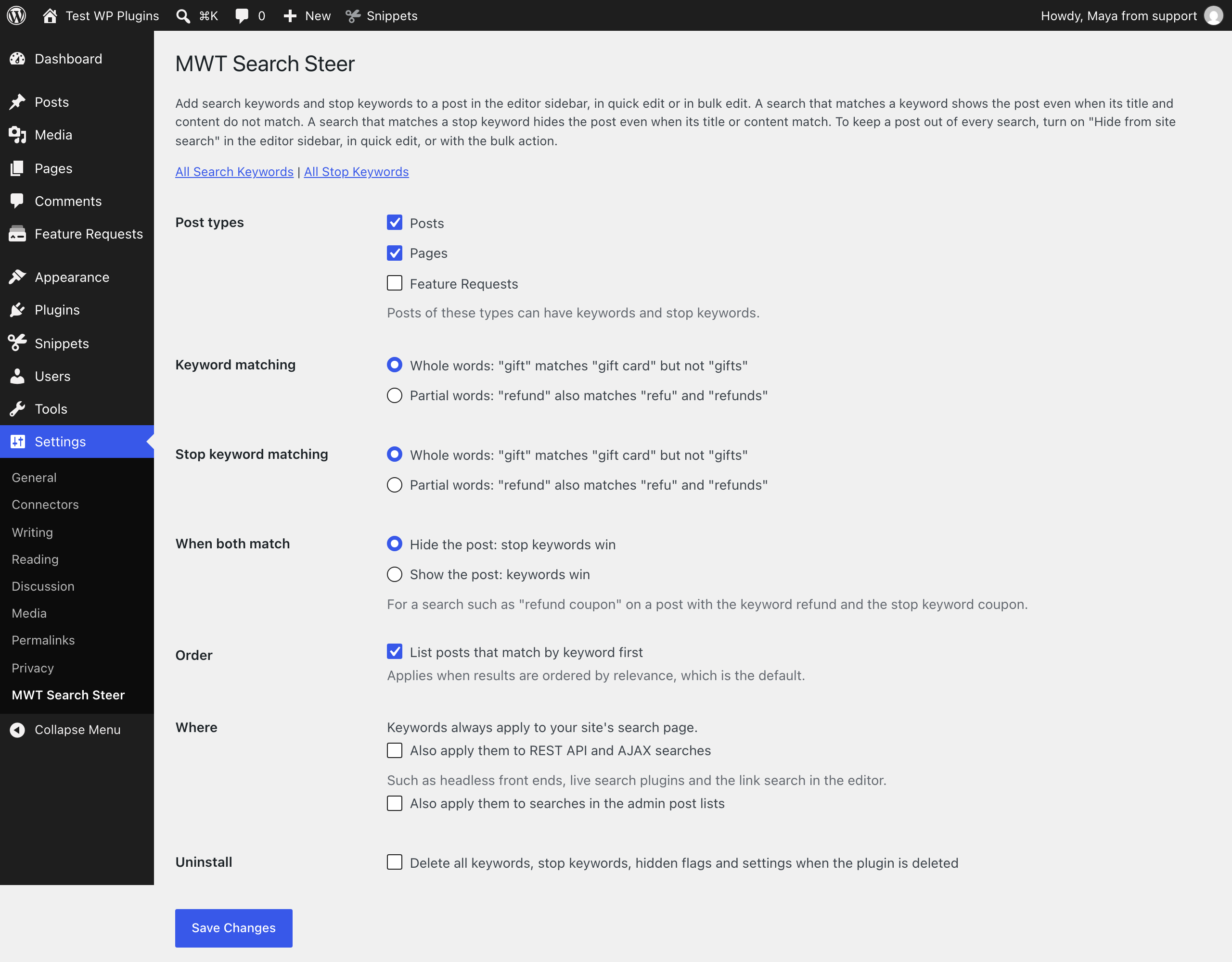
Under Settings > MWT Search Steer you choose:
- Post types that can have search settings. Posts and pages by default.
- How keywords match, separately for keywords and stop keywords:
- Whole words (default): “gift” matches “gift card” but not “gifts”.
- Partial words: “refund” also matches “refu” and “refunds”.
- Which list wins when a search matches both a keyword and a stop keyword of the same post. Stop keywords win by default.
- Order: list posts that match by keyword first.
- Where search settings apply: always on the search page, and optionally in REST API and AJAX searches and in the admin post lists.
Case and accents are ignored, so “Café”, “cafe” and “CAFE” are the same keyword.
For developers
Search settings apply to the main search query on the front end. To apply them to another query, use the filter:
add_filter( 'mwtss_applies_to_query', function ( $applies, $query ) { return $applies || $query->get( 'my_live_search' ); }, 10, 2 );
To turn them off for one query, pass 'mwtss_skip' => true to WP_Query.
Screenshots




Installation
- Install and activate the plugin from Plugins > Add New.
- Open a post and use the Site search panel and the keyword panels in the sidebar.
- Optional: change the matching and other options under Settings > MWT Search Steer.
FAQ
-
No. It only stays out of your site’s search results. It is still listed in menus, archives and widgets, and reachable at its own address.
-
Does it hide posts from Google?
-
No. MWT Search Steer controls the search on your own site. To keep a page out of search engines, use your SEO plugin’s “noindex” setting.
-
Live search boxes often search through the REST API or admin-ajax.php. Tick “Also apply them to REST API and AJAX searches” in the settings. Live search plugins that run their own queries can call the
mwtss_applies_to_queryfilter, described below. -
Does it work with Relevanssi, SearchWP, Jetpack Search or ElasticPress?
-
No. Those plugins replace WordPress’s own search query with their own index, and MWT Search Steer changes WordPress’s own query. Use their exclusion features instead.
-
Does it work with WooCommerce?
-
Yes, for the product search on the shop’s search page, which uses WordPress’s own query. Choose Products under Post types in the settings. WooCommerce’s own visibility still applies: search keywords do not bring in a product whose catalog visibility leaves it out of search, or an out-of-stock product when the shop hides those.
-
How do I import from Search Exclude, Hide from Search or Hide Posts?
-
Go to Settings > MWT Search Steer and click the import button for your plugin. The section shows only the plugins that have hidden posts on your site. Search Exclude can also hide every post of a type, a category or an author. Those settings are listed but not imported: select the posts in their list and use the “Hide from site search” bulk action.
-
Does a search need to match every word?
-
No. A post is added when any keyword matches the search. With the keyword refund, a search for “refund status” finds the post.
-
Can visitors see the keywords?
-
No. Keywords have no public pages and are not printed anywhere on the site. Through the REST API, only users who can edit posts can read them.
-
What happens to my settings when I delete the plugin?
-
They are kept, unless you tick “Delete all keywords, stop keywords, hidden flags and settings when the plugin is deleted” in the settings first.
Reviews
There are no reviews for this plugin.
Contributors & Developers
“MWT Search Steer” is open source software. The following people have contributed to this plugin.
Contributors
Translate “MWT Search Steer” into your language.
Interested in development?
Browse the code, check out the SVN repository, or subscribe to the development log by RSS.
Changelog
1.0.0
- First release.