
Description
Receive and manage consumer complaints from your WordPress website.
DU – Libro de Reclamaciones Perú brings the public form, numbered sheets, PDF copies and private follow-up together in one plugin. Built for businesses operating in Peru, with a Spanish interface and email delivery through WordPress.
From submission to response
A consumer completes the form without creating an account. The plugin saves the sheet, assigns its number and presentation time, and sends a complete HTML copy with a PDF attachment to the consumer and your configured internal recipients.
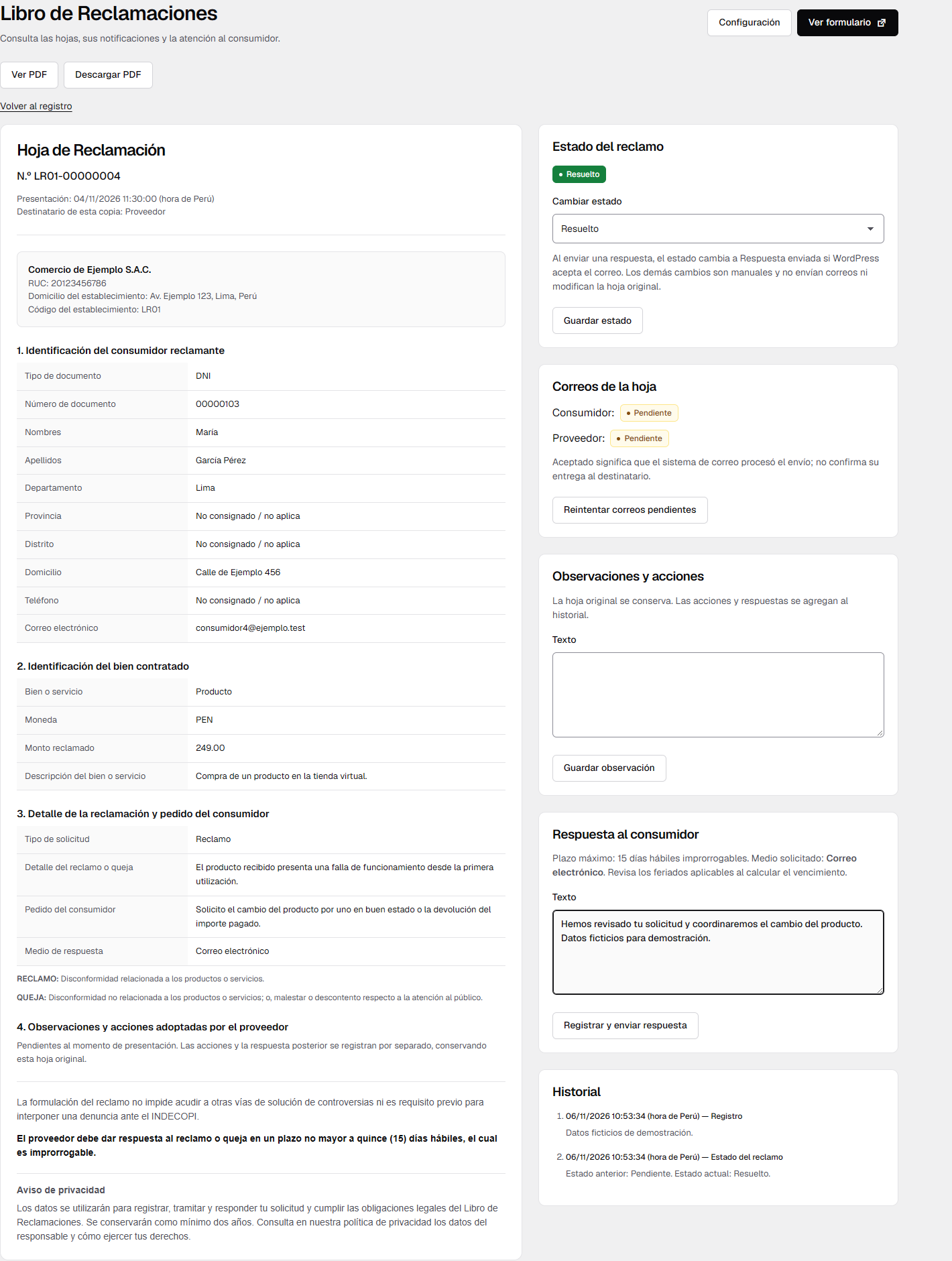
Your team can search the private registry, review a sheet, add internal observations and send a written response without leaving WordPress.
Everything you need to organize your book
- Public form in Spanish: consumer identification, product or service details, amount and currency, complaint, requested solution and representative details for minors.
- Numbered sheets and PDF copies: independent numbering for each book, server-generated timestamps shown in Peru time, and private PDF viewing and downloads.
- Email through WordPress: complete consumer copies, PDF attachments, multiple internal recipients and a test-email action. Uses your existing SMTP or mail plugin when one is configured.
- Private follow-up: search by sheet, consumer, document, email, amount, currency or content; combine book, request-type, status and date filters.
- Four internal statuses: Pendiente, En revisión, Respuesta enviada and Resuelto, with a history of changes and responses.
- Multiple companies or establishments: each book has its own business identity, RUC, address, code, public page, privacy notice and notification recipients.
- Historical business details: new settings apply to future sheets; existing sheets retain the company details recorded when they were submitted.
- Flexible placement: assign a main page or place the form with a shortcode, including in an Elementor Shortcode widget. Includes a public notice shortcode that links to the selected book.
Ready for your company or your next client
Use a single book for one business, separate books for different RUCs, or a book per establishment of the same company. Each book has independent numbering and email routing. All WordPress administrators with manage_options can manage every book; separate company user roles are not provided.
No paid plan, activation key or external complaints platform is required. Records are stored in your WordPress database. PDFs are generated locally, and mail uses your site’s configured transport.
Peruvian format, with a clear legal scope
The notices and definitions reproduce Indecopi’s official complaints-sheet format in Annex I of DS 101-2022-PCM. The same texts appear in the form, sheets, emails and PDFs; your business’s privacy notice is shown separately. Read the official format.
This is independent software, not affiliated with, approved by or certified by Indecopi, SUNAT or the Peruvian government. It does not submit complaints to those institutions or verify identities or tax status. Installing it does not guarantee legal compliance.
The general response period displayed is 15 non-extendable business days. The business remains responsible for applicable deadlines and holidays, actual responses and delivery, availability, public notices, privacy and record retention. See docs/requisitos-pe.txt for the sources and research limitations. Updated in 2026 refers to the software, not a certification of current law.
Documentation and support
Start with the Installation section and the frequently asked questions below. For help, use the WordPress.org support forum. Do not post consumer records, private receipt links or passwords in the public forum.
Developed by dudesign.
Screenshots




Installation
Install from the WordPress.org plugin directory or upload the ZIP. If replacing an earlier private build under a different directory, back up first, deactivate the old copy and replace it; never activate both copies. Since 1.2.0 records, settings and numbering migrate automatically to the dudesign_lr_ prefix without deleting the previous data. Replace old shortcodes with [dudesign_lr_libro_reclamaciones] and [dudesign_lr_libro_aviso].
- Upload the ZIP through Plugins > Add New > Upload Plugin and activate it on the intended site.
- Open Reclamaciones > Configuracion, select Configurar beside a book, or use Crear libro. Enter the business name, valid RUC, establishment address and code, notification addresses and the business’s own privacy notice and policy URL.
- Choose a published, password-free main book page in the settings. The form appears automatically if it is not already present, without overwriting saved content. You can still use [dudesign_lr_libro_reclamaciones] to control its position. A single existing shortcode page (including Elementor data) is detected automatically; if several exist without a previous selection, choose the main page. If none exists, use Create and use book page. Later duplicate pages do not move an existing valid destination.
- Add [dudesign_lr_libro_aviso] in a visible location on the home page. It links to the configured book using the bundled 122 x 71 image, with a subtle hover effect and keyboard focus. Reduced-motion preferences are respected. Review the applicable official notice requirements for your site.
- Serve the book over HTTPS. Exclude the book page and wp-admin/admin-post.php receipts from page/CDN caching, analytics and session-replay tools. Hosting/CDN rules must preserve the private receipt and PDF responses’ no-store and no-referrer headers. Do not block admin-post.php for visitors.
- Save the configured internal recipients before using Enviar prueba de correo. The test sends to all saved internal recipients; if none are configured, it uses the WordPress administration email from Settings > General. It does not automatically add the signed-in administrator. Verify actual receipt and test the full flow before making the book available to consumers.
Multiple book configurations are supported per site. In Multisite, activate separately on each site; network activation is explicitly rejected. Business name, RUC, address and establishment code remain editable after records exist. Changes apply to new sheets; existing sheets retain their original business details and prefix. The numeric sequence continues without restarting. Invalid RUCs are still rejected. A change of legal entity does not transfer responsibility for historical records; the operator remains responsible for appropriate custody and access.
FAQ
-
What happens if a settings value is invalid?
-
With JavaScript enabled, saving settings stays on the same page. Errors appear next to every invalid field, the first error receives focus, and entered values stay in the form. The previous saved configuration remains active until all fields are valid. A connection failure also preserves the form. A successful main-page change refreshes the settings view so its page link and related controls match the saved destination. The normal WordPress Settings API form remains available as a non-JavaScript fallback.
-
How does the main book page work?
-
Assign a published, password-free page in the settings. If the rendered main content already contains the form, its position is kept. Otherwise the form is appended at display time; the plugin never replaces the saved page content. Shortcodes remain supported for precise placement. The theme/template must render the standard WordPress page content.
A single published shortcode page can be detected from WordPress content or Elementor page data. Detection runs during page/Elementor saves or administrator setup, not by scanning all pages on every visitor request. Once a valid destination is established, later duplicate pages do not move it. Use Change page to assign another published page. If multiple candidates exist without a selected destination, an administrator must choose. Page creation is an explicit administrator action with nonce and publication-permission checks; activating the plugin does not create pages automatically.
-
Does it need an SMTP service?
-
It uses native wp_mail(). You can set internal recipients, an optional sender name/address and an optional reply address. If the site uses an SMTP or mail-delivery plugin, that transport is used. This plugin does not store SMTP passwords or replace the site’s transport.
-
Does accepted email status confirm delivery?
-
No. accepted means wp_mail() accepted the request; it does not confirm inbox delivery or reading. Records are saved before sending. Failed sheet copies receive up to three automatic processing attempts through WP-Cron and can be retried manually. Cron requires site traffic or a system scheduler configured by the administrator. A process interrupted after transport acceptance can cause a repeated message: email and database writes do not share a transaction.
Substantive written responses that fail to send must be submitted again by the administrator. Postal replies require actual delivery outside WordPress; recording a note alone does not prove delivery.
-
Is a PDF generated?
-
Yes. PDFs are generated locally from the original record and its historical business details using bundled Dompdf. Consumer and internal sheet emails include the full HTML sheet plus a PDF attachment; written response emails also attach the original sheet. The receipt and administrator detail provide View PDF and Download PDF actions. Later actions remain in the separate history and do not rewrite the original PDF.
PDFs are not stored in the media library or public uploads. Mail attachments and font caches use random private system temporary directories and are removed after processing, including transport failure. An interrupted PHP process may leave temporary files for the server administrator’s normal temporary-file cleanup. The database remains the retained original. PDF access uses the receipt’s private 30-day key or administrator permissions plus a sheet-specific nonce. PHP DOM and mbstring extensions and a writable system temporary directory outside the web root are required. If generation fails, the sheet stays saved and the mail attempt is marked failed for retry; no incomplete copy is marked accepted. Fonts support Latin text; unsupported writing systems may require a suitable bundled font.
-
How are records numbered?
-
Each book has an atomic database counter and a distinct establishment prefix. Numbers do not reset yearly. New books start at 1. Upgrading an existing installation assigns all previous sheets to book 1, keeps their original printed codes and payloads, and seeds its counter from the maximum historical ID. Concurrent submissions receive distinct numbers; resubmitting the same request key returns the original record. Failed database operations may leave gaps. Existing books and numbering are not imported; plan any transition before activation.
-
The site’s database stores submitted identity, address and contact information; representative details for minors; product/service, amount, complaint and requested solution; business details at submission; submission time, actions and response history; and email-processing status. History records the acting WordPress user ID. A hash of the random request key supports duplicate prevention and private receipt access. The plugin does not store IP addresses, set additional cookies or track visitors.
The complete sheet is sent to the consumer and configured internal recipients through the site’s mail transport. That transport or its provider may process these data. The plugin sends no data to DU Design, Indecopi, SUNAT or an external validation/analytics service. The administrator supplies the privacy-policy link and all business-specific disclosures. Marketing consent is not required.
-
How do privacy exports and erasure work?
-
The plugin integrates with WordPress Tools > Export Personal Data. It exports sheets and history associated with the verified consumer or representative email, in pages of 25 records. The administrator must review the export and the requester’s authority before disclosure.
Tools > Erase Personal Data reports matching records as retained and explains why the provider must review deletion against legal retention duties. It does not automatically delete sheets, responses or evidence. The business must handle requests, determine its final retention period and arrange any justified deletion. Suggested text is available in WordPress’s privacy-policy guide; it does not overwrite a published policy.
-
What happens when a receipt link expires or the plugin is deleted?
-
The private receipt URL contains a random 256-bit access key and expires after 30 days. Treat it as private. Expiry protects that link and does not remove the record or disable the plugin. Consumers keep their complete email copy and can request another copy from the business.
Deactivation and deletion of the plugin preserve records, history and settings. Back up the site’s prefixed dudesign_lr_sheets, dudesign_lr_events and dudesign_lr_books tables, together with the WordPress options holding each book’s settings securely with normal WordPress backups. There is no automatic deletion. Peruvian general rules require at least two years’ conservation; the business determines additional duties and its actual retention policy.
-
Are external services or libraries required?
-
No external API, script, account or paid service is required. CSS and JavaScript are included in readable source form. Geist is served from this plugin’s assets/fonts directory, with its copyright notice and SIL Open Font License in assets/fonts/OFL.txt. Its source is https://github.com/google/fonts/tree/main/ofl/geist (original project: https://github.com/vercel/geist-font). No Google Fonts request is made by the installed plugin. WordPress core handles database access, settings, permissions, nonces and email. An optional mail provider and privacy-policy destination are configured by the operator.
The complaints-book image in assets/libro-reclamaciones.png is original artwork supplied by DU Design, copyright 2026 DU Design, distributed under GPL-2.0-or-later together with this plugin. It is served locally and is not an Indecopi endorsement or certification.
The DU labs logo in assets/du-logo.svg is original artwork supplied by the project owner, copyright 2026 DU Design, distributed under GPL-2.0-or-later with this plugin for the administrator footer credit. It is bundled unchanged with its original dark lettering and red accent, at text height. A subtle hover and keyboard-focus effect respects reduced-motion preferences. The locally served asset links to dudesign.pe only when an administrator opens the credit link.
PDF dependencies are bundled in readable source form under vendor/, isolated under the Dudesign_LR_Vendor namespace: Dompdf 3.1.6 (LGPL-2.1), php-font-lib 1.0.2 (LGPL-2.1), php-svg-lib 1.0.2 (LGPL-3.0-or-later), Masterminds HTML5 2.11.0 (MIT), and Sabberworm CSS Parser 9.5.0 (MIT). Original licenses, font notices and source references are retained in each package and composer.lock. DejaVu fonts retain their upstream license notices under vendor/dompdf/dompdf/lib/fonts/. No PDF data is sent to an external service. Build/source information is in docs/pdf-build.txt. The plugin’s WordPress administrator pages include a DU Design credit; public forms, PDFs and emails do not add promotional links.
Reviews
There are no reviews for this plugin.
Contributors & Developers
“DU – Libro de Reclamaciones Perú” is open source software. The following people have contributed to this plugin.
Contributors
Translate “DU – Libro de Reclamaciones Perú” into your language.
Interested in development?
Browse the code, check out the SVN repository, or subscribe to the development log by RSS.
Changelog
1.2.1
- Verify the public submission and settings nonces before reading form data. Clarify access checks for read-only routes.
1.2.0
- Use the unique dudesign_lr_ prefix for all classes, constants, options, tables, hooks, AJAX actions, nonces, shortcodes, assets and admin pages.
- New shortcodes: [dudesign_lr_libro_reclamaciones] and [dudesign_lr_libro_aviso]. Update pages that used the previous shortcodes.
- Existing records, settings, numbering and pending email retries are migrated automatically; previous data is preserved.
1.1.6
- Use the distinctive DU plugin name and proposed dudesign-libro-reclamaciones-peru directory slug and translation domain.
- Sanitize the public form nonce before verification. Preserve existing data, settings, numbering and shortcodes.
- Keep the local credit exclusively on this plugin’s administration pages; no public attribution.
1.1.5
- Added View book beside Configure and View sheets in the book catalog. Opens the selected book in a new tab; unavailable until a published main page is assigned.
1.1.4
- Sending a consumer response automatically records Response sent after WordPress accepts the email. Failed sends preserve the previous status; other status changes remain manual.
1.1.3
- Added automatic filtering by internal claim status, combined with book, search, type and dates.
- Singular status labels and neutral, yellow, light-green and green badges. Widened the administration table by up to 50 pixels and compacted cell spacing.
1.1.2
- Search now precedes the book, request type and presentation date filters.
- Added private claim status in the registry and sheet administration: pending, under review, response sent and resolved. Status changes are manual, recorded in history, and do not send email or alter original sheets.
1.1.1
- Configuration opens the book catalog, with a create button and per-book settings and records. Removed the separate Books submenu.
- The private registry always offers its styled book selector. Historical sheets and mail settings are preserved.
1.1.0
- Multiple independent books for different companies or establishments, with per-book settings, main pages, shortcodes and email routing.
- Independent concurrent-safe numbering; automatic migration preserves the original book, sheet payloads, printed codes, history and mail configuration.
- Book catalog, creation workflow and live registry filter. Main pages and current or historical prefixes cannot be shared between different books.
- Privacy exports, PDF copies, response messages and scheduled retries retain the matching book number and provider identity.
1.0.28
- Compacts administrator filters with an in-field search hint, a request-type prompt and visually hidden accessible labels and search help.
- Keeps the custom-date selector on one line with enough width beside its range control. Existing automatic filters and records are preserved.
1.0.27
- Uses the existing accessible styled selectors for administrator request-type and presentation-date filters, with All, Claims and Complaints choices.
- Shares the selector component with public forms, preserves automatic filtering and keeps native selects available without JavaScript.
1.0.26
- Shows register presentation dates in UTC-5 with a 12-hour AM/PM clock; original sheets, emails and PDFs keep their existing timestamp format.
- Replaces row-hover links with an accessible icon action column for PDF viewing and direct navigation to the consumer response field.
1.0.25
- Uses compact text links for register row actions without shifting the vertically centered sheet code or changing row height on hover.
- Moves the private-record retention notice below the register table.
1.0.24
- Adds a Today date preset in Peru time, moves the result count above the table and shortens filter help.
- Orders the private register by sheet, full consumer name, document, type, amount/currency, department and presentation date.
- Adds quick View details and View PDF actions on row hover or keyboard focus, always visible on touch devices.
1.0.23
- Shows only Clear beside automatic register filters. The Apply action remains available without JavaScript, and Enter in the search field can retry a failed live request.
1.0.22
- Shows document type/number and claimed amount/currency in the private register, keeping the consumer’s full name in one cell.
- Existing live search includes document, name, surname, currency and amount, including combined queries such as PEN 12.50. Original records remain unchanged.
1.0.21
- Aligns filter actions with inputs and updates private results as the search or filters change, preserving focus and rejecting stale responses.
- Adds this-week and this-month presets in Peru time and a styled, keyboard-accessible two-month calendar for custom date ranges. Native GET/date inputs remain available without JavaScript.
1.0.20
- Adds private administrator search across sheet data and sheet numbers, request-type filters and an inclusive presentation-date range in Peru time.
- Combines filters before pagination, preserves them when opening a sheet or changing pages, and shows field errors without changing stored records.
1.0.19
- Sends email tests to all saved internal notification recipients, falling back to the WordPress administration email only when no internal recipients are configured.
- Renames the test button to Enviar prueba de correo and explains the saved-recipient behavior.
1.0.18
- Protects action button appearance from later theme type-selector resets, including Rey, without changing custom dropdowns or theme buttons outside the plugin.
- Aligns administrator external-link icons when WordPress applies its default button icon line height.
1.0.17
- Clarifies the Peruvian regulatory and Indecopi-format references in the description and identifies 2026 as the software update year.
1.0.16
- Describes the included official Indecopi-format notices and definitions, numbered sheets, PDF copies and email notifications. Does not claim official endorsement or guaranteed legal compliance.
1.0.15
- Renames the plugin to DU – Libro de Reclamaciones Perú and links the lowercase author dudesign to its website. Existing identifiers, records and settings are preserved.
1.0.14
- Keeps custom selector text readable on hover, focus, active and expanded states when themes apply white button text, including Hello Elementor.
1.0.13
- Adds styled public dropdowns with keyboard navigation and accent-insensitive department search, preserving native form submission and server validation.
- Replaces exterior input focus outlines with inset indicators and animates the administrator page picker with reduced-motion support.
1.0.12
- Prepared the distribution for directory review, with site-specific business settings and explicit bundled-logo licensing.
1.0.11
- Uses the supplied DU labs SVG unchanged for the administrator credit, with a subtle hover/focus enlargement and reduced-motion support.
1.0.10
- Replaces the administrator footer’s text credit with the supplied DU logo at text height, using a dark variant with its original orange accent.
- Keeps the View form button’s external-link icon white across link, hover, focus and visited states.
1.0.8
- Uses the Spanish notices and complaint definitions from the official 2022 Annex I throughout the public form, HTML sheets, emails and PDFs; separates the configured privacy notice.
- Aligns short PDF labels and answers in fixed columns with matching text metrics. Long answers remain flowing blocks for pagination.
- Preserves original records, business snapshots, settings and native mail transport.
1.0.7
- Added private server-generated PDF copies, email attachments, consumer and administrator view/download actions, and cleanup of temporary files.
- Opens form/main-page links in new tabs with an accessible external-link icon. Improved Change page pointer, hover, focus and expanded state.
- Added a DU Design footer credit only on this plugin’s administrator screens. Records, historical business data and mail transport are preserved.
1.0.6
- Added in-place settings validation with field-specific errors and preserved input. Invalid submissions do not partially update the saved configuration.
- Shares validation between the Settings API and authenticated AJAX saves, protected by capabilities and the settings nonce.
1.0.5
- Added a main book page that displays the form automatically without overwriting content or duplicating an existing form.
- Detects a unique shortcode page, including Elementor data; retains the selected destination when other pages are published.
- Added an explicit create-page action when no book exists, with permissions and nonce checks; moved the selector under Change page.
1.0.4
- Removed the public reply-channel selector. New sheets use email and explain that choice in the form; historical sheets retain their original reply channel.
1.0.3
- Bundled the DU Design complaints-book image for the notice shortcode, including a subtle hover, visible keyboard focus and reduced-motion support.
- Allowed business identity changes for future sheets while preserving original details, prefixes and the continuing number sequence of historical records.
- Removed the repeated title from the public form shortcode; printable sheets and emails keep their headings.
1.0.2
- Unified the public form, plugin administration, complete HTML email sheets and browser-print/PDF view with a monochrome visual system.
- Bundled Geist locally with its SIL Open Font License; improved responsive spacing, keyboard focus and readable email status labels.
- Preserved complaint records, business settings and the site’s native mail transport.
1.0.1
- Prepared the directory submission package and English readme; added the GPL license and translation template.
- Hardened custom-table queries, scalar input validation and output handling; registered resources through WordPress on standalone receipts.
- Added WordPress privacy exports, explicit retained-data responses and suggested privacy-policy text.
- Added a per-site Multisite activation guard and corrected the response-text character limit.
1.0.0
- Initial version with private numbered sheets, complete consumer copies, printable receipts and native WordPress email.