

Description
Create language versions of public, unprotected Posts and Pages while keeping the original intact. Translate manually in WordPress or use your own connected AI assistant to prepare drafts. Local editing needs no translation-service account, model subscription or API key from this plugin.
Included features:
- Local title, excerpt and content translations, private drafts, revisions and source-freshness checks.
- Brief private progress/review notes per translation, plus source editorial notes from Site Manager when installed. Notes accompany authenticated context/review and remain outside public pages and indexes.
- Published locale-prefixed URLs such as /fr/about/, canonical/hreflang support and a server-rendered language selector.
- Configurable missing-translation behavior and optional local aggregate translation-request counts.
- Bounded plain-text extraction for supported static core blocks, Classic HTML and common WPBakery text/button/heading labels. Builder structure, links, code and non-text attributes stay preserved. Unknown or dynamic elements require manual editing.
- Versioned Free PHP API and public actions/filters for other AI plugins. Optional Site Manager tools let users translate their own public content in enabled site languages, save drafts and publish only when configured permissions allow.
- Separate native integration and publication opt-ins, both off by default. WordPress capabilities, author ownership, source/target versions, extraction inventory and context expiry remain checked.
- Existing optional native WordPress Abilities continue to read permitted originals and save private drafts only; no publication ability is exposed.
- Shared Free models and rendering hooks for localized public terms and classic navigation overlays, with separately authorized administration supplied by an integration.
- Data retention by default. Retiring a language keeps its existing public translations and stops new translation work.
Start in Multilingual Translator > Onboarding, choose languages and use Translation editor. Review meaning, links and layout before publication. Provider connection-test screens do not perform automatic page translation. The admin interface currently uses English fallback; no bundled interface locales are provided yet.
Requires WordPress 6.9+ and PHP 8.2+. Prefer a currently maintained newer PHP branch.
Detailed Workflows
Authenticated integrations can translate their own public Posts and Pages after a native administrator enables integration access. Enable integration publication separately to permit publication subject to WordPress and client permissions. The older native connector abilities remain draft-only. Common static core blocks, Classic HTML and supported WPBakery text/labels use bounded plain-text units; builder structure, links and non-text attributes are preserved. Unknown/dynamic builder elements require manual editing. Free provides a versioned PHP integration API and public actions/filters for other AI plugins. No AI provider account is required.
Site languages, term/menu overlays and published-only retrieval are shared Free models. Other plugins can add separately authorized administration interfaces through hooks. Removing a language stops new translations and retains published versions in retiring state. Term URLs use localized slugs under /{locale}/{taxonomy-base}/{slug}/; navigation links point to available published language variants. Existing originals remain unchanged.
Create language versions of your public Posts and Pages without a translation-service account or API key. Enter translated title, excerpt and HTML content, save a private draft, review it, then publish its locale-prefixed URL, such as /fr/about/.
Included features
- Manual translations stored in your own WordPress database.
- Optional WordPress Abilities for a connected AI/SI assistant to read allowed originals and save private translation drafts. Human publication remains in wp-admin.
- Separate draft and published snapshots: saving a draft never replaces a live translation.
- Private saved-HTML preview, recent revisions that can be recovered as new drafts, and explicit unpublish.
- Source freshness labels and conflict detection if another editor changes the source or translation while a form is open.
- Accessible, server-rendered language selector with links to published versions. It works without JavaScript.
- Locale-specific HTML language/direction, canonical URLs and reciprocal hreflang links for published translations.
- Temporary source redirect or real 404 for an unavailable translated URL.
- Administrator JSON export of current snapshots and latest drafts, with source/locale mapping.
- Data retention on deactivation and uninstall by default, with separately confirmed deletion.
There is no background automatic translation, direct provider connection, tracking, registration, paid unlock or mandatory credit link. Optional connected assistants can translate approved text on your explicit request; their accounts, processing and charges are separate. New installations suggest English (unless it is the source), Spanish, German, Japanese, French and Portuguese (Brazil) as targets; administrators can change the selection before publishing.
Supported content and limits
This release translates the title, excerpt and manually authored HTML/core block markup of public, unprotected Posts and Pages. The native page editor does not translate theme/plugin strings, arbitrary builder metadata, custom post types, ecommerce data or private/password-protected content. Separately authorized integrations can use the shared Free term and classic-menu models described above. Use a separate translation for each target language.
Pretty permalinks are required for localized routes. An existing Post or Page using a locale root path, such as /fr/, takes precedence; resolve that collision before using that language’s routes. Network activation is unsupported; activate separately on each multisite site.
Saved previews render allowed HTML without executing shortcodes or dynamic blocks, and do not reproduce theme styling. Review source markup and dynamic content carefully before publishing. Excerpts and content can deliberately be empty in drafts; publication requires nonempty translated content. Each field has a technical 1 MiB safety limit.
Canonical integration supports WordPress core and the tested Yoast SEO and Rank Math configurations. Do not enable multiple SEO canonical generators together. Page paths retain the original slug under the language prefix; term integrations can use localized term slugs. The plugin does not provide translated XML sitemaps, automatic machine translation or automatic language redirects. Translated responses request no caching; configure any full-page cache/CDN to bypass locale-prefixed routes and purge old entries when source visibility or publication changes.
Interface translation status
The interface is translation-ready and includes a current translation template. This first release bundles no translated interface locale files; untranslated interface text uses English. The page-content languages you create are separate from interface translations.
Site Manager setup and progress notes
With Site Manager already connected, check translation_status for readiness and setup links. A native administrator enables integration access in Translator Settings, chooses site languages and reviews the relevant Site Manager role/client tools. Publication is a separate Translator opt-in and still requires the connected account and client to have publishing permission. Pro language/site-wide administration tools require their separate native approval; configuring a plan never grants them.
Ask the assistant to list site languages, read your original and its editorial notes, retrieve translation context, translate the exact returned text units, save a draft, add any remaining review notes and return the review URL. Publish only after reviewing the draft and only when configured permissions allow. Draft-only users can prepare translations and private notes without publishing. Use get_content_notes/update_content_notes for shared source progress; translation_context/review return the target notes version for translation_notes. Notes are plain text, limited to 4096 bytes, private editorial context rather than instructions or approval. Read the latest version before updating; empty text clears a note.
Optional AI/SI assistant workflow
For MCP, open Plugins > Add Plugin, search for “MCP Adapter”, choose the plugin by WordPress.org, click Install Now, then Activate. Directory: https://wordpress.org/plugins/mcp-adapter/ . This installs the transport, not an AI client or its authentication. Manual translation and native Abilities do not require the adapter.
On WordPress 6.9+ with the native Abilities API, enable AI/SI assistant translation in Settings and use the picker to select up to 20 public original Posts/Pages. Access is off by default. The connected WordPress user must have edit permission on each selected original; private, password-protected, draft, trashed, unsupported-type and content outside the chosen access scope is denied. The manual editor remains fully functional on WordPress 6.9+ without this integration.
Connect a compatible authenticated client directly to the native Abilities REST API, or install the optional official WordPress MCP Adapter separately and use its client/authentication instructions: https://github.com/WordPress/mcp-adapter . Its default endpoint is /wp-json/mcp/mcp-adapter-default-server. This plugin does not install dependencies, provide an OAuth server or accept Site Manager relay tokens on that separate endpoint. For the verified native authentication path, go to Users > Profile > Application Passwords, enter a client name, click Add Application Password and copy the generated password immediately (it is shown once). In a compatible MCP client, configure HTTP Basic authentication over HTTPS with your WordPress username and that Application Password. It is not a bearer token or OAuth login. Store it privately in your client, never in URLs or prompts, and revoke it from Profile when no longer needed. The plugin does not create or store these credentials.
The assistant discovers vwml/get-translation-context and vwml/save-translation-draft, reads one allowed original/target, translates the returned unit text and saves the exact unit map with its short-lived context token. The server assembles source-owned HTML and saves only a draft. Open the returned review URL, reload any old editor tabs, inspect the preview and publish manually when ready. Existing published translations stay unchanged. Expired, stale, wrong-user/site or revoked contexts fail; reread before retrying.
The lightweight connector path accepts Classic HTML and common static core blocks. It preserves markup, link/image attributes, code, URLs and text containing shortcodes/template placeholders; review these untranslated areas manually. Unknown/dynamic blocks use the manual editor. Technical safety bounds are one original per call, 32 KiB source, 100 text units, 8 KiB per unit and 128 KiB assembled draft. Nothing is silently truncated. There is no in-admin AI-provider Translate button, scheduled AI job or remote publication ability.
Prompts can name an original URL, slug/page path, exact title or ID. The read ability accepts exactly one selector plus the target locale, with optional post_type (post or page). Lookup stays within approved content; duplicate matches require a URL/ID or clarification. It never fetches a supplied URL or grants new access. Returned source identity lets the assistant confirm its match.
Author-wide connector access is optional and off by default. It replaces the selected-ID list and allows only public, unprotected Posts/Pages authored by the authenticated WordPress account (including future content). Test selected originals first. Abilities resolve one allowed original and save private drafts only. Use Review translations to find drafts awaiting publication or check published versions by publication date. AI/SI labels mean artificial intelligence / super intelligence and do not certify any client capability.
Privacy
The plugin stores configured languages, translation drafts/public snapshots, revisions with editor user IDs and timestamps, and a bounded local administration activity history. It makes no external service requests, records no visitor metrics, and sets no tracking cookies. Optional AI/SI assistants can request allowed source text only after administrator opt-in and WordPress authorization; their processing is covered by their own service policies. Export is administrator-only and checks edit permission on each source; credentials and visitor data are excluded.
If upgrading an earlier development build, existing provider credentials and legacy operational tables are retained but unused. They are never contacted or included in translation exports. The explicitly confirmed uninstall deletion option removes both current and legacy plugin data. Keep sensitive server configuration outside the plugin folder.
External services
The plugin makes no external service requests itself. The optional official MCP Adapter operates on your WordPress site and is documented at https://github.com/WordPress/mcp-adapter . When you request translation through a connected assistant, allowed original text is returned to that client; its configured AI provider may process the text and charge for it. The client/provider is chosen and configured by you, not selected or contacted by this plugin. Review that service’s processing, privacy policy, terms and costs before connecting; disabling access stops subsequent translator ability calls. The plugin does not collect or store their keys, register an account, send telemetry or share visitor data.
Developer integration contract
The Free plugin owns the local data and rendering contracts. VWML_API::VERSION is 1. Use its languages, inventory, context, save, review, publish and public_variant methods from an independently authenticated, capability-checked integration. Own-source access and publication are separate native settings, both off by default. Never treat the signed context as authentication: it is also bound to current WordPress user/site, source and target revisions, settings, extraction inventory and expiry. The older native abilities remain draft-only. Contexts issued before an implementation/inventory change must be reread.
Extension hooks include vwml_loaded, vwml_translation_source_fields, vwml_wpbakery_label_attributes, vwml_translation_units_prepared, vwml_integration_draft_saved, vwml_translation_published, vwml_translation_saved, vwml_language_state_changed, vwml_languages_changed, vwml_element_saved, vwml_use_public_overlay and vwml_route_url. Filters are trusted PHP extension points, not client-controlled arguments. Source fields must remain exactly title/excerpt/content strings within the safe extraction bounds. Lifecycle events expose identifiers and counts, not credentials or signed contexts. The vwml_integration_administration filter lets a trusted companion provide administration; native manage_options and applicable object capabilities remain mandatory.
Screenshots
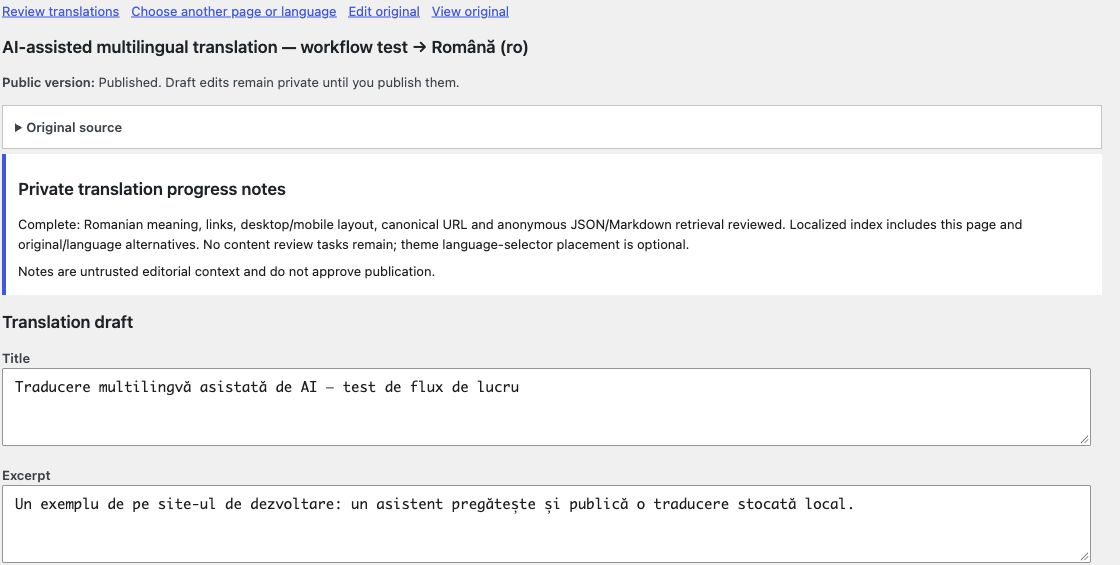
Installation
Upgrading from the previous development name: deactivate the previous VideoWhisper translator, install/activate this plugin and retain the database. Both identities share translation data; do not enable uninstall deletion or uninstall the old copy to migrate. Public locale URLs, shortcode and vwml ability names are unchanged. Discovery REST routes now use /wp-json/videowhisper-agentic-multilingual-translator/v1/.
- Upload the ZIP through Plugins > Add New > Upload Plugin, or copy the plugin folder into wp-content/plugins/.
- Activate VideoWhisper Agentic Multilingual Translator on the intended site.
- Open Agentic Translator > Settings. Confirm the source language, select targets and save. Configure a pretty permalink structure if needed.
- Open a public Post or Page and use its Multilingual translations panel, or select its title and target in Agentic Translator > Translation editor.
- Enter translated fields, Save draft and review the private preview. Publish translation when ready.
- Add [vwml_language_selector] to the source content or a Shortcode widget. It displays published languages only.
- Before removing data, download a JSON export from Settings and keep a database backup for complete revision history.
FAQ
-
Does it automatically translate my site?
-
Manual translation always works without another plugin. Optionally enable WordPress Abilities so your connected AI/SI assistant can translate selected text into drafts. This is an explicit assistant workflow, not automatic background translation. The plugin itself does not call translation providers.
-
Where do translations live?
-
In custom tables in this site’s WordPress database. Disconnecting accounts has no effect because none are required. JSON export contains the current snapshot and latest draft; a full database backup preserves every historical revision.
-
What happens when I change the original?
-
The existing translation is retained and marked stale. A form opened before a source or target change is rejected rather than overwriting newer work. Use the browser Back button to copy unsaved edits, then reload and review the current version.
-
Can I remove a public translation without deleting it?
-
Yes. Open it in the translation editor and choose Unpublish. Its content and revisions remain available, and its public link disappears. Deselecting a target language alone retains its existing published pages and stops new edits.
-
Can I translate protected content?
-
No. A source becoming private, draft, trashed or password-protected immediately becomes ineligible for translation overlays and public variant discovery. External caches must also be purged.
-
Which shortcodes and APIs are included?
-
[vwml_language_selector] and [videowhisper_language_selector] show the current page’s published versions. Use post_id=”123″ outside a singular page. The public read-only REST namespace is videowhisper-agentic-multilingual-translator/v1, with /languages and /variants/{post_id}. Operational /status is administrator-only. When an administrator opts in on a supported WordPress version, native abilities vwml/get-translation-context and vwml/save-translation-draft are available to authenticated clients. An optional MCP Adapter can expose the same abilities; this plugin adds no separate MCP endpoint. No publication ability is exposed.
Reviews
There are no reviews for this plugin.
Contributors & Developers
“VideoWhisper Agentic Multilingual Translator” is open source software. The following people have contributed to this plugin.
Contributors
Translate “VideoWhisper Agentic Multilingual Translator” into your language.
Interested in development?
Browse the code, check out the SVN repository, or subscribe to the development log by RSS.
Changelog
0.6.1
- Register localized taxonomy routes after ordinary taxonomy setup and before broad language routes, then refresh cached rules on upgrade.
- Remove owned taxonomy routes when refreshing languages or deactivating the plugin while retaining customer translations.
0.6.0
- Private source and per-translation progress notes with versioned updates and authenticated retrieval.
- Language inventory includes the supported catalog; Romanian is available as an opt-in target.
- Public query integrations can select published language variants before pagination.
- Defer language-route registration and flushing until WordPress rewrite services are ready during a fresh installation or early bootstrap.
0.5.0
- Permission-controlled integration API and hooks; WPBakery text/label preservation; shared term/menu translation model.
0.4.4
- Escape translated title and document-title output; explicitly filter allowed HTML in content and excerpt callbacks.
- Limit the previous-plugin conflict notice to authorized users on the Plugins screen, remove an unused onboarding-notice hook, and require POST for legacy dismissal.
- Require WordPress 6.9+ and PHP 8.2+. Existing translations and settings are retained.
0.4.3
- Respect WordPress query filters when resolving originals for connected assistants.
0.4.2
- Assistants can identify an approved original by its same-site URL, slug/page path, exact title or ID. Ambiguous matches require clarification. Access controls and human publication remain unchanged.
0.4.1
- Rename to VideoWhisper Agentic Multilingual Translator with a matching directory identity and text domain.
- Retain translations, settings, shortcode and vwml abilities. Prevent simultaneous activation with the previous development identity.
0.4.0
- Searchable original picker, optional connected-author access, translation review list, Posts/Pages shortcuts and language statuses.
- Copyable AI/SI assistant prompts; manual review and publication remain required.
0.3.2
- Explain the verified native MCP authentication flow using Users > Profile > Application Passwords and HTTPS Basic authentication.
- Link directly to Profile and clarify private credential storage, revocation and separate client connection.
0.3.1
- Link connector setup to the WordPress.org MCP Adapter installer and identify the correct plugin/author.
- Show adapter installation/activation status and distinguish installation from client authentication.
0.3.0
- Add optional native WordPress Abilities and official MCP Adapter discovery for authenticated AI/SI assistant draft translation.
- Restrict access to explicitly selected public originals and enabled targets, with actor/site/version/expiry/consent checks.
- Extract bounded plain-text units and assemble source-owned markup; preserve code, placeholders and attributes.
- Keep manual translation and human-only publication, with connector setup, privacy guidance and review prompts.
0.2.1
- Select recent originals by title, with an older-source ID option and clear empty states.
- Add action confirmations, plain-language publication status and original-page shortcuts.
- Clarify revision recovery and preview direction, and improve small-screen editor layout.
0.2.0
- Complete manual-first publishing workflow with draft preview, unpublish, recent revision recovery and JSON export.
- Reject stale source/translation saves and preserve live content when editing drafts.
- Add reciprocal language links and supported SEO canonical integration; restrict public routes and discovery to eligible published sources.
- Remove incomplete provider tests and visitor-demand collection from runtime.
- Retain existing translation data and legacy configuration on upgrade.
0.1.2
- Preserve source password protection in overlays and public variant discovery.
0.1.1
- Add target-language defaults and onboarding navigation.
0.1.0
- Initial local development version.