

Description
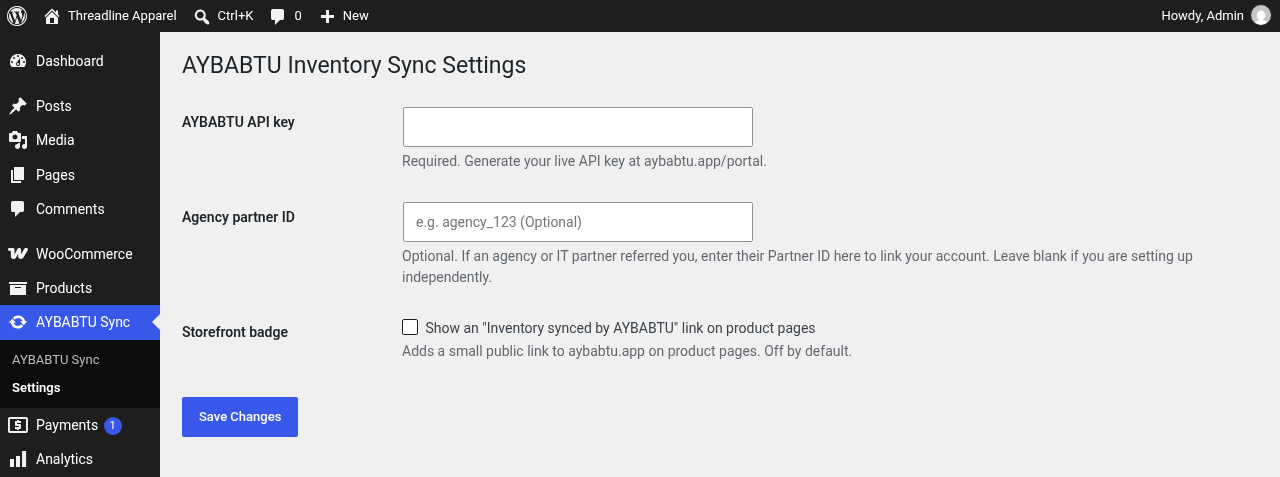
Connect WooCommerce to AYBABTU to configure supplier feeds and synchronize selected product and variation inventory. The plugin provides a native settings page in wp-admin and a link to the separate AYBABTU dashboard.
An AYBABTU account and API key are required. The Sandbox plan includes 1,000 requests per month at no cost, plus automatic inventory syncs every 15 minutes. Scheduled syncs are not counted against the monthly request allowance.
AYBABTU is not affiliated with or endorsed by SanMar Corporation. SanMar is a trademark of its owner.
External services
This plugin connects to AYBABTU, operated by Epic Force LLC. Its default service origin is https://aybabtu.app; an administrator can configure a validated HTTPS origin with AYBABTU_SYNC_APP_URL in wp-config.php.
When an administrator with the manage_options capability views the AYBABTU Sync settings page and an API key is saved, WordPress makes a server-side GET request to https://aybabtu.app/api/dashboard/jobs/active, or to the same path at the configured service origin. This read-only route uses the same API-key authentication as the dashboard and works before a WooCommerce connection is configured. The saved key is sent only in the Authorization: Bearer header. The URL does not include the key, WordPress site URL, or other site settings. The plugin uses the HTTP status to display connection status and does not display the response body. Results are cached per site and key for about 10 minutes. Clicking Check connection clears the cache and redirects to the settings page, where the check runs again. This authenticated read request can count toward the AYBABTU API request allowance. WordPress sends ordinary network information such as the server IP address and HTTP headers with this request.
The optional agency partner ID is saved in WordPress settings and is not included in the connection check.
Open AYBABTU dashboard is a plain link to https://aybabtu.app/portal opened only when an administrator clicks it. The link includes no API key or site data. Following it sends ordinary browser request metadata to AYBABTU. The portal is a separate site; the plugin does not load the portal inside wp-admin.
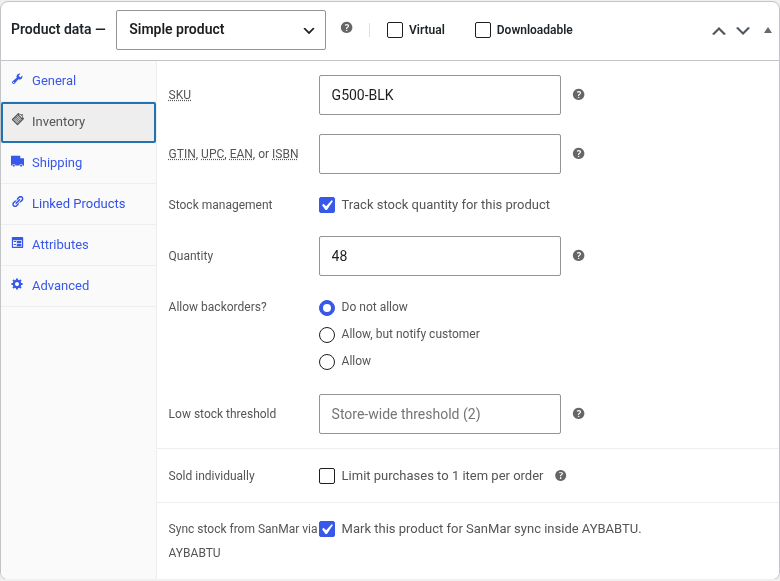
When an administrator connects a WooCommerce store in the AYBABTU portal, the store URL and WooCommerce REST API consumer key and secret are sent to AYBABTU. The AYBABTU service uses those credentials to read and update product and variation SKUs, stock quantities, backorder settings, optional prices, and the _aybabtu_supplier product-selection field during configuration and inventory synchronization. The plugin exposes _aybabtu_supplier as WooCommerce REST product metadata for that selection flow.
The plugin also registers the WooCommerce REST route /wp-json/wc-aybabtu/v1/stock/increment. AYBABTU can send a receipt ID and product or variation stock adjustments to this route after a receipt is marked received. The route requires a timestamped HMAC proof associated with a WooCommerce read/write API key and applies each receipt adjustment once.
The optional storefront link to https://aybabtu.app is disabled by default. If enabled, it adds a link to product pages; a visitor’s browser contacts AYBABTU only if the visitor follows that link.
The plugin does not load third-party scripts, styles, fonts, or analytics, and it does not contact supplier services directly. If an administrator configures a supplier such as SanMar, AYBABTU’s service may contact that supplier using the feed credentials and product information provided to AYBABTU.
Terms of Service: https://aybabtu.app/terms
Privacy Policy: https://aybabtu.app/privacy
Screenshots
Installation
- Install and activate WooCommerce.
- Install and activate this plugin.
- Create an AYBABTU account and API key at https://aybabtu.app/portal.
- In wp-admin, open AYBABTU Sync and save your API key in Settings.
- Confirm the connection status, then select Open AYBABTU dashboard to connect your store with WooCommerce REST API consumer credentials with read and write access.
- Configure a supplier feed in the AYBABTU dashboard and choose which products to synchronize.
FAQ
-
What does this plugin synchronize?
-
The AYBABTU service synchronizes selected WooCommerce product and variation inventory using the supplier feed and matching rules you configure. Depending on your settings, it can update stock quantities, backorder settings, and prices.
-
Where do I manage my AYBABTU connection?
-
Save the AYBABTU API key on the AYBABTU Sync settings page. Use Open AYBABTU dashboard to open the separate AYBABTU portal in a new tab and manage the WooCommerce connection and supplier settings there.
-
Does the plugin contact supplier services directly?
-
No. The plugin connects to AYBABTU. If you configure a supplier such as SanMar, AYBABTU’s service may contact that supplier using the credentials and feed settings you provide to AYBABTU.
-
Is AYBABTU affiliated with SanMar?
-
No. AYBABTU is not affiliated with or endorsed by SanMar Corporation.
-
Is the storefront link enabled by default?
-
No. The optional Inventory synced by AYBABTU link is off until an administrator enables it on the plugin settings page.
-
What information is sent to AYBABTU?
-
The plugin’s server-side connection check sends the saved API key in an Authorization header. The AYBABTU service also communicates with WooCommerce to read and update products when you configure a store connection. See External services for details.
Reviews
There are no reviews for this plugin.
Contributors & Developers
“AYBABTU Inventory Sync for WooCommerce” is open source software. The following people have contributed to this plugin.
Contributors
Translate “AYBABTU Inventory Sync for WooCommerce” into your language.
Interested in development?
Browse the code, check out the SVN repository, or subscribe to the development log by RSS.
Changelog
1.3.0
- Replaced the wp-admin dashboard embed with a native settings page and external AYBABTU dashboard link.
- Added a server-side, cached API key connection check and scoped, persistent settings notices.
- Removed the browser-side API key handshake and made storefront-link configuration available in plugin settings only.
1.2.0
- Added an authenticated, idempotent receipt stock increment endpoint for AYBABTU ordering.
- Added atomic marker and stock updates for simple products and variations.
1.1.0
- Prepared the readme and package checks for WordPress.org directory review.
- Clarified the AYBABTU service data flows and optional storefront link.
- Retained the existing WooCommerce compatibility declarations and prefixed settings.