

Description
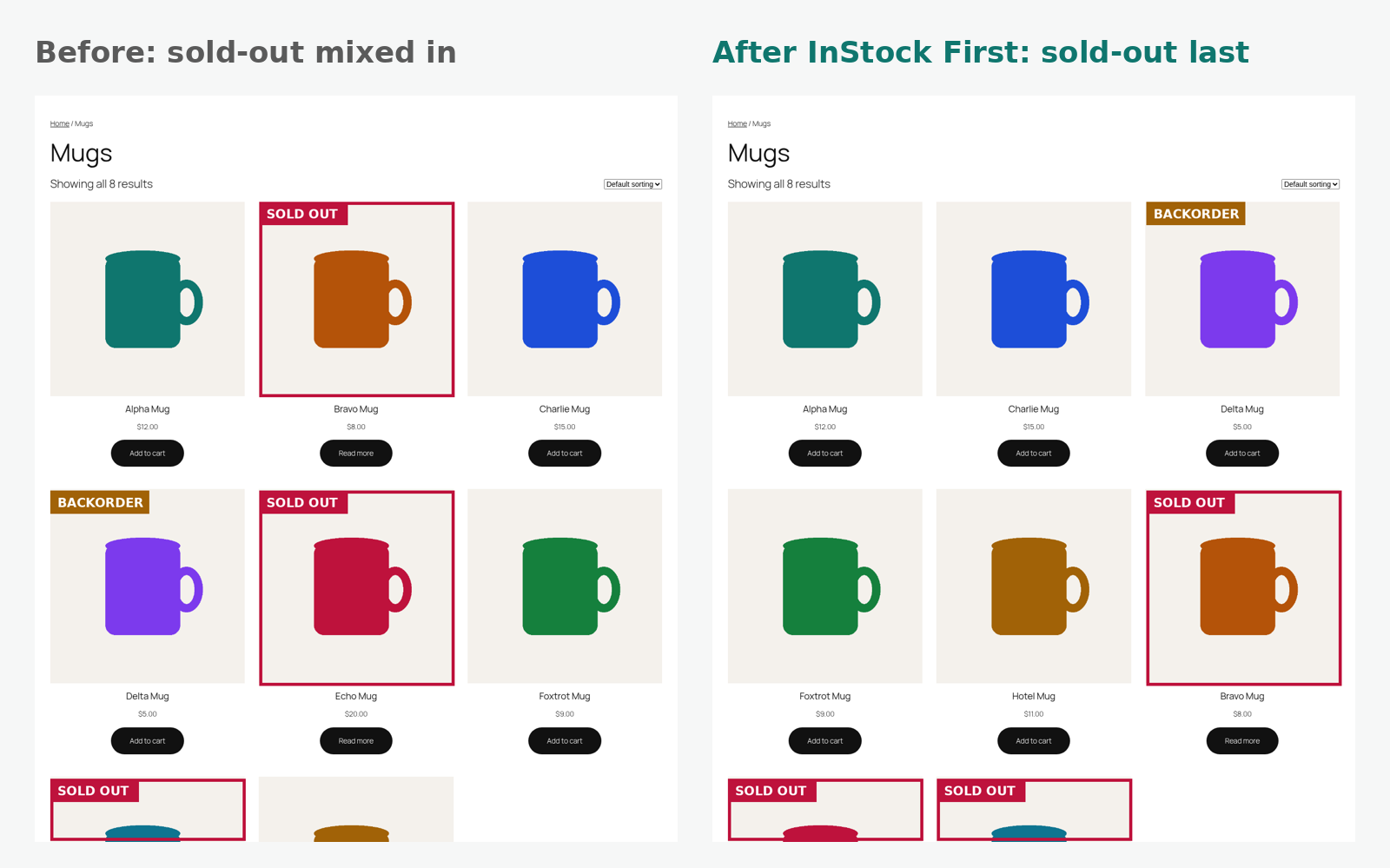
Shoppers who land on a category full of “Out of stock” badges leave. InStock First keeps what you can actually sell at the top: in-stock products are shown first and sold-out products move to the end of the list, without hiding them (so you keep their SEO and customers can still sign up for restock alerts).
It works the moment you activate it. There is nothing to configure and nothing to re-run: the order is applied when the page loads, so a product that comes back in stock moves straight back up, and a product that sells out drops to the end on its own.
What it does (free, no limits)
- Out of stock products last on the main shop page
- Category, tag and attribute archives (every product taxonomy)
- Product search results
- [products] shortcode lists
- Keeps your normal sorting inside each group: default/custom order, popularity, rating, newest, price low to high and high to low all still work
- Backorders your way: treat them as in stock, put them between in-stock and sold-out, or treat them as sold out
- Variable products are handled through WooCommerce’s own stock status (a variable product is “out of stock” only when all its variations are)
- No catalog changes: it never edits products, menu order or dates, so deactivating it puts everything back exactly as it was
- Fast: one indexed join on WooCommerce’s product lookup table, no extra queries per product, no cron jobs, no background processing
- Works with any theme that uses standard WooCommerce product loops
- HPOS compatible, translation ready, no ads, no tracking
Privacy
InStock First does not collect, store or send personal data, and it makes no external requests.
Screenshots


Installation
- Install and activate WooCommerce.
- Go to Plugins Add New, search for “InStock First”, install and activate.
- That’s it. Sold-out products now appear last. Optional settings: WooCommerce Settings Products Sold-out order.
FAQ
-
Does this hide out of stock products?
-
No. They stay visible, just at the end. If you want to hide them completely, WooCommerce has a built-in option (WooCommerce Settings Products Inventory “Hide out of stock items from the catalog”).
-
Will it change my product order or data?
-
No. Nothing is written to your products. The order is calculated when the listing is shown, so deactivating the plugin restores your previous order instantly.
-
Does it work with sorting by price, popularity or newest?
-
Yes. Within the in-stock group and within the sold-out group your chosen sorting still applies.
-
What about products on backorder?
-
You choose: treated as in stock (default), shown between in-stock and sold-out products, or treated as sold out.
-
Does it work with caching plugins?
-
Yes. Cached pages update when your cache refreshes, the same as any stock change.
-
Does it work with the block editor “Product Collection” block or page builders?
-
Version 1.0 covers the classic shop, category, tag, attribute and search pages (including block themes’ product archive templates that use the main query) and the [products] shortcode. Custom loops can opt in with the
instock_first_applies_to_queryfilter. -
Does the plugin collect any data?
-
No. The plugin does not collect, store or send any data, and it makes no external requests.
-
Developer hooks
-
instock_first_applies_to_query(bool $apply, WP_Query $query): turn reordering on or off for any query.instock_first_rank_cases(array $ranks): map stock statuses to sort ranks (lower is earlier).instock_first_rank_sql(string $sql, string $alias, WP_Query $query): replace the rank SQL expression.
Reviews
There are no reviews for this plugin.
Contributors & Developers
“InStock First – Sold Out Products Last for WooCommerce” is open source software. The following people have contributed to this plugin.
Contributors
Translate “InStock First – Sold Out Products Last for WooCommerce” into your language.
Interested in development?
Browse the code, check out the SVN repository, or subscribe to the development log by RSS.
Changelog
1.0.0
- First release.