
Description
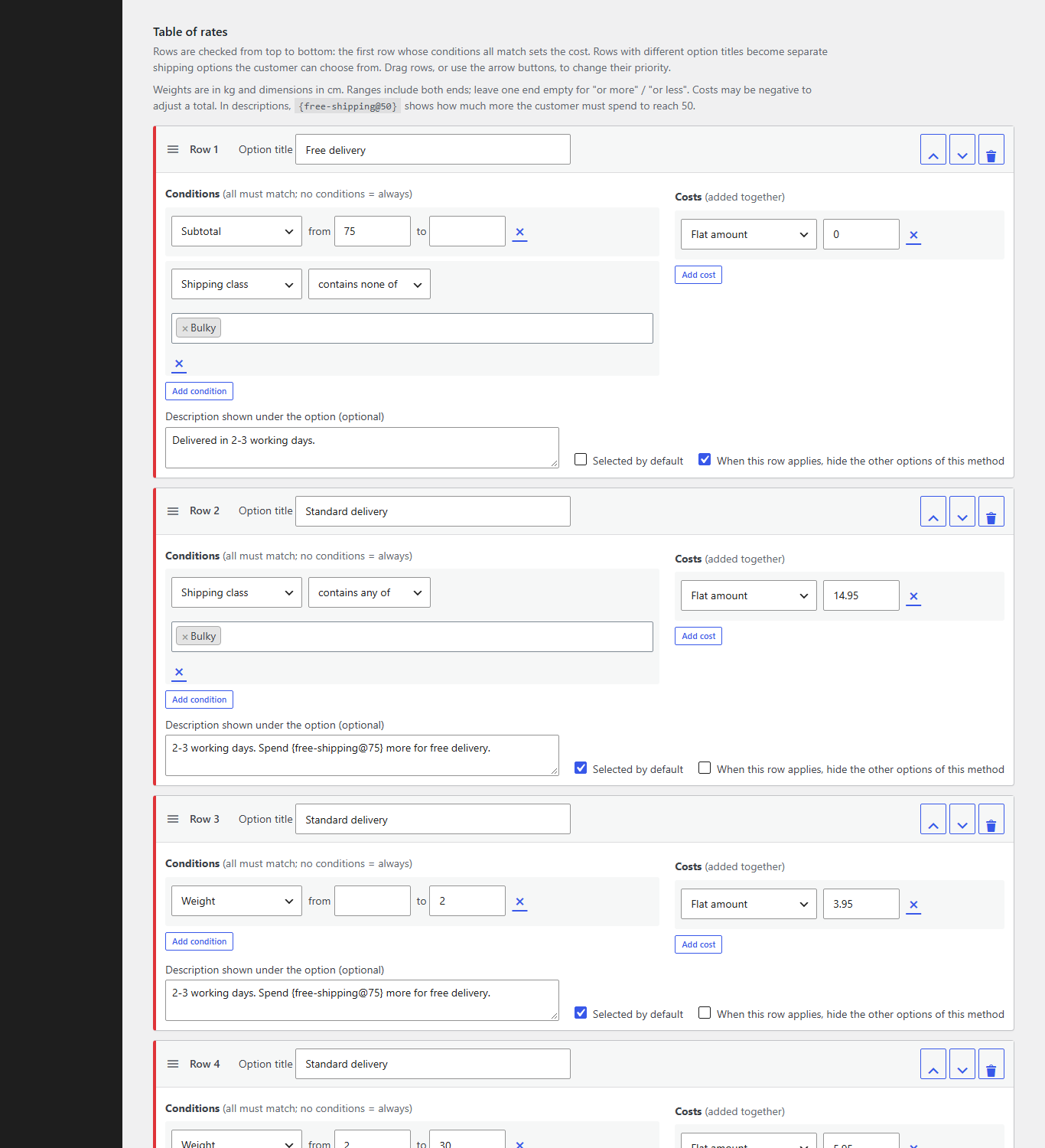
Codiffy Table Rate Shipping for WooCommerce adds a “Codiffy Table Rate” shipping method to your WooCommerce shipping zones. Build a table of rows; each row has one or more conditions and one or more costs. The first row that matches sets the price, so you can model almost any shipping price list: weight bands, order-value bands, free shipping over an amount, surcharges for bulky items, per-item fees, fuel surcharges and more.
Features
- Works with WooCommerce shipping zones: add the method to any zone (by country, state or postcode), as many times as you like.
- Four ways to calculate: per order, per item (every unit), per line item, or per shipping class.
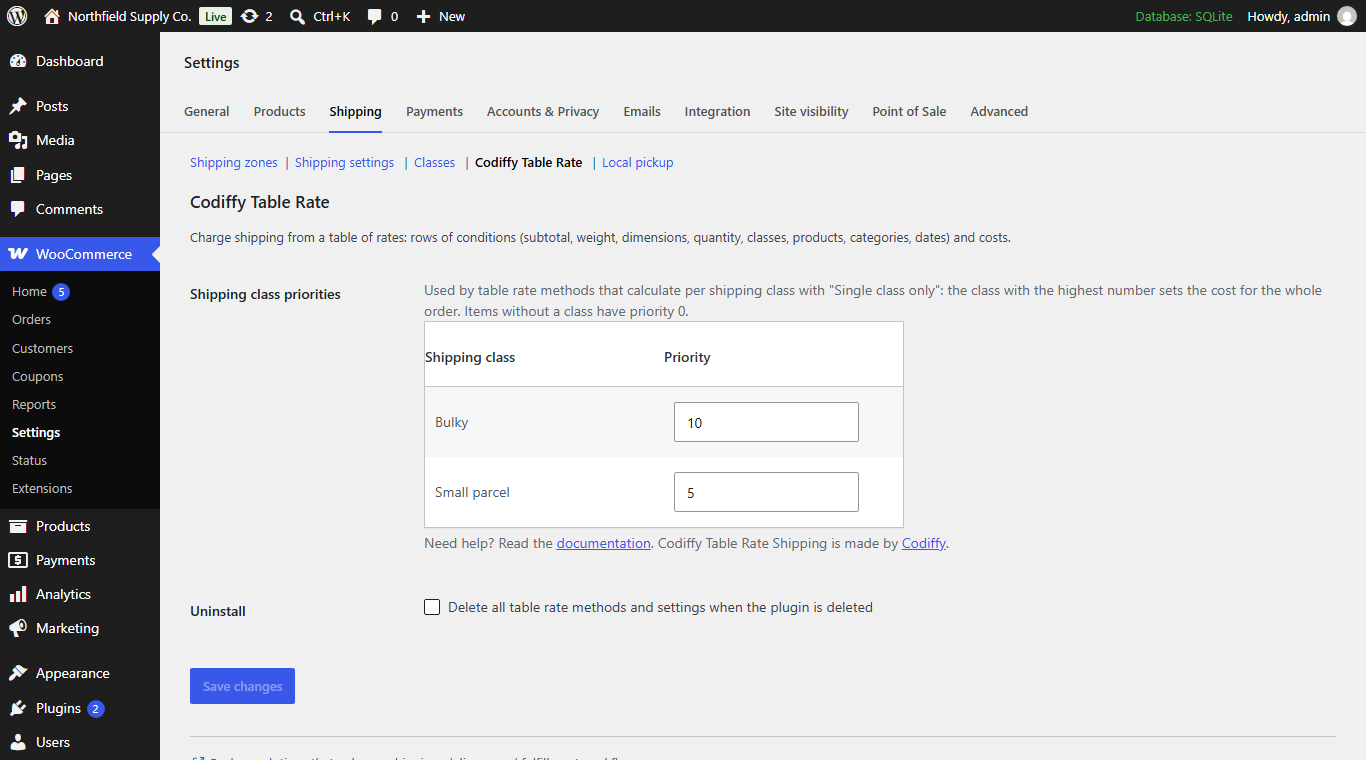
- Per shipping class options: add up every class, use a single class only (highest priority), or charge only the highest or lowest costing class. Set class priorities on one screen.
- 13 conditions, as many per row as you need: subtotal, quantity, weight, length, width, height, surface area, volume, shipping class, product, category, date range and day of week.
- Flexible costs, combined in one row: flat amount, percentage of subtotal, amount multiplied by weight / size / area / volume / quantity / subtotal, and amount “for every” X currency, weight, size or items. For example “€3 + €1 for every kg” or “flat fee + 2% fuel surcharge”.
- Several shipping options from one table: give rows an option title (for example “Standard” and “Express”) and customers choose between them.
- Drag and drop priority: reorder rows by dragging, or with keyboard-accessible arrow buttons.
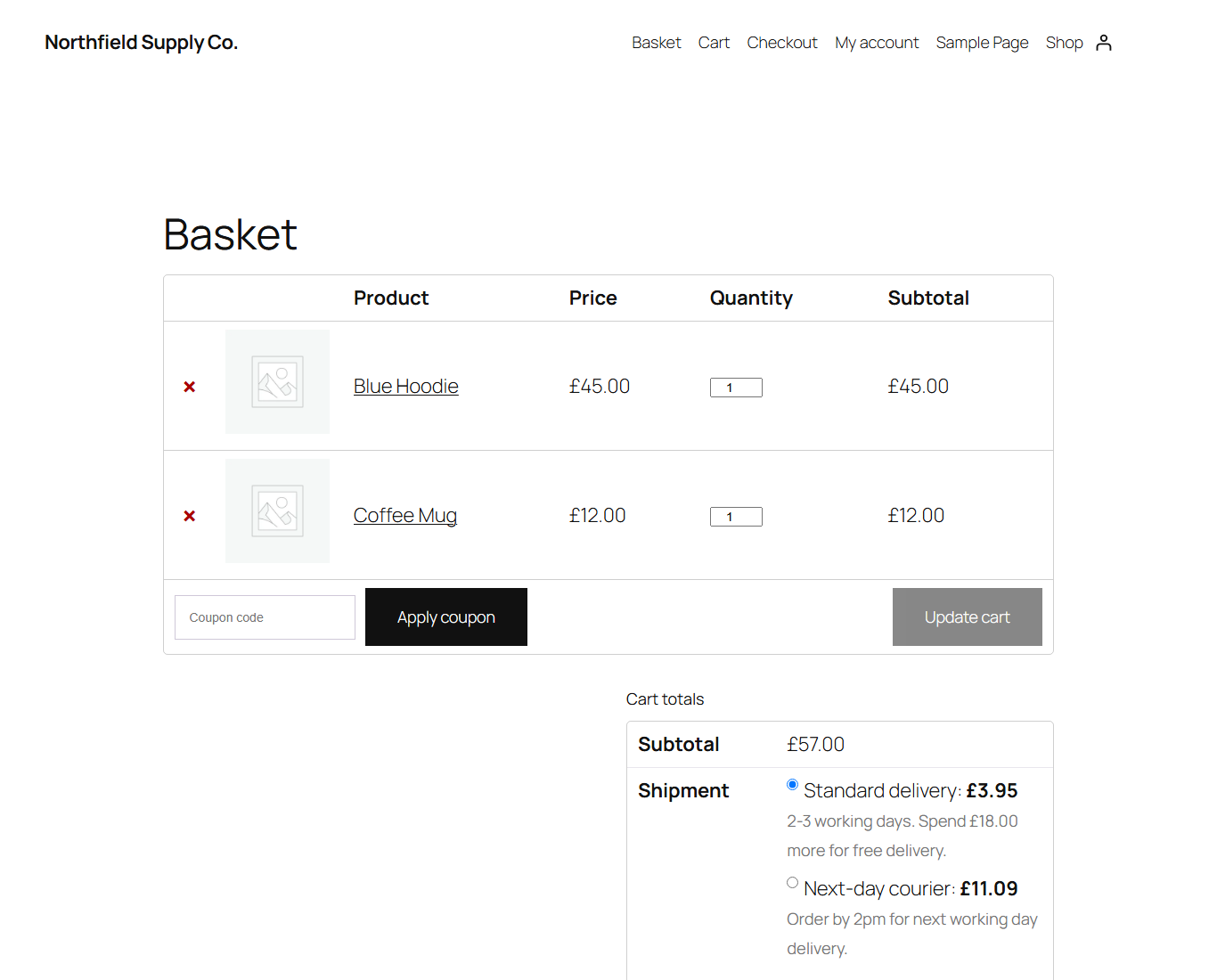
- Descriptions under each option: for example delivery times, with a free-shipping counter:
Spend {free-shipping@50} more for free shipping! - Default option: choose which option is selected first.
- Exclusive options: when a row applies, hide the method’s other options (for example only offer “Free shipping” once it qualifies).
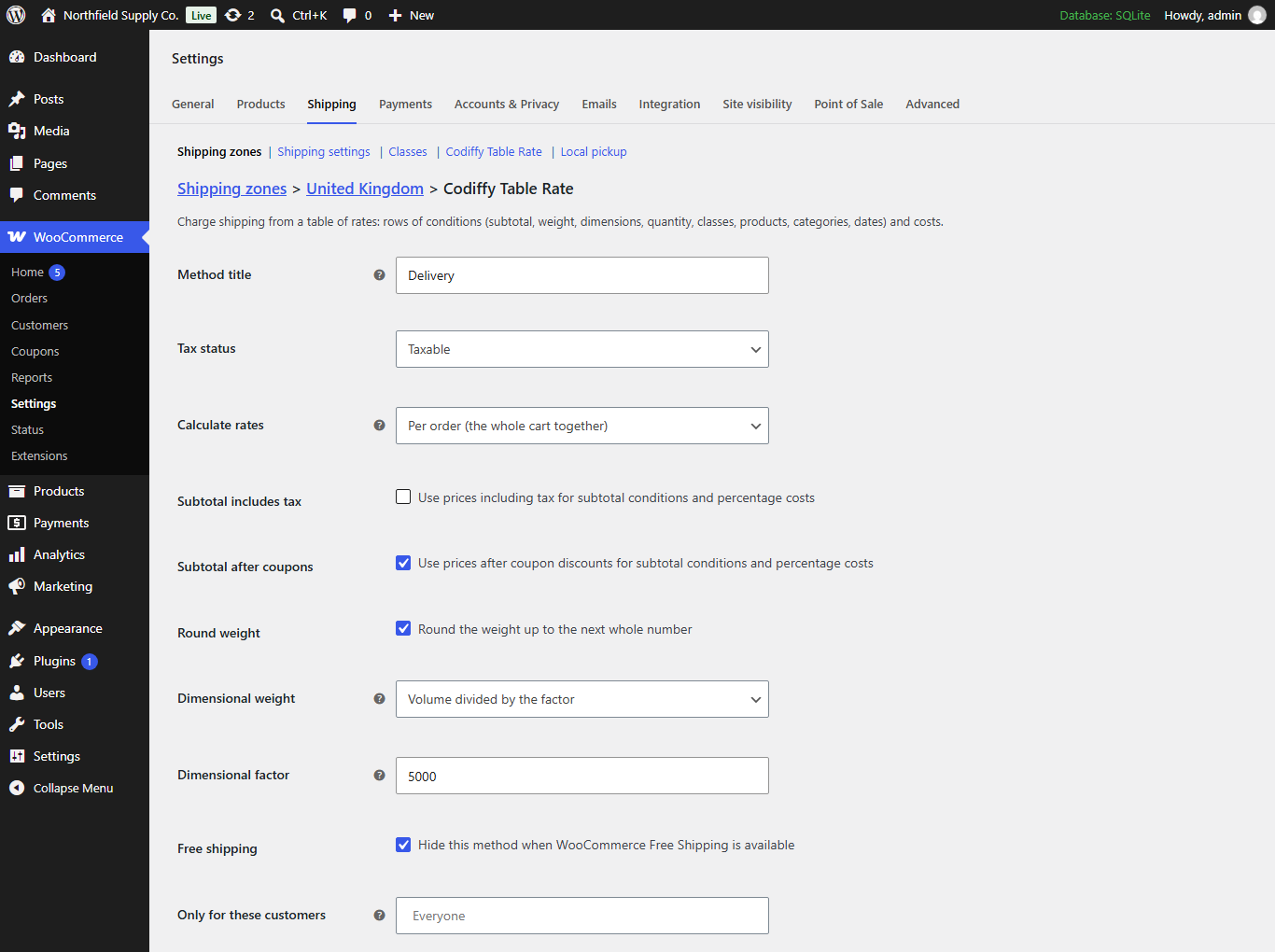
- Hide when WooCommerce Free Shipping is available.
- Limit by customer role, including guests.
- Tax: taxable or not, per method.
- Subtotal options: include tax and/or apply coupons before the subtotal conditions and percentages are worked out.
- Weight options: round weight up to the next whole number, and dimensional (volumetric) weight: volume divided or multiplied by a factor.
- Works with the classic and block cart and checkout, and with HPOS order storage.
- No external services, no tracking, nothing loaded on your storefront.
How it works
- Go to WooCommerce > Settings > Shipping, open a shipping zone and click Add shipping method.
- Choose Codiffy Table Rate, then click Edit next to it.
- Choose how rates are calculated, then add rows to the Table of rates: conditions on the left, costs on the right.
- Save. Customers in that zone now see the option and price of the first matching row.
Example: weight bands
- Row 1: Weight from 0 to 5 Flat 4.95
- Row 2: Weight from 5 to 20 Flat 9.95
- Row 3: Weight from 20 Flat 9.95 + 0.50 for every 1 kg
If no row matches (for example an order that is too heavy), the option is not offered.
About Codiffy
Codiffy Table Rate Shipping is built and maintained by Codiffy, a WordPress and WooCommerce development studio. Need a custom feature for your store? Get in touch.
Screenshots

Installation
- Make sure WooCommerce is installed and active.
- In WordPress go to Plugins > Add New, search for “Codiffy Table Rate Shipping” and click Install Now, then Activate. (Or upload the plugin ZIP through Plugins > Add New > Upload Plugin.)
- Go to WooCommerce > Settings > Shipping, open a zone, add Codiffy Table Rate and click Edit to build your table.
Activating the plugin changes nothing on its own: shipping only changes once you add the method to a zone.
FAQ
-
In which order are rows checked?
-
From top to bottom. For each shipping option, the first row whose conditions all match sets the cost. Put your most specific rows at the top.
-
What happens when no row matches?
-
That option is not offered. If no option of the method matches, the method shows nothing, which is how you stop orders that are too heavy or too large.
-
How do I offer Standard and Express from one table?
-
Give some rows the option title “Standard” and others “Express”. Each title becomes its own shipping option.
-
How does “per item” or “per shipping class” work?
-
The cart is split into groups (every unit, every cart line, or every shipping class). Each group is matched against the table on its own and the costs are added up. With “per shipping class” you can instead charge only one class: the highest priority class, or the highest or lowest costing class.
-
How do I make “€18 up to 15 kg, then €1 for each extra kg”?
-
Row 1: Weight to 15 Flat 18. Row 2: Weight from 15 Flat 3 + 1 for every 1 kg. The “for every” cost counts the whole weight, so the flat part is adjusted (here 18 − 15 = 3). Costs may also be negative.
-
What do length, width and height mean for a group of products?
-
They are the largest single item in the group (useful for oversize surcharges). Surface area (length × width) and volume (length × width × height) are totals for the group.
-
Which timezone do date and day of week conditions use?
-
Your site timezone from Settings > General.
-
Does it work with the block cart and checkout?
-
Yes. Options, prices and descriptions appear in both the block-based and the classic cart and checkout.
-
Does the plugin send any data to other websites?
-
No. It does not contact any external service and does not track anyone.
-
What is removed when I delete the plugin?
-
By default nothing, so you can reinstall without losing your tables. Tick Delete all table rate methods and settings when the plugin is deleted under WooCommerce > Settings > Shipping > Codiffy Table Rate to remove them.
Reviews
There are no reviews for this plugin.
Contributors & Developers
“Codiffy Table Rate Shipping for WooCommerce” is open source software. The following people have contributed to this plugin.
Contributors

Translate “Codiffy Table Rate Shipping for WooCommerce” into your language.
Interested in development?
Browse the code, check out the SVN repository, or subscribe to the development log by RSS.
Changelog
1.0.0
- First public release.