
Description
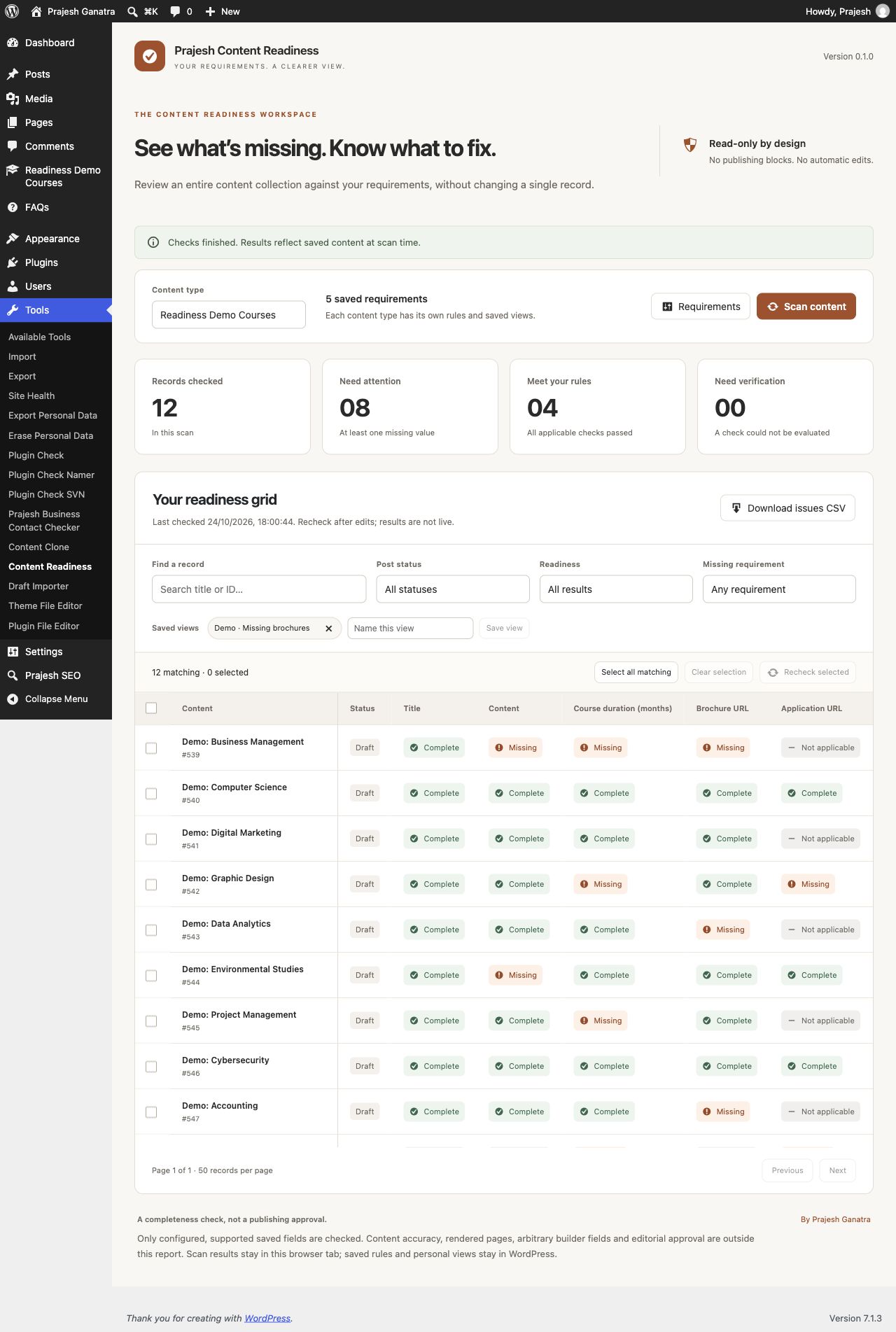
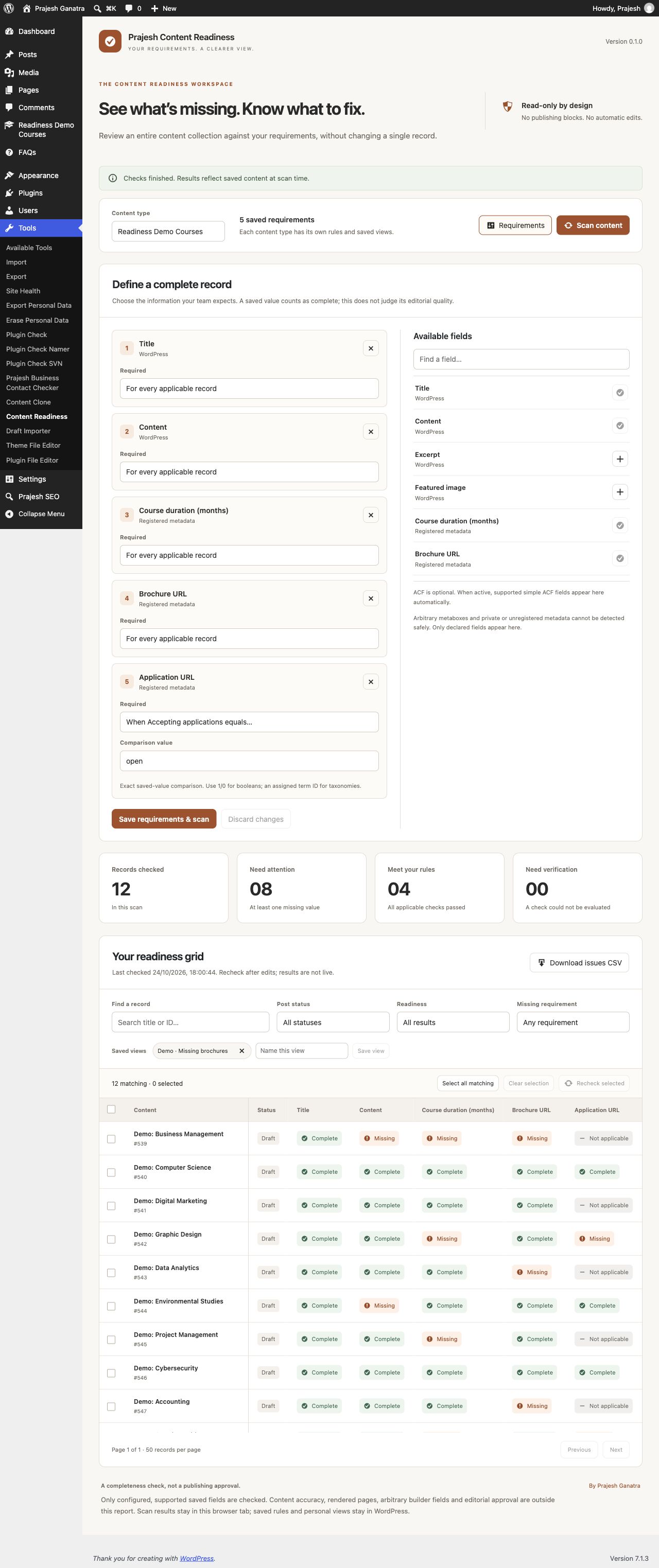
Choose a content type, add requirements, then review the missing information in a compact grid. Filter by title, status, readiness or a missing requirement. Recheck selected records and download an issue report as CSV.
- Rules per content type, including optional exact-value conditions.
- WordPress title, content, excerpt, featured image and taxonomy assignments.
- Public, single-value registered scalar post metadata exposed to the REST API.
- Optional ACF integration for supported top-level simple fields, images and files.
- Complete, Missing, Not applicable and Unsupported results with explanations.
- Personal saved filter views and 50-row display pagination.
- Read-only scanning; content changes remain in the WordPress editor.
Scans run in batches of 100 without a total-record quota. CSV reports require a completed scan with saved requirements. Results are held in the current browser tab, not stored as content snapshots. Changing content while a scan is running can affect its results; run a fresh scan when editorial activity has settled.
Built with WordPress-provided wp/element. No external fonts, tracking, account, subscription or remote scan service.
Source Code and Development
The complete human-readable PHP, JavaScript and CSS source is included. There is no compilation or build step. WordPress supplies wp.element, wp.apiFetch, wp.i18n and Dashicons; no third-party JavaScript library is bundled.
- prajesh-content-readiness.php: plugin bootstrap.
- includes/class-pgcrdy-plugin.php: field discovery, permission checks, REST endpoints and audit engine.
- assets/admin.js: administration UI written with wp.element.createElement; no JSX or transpilation.
- assets/admin.css: scoped, editable administration styles.
- uninstall.php: removes plugin rules and personal views on the current site.
Translation strings use the prajesh-content-readiness text domain. A POT reference is included for translators. WordPress.org language packs can supply runtime translations.
Screenshots
Installation
- Upload the plugin directory to wp-content/plugins, or install its ZIP using Plugins > Add New.
- Activate the plugin.
- Open Tools > Content Readiness. Administrators configure rules; editors and authors can audit records they can edit.
- Choose a content type, add requirements and select Save requirements & scan.
FAQ
-
Does this prevent publishing or change content?
-
No. It checks saved values only. An editor makes any changes using normal WordPress editing screens.
-
Does Complete mean the content is approved?
-
No. Complete means a saved value satisfies the configured presence check. It does not assess accuracy, quality, accessibility compliance or editorial approval.
-
Which ACF fields are supported?
-
Top-level text, textarea, email, URL, number, range, select, checkbox, radio, button group, true/false, image and file fields. Repeaters, groups, clones, flexible content and other complex fields are unsupported. ACF group location is checked for each record. Basic equality, inequality, empty, nonempty and numeric comparison conditional operators are supported. Unknown operators produce Unsupported, not a silent pass. ACF is optional and is not bundled.
-
Can it discover every metabox?
-
No. Only declared supported fields are available. Unregistered metadata, private keys, arbitrary builder fields and rendered-page output are outside this audit.
-
What is stored?
-
Rules are stored in a WordPress option. Personal filter views are stored in user metadata. Scan results stay in the current browser tab and disappear on refresh. Downloaded reports contain titles and editor URLs: share them only with the intended team. Deactivation retains settings; uninstall deletes this plugin’s rules and views on the current site, never posts or field content.
-
Are zero values treated as missing?
-
No. A saved numeric zero or false boolean counts as present. A condition can require a specific saved value. Empty selections and invalid attachment references count as missing.
-
Does the attachment check verify the file on disk?
-
No. It verifies that the reference resolves to a non-trashed WordPress attachment, and that image requirements reference an image attachment. File availability, remote URL health and MIME safety are outside this check.
Reviews
There are no reviews for this plugin.
Contributors & Developers
“Prajesh Content Readiness” is open source software. The following people have contributed to this plugin.
Contributors
Translate “Prajesh Content Readiness” into your language.
Interested in development?
Browse the code, check out the SVN repository, or subscribe to the development log by RSS.
Changelog
0.1.0
- Initial release. Read-only content audits, configurable conditions, supported ACF fields, personal views and CSV reports.