

Description
EzerWeb Forms and Comments Anti-Spam Guard protects your WordPress site from automated bots, disposable email burners, and spam submissions.
It provides a dual-layer defense mechanism:
- Client-side JavaScript validation – Instantly blocks restricted email addresses or TLDs before the form is submitted.
- Server-side PHP inspection – Catches any submission that bypasses JavaScript (or when JS is disabled) and blocks it with a clear error message.
The plugin works automatically on all forms and comment sections on your site. No shortcodes or template changes are required.
Key Features
- Dual-layer (client + server) protection
- Two operating modes:
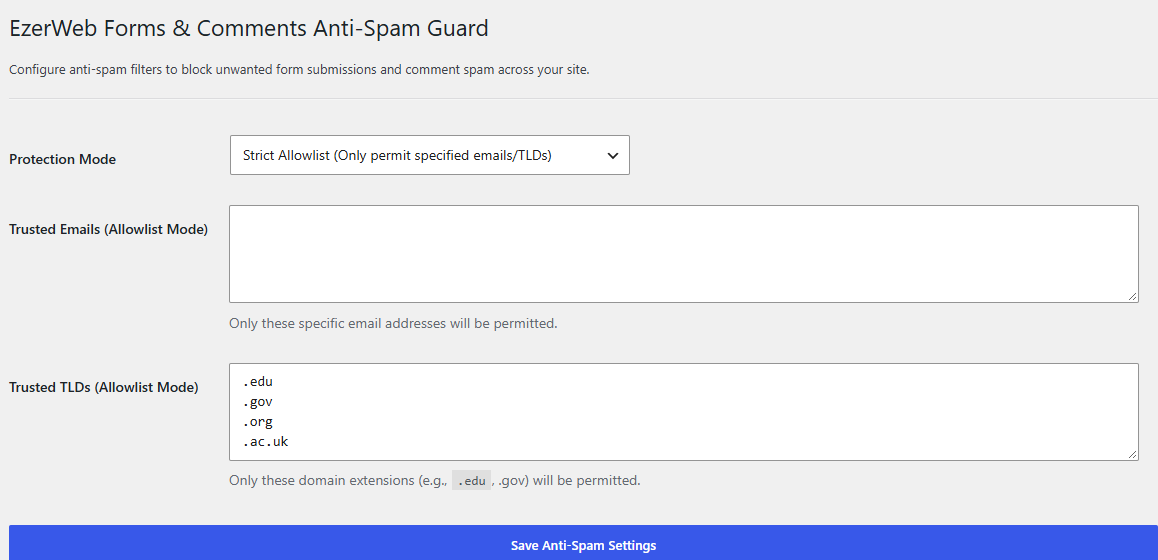
- Strict Allowlist – Only emails/TLDs you explicitly permit are accepted
- Blocklist Only – Everything is allowed except the addresses and TLDs you ban
- Configurable lists for:
- Specific email addresses
- Top-level domains (TLDs) such as
.xyz,.top,.click, etc.
- Works with native WordPress comments, Contact Form 7, Gravity Forms, Elementor forms, and most other form plugins that use standard email fields
- Lightweight – no external API calls or database bloat
- Clean admin settings page under Settings EzerWeb Anti-Spam
Screenshots
Installation
- Upload the entire
ezerweb-forms-and-comments-anti-spam-guardfolder to the/wp-content/plugins/directory,
or install the plugin through the WordPress Plugins screen. - Activate the plugin through the Plugins menu in WordPress.
- Go to Settings EzerWeb Anti-Spam to configure the protection mode and your allow/block lists.
- Save the settings. Protection is active immediately on all forms and comments.
FAQ
-
Do I need to add any shortcodes or code to my theme?
-
No. Once activated and configured, the plugin automatically protects every form and the native comment form on your site.
-
What happens when a spam email is submitted?
-
- If JavaScript is enabled the user sees an alert and the form does not submit.
- If JavaScript is disabled (or the request is made via AJAX that bypasses the client script) the server returns a 403 response with a clear “Submission Blocked by Anti-Spam” message.
-
Can I use both allowlist and blocklist at the same time?
-
The plugin always applies the blocklist first. In Allowlist mode only the addresses/TLDs you have allowed will pass (and they must also not be on the blocklist). In Blocklist mode everything is allowed except the items you have blocked.
-
Does it work with popular form plugins?
-
Yes. It inspects all POST data for email-looking values, so it works with Contact Form 7, Gravity Forms, WPForms, Elementor forms, and most other plugins that submit standard HTML forms.
Reviews
There are no reviews for this plugin.
Contributors & Developers
“EzerWeb Forms and Comments Anti-Spam Guard” is open source software. The following people have contributed to this plugin.
Contributors
Translate “EzerWeb Forms and Comments Anti-Spam Guard” into your language.
Interested in development?
Browse the code, check out the SVN repository, or subscribe to the development log by RSS.
Changelog
2.0.1
- Fixed installation instructions in readme.txt
- Properly enqueued admin JavaScript (removed inline
- Improved sanitization of $_POST data before email extraction
- Added consistent EWFAG_ prefixes to all classes, constants, options and script handles
- Updated Plugin URI and version metadata
- Improved accessibility and internationalization of admin page
2.0.0
- Dual-layer (client + server) anti-spam protection
- Admin settings page with allowlist / blocklist modes
- Support for custom email and TLD lists
1.0.0
- Initial release.