
Description
LAFU Gift Cards turns any simple WooCommerce product into a gift card. Customers choose the amount, see the card in the shop’s design, and send the card by email right away or on the day they pick. Shops sell cards at the till too, and every card has a complete history of where its money went.
Everything below is free, with no account, licence key or upsell screens.
Selling
- Ready amounts and an own amount with your lowest and highest limit.
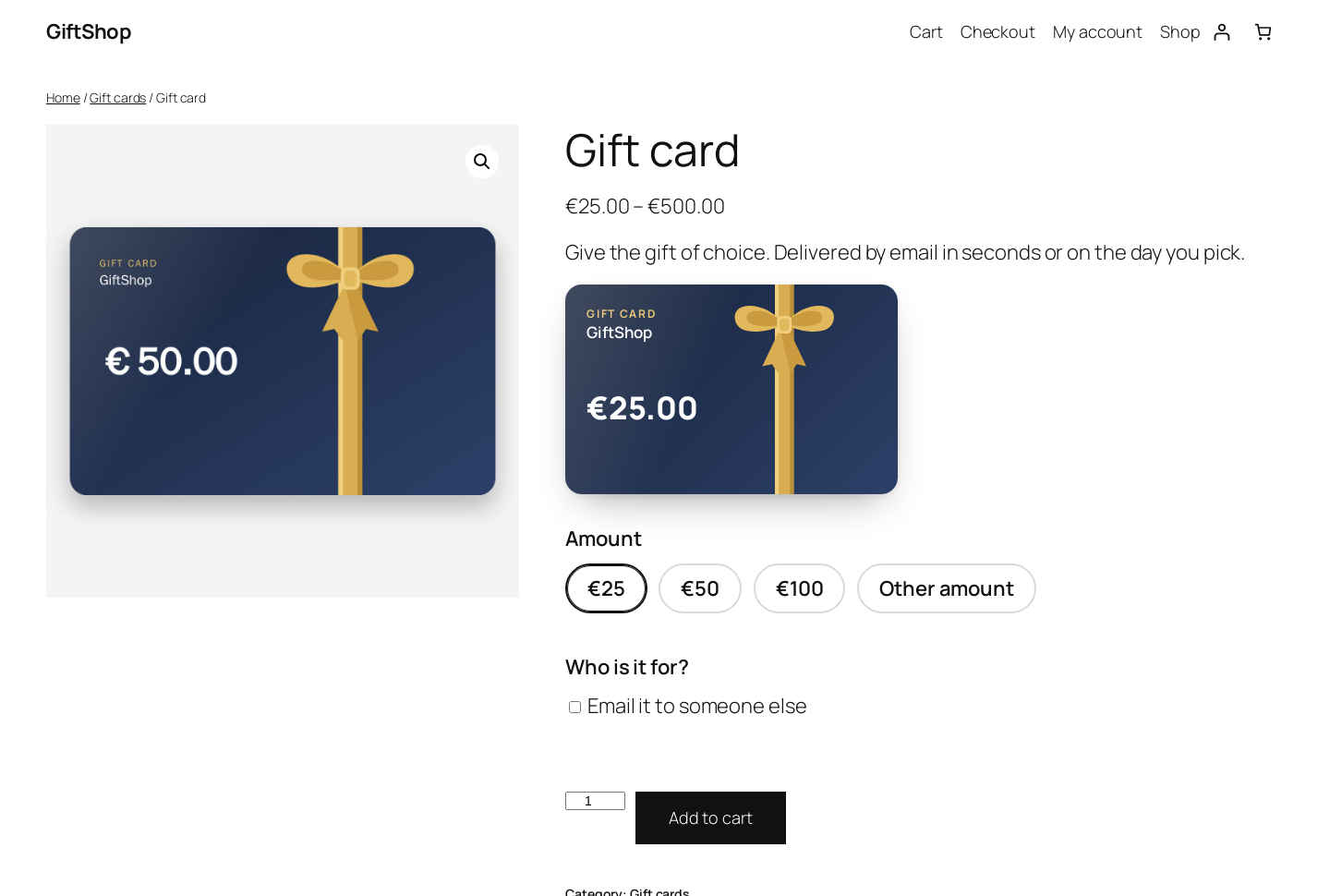
- Three ready designs: Colour in your own brand colour, Gift ribbon and Christmas, drawn so the amount, code and QR code stay readable.
- One design per product, with its colour, picked on the product’s Gift card tab. The card shows your shop name.
- A live preview of the card while the buyer fills in the form, which stays in view while they scroll.
- Change the heading of the card per product, for example to your own language. Card texts come in 19 languages.
- Every card carries a QR code for quick lookup at the till.
- Send to someone else with their name, your name or anonymously, a message and a delivery date.
- Several recipients in one go: each address gets its own card.
- Printed cards that you ship instead of email.
- Gift cards are sold without VAT and cannot be bought with coupons.
In the shop
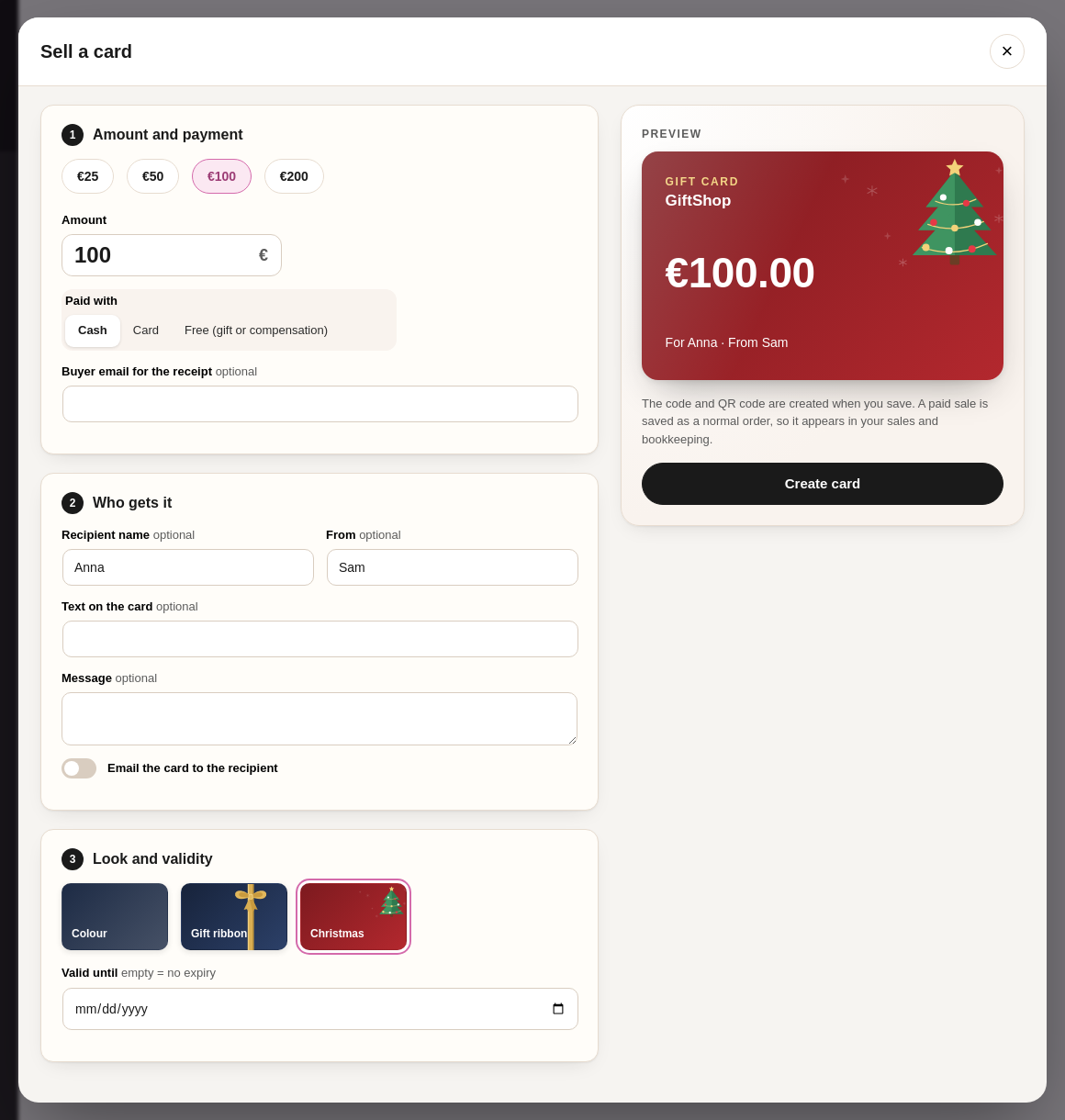
- Sell a card at the till (cash or card) from WooCommerce > Gift cards. It is saved as a normal paid order, so it appears in your sales and bookkeeping.
- Give a card away without payment, for example as compensation.
- Print any card, with its code and design.
Paying with a card
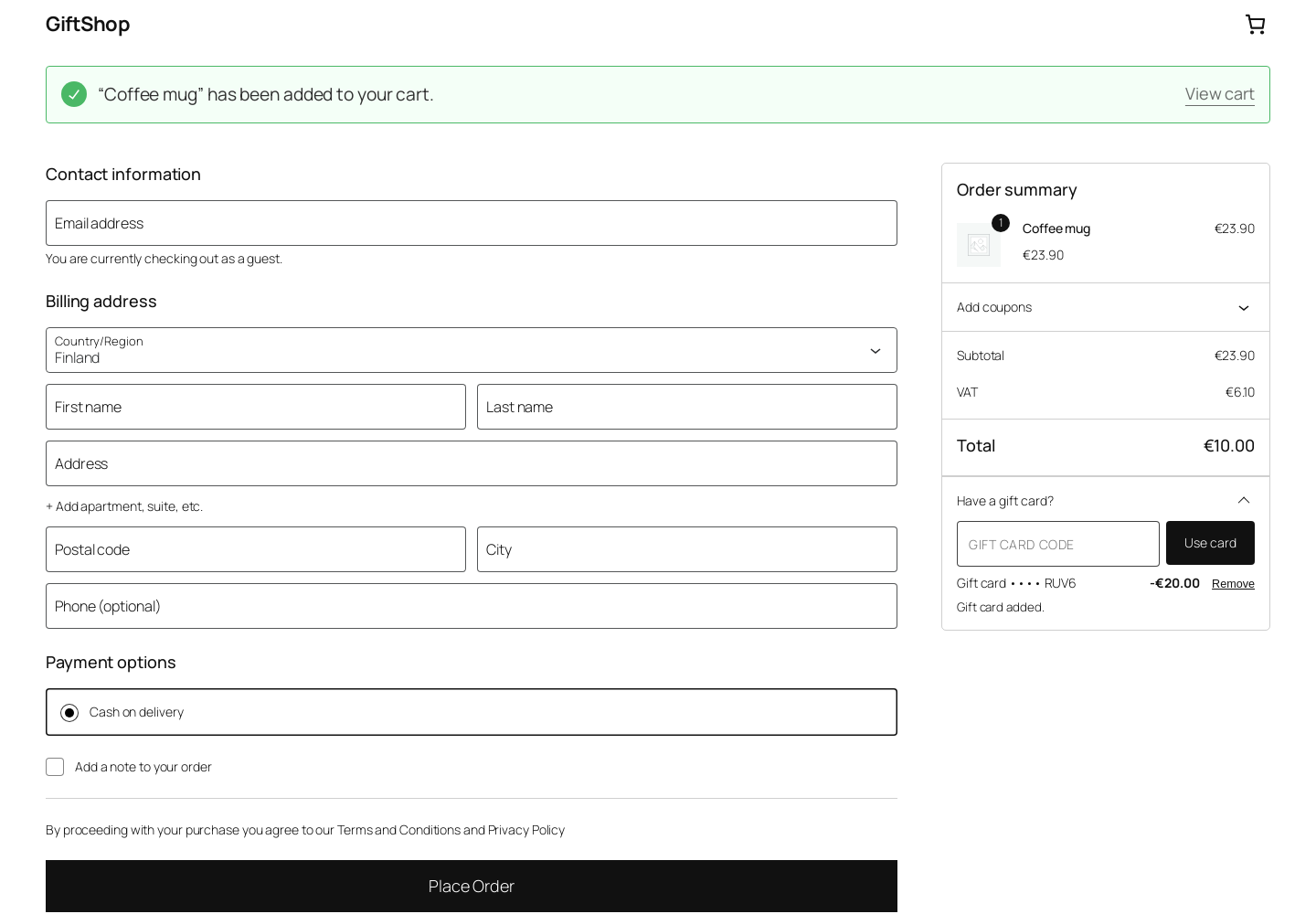
- Customers enter the code in the cart or checkout. Works in the classic pages and in the cart and checkout blocks.
- Partial use: whatever is not spent stays on the card.
- The card pays like a payment method. Product prices and VAT stay as they are, which is how most multi-purpose vouchers are booked.
- Several cards on one order, and cards can cover the whole order.
- Cancelled and refunded orders put the money back on the card automatically.
- Partly refunded order? Return to card on the order screen puts back what the card paid.
Customers
- My Account > Gift cards lists their cards with balances, and they can save a card they received to use it with one click.
- Balance check anywhere with the [lafu_gift_card_balance] shortcode.
Control
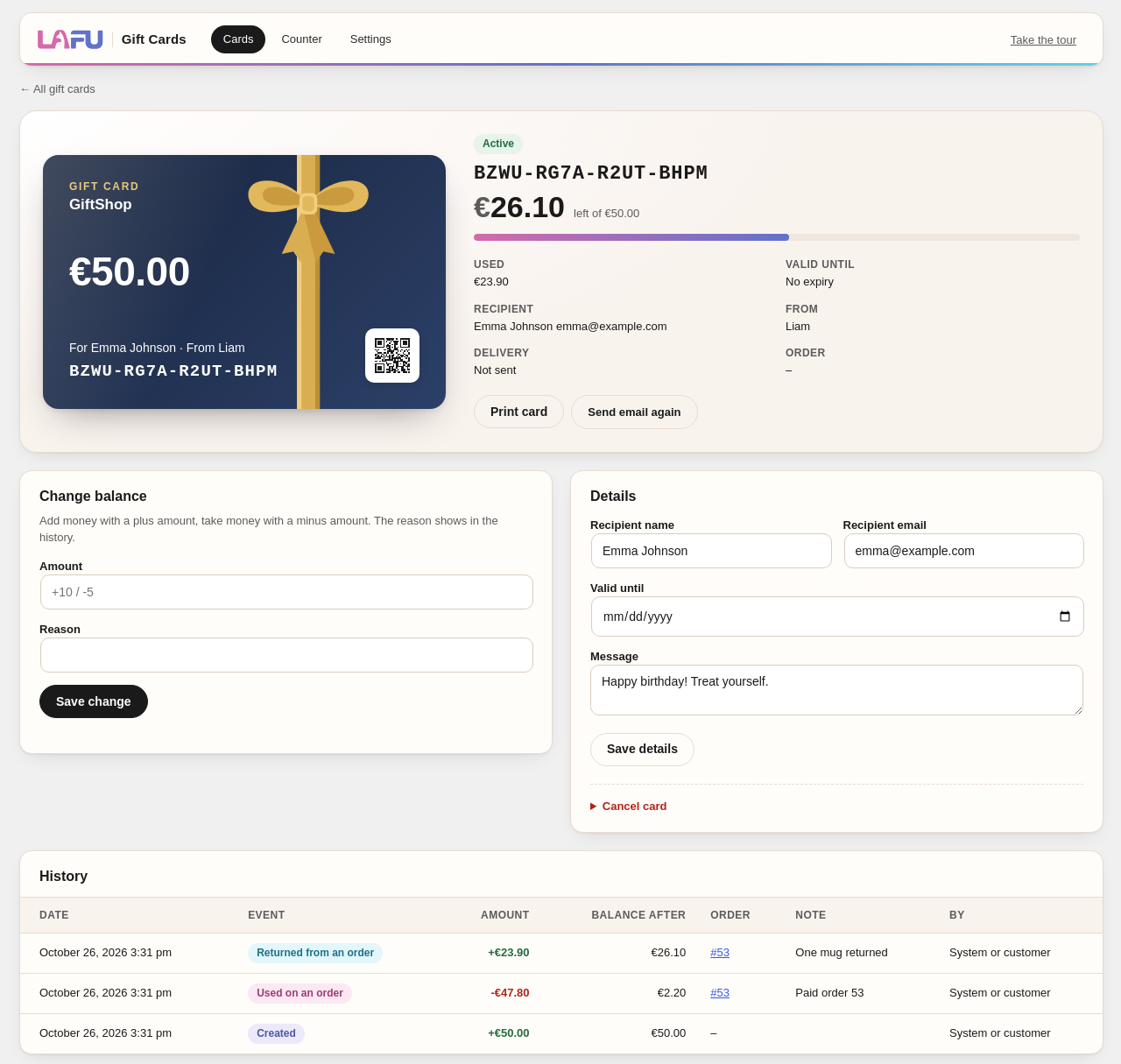
- Every change of balance is one row in the card history, written under a database lock, so a card can never be spent twice.
- Change a balance with a reason, edit the recipient or expiry date, resend the email, or cancel a card.
- Import existing cards (for example paper cards) from CSV with their own codes and balances. Export all cards to CSV.
- Optional expiry after a number of months, with a daily job that closes expired cards.
- Code lookups are rate limited, and codes have about 79 bits of randomness.
- Works with WooCommerce High-Performance Order Storage, the cart and checkout blocks and the Add to cart with options block.
- Personal data export and erase through the WordPress privacy tools. Codes and balances are kept, because they are money.
- Accessible: WCAG 2.1 AA checked.
For developers
- Hooks: lafu_gift_cards_issued, lafu_gift_cards_balance_changed, lafu_gift_cards_designs, lafu_gift_cards_default_expiry.
- Orders paid with gift cards carry the meta _lafu_gc_redemptions (card, masked code, amount), so accounting tools can book them as a payment.
- Email templates can be overridden in your theme like any WooCommerce email.
LAFU Gift Cards Pro
Everything above is free and stays free. For shops that want more, the separate LAFU Gift Cards Pro add-on adds:
- Designer: your own words and colours on every design, the style of the gift card page, and designs made from your own photo or printed card, with the amount placed anywhere
- Ten illustrated occasion designs and buyer photo cards
- Till for the counter with QR scanning
- Printed card batches and bulk orders for companies
- Store credit from refunds, top-ups and bonus cards
- Group gifts: several people chip in for one card
- Text message and WhatsApp delivery
- Limits by category or product
- Expiry reminders and reports
- REST API and webhooks
Credits
The gift card page bundles the Fraunces and Manrope fonts (SIL Open Font License 1.1, licence files in assets/fonts). No fonts are loaded from other servers.
Screenshots

Installation
- Install and activate WooCommerce and LAFU Gift Cards.
- Click Create gift card product in the notice, or tick Gift card on any simple product.
- Set the amounts and the design on the Gift card tab and publish the product.
- Optional: set a code prefix and validity under WooCommerce > Settings > Products > Gift cards.
FAQ
-
Is VAT charged on gift cards?
-
The card is sold without VAT and VAT is charged on the products when the card is used, which is the usual rule for multi-purpose vouchers in the EU. Check with your accountant how your cards should be booked.
-
What happens when an order paid with a gift card is cancelled?
-
The amount taken from the card goes back to it, and the card history shows both rows.
-
What happens when a gift card purchase is refunded?
-
The card is cancelled. If part of it was already spent, the order gets a note so you can decide what to do.
-
Can I import paper gift cards?
-
Yes. WooCommerce > Gift cards > Import takes a CSV file with the code and balance of each card. Customers keep using their old codes.
Reviews
There are no reviews for this plugin.
Contributors & Developers
“LAFU Gift Cards” is open source software. The following people have contributed to this plugin.
Contributors
Translate “LAFU Gift Cards” into your language.
Interested in development?
Browse the code, check out the SVN repository, or subscribe to the development log by RSS.
Changelog
1.12.2
- Plugin header: author is LAFU, like our other plugins on WordPress.org.
1.12.1
- Product page: the gift option now says Email it to someone else, so buyers know the card goes by email.
1.12.0
- The cart and order show Delivery: Printed card for printed cards, and no longer show the colour as a code.
- Hooks for add-ons: lafu_gift_cards_buyer_form_delivery (start of the Who is it for part) and lafu_gift_cards_physical_line (printed or emailed per order line).
1.11.0
- The Designer page moves to LAFU Gift Cards Pro. The free plugin keeps the three ready designs, picked with their colour on each gift card product. Texts and colours you saved in the Designer keep showing on your cards.
- The first-run tour starts with your first gift card product.
1.10.2
- A “Pro features” link on the Plugins screen and a small card at the bottom of the Gift cards page that says what the Pro add-on adds. The card can be hidden, and neither shows once Pro is active.
1.10.1
- Photo cards stay visible with image lazy-load plugins (EWWW, Jetpack, WP Rocket, LiteSpeed, Smush, a3 Lazy Load): the card opts out of lazy loading.
1.10.0
- Card designs can place the amount anywhere and choose its size, font and colour (used by Pro photo designs).
- Card designs with the amount at the top or bottom place it right under the heading or right above the names and code, so it never covers them.
1.9.0
- New: a short tour of the Gift cards pages on the first visit (Designer, Counter, Cards, Settings). Skip it any time; Take the tour plays it again.
- Card designs can hide the heading and shop name and put the amount in another spot (used by Pro photo designs), on the web card, in emails and in product images.
1.8.1
- My Account: the Gift cards entry gets a gift icon in themes that give every entry an icon (Storefront, OceanWP, Blocksy, WoodMart).
- The gift card form keeps its layout in every theme: no grey boxes or clipped headings, and themes that put the add to cart form in a row no longer squeeze it.
- The card list in My Account stacks on phones in every theme.
1.8.0
- Designer: one colour picker for every design. Our ready designs take your colour too, the art stays, and the card and its tile change as you pick. Your brand colours are one-click picks.
- Designer: the preview stays in view while you scroll the designs and settings.
1.7.0
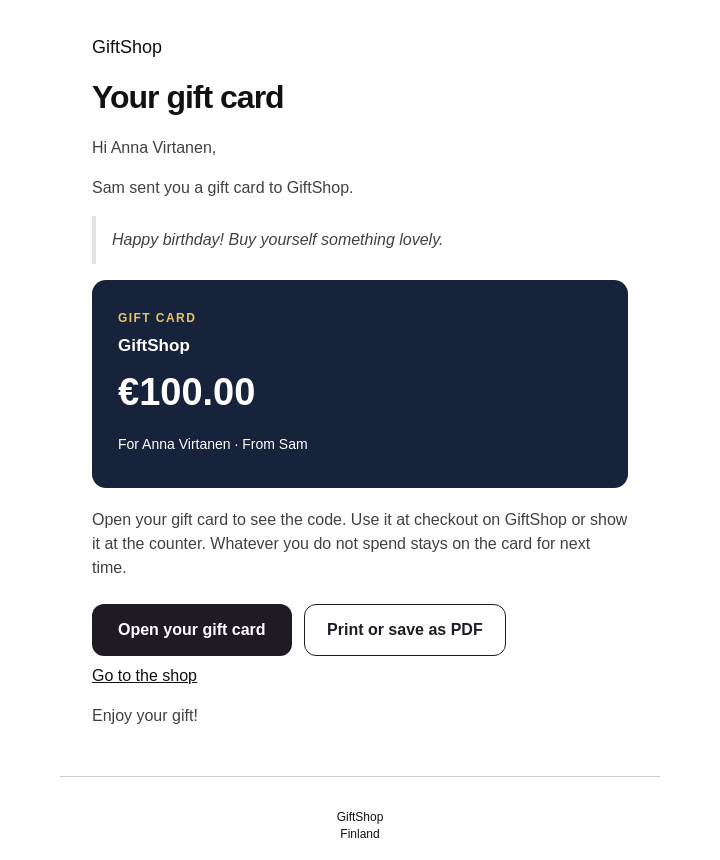
- The gift card email no longer shows the code by default: it shows the card and an Open your gift card button, and the code is on the private gift card page. Turn on Code in the email under WooCommerce > Settings > Gift cards to show it.
- New Print or save as PDF button in the gift card email: it opens the gift card page ready to print.
1.6.0
- New Designer: one page for the card design, the texts on the card, your brand colours and the gift card page. Pick a design on the left, see it large with your texts as you type, and make a new product from it.
- New Letter style for the gift card page: the card comes out of an envelope and the message reads like a letter.
- Point at a gift card page style to see a small live preview of it, click Preview for the full page.
1.5.1
- Fix: the Edit email text links on the Designs page and the Pro reminder settings now open the right email settings.
1.5.0
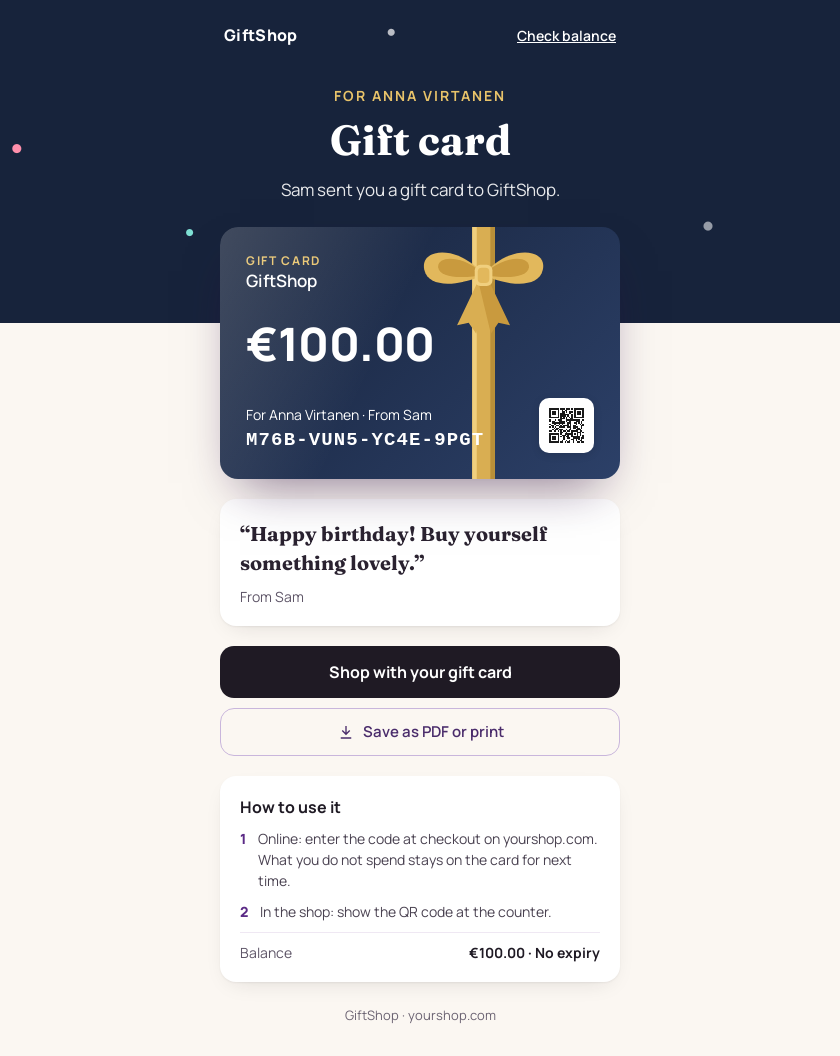
- New gift card page: the link in the gift card email opens a page made for the recipient, with the card, the message, how to use it, a Shop button and a Save as PDF or print button. Choose the Celebration or the Card style on the Designs page and preview both.
- Entrance animation that fits the design: confetti, snow, stars or hearts fly in once when the page opens. It can be switched off, and visitors who turn off motion never see it.
- The gift card email has an Open your gift card button.
- A gift card goes into the cart only through its product form. Express pay buttons, block add to cart buttons and other plugins that add products directly are refused with a clear message, so no order line can exist without a card behind it.
- Apple Pay, Google Pay and PayPal product page buttons (WooCommerce Stripe Gateway, WooPayments, Payment Plugins for Stripe and PayPal) are hidden on gift card pages. They stay available at checkout.
- Tested with WordPress 6.5 to 7.1, WooCommerce 9.4 to 11.2, Elementor with Pro Elements, Polylang, Yoast SEO, Klarna, WoodMart, Storefront, Hello Elementor and Twenty Twenty-Five.
1.4.2
- Use this card as the product image now makes a sharp square image of the whole card (design, art and texts), so shop grids that crop to squares still show all of it. The image stays when you then click Update, and the Product image box shows it right away.
- Card history amounts and other plus amounts in tables line up again (a Counter style had turned them into blocks).
- The live card preview shows amounts exactly like the shop: same currency position, decimals and separators.
- Card text fields on the Designs page use the full width, so the example text fits.
- Wide report tables scroll inside their box on phones.
1.4.1
- Ships in 20 languages, and Finnish and Swedish load for every shop locale variant (fi, fi_FI, sv, sv_SE).
- WPML can translate the card texts and the product heading, name and line. Polylang can translate the shop card texts. Gift card emails use the language the buyer checked out in.
- A gift card charged at checkout is released when the payment fails, the order is cancelled, or a pending payment is left unfinished. Paying that order later charges the card again, and if a card can no longer pay, the order gets a note.
- Refunding the products on an order returns the gift cards’ share of those lines. Refunding part of a sold gift card lowers that card, and refunded cards are not issued later.
- A gift card cannot pay for another gift card.
- The Gift card tab can save the card preview as the product image.
- Designs has a link to the gift card email text.
1.4.0
- A simpler menu: Cards, Counter, Designs and Settings. Import is a button on the card list.
- Each gift card product now shows one design that you choose, like any other product with its own picture. For Christmas or a birthday, make another gift card product with that design: one click from the Designs page.
- New Designs page, one place for the look of your cards: the heading, the name and a line of text on the card (live preview as you type), your brand colours and the recipient and expiry texts, in your own words or language.
- Each gift card product can change the heading, name and text on its own cards, with a live card preview on the product’s Gift card tab.
- New Colour card in your own brand colour.
- Counter: sell a card in a pop-up window, POS style. Staff can pick any design there.
- Christmas is now an illustrated card with a decorated tree, and the new Gift ribbon card has a gold ribbon and bow.
- The design picker at the counter shows small cards instead of colour chips.
- Classic, Warm and Minimal are no longer offered for new products. Cards already sold with them keep their look.
- New hook data for add-ons: designs can carry an illustration or a picture with position, size and shade.
1.3.0
- Printed cards can be made in advance and activated when they are sold (“Not activated” status).
- Checkout shows the name of each card, for example “Gift card ••••7KQ2”.
- New hooks for add-ons: card data, card limits, delivery, card look, admin sections and the account page.
1.2.0
- Return to card: put back what a gift card paid on an order, for example when the order is refunded in part.
- Privacy: gift cards are included in WordPress personal data export and erase, and a suggested privacy policy text is added.
- Accessibility: colours meet WCAG 2.1 AA contrast; the Warm design is a little deeper.
- No inline JavaScript or encoded data in the plugin markup.
1.1.0
- QR code on every card (print page, email and admin), made inside the plugin with no outside service.
- Live card preview on the product page and in the admin sale form.
- New admin look: overview numbers (open balance, active cards, sold and used this month), card page with balance meter and history, step by step sale form, simpler import.
- Christmas design reads better (gold label).
1.0.0
- First release.