
Description
A donation form for Indian nonprofits. Donors pay your own bank account by UPI, so there are no platform fees and no cut. You confirm each donation, then the donor gets a thank-you mail and a certificate of appreciation.
Features
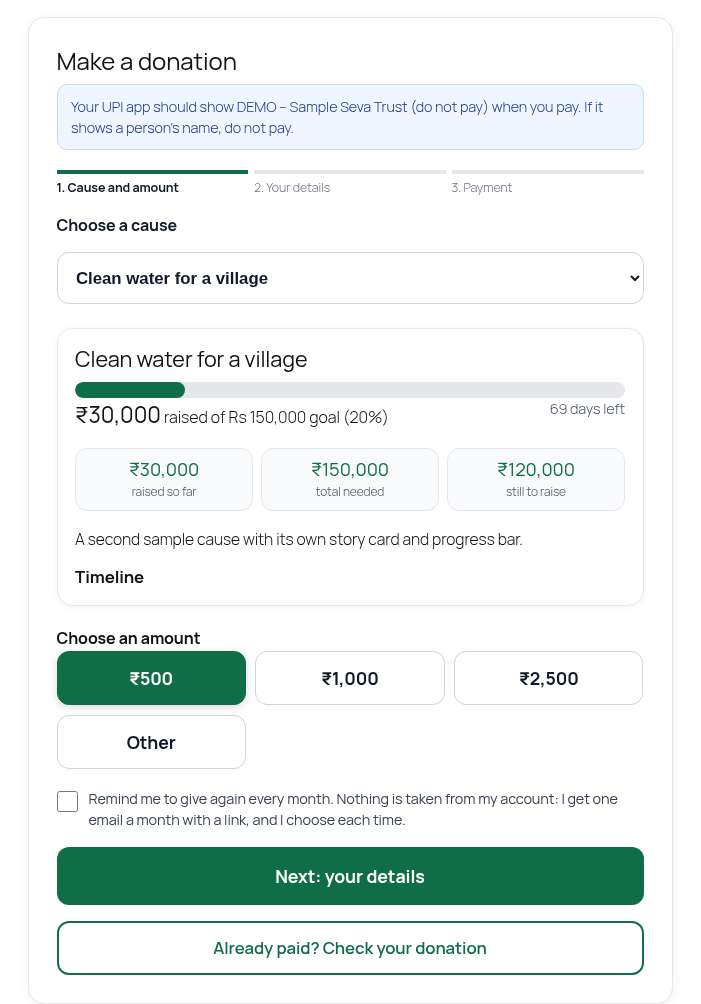
- Donate block with preset amounts and an “other” amount
- UPI direct: the payment details appear only after your UPI ID is verified; intent link, QR and a short donation reference
- Donation status page for each donor, with an optional “Send screenshot as proof” step
- Optional automatic confirmation: a donation is confirmed only when your bank statement or bank alert already shows that payment (same amount, same reference). A donor’s picture alone never confirms. It is off by default. Every automatic step is logged and can be reversed.
- Duplicate-picture and edited-picture flags on donor proofs, for the owner to review
- Verify UPI screen for the owner, bank statement matching, record a payment received outside the site
- Editable mail templates for every mail the plugin sends
- Branded certificate of appreciation and an 80G receipt layout. The plugin does not claim 80G status for you. You enter your own registration details.
- Donor list, filters, CSV export, reports
- Phone-first. No trackers. No ads. No data goes to the plugin author.
How it confirms donations: UPI direct has no payment gateway, so the plugin watches your bank for you. After a one-time setup (forward your bank’s credit alert mails, or upload a statement now and then), it matches each credit to the donation by amount and the DON reference in the payment note, and confirms it. You never need to open your bank account to check donations. Anything the plugin is not sure about waits on a short list, and you confirm it with one tap.
A donor’s screenshot is kept as a private record and to speed up matching. A picture alone never confirms a donation. Pictures that look like one already sent, or that carry an editing-app tag, are flagged for you to check and are never confirmed automatically.
An instant receipt is not the statutory 80G certificate. Check the rules with your chartered accountant.
External services
The plugin contacts outside services only when you turn the matching feature on. Nothing is sent to the plugin author.
- Brevo (optional mail delivery over HTTPS). Only if you choose Brevo under Email setup, with your own API key. Data sent: the mail itself (recipient, subject, body) to https://api.brevo.com/v3/smtp/email. Terms: https://www.brevo.com/legal/termsofuse/ Privacy: https://www.brevo.com/legal/privacypolicy/
- Your own mailbox (IMAP) (optional bank alert reading). Only if you add a mailbox under Alert mailbox. The plugin connects from your server to the mail server you enter and reads bank alert mails. Nothing is forwarded.
- Income Tax Department search page (link only). A “Verify yourself” link to https://incometaxindia.gov.in/Pages/utilities/exempted-institutions.aspx is shown to donors. Nothing is sent unless they click it.
Third-party code
The screenshot reader runs inside the donor’s own browser. The picture is read on the phone and is sent to the organisation only when the donor taps Send.
Bundled in the ocr folder, all Apache-2.0 (compatible with GPLv2 or later through GPLv3). The .wasm.js files are the unmodified official builds. tesseract.min.js and worker.min.js are the official 5.1.1 builds with one change each: the default fallback web addresses (cdn.jsdelivr.net) are removed, because the plugin always passes local file paths and loads nothing from a CDN. Their source is public:
- tesseract.js 5.1.1: https://github.com/naptha/tesseract.js
- tesseract.js-core 5.1.1 (Tesseract OCR engine): https://github.com/naptha/tesseract.js-core
- tessdata_fast English model: https://github.com/tesseract-ocr/tessdata_fast
- QR code generator (qrcode.js), MIT licence
The plugin’s own scripts (icnd-parse.js, icnd-shot.js, donate.js) are not minified and are GPLv2 or later.
Screenshots
Blocks
This plugin provides 1 block.
- Donate form
Installation
- Upload the plugin and activate it.
- Open Donations > Settings and enter your NGO UPI ID. That is all you need to start.
- Add the Donate form block to any page.
- Optional: set up Email setup so donors get mails. Open Mail templates to edit the wording.
FAQ
-
UPI apps such as Google Pay and PhonePe can reject payment links (upi://pay) that point to an ordinary personal UPI ID, whatever the amount. Screenshots of a QR code are limited to Rs 2,000 in most UPI apps. For this reason the donate form on phones shows the UPI ID, the amount and a short reference to type in the donor’s own UPI app, which works for any amount, and keeps the one-tap button as a fallback. A UPI ID registered with your bank as a merchant or business account is the known fix for one-tap links. This is a bank-side decision, not a plugin setting.
-
Is the PAN checked against the tax department?
-
No. The plugin checks only the format of the PAN. Confirming that a PAN is real and belongs to the donor needs a paid KYC service, which is not part of this free plugin (parked).
Reviews
There are no reviews for this plugin.
Contributors & Developers
“Impact Connect Nonprofits Donation” is open source software. The following people have contributed to this plugin.
Contributors
Translate “Impact Connect Nonprofits Donation” into your language.
Interested in development?
Browse the code, check out the SVN repository, or subscribe to the development log by RSS.
Changelog
1.0.6
- New: the admin screens now have an icon menu (Record, Verify, Donations, Donors, Reports, Papers, Settings) that becomes a bottom bar on a phone, one big next-step button on each page, status chips in plain words, tables as cards on a phone, and Settings and Papers in sections that open one at a time. Look only, nothing else changed.
1.0.5
- Fix: the Reports and Donors tables now stack as cards on a phone instead of scrolling sideways.
- Fix: one donor per email. A repeat donation reuses the donor record (details refreshed, PAN and address kept unless new ones are given), and the Donors list merges rows that share an email. Existing rows are not deleted.
- New: a donor who forgot to ask for an 80G receipt can add PAN and address later on the donation status page, and the receipt follows once the donation is confirmed.
1.0.4
- Removed: the optional Razorpay card payment mode, its settings, its checkout script and its webhook. The plugin now takes donations by UPI and bank transfer only, straight to the owner’s own account. It no longer loads any script from, or sends any data to, a payment gateway.
1.0.3
- New: plugin name is now “Impact Connect Nonprofits Donation” (slug impact-connect-nonprofits-donation), with the code prefix icnd_ / ICND_ so names cannot clash with other plugins.
- New: the privacy line on the donation form shows only when the privacy policy page is published, so donors never get a dead link.
- New: a one-click starter privacy page, saved as a draft (never published for you), offered on this plugin’s own screens when no published page exists.
- Fix: all inline scripts and styles now go through the WordPress script and style functions instead of raw tags in the page output.
- Fix: the public donor forms (find my donation, status page, send proof, flow tracker) now carry and check a nonce.
- Fix: payment proof pictures are stored with wp_handle_upload instead of move_uploaded_file.
- Fix: the bundled screenshot reader no longer contains fallback addresses that point to a CDN. It reads everything from the plugin folder.
- Fix: the Plugin URI header pointed to a page that does not exist and was removed.
0.9.37
- Donor proof pictures get a fingerprint. A picture that matches or closely resembles an earlier proof, or carries an editing-app tag, is flagged on the Payment proofs list and is never confirmed automatically. Flags only ask the owner to look; they never reject anything.
- Readme: how confirmation works without the owner watching the bank.
0.9.36
- Safer automatic confirmation: a donor proof (picture and typed reference) no longer confirms a donation by itself. It confirms only when the bank statement or bank alert already shows the same payment. Without that, the proof waits on the owner’s list. A proof that arrives before the bank credit is re-checked when the credit is matched.
0.9.35
- Fix: the screenshot reader scripts now carry the plugin version in their address, so a phone that kept an older copy no longer sends the proof form without the picture.
0.9.34
- The donation status page now has an optional “Send screenshot as proof” block: the donor reads the reference from the screenshot on their phone, ticks consent and sends it. It is stored privately and feeds the same automatic-confirm rule. The picture is sent only when the donor taps Send.
0.9.33
- Verify UPI: “Clear reference” removes a wrong or duplicate reference from a waiting donation (the donation stays).
- Mail templates: every mail the plugin sends (thank-you, receipt, I-have-paid note, proof received, reminders, correction and the owner alerts) has one editable template under Donations > Mail templates, with placeholders like {donor_name}, {amount}, {reference}. Mails are sent as HTML with a header in your logo, name and colour.
0.9.32
- Logo is taken from the site automatically (Site Identity logo, then site icon). The Settings picker is an optional override.
- Blocked tries on the Find my donation page no longer extend the one-hour limit.
- Verify UPI shows a copyable donor status link on each donation.
0.9.31
- The 80G receipt PDF has a new branded layout: header band, amount card, donor and donation cards, approval box and clear tax wording. Sample receipts are marked as sample.
- One place for branding: organisation name, logo (new, chosen in Settings) and colour now also appear on the certificate of appreciation and the 80G receipt.
0.9.30
- Screenshot reads that find no reference are kept privately (text only, owner screen only) so the reader can be improved. Shown on the Payment proofs page.
0.9.29
- Email setup: clear message when Brevo blocks the site by IP address.
0.9.28
- Screenshot reader: YONO SBI Pay layout (“UPI transaction ID”); amount check tolerates the rupee mark read as a digit.
0.9.27
- Status page now shows “Reference saved: …” after a donor adds a reference, and offers Replace reference.
0.9.26
- Fix: Email setup menu registered before its parent menu.
0.9.25
- Email setup: Brevo option that sends over HTTPS (works on hosts that block SMTP ports).
0.9.24
- Donor gets a “we got your proof, confirmed within 24 hours” reply (email where the host can send, on-screen always).
- Optional switch (Payment proofs page, off by default): a proof auto-confirms only when its reference, amount and email equal exactly one waiting donation whose reference the donor already typed at I have paid. Everything else stays for the owner. Every automatic step is listed under Handled automatically.
- Email setup page: guided steps for Gmail, Outlook, Zoho and any SMTP; flags “needs re-linking” if a later send fails, a Send test mail button with a clear linked or failed result, and a “Mail not linked” warning until it passes.
0.9.22
- Payment proof form: the UPI reference is optional. A screenshot alone, a reference alone, or just the amount is enough with a name and one contact.
0.9.21
- Lookup: a UPI reference alone is enough. Email is needed only without a reference.
0.9.20
- “Already paid?” lookup: email, payment app (with where to find the reference), reference or screenshot. No DON number needed. A reference match finds the donation on its own.
0.9.19
- Spacing under Next.
0.9.18
- “Already paid?” is now a full-width outlined button under Next.
0.9.17
- Not-found lookup lets a donor send payment proof (name, one contact, screenshot, reference). The owner sees these under Payment proofs and can create the donation in one tap. Pictures are stored privately.
0.9.16
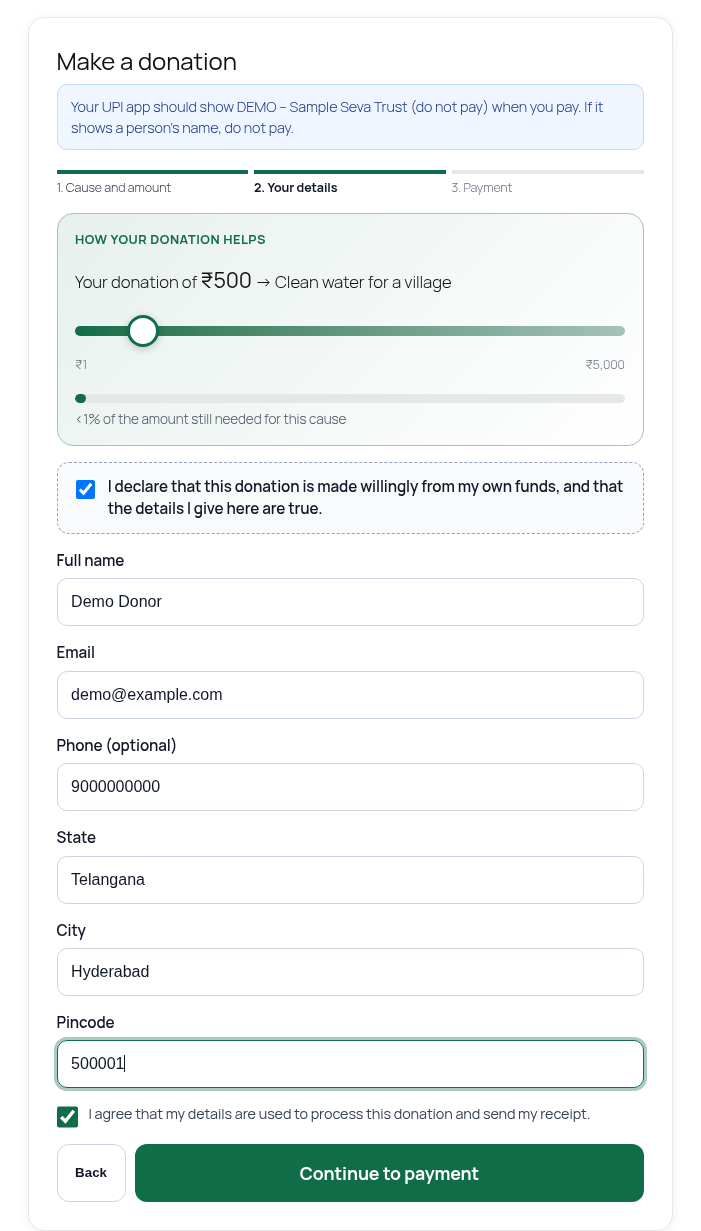
- PAN check on the donate form: 10 characters (5 letters, 4 digits, 1 letter) with a valid 4th letter (P, C, H, F, A, T, B, L, J, G). Capitals are applied as you type. A well-formed PAN is never rejected, because the plugin cannot confirm that a PAN is real.
0.9.15
- Find page list: readable detail text.
0.9.14
- “Already paid? Check your donation” link on step 1. Find page works with just an email (lists the donations, newest first) and the status page has an “I have paid” button next to the screenshot reader.
0.9.13
- Screenshot reader works on payment apps it has not seen: it ranks every long number on the screen, ignores phone numbers, dates and amounts, and asks the donor to check the guess.
0.9.12
- Screenshot reader: prefers UTR / UPI Ref / RRN labels, fixes letters read in place of digits, accepts Bank Ref and RRN labels.
0.9.11
- Thank-you email carries the certificate link.
0.9.10
- Owner can record a payment that arrived with no donation on the site (Donations > Record a payment). It is saved as paid and the donor gets the certificate link.
- Unknown credits from a bank statement get a “Create donation from this” button.
- Screenshot reader now reads references printed in groups (for example 2177 0746 2671) and Transaction ID style references.
- Step 2: address autofill hint, and the declaration message clears when ticked.
0.9.7
- Payment step on phones: UPI ID, amount and reference with copy buttons come first; one-tap link and QR are fallbacks.
- Donor can say how the money should be used. Share and invite after donating. Certificate of appreciation for confirmed donations.
0.1.0
- First release.