

Description
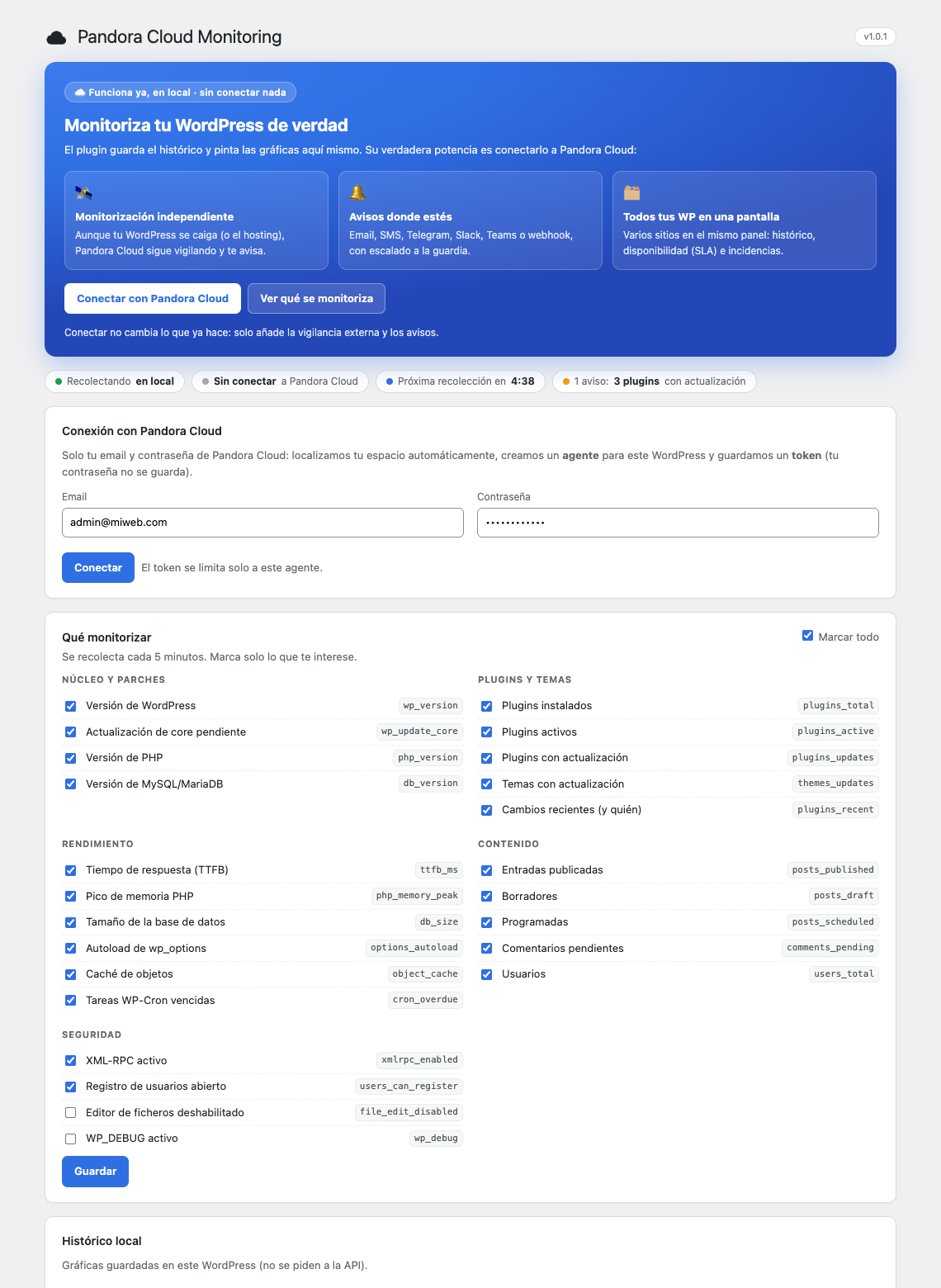
Pandora Cloud Monitoring watches what matters in your WordPress and shows it at a glance. It works locally out of the box (it stores a history and draws charts inside your own WordPress, no account needed) and, optionally, connects to Pandora Cloud to add independent monitoring and alerts.
What it monitors
- Core and patches: WordPress version, pending core update, PHP version, MySQL/MariaDB version.
- Plugins and themes: how many are installed/active, how many have updates available, and who changed a plugin and when (installed, activated, updated, deleted).
- Performance: response time (TTFB), PHP memory usage (% of the limit), database size,
wp_optionsautoload size, object cache, overdue WP-Cron tasks and recent PHP errors. - Content: published/draft/scheduled posts, pending/spam comments and users.
- Security: XML-RPC enabled, open user registration, file editor enabled,
WP_DEBUG.
Why connect to Pandora Cloud
- Independent monitoring: even if your WordPress or its hosting goes down, Pandora Cloud keeps checking from the outside and alerts you.
- Alerts over email, SMS, Telegram, Slack, Teams or webhook, with on-call escalation.
- All your WordPress sites on one screen: history, availability (SLA) and incidents in the same dashboard.
What it stores locally
A history of the collected metrics (last 30 days) in a custom table, plus the list of recent plugin changes. Nothing is sent anywhere unless you connect to Pandora Cloud.
How connection works
You enter the email and password of your Pandora Cloud account once. The plugin obtains a scoped access token bound only to this site and does not store your password. From then on it sends the collected metrics and a heartbeat every 5 minutes.
External service
This plugin connects to Pandora FMS services:
- Cloud Master —
https://cloudmaster.pandorafms.com
Used only when you connect the plugin, to locate your Pandora Cloud node from your email and password. The password is sent over HTTPS exclusively to validate your account and obtain an access token; it is not stored by the plugin. - Your Pandora Cloud node — the URL shown after connecting (e.g.
https://your-host/your-instance)
The plugin sends the collected metrics and a periodic heartbeat, authenticated with a scoped token that only allows reading and writing the data of this site’s agent.
Data sent: WordPress/PHP/MySQL versions, update and plugin/theme counters, content counters, performance and security flags, and the recent plugin-change log. No visitor or personal data is collected. No data is sent until you connect the plugin.
The plugin is fully functional without connecting (local history and charts).
- Legal information & licenses: https://pandorafms.com/en/legal-information-licenses/
- Privacy Policy: https://pandorafms.com/en/privacy-policy/
- Source code: https://github.com/slerena/pandorafms-WP
Screenshots
Installation
- Upload the plugin to your site (Plugins Add New Upload Plugin) and activate it.
- Go to the Pandora Cloud menu.
- (Optional) Connect with your Pandora Cloud account: enter your email and password.
- Choose what to monitor and save. Metrics are collected every 5 minutes.
FAQ
-
Does it work without a Pandora Cloud account?
-
Yes. The plugin collects the metrics and keeps a local history with charts on its own. Connecting to Pandora Cloud is optional and only adds independent monitoring, alerts and the multi-site dashboard.
-
Do you store my Pandora Cloud password?
-
No. It is used once, over HTTPS, to obtain a scoped access token; the password is not saved.
-
Does it collect visitor data?
-
No. Only technical and content counters of your own site.
Reviews
There are no reviews for this plugin.
Contributors & Developers
“Pandora Cloud Monitoring” is open source software. The following people have contributed to this plugin.
Contributors
Translate “Pandora Cloud Monitoring” into your language.
Interested in development?
Browse the code, check out the SVN repository, or subscribe to the development log by RSS.
Changelog
1.0.12
- Code quality: admin script enqueued and unique prefixed names (WordPress.org review).
1.0.11
- New checks: sitemap (reachable, valid and with entries) and robots.txt (SEO + GEO score: sitemap declared, site not blocked, AI crawlers allowed).
1.0.10
- Fixed a false “core update pending” warning: only real upgrades count (the “latest” entry WordPress keeps when the site is up to date no longer counts).
1.0.9
- WordPress.org submission fixes (distinct plugin and author URIs).
1.0.8
- Code quality: passes the WordPress coding standards and Plugin Check (escaping, sanitization, i18n translator comments, nonce handling).
1.0.7
- Connected state: the admin banner becomes a green status panel (agent, node, last sync) with no “Connect” button.
1.0.6
- Packaging release (same functionality as 1.0.5).
1.0.5
- Unique agent identity (agent_ref): two sites with the same name never share an agent.
- Editable visible name (alias), default “WP – your-domain”.
1.0.4
- Send a human-readable description with each module.
- PHP memory usage shown as a percentage of the limit.
1.0.3
- Send the metrics right after connecting.
- Link to the site’s page in the Pandora Cloud dashboard.
1.0.2
- Per-metric status (OK / warning / critical) with WordPress rules.
- Local history with status badges.
1.0.1
- Connect with email and password only (the node is resolved through the Cloud Master).
1.0.0
- First release: connection, metric collection, local history and charts, plugin-change log.