
Description
See who is really clicking your ads. AdProtektor checks every visit to your WordPress or WooCommerce site and sorts it into real visitors, crawlers, bots, competitors and click farms, with the evidence behind each verdict: where the visit came from, what it did on the page and why it was flagged.
Start free. Every account starts with a seven-day trial of every feature. After it, your first website stays on the free plan: visits are still checked and every attack is shown in your dashboard, up to a monthly visit limit. Blocking, Google Ads and Meta exclusions and ConversionOS are on the paid plans.
Stop paying for the same source twice. On a paid plan, a visitor who crosses your threat threshold is blocked even when they change IP address, and once your Google Ads account is connected the addresses behind them go into its IP exclusion lists automatically. Google still charges for the click that revealed a source; the Refund Report gathers the evidence for an invalid-traffic claim, and Google decides whether to credit it.
A suspicious visit is not proof of fraud on its own: shared IP addresses, short visits and automation need context, which is why every verdict comes with its evidence and you choose how strict protection is.
Traffic review and protection:
- Visitor analytics, browser identity signals and device fingerprinting
- Risk classifications and configurable protection rules
- Google Ads IP exclusions for eligible connected campaigns, and Meta exclusion audiences where configured and supported
- First-party tracking option that serves the script and relays requests through your own domain; this does not guarantee bypassing ad blockers or browser restrictions
- Evidence reports to support a Google Ads invalid-traffic review; Google decides whether a refund is granted
- Checkout protection for WooCommerce: a visitor AdProtektor has flagged on hard evidence (detected automation, a block you set yourself, or a visit from outside the area you allow) cannot add to the cart or place an order, and is shown a reference to quote if they think it is a mistake. Everyone else checks out as normal, and if AdProtektor cannot be reached the order goes through. You can switch it off per domain in the AdProtektor dashboard
Installing the plugin does not automatically enable every protection action. Add your tracking code, confirm visits are arriving, and review the domain’s protection settings and advertising-account connections in AdProtektor.
ConversionOS server-side conversion capture:
With ConversionOS enabled on your subscription and a domain site key configured, the plugin sends supported events to AdProtektor. Delivery to Meta CAPI, GA4 and Google Ads requires the corresponding destination configuration, account permissions and eligible events. A delivery receipt is distinct from a conversion appearing in a platform’s reports.
- WooCommerce — purchases when payment is confirmed, plus refund/cancellation notifications; downstream adjustments depend on the destination and the original conversion’s delivery status
- WooCommerce funnel events — product views, add-to-cart and checkout events
- Gravity Forms, Contact Form 7, WPForms and Elementor Pro — leads from supported form submissions
- Email, phone and name are SHA-256 hashed on your server before they are sent, using the normalization required for matching
- Read-only Activity page with connection status and a rolling outbound-event log
Server-side capture can retain supported order and form events without depending solely on a browser pixel. It does not guarantee complete attribution, platform acceptance or immunity to blockers. A form submission is not a qualified lead.
Requirements and evaluation:
The connector plugin is free. Current plan terms, including the free plan’s monthly visit limit, are on the AdProtektor pricing page.
- An active AdProtektor account at app.adprotektor.app, your domain and its tracking code
- For ConversionOS: the add-on enabled on your subscription plus a site key for your domain; configure the destinations you want to use
- Install the tracking code and verify actual visits and supported test events before evaluating results
- The seven-day trial requires installation and real traffic to be useful; low traffic may leave the evaluation inconclusive. Check current trial and subscription terms in AdProtektor before signing up
External services
This plugin connects your site to AdProtektor (https://adprotektor.app), a third-party click-fraud protection and conversion-tracking service operated by AVI-WEB. An AdProtektor account is required; nothing is sent until you enter a tracking code or site key in Settings AdProtektor.
AdProtektor tracking script (cdn.adprotektor.app and api.adprotektor.app)
- What it is for: assessing tracked visits for risk signals and supporting configured protection actions on eligible connected advertising accounts.
- When: once a tracking code is saved, the plugin adds the script to every front-end page. With “First-party tracking” switched on, the same script and its requests are relayed through your own domain (under
/_adp) instead: your server fetches the script from cdn.adprotektor.app and forwards the tracking requests to api.adprotektor.app, adding your site key and the visitor’s IP address (and, behind a trusted edge you configure, the visitor’s TLS fingerprint). Of the visitor’s cookies, only AdProtektor’s own (adp_*) are forwarded. - What is sent, from the visitor’s browser: the visitor’s IP address, user agent, browser and device characteristics (used to recognise the same browser across visits), page URL and referrer, ad click identifiers and campaign parameters (such as gclid, fbclid and UTM values), and on-page behaviour such as time on page, scrolling, clicks and mouse movement. A visitor identifier is kept in first-party cookies and browser storage.
- Session recording: if you switch on session recording for your domain in the AdProtektor dashboard, the script also records visitors’ sessions so you can replay them. If you use it, disclose session recording in your site’s privacy notice where the law requires it.
ConversionOS server-side conversions (api.adprotektor.app)
- What it is for: reporting conversions from your server to the ad and analytics platforms you connect in AdProtektor (Meta Conversions API, GA4, Google Ads Enhanced Conversions).
- When: only if you enter a ConversionOS site key, and only when a supported event happens: a WooCommerce order is paid, refunded or cancelled, a product is viewed, added to the cart or checked out, or a Gravity Forms, Contact Form 7, WPForms or Elementor Pro form is submitted.
- What is sent, from your server: the event type, order or form details (order value, currency, product IDs, names and categories), the visitor and session identifiers from the AdProtektor cookies, and the customer’s email, phone, name and address. Email, phone and name are SHA-256 hashed on your server before they are sent.
Checkout protection (api.adprotektor.app)
- What it is for: refusing an order from a visitor AdProtektor has flagged on hard evidence before WooCommerce creates it.
- When: only if you enter a site key, and only when a shopper places a WooCommerce order (classic checkout, the Checkout block, or a payment button that places the order through them). Store managers placing an order are not checked.
- What is sent, from your server: your site’s host name and checkout page path, the visitor identifier from the AdProtektor cookies, the shopper’s IP address, the cart or order total and currency, and your site’s language. AdProtektor answers allow or block; a blocked attempt is recorded in your AdProtektor dashboard with its reference.
Connection status on the Activity page (api.adprotektor.app)
- What it is for: showing whether ConversionOS is enabled for your domain and when AdProtektor last received an event from it.
- When: only when an administrator opens the AdProtektor Activity page with a site key saved. The answer is kept for five minutes.
- What is sent, from your server: the site key and your site’s host name.
Sign-up and connect links (app.adprotektor.app)
- What it is for: creating your AdProtektor account for this site and getting its tracking code into the settings field.
- When: only when an administrator clicks “Create your free account” on the Settings AdProtektor page. The plugin itself sends nothing: the button opens app.adprotektor.app/register in a new tab with your site’s host name and the plugin’s UTM tags in the link, so the sign-up form is filled in for this site and the signup is credited to the plugin. The dashboard’s “Open my WordPress plugin settings” button links back to this settings page with your tracking code in the link; it fills in the field and saves nothing until you click Save Settings.
Optional footer badge (adprotektor.app)
- Off by default. If you switch on “Footer badge” in Settings AdProtektor, a small “Protected by AdProtektor” text link to https://adprotektor.app/ is added to your site footer, with your referral code if you enter one. Nothing is sent anywhere unless a visitor clicks it.
AdProtektor Terms of Service · Privacy Policy · Data Processing Agreement
Screenshots
Installation
- Upload the
adprotektorfolder to the/wp-content/plugins/directory, or install via the WordPress plugin installer. - Activate the plugin through the ‘Plugins’ menu in WordPress.
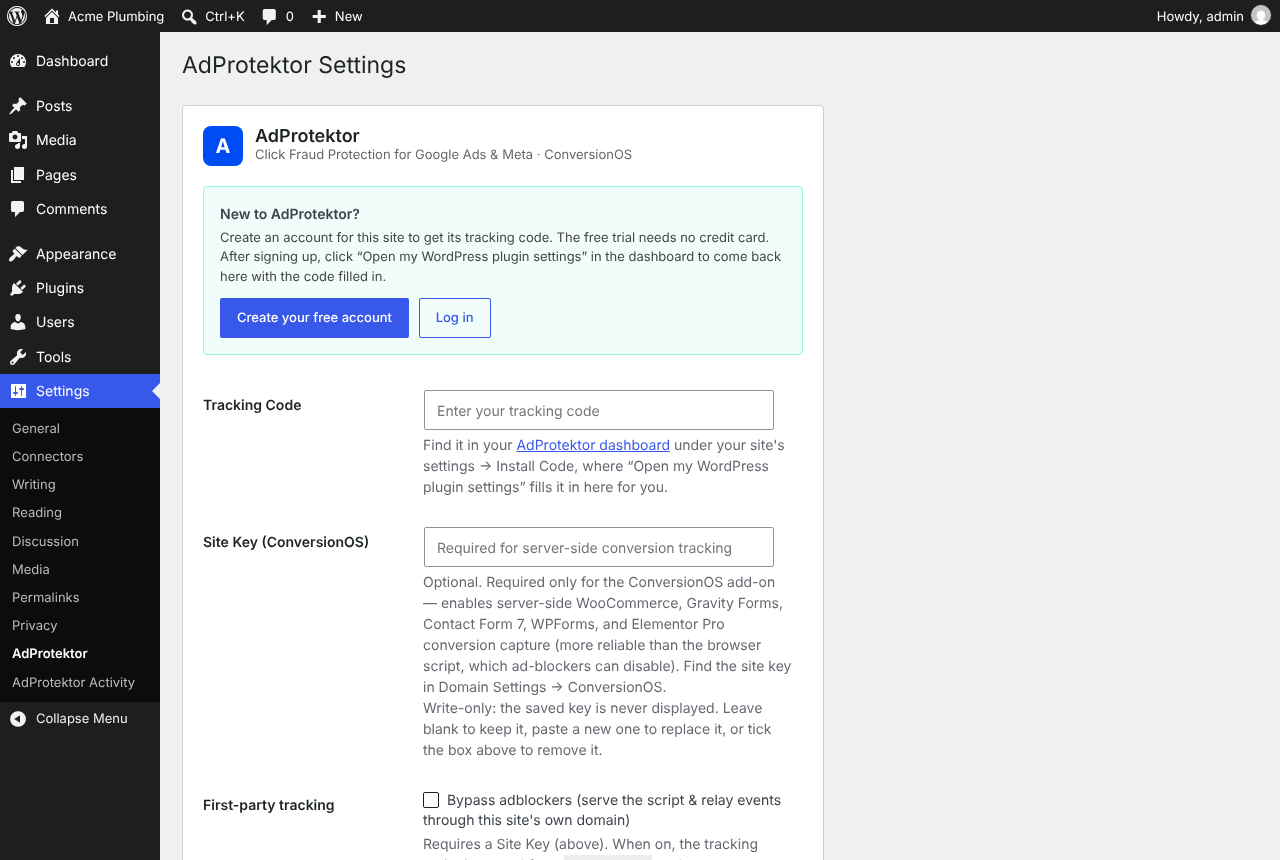
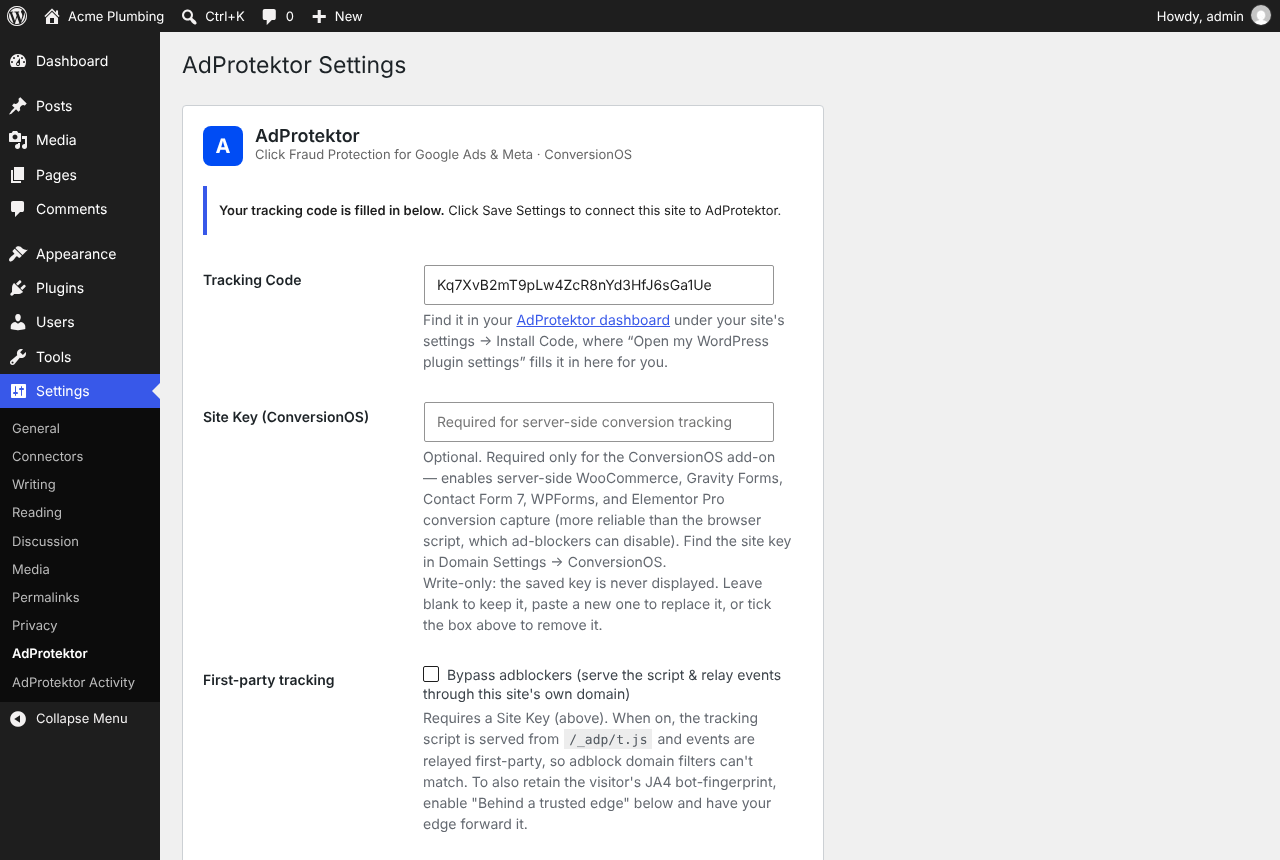
- Go to Settings > AdProtektor. New to AdProtektor? Click “Create your free account”: the sign-up form opens with this site filled in. Then click “Open my WordPress plugin settings” in the dashboard to come back with your tracking code filled in, and click Save Settings.
- (Optional) For ConversionOS, paste your site key in the same screen to enable server-side conversion capture.
- Open your AdProtektor dashboard and confirm that visits arrive for the correct domain. Review protection settings and connected advertising accounts before enabling exclusions.
- If using ConversionOS, submit a supported test form or trigger a paid-order event in your WooCommerce test environment, inspect the Activity log, and verify the event and destination delivery in AdProtektor. Plugin activation alone does not confirm tracking or downstream delivery.
FAQ
-
Where do I get my tracking code?
-
Click “Create your free account” in Settings AdProtektor, or sign up at app.adprotektor.app and add your domain. The code is shown in the dashboard under your site’s settings Install Code, next to an “Open my WordPress plugin settings” button that fills it in here for you.
-
What is the site key for?
-
The site key authenticates the plugin’s calls from your server: the ConversionOS server-side hooks (WooCommerce, Gravity Forms, Contact Form 7, WPForms, Elementor Pro) and the checkout protection check when a WooCommerce order is placed. Find it under Domain Settings ConversionOS in your dashboard. Treat it like a password.
-
Do I need to tell my visitors about AdProtektor?
-
AdProtektor processes visitor data on your behalf to detect click fraud, so mention it in your privacy policy. If you turn on session recording, disclose that too where the law requires it. See the External services section above for exactly what is sent.
-
Does this slow down my site?
-
The tracking script loads asynchronously, but tracking, optional recording and server-side conversion requests still use resources. Some server requests can run during order or form processing. Performance depends on enabled features, hosting and network conditions; test page loads, checkout and forms on your own site after installation.
Reviews
There are no reviews for this plugin.
Contributors & Developers
“AdProtektor – Click Fraud Protection” is open source software. The following people have contributed to this plugin.
Contributors
Translate “AdProtektor – Click Fraud Protection” into your language.
Interested in development?
Browse the code, check out the SVN repository, or subscribe to the development log by RSS.
Changelog
1.18.4
- Shorten the plugin name to “AdProtektor – Click Fraud Protection”. Plugin behaviour is unchanged
1.18.3
- The plugin’s name is now “AdProtektor – Click Fraud Protection for Google Ads”. Plugin behaviour is unchanged
1.18.2
- Readme: opens with what the free plan and the paid plans do. Plugin behaviour is unchanged
1.18.1
- Readme: describes the free plan that follows the trial. Plugin behaviour is unchanged
1.18.0
- New: a “Create your free account” button on the settings page opens AdProtektor’s sign-up with this site already filled in
- New: the dashboard’s “Open my WordPress plugin settings” button now fills in your tracking code here; click Save Settings to connect. Nothing is saved until you do
- New: until a tracking code is saved, a notice on the Plugins screen links to the settings page. It goes away once the site is connected
1.17.2
- The plugin’s Plugin URI now points to its own page, https://adprotektor.app/integrations/wordpress, so it no longer matches the Author URI
1.17.1
- Fix: on sites using first-party tracking, a verified AI agent (ChatGPT agent, Google-Agent) is recognised instead of being scored as a bot. WordPress adds backslashes to request headers, and the proxy relayed the agent’s signature with them still in it, so it never verified. A user agent or referrer containing quotes is now relayed unchanged too
- First-party tracking uses WordPress’s own HTTP API, and keeps its copy of the tracking script in a transient instead of the server’s temp directory. Repeat page views revalidate the script (304 Not Modified) instead of downloading it again, and the request’s Content-Type is now relayed on Apache hosts too
- The checkout protection message shown in the Checkout block is escaped; it reads the same
- The “remove the saved key” checkbox in Settings AdProtektor checks the settings form’s own security nonce before it clears the site key
- Tested with WordPress 7.1
1.17.0
- Fix: a form lead reached Meta and Google twice when the browser and the plugin both reported it and the plugin’s copy waited for WP-Cron. Leads now say when the form was submitted, so the two copies are recognised as one however late the plugin’s arrives, and on PHP-FPM and LiteSpeed hosts they are sent from the request that produced them, right after the visitor’s page has been answered. On Apache mod_php or CGI hosts, where that would keep the visitor’s page loading, WP-Cron still sends them. The queued copy stays as the retry if a send fails
- Fix: a login or registration form built with Gravity Forms, WPForms, Elementor or Contact Form 7 (any form with a password field) no longer reports a lead
1.16.0
- New: checkout protection for WooCommerce. When a shopper places an order, the plugin asks AdProtektor whether this visitor has been flagged on hard evidence (detected automation, a block you set, or a visit from outside the area you allow). A flagged visitor’s order is refused before WooCommerce creates it, and they see a reference to quote if they think it is a mistake. Works with the classic checkout and the Checkout block
- Fails open: if AdProtektor does not answer within three seconds, the order goes through. Store managers placing an order are never checked
- Uses the shopper’s IP address from Cloudflare or your proxy only when “Behind a trusted edge” is switched on
1.15.11
- Fix: purchases and leads on sites using first-party tracking were rejected by the server and never reached Meta, Google Ads or GA4. The plugin sent a visitor cookie in the place of a session id; it no longer does
- Orders placed with an earlier version and paid later (for example by a payment gateway notification) keep their visitor attribution
- When the tracking script’s own visitor cookie is missing, conversions now fall back to the visitor id the server stored on your domain instead of an anonymous one
1.15.10
- Clarify protection, conversion delivery, trial setup and performance expectations; plugin behaviour is unchanged
1.15.9
- First-party proxy mode relays the signature of verified AI agents (ChatGPT agent, Google-Agent), so an AI assistant browsing for a person is recognised instead of blocked as a bot
1.15.8
- First-party proxy mode now relays page heatmap uploads, so Analytics Heatmaps works on sites that serve tracking from their own domain
1.15.7
- Optional “Protected by AdProtektor” footer badge, off by default, with an optional referral code
1.15.6
- The tracking tag is printed with WordPress’s own script-tag API, so every attribute is escaped (requires WordPress 5.7 or later)
- Cookie values are unslashed before they are sanitized, and connection errors are only written to the PHP error log when WP_DEBUG is on
- The readme documents every external service the plugin connects to and what it sends
1.14.0
- Purchase is now captured when payment is confirmed (payment_complete / processing / completed status), not only when the shopper returns to the thank-you page — sales are no longer lost when the buyer closes the tab at the gateway
- Unpaid orders (pending payment / failed) no longer count as purchases from the thank-you page; they are captured when they become paid
- A purchase that fails to reach the AdProtektor API (timeout, outage) is retried on the next order event instead of being permanently lost
- The shopper’s visitor/session ids are stored on the order at checkout, so gateway-confirmed purchases keep full click/session attribution
1.12.0
- Purchase now sends the full customer address (city, state, postcode) alongside name/email/phone/country, so Meta CAPI Advanced Matching gets every available identifier for the order
1.11.1
- The tracking tag now carries skip attributes (data-cfasync, data-no-optimize, data-no-minify, data-noptimize, data-wpfc-render, data-pagespeed-no-defer) so JS minify/combine plugins and Cloudflare Rocket Loader leave it in place — preventing the relocated-tag 404 on conversions.min.js / rrweb.min.js
1.11.0
- WooCommerce events (ViewContent, AddToCart, InitiateCheckout, Purchase) now send the numeric product ID, product name, and category names with each line item — so Meta CAPI custom_data carries content_ids, content_name, and content_category, matching what plugins like PixelYourSite emit
1.10.0
- First-party tracking: new toggle that serves the script and relays events through your own domain; browser and blocker restrictions can still apply
- Optional JA4 edge-header passthrough to retain the visitor bot-fingerprint behind Cloudflare/nginx
- Activity page shows first-party tracking status
1.4.0
- ConversionOS: server-side conversion capture for WooCommerce, Gravity Forms, Contact Form 7, WPForms, and Elementor Pro
- WooCommerce funnel events (ViewContent, AddToCart, InitiateCheckout) as Meta Standard Events
- WooCommerce refund/cancellation notifications for destination-specific conversion handling
- Read-only Activity diagnostics page with connection status and event log
1.0.0
- Initial release