

Description
Linkvane checks the links in your content for errors and maps how your own pages link to each other. Everything is stored and analysed in your own WordPress database; you do not need an account or an API key.
A link is reported as broken only after it has failed several probes spaced out over time, so a server that is briefly down, a rate limit or a bot challenge (HTTP 429, 403, 999) is not reported as a broken link.
Broken links
- Scans posts and pages out of the box; optionally custom post types, media, approved comments and navigation menus.
- Works in small background batches through WP-Cron (5 posts every 15 minutes by default, both adjustable), using a HEAD request with a GET fallback.
- Reads your content with
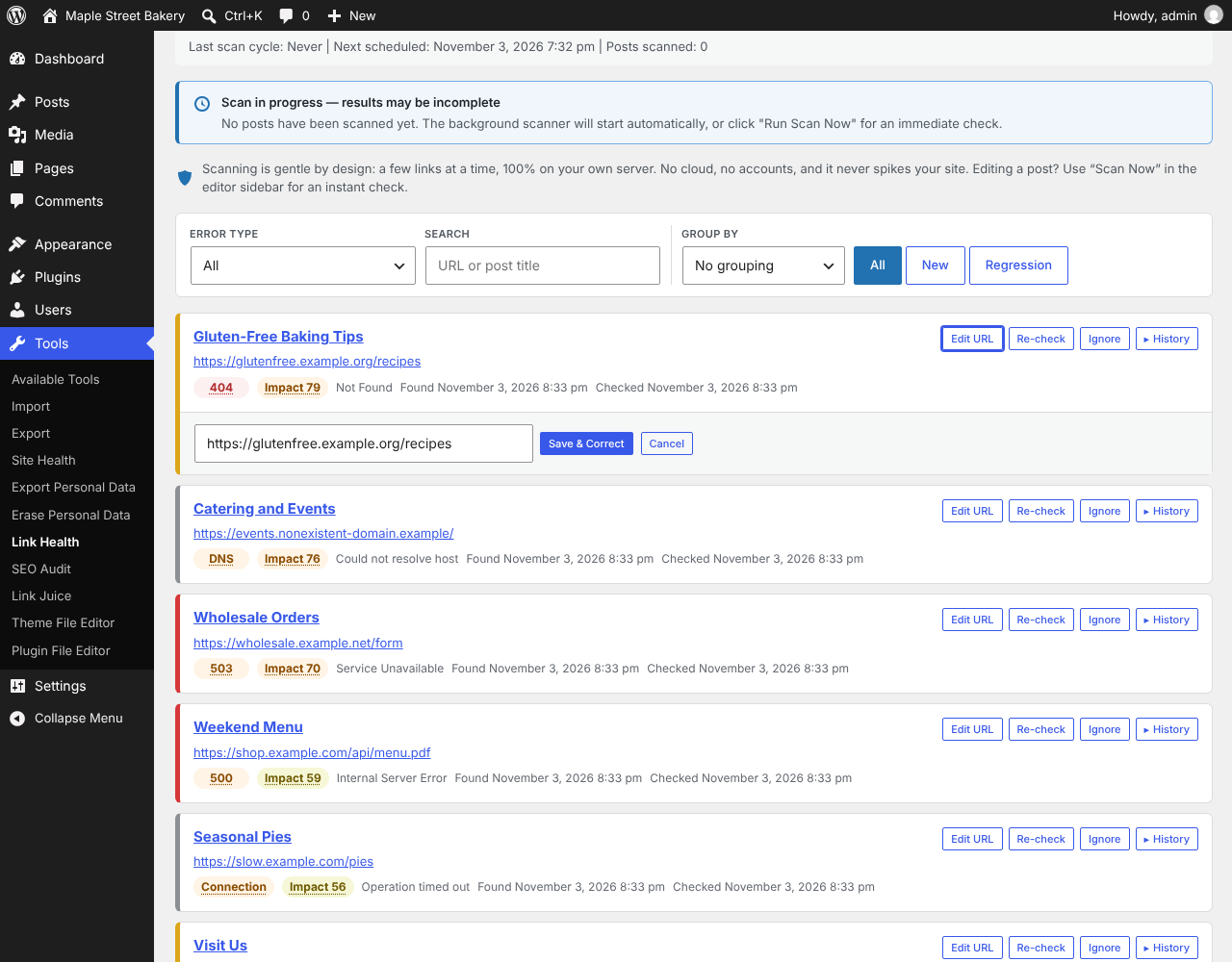
WP_HTML_Tag_Processor, the HTML parser built into WordPress, and uses the same parser to correct a URL in place. - Dashboard with status codes, affected content, and grouping by domain or error type (4xx, 5xx, DNS, SSL, timeout, missing anchor).
- Validates
#anchorlinks against the target page and clears the warning once the anchor exists. - Re-check a link on demand, export the list as CSV, or set rules that rewrite known bad domains during scans.
Internal links (Link Juice)
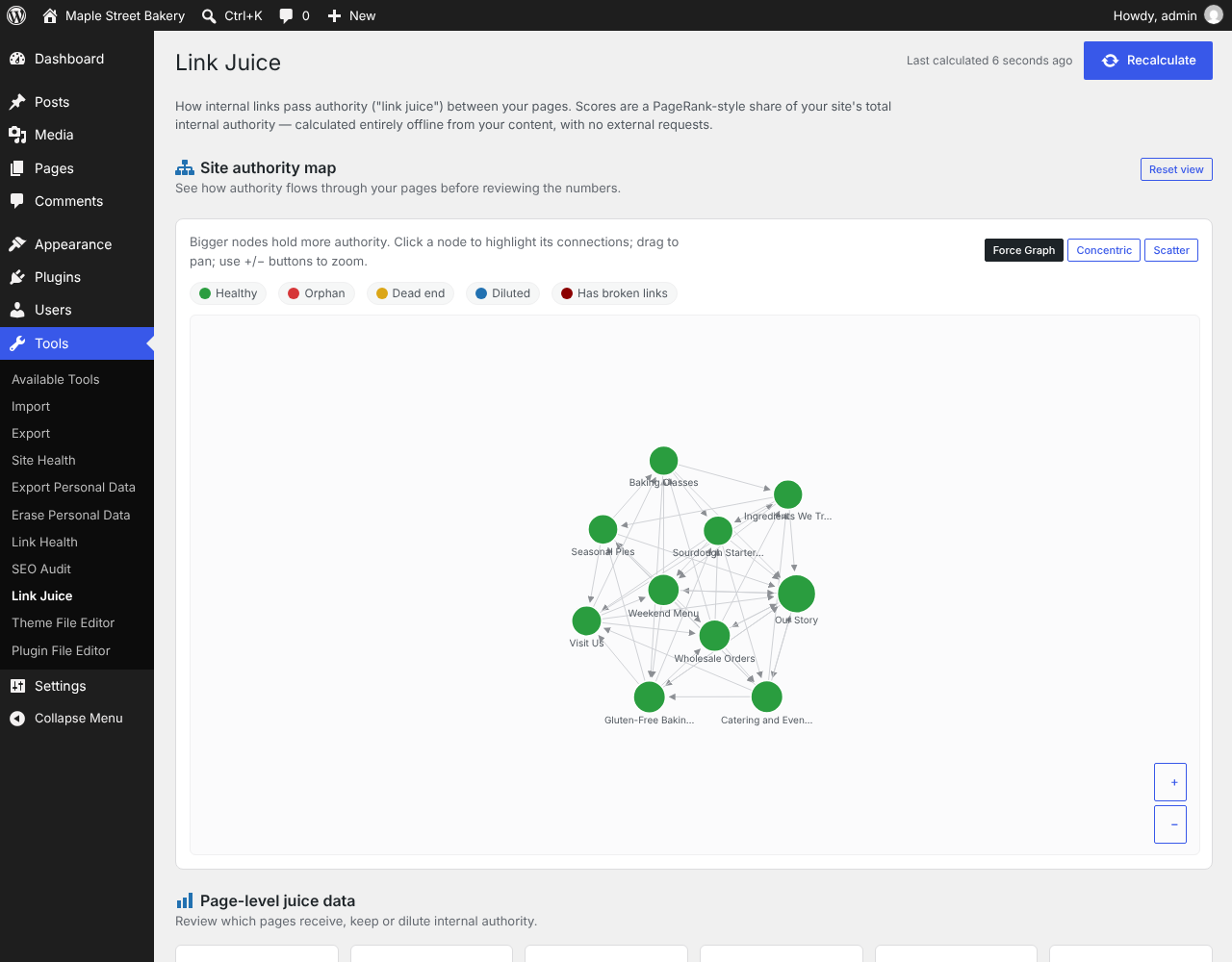
- Builds a map of the links between your own pages and computes a PageRank-style authority score for each page. This step makes no HTTP requests.
- Lists orphan pages (no internal links pointing to them), dead ends (no internal links out) and pages with a very large number of outbound links.
- Shows the link flow for each page, a site-wide authority graph and an overall score, with suggestions that link straight to the editor.
SEO audit
- Twelve checks: orphan pages, mixed content, canonical tags, redundant links, redirect chains, image alt text and dimensions, image formats, title and excerpt length, heading order and keyword density.
WP-CLI
wp nlhealth scan,list,recheck,auditandstatus, pluswp nlhealth juiceandwp nlhealth dbsubcommands, for site owners with shell access.
External services
This plugin does not use any external API or service run by the plugin author. To find broken links it has to contact the web sites your content links to:
Link checks (the sites your content links to)
- What: an HTTP HEAD request (a GET request when the server refuses HEAD) to each URL found in your posts, pages and, if you enable them, comments, menus and media. Links to your own site are checked against your own site.
- Data sent: the URL itself, a browser-style User-Agent header and standard Accept headers. No content from your site and no data about your visitors or users is sent. The receiving server sees your server’s IP address, as with any HTTP request.
- When: during the background scan (WP-Cron, every 15 minutes by default), when you click “Scan Now” on the dashboard or in the post editor, when you re-check a link from the dashboard, when the SEO audit follows your internal links to detect redirect chains, and when you run the
wp nlhealthcommands. - Terms and privacy: each linked site’s own terms of service and privacy policy apply. The plugin only contacts sites you already link to; it cannot choose them. You can stop all requests by deactivating the plugin, and exclude a URL with the ignore list on the dashboard.
Screenshots


Installation
- Upload the
linkvanefolder to/wp-content/plugins/. - Activate the plugin from the Plugins menu in WordPress.
- Go to Tools Link Health to view the dashboard and run your first scan.
- The background scanner starts automatically via WordPress Cron. No configuration required.
FAQ
-
Will this plugin slow down my site?
-
It checks a few posts per WP-Cron run and caches links that answered correctly for 48 hours, so each run is short. You can lower the batch size or the frequency under Settings Link Health.
-
Does it work with WooCommerce or custom post types?
-
Yes. Posts and pages are always scanned. You can opt into Custom Post Types, media, comments and navigation menus under Settings Link Health Scan Scope.
-
How does it change a URL in my content?
-
Corrections go through
WP_HTML_Tag_Processor, the HTML parser built into WordPress, which rewrites only the attribute that holds the link and leaves the rest of the block markup untouched. -
What HTTP status codes are flagged as broken?
-
400, 401, 403, 404, 410, 5xx, and connection errors — but only after a link fails several spaced-out probes, so transient blips are not reported. Redirects (301/302) are followed (up to 5 hops) and not flagged unless the final destination returns an error. Soft codes such as 429/999 are treated as “could not verify”, not broken.
-
It is an offline analysis of how link authority flows between your own pages (internal links). It highlights orphan pages, dead ends and over-diluted pages so you can strengthen your internal linking for SEO. It runs entirely on your server and makes no HTTP requests.
-
Does it send my content anywhere?
-
No. Your content, the link map and the results stay in your WordPress database. The only outbound requests are the link checks themselves, described under External services below.
-
Where are the settings?
-
Go to Settings Link Health. The scan scope (post types, comments, menus, media), batch size, scan frequency, auto-fix rules and the uninstall option are all on that page, and a help panel at the top explains each one.
Reviews
There are no reviews for this plugin.
Contributors & Developers
“Linkvane” is open source software. The following people have contributed to this plugin.
Contributors
Translate “Linkvane” into your language.
Interested in development?
Browse the code, check out the SVN repository, or subscribe to the development log by RSS.
Changelog
1.7.3
- Fixing a broken link no longer removes backslashes from the post content.
- On multisite, activating for the whole network now sets up every existing site, and sites created later are set up automatically.
1.7.2
- Settings checkboxes are now sanitized strictly, so a submitted “false” is saved as off.
1.7.1
- The plugin is now named Linkvane (previously “Native Link Health”), with the folder and text domain
linkvane.
1.7.0
- First release on WordPress.org.
- The plugin’s data now uses the
nlhealth_prefix; data from earlier development builds is moved over automatically on update. - WP-CLI commands are now
wp nlhealth ...and their messages are translatable. - Translations come from translate.wordpress.org.
- Other plugins’ admin notices are no longer hidden on this plugin’s screens.