

Description
Try-On shows your clothes on a real body, in every size, without a photo shoot.
A flat photo can’t show how a dress moves or how a jacket sits on the shoulders. Try-On Video for WooCommerce turns
the product photo you already have into a short, looping video of your clothes worn by one of Try-On’s models, and
plays it in your product gallery, in the size and colour the shopper picks.
No studio, no models to book, no theme to edit.
- Show the fit, not just the fabric. Clothes on a body, moving, show what a flat photo can’t.
- Cover every size. Women, men, girls and boys, in every size your shop sells; the video changes when the
shopper changes size or colour. - Start from the photos you have. A flat-lay or ghost-mannequin photo works best, and each colour starts from
its own picture. - Keep your theme. The video is a slide of WooCommerce’s own product gallery, muted and looping.
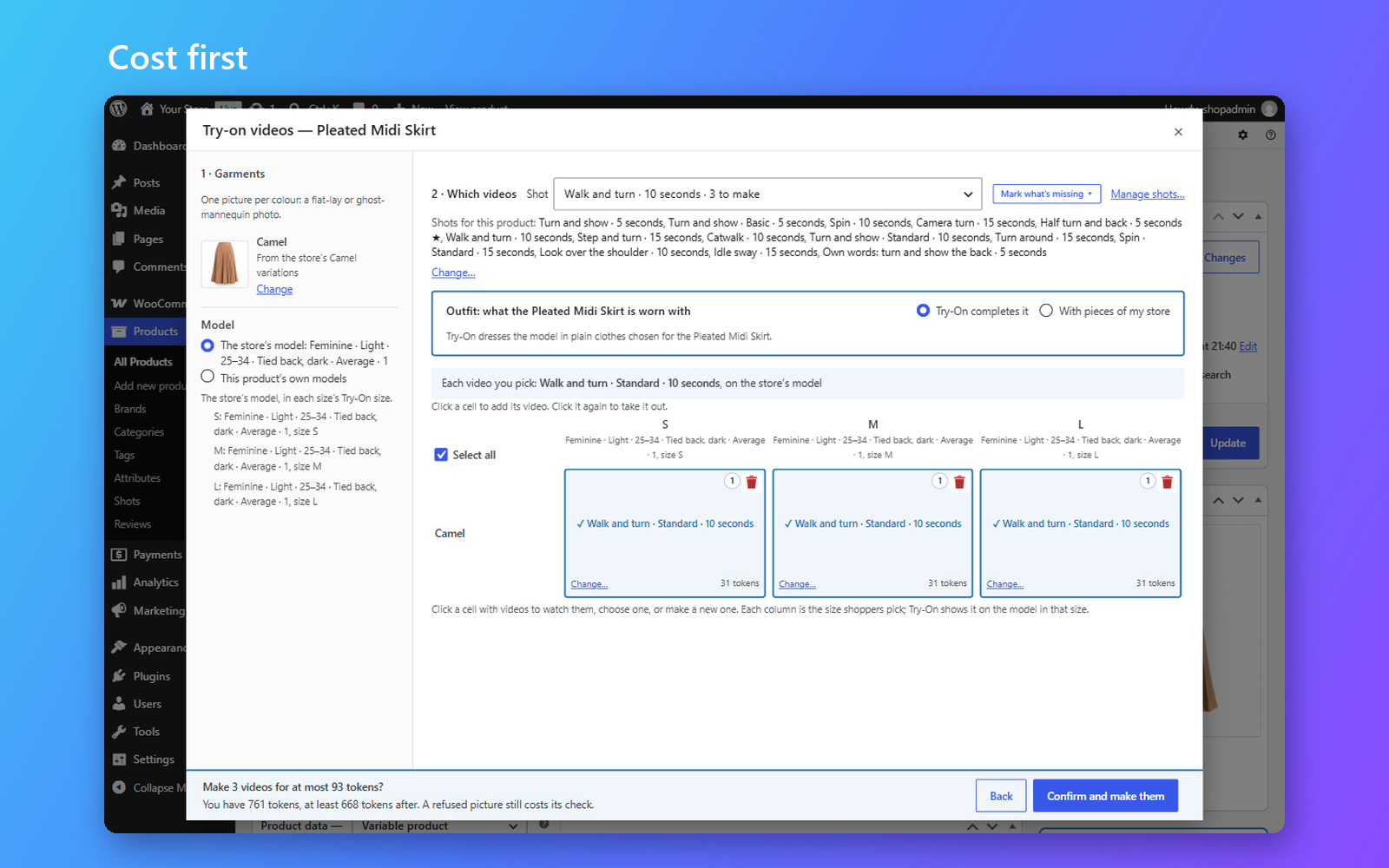
- Pay only for what you make. Every run shows its cost and your balance before anything is made.
EVERYTHING YOU NEED TO SHOW THE FIT
From one product to your whole catalogue, the work happens inside WooCommerce, on the screens you already use.
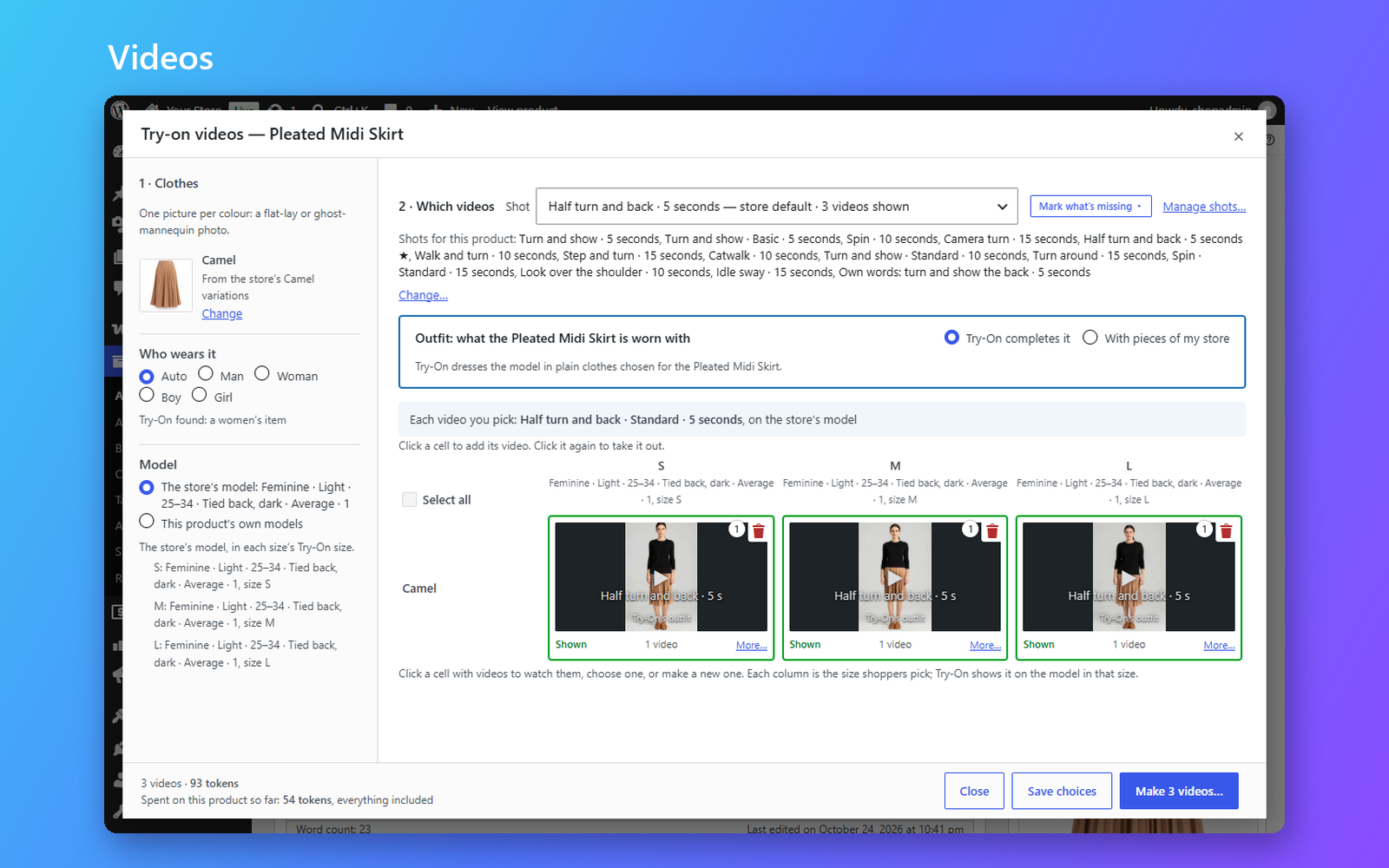
- Pick, confirm, done. Open a product, choose the clothing photo, the colours and sizes, and a shot. The video
is made in the background and appears in the gallery. - Choose the style. Use Try-On’s ready-made shots, or describe a movement, a scene and a framing in your own
words and save it for next time. - Dress the whole look. Show a product worn with other pieces from your store, with “Goes with this” links to
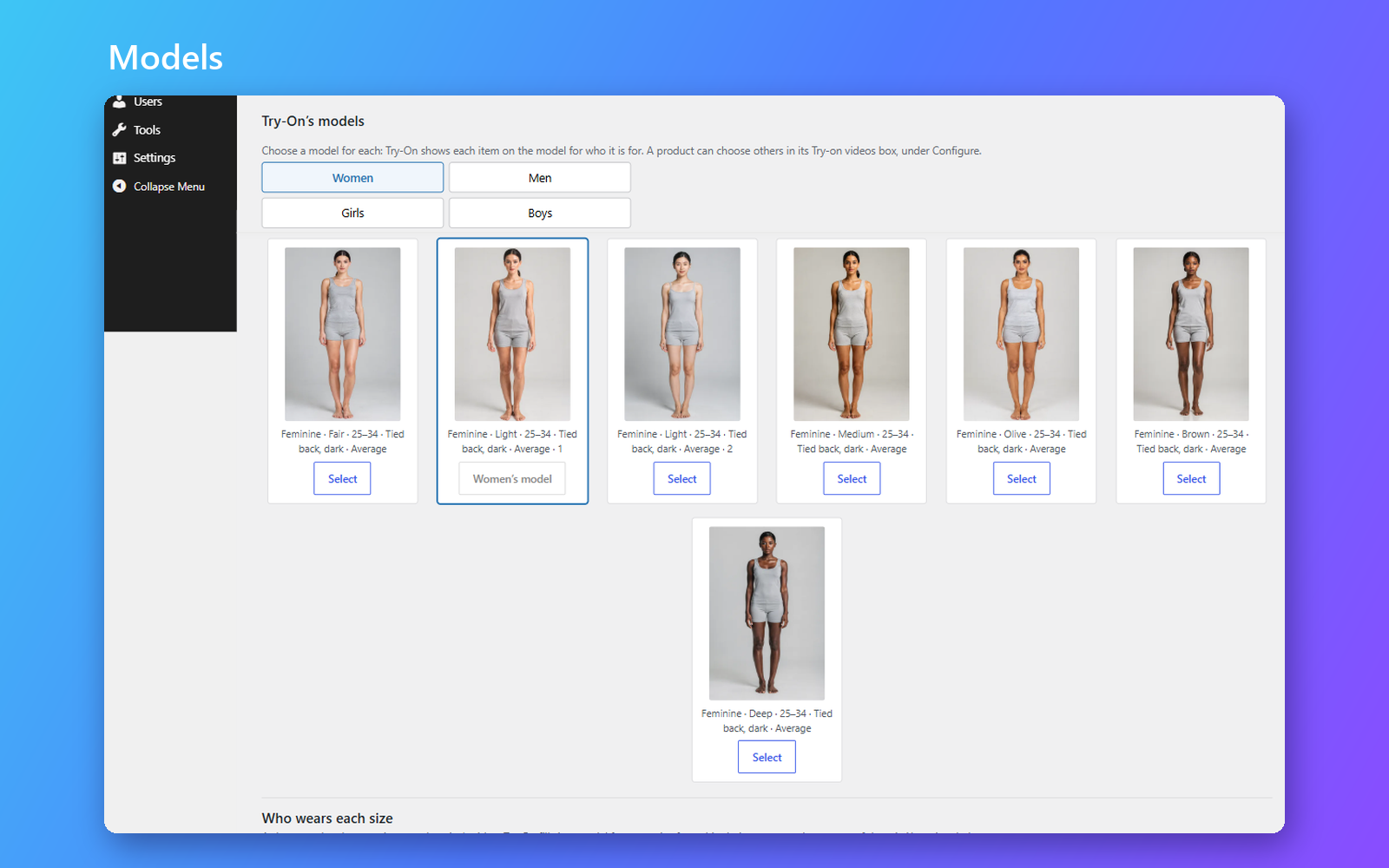
each. - Say who wears it. Tell Try-On who each category is for, or choose Man, Woman, Boy or Girl for one product,
and the right model and cost show before anything is made. A Google feed’s gender is read too. - Make videos in bulk. Select many products in the Products list and make their videos in one run.
- Match sizes in seconds. Tell the setup wizard which size attribute you use, and Try-On matches your sizes to
its models, free.
Made for clothing
Try-On makes videos of clothes: T-shirts, shirts, blouses and tops, knitwear, hoodies and sweatshirts, trousers,
jeans, shorts and skirts, dresses and jumpsuits, jackets, coats and blazers.
Not yet: shoes and boots, hats and caps, bags, jewellery and other accessories, swimwear and lingerie. A photo of
one of these is refused, and only its check is charged.
Start free, pay as you grow
Videos are paid in tokens. Start on the free plan: every store gets 30 tokens a month, enough for 5 short
videos, for as long as Try-On is installed, with nothing to renew. Free videos are made at draft quality and carry
the Try-On logo in a corner, and they are yours to publish.
When you need more, buy tokens: you unlock more videos and higher quality, and the videos you make from then on
carry no logo. A photo that can’t be used costs only its check, and so does a video that fails.
Own your videos – forever
Every video is saved in your WordPress media library, exactly as it arrives. Deleting the plugin never deletes them,
and your product pages go back to how they were.
Your storefront never calls Try-On: it plays the video from your own site, and nothing about your shoppers, orders
or customers is ever sent. If you choose to share anonymous usage data with us, you can turn it off at any time.
Translate
Try-On Video for WooCommerce is in English for now. It is ready to be translated, and its screens work
right-to-left; help bring it to your language at
translate.wordpress.org.
Connection to Try-On
The videos are made by Try-On, a paid service operated by ORCA-AD LTD at https://connect.try-on.co. The plugin
can’t make videos without it, and talks to it over HTTPS only. This is what it sends, and when:
- When you connect: your store’s URL and name, the plugin and WooCommerce versions, and the language you work
in. That language also goes with every link to Try-On’s pages (your account, buying tokens), so they answer you
in it. - When you match sizes: the size attribute’s name and your size names.
- When you confirm a run, and only then: the clothing photo you picked, the model, the size, any words you wrote,
the quality and length, your store URL, your language, and an anonymous code for the staff member who started it. - When you ask what goes with a product: that product’s pictures, title, categories and attributes.
- The finished video is downloaded from the address the service returns.
- Anonymous usage data, only if you turn it on (off by default): once a day, the WordPress, PHP, WooCommerce and
plugin versions, the site language, and whether steps such as connecting or making a video worked. No store URL,
no ids, nothing about your shoppers.
This service is provided by ORCA-AD LTD: Terms of use, Privacy policy.
Screenshots


Installation
Minimum Requirements
- WordPress 7.0 or greater
- WooCommerce 11.0 or greater
- PHP 8.1 or greater
- A Try-On account: free to create, with tokens every month
Automatic installation
Automatic installation is the easiest option: WordPress handles the file transfer, and you won’t need to leave your web browser. Make sure WooCommerce is installed and active, then go to Plugins Add New Plugin, search for “Try-On Video for WooCommerce”, and click Install Now, then Activate.
Go to WooCommerce Settings Try-On and click Connect. The setup wizard then asks which size attribute your shop uses, which sizes matter and how long the videos should be; you can change every answer later.
Manual installation
Download the plugin’s zip, upload it under Plugins Add New Plugin Upload Plugin, activate it, then connect your store in WooCommerce Settings Try-On.
Updating
Automatic updates should work smoothly; we still recommend you back up your site. Your videos, settings and connection are kept across updates.
FAQ
-
Do I need a Try-On account?
-
Yes. The videos are made by Try-On, so you connect your store once, from WooCommerce Settings Try-On.
Connecting is free, and every account gets tokens each month, so you can make a finished video before paying
anything. -
What can I make videos of?
-
Clothes worn on the body: tops, shirts, knitwear and hoodies, trousers, jeans, shorts and skirts, dresses and
jumpsuits, jackets, coats and blazers. Shoes and boots, hats and caps, bags, jewellery and other accessories,
swimwear and lingerie aren’t supported yet: a photo of one of these is refused, and only its check is charged. The
plugin shows the full list where you choose what to make. -
Where can I get help?
-
Ask in the plugin’s support forum. The plugin
also has a guided tour of every screen. -
Which photos work best?
-
A photo of the clothing on its own: a flat-lay or a ghost mannequin. A picture with a person in it is refused, and
its check is still charged. For the back, add a photo of the back to the product’s gallery. -
Does the plugin pick the clothing photo for me?
-
No, you always choose. A colour whose variations already have a picture starts with that picture, and you can change
it. Only when you make videos for many products at once, and agree to it, does Try-On pick each product’s picture. -
Will it work with my theme?
-
Yes, with any theme that shows WooCommerce’s standard product gallery. The video is added as one of its slides.
-
Will it slow down my product pages?
-
No. Your storefront never calls Try-On: it plays a video file from your own media library, and only the video on
show loads. -
Which sizes appear?
-
The ones your shop already sells. Try-On matches each of your sizes to one of its own, and you can change any match
under Products Attributes. -
Can I use my own model photos?
-
No. The videos show Try-On’s own models, in every size; you choose the clothing photo.
-
What happens to my videos if I delete the plugin?
-
They stay in your media library: deleting the plugin never deletes the videos you paid for. Installing it again
brings them back to your products. -
My videos are waiting. What do I do?
-
WordPress runs background work when someone visits your site, so on a quiet shop a video can wait. The plugin tells
you when nothing has run for fifteen minutes. Ask your host to run WordPress’s scheduler every minute (a “cron
job”) to fix it for good. Nothing is lost while a video waits. -
Where is the source code?
-
In the plugin itself: every script ships with the TypeScript it is built from, and
npm ci && npm run buildbuilds
them again.
Reviews
There are no reviews for this plugin.
Contributors & Developers
“Try-On Video for WooCommerce” is open source software. The following people have contributed to this plugin.
Contributors
“Try-On Video for WooCommerce” has been translated into 4 locales. Thank you to the translators for their contributions.
Translate “Try-On Video for WooCommerce” into your language.
Interested in development?
Browse the code, check out the SVN repository, or subscribe to the development log by RSS.
Changelog
1.0.0
- First release.