

Description
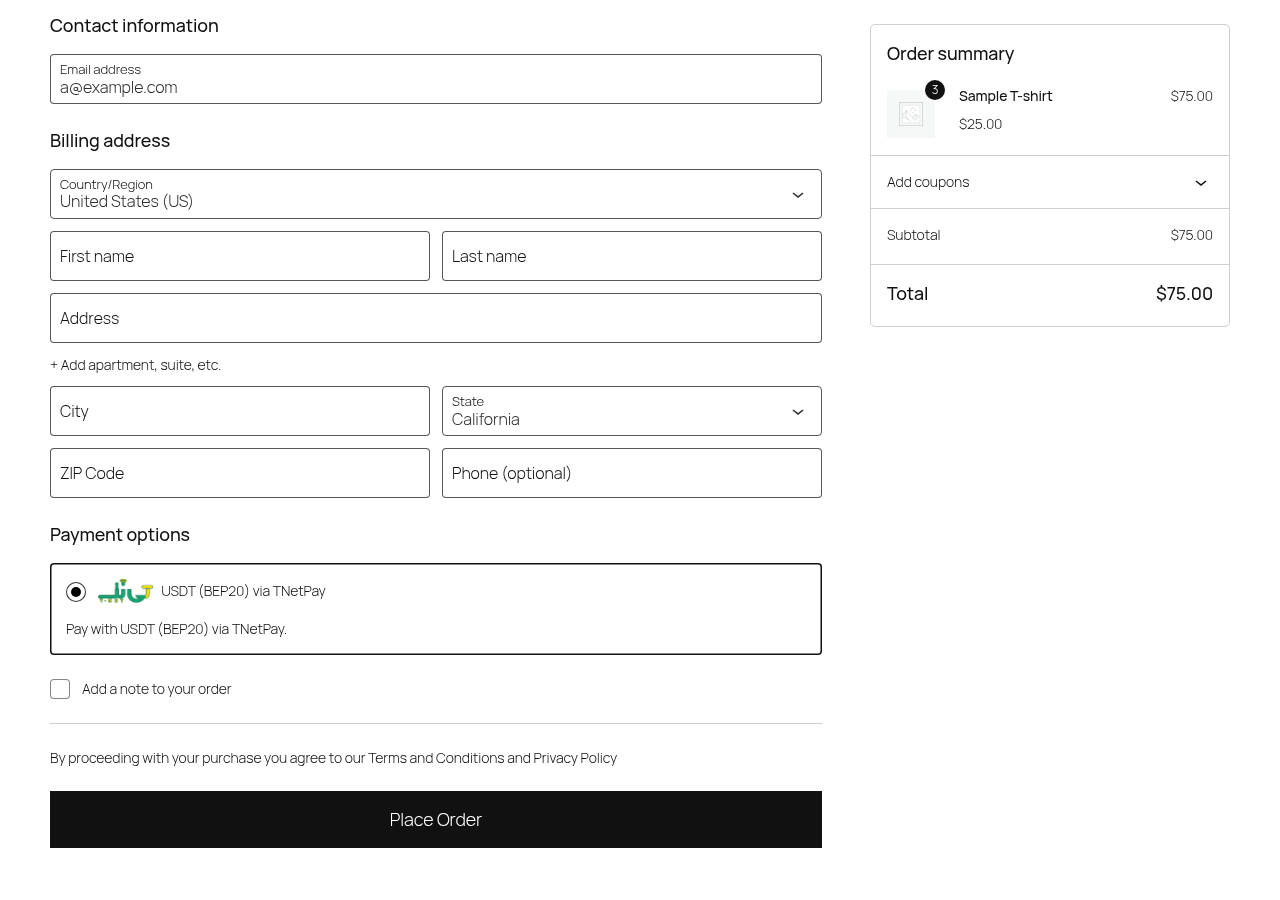
TNetPay – USDT (BEP20) Payment Gateway for WooCommerce adds a “Pay with USDT” option to your WooCommerce checkout. For every order, TNetPay creates an invoice that shows the amount, the BEP20 network and the payment address. When the payment is confirmed, the order status in your store is updated automatically through a webhook.
Pricing: Free registration, plugin and API; no monthly fee — 5% fee per transaction. In your TNetPay merchant panel you can choose to add the fee to the customer’s payment amount, so the customer pays the fee and you receive the full order amount.
Network: payments are accepted in USDT on the BEP20 network only.
Features
- USDT (BEP20) payments at the WooCommerce checkout.
- Works with both the classic checkout and the Cart & Checkout blocks.
- Compatible with WooCommerce High-Performance Order Storage (HPOS).
- Automatic order status updates after the payment is confirmed (webhook).
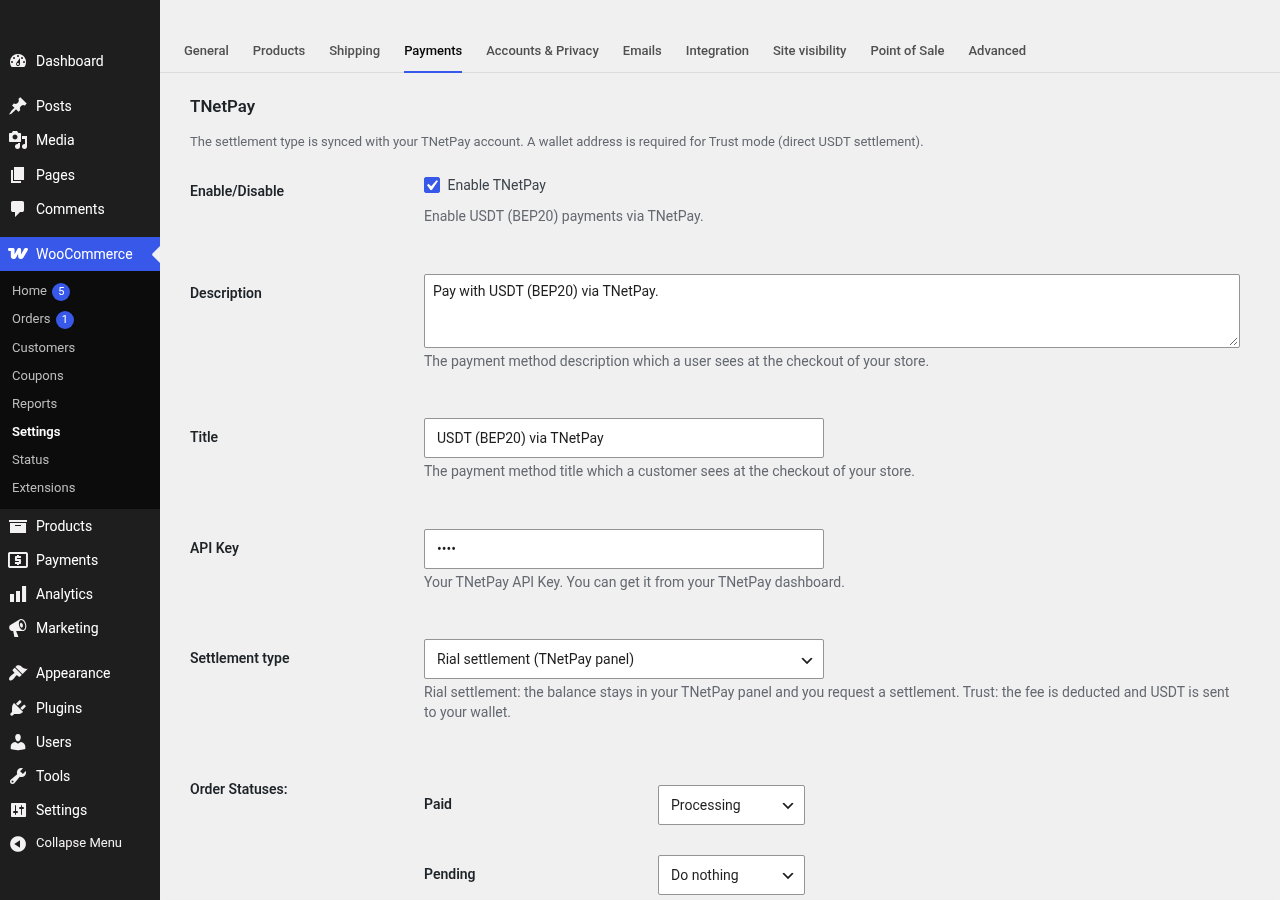
- Configurable mapping of TNetPay invoice statuses (paid, pending, expired) to WooCommerce order statuses.
- Two settlement options, synced with your TNetPay account:
- Rial settlement – the balance stays in your TNetPay panel and you request a settlement.
- Trust (direct USDT) – the fee is deducted and USDT is sent to your own BEP20 wallet.
- Option to have the customer pay the transaction fee (set in the TNetPay merchant panel).
- Works with Iranian Toman and Rial store currencies (IRT, IRR). Order totals are sent to TNetPay in Toman and converted to USDT at the live rate on the invoice.
Requirements
- A TNetPay merchant account. Merchant identity verification is mandatory before the gateway can be activated.
- An API Key from your TNetPay merchant panel.
- WooCommerce 8.0 or later.
External services
This plugin connects to the TNetPay payment service, operated by TNetPay (https://tnetpay.com). It is required to create payment invoices and to confirm payments; the gateway cannot work without it.
The plugin sends requests to the TNetPay API. The primary endpoint is https://api-relay.mytnet.ir (a TNetPay-operated relay for hosts in Iran); if it is unreachable, the plugin retries on https://tnetpay.com/api.
What is sent, and when:
- When you save the gateway settings and open the settings screen: your TNetPay API Key (as an authorization header) is sent to verify it, and your settlement type and, in Trust mode, your BEP20 wallet address are read from and saved to your TNetPay account.
- When a customer places an order with this payment method: your API Key, the order ID, the order total, the names and quantities of the ordered items, and your store’s return, cancel and webhook URLs are sent to create an invoice. The customer is then redirected to the TNetPay payment page on tnetpay.com, which is provided by TNetPay.
- When TNetPay notifies your store about a payment (webhook): the plugin sends your API Key and the invoice ID to TNetPay to read the real invoice status before changing the order.
The plugin itself does not send customer names, email addresses, phone numbers or postal addresses to TNetPay. Any details a customer enters on the TNetPay payment page are handled under the TNetPay Privacy Policy.
- TNetPay Terms of Service: https://tnetpay.com/terms
- TNetPay Privacy Policy: https://tnetpay.com/privacy
توضیحات فارسی
افزونهٔ رسمی تینتپی برای ووکامرس، پرداخت با تتر (USDT روی شبکهٔ BEP20) را به صفحهٔ تسویهحساب فروشگاه وردپرسی شما اضافه میکند. برای هر سفارش یک فاکتور ساخته میشود که مبلغ، شبکهٔ BEP20 و آدرس پرداخت را نشان میدهد و پس از تأیید پرداخت، وضعیت سفارش از طریق وبهوک خودکار بهروز میشود.
- ثبتنام، افزونه و API رایگان؛ بدون هزینهٔ ماهانه، فقط ۵٪ کارمزد هر تراکنش.
- میتوانید در پنل فروشنده تنظیم کنید که کارمزد به مبلغ پرداخت مشتری اضافه شود؛ یعنی کارمزد را مشتری میپردازد و شما کل مبلغ سفارش را دریافت میکنید.
- پرداخت فقط با تتر روی شبکهٔ BEP20.
- سازگار با تسویهحساب کلاسیک و بلوکی ووکامرس و HPOS.
- دو روش تسویه: تسویهٔ ریالی از پنل تینتپی، یا واریز مستقیم USDT به ولت BEP20 شما (Trust).
- پشتیبانی از واحد پول تومان و ریال.
- احراز هویت فروشنده برای فعال شدن درگاه الزامی است.
نصب: افزونه را نصب و فعال کنید، به ووکامرس پیکربندی پرداختها TNetPay بروید، API Key پنل فروشنده را وارد و نوع تسویه را انتخاب کنید.
Screenshots
Installation
- Create a TNetPay merchant account at https://tnetpay.com and complete identity verification (mandatory).
- Copy your API Key from the TNetPay merchant panel.
- In WordPress, go to Plugins Add New, search for “TNetPay”, then install and activate the plugin. WooCommerce must be active.
- Go to WooCommerce Settings Payments TNetPay.
- Enable the gateway, paste your API Key, choose the settlement type (for Trust mode, enter your BEP20 wallet address) and save.
Upgrading from the TNetPay plugin downloaded from tnetpay.com (folder tnetpay-woocommerce, 1.0.x): install this plugin, deactivate the old plugin, then activate this one. Your API key, settlement type, wallet address, title, description and order-status mapping are read from the same WooCommerce setting, so nothing needs to be re-entered. You can then delete the old plugin. While the old plugin is still active, this plugin stays idle and shows a notice instead of loading twice.
FAQ
-
How much does it cost?
-
Free registration, plugin and API; no monthly fee — 5% fee per transaction.
-
Can the customer pay the fee?
-
Yes. In your TNetPay merchant panel you can choose to add the fee to the customer’s payment amount. In that case you receive the full order amount.
-
Which network is supported?
-
USDT on the BEP20 network only.
-
Is identity verification required?
-
Yes. Merchant identity verification is mandatory before the gateway can be activated.
-
Does it work with the block-based checkout?
-
Yes. The gateway works with the classic checkout and with the WooCommerce Cart & Checkout blocks.
-
My store currency is Toman (IRT). Is that supported?
-
Yes. TNetPay invoices are priced in Iranian Toman, so the store currency must be Iranian Toman (IRT) or Iranian Rial (IRR); Rial totals are converted to Toman automatically. For other store currencies the payment method is hidden at checkout. Developers can map another currency with the
tnetpay_wc_order_amount_tomanfilter. -
Where do I get help?
-
Contact TNetPay support through https://tnetpay.com or use the support forum of this plugin.
Reviews
There are no reviews for this plugin.
Contributors & Developers
“TNetPay – USDT (BEP20) Payment Gateway for WooCommerce” is open source software. The following people have contributed to this plugin.
Contributors
Translate “TNetPay – USDT (BEP20) Payment Gateway for WooCommerce” into your language.
Interested in development?
Browse the code, check out the SVN repository, or subscribe to the development log by RSS.
Changelog
1.1.2
- WordPress.org review: removed bundled translation files (translations are provided via translate.wordpress.org).
- Removed load_plugin_textdomain; admin notices are limited to the Plugins screen or this gateway’s WooCommerce settings, require manage_woocommerce, and support per-user dismissible notices without marketing content.
1.1.1
- Includes the fixes from the TNetPay 1.0.10 and 1.0.11 builds.
- API endpoints are now strictly HTTPS-only: any non-HTTPS address added through the tnetpay_wc_api_base_candidates filter is ignored.
- Improved failover from the Iran relay to tnetpay.com: server errors (5xx), timeouts, rate limits (429) and other connection failures now try the next endpoint; authentication and validation errors (401, 403, 422) stop immediately.
- Safe upgrade from the stand-alone TNetPay plugin (1.0.x): while the old plugin is still active this plugin stays idle and shows an admin notice instead of loading twice. Settings are shared (same gateway ID and option), so nothing needs to be re-entered.
- Payment creation now also accepts the flat API response shape (invoiceId and paymentUrl at the top level) and reports “invalid_api_response” for unexpected responses.
1.1.0
- First release on WordPress.org.
- Licensed under GPLv2 or later.
- Removed the custom update checker; updates are delivered by WordPress.org.
- Removed an unused encoded legacy license file.
- Removed debug logging; errors are written to the WooCommerce log (source “tnetpay”) without secrets.
- All API traffic uses HTTPS only.
- Added English source strings with a bundled Persian (fa_IR) translation.
- Added uninstall cleanup of the gateway settings.
- Added a “Settings” link on the Plugins screen.
- Fixed: order totals are now always sent in Toman (IRR totals are divided by 10). The gateway is hidden for store currencies that cannot be converted to Toman (USD, EUR, GBP), which previously created invoices for the wrong amount.
- Fixed: the cancel URL sent to TNetPay is no longer HTML-escaped.
1.0.9
- The API address is set internally (Iran relay) with automatic failover to tnetpay.com.
1.0.5
- Registered the gateway for the classic and block checkout; HPOS and Blocks compatibility; IRT/IRR currency support.
1.0.3
- Settlement type selection (Rial / direct USDT).