

Description
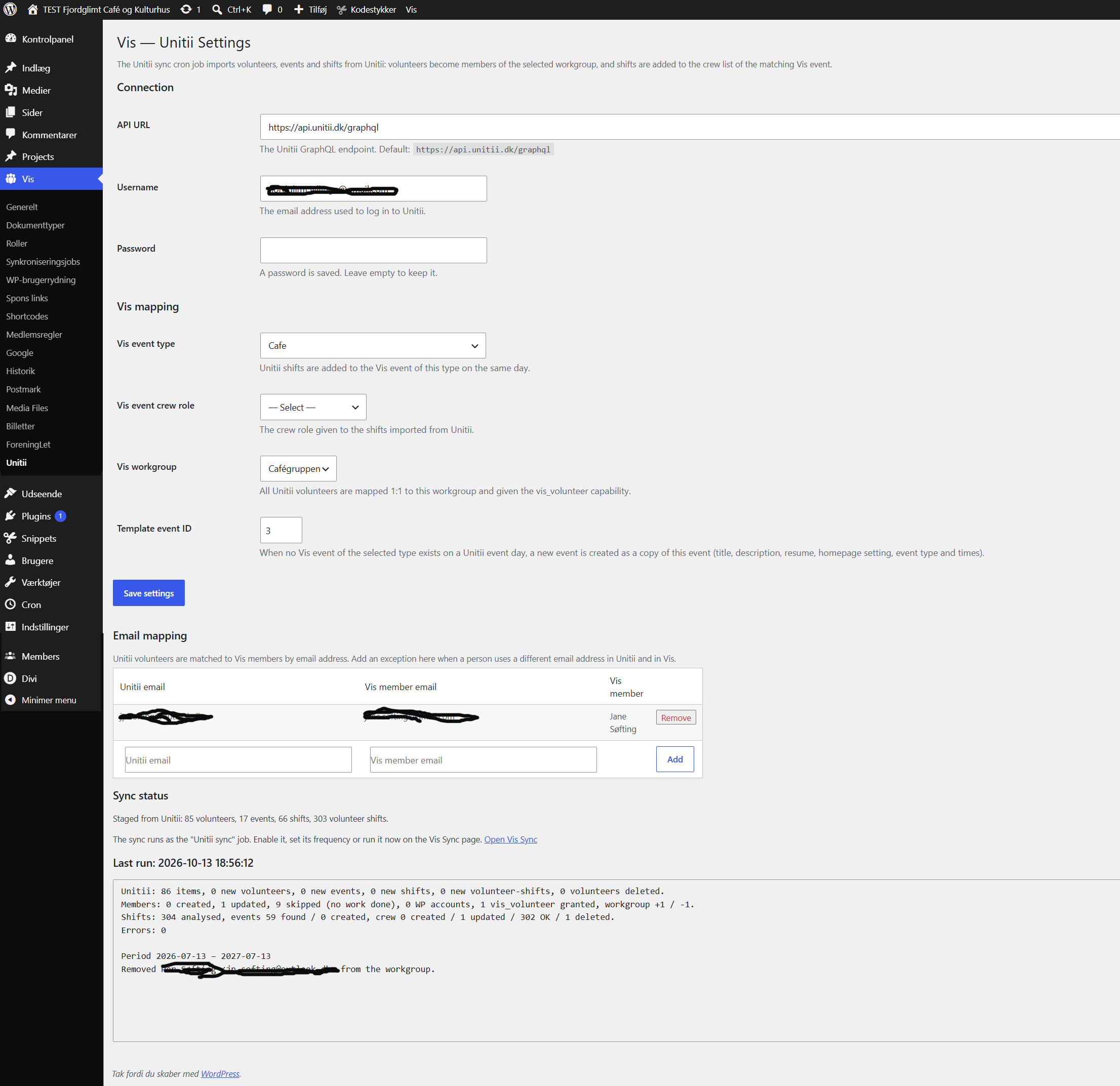
PCIO VIS With Unitii is an extension for the PCIO VIS Member Event plugin. A single cron job reads volunteers, events and shifts from the Unitii volunteer platform and:
- matches Unitii volunteers to Vis members by email address (with a configurable table of exceptions),
- creates Vis members for new volunteers that have worked a shift, and grants them the vis_volunteer capability,
- keeps the selected Vis workgroup 1:1 with the Unitii volunteers,
- finds the Vis event of the selected event type on each Unitii shift day, or creates it as a copy of a template event,
- adds each Unitii shift to the event crew list with the selected crew role, and updates or removes it when the shift changes in Unitii.
The sync covers the period from three months ago to nine months ahead. If the Unitii API cannot be reached, the run is aborted without changing anything in Vis.
This plugin requires the PCIO VIS Member Event core plugin to be installed and active.
External services
This plugin connects to the Unitii volunteer platform (https://unitii.dk) to import your organisation’s volunteers, events and shifts. Requests are only made when you have entered Unitii credentials on the plugin’s settings page, and only when the sync cron job runs.
What is sent, and when:
- Login: the configured Unitii username and password are sent to the configured API URL (default
https://api.unitii.dk/graphql) to obtain an access token. - Volunteers and shifts: a query for the sync period is sent with the access token. The response (volunteer names, email addresses, phone numbers, worked hours, events and shifts) is stored locally and used to update Vis members, the workgroup and event crew lists.
No other data from your WordPress site is sent to Unitii. Please ensure your own privacy policy covers this integration. Unitii terms and privacy information: https://unitii.dk/
Screenshots
Installation
- Install and activate the PCIO VIS Member Event core plugin first.
- Upload the
pcio-vis-with-unitiidirectory to/wp-content/plugins/. - Activate the plugin in Plugins in the WordPress admin.
- Configure the connection and Vis mapping under Vis Unitii.
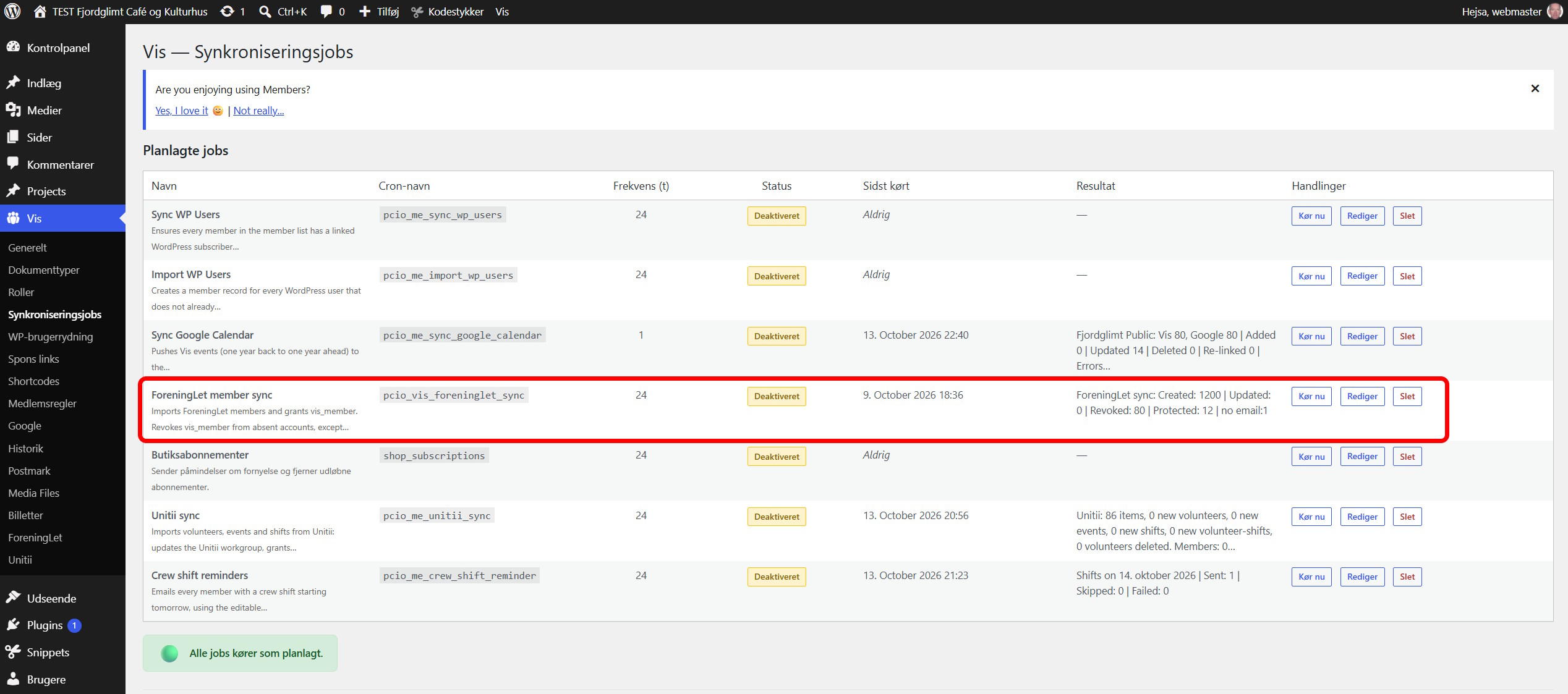
- Enable the “Unitii sync” job under Vis Sync.
FAQ
-
How often does the sync run?
-
On the schedule configured for the “Unitii sync” job under Vis Sync. The job is disabled until you enable it.
-
Which volunteers become Vis members?
-
Volunteers whose email address (or mapped exception) matches an existing Vis member are always linked. New Vis members are created only for volunteers who have worked hours and have at least one shift.
-
Are manually added crew assignments touched?
-
No. The sync only updates and removes the crew rows it created (or adopted) for Unitii shifts.
-
What is copied from the template event?
-
Title, description, resume, the “publish on homepage” flag and the event type. The start, end, get-in and door opening times are moved to the new day with the same time of day, so an end after midnight or a get-in the evening before stays relative to the start. Requires PCIO VIS Member Event 1.6.0 or later for get-in and door opening times.
Reviews
There are no reviews for this plugin.
Contributors & Developers
“PCIO VIS With Unitii” is open source software. The following people have contributed to this plugin.
Contributors
Translate “PCIO VIS With Unitii” into your language.
Interested in development?
Browse the code, check out the SVN repository, or subscribe to the development log by RSS.
Changelog
1.0.0
- Initial release.