

Description
From 31 January 2027 Google Merchant Center requires product images of at least
500 × 500 pixels, for the main image (image_link) and for the additional images
(additional_image_link).
Merchant Center already shows the warning “Image too small for upcoming enforcement” on offers
whose images are smaller. Google may reject such an image or replace it with an enlarged copy.
A shop that has been adding products for years can have hundreds of such images and no way to see
them: WordPress shows every picture as a neat thumbnail. This plugin measures every image that goes
to Google and tells you which products need attention, and how much work each one is.
What it checks
- The main image of every published product and the own image of every variation.
- Gallery images, up to 10 per product — Google takes up to 10 additional images.
- A product with no main image: the first gallery image, because that is the one Google for
WooCommerce sends as the main image.
The size is read from the image file itself, the full-size file that feeds send to Google.
A verdict for every product
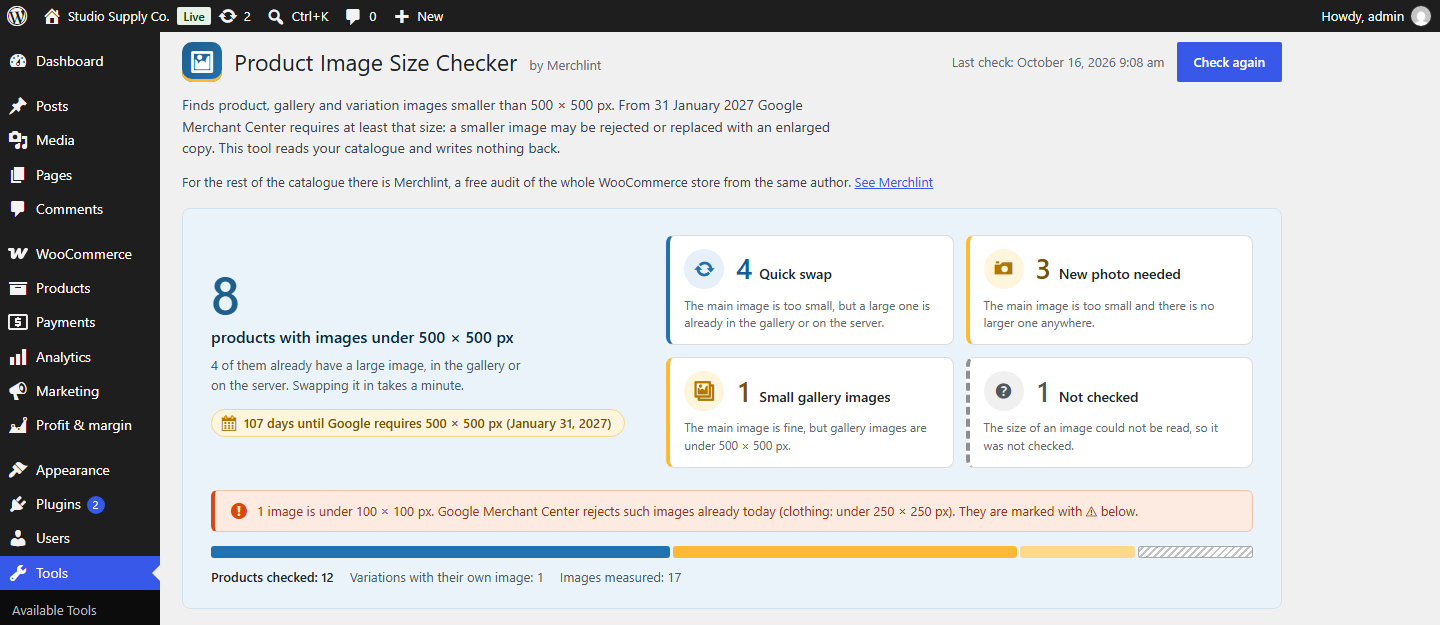
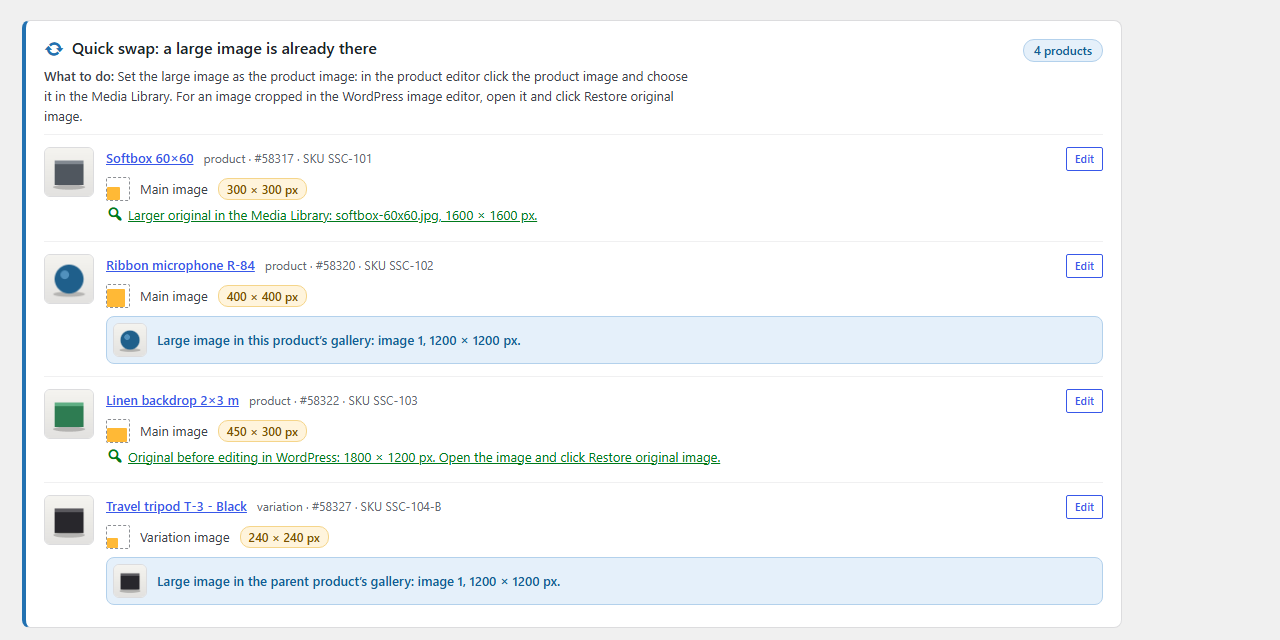
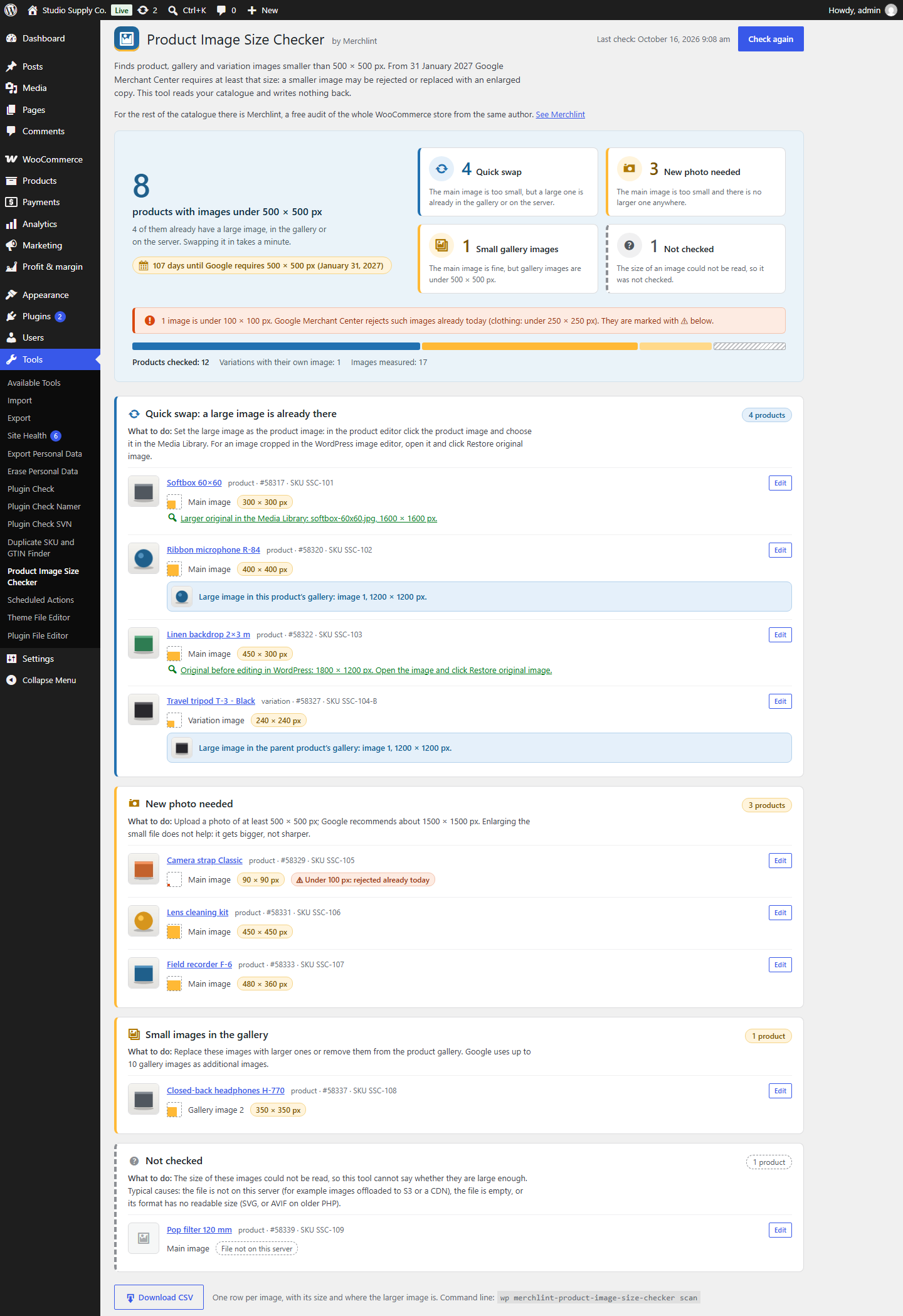
- Quick swap — the main image is too small, but a large one is already there: in the product
gallery or on the server. - New photo needed — the main image is too small and there is no larger one anywhere.
- Small gallery images — the main image is fine, but some gallery images are under 500 × 500 px.
- Not checked — the size of an image could not be read, so the plugin does not guess.
Images under 100 × 100 px are marked separately: Google Merchant Center rejects those already today
(clothing: under 250 × 250 px).
Larger originals already on the server
Very often a small product image is a thumbnail — a file whose name ends in -300x300 — that was
uploaded or imported as an image of its own, while the full picture is still there. The plugin
looks for:
- the full image with the same name in the Media Library;
- the full image as a file in the same folder, outside the Media Library;
- an image cropped in the WordPress image editor, whose untouched original WordPress keeps
(“Restore original image”).
Where you see the result
- One screen under Tools: the number of products to fix, the days left until 31 January 2027,
and a card for each verdict with thumbnails, sizes, where the large image is, and a link to edit
the product. - A CSV file with one row per image: product, SKU, size, verdict and where the larger image is.
Semicolon separated, opens in Excel and Google Sheets. - WP-CLI:
wp merchlint-product-image-size-checker scan, with--export=file.csvfor the full
list.
What it does not do
It never changes your products or images. It does not enlarge images and does not add frames:
an enlarged small picture gets bigger, not sharper. Every finding shows the size that was read, so
you can check the claim before you act on it.
The check runs in a single request, so on a very large catalogue it can run into your host’s time
limit — the screen says so when that becomes likely, and the WP-CLI command has no such limit.
A small part of Merchlint
This plugin comes from the author of Merchlint, a free
audit of the whole WooCommerce catalogue: products that sold in the past year and can no longer be
bought, products with no price or no photo, duplicate SKUs, sale prices that should have ended and
images with no alt text, each with the money at stake. This plugin carries its own copy of the
scanning engine with its own class names, so both can run side by side.
Screenshots
Installation
- Install and activate.
- Open Tools Product Image Size Checker.
- Press Check images now.
For large catalogues there is a WP-CLI command: wp merchlint-product-image-size-checker scan.
FAQ
-
What does “Image too small for upcoming enforcement” mean?
-
It is a warning in Google Merchant Center: the image of this offer is smaller than 500 × 500 pixels,
the minimum Google applies to all products from 31 January 2027. Until then the old minimum applies:
100 × 100 pixels, or 250 × 250 for clothing. The rules are on
Google’s help page for the image_link attribute. -
Will Google reject every image this plugin lists?
-
Not necessarily. Google says it will optimize some images smaller than 500 × 500 automatically, and
it does not say which. A listed image may be rejected or replaced with an enlarged copy. Images
under 100 × 100 px are rejected already today; the plugin marks them separately. -
My original image is large, but Merchant Center still says it is too small.
-
The plugin checks the full-size file. Some feed plugins let you choose which image size goes into
the feed; if yours sends a smaller size, Google gets that smaller image. Set the feed to the full
size. -
Which images are not checked?
-
Images whose file is not on this server (for example images offloaded to S3 or a CDN), empty files,
and formats whose size PHP cannot read (SVG, or AVIF on older PHP). They are listed as “Not checked”
with the reason, instead of being guessed. Drafts and private products are not checked: they do not
go to Google. -
Can I just enlarge the small images?
-
The plugin does not do it, and it does not help: an enlarged small picture gets bigger, not sharper.
Use a larger original or a new photo. Google recommends about 1500 × 1500 pixels. -
Does it change anything in my shop?
-
No. It reads products and image files and stores only the last result in one option. Deleting the
plugin removes that option.
Reviews
There are no reviews for this plugin.
Contributors & Developers
“Merchlint – Product Image Size Checker for Google Merchant Center” is open source software. The following people have contributed to this plugin.
Contributors
“Merchlint – Product Image Size Checker for Google Merchant Center” has been translated into 1 locale. Thank you to the translators for their contributions.
Translate “Merchlint – Product Image Size Checker for Google Merchant Center” into your language.
Interested in development?
Browse the code, check out the SVN repository, or subscribe to the development log by RSS.
Changelog
0.1.0
- First release.