Description
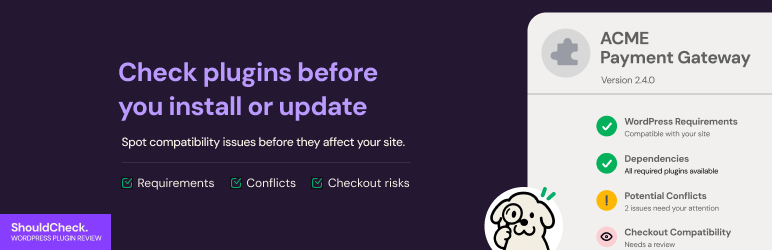
ShouldCheck reads a plugin’s header and code without running it, compares what it finds with your site, and gives a verdict: blocking problems, things to verify, what passed, and what was not checked.
- Reviews ZIP uploads, WordPress.org plugin cards and pending plugin updates.
- Detects payments, WooCommerce, page builder, form, REST, scheduled task, database and email code patterns.
- Compares WooCommerce HPOS and Checkout Blocks declarations with how your store is set up.
- Compares the function, class and constant names a package declares with your active plugins, to find a “Cannot redeclare” crash before you activate.
- Marks reviews that touch your money path (payment gateways, WooCommerce itself) and warns when customers are checking out right now.
- Shows how your checkout is set up: currency, HTTPS, enabled payment methods, test mode, whether credentials were entered (never their values), and your quietest three hours from your own order times.
- Records plugin, theme and core changes on your site.
What it does not do: it does not run the plugin, it does not install, activate or deactivate any plugin, it is not a security scanner, it does not place orders or take payments, and a passed check never means a plugin works. When it left more unchecked than it checked, the verdict says so.
Learn more at shouldcheck.satyenaghor.com.
External services
ShouldCheck contacts two WordPress.org services, only when you ask it to review a plugin from the directory, and only after you have chosen.
- api.wordpress.org: the plugin’s listing (name, version, requirements, tags). This is the same request WordPress makes on Plugins > Add New. Terms and privacy: https://wordpress.org/about/privacy/
- downloads.wordpress.org: the published ZIP of the plugin, downloaded so its code can be read. ShouldCheck reads the file and deletes it. It does not extract it into your plugins folder, install it or run it. It asks first, once, and you can turn it off in ShouldCheck settings. Without it, a review reads the listing only.
Both requests carry WordPress’s usual user agent (your site address and WordPress version). ShouldCheck sends nothing to its authors, has no account, and runs no tracking or analytics.
After a review of a WordPress.org plugin or a pending update, Continue opens WordPress’s own installer or updater for that plugin. WordPress core does the install, with its usual checks. A ZIP you uploaded for review is only read: to install it, choose it again in Plugins > Add New > Upload Plugin. Activating is always your own step on the Plugins screen.
Privacy
ShouldCheck stores its reviews, a list of site changes (plugin, theme and WordPress updates) and its settings in your database. A review records the ID of the administrator who asked for it. It stores no visitor or customer data and no payment keys; it only notes whether keys were entered. Nothing is sent to the authors. There is no account, tracking or analytics. The only outside requests are the two WordPress.org ones listed above, made when an administrator asks. ShouldCheck adds suggested wording to Settings > Privacy > Policy Guide. Deleting the plugin removes its data unless you chose to keep reviews, history and settings.
Settings
- Reading plugins from WordPress.org: download the published ZIP to read its code, or read the listing only.
- Where ShouldCheck appears: next to the install buttons (adds a review button beside Install Now, Upload and updates; WordPress’s own buttons stay as they are), or only when you ask. Nothing is added until you choose.
Installation
- In your WordPress admin, go to Plugins > Add New, search for “ShouldCheck”, then click Install Now and Activate.
- On the Plugins screen, a notice asks for your first choices: where ShouldCheck appears, and whether it may read plugin code from WordPress.org. Click Choose now, or open Tools > ShouldCheck.
- To review a plugin, use the ShouldCheck button beside Install Now on a plugin card, beside Install Now on Upload Plugin, or on a plugin with a pending update. You can also open Tools > ShouldCheck and choose a ZIP under “Check a plugin before you install it”.
To install by hand, upload the shouldcheck folder to /wp-content/plugins/ and activate it on the Plugins screen.
FAQ
-
How do I report a problem or ask a question?
-
Use the support tab of this plugin on WordPress.org. Please include your WordPress, PHP and WooCommerce versions, and the name of the plugin you were reviewing. For a security problem, do not post details in public. Follow SECURITY.md in the plugin folder and email the address there.
-
Does a review mean a plugin is safe?
-
No. ShouldCheck reads a package and reports what it found and what it did not test. It does not prove a plugin works or is safe.
-
Does ShouldCheck install or activate plugins?
-
No. It only reads them. After a review of a WordPress.org plugin or an update, Continue opens WordPress’s own installer or updater. A ZIP you reviewed is installed from Plugins > Add New > Upload Plugin, and you activate plugins on the Plugins screen.
-
Yes. Choose the plugin’s ZIP on Upload Plugin and press the ShouldCheck button beside Install Now, or choose it under Tools > ShouldCheck. It reads ZIPs up to 25 MB. Then install the same file with Install Now.
-
Do I need WooCommerce?
-
No. ShouldCheck works on any WordPress site. The checkout and money-path checks only run when WooCommerce is active.
-
What does ShouldCheck send outside my site?
-
Only two requests to WordPress.org, when you review a directory plugin: its listing, and, if you allowed it, its published ZIP so the code can be read. Nothing goes to ShouldCheck’s authors. See External services above.
-
Will it slow down my site?
-
Reviews run only when an administrator asks for one, in the admin. A light hourly check records plugin, theme and WordPress changes for the Site changes tab. Nothing runs for visitors.
-
How is it different from Plugin Check?
-
Plugin Check helps authors prepare a plugin for WordPress.org. ShouldCheck helps site owners: it reads a plugin against your own site (your WordPress, PHP, WooCommerce and active plugins) before you install, update or activate it.
-
Does it work on multisite?
-
Not fully in this version. On a multisite network the review buttons are not added to the install and update screens, and ZIP checks are not offered.
Reviews
There are no reviews for this plugin.
Contributors & Developers
“ShouldCheck” is open source software. The following people have contributed to this plugin.
Contributors
Translate “ShouldCheck” into your language.
Interested in development?
Browse the code, check out the SVN repository, or subscribe to the development log by RSS.
Changelog
1.0.1
- First public release.
- Reviews a plugin before you install it (ZIP upload, Add New card), update it, or activate it. Reads code without running it.
- Never installs, activates or deactivates a plugin, and never replaces a WordPress button. A reviewed ZIP is installed from WordPress’s Upload Plugin, and plugins are activated from the Plugins screen. No redirect after activating ShouldCheck: a notice on the Plugins screens asks for the first-run choices.
- Plain-language findings: what was noticed, why it could matter, how worried to be, what to do.
- Says what it did not check. Never says a plugin is safe.
- Checks declared versions, name clashes with your active plugins, public entry points, WooCommerce HPOS and Checkout Blocks declarations, code that needs a newer PHP, and programs or scripts inside a ZIP.
- Privacy wording in the readme and in Settings > Privacy > Policy Guide.
- Not verified: tested on fixture plugins and a set of real-plugin reviews, not against every WordPress.org plugin.