
Description
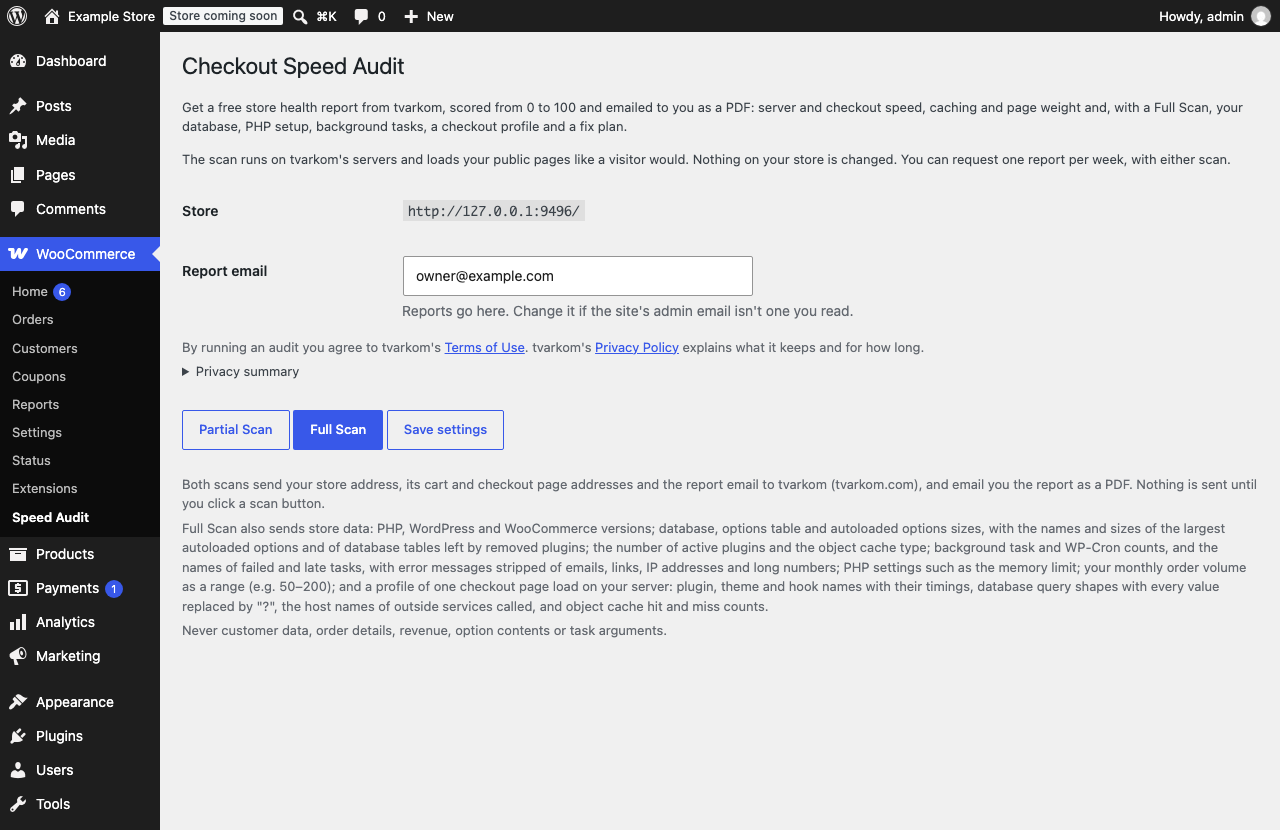
Adds a WooCommerce Speed Audit page with two buttons. Both are free, and the report arrives by email as a PDF within a few minutes.
Partial Scan: Tvarkom’s scanner measures your store from outside, the way a visitor’s request would reach it:
- Server response time of your homepage, cart and checkout
- Caching of your pages and static files
- Page weight, number of files and marketing trackers
Full Scan: everything in the Partial Scan, plus what the plugin reads from your store:
- Autoloaded options and database size, with the largest autoloaded options and the database tables left by removed plugins
- PHP version and settings, active plugins and object cache
- Action Scheduler and WP-Cron health, with failed and late tasks
- A profile of one checkout page load: which plugins, hooks, database queries and outside services take the time
- A fix plan: what to fix first, step by step, with estimated developer hours
You can request one report per week, with either scan. Until 7 days have passed, the scan buttons are disabled and the page shows the date of your next scan. A scan that failed doesn’t count. Reports go to the site’s admin email by default; you can change the address.
The scan runs on Tvarkom’s servers and loads your public pages like a visitor would. The plugin changes nothing on your store. For the Full Scan’s checkout profile it loads your checkout page once from your own server, with one product in a temporary cart that is never saved; nothing is ordered. Analytics or marketing plugins that record checkout visits on the server may count that page load as one visit.
External services
This plugin uses the Tvarkom audit service (https://tvarkom.com) to register your store and run scans. Nothing is sent to Tvarkom until an administrator clicks Partial Scan or Full Scan.
Registration (first scan only): your store’s home URL, the report email and the URL of the plugin’s verification endpoint are sent to https://api.tvarkom.com/v1/register. Tvarkom then calls https://<your store>/wp-json/tvarkom/v1/verify to confirm the request came from your store, and issues a free API key for your domain (https://api.tvarkom.com/v1/register/verify).
Each scan: your store’s home URL, cart and checkout URLs and the report email are sent to https://api.tvarkom.com/v1/audits. Tvarkom’s scanner then loads your homepage, cart and checkout pages. A Partial Scan sends nothing else.
Full Scan only: these values are sent as well. The plugin lists them next to the Full Scan button.
- PHP, WordPress and WooCommerce versions
- Database and options table sizes, autoloaded options size
- Number of active plugins, object cache type
- Action Scheduler task counts (pending, overdue, failed) and how late WP-Cron is
- Orders in the last 30 days as a range (for example 50–200)
- The names and sizes of the 20 largest autoloaded options (never their contents)
- Names, sizes and estimated row counts of database tables no active plugin or theme matches, each with the name of the switched-off or not-installed plugin or theme it likely belongs to
memory_limit,WP_MEMORY_LIMIT,max_execution_timeand whether OPcache is on- Failed Action Scheduler tasks grouped by hook with their count and last error message (with emails, links, IP addresses and long numbers removed), and the hook names and times of tasks more than 15 minutes late (never their arguments)
- The checkout profile: plugin, theme and hook names with their timings and call counts, database query shapes with every value replaced by
?, the host names (not the full addresses) of outside services called while the checkout page loads, object cache hit and miss counts, peak memory and the page’s server time
The report is emailed to the report email, with a copy to Tvarkom’s report mailbox (checkoutspeedaudit@tvarkom.com) for support and records, deleted after 12 months. Tvarkom’s database keeps no copy of it once it’s sent (see the privacy policy for the mailbox, the short-lived working copy and backups).
Next scan date: the plugin asks https://api.tvarkom.com/v1/client when your store may scan again, each time you open its page and before each scan.
No customer data, order contents or revenue figures are ever sent. The report is emailed only to the report email.
Terms of use: https://plugins.svn.wordpress.org/tvarkom-checkout-speed-audit-for-woocommerce/trunk/legal/terms-of-use.txt
Privacy policy: https://plugins.svn.wordpress.org/tvarkom-checkout-speed-audit-for-woocommerce/trunk/legal/privacy-policy.txt
Both ship with the plugin in its legal folder. The plugin page links to them before you run a scan, with a short privacy summary, and the plugin suggests text for your own privacy policy under Settings Privacy.
Screenshots
Installation
- Install from Plugins Add New: search for “Checkout Speed Audit”, or upload the plugin zip. WooCommerce must be installed and active.
- Activate the plugin.
- Go to WooCommerce Speed Audit, check the Report email, and click Partial Scan or Full Scan. The first scan registers your store with Tvarkom; the report arrives by email within a few minutes.
FAQ
-
Does it work on a staging or local site?
-
No: Tvarkom must reach your store over the public internet with https, so localhost, IP addresses and password-protected sites can’t be scanned.
-
Registration fails with “We couldn’t confirm this domain”
-
Tvarkom needs to reach
/wp-json/tvarkom/v1/verifyon your store. Check that a security plugin or firewall doesn’t block the WordPress REST API for outside visitors. -
How often can I run a scan?
-
Once a week, with either scan. The 7 days count from your last scan; until then the scan buttons are disabled and the page shows the date of your next scan. A scan that failed doesn’t count, so you can try again (at most 3 new scans in 24 hours).
-
What is the difference between Partial Scan and Full Scan?
-
A Partial Scan measures your public pages from outside and sends no store data. A Full Scan also sends the store data listed under External services, so the report covers your database, PHP setup, background tasks and a checkout profile, with a fix plan. Both are free.
-
Why don’t I see results on the plugin page?
-
Every result arrives by email as a PDF report, so you can keep it and pass it to your developer.
-
The report didn’t arrive
-
Reports come from checkoutspeedaudit@tvarkom.com within a few minutes. Check your spam folder and that the Report email on the plugin page is one you read.
-
What happens to my data if I uninstall?
-
Uninstalling removes the plugin’s settings from your database. Run the plugin again later and your store registers again with a new key.
-
Where do I get help?
-
Use the plugin’s support forum on WordPress.org, or email support@tvarkom.com.
Reviews
There are no reviews for this plugin.
Contributors & Developers
“Checkout Speed Audit” is open source software. The following people have contributed to this plugin.
Contributors
Translate “Checkout Speed Audit” into your language.
Interested in development?
Browse the code, check out the SVN repository, or subscribe to the development log by RSS.
Changelog
0.9.1
- The plugin is now called Checkout Speed Audit.
0.9.0
- First release on WordPress.org.
- Free store health report from Tvarkom, scored from 0 to 100 and emailed as a PDF: Partial Scan (outside measurements) or Full Scan (with store data, a checkout profile and a fix plan). One report per week.
- Terms of use and privacy policy ship with the plugin.