
Description
ViewWear AI Try-on adds a “Virtual Try-On” button to your WooCommerce clothing products. The shopper uploads a photo or uses their camera, and a few seconds later sees themselves wearing the product – in the colour and variation they picked.
Free AI option
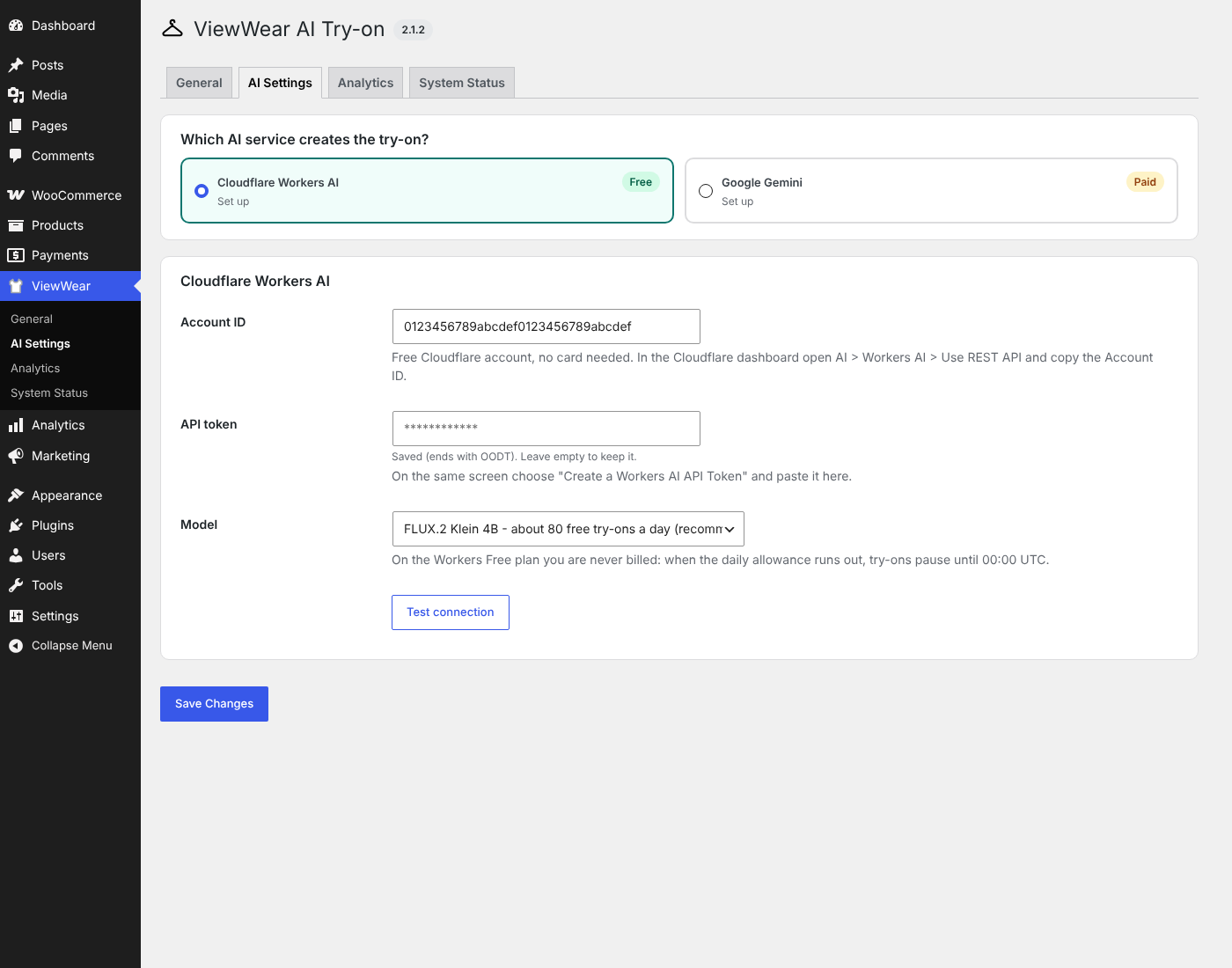
ViewWear works with a free Cloudflare account (no credit card). Cloudflare Workers AI includes 10,000 free “neurons” a day – about 80 try-ons with the FLUX.2 Klein 4B model. On the Workers Free plan you are never billed: when the daily allowance runs out, try-ons simply pause until 00:00 UTC.
Prefer Google? ViewWear also works with Google Gemini image models (paid by Google, no free tier for images). The newest model is picked automatically.
Features
- Try-on popup on product pages: upload, drag and drop, or camera (front / back camera switch on phones and tablets)
- Shoppers can choose which product photo to try and pick size / colour in the popup
- Before / After slider and side-by-side view
- Add to Cart straight from the result
- Download and share (WhatsApp, Facebook, X, Pinterest, or the phone’s share sheet)
- Face accuracy: the photo is cropped around the shopper before it is sent, and the shopper’s real face can be blended back into the result – both run in the shopper’s browser
- Optional “garment-only” photo per product for the most faithful results
- Turn try-on on for all products, per product, or with bulk actions on the Products list
- The shopper’s photo can be remembered in their own browser for 24 hours (they can remove it at any time)
- Abuse protection you control: try-ons per visitor, wait between tries of the same product, store-wide daily cap, logged-in shoppers only, proxy setting
- Image settings: size and JPEG quality sent to the AI, and reuse of earlier results for the same photo and product
- Analytics for 7, 30 or 90 days: try-ons, success rate, button clicks, top products and why try-ons failed
- Privacy: consent checkbox, suggested privacy-policy text, WordPress personal-data eraser, automatic deletion of try-on images
- Works with page caching, HPOS and the block checkout
ViewWear Pro
ViewWear AI Try-on Pro is a separate, optional add-on plugin that you install next to this one. It adds its own features: try-on by product category, “Try On” links on shop and category pages, a shortcode for any page or page builder, “Try more products” suggestions, and sales tracking (add to carts, orders and revenue from try-ons, with a dashboard widget). This free plugin has no locked or limited features.
External services
ViewWear needs an AI image service to create the try-on picture. Nothing is sent anywhere until the store owner has entered their own API credentials and a shopper ticks the consent box and starts a try-on.
Cloudflare Workers AI (when selected under ViewWear > AI Settings)
- What is sent, and when: when a shopper starts a try-on, their photo (resized to under 512 px) and the product photo, plus a text instruction with the product name and short description. When the store owner presses “Test connection”, only the credentials are checked (no image).
- Endpoint: api.cloudflare.com
- Terms of service: https://www.cloudflare.com/terms/ – Privacy policy: https://www.cloudflare.com/privacypolicy/
Google Gemini API (when selected under ViewWear > AI Settings)
- What is sent, and when: when a shopper starts a try-on, their photo and the product photo (resized), plus a text instruction with the product name and short description. When the store owner opens AI Settings or presses “Test connection”, the list of available models is requested with the API key (no image).
- Endpoint: generativelanguage.googleapis.com
- Terms of service: https://ai.google.dev/gemini-api/terms – Privacy policy: https://policies.google.com/privacy
ViewWear itself does not collect any data and does not “phone home”. Face detection for “Crop to the shopper” and “Keep the real face” runs entirely in the shopper’s browser with the bundled face-api library; no extra data is sent.
Screenshots

Installation
- Install and activate WooCommerce.
- Install ViewWear AI Try-on from Plugins > Add New (or upload the zip) and activate it.
- Create a free Cloudflare account at https://dash.cloudflare.com/ and open AI > Workers AI > Use REST API. Copy the Account ID and create a Workers AI API token.
- In WordPress open ViewWear > AI Settings, choose Cloudflare Workers AI, paste both values, save and press Test connection.
- Under ViewWear > General switch on “All products”, or turn try-on on per product (Product data > General) or with the bulk actions on the Products list.
FAQ
-
Is it really free?
-
Yes, with Cloudflare Workers AI on the Workers Free plan (about 80 try-ons a day). If you move your Cloudflare account to the paid Workers plan, Cloudflare bills usage above the free allowance.
-
Which products work best?
-
Clothing: tops, shirts, jackets, dresses, trousers and full outfits. For the most faithful results add a “Try-on garment photo” (flat-lay, hanger or ghost mannequin) on the product.
-
Is the shopper’s photo stored?
-
The original photo is not stored on your server. It is sent to the AI service you selected, together with the product image. The created picture is stored in wp-content/uploads/viewwear-results with a random file name, is excluded from search engines, and is deleted automatically after the number of days you choose (1 day by default). Shoppers can choose to keep their photo in their own browser for 24 hours to try more items.
-
Does it work with my theme / page cache?
-
The button and popup use their own styles and do not change your theme’s Add to Cart layout. Pages served from a full-page cache work: the popup refreshes its security token when needed.
-
Where is the source code of the minified files?
-
The readable source of every minified script and stylesheet is included next to it (for example assets/js/popup.js next to popup.min.js). They are minified with terser and clean-css; set SCRIPT_DEBUG to true to load the readable versions. The bundled face-api library (assets/vendor/face-api) is published by Vladimir Mandic under the MIT licence; its source is at https://github.com/vladmandic/face-api
Reviews
There are no reviews for this plugin.
Contributors & Developers
“ViewWear AI Try-on” is open source software. The following people have contributed to this plugin.
Contributors
Translate “ViewWear AI Try-on” into your language.
Interested in development?
Browse the code, check out the SVN repository, or subscribe to the development log by RSS.
Changelog
2.1.2
- Face detection model weights are now shipped as JSON files (no binary files in the plugin).
2.1.1
- Size / colour labels in the popup start with a capital letter even when the store named the attribute in lower case.
2.1.0
- Image settings and abuse-protection limits can now be changed on the General screen.
- Analytics: 30 and 90-day views and a “Why try-ons failed” table.
2.0.1
- ViewWear Pro is now a separate add-on plugin installed next to the free plugin (it no longer replaces it).
- The free plugin no longer bundles any licensing SDK.
2.0.0
- Rebuilt from the ground up: new code base, faster pages, smaller attack surface.
- Free and Pro editions. The free edition includes the full try-on experience, face accuracy, both AI services and basic analytics.
- Removed the Replicate / FAL providers (the IDM-VTON model they used is licensed for non-commercial use only).
- No REST API and no polling endpoint: everything goes through nonce-checked admin-ajax requests.
- Analytics chart drawn by the plugin (no chart library).
- Settings, products and statistics from 1.x are kept.