Description
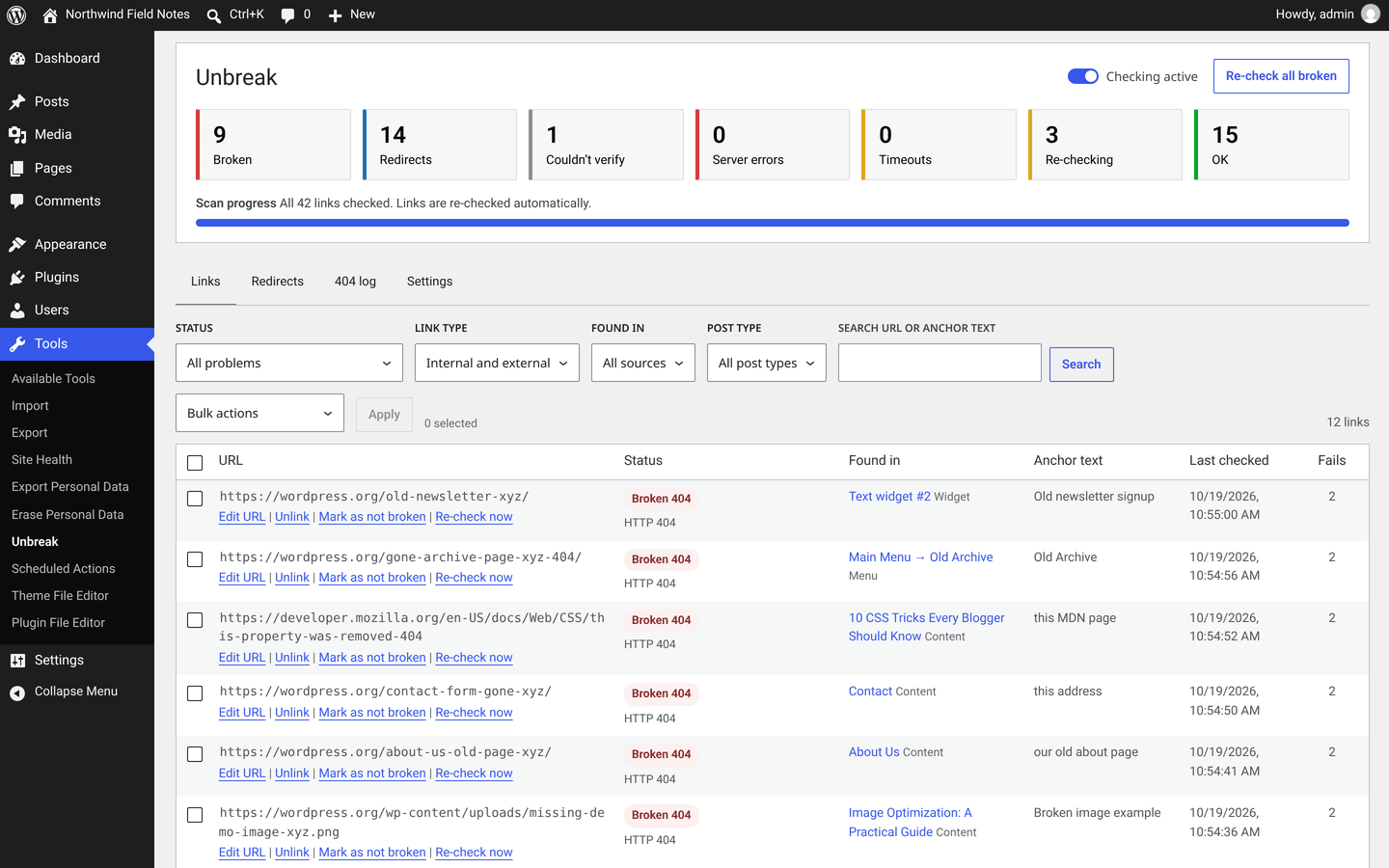
Unbreak checks the links on your site from your own server. It needs no account, no API key and no credit card. Sites that block automated checks (Amazon, LinkedIn, Cloudflare challenges) are listed as “Couldn’t verify” instead of broken, and a link is only marked broken after repeated failures over time. It finds links in post content, Elementor data, menus and widgets. You can fix them in bulk: every change is previewed first, and the last bulk action can be undone in one click. Redirects and a 404 log are built in.
Fewer false alarms
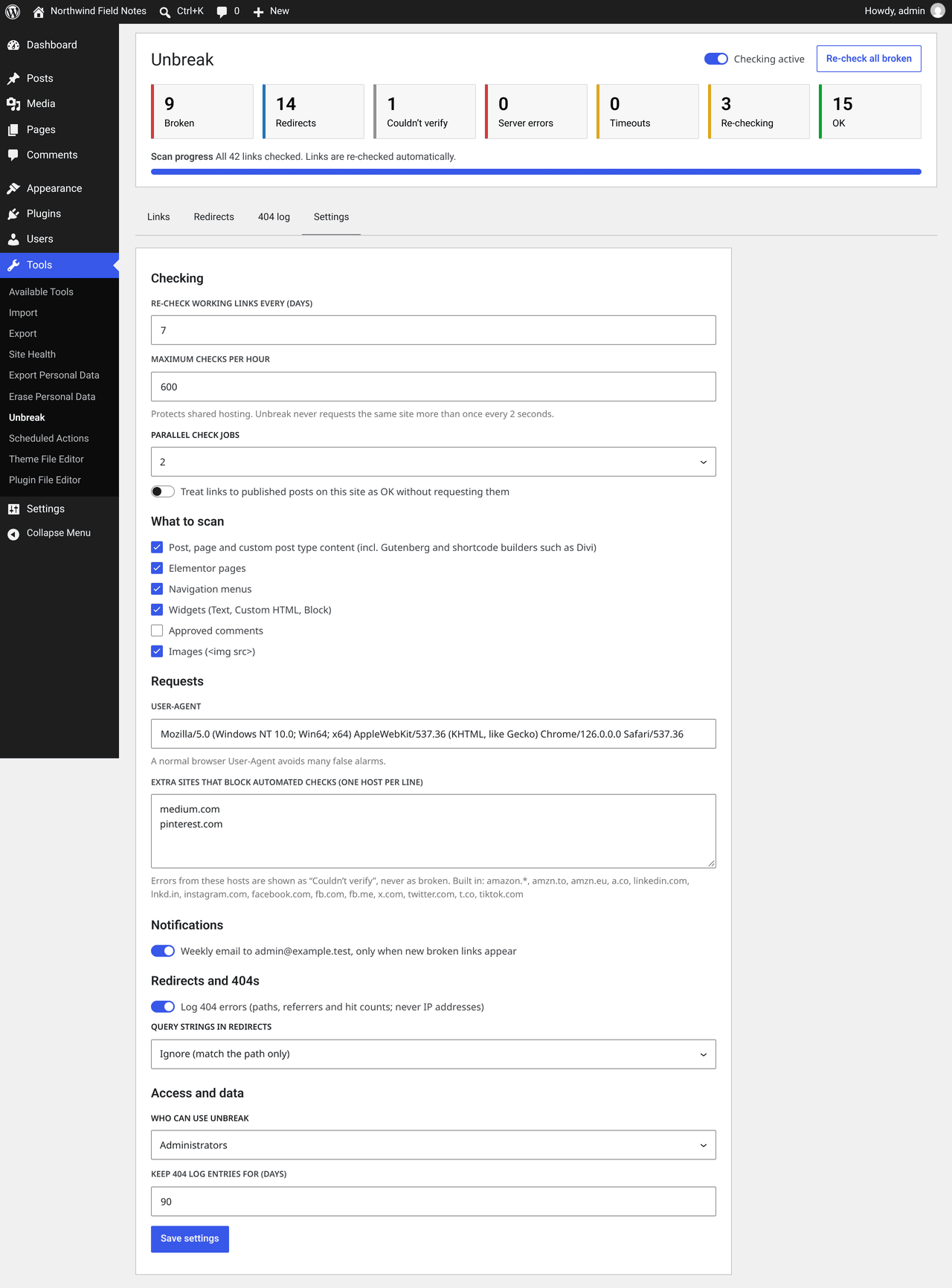
Many sites answer automated requests with 403, 429, 503 or 999, or with a bot challenge page. Those answers say nothing about whether the page exists, so Unbreak lists such links as “Couldn’t verify”. You can add more hosts to this list under Settings.
A failing link is first shown as “Re-checking (not confirmed yet)” and checked again later. It is only marked broken when it keeps failing: a 404 twice, at least 6 hours apart; server errors and timeouts three times over at least 24 hours.
Where it finds links
- Posts, pages and custom post types: classic editor and Gutenberg blocks (including embeds and file blocks)
- Elementor pages (
_elementor_data) - Divi and other shortcode-based builders (button and module URLs)
- Navigation menus (custom links)
- Text, Custom HTML and Block widgets
- Approved comments (optional, off by default)
- Images (optional, on by default)
Links to your own dashboard, login page and other admin URLs are ignored.
Fixing links
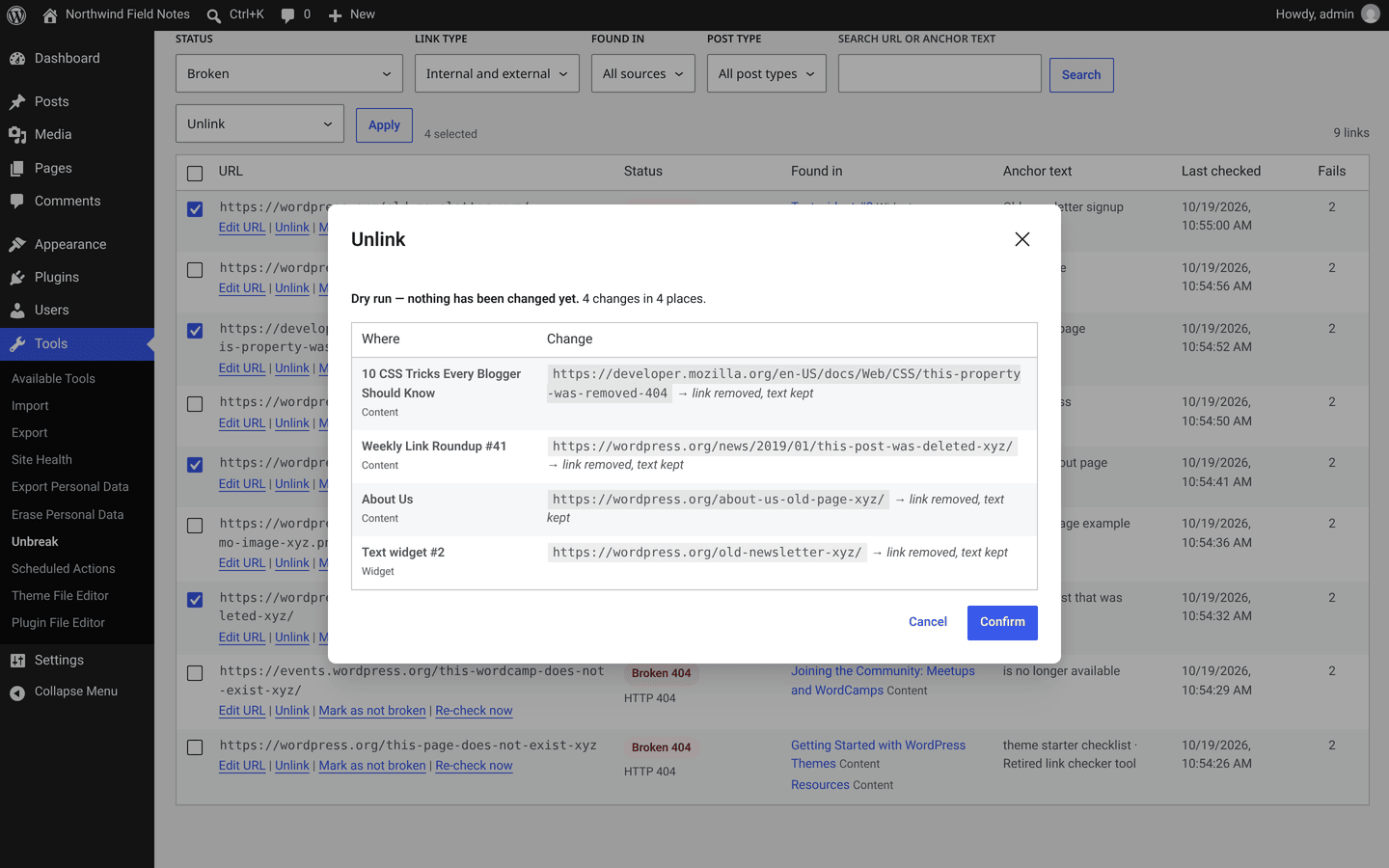
- Edit a URL everywhere it appears, unlink it (the text stays), update a redirected link to its final URL, mark a link as “not broken”, or re-check it.
- Every action shows a dry run first, listing each change before anything is saved.
- Post changes are saved as revisions. “Undo last bulk action” restores the previous content.
- Posts that someone has open in the editor are skipped, so neither copy overwrites the other.
Redirects and 404 log
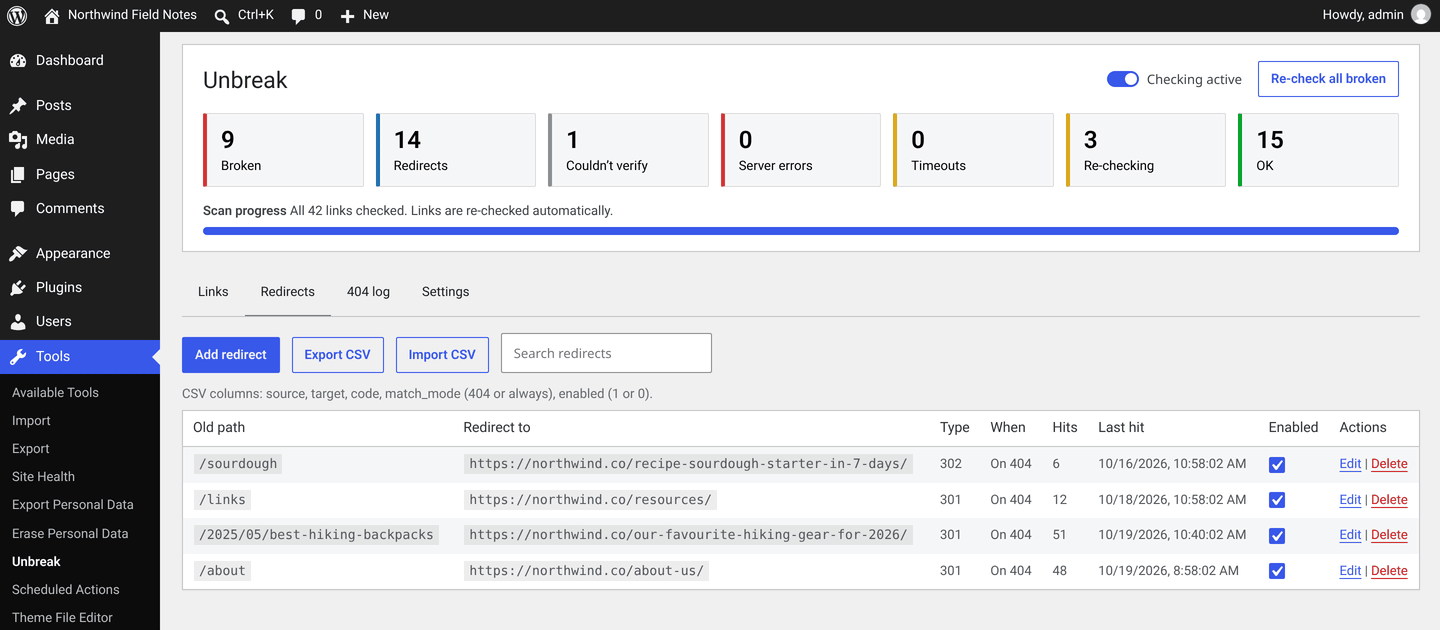
Create 301, 302, 307 and 308 redirects, with CSV import and export, hit counters, and loop and chain protection. Optionally log which missing pages visitors request. IP addresses are not stored.
Light on your server
- Small custom tables. Uninstalling removes all tables, options and scheduled jobs.
- Checks run in the background with Action Scheduler, in small batches. By default at most one request per website every 2 seconds and 600 checks per hour.
- Normal front-end page views run no extra database queries. Only 404 responses look up the cached redirect list, and the optional 404 log writes one row per 404.
- A switch at the top of the plugin screen pauses all checking.
External services
Unbreak checks the URLs found in your site’s own content: posts, pages, menus, widgets and, if enabled, comments. To do that, your server sends HTTP requests (HEAD, and a short GET when needed) directly to those URLs. Only the URL is requested, with a browser-like User-Agent that you can change in the settings. Nothing about your site, your visitors or your content is added. Checks run after activation, when content changes, and when a link is due for a re-check (every 7 days by default).
Unbreak does not contact any other service, and it contains no tracking or analytics.
Source code
The admin screen is a small React app. Its uncompressed JavaScript and SCSS sources are included in the plugin under assets/src/, together with the build configuration (package.json, package-lock.json, webpack.config.js, babel.config.js). The built files in assets/build/ are not minified either.
To rebuild assets/build/ from the sources, run this in the plugin folder (Node.js 22.22 or later):
npm ci --legacy-peer-deps && npm run build
The PHP code is not compiled. The only bundled library is Action Scheduler in vendor/, installed with Composer from composer.json.
Screenshots
Installation
- Install Unbreak from Plugins Add New, or upload the zip under Plugins Add New Upload Plugin.
- Activate it. The first scan starts in the background right away.
- Open Tools Unbreak to follow the progress and review the results.
FAQ
-
Why are some links marked “Couldn’t verify”?
-
The site blocked the automated check (for example with a 999 status or a bot challenge page), so the result says nothing about whether the page exists. Open the link in your browser to be sure.
-
Why isn’t a failing link shown as broken right away?
-
Sites go down for a few minutes all the time. Unbreak checks a failing link again later and only marks it broken once it keeps failing. Until then it is listed under “All problems” as “Re-checking (not confirmed yet)”.
-
Will it slow down my site?
-
No. Checks run in the background with rate limits, and normal page views run no extra database queries. You can pause all checking at any time.
-
Can I undo a bulk change?
-
Yes. “Undo last bulk action” restores every changed post, menu item, widget or comment, unless it was edited again in the meantime.
-
Does Unbreak change anything else in my content?
-
No. An action changes only the link: the
hreforsrcvalue, or, for “Unlink”, the<a>tag around the text, which stays. New URLs are sanitized (http and https only), and you must be allowed to edit the post.For that one save, WordPress’s HTML filter (KSES) is switched off and switched back on right after. Otherwise, when the user running the action lacks the “unfiltered HTML” permission (for example a site administrator on multisite), KSES would remove embeds, iframes or scripts that an administrator added earlier and that have nothing to do with the link.
-
What happens when I uninstall the plugin?
-
Deleting Unbreak from the Plugins screen removes its database tables, options, transients and scheduled jobs.
-
Does it work on multisite?
-
Yes. Each site has its own tables and settings, and the plugin can be network-activated.
Reviews
There are no reviews for this plugin.
Contributors & Developers
“Unbreak – Find & Fix Broken Links” is open source software. The following people have contributed to this plugin.
Contributors
Translate “Unbreak – Find & Fix Broken Links” into your language.
Interested in development?
Browse the code, check out the SVN repository, or subscribe to the development log by RSS.
Changelog
1.0.0
- First public release.
- Local link checking with no account: posts, pages, custom post types, Gutenberg blocks, Elementor, Divi/shortcode builders, menus, widgets and (optionally) comments.
- False-positive protection: “Couldn’t verify” for sites that block bots, and confirmation over time before a link is called broken.
- Bulk edit, unlink, update-to-final-URL and dismiss, each with a dry run and undo.
- Redirects (301/302/307/308) with CSV import/export, and an optional 404 log.
- Weekly email digest (opt-in), pause switch, rate limits, clean uninstall.