

Description
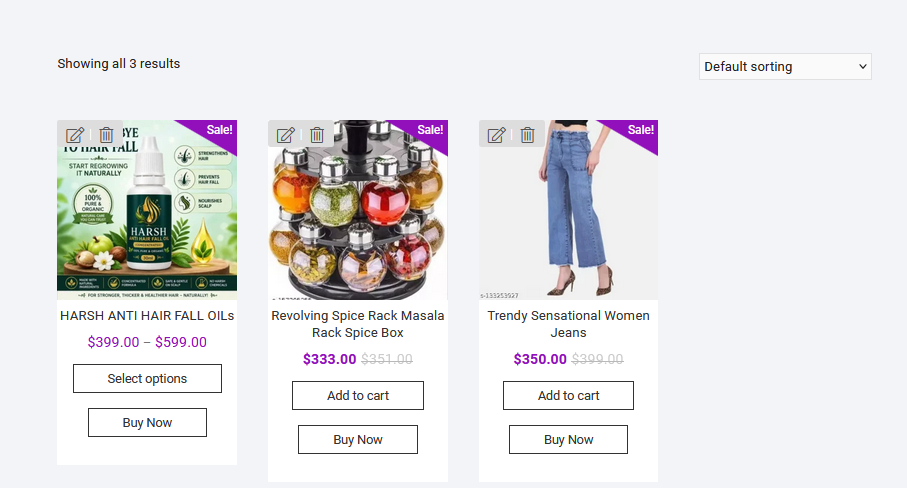
SosWoo Buy Now Button for WooCommerce adds a responsive Buy Now button to your store, helping customers move from product selection to checkout with fewer steps.
Choose where the button appears on shop and single-product pages, control its appearance, and use the shortcode to place a button where you need it. The plugin supports Simple and Variable products in the free version.
Free features
- Responsive, mobile-friendly Buy Now button.
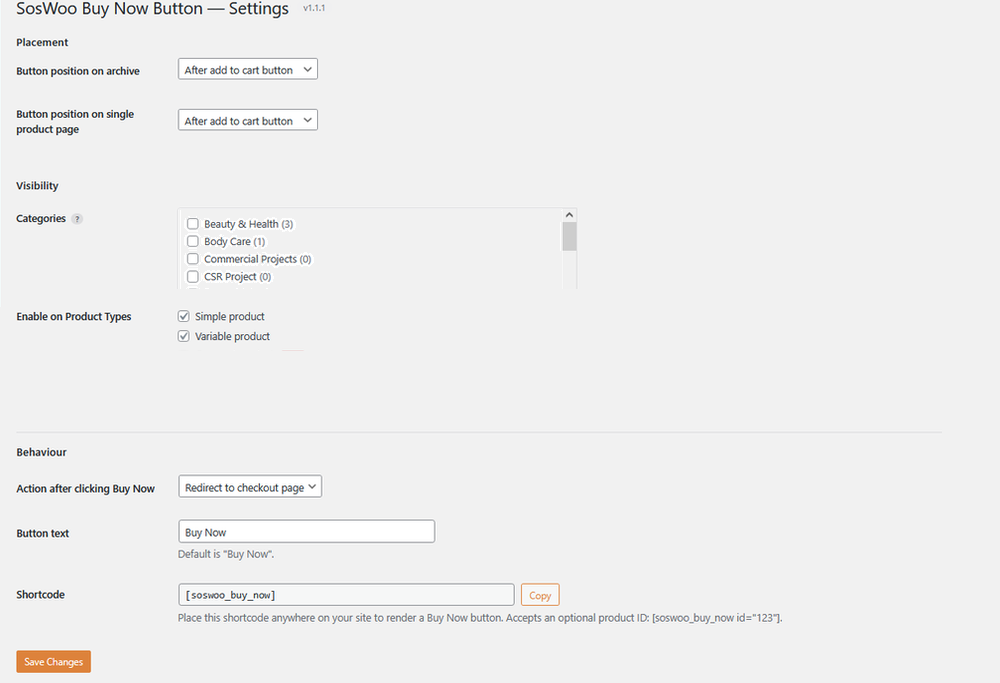
- Choose button position on archive and shop pages:
- After price
- After title
- Before Add to Cart button
- After Add to Cart button
- After rating
- None (hide)
- Choose button position on single-product pages:
- Before Add to Cart button
- After Add to Cart button
- None (hide)
- Show the button only for products in selected categories.
- Enable the button for Simple and Variable product types.
- Clicking Buy Now adds the selected product to the cart and redirects the customer to the checkout page.
- Customisable button text.
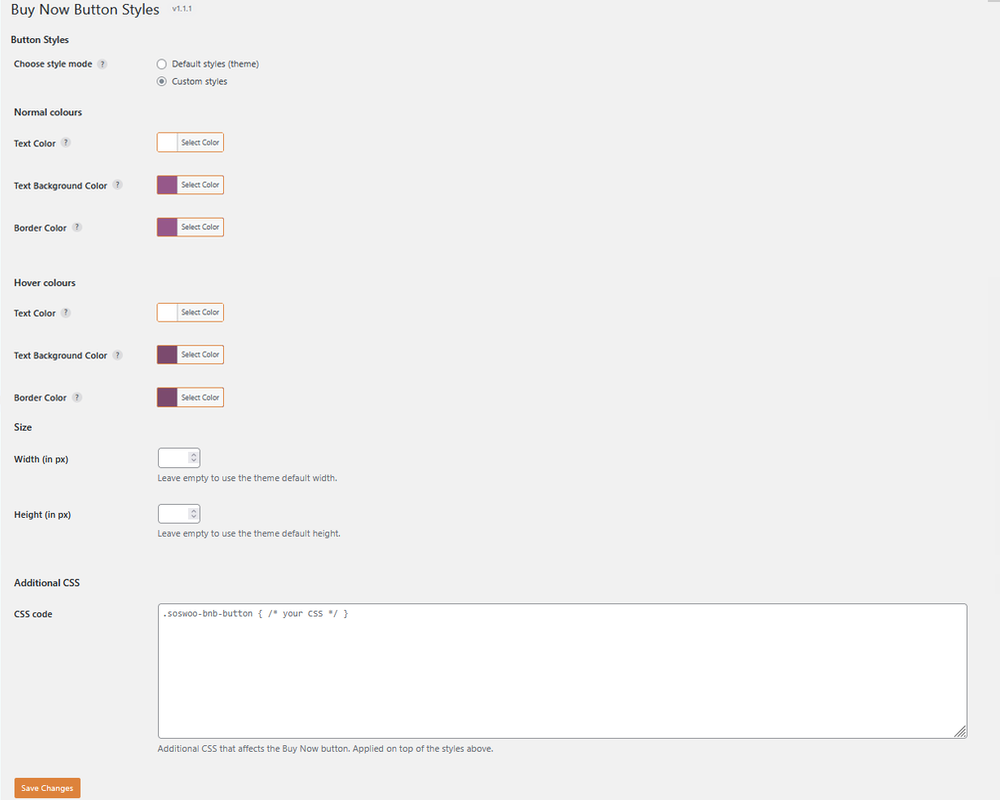
- Choose Default style to match your theme’s buttons or Custom style to set your own appearance.
- Set normal and hover colours for button text, background, and border.
- Configure button width and height in pixels.
- Additional CSS field for more styling control.
- Use the
[soswoo_buy_now]shortcode to display a button where shortcodes are supported. - Works on single-product pages, shop pages, archive loops, and shortcode placements.
- Supports Blocksy, Storefront, Twenty Twenty-Four, and other WooCommerce-compatible themes.
Want more control over the Buy Now experience?
Upgrade to SosWoo Buy Now Button Pro for additional product-type support and checkout-flow options. Pro features include support for Grouped and External / Affiliate products, alternative redirect actions, and controls to simplify the product page.
Explore Pro features and get the premium version:
https://soswoo.com/woocommerce-plugin/soswoo-buy-now-button-for-woocommerce/
Premium features
SosWoo Buy Now Button Pro adds the following features:
- More product types: Enable the Buy Now button for Simple, Variable, Grouped, and External / Affiliate products.
- Choose the button action: Redirect customers to the checkout page, cart page, or a custom page after clicking Buy Now.
- Hide the Add to Cart button: Choose Yes or No using the available dropdown or checkbox setting.
- Remove the quantity input: Optionally hide the quantity input on single-product pages. This option is unchecked by default.
- Reset the cart: Clear the cart when the customer clicks the Buy Now button.
See the Pro product page for details:
https://soswoo.com/woocommerce-plugin/soswoo-buy-now-button-for-woocommerce/
Credits
- Developed by Suresh Dindorkar (https://soswoo.com).
- Uses the WooCommerce Store API for one-click add-to-cart functionality.
Screenshots

Installation
- Install the plugin from the WordPress Plugins screen, or upload the plugin folder to
/wp-content/plugins/. - Activate the plugin through the Plugins menu in WordPress.
- Open SosWoo Buy Now in the WordPress admin sidebar.
- Configure the button settings, visibility, position, and behaviour.
- Open Button Styles to customise the button’s appearance if required.
FAQ
-
Does it work with my theme?
-
The plugin is designed to work with WooCommerce-compatible themes. In Default style mode, the Buy Now button uses your theme’s button styling so it can match the appearance of your Add to Cart button. You can also use Custom style settings.
-
Does it work with Variable products?
-
Yes. On a single-product page, the Buy Now button for a Variable product remains disabled until the customer selects all required variations. Once a valid variation is selected, the button becomes active and adds the selected variation to the cart before redirecting to checkout.
On shop and archive pages, the Buy Now button for a Variable product takes the customer to the product page to select the required variations.
-
Does it work with Simple products?
-
Yes. Clicking Buy Now on a Simple product adds it to the cart and redirects the customer to checkout.
-
How do I use the shortcode?
-
Add this shortcode to a page, post, widget, or other area where shortcodes are supported:
[soswoo_buy_now]To display a Buy Now button for a specific product, pass its product ID:
[soswoo_buy_now id="123"]Optional attributes:
text="Order Now"— override the button text for that shortcode instance.class="my-class"— add extra CSS classes to the button.force="1"— render the button even when category or product-type visibility rules would otherwise hide it.
-
Can I redirect customers to the cart or a custom page?
-
The free version redirects customers to the checkout page. SosWoo Buy Now Button Pro adds options to redirect customers to the cart page or a custom page.
-
Support for Grouped and External / Affiliate product types is available in the Pro version. The free version supports Simple and Variable products.
-
These controls are available in SosWoo Buy Now Button Pro. Pro also includes an option to clear the cart when the customer clicks Buy Now.
-
Will it slow down my site?
-
The plugin loads its frontend CSS and JavaScript on WooCommerce pages and does not require jQuery for its frontend button functionality.
-
Yes. Configure the product types and categories where the button should appear, or set the button position to None (hide) for the relevant location.
-
Where can I learn more about the Pro version?
-
Visit the SosWoo Buy Now Button Pro product page:
https://soswoo.com/woocommerce-plugin/soswoo-buy-now-button-for-woocommerce/
Reviews
There are no reviews for this plugin.
Contributors & Developers
“SosWoo Buy Now Button for WooCommerce” is open source software. The following people have contributed to this plugin.
Contributors
Translate “SosWoo Buy Now Button for WooCommerce” into your language.
Interested in development?
Browse the code, check out the SVN repository, or subscribe to the development log by RSS.
Changelog
1.1.2
- Updated the free-version release and documentation.
1.1.1
- Fixed: Shortcode on a Variable product page now shares the same “disabled until variation selected” behaviour as the automatically placed Buy Now button.
- Added:
soswoo_bnb_shortcode_contextfilter to override the shortcode render context.
1.1.0
- Added: Additional CSS field.
- Added: Style mode selector (Default / Custom).
- Added: Shortcode copy button on the Settings page.
- Added: Multi-button support (related products and upsells).
- Improved: Default style mode now uses the theme’s
.buttonclass so the Buy Now button matches the theme’s Add to Cart button. - Improved: Store API payload for Variable products.
- Improved: Admin header rendering on hosts where another plugin injects notices into headings.
1.0.0
- Initial release.
- Buy Now button on archive and single-product pages.
- Visibility rules: categories, product types, and position.
- Variable product support (disabled until a variation is selected).
- Shortcode
[soswoo_buy_now]. - Normal and hover colour controls.
- Width and height controls.
- Admin settings pages: Settings, Button Styles, and Upgrade.