
Description
What makes MediaXray different
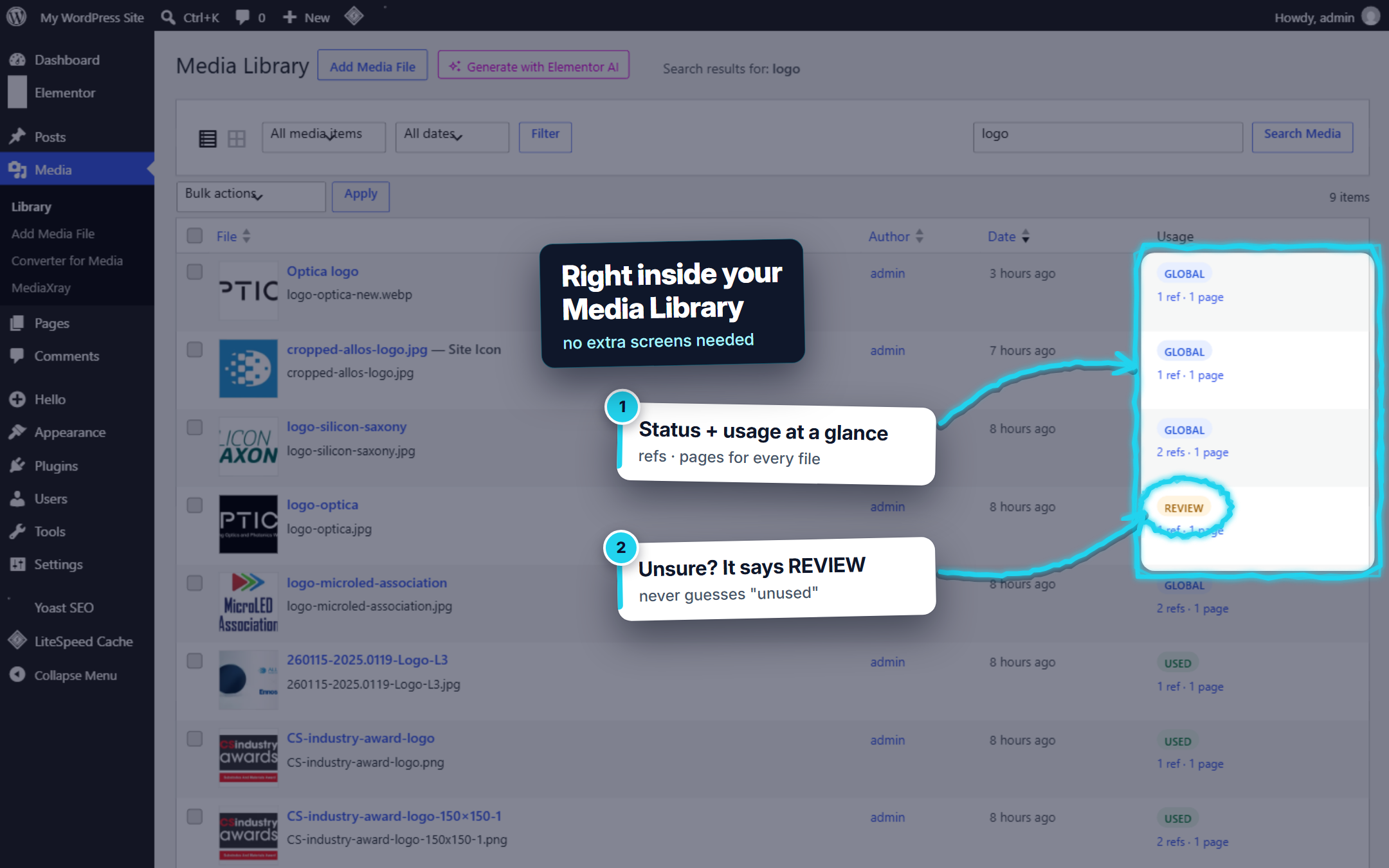
Most media cleaners give you a yes/no “unused” list. MediaXray builds a full usage map first and treats deletion as the last, reversible step:
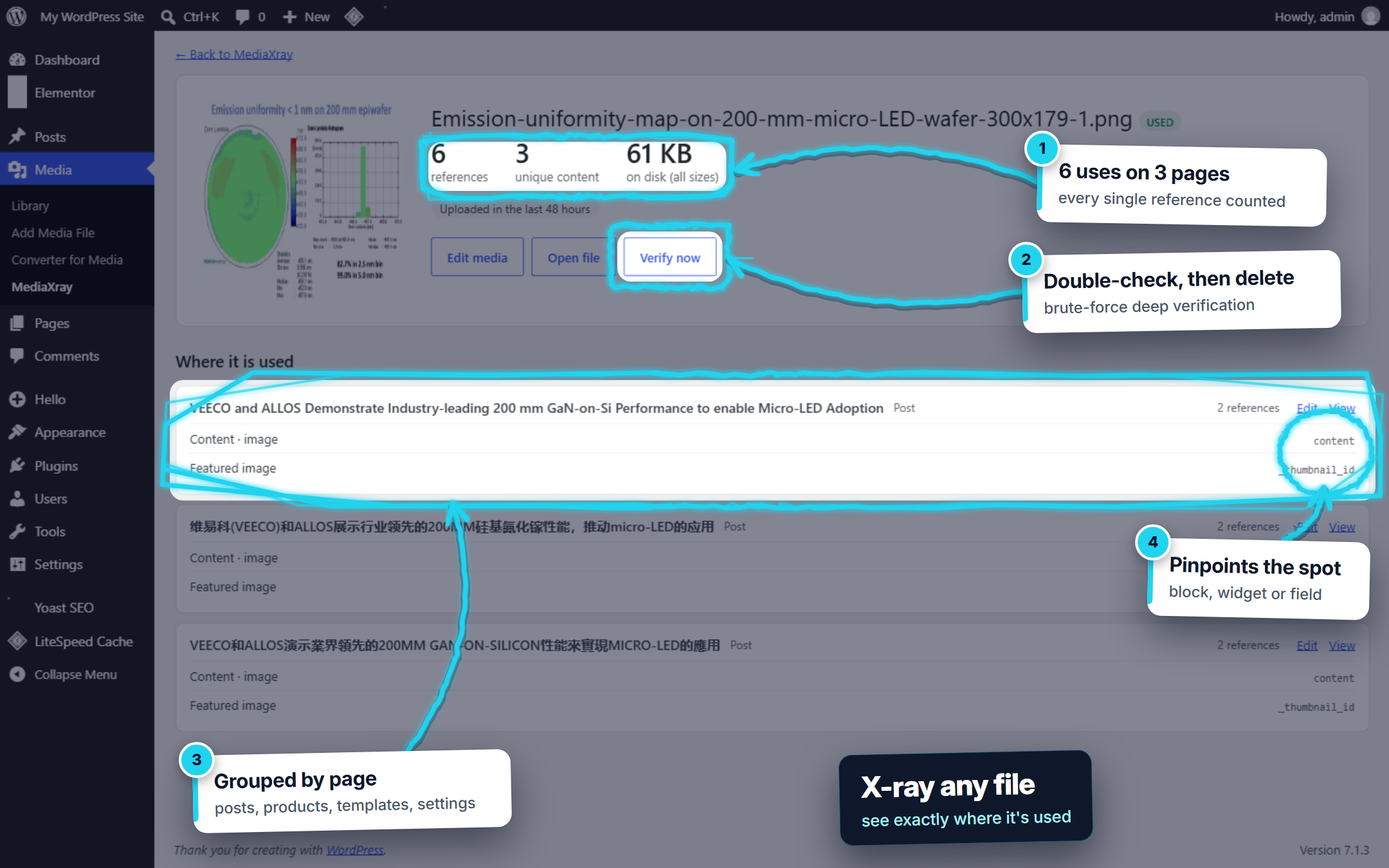
- Counts every single use, not just “used / unused”. Each occurrence is recorded with the page, product, template or setting it is in, and the exact block, widget, breakpoint or field that uses it.
- Understands Elementor at widget level. Image widgets, container backgrounds on every breakpoint, overlays, carousels, dynamic tags, the Global Kit and Theme Builder display conditions (a header shown site-wide makes its logo Global).
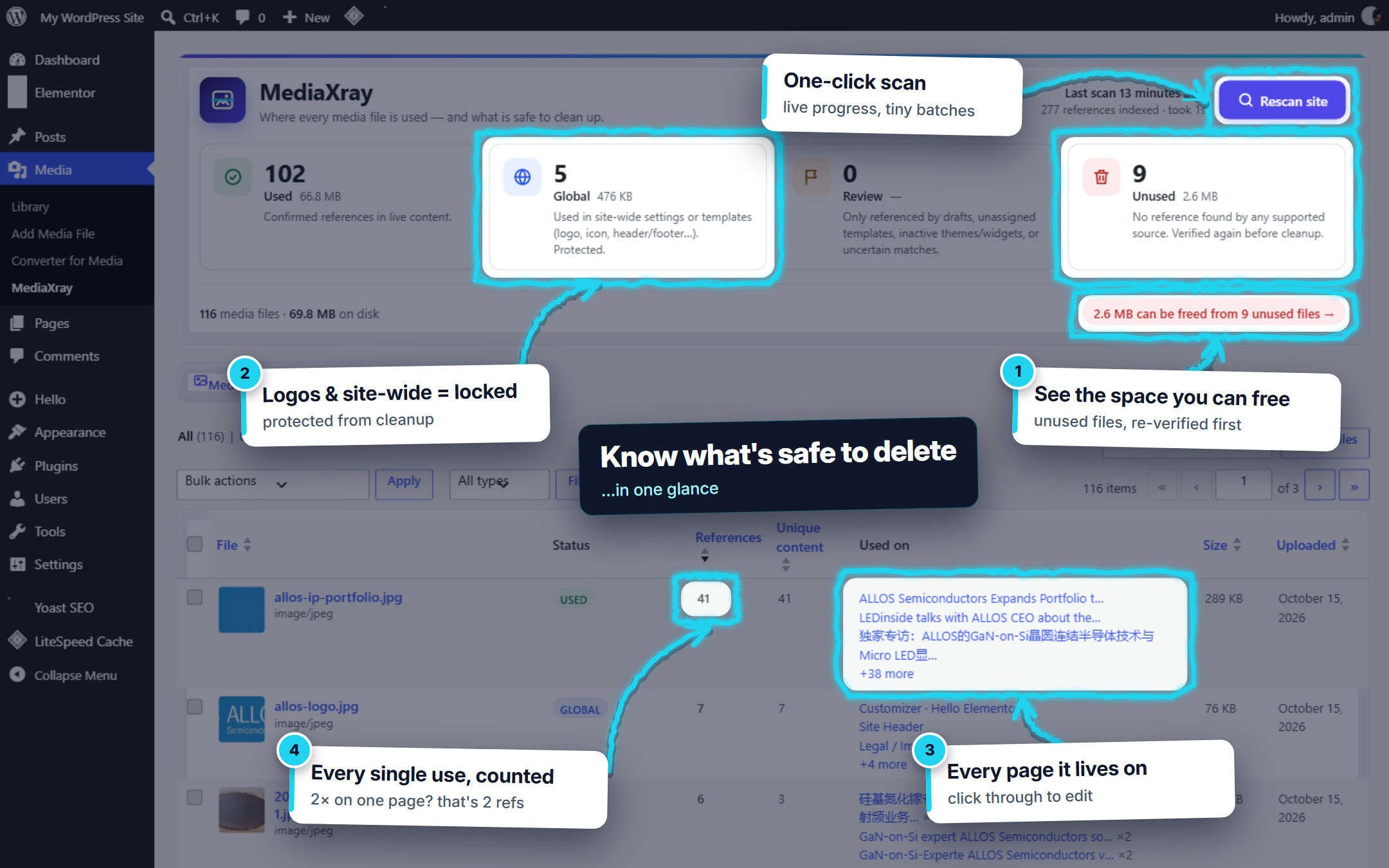
- Four statuses instead of two. Used, Global (protected), Needs check (not on any live page: only drafts, saved templates, inactive themes, unclear matches) and Unused, so “no reference found” never silently becomes “delete”.
- Independent deep verification before cleanup. A brute-force search of the raw database and the active theme’s files double-checks every file before it can be removed.
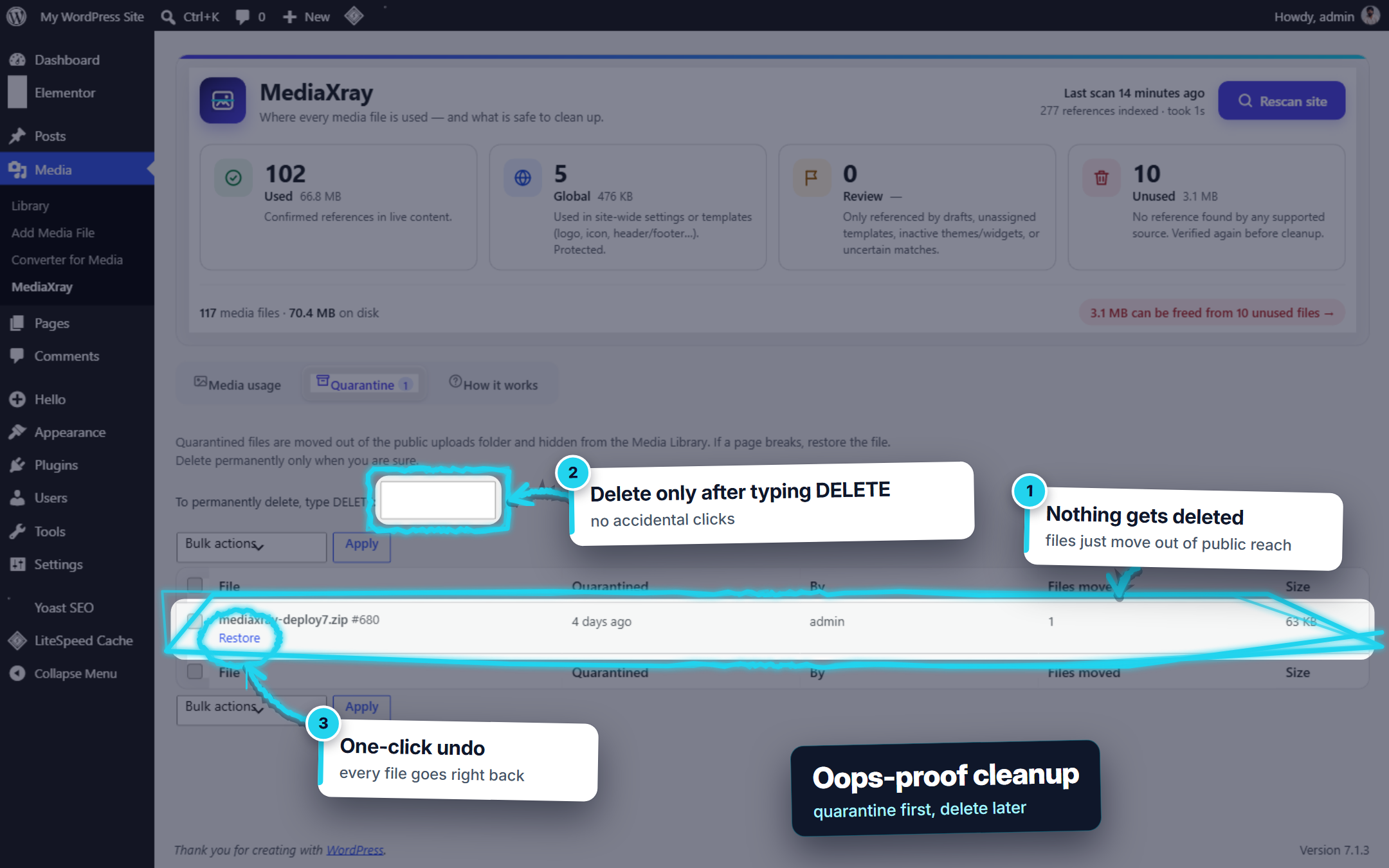
- Restorable quarantine. Files (including WebP/AVIF copies) are moved out of reach, not deleted, so you can check your site and restore with one click.
- Built for big sites. Resumable batched scans, an index that updates itself as content changes, and WP-CLI commands.
MediaXray answers two questions, in this order:
- Where is this file used? Every individual reference, grouped by page, product, template or setting, with the widget, block or field that uses it.
- Is it safe to remove? Only after the first question is answered, and only after an independent deep verification.
Statuses
- Used — confirmed references in live (published or private) content.
- Global — logo, site icon, active theme settings, Theme Builder templates shown site-wide, Elementor Global Kit, active widgets. Protected from cleanup.
- Needs check — not on any live page: only referenced by drafts, unassigned templates, inactive themes or widgets, Elementor’s stored fallback HTML, or uncertain matches.
- Unused — no reference found by any supported source.
- Kept — you chose to keep the file; it is never offered for cleanup.
How references are counted
- A reference is one individual use. The same image twice on a page is 2 references on 1 page.
- One image tag with its srcset, wp-image class and a link to its full size is 1 reference.
- Unique content counts each page, product, template, term or setting once.
What is scanned
- All content types (pages, posts, products, custom post types, Elementor templates, block templates, reusable blocks) in every status except Trash.
- Gutenberg blocks (block-aware), classic HTML, galleries and shortcodes, featured images, excerpts.
- Elementor: every widget and container — images, backgrounds on every breakpoint, overlays, galleries and carousels, video, links, dynamic tags, page and Global Kit settings, Theme Builder display conditions, embedded templates, atomic elements.
- WooCommerce: product images, galleries, variation images (shown on the parent product), category images, downloadable files.
- ACF fields (field-type aware when ACF is active), all custom fields, term and user meta, comments, widgets, Customizer, site icon and logo, Yoast SEO images and plugin settings.
Safe cleanup
- Deep verification searches the raw database and the active theme’s files for every file name and ID pattern of the attachment, independently of the parsers.
- Quarantine (one file, a selection, or every unused file in one click) moves all files of an attachment (including WebP/AVIF copies made by converter plugins) into a protected folder and hides it from the Media Library. One click restores it.
- Permanent deletion only works on quarantined items and requires typing DELETE.
- Uninstalling the plugin restores everything that is still in quarantine.
Built for large sites
Scans run in short, resumable batches, keep the previous results visible until the new scan is complete, and the index updates itself when content, terms, uploads or settings change. WP-CLI: wp mediaxray scan, status, list, usage <id>, verify <id>.
Privacy
MediaXray makes no external requests, sends no data anywhere and adds no tracking. All analysis happens in your own database.
Screenshots
Installation
- Upload the plugin through Plugins Add New Upload Plugin, or install it from the plugin directory.
- Activate it.
- Go to Media MediaXray and click Start scan.
FAQ
-
Will it delete anything automatically?
-
No. Nothing is ever deleted automatically. Unused files are only moved to quarantine when you choose to, after a fresh deep verification, and you can restore them at any time.
-
Why is a file marked Needs check instead of Unused?
-
Something still mentions it, but not in live content — for example a draft, a saved Elementor template that is not placed anywhere, an inactive theme’s settings, or Elementor’s stored fallback copy of a page. Open the file’s usage details to see exactly where.
-
Can it detect every possible use?
-
No tool can. Files referenced only from PHP code outside the active theme, external websites, JavaScript-built URLs or plugins that keep their own database tables cannot be detected. That is why cleanup goes through quarantine: check your site, then delete.
-
Does it work with page caches and CDNs?
-
Yes. File URLs on other hosts (CDNs) are matched by their uploads path, and MediaXray’s own admin requests opt out of page caching.
Reviews

Contributors & Developers
“MediaXray” is open source software. The following people have contributed to this plugin.
Contributors
Translate “MediaXray” into your language.
Interested in development?
Browse the code, check out the SVN repository, or subscribe to the development log by RSS.
Changelog
1.0.3
- One-click bulk actions: quarantine all unused files, quarantine all files that need a check, restore all, or permanently delete everything in quarantine — no more page-by-page selection. Runs in small batches with a progress bar and can be stopped.
- Files that the final check still finds somewhere are moved to Needs check automatically during a bulk quarantine.
- Simpler lists: the Bulk actions dropdowns and checkboxes are gone. Use the one-click buttons for everything, or the links on a single file.
- Undo: right after a bulk quarantine, one click puts those files back.
- Keep: mark any unused or Needs check file as Kept so it is never offered for cleanup again (new Kept filter).
- The Used on column now says why a file needs a check (draft, saved template, inactive, unclear match).
- Files that need a check can be quarantined individually from their details page.
1.0.2
- “Review” is now called “Needs check”, with a plainer explanation and a shortcut from the dashboard.
- Quarantine has a single delete action: choose Delete permanently, then confirm by typing DELETE.
- Links to pages and templates open the normal WordPress edit screen.
1.0.1
- New dashboard panel: scan button, live step-by-step progress and status cards in one place.
- Shows how much disk space unused media takes up.
- WordPress notices now appear at the top of the screen, above the MediaXray panel.
- Added the standard “View details” link on the Plugins screen.
- Refreshed tabs, cards and table styling.
1.0.0
- First release.