

Description
No more double entry between HelloAsso and your association’s website!
Publish your event once on HelloAsso: Tepee for HelloAsso brings it to your WordPress site automatically, with its image, date, place, price and a “Register” button that leads straight to HelloAsso. New events show up within the hour, and changes follow on their own within a day. You keep managing everything in one place, and your site is always up to date.
Why you’ll love it
- Zero double entry: HelloAsso stays your single source; your site follows by itself.
- Ready in a few minutes: enter your HelloAsso API keys, click “Refresh now”, add the block to a page. That’s it.
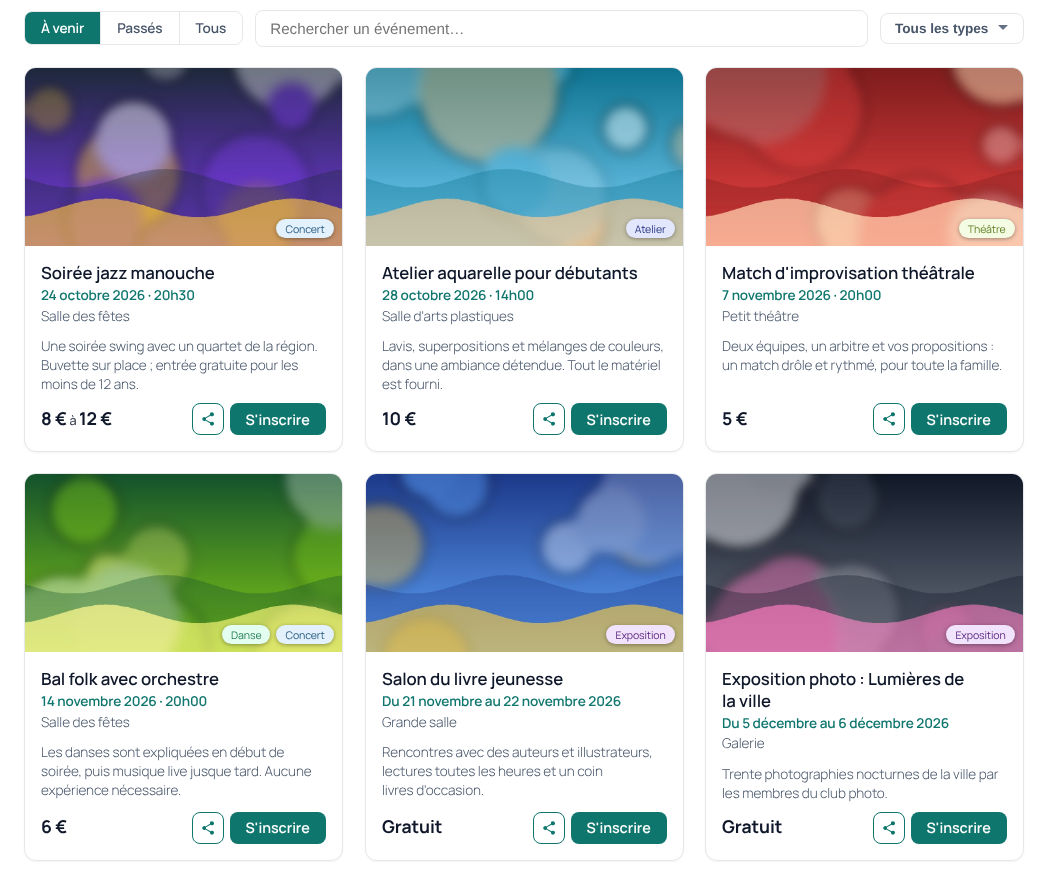
- Displays that look great everywhere: cards or list, on computers and phones, with search and tag filters.
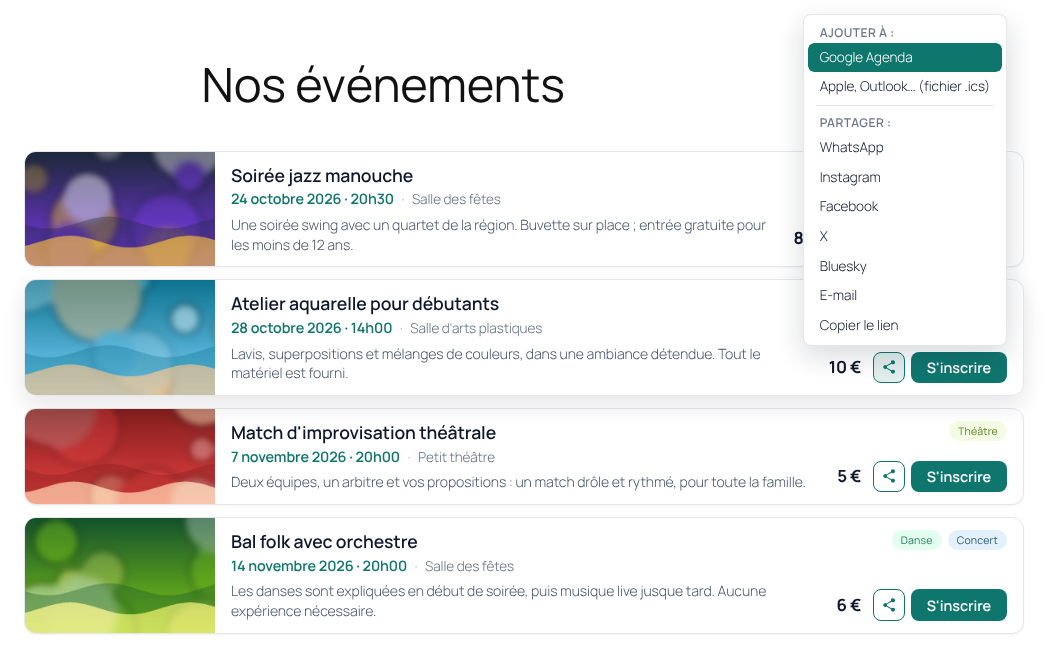
- Spread the word: a “Share” menu for WhatsApp, Instagram, Facebook, X, Bluesky, email or a copied link (and the phone’s own sharing), next to “Add to my calendar”.
- Two blocks, two uses: “HelloAsso events” for a complete agenda page, and “HelloAsso mini agenda” for the next events on your home page, in a sidebar or a footer. All options are in the block sidebar, and a shortcode covers page builders and widgets.
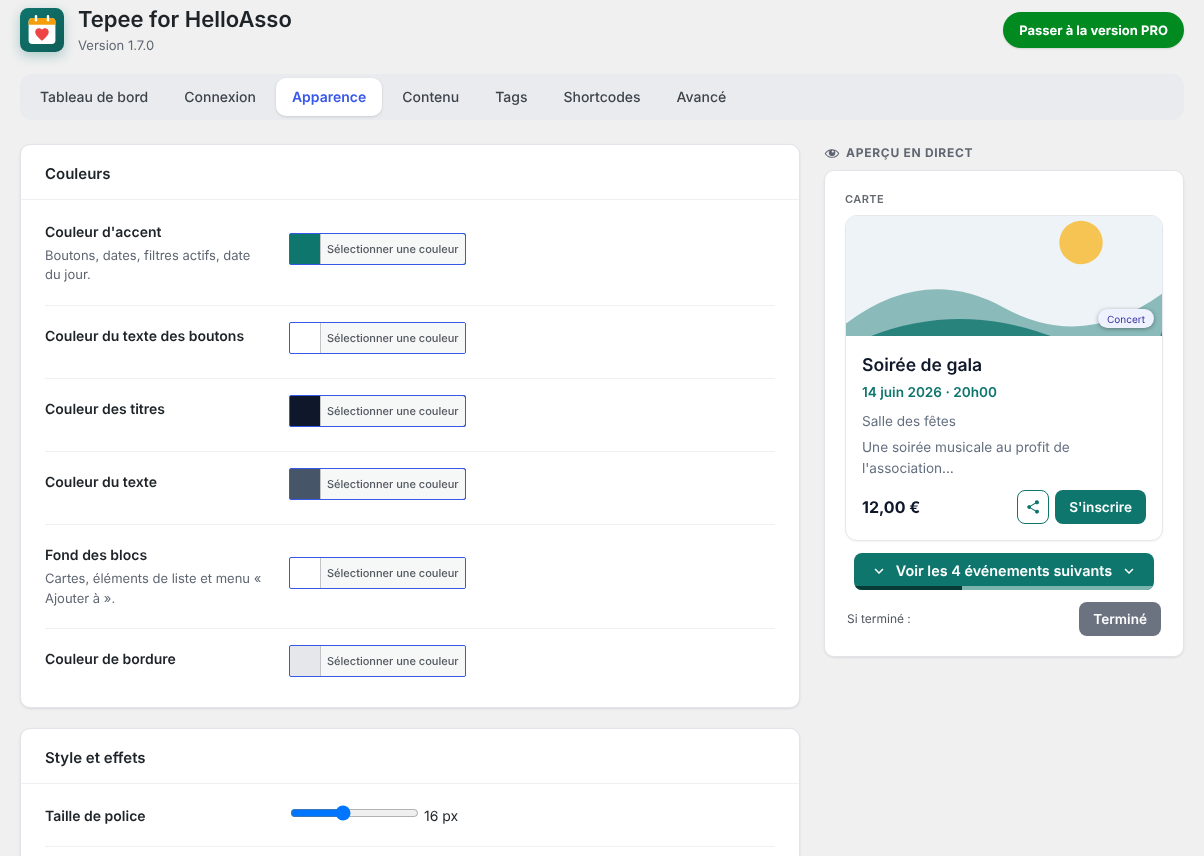
- Matches your theme: colors, corner radius, font size and displayed elements are customizable, with a live preview.
- Respectful: no cookies, no tracking, no advertising. Read-only: the plugin never creates or changes anything on HelloAsso.
This plugin is not affiliated with or endorsed by HelloAsso.
All features
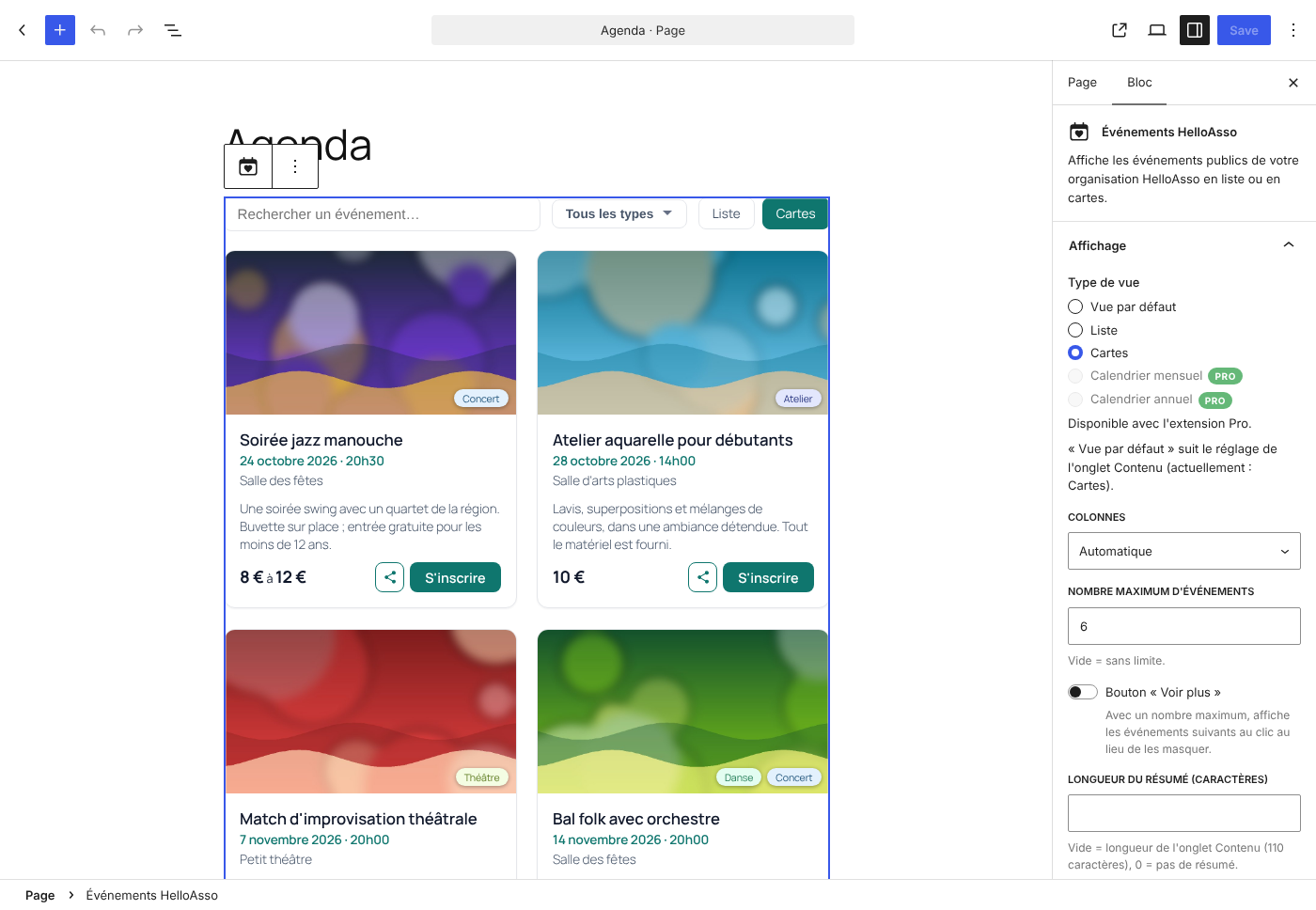
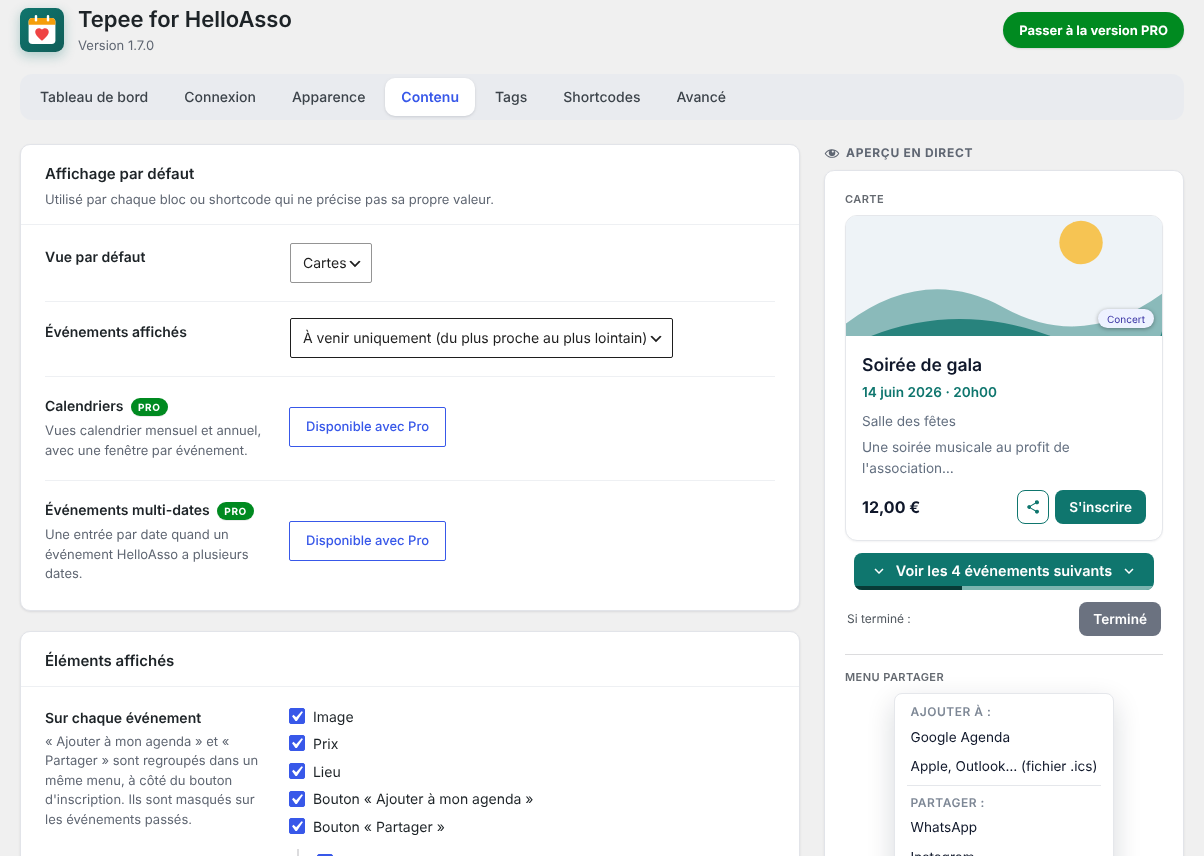
- “HelloAsso events” block for the block editor, with all options in the settings sidebar and a real preview of the display.
- “HelloAsso mini agenda” block: a compact list of the next events for the home page, a sidebar or a footer.
[tepee_for_helloasso]shortcode for the classic editor, page builders and widgets.- List view (with thumbnail) and cards view, with an optional view switcher for visitors.
- Optional “Show more” button on long lists.
- “Add to my calendar” button (Google Calendar, .ics file for Apple Calendar, Outlook…).
- “Share” button: WhatsApp, Instagram, Facebook, X, Bluesky, email and “copy the link” (each one can be turned off), plus the phone’s own sharing on mobile. Grouped with “Add to my calendar” in a single menu.
- Past events show an “Ended” button instead of “Register” (customizable text), still linking to HelloAsso.
- Structured data (schema.org) for upcoming events, describing only the events actually visible on the page.
- Automatic hourly refresh in the background; details older than 24 hours are refreshed gradually, so price changes are picked up within a day.
- Search bar (several words = all required, quotes for an exact phrase), tag filters and an Upcoming / Past / All selector.
- Colors (accent, text, block background and border), corner radius, font size, clickable area and displayed elements customizable, with a live preview.
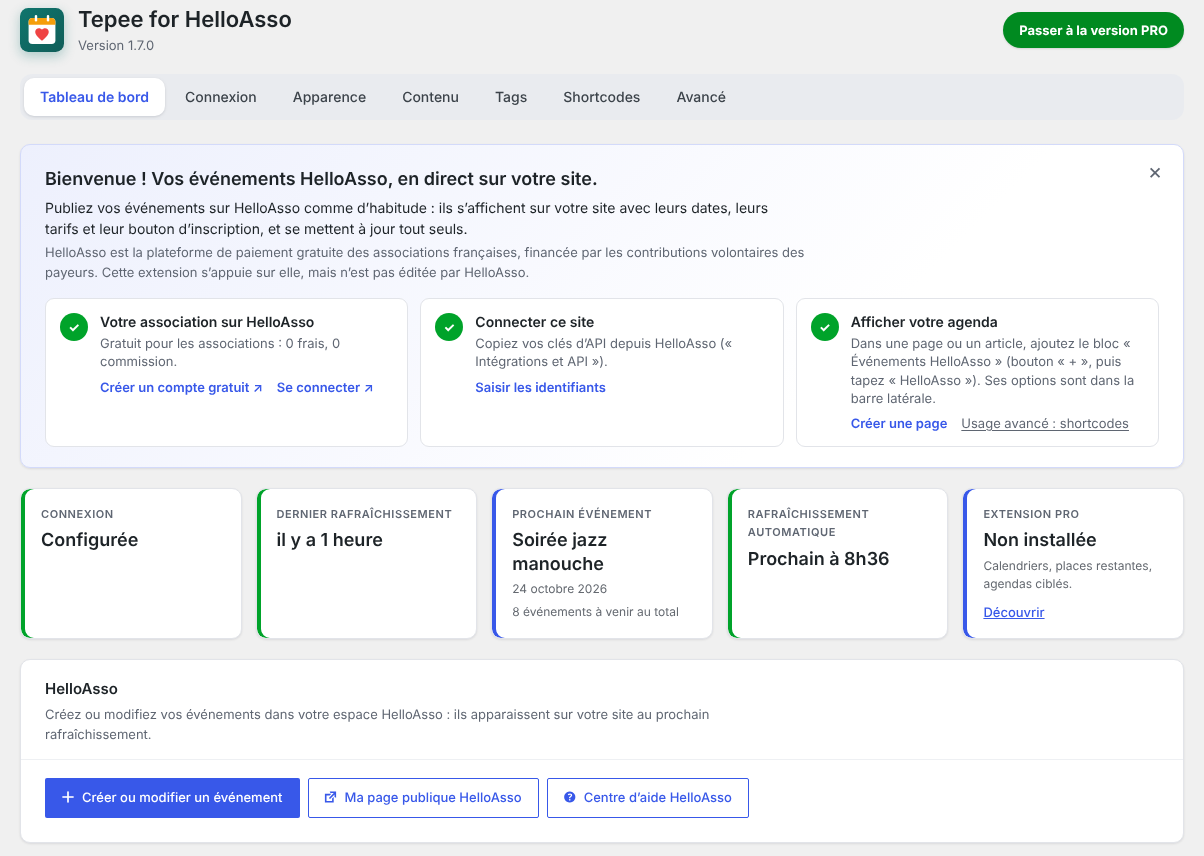
- A clear settings area: a Dashboard showing the synchronization status, then Connection, Appearance, Content, Tags, Shortcodes and Advanced tabs.
- Per-tag colors, based on the activity types detected on HelloAsso.
- Event thumbnails cached on your own site (WebP when available).
- Automatic page-cache clearing after a refresh or a settings change (WP Rocket, W3 Total Cache, WP Super Cache, WP Fastest Cache, LiteSpeed Cache and more).
- Credentials can be defined as constants in wp-config.php.
- No cookies, no tracking, no advertising.
Pro add-on
An optional paid add-on, Tepee for HelloAsso Pro, adds month and year calendars with event windows, remaining places (“Full” button and “Fewer than N places left” badge), targeted agendas (by tags or keywords), one entry per date for multi-date events, advanced design and hover effects, team access, and settings export / import.
The free plugin is complete on its own and is not limited in time or in number of events. The Pro add-on is installed next to it and keeps your settings.
Third-party service and limitation of liability
This plugin depends on HelloAsso and its API, a third-party service that the author does not control. HelloAsso may change, restrict or discontinue its API, or some of the data it provides, at any time. Some features may then stop working until the plugin is updated, or permanently if the data is no longer available.
The plugin is provided “as is”, without warranty of any kind, as stated in the GPL license. To the extent permitted by applicable law, the author cannot be held liable for the unavailability, changes, errors or delays of the HelloAsso service or of the data it provides, nor for their consequences on your site.
External services
HelloAsso API
This plugin connects to the HelloAsso API (https://api.helloasso.com) to retrieve your organization’s public events, their prices and their dates. It sends your API credentials (to obtain an access token) and your organization slug. Requests are made only by your server: when you click “Test connection” or “Refresh now”, during the hourly automatic refresh (if enabled), and when the event cache expires. Visitors’ browsers never contact the HelloAsso API.
Event images are hosted by HelloAsso. With the “Local images” option (Advanced tab, enabled by default), they are downloaded once by your server and then served from your own site. Without it, visitors’ browsers load the images directly from HelloAsso’s servers, which receive the visitor’s IP address like any embedded image.
- HelloAsso terms of use for organizations (section 4.5 covers the API): https://info.helloasso.com/cgu-associations
- HelloAsso privacy policy: https://info.helloasso.com/politique-de-confidentialite
Google Calendar
With the “Add to my calendar” button enabled, a visitor who chooses “Google Calendar” opens a Google Calendar page in a new tab. The link contains the event’s title, dates, place and HelloAsso address. Nothing is sent to Google unless the visitor clicks this link. The .ics file option is generated in the browser and contacts no server.
- Google terms of service: https://policies.google.com/terms
- Google privacy policy: https://policies.google.com/privacy
Sharing (WhatsApp, Instagram, Facebook, X, Bluesky, email)
With the “Share” button enabled, the menu contains simple share links. No script, image or button from these services is loaded on your site. A visitor who clicks one of them opens the service in a new tab (or their email application), with the event’s title, date and HelloAsso address. Nothing is sent to these services unless the visitor clicks. “Copy the link” and the phone’s own sharing contact no server. Instagram does not offer share links for websites: its item copies the event’s address and opens instagram.com (the app on phones), where the visitor pastes it.
- WhatsApp terms and privacy policy: https://www.whatsapp.com/legal/terms-of-service and https://www.whatsapp.com/legal/privacy-policy
- Instagram terms and privacy policy: https://help.instagram.com/581066165581870 and https://privacycenter.instagram.com/policy
- Facebook terms and privacy policy: https://www.facebook.com/terms.php and https://www.facebook.com/privacy/policy/
- X terms and privacy policy: https://x.com/tos and https://x.com/privacy
- Bluesky terms and privacy policy: https://bsky.social/about/support/tos and https://bsky.social/about/support/privacy-policy
Screenshots
Installation
- Install and activate the plugin.
- Open the “Tepee for HelloAsso” menu, then the Connection tab. Enter your Client ID, Client Secret and organization slug (see the FAQ), then click “Test connection” and save.
- Go back to the Dashboard and click “Refresh now”.
- Add the “HelloAsso events” block to a page, or insert the
[tepee_for_helloasso]shortcode.
FAQ
-
Where do I get my API credentials?
-
In your HelloAsso back office, open “Integrations and API” to get your Client ID and Client Secret. The organization slug is the identifier in your public HelloAsso URL:
https://www.helloasso.com/associations/YOUR-SLUG. -
Is the Client Secret exposed to visitors?
-
No. All calls to the HelloAsso API are made server-side. The secret is never sent to the browser, not even on the settings page.
-
Can I define the credentials in wp-config.php?
-
Yes:
TFHA_CLIENT_ID,TFHA_CLIENT_SECRET,TFHA_ORG_SLUG,TFHA_CACHE_TTLandTFHA_MAX_EVENTS. These constants take priority over the settings page, and the related fields are locked. -
What does the block editor show?
-
The real display, with your events (from the last refresh), your settings and your colors. It is not clickable in the editor, so that a click selects the block, and very long displays are shortened. The complete, interactive display appears on the published page.
-
No. It sets no cookies, stores no data about visitors and sends no statistics anywhere. The only data stored on your site is the public information about your events (cached), and your HelloAsso API credentials.
-
Does it work with page cache plugins?
-
Yes. After each refresh of the events or each settings change, the cache of the pages is cleared automatically for the main cache plugins (option in the Advanced tab).
-
What happens if HelloAsso changes its API?
-
The events already retrieved stay displayed from the cache, and the Dashboard shows the error. The plugin is then updated, when possible, to follow the change. See “Third-party service and limitation of liability” in the description.
-
Is there a Pro version?
-
Yes, an optional paid add-on (see the description). Everything described in “All features” stays free.
-
Can developers customize the output?
-
Yes. Available hooks:
tfha_events(filter): the events displayed by an instance, after period filtering.tfha_render_config(filter): the configuration passed to the display.tfha_jsonld_event(filter): the schema.org object of an event; return an empty value to leave the event out.tfha_after_refresh(action): fired after a manual or scheduled refresh, with the events, the context and whether the data changed.shortcode_atts_tepee_for_helloasso(WordPress core filter): the shortcode attributes.tfha_settings_defaults,tfha_sanitize_setting,tfha_form_sections(filters): add your own settings.tfha_views,tfha_i18n,tfha_style_vars,tfha_display_settings(filters): add views, texts and CSS variables to the display. In JavaScript,window.tfhaExtensionsreceives the display class (loaded before the plugin’s script).tfha_block_attributes,tfha_upcoming_block_attributes(filters) and thetfha.*JavaScript hooks (wp.hooks): extend the blocks.tfha_admin_*actions andtfha_dashboard_cards,tfha_shortcode_doc(filters): add rows, sections and cards to the settings pages.
Reviews
There are no reviews for this plugin.
Contributors & Developers
“Tepee for HelloAsso” is open source software. The following people have contributed to this plugin.
Contributors
Translate “Tepee for HelloAsso” into your language.
Interested in development?
Browse the code, check out the SVN repository, or subscribe to the development log by RSS.
Changelog
1.7.0
- “Share” button (WhatsApp, Instagram, Facebook, X, Bluesky, email, copy the link, and the phone’s own sharing), grouped with “Add to my calendar” in a single menu.
- Dashboard: a late automatic refresh (WP-Cron not running) is now reported, with a link to Site Health.
- More compact list view: the image fills the left side, price and buttons sit side by side on the right, categories move onto the image on phones (long names are shortened), about a third less height on computers. The layout follows the actual width of the list, so it also adapts to columns and sidebars.
- “Show more” button now says how many events it adds (“Show the next 4 events”), with a thin gauge along its bottom edge showing how much of the agenda is already displayed.
- More compact “Add to my calendar” / “Share” menu.
- Color pickers offer your theme’s colors in one click.
- Redesigned settings pages: clearer tabs (all visible, also on phones), every section in its own card, and a save bar that stays in view and signals unsaved changes.
- Dashboard: a welcome message (can be hidden) with the three setup steps, and a HelloAsso section with links to your HelloAsso back office, your public page and the help centre.
- Compatibility with the Pro add-on: if it is too old for this version (for example after its licence expired), its features are paused cleanly and the agenda uses the free display meanwhile; a notice, the dashboard and a single email to the site administrator say which version is needed.
- Faster pages: settings are read once per page, and the display’s styles load in the page header when the page content contains it (no unstyled flash).
- Security and robustness: event images are only downloaded from public addresses and must be real images; the background refresh can no longer run twice at the same time; dates written in capitals in rate labels (“12 DÉCEMBRE”) are recognised; the cache of event details no longer keeps deleted events.
- Uninstalling now also removes the local images of every site of a network and the per-user welcome preference.
1.6.0
- Real preview in the block editor: both blocks show the actual display, with your events, settings and colors, instead of a summary.
1.5.0
- First public release.