

Description
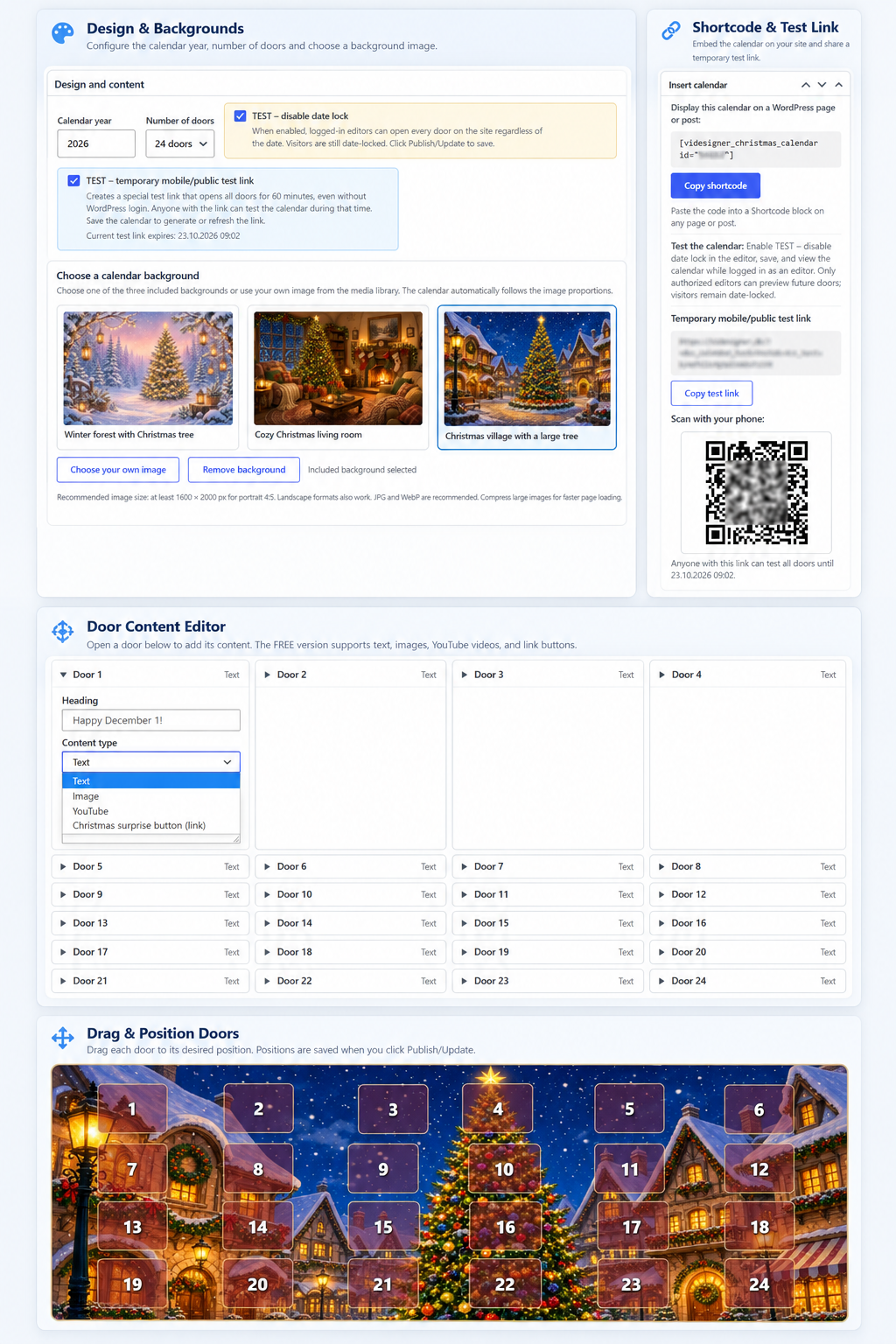
ViDesigner Christmas Calendar gives you a simple Christmas advent calendar with 24 or 25 independently placed doors. Choose from three ready-made holiday backgrounds or upload your own portrait or landscape picture. Each day reveals a text greeting, an image, a YouTube video, or a festive link button. The site owner can position doors by dragging them in the editor. Each door opens on or after its December date, using the WordPress site’s configured timezone.
Works with any standard WordPress theme or page builder. No specific site domain, license service or account is required to use the free plugin. The plugin interface is bilingual: English by default, with bundled Danish translations following WordPress locale settings. Calendar content written by the user is not automatically translated.
Shortcode: [videsigner_christmas_calendar id=”123″] (replace 123 with your actual calendar ID). The earlier Danish shortcode [videsigner_julekalender id=”123″] is supported too.
This is the 1.0.0 release prepared for WordPress.org submission. The initial directory listing is subject to WordPress.org review.
Credits and licenses
The three included background images (assets/backgrounds/vd001.jpg, vd002.jpg and vd003.jpg) were generated using Grok Imagine (xAI) and contributed by ViDesigner. Created with Grok. The contributor has authorized these bundled images to be distributed, copied, modified and redistributed under GPL-2.0-or-later, to the extent applicable rights are held by the contributor. The source and permission statement are in assets/backgrounds/IMAGE-LICENSE.txt.
The bundled QR-code implementation is licensed GPL-2.0-or-later; see assets/js/vendor/LICENSE-QR.txt. No external QR-code service is used.
Screenshots
Installation
- Upload the ZIP in Plugins > Add New Plugin > Upload Plugin.
- If a previous version is installed, select Replace current with uploaded version, retaining existing settings and doors.
- Activate the plugin if needed.
- Go to Christmas Calendars > Add Christmas Calendar (or Julekalendere > Opret julekalender in Danish). Choose an included background or your own image, calendar year, and 24/25 doors.
- Drag each door over the selected image and set its content, then Publish or Update.
- Copy the shortcode from the Insert calendar box into a WordPress Shortcode block on a published page.
FAQ
-
How can I test before December?
-
Open the calendar editor, tick “TEST – disable date lock” (Danish: “TEST – uden datolås”), and click Update/Publish. Visit the page containing its shortcode while logged in with edit permission for that calendar. All doors will open for you, but not for public visitors. Untick and save to end test mode. Alternatively, enable the temporary mobile/public test link to generate a standalone 60-minute test URL that opens all doors without requiring WordPress login. A scannable QR code appears next to the link in the editor. A logged-in editor can also add ?vdcc_preview=10 to the page URL to test doors 1–10 only.
-
Can I use it on another site or domain?
-
Yes. There is no domain lock. WordPress supplies media URLs, date/timezone and REST endpoints for the current site.
-
Future door content is not included in the public page HTML. The REST endpoint enforces date access. Note that public WordPress media uploads are still directly accessible if somebody already knows their URL. For secret prize assets, use separate protected storage.
-
What image dimensions work best?
-
The display follows the original aspect ratio. Portrait 4:5 works very well (1600 x 2000 or larger). Landscape images, including the three included 1168 x 784 backgrounds, are also supported.
Reviews
There are no reviews for this plugin.
Contributors & Developers
“ViDesigner Christmas Calendar” is open source software. The following people have contributed to this plugin.
Contributors
Translate “ViDesigner Christmas Calendar” into your language.
Interested in development?
Browse the code, check out the SVN repository, or subscribe to the development log by RSS.
Changelog
1.0.0
- Initial public release of ViDesigner Christmas Calendar FREE.
- Includes 24/25 movable doors, three included holiday backgrounds, media and link content, bilingual interface, server-enforced date locks and temporary QR test links.
- Added image source and distribution-license information. No change to calendar behavior from the previously tested 0.2.9 build.
0.2.9
- Replace the previous mixed-license QR dependency with an original, self-contained GPL-2.0-or-later QR generator.
- Remove Apache-2.0 third-party QR code and license text from the plugin package.
- Keep QR generation entirely inside the WordPress editor without any external QR service.
- Preserve the existing test link, QR scanning workflow, layouts, date locks, and stored calendars.
0.2.8
- Fix missing calendar styles on the standalone QR/mobile test page: explicitly enqueue the calendar stylesheet before WordPress prints it.
- Preserve the isolated test page (no theme or SEO hooks), time-limited access, all 24/25 doors, existing content, and current free door appearance.
0.2.7
- Address Plugin Check issues: translation notes, localized CSS/JS, input warning, readme metadata.
- Preserve existing calendars, 24/25 doors, backgrounds, mobile QR test and locking behavior.
0.2.6
- Load image-door photos eagerly inside the popup to improve mobile and QR-link testing.
- Use a single large image URL instead of device-dependent srcset thumbnails; retry the original image and offer a direct link if the photo cannot be displayed.
- Make red and locked calendar doors visibly more transparent while preserving legible numbering.
- Preserve existing calendars, placements, test QR codes, bilingual interface and date locks.
0.2.5
- Isolate the temporary 60-minute QR/mobile test page from theme and SEO header/footer callbacks that assume a standard WordPress page query.
- Load only the calendar stylesheet and frontend JavaScript on that special standalone test page.
- Keep existing free calendars, translations, door appearance, the QR code, shortcode pages and test permissions unchanged.
0.2.4
- Show a locally generated QR code next to the temporary 60-minute mobile test link in the calendar editor. No QR web service or third-party disclosure.
- Adjust free door size to halfway between 0.2.2 and 0.2.3.
- Reduce red and locked-door overlay opacity to reveal more of the background. User-adjustable colors and opacity remain planned for PRO.
- Prevent test-link referrer leakage and search indexing on the standalone mobile test page.
0.2.3
- New temporary mobile/public test link that opens all doors for 60 minutes without WordPress login.
- New standalone test page URL generated from the calendar editor for easy phone/tablet testing.
- Door buttons increased by roughly one third in both the editor and frontend for easier tapping, especially on mobile.
0.2.2
- Full English default interface with bundled Danish translations (.po/.mo and POT template).
- Translated admin labels, media and background controls, copy buttons, date-lock messages, frontend modal instructions and preview status.
- Existing calendars, all 3 background templates, stored editor test settings, and both old and new shortcode names remain compatible.
0.2.1
- New per-calendar “TEST – uden datolås” editor checkbox unlocks all doors for logged-in authorized editors only.
- Public visitors remain date-locked; protected REST routes recheck authorization.
0.2.0
- Three included Christmas calendar background pictures.
- Editor and public calendar follow the selected image’s natural aspect ratio.
- Help on image dimensions and built-in shortcode copying.
- New official English shortcode; retain old Danish shortcode for compatibility.
- Existing calendars, doors and content are preserved on upgrade.
0.1.0
- Initial development preview: 24/25 doors, movable doors, background images, text/image/YouTube/link content, server-side day locks and editor preview.