

Description
Codiffy Tiered Pricing for WooCommerce rewards customers who buy more. Set a lower price per item when a customer buys 10, 50 or 100 of a product, and show a clear bulk pricing table on the product page so they can see what they save.
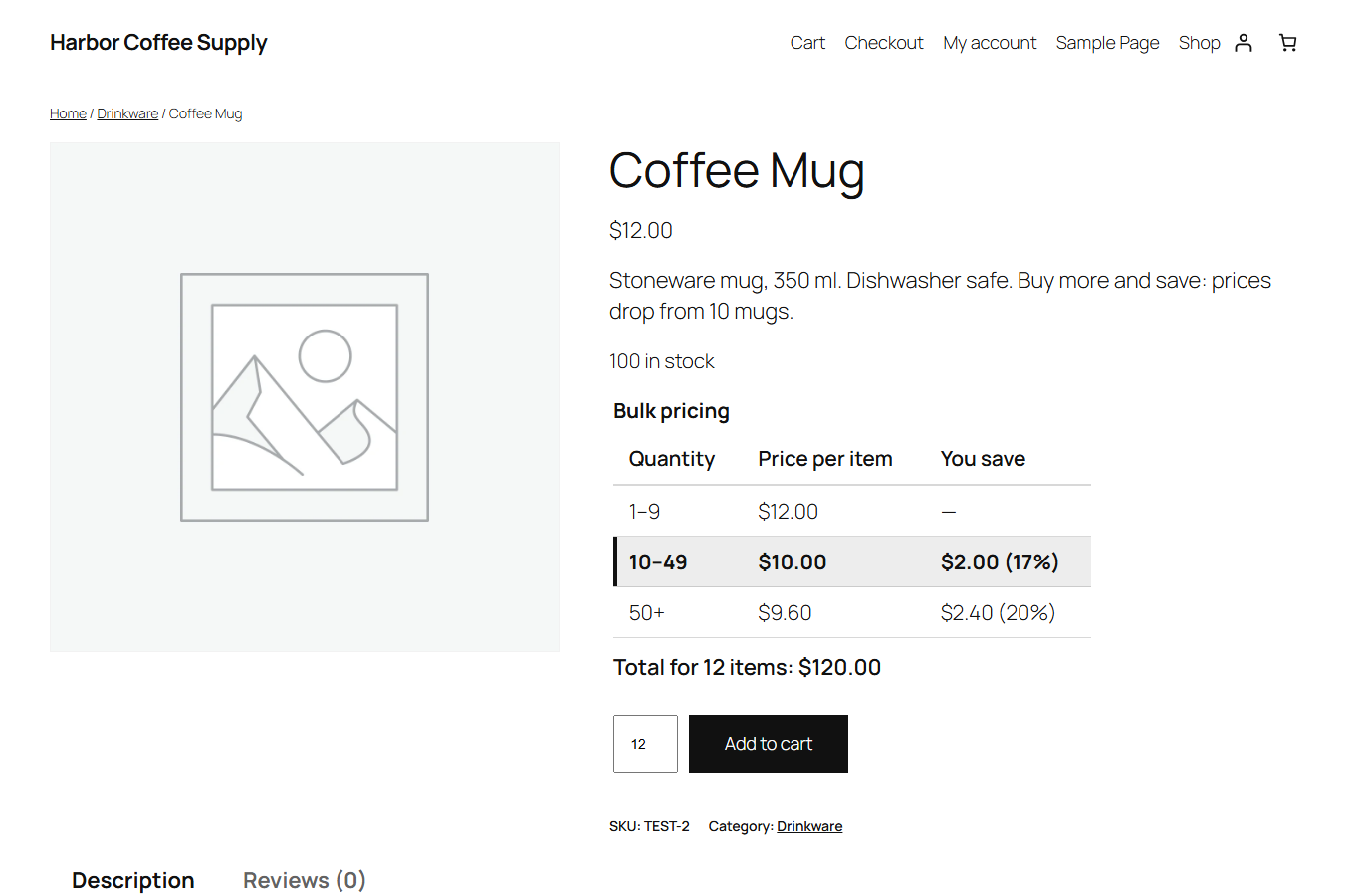
For example: a mug costs $12, from 10 mugs it costs $10 each, and from 50 mugs there is 15% off. The cart picks the right price automatically.
It is ideal for wholesalers, print shops, coffee roasters, craft and party suppliers, and any store that sells consumables in volume.
Features
- Price tiers: each tier has a minimum quantity and either a fixed price per item or a percentage discount.
- Per product, per variation or by rule set:
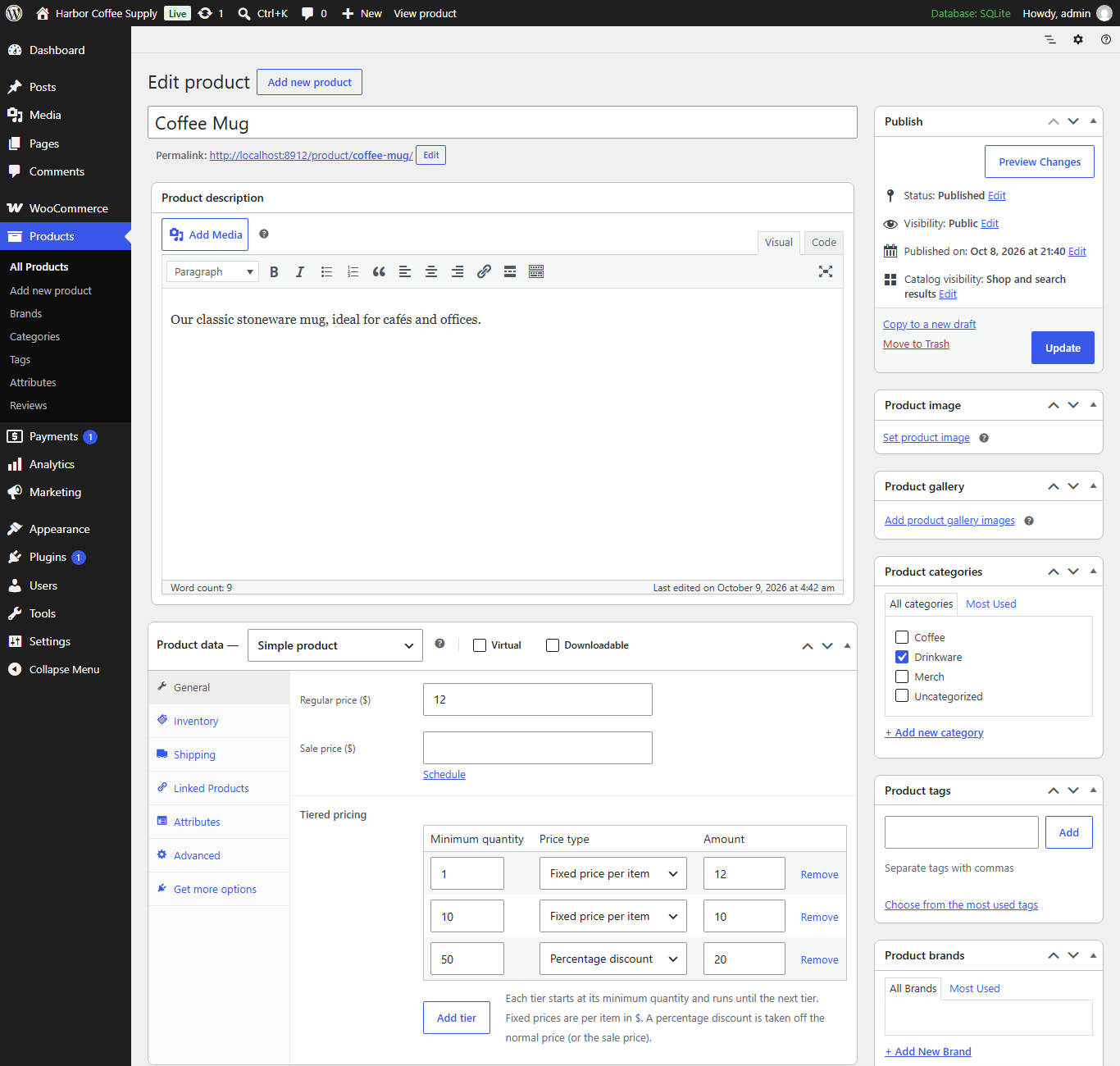
- on a simple product (General tab);
- on a variable product, for all its variations at once;
- on a single variation, which overrides the product’s tiers;
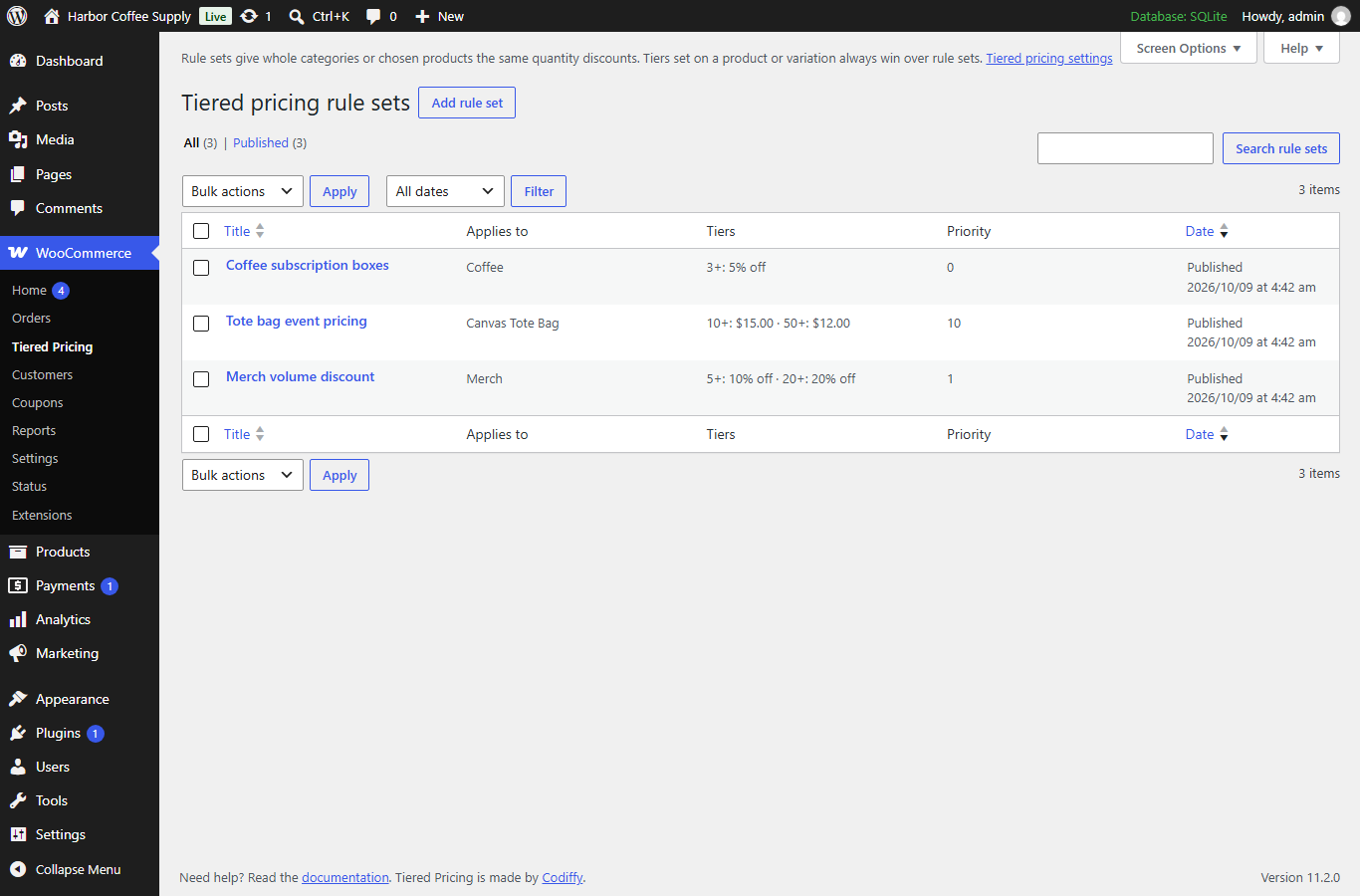
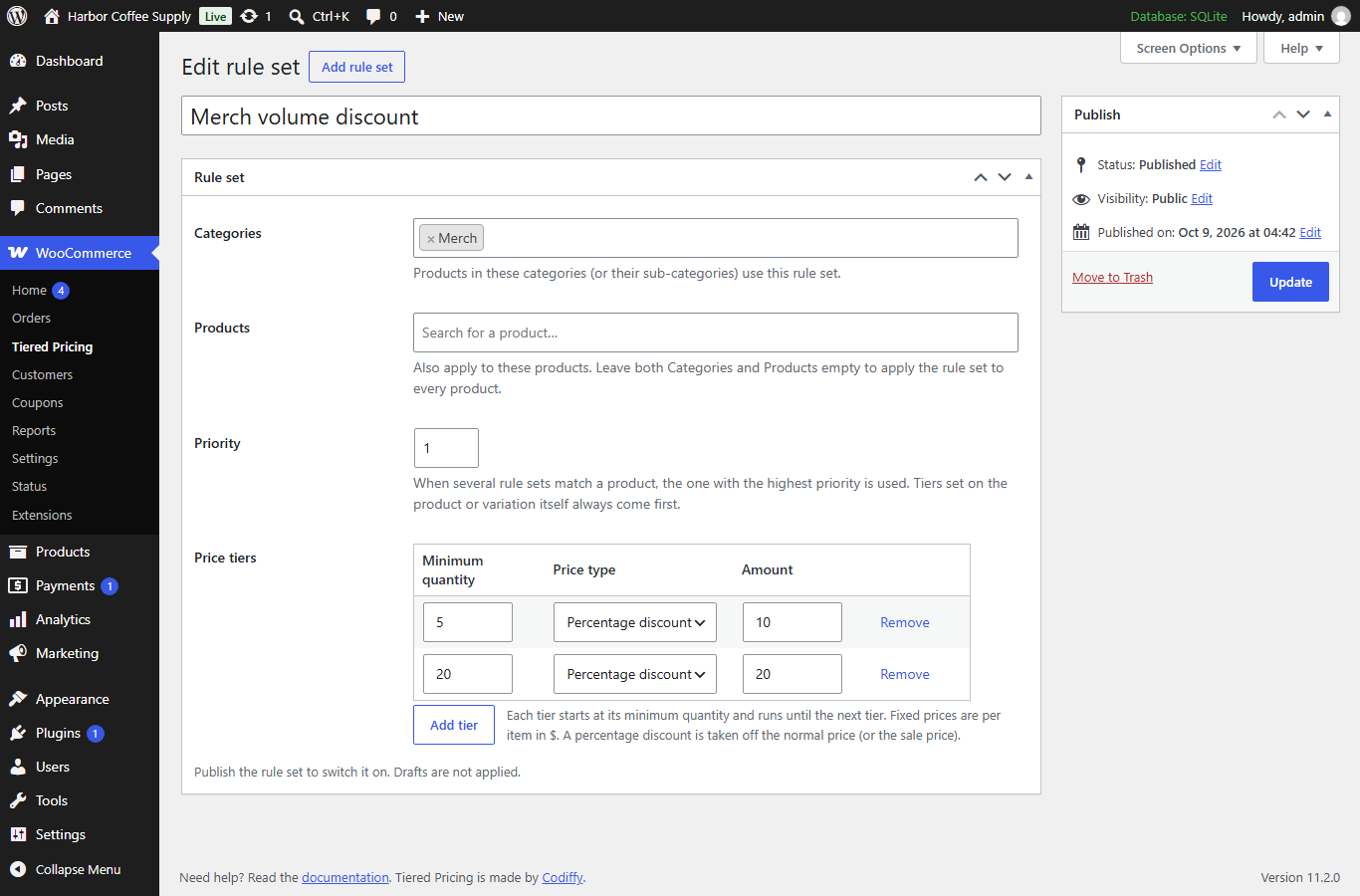
- with rule sets (WooCommerce > Tiered Pricing) for whole categories or chosen products, with a priority.
- Clear precedence: tiers on the variation, then on the product, then the highest-priority matching rule set.
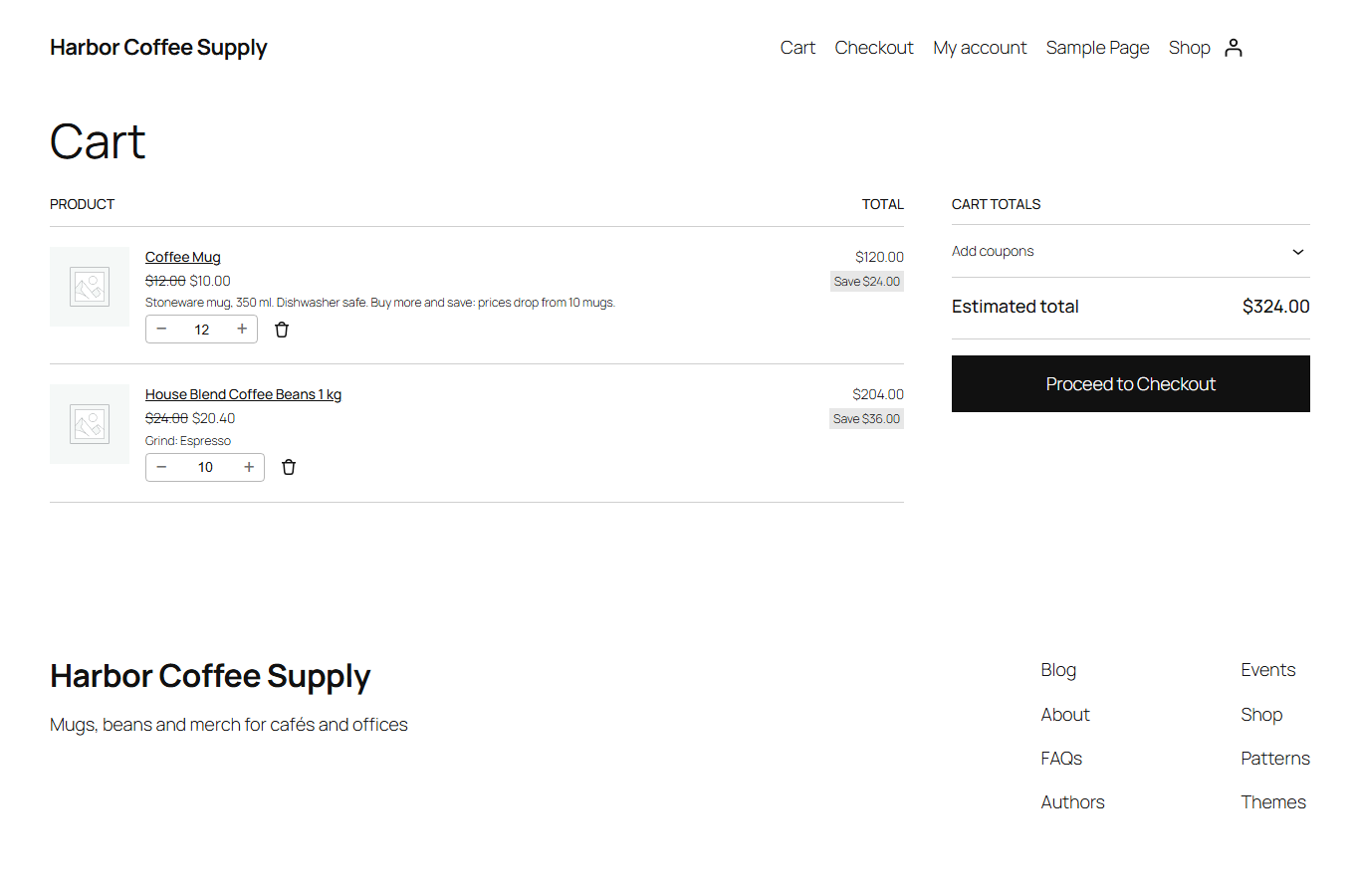
- Correct cart prices: tier prices are calculated on the server for every cart line, in both the classic and the block cart and checkout. A tier price is never below zero and never higher than the normal price.
- Count quantity per cart line, or per product: for example 6 small + 4 large T-shirts can count as 10.
- Sale prices: apply tiers to the sale price, or switch tiers off while a product is on sale.
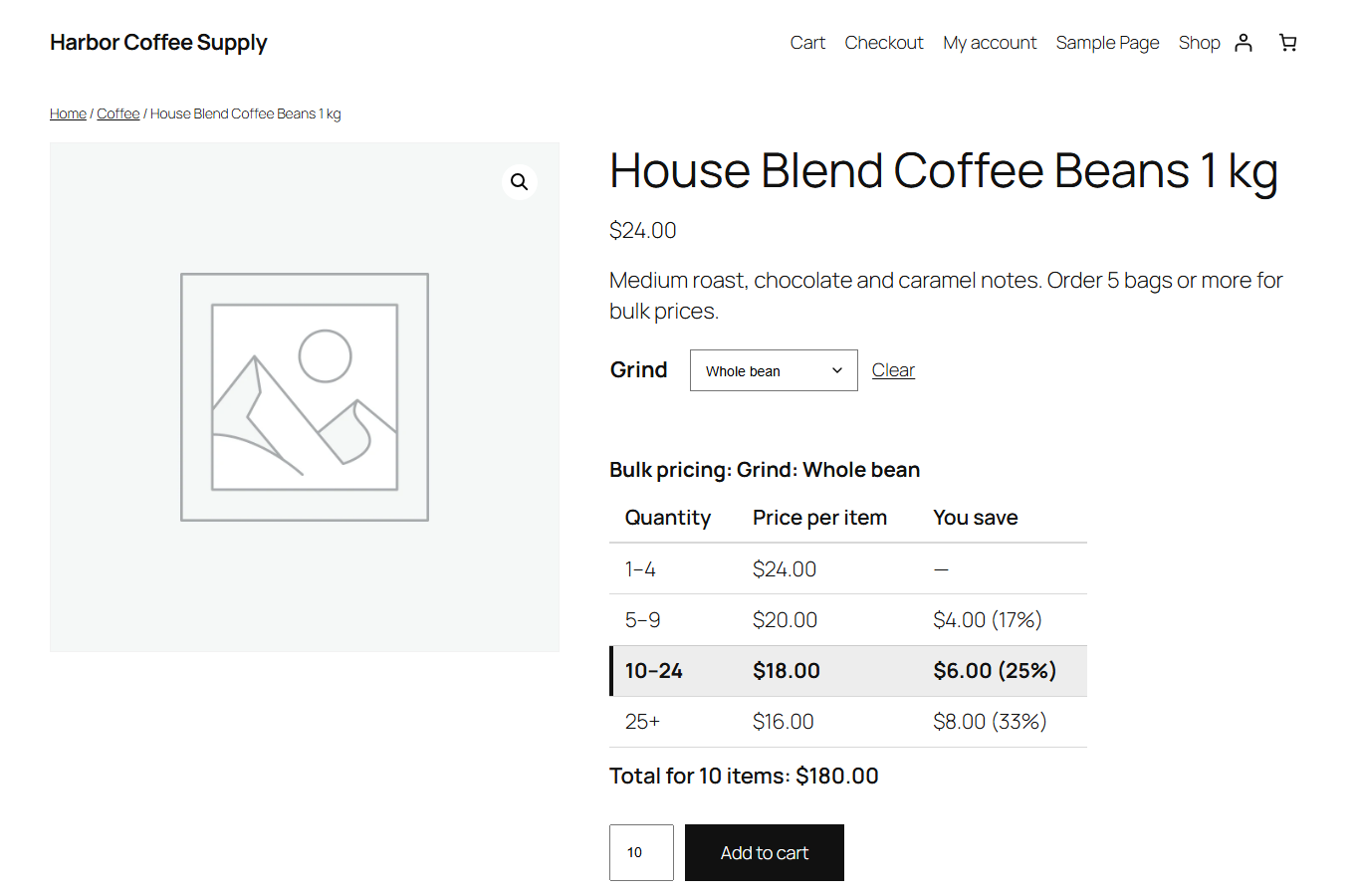
- Bulk pricing table on product pages (Quantity | Price per item | You save), above or below the Add to cart button. The active tier is highlighted as the customer changes the quantity, with an optional live “Total for 10 items” line.
- Variable products: the table follows the chosen variation.
- “From” price in shop and category lists (optional): “From $10.00”.
- Works with block themes (Twenty Twenty-Five and other block themes) and classic themes.
- Checks your input: tiers are sorted by quantity when you save; duplicate or invalid rows are refused with a clear message.
- Shop managers can manage rule sets and settings.
- Lightweight: no external services, no tracking, and the table files load only on product pages that show a table.
How it works
- Edit a product. In Product data > General, find Tiered pricing.
- Add a row for each tier, for example 10 – Fixed price per item – 10 and 50 – Percentage discount – 15.
- Update the product. The pricing table appears on the product page and the cart uses the tier prices.
To give a whole category the same discounts, go to WooCommerce > Tiered Pricing > Add rule set.
Developers
The filter codiffy_tp_tiers lets you change the tiers used for a product or variation.
About Codiffy
Codiffy Tiered Pricing is built and maintained by Codiffy, a WordPress and WooCommerce development studio. Need a custom pricing rule for your store? Get in touch.
Screenshots
Installation
- Make sure WooCommerce is installed and active.
- In WordPress go to Plugins > Add New, search for “Codiffy Tiered Pricing” and click Install Now, then Activate. (Or upload the plugin ZIP through Plugins > Add New > Upload Plugin.)
- Edit a product and add tiers in Product data > General > Tiered pricing, or create a rule set in WooCommerce > Tiered Pricing.
- Optional: change the table position and other options in WooCommerce > Settings > Products > Tiered pricing.
Activating the plugin changes nothing in your store until you add tiers.
FAQ
-
How is the tier chosen?
-
The tier with the highest minimum quantity that the customer reaches. With tiers at 10 and 50, a customer buying 9 pays the normal price, 10 to 49 get the first tier and 50 or more get the second.
-
What if a product has tiers and also matches a rule set?
-
The product’s own tiers win. A variation’s own tiers win over its product’s tiers. Rule sets are used only for products without tiers of their own; if several rule sets match, the one with the highest priority is used.
-
Can a tier make the price higher?
-
No. A tier price is never higher than the normal (or sale) price and never below zero. If you enter a fixed tier price above the normal price, the normal price is used.
-
What happens with products on sale?
-
You choose in the settings: either tiers apply to the sale price (a fixed tier price is used only when it is lower than the sale price, and a percentage discount is taken off the sale price), or tiers are ignored while the product is on sale.
-
Can different variations count together?
-
Yes. Set Count quantity to Per product and all variations of the same product in the cart are added together to choose the tier.
-
Does it work with the block cart and checkout?
-
Yes. Prices are calculated on the server, so the classic cart, the block cart and checkout, and the Store API all use the tier prices.
-
Does it work with taxes?
-
Yes. Enter tier prices the same way you enter your normal prices (including or excluding tax, as set in WooCommerce). The table shows prices the way your shop displays prices.
-
Does the plugin send any data to other websites?
-
No. It does not contact any external service and does not track visitors.
-
What is removed when I delete the plugin?
-
The settings are always removed. Your tiers and rule sets are kept, so you can reinstall without losing them, unless you tick Delete all tiers and rule sets when the plugin is deleted in the settings.
Reviews
There are no reviews for this plugin.
Contributors & Developers
“Codiffy Tiered Pricing for WooCommerce” is open source software. The following people have contributed to this plugin.
Contributors

Translate “Codiffy Tiered Pricing for WooCommerce” into your language.
Interested in development?
Browse the code, check out the SVN repository, or subscribe to the development log by RSS.
Changelog
1.0.0
- First public release on WordPress.org, rebuilt from Codiffy’s in-house “Price by quantity” plugin.
- New: a working pricing engine for the classic cart, the block cart and checkout.
- New: tiers per product, per variation and by rule set, with clear precedence and priorities.
- New: bulk pricing table with active-tier highlight and live total; “From” price in shop lists.
- New: count quantity per cart line or per product; sale price setting.
- Improved: rows sorted on save, invalid and duplicate rows refused with a message; optional data removal on uninstall.