

Description
This plugin adds four shipping methods for South African WooCommerce stores:
- The Courier Guy (door to door): live rates from the ShipLogic API that The Courier Guy uses. Each service level on your account (for example Economy) shows as its own option, or you can limit it to the codes you choose.
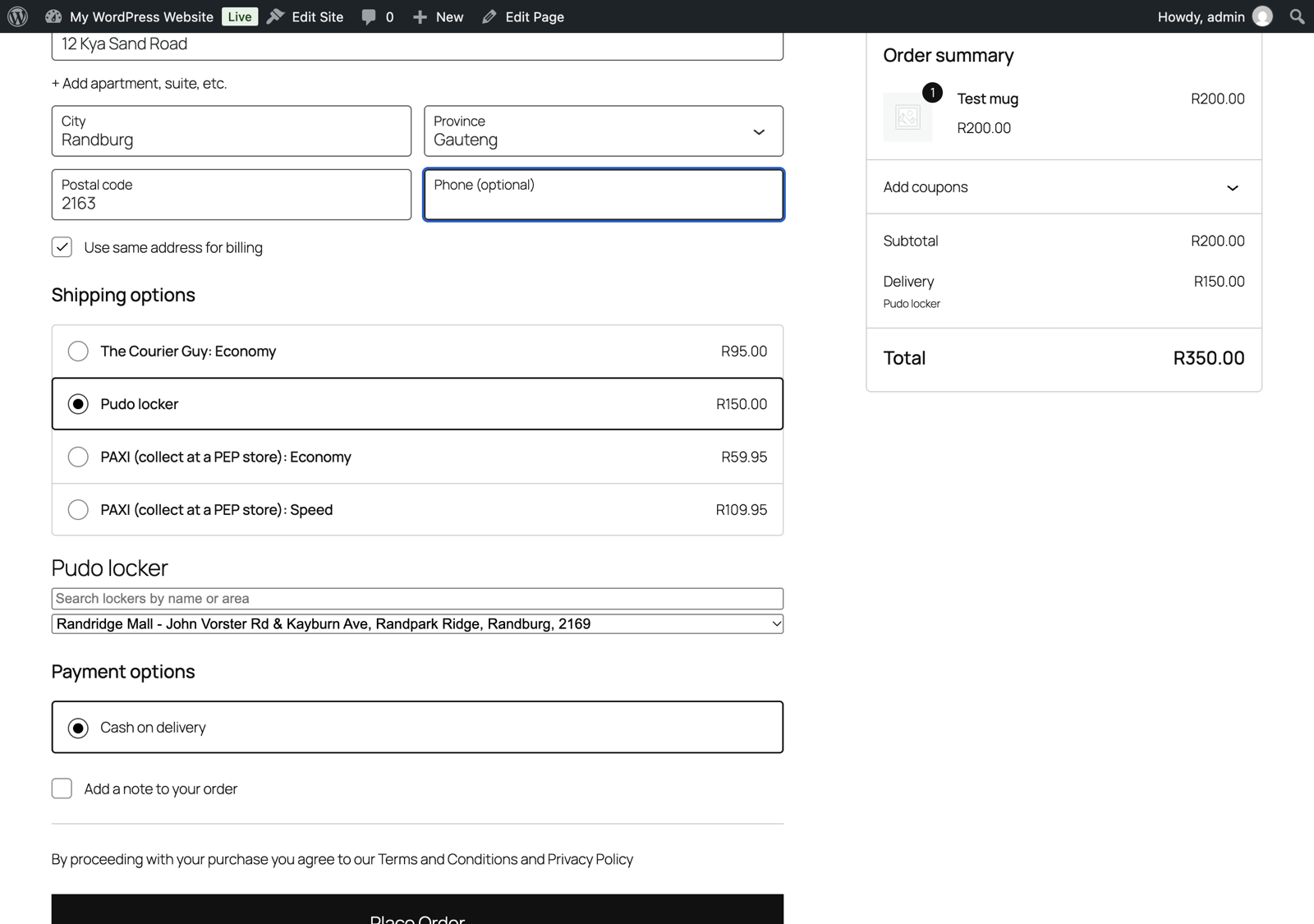
- Pudo locker: door to locker rates from Pudo (The Courier Guy Locker). The customer picks a locker at checkout, and the plugin quotes the smallest locker box (XS to XL) that fits the cart.
- Fastway (door to door): live rates from Fastway Couriers South Africa. You choose the Fastway franchise that collects your parcels, and the customer sees each Fastway parcel service for their address (for example Local or Road), with satchel prices as an option. It uses a free Fastway API key; the default limit is 100 calls a day and rates are cached to save calls.
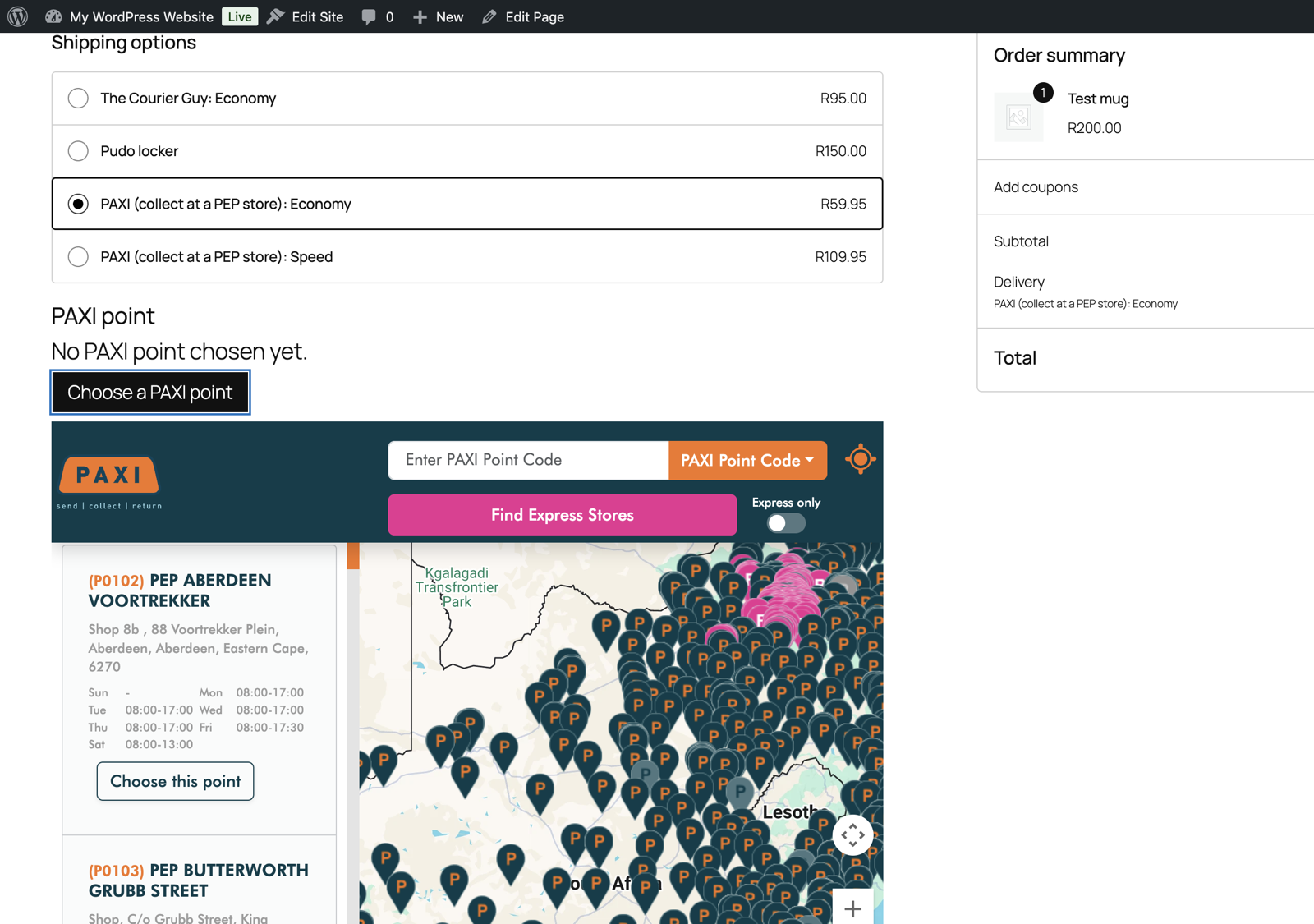
- PAXI (collect at a PEP store): the customer picks a PAXI point on the official PAXI map at checkout. PAXI has no public rates API, so you set the Economy and Speed prices yourself (defaults R59.95 and R109.95; check your current PAXI price list).
The Courier Guy, Pudo and Fastway methods share these settings in each shipping zone (Fastway uses a pickup franchise in place of the sandbox switch and sender address):
- Sandbox or live API key
- Sender address
- Default parcel size and weight for products without dimensions
- Markup in rand and percent (or a discount with a negative number)
- Free shipping over an order amount
- A fallback flat rate that shows when the courier API fails, times out or returns nothing, so a courier outage never leaves customers with “no shipping method”
The PAXI method has its own prices, labels, an optional maximum cart weight and a free shipping threshold.
The plugin does not change your billing or shipping address fields.
Locker and PAXI point picker
When the Pudo method is selected, a locker list appears under the shipping options. Lockers in the customer’s postal code, town and province are listed first, and a search box filters the list. The chosen locker is checked against the Pudo locker list.
When a PAXI rate is selected, a “Choose a PAXI point” button opens the PAXI map. The point the customer picks is checked (it must be a PAXI node code such as P1234) and the order cannot be placed without one.
The chosen locker or PAXI point is saved on the order and shown on the admin order screen, the order received page and order emails.
Checkout block and classic checkout
Both pickers work on the Checkout block (the default on new WooCommerce stores) and on the classic [woocommerce_checkout] shortcode checkout. On the Checkout block the picker appears below the shipping options and shows up to 200 lockers, best address match first. The choice is saved through the WooCommerce Store API and checked again on the server when the order is placed.
What this version does not do
Version 0.1 quotes rates and records the locker or PAXI point. It does not book collections, print waybills or send tracking updates. Book shipments in your The Courier Guy, Pudo, Fastway or PAXI account as usual. The optional Pro version adds booking for The Courier Guy only.
External services
This plugin connects to these services. It sends data only when rates are calculated in the cart or checkout, when the Pudo locker list is refreshed (at most every 12 hours), or when the customer opens the PAXI map.
- ShipLogic / The Courier Guy (api.shiplogic.com for sandbox keys, api.portal.thecourierguy.co.za for live keys): used for door to door rates. Sends your sender address, the customer’s delivery address (street, suburb, city, province, postal code, company), the parcel size and weight, and the cart value as declared value. Terms: https://thecourierguy.co.za/terms-conditions/ Privacy: https://thecourierguy.co.za/privacy-policy/
- Pudo (The Courier Guy Locker) (sandbox.api-pudo.co.za for sandbox, api-tcg.co.za for live): used for locker rates and the locker list. Sends your sender address, the chosen locker code and the parcel size and weight. Pudo is now The Courier Guy Locker, covered by the same terms (https://thecourierguy.co.za/terms-conditions/) and privacy policy (https://thecourierguy.co.za/privacy-policy/).
- Fastway Couriers South Africa (sa.api.fastway.org): used for Fastway door to door rates. Sends your API key, your pickup franchise code, the customer’s town or suburb and postal code, and the parcel weight. Website terms: https://www.fastway.co.za/terms-and-conditions/website-terms-of-use/ Privacy: https://www.fastway.co.za/media/2467/privacy-and-protection-of-personal-information-fastway-june-2021.pdf
- PAXI map (map.paxi.co.za, run by PAXI, part of the Pepkor group): when the customer clicks “Choose a PAXI point”, the map loads in a frame in the customer’s browser. The plugin sends nothing to PAXI itself; the map page is loaded from PAXI’s servers (which see the customer’s IP address and browser details) and it may use Google Maps and Google Analytics. Only the chosen point (code, name, address) comes back to your store. Terms and privacy policy: https://www.paxi.co.za/terms-conditions
You need your own account and API key with The Courier Guy and Pudo, and a free Fastway API key from sa.api.fastway.org for Fastway rates. PAXI parcels are sent through your own PAXI account or a PEP store.
Pro version (optional)
Skillmerc Shipping Pro books The Courier Guy shipments from the WooCommerce order screen, downloads the label PDF, adds the tracking reference to the customer’s completed order email and My Account, books up to 50 orders at once from the orders list, and shows the courier status in an orders column. Pudo and PAXI booking are not included yet. USD 49 a year for one site, with a 14-day money-back guarantee: https://checkout.freemius.com/plugin/43024/plan/74888/licenses/1/
This free plugin shows a short Pro panel at the bottom of its own The Courier Guy method settings and a “Get Pro” link on the Plugins screen. You can hide the panel, it is never shown as an admin notice, and nothing in the free plugin is locked or time-limited.
Screenshots

Installation
- Install and activate the plugin. WooCommerce must be active.
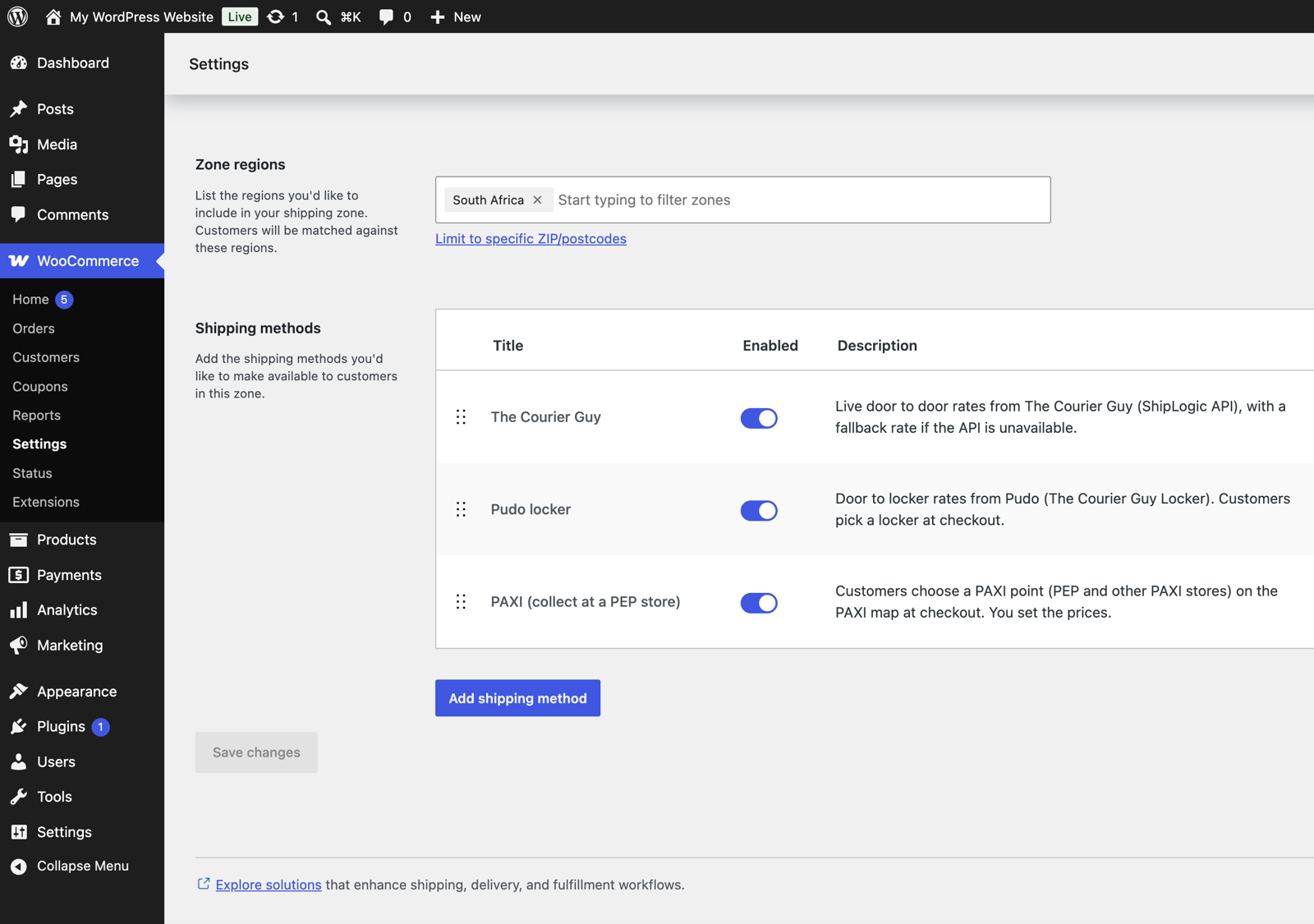
- Go to WooCommerce > Settings > Shipping, open your South Africa zone and add “The Courier Guy (door to door)”, “Pudo locker” and/or “PAXI (collect at a PEP store)”.
- Edit each method. For The Courier Guy and Pudo: choose Sandbox or Live, paste the API key, fill in your sender address, and check the default parcel and fallback rate. For PAXI: set your prices. Sandbox accounts are free: sandbox.shiplogic.com for The Courier Guy and sandbox.pudo.co.za for Pudo. Sandbox prices are test prices.
FAQ
-
Does it support the Checkout block?
-
Yes. The Courier Guy rates, the Pudo locker picker and the PAXI point picker work on the Checkout block and on the classic checkout.
-
Can a customer order PAXI or Pudo without choosing a point?
-
No. The order is blocked with a message until a locker or PAXI point is chosen.
-
What happens if the courier API is down?
-
The Courier Guy and Pudo methods show your fallback rate instead of disappearing. Failed calls are logged under WooCommerce > Status > Logs (source skillmerc-shipping-courier-guy-pudo-paxi) without your API key, and the plugin waits two minutes before trying the API again so checkout stays fast. PAXI uses your fixed prices and does not call an API for rates.
-
How is the parcel size worked out?
-
Product weights are added up. The parcel uses the largest length, width and height across the products in the cart. Products without a weight or dimensions use the defaults from the method settings. For Pudo, the smallest locker box that fits the parcel size, volume and weight is quoted. If nothing fits the largest box, the Pudo method is not shown.
-
Are rates cached?
-
Yes, each quote is cached for 10 minutes per address and parcel, and the locker list for 12 hours.
-
How do I get a Fastway API key?
-
Go to sa.api.fastway.org, open Get API Key, choose South Africa and register. The key arrives on screen and by email. Paste it into the Fastway method in your shipping zone and pick the franchise that collects your parcels.
-
Is this plugin made by The Courier Guy, Pudo, Fastway or PAXI?
-
No. It is an independent plugin by Skillmerc that uses their public APIs and map. The names are trademarks of their owners.
Reviews
There are no reviews for this plugin.
Contributors & Developers
“Skillmerc Shipping for The Courier Guy, Pudo and PAXI” is open source software. The following people have contributed to this plugin.
Contributors
Translate “Skillmerc Shipping for The Courier Guy, Pudo and PAXI” into your language.
Interested in development?
Browse the code, check out the SVN repository, or subscribe to the development log by RSS.
Changelog
0.1.2
- Added: Fastway (door to door) shipping method with live Fastway Couriers South Africa rates, a pickup franchise setting and optional satchel prices. Uses the same parcel defaults, markup, free shipping threshold and fallback rate as the other methods.
- Fixed: uninstall now also removes the Fastway method from shipping zones.
0.1.1
- Added: a short, dismissible panel describing the optional Pro version on The Courier Guy method settings, and a Get Pro link on the Plugins screen. No changes to rates or checkout.
0.1.0
- First release: The Courier Guy door to door rates, Pudo door to locker rates with a locker picker, PAXI collection with the PAXI map, pickers for the Checkout block and the classic checkout, fallback rate, markup, free shipping threshold.