

Description
Connect your WooCommerce source catalog and stock to ShipWave Channels. This
companion adds recoverable marketplace-order receipts and quantity-scoped
shipment tracking. It supports WooCommerce legacy orders and HPOS.
External service
This plugin is the companion for ShipWave Channels, operated by Levy Electric,
Inc. A ShipWave account and a connection from ShipWave to this WooCommerce store
are required. The plugin does not provide standalone marketplace connections.
ShipWave provides the hosted marketplace connections, synchronization and
fulfillment workflow. Service subscriptions and shipping charges are separate
from this free plugin; see the current service and pricing page below.
This package is prepared for WordPress.org distribution. A WooCommerce
Marketplace listing is separate from installation and is not required.
After the store owner authorizes access, ShipWave reads catalog, stock and order
data through WooCommerce’s API. Registered WooCommerce webhooks send product and
order events to ShipWave. Enabled write lanes let ShipWave create marketplace
order mirrors and save quantity-scoped tracking. Mirrors include the buyer’s
shipping details where the marketplace permits it. Amazon buyer name, street
address, phone and email are never written to WooCommerce; those mirrors use
“Marketplace Customer” placeholders with only city, state, postal code and country.
The companion authenticates these requests using the store’s WooCommerce API
key and its existing permissions. It does not execute payment gateways or refunds.
Service and pricing: https://shipwave.app/pricing
Setup and support: https://shipwave.app/help/connect-woocommerce-channels
Terms of service: https://shipwave.app/terms
Privacy policy: https://shipwave.app/privacy
Screenshots
Installation
- Install and activate WooCommerce. Enable WooCommerce stock management.
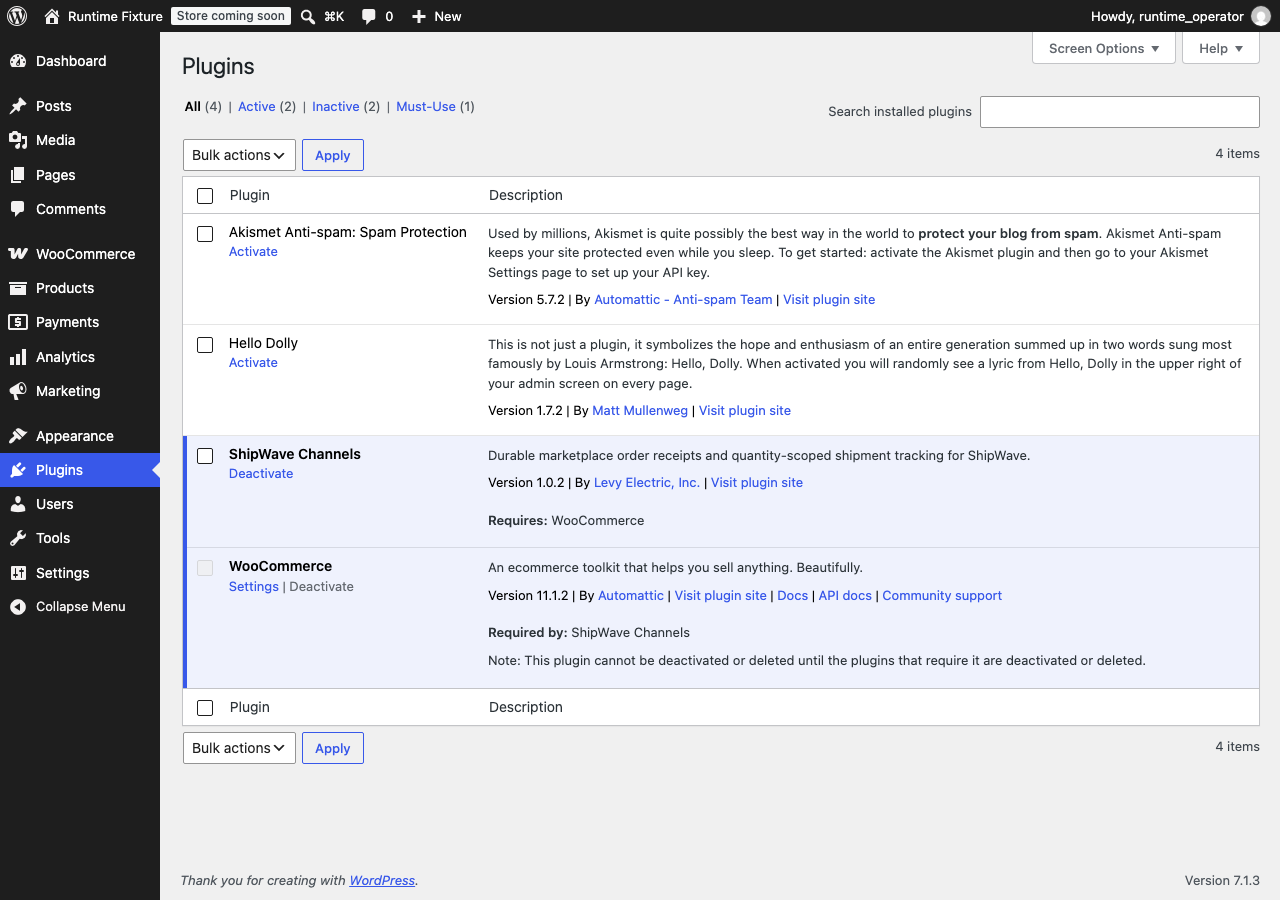
- In WordPress, open Plugins > Add New > Upload Plugin. Upload the ShipWave Channels ZIP and activate it. After WordPress.org publication, you can also search for ShipWave Channels under Plugins > Add New and choose Install Now.
- In ShipWave, choose Stores > Connect > WooCommerce, enter your public HTTPS store address, and approve the read/write connection in WooCommerce.
- Start read-only sync, resolve SKU/stock mapping issues, and complete test-store acceptance before enabling order mirrors, marketplace stock, or tracking.
- Stop any previous connector writers before enabling ShipWave write lanes.
Alternatively, create a WooCommerce read/write REST API key for an administrator and use ShipWave’s existing-API-keys option. Keep the key and secret private. Public HTTPS with valid TLS is required. Private networks and redirecting REST endpoints are unsupported.
Orders and tracking
Marketplace orders represent sales already paid on the marketplace. The plugin does not charge a buyer, execute a payment gateway, or issue refunds. Source stock is reserved and deducted through WooCommerce’s native stock functions. Untracked, backordered, virtual or ambiguous shared-stock products are held. Replaying an identical reference recovers its receipt. A changed or uncertain request requires reconciliation instead of automatically creating another order.
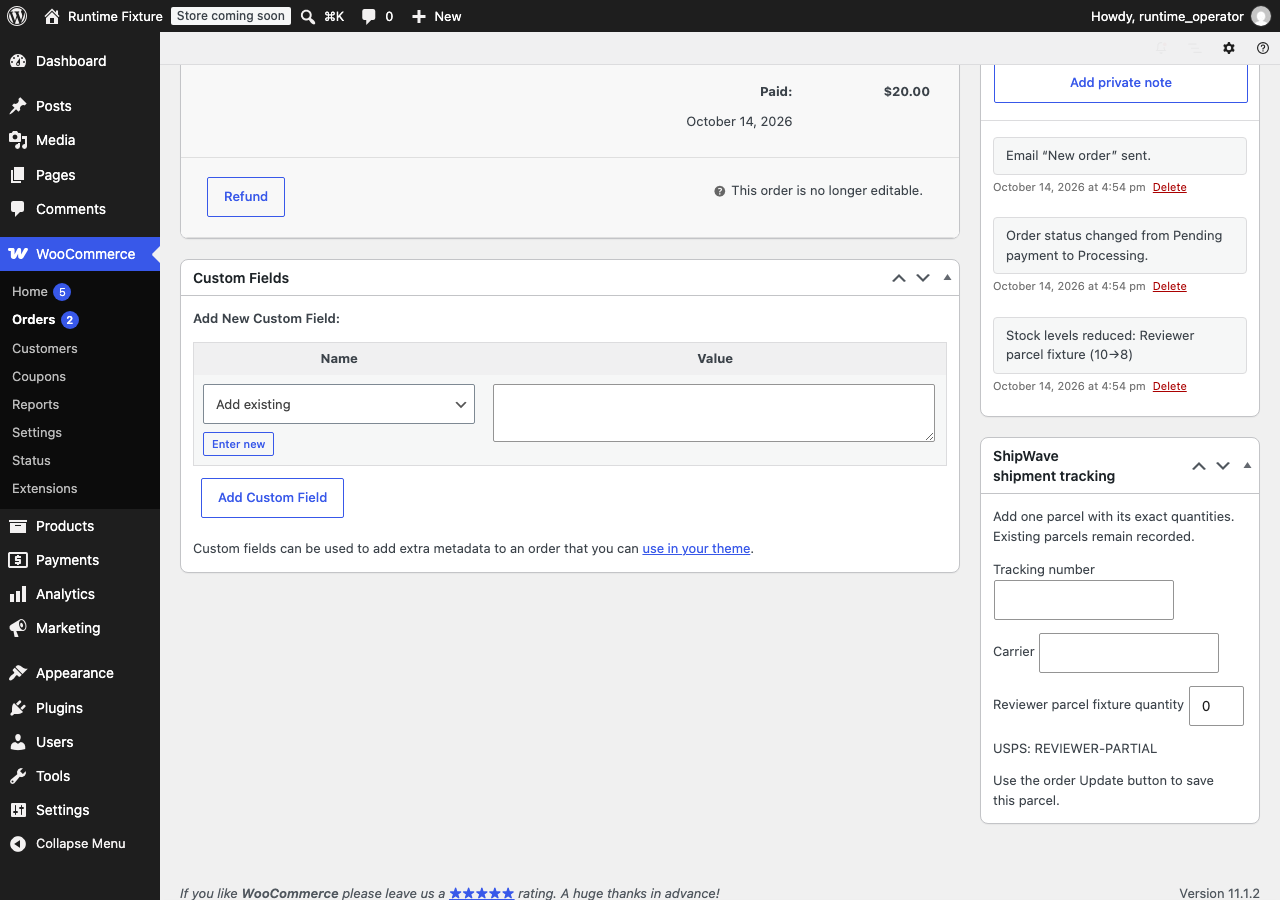
In a WooCommerce order’s ShipWave shipment tracking box, enter a carrier, tracking number and the exact quantities in one parcel, then use the order Update button. Each parcel remains recorded. Partial parcels do not complete the entire order. ShipWave shipping labels continue to use ShipWave’s warehouse and rate policies.
Recovery
If an order or shipment reports reconciliation required, pause the affected write lane in ShipWave and inspect its source receipt and ShipWave Sync health. Do not delete plugin claim/lock options, remove receipt metadata or re-create a reference to bypass an uncertain result. Contact support@shipwave.app or consult the setup guide above. Disabling the plugin stops companion writes; historical orders, shipments, stock deductions and claims remain stored.
FAQ
-
Is a WooCommerce.com account required to connect my store?
-
No. Direct installation and store authorization use your own WordPress site.
A WooCommerce.com vendor account is a separate requirement for publishing this
plugin in Woo’s official Marketplace. -
Can I keep another connector writing orders or inventory?
-
Complete a read-only comparison first, then disable the previous connector’s
affected writers before enabling the corresponding ShipWave write lanes.
Reviews
There are no reviews for this plugin.
Contributors & Developers
“ShipWave Channels” is open source software. The following people have contributed to this plugin.
Contributors
Translate “ShipWave Channels” into your language.
Interested in development?
Browse the code, check out the SVN repository, or subscribe to the development log by RSS.
Changelog
1.0.3
- Uses the distinct shipwave_channels prefix for declarations, form fields and new claims.
- Preserves existing order and parcel receipts and honors legacy uncertain claims and locks.
1.0.2
- Prepares WordPress.org readme metadata and service disclosures.
- Directory packages use WordPress.org updates; direct-download packages retain
the ShipWave Update URI and manual replacement workflow.
1.0.1
- Amazon order mirrors use non-restricted buyer placeholders instead of being
refused. - Declares cart/checkout block compatibility, sanitizes request input, caches the
storage-engine check, and makes the tracking box translatable. - Adds tested-version metadata and an Update URI so unrelated directory plugins
cannot replace this companion.
1.0.0
- Initial companion with durable order receipts, native atomic stock reservation,
exact parcel quantities, permission checks, and legacy/HPOS order support. - Direct download includes service disclosures, plugin metadata and GPL license.