

Description
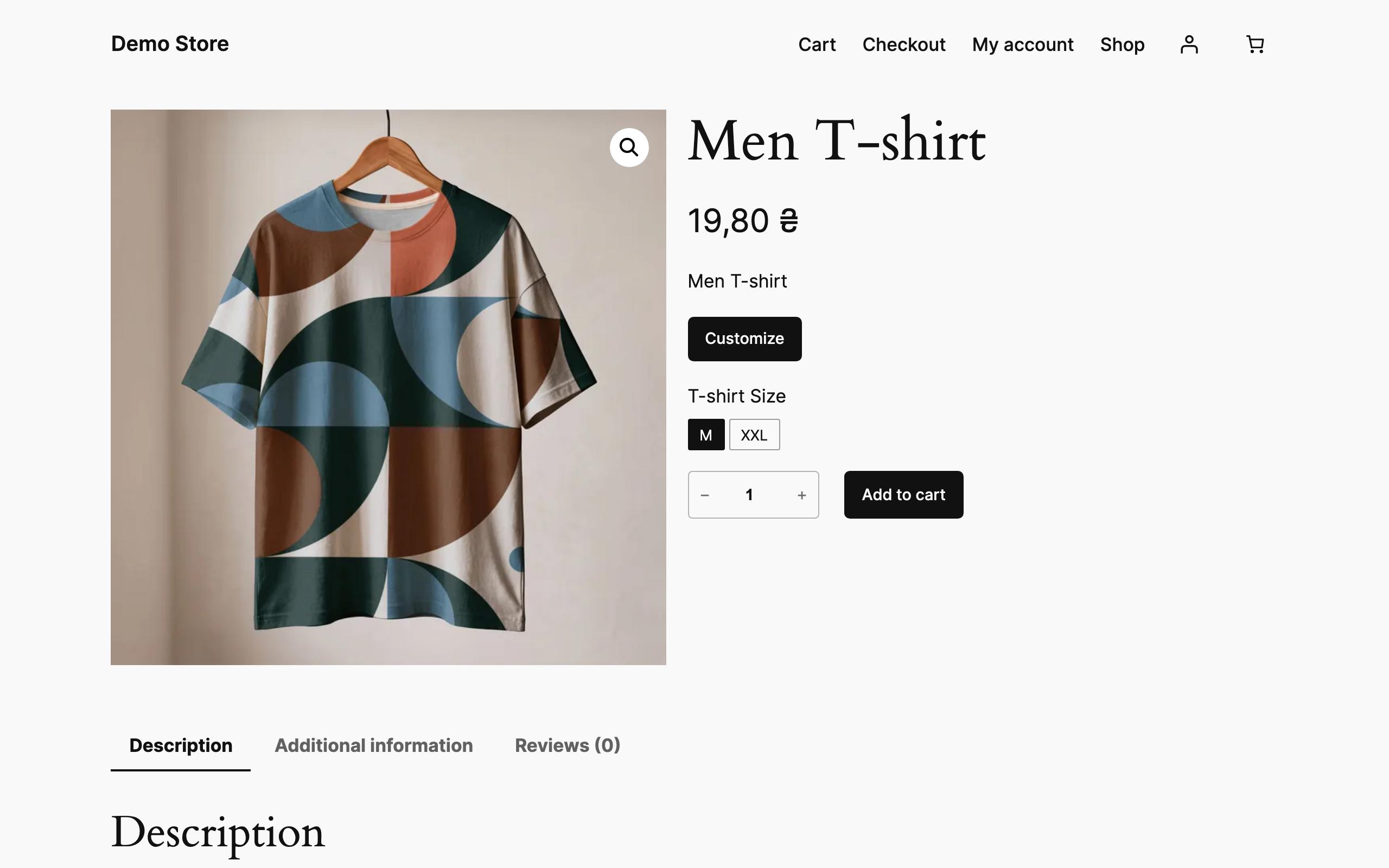
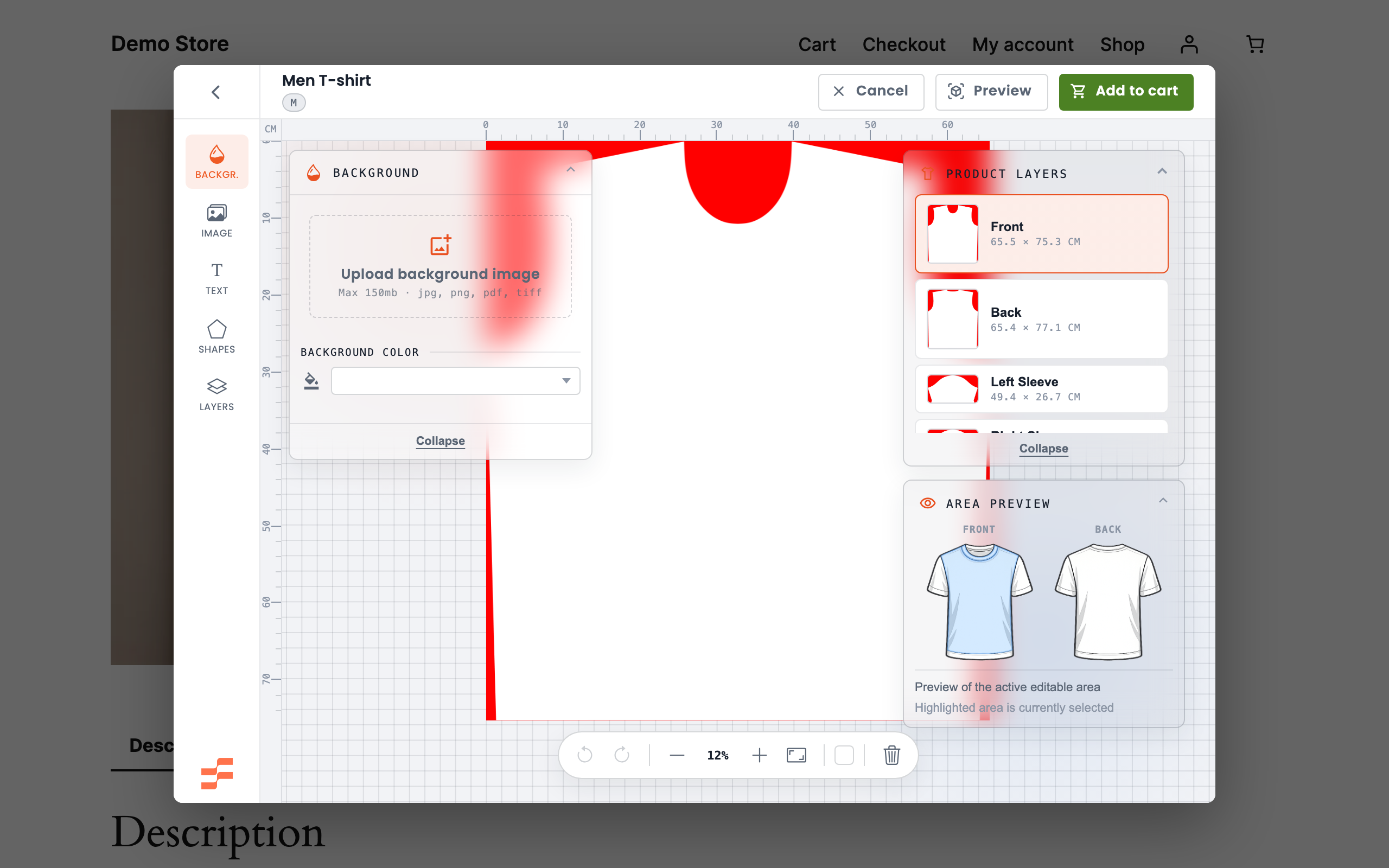
Fabrixa Studio for WooCommerce adds a Customize button to the products you choose. The shopper designs the item in the Fabrixa Studio editor without leaving your shop, the design travels with the cart line through checkout, and the finished order goes to Fabrixa to be produced and shipped.
You decide which products are customizable, one product at a time. Everything else in your shop is untouched.
What it does
- A Customize button on the products you enable, opening the Fabrixa Studio editor in a modal.
- Per-variation SKUs, so a design is made against the right garment and colour.
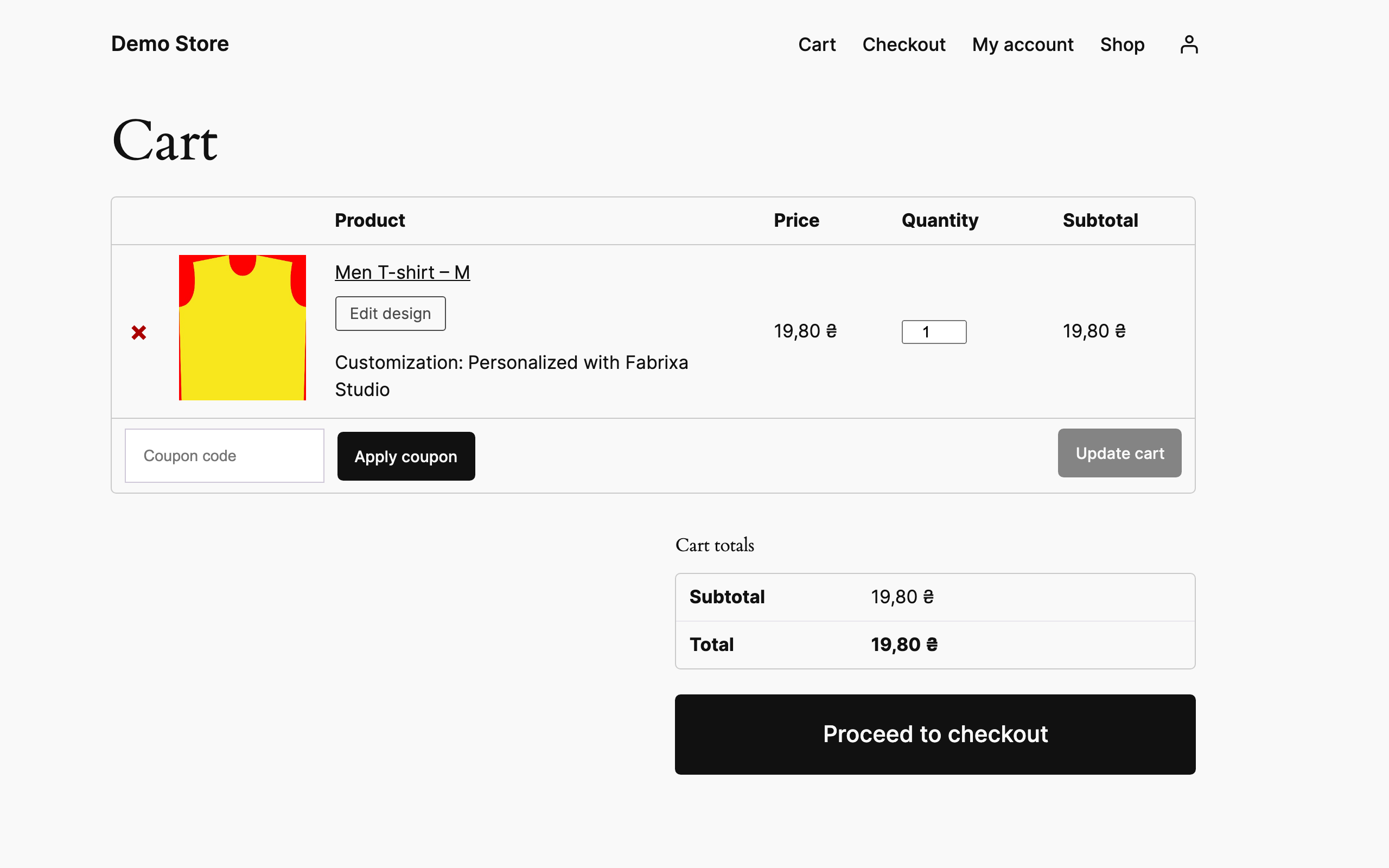
- The design preview replaces the product photo in the cart, and shoppers can reopen the editor to change it.
- Works in the classic cart, the Cart block and the Mini Cart.
- The shopper’s design travels with the order line, so the item Fabrixa produces carries it — through the Fabrixa channel connection your shop already has.
- When Fabrixa reports back over its webhook, tracking details land on the order and the order can complete itself.
- Compatible with High Performance Order Storage and with the Cart and Checkout blocks.
Requirements
WooCommerce and a Fabrixa account with your shop connected as a channel. The plugin does nothing until you enter your Application Key.
External services
This plugin connects your shop to Fabrixa, a print-on-demand service operated by Fabrixa B.V. in the Netherlands. The connection is the point of the plugin: Fabrixa hosts the design editor and produces the orders. Nothing leaves your shop through this plugin until you enter your Application Key under WooCommerce Fabrixa Studio.
There are three exchanges.
The design editor, from the shopper’s browser. Clicking Customize opens studio.fabrixa.com in an iframe. Only your public Application Key and the product’s Fabrixa SKU are passed to it. The plugin sends no shopper data here.
Design previews, from the shopper’s browser. The cart shows the design in place of the product photo, loaded from api.fabrixa.com using your Application Key and the identifier of the design.
Order data is not sent by this plugin. Orders reach Fabrixa through the channel connection between your Fabrixa account and your shop, which reads them over the WooCommerce REST API under the terms of your Fabrixa agreement. The plugin only stores the identifier of the shopper’s design and the SKU on each customized order line, where that connection can read them.
Fulfilment updates, to your server. Fabrixa calls a REST endpoint this plugin registers to report production and shipping status. Every request must carry a valid signature generated with the webhook secret from your Fabrixa dashboard, and requests that do not are rejected.
Fabrixa’s terms of service: https://www.fabrixa.com/terms/
Fabrixa’s privacy policy: https://www.fabrixa.com/privacy/
Screenshots
Installation
- Install and activate the plugin. WooCommerce must be active.
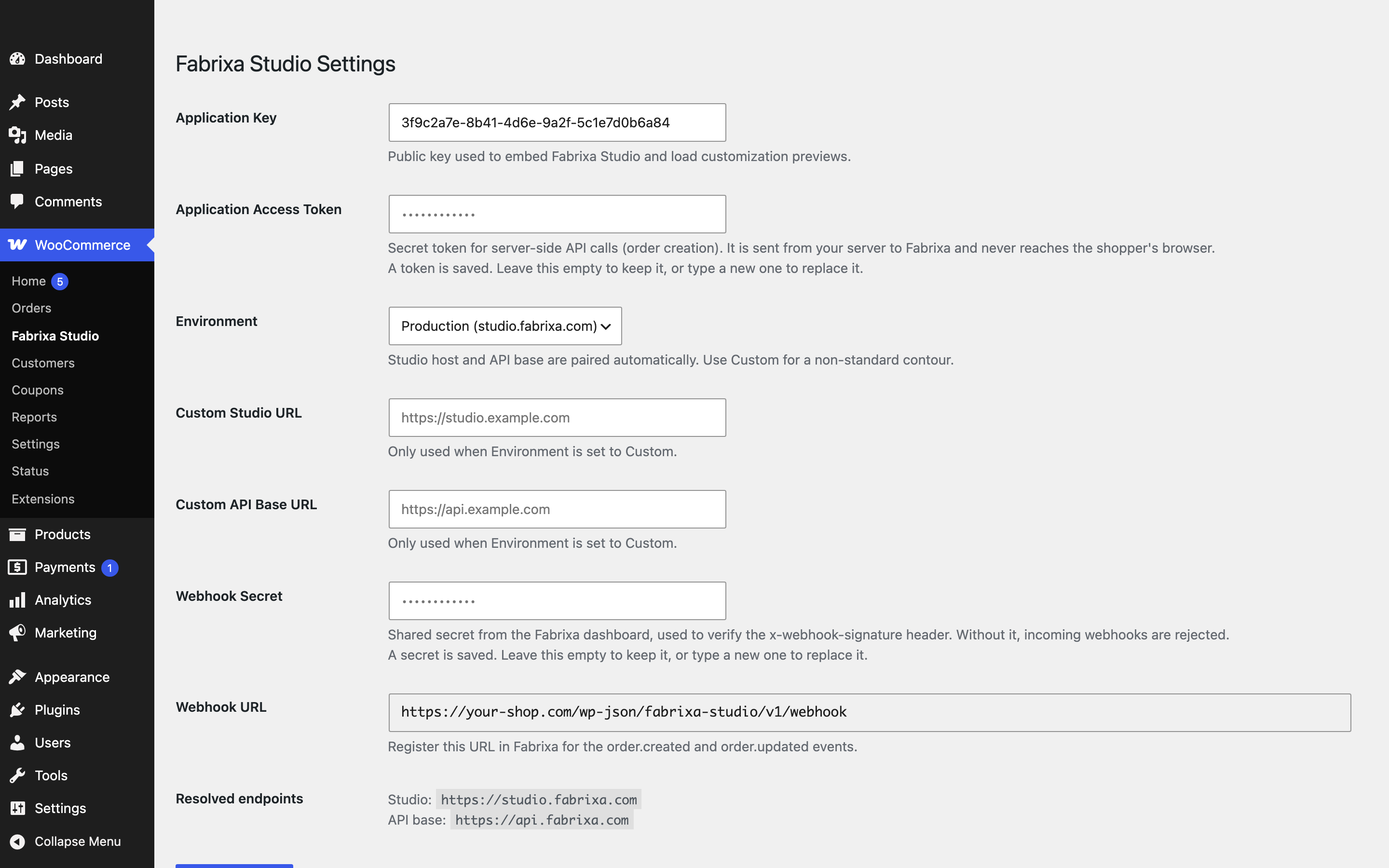
- Go to WooCommerce Fabrixa Studio and enter your Application Key from the Fabrixa dashboard.
- Optional, when Fabrixa provides you with a webhook secret: paste it as the Webhook Secret on the same screen and register the Webhook URL shown there in Fabrixa for the
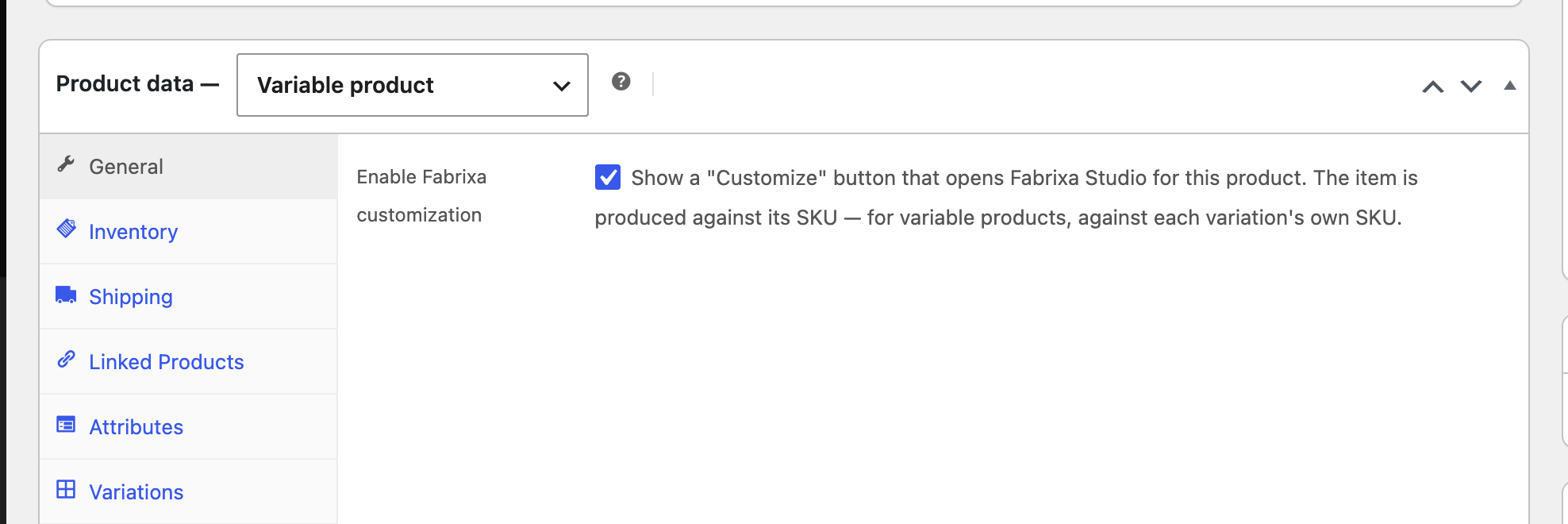
order.createdandorder.updatedevents. This is how production status and tracking come back to the order. Without it the plugin still works; the order is simply not updated from Fabrixa’s side. - Edit a product, open Product data General and tick Enable Fabrixa customization. The item Fabrixa produces is named by the product’s SKU — for variable products, by each variation’s own SKU; a variation never borrows its parent’s. Products created by the Fabrixa catalogue sync already carry the right SKU. An item without one cannot be customized, and the product edit screen will say so.
FAQ
-
Do I need a Fabrixa account?
-
Yes. The plugin is a connector; the editor, the production and the shipping are Fabrixa’s.
-
Does this change products I have not enabled?
-
No. The Customize button appears only on products where you have ticked the box, and only customized lines are ever sent to Fabrixa.
-
How do orders get to Fabrixa?
-
Through the channel connection between your Fabrixa account and your shop, the same one that syncs products. The plugin does not send orders itself; it stores the shopper’s design on each customized order line, and Fabrixa attaches it to the item it produces. If an order is missing in Fabrixa, check the channel in your Fabrixa dashboard.
-
Does it work with the Cart and Checkout blocks?
-
Yes, and with the Mini Cart. The design preview and the edit action are implemented for the block carts as well as the classic templates.
-
Can I keep my credentials out of the database?
-
Yes. Define
FABRIXA_WEBHOOK_SECRETinwp-config.phpand it takes precedence over the settings screen, which shows the field greyed out with a note. Anything you had already saved is left in place, so removing the constant falls back to it. -
Because it has no SKU of its own. The button appears only where Enable Fabrixa customization is ticked and the item has a SKU — per variation, for variable products; the parent’s SKU does not count. Without one there is nothing for Fabrixa to produce, so the button is hidden rather than leading to a design that could never be made. The product edit screen shows a warning naming the variations concerned.
-
Where can I see whether an order reached Fabrixa?
-
On the order edit screen, once Fabrixa has reported back: the Fabrixa order id, its status and fulfilment state, and any tracking details in the order notes.
-
What happens to my data if I delete the plugin?
-
Your settings and the per-product customization options are removed. Order data is not: the Fabrixa order id, fulfilment status and tracking details stay on your orders, because they record something that actually shipped.
Reviews
There are no reviews for this plugin.
Contributors & Developers
“Fabrixa Studio for WooCommerce” is open source software. The following people have contributed to this plugin.
Contributors
Translate “Fabrixa Studio for WooCommerce” into your language.
Interested in development?
Browse the code, check out the SVN repository, or subscribe to the development log by RSS.
Changelog
0.4.0
- Orders are no longer sent to Fabrixa by the plugin. Shops are connected to Fabrixa as a channel, which imports orders itself; the plugin’s own push produced every order twice. The plugin now stores the design on the order line, where the channel reads it.
- The Application Access Token setting is gone with it. Sends still queued by earlier versions are cleared on upgrade.
- The order screen shows the Fabrixa order id, status and fulfilment state reported by webhook.
- Fixed: on the Add to Cart with Options block the Customize button sat level with the first attribute label.
- The Studio window is titled for assistive technology, takes keyboard focus when it opens and hands it back when it closes.
- Added changelog.txt.
0.3.1
- The Fabrixa SKU field is gone. The item Fabrixa produces is named by the WooCommerce SKU of what is bought — for variable products the variation’s own SKU, never the parent’s — which is the value the Fabrixa catalogue sync already fills in. Whether a product can be customized is decided by its toggle alone.
- The product edit screen warns when customization is enabled but the product, or one of its variations, has no SKU of its own, and names the variations concerned.
- Fixed: bundled translations were never loaded. 0.3.0 dropped the load_plugin_textdomain() call on the assumption that WordPress loads them on demand, which it does only for plugins hosted on wordpress.org.
- Fixed: a second click on “Edit design” in the Cart or Mini Cart block while the first was still loading locked up the script.
- Fixed: on the classic checkout page and in the classic mini-cart widget, a customized line showed a stray colon and an “Edit design” link meant for the block carts.
- Product settings are saved as part of WooCommerce’s own save rather than a second one, so woocommerce_update_product fires once per edit.
- The fabrixa_order_trigger_statuses filter is now honoured by the order sender as well as the webhook when it is added from a theme.
0.3.0
- Removed the bundled self-updater; updates are delivered by the marketplace the plugin is distributed from.
- Removed the internal development environment from the settings screen.
- Declared compatibility with the Cart and Checkout blocks, which the plugin already supported through the Store API.
- Orders no longer carry the shopper’s IP address or browser user agent, neither of which was used to produce or ship anything.
- Added an uninstall routine that clears settings and per-product configuration while leaving order records intact.
- Webhook order lookup works on both order datastores without tripping the WooCommerce 9.2 notice, and confirms the match before applying an update.
- Dropped the redundant load_plugin_textdomain() call; bundled translations load on demand.
- Added a translation template and the GPLv3 licence text.
- Security: the Fabrixa SKU sent for production is now resolved from the product being bought instead of being read back from the add-to-cart request, and a design is only accepted for a product that has customization enabled.
- Security: the settings screen no longer renders the stored access token or webhook secret into the page, and requires the same capability to open as WordPress requires to save it.
- Fixed: a variation with no Fabrixa SKU of its own inherited the parent’s WooCommerce SKU and was produced against that. The Fabrixa SKU is now only ever the value entered in that field.
- The Application Access Token can be set with the FABRIXA_ACCESS_TOKEN constant, as the webhook secret already could.
- Saving the settings screen no longer erases a stored secret that a wp-config.php constant is currently overriding.
- Failed API responses are no longer written to the WooCommerce logs in full; define FABRIXA_LOG_RESPONSE_BODIES to restore that while debugging.
0.2.1
- Customize button now renders styled on block themes and keeps its own line above Add to cart on themes that style WooCommerce buttons.
- Variable products show “Select options first” immediately instead of briefly showing “Customize” before the script loads.
- Disabled state is greyed out on themes that do not style it themselves.
- A failed update check now reports itself on the Plugins screen instead of leaving the site silently stuck on an old version.
0.2.0
- Order creation via POST /v2/integration/orders, sent asynchronously on processing/completed.
- Only customized line items are sent; idempotent per order, with retries for transient failures.
- Fulfilment webhooks (order.created / order.updated) with HMAC-SHA256 signature verification.
- Tracking details and fulfilment status stored on the order; auto-complete when Fabrixa ships.
- Webhook secret setting (overridable via the FABRIXA_WEBHOOK_SECRET constant) and webhook URL display.
- Sync state shown on the order edit screen; all API activity logged to WooCommerce logs.
- Declared High Performance Order Storage compatibility.
- Translations loaded from /languages on init; declared WooCommerce as a required plugin.
- Queued order sends are cancelled on deactivation.
0.1.0
- Customize button on selected products (per-product toggle).
- Fabrixa Studio embedded via modal iframe with postMessage handling.
- Environment switcher (dev/production/custom) pairing Studio + API hosts.
- Per-variation Fabrixa SKU with resolver (override -> variation SKU -> fallback).
- cart_item_key persisted to cart and order line item meta.
- Live customization preview in the cart.
- Automatic updates from Bitbucket.