

Description
Give every product in your shop its own EU Digital Product Passport. ActivateDigital builds each one from the data your WooCommerce shop already holds, asks you only for what’s missing and puts a passport badge on the product page.
Your first 5 passports are free. Download the plugin, then press Connect this shop.
The numbers
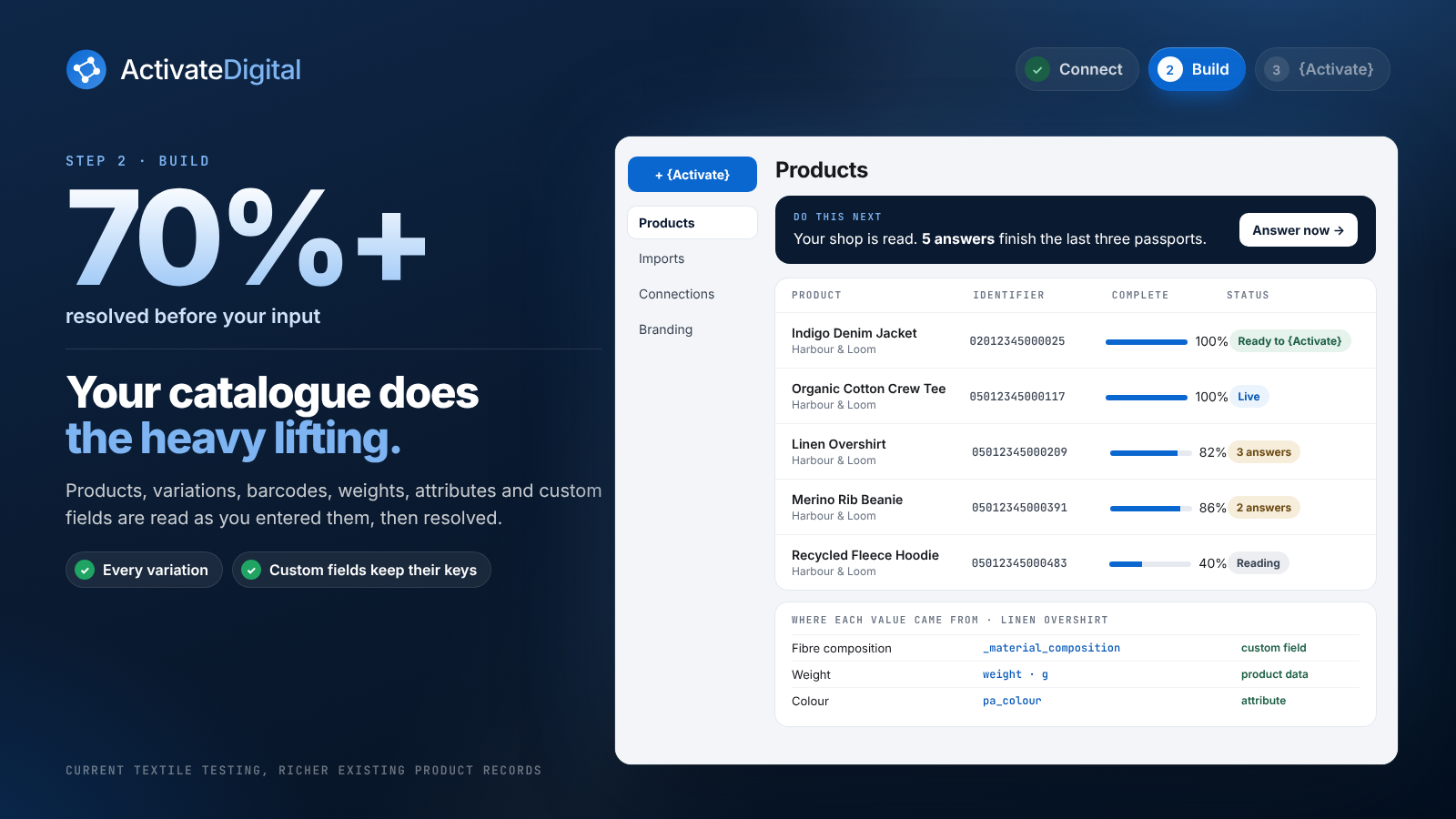
- 70%+ resolved before your input.
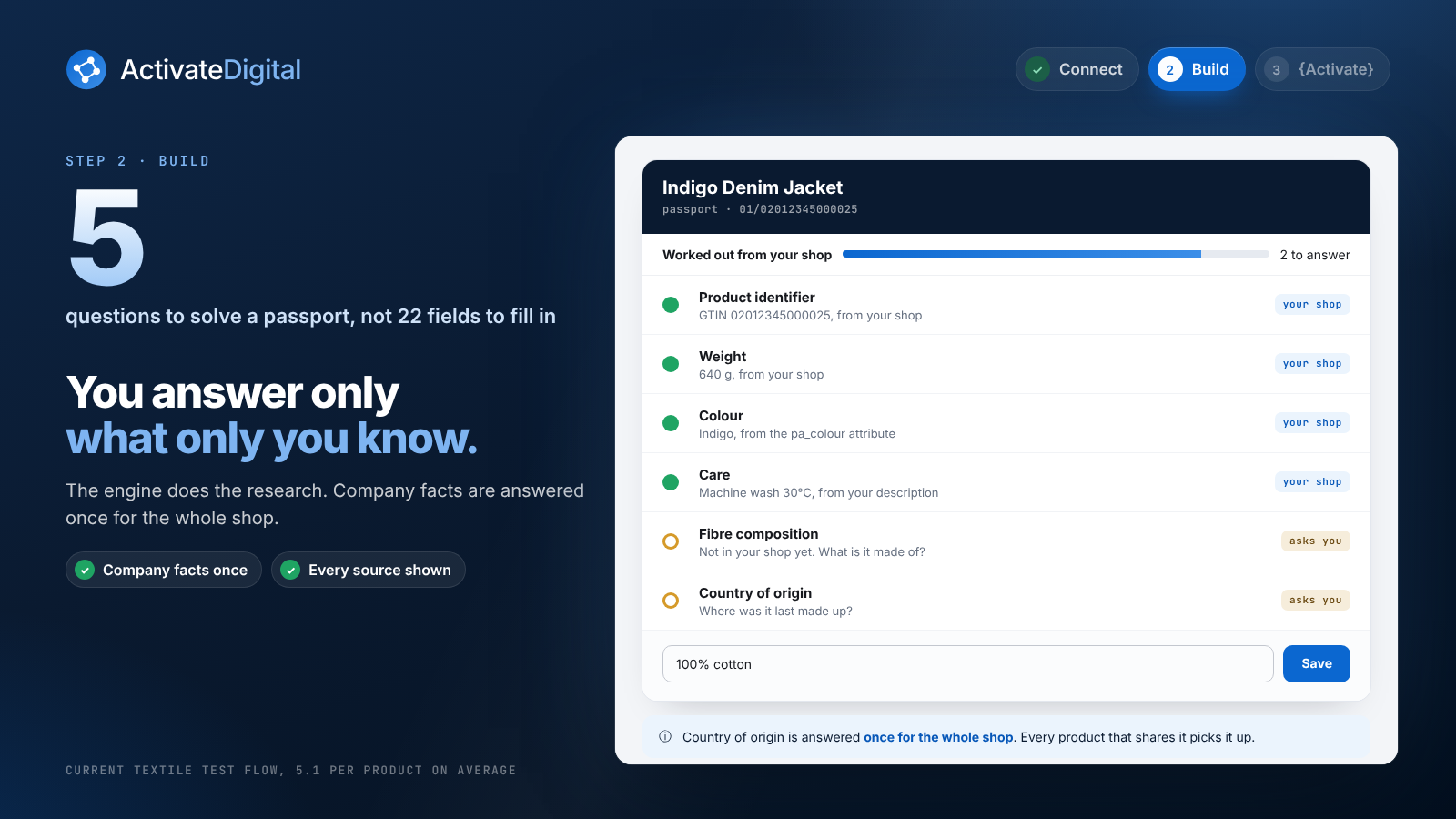
- 5 questions to solve a passport, not 22 fields to fill in.
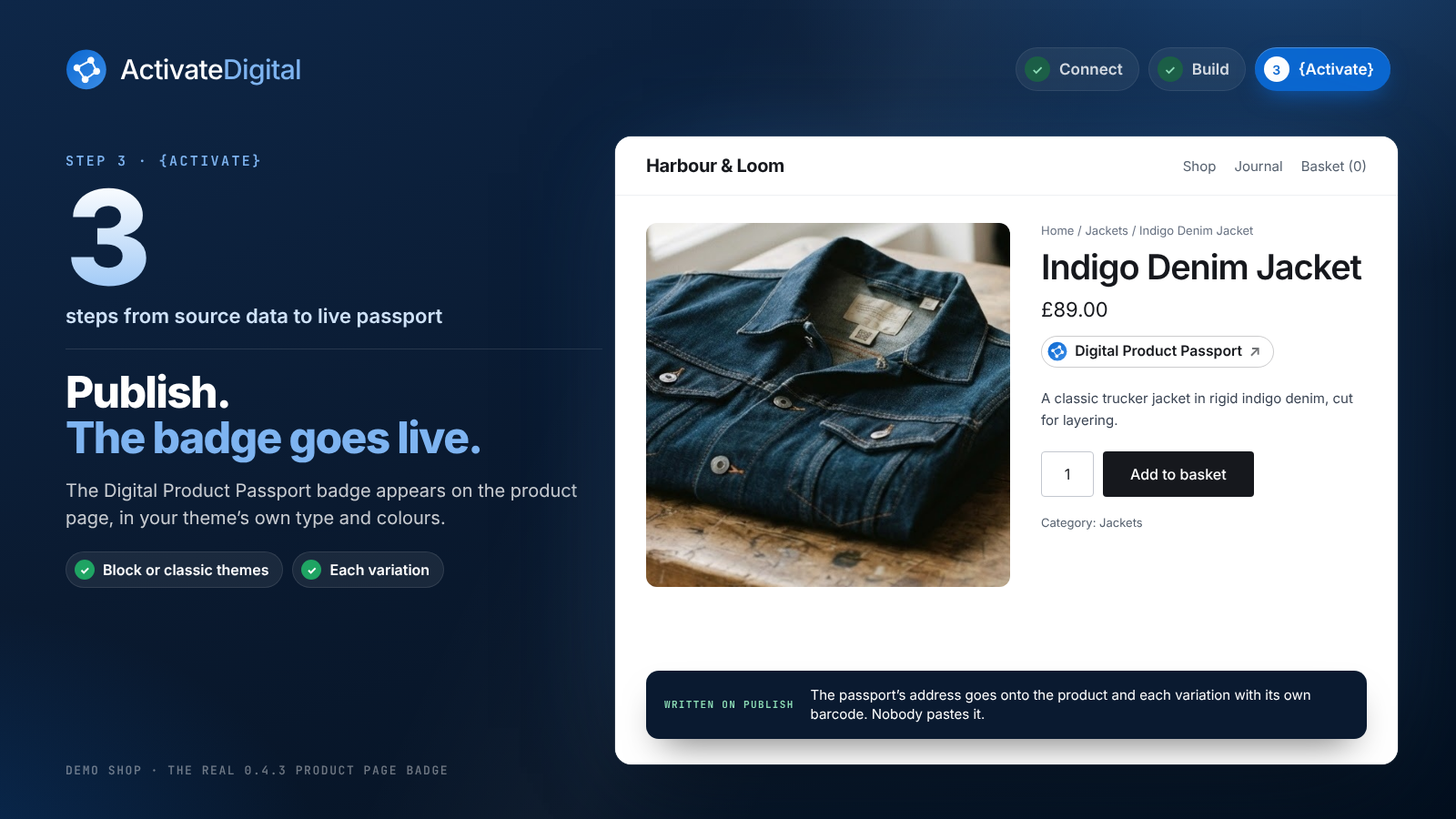
- 3 steps from source data to live passport.
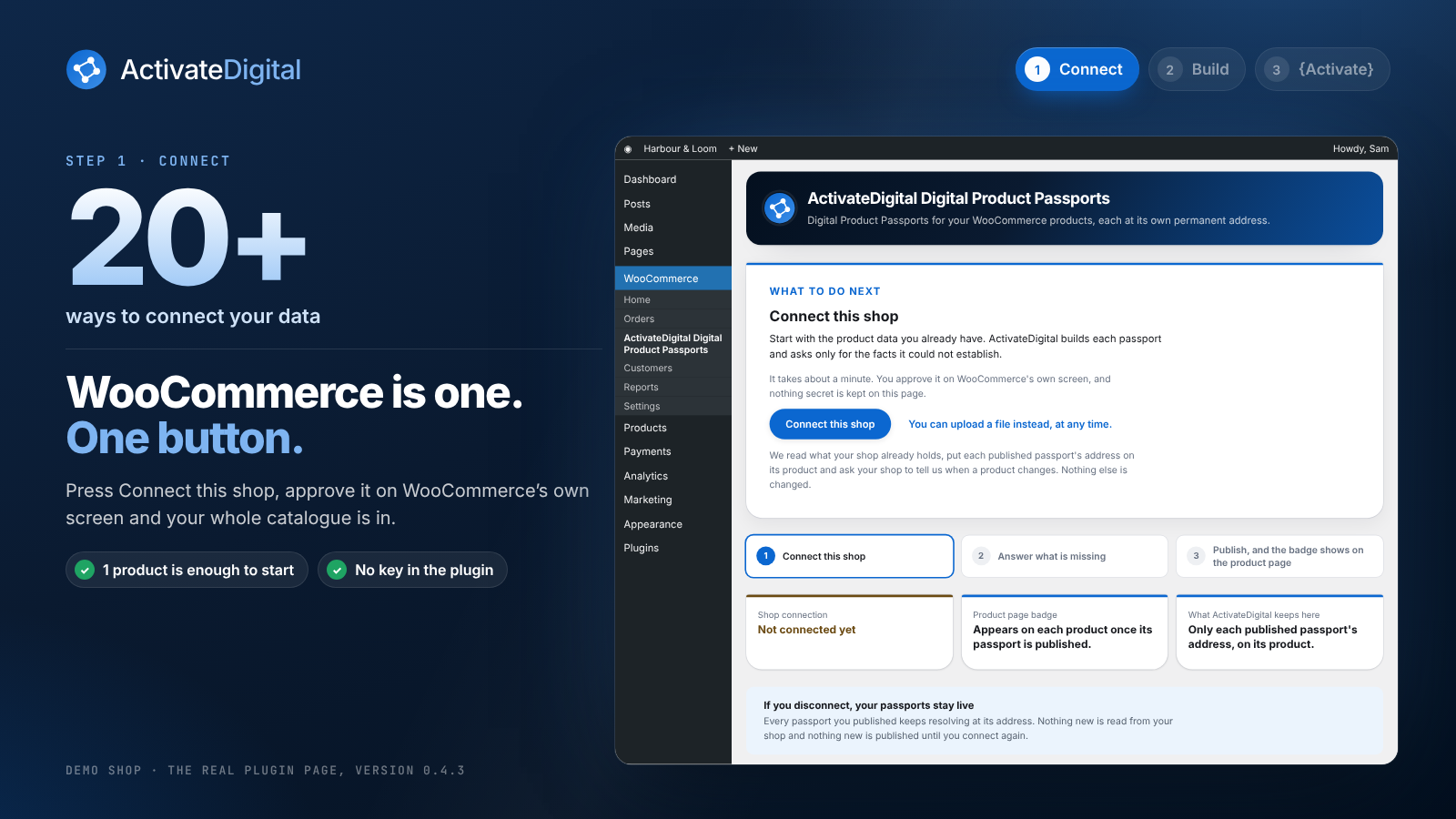
- 20+ ways to connect your data. WooCommerce is one button.
- 22 EU ESPR requirements for textiles.
- 1 product is enough to start.
In current textile testing, richer existing product records reached about 71% of scoped decisions settled before the merchant answered anything. See the data.
Why it works
- One governed record, multiple outputs. The same governed product record produces the live passport, its GS1 Digital Link, the Product Pack and an API-readable record, without rebuilding the evidence for every destination.
- One piece of data unlocks many decisions. Composition and identity come first, because once they’re established much of the rest of the passport is bookkeeping the engine does for you.
- You answer only what only you can know. The engine does the research. Company facts are answered once for the whole shop.
3 steps: Connect, Build, {Activate}
- Connect. Press Connect this shop and approve on WooCommerce’s own screen. Your products, variations, barcodes, weights, attributes and custom fields are read as you entered them.
- Build. ActivateDigital works out every passport field it can, shows where each answer came from and asks only what it could not establish. Most questions are answered once for the whole shop.
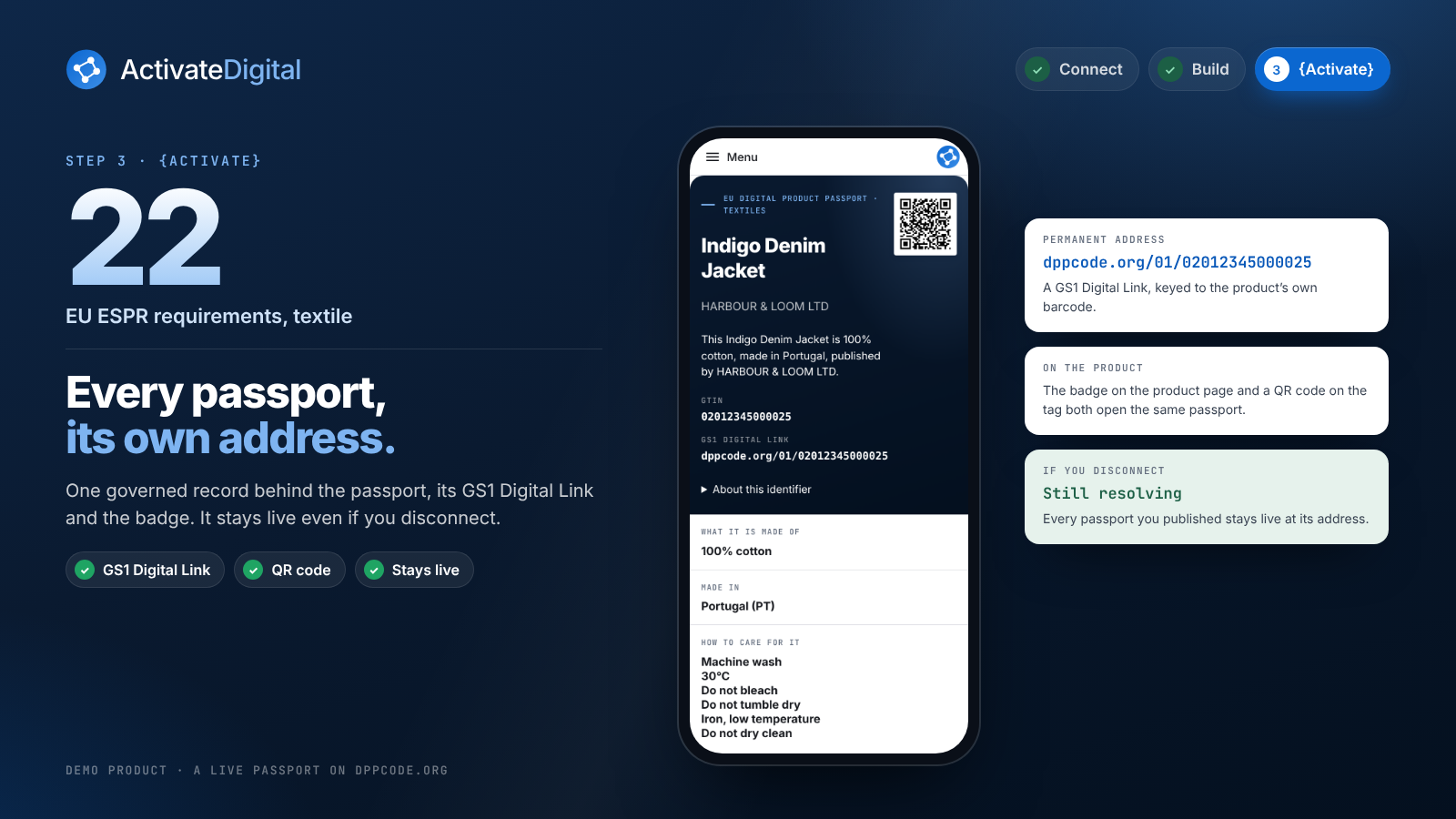
- {Activate}. Approve and publish. The passport’s address is written onto the product and onto each variation with its own barcode. The badge appears on the product page. Nobody pastes anything.
What you get
- A passport for each product at its own permanent address on dppcode.org, with a GS1 Digital Link and a QR code.
- A Digital Product Passport badge on the product page, as a block or under the product summary.
- A catalogue that stays in step. When you edit, add or bin a product, your shop tells ActivateDigital. Only products that changed are read again.
- Passports that stay live. Every passport you publish keeps resolving, even if you disconnect.
Who it’s for
Clothing and textile shops selling into the EU, where the Ecodesign for Sustainable Products Regulation (ESPR) brings Digital Product Passports in category by category. Q4 2027 is the Commission’s indicative timing for the textile act. It’s a planning date, not a compliance date. Shops that start now aren’t starting from a blank page when the act lands.
See how it works at activatedigital.ai.
Pricing
- Your first 5 passports are free.
- Pay as you go: 0.99 per published passport, at most 50.00 in any 30 days.
- Unlimited: 19.99 every 30 days for as many passports as you publish.
- Prices are in US dollars or pounds sterling, at the same figures.
The plugin is free, with nothing in it locked behind payment. ActivateDigital is a paid service, and nothing is charged until you choose a plan in the console. Payment is taken there, and the plugin never sees or stores payment details.
What the plugin does on your site
- Adds an ActivateDigital Digital Product Passports page under WooCommerce that says what to do next, with a Connect this shop button.
- Shows the Digital Product Passport badge on the product page, linking to the published passport.
The plugin keeps no data, holds no key and makes no call from your server. The connection uses WooCommerce’s own approval screen, and everything else happens in the ActivateDigital console.
External services
This plugin connects your shop to one external service, the ActivateDigital console at activatedigital.ai, run by SIGNALANALYTICS.AI LTD. The plugin itself makes no call from your server, sends nothing on activation and does no tracking. Nothing is sent until you press Connect this shop.
What goes to activatedigital.ai, when and why:
- When you press Connect this shop, your browser opens the console with your shop’s host name, the platform name (woocommerce) and the address of this admin page to come back to. This tells the console which shop to connect.
- WooCommerce then shows its own approval screen. When you approve, your shop sends a consumer key and secret with read and write access to the console. The key pair is created by WooCommerce, never by this plugin, and the plugin never holds it.
- With that key the console reads, through the WooCommerce REST API, your products, their variations and your weight unit setting. It reads them to build each passport.
- When you publish a passport, the console writes one field, activate_digital_passport_link, onto that product and onto each variation with its own barcode. It writes nothing else: titles, prices, stock and descriptions are never written.
- The console creates product webhooks in your shop, so your shop tells it when a product is created, edited, binned or restored. They send that product’s data to the console.
- No customer or order data is read.
What goes to dppcode.org:
- Nothing from the plugin or from your shop. Published passports are public pages served from dppcode.org. The product page links to them and a shopper’s browser opens them when the link is clicked. They keep resolving whether or not the plugin stays active.
Privacy policy: https://activatedigital.ai/privacy
Terms of service: https://activatedigital.ai/terms
Service and support: https://activatedigital.ai/woocommerce-digital-product-passport
You can withdraw access at any time under WooCommerce, Settings, Advanced, REST API, by revoking the ActivateDigital key. Its webhooks stop being accepted at the same moment.
Screenshots
Blocks
This plugin provides 1 block.
- Activate Digital Passport Link
Installation
- Install and activate the plugin. WooCommerce must be active.
- Open WooCommerce, ActivateDigital Digital Product Passports and press Connect this shop.
- Sign in or create an ActivateDigital account, then approve access on WooCommerce’s screen.
- You land on a page that says how many products and variants were found and how many passports are ready, need your input or are published.
- Open my products, answer what is left, approve and publish. The badge appears on each product page.
FAQ
-
What is a Digital Product Passport?
-
A public page for one product that carries its facts, such as what it’s made of, where it was made and how to care for it, reached from the product page or by scanning a code. The EU’s ESPR makes them a requirement category by category.
-
Do I need to fill in a form for every product?
-
No. ActivateDigital starts from the data your shop already holds and only asks about what it could not establish. Most questions are answered once for your business and apply to every product.
-
What does it cost?
-
Your first 5 passports are free. After that you pay per published passport or choose Unlimited, in the console. The plugin itself is free.
-
What happens to my products?
-
Nothing changes except one field holding the published passport’s address, written when you publish. Titles, prices, stock and descriptions are never written.
-
Does it work with variable products?
-
Yes. Each variation is read with its own barcode and weight, and each variation with its own barcode gets its own passport address.
-
What if my products have no barcode?
-
A passport can still be built. Products without a GTIN are told so plainly, and you can add barcodes later. The address follows the barcode.
-
Where does my store’s weight unit come from?
-
From your WooCommerce setting. A weight of 180 in a store set to grams is read as 180 g.
-
What happens if I uninstall the plugin or revoke the key?
-
Nothing new is read and nothing new is published, and every passport you already published keeps resolving at its address.
-
Does it support HPOS and the block checkout?
-
Yes. The plugin stores nothing on orders.
-
Where do I get help?
-
Email hello@signalanalytics.ai or visit https://activatedigital.ai/woocommerce-digital-product-passport.
Reviews
There are no reviews for this plugin.
Contributors & Developers
“ActivateDigital: Digital Product Passports for WooCommerce” is open source software. The following people have contributed to this plugin.
Contributors
Translate “ActivateDigital: Digital Product Passports for WooCommerce” into your language.
Interested in development?
Browse the code, check out the SVN repository, or subscribe to the development log by RSS.
Changelog
0.4.3
- The plugin page is redesigned in ActivateDigital’s look and says on every screen what to do next.
- The product page shows a small Digital Product Passport badge in place of the plain link.
- The text domain is the plugin’s WordPress.org slug, activatedigital-digital-product-passports-for-woocommerce.
0.4.2
- Products added or changed in your shop appear in the console when you open it, without visiting this page first.
- In the console, Publish turns green when a passport is ready, and Save / approve all saves your answers and approves every product that is ready.
0.4.1
- The plugin page shows the shop as connected after you leave it and come back, not only on the way back from approving.
0.4.0
- Every sentence the plugin shows is translatable under the activate-digital text domain.
- The generated config.php refuses direct access, like every other file.
- The readme states the pricing, the external services and the support address in full.
0.3.0
- The catalogue is read the moment you come back from approving, and the page says what was found.
- Published passport addresses are written onto products and variations automatically.
- Product changes reach ActivateDigital through WooCommerce’s own webhooks.
- HPOS and block checkout compatibility declared.
0.2.0
- The console address now carries its product path, and the admin styles ship inside the plugin.
0.1.0
- First release.