Description
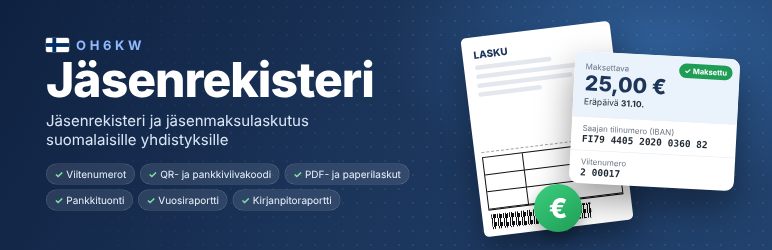
OH6KW Jäsenrekisteri (“membership register”) is a complete membership register and membership-fee invoicing tool for Finnish associations (yhdistys / ry), built into the WordPress admin. It is completely free: no paid version, no subscription and no limit on the number of members. Send membership fee invoices by email, print paper invoices and address labels, import payments from the bank and get reports for the general meeting and the accountant. The user interface is in Finnish, because the plugin implements Finnish banking standards.
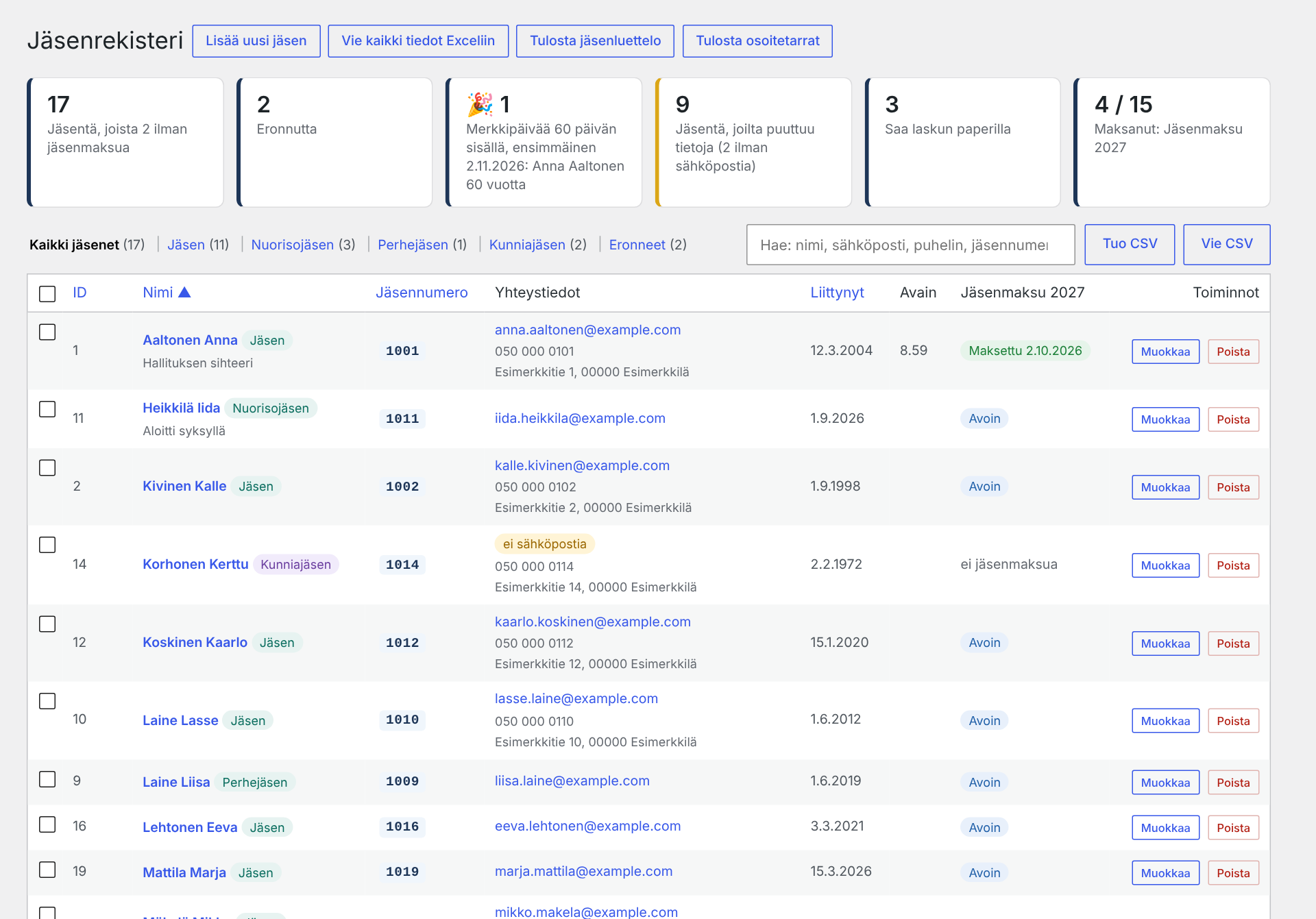
Members
- Your own membership classes with their own fees (e.g. Member 25 €, Youth member 10 €, Honorary member 0 €). Members of a 0 € class are never invoiced but still receive newsletters.
- Search, sorting, bulk actions and a full invoice and payment history for every member.
- Custom fields defined in the settings, such as a clubhouse key number (text) or a yes/no checkbox, optionally shown as a column in the member list.
- CSV import and export (Excel compatible). Columns are recognised from the headers.
- The resignation date is recorded, for accurate yearly member counts.
- Optional milestones: members reaching round birthdays (from an optional birth year or birth date) or membership anniversaries; the years are configurable and the feature can be switched off.
Printouts and exports
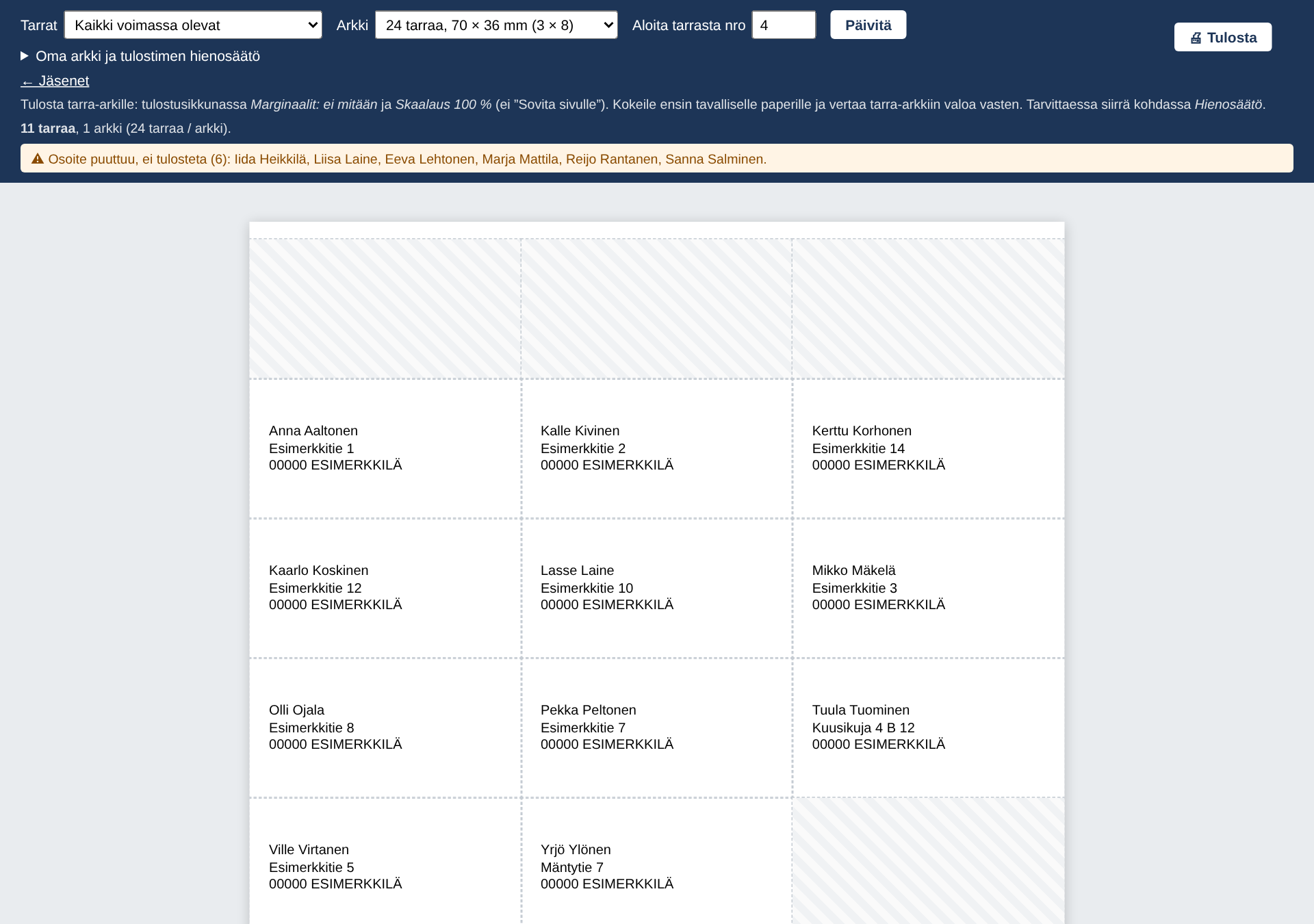
- Address labels printed straight onto ordinary A4 label sheets (e.g. 24 labels, 70 × 36 mm, or your own dimensions): paper-invoice recipients, all members, a membership class, resigned or selected members. Postal code and town in capitals as recommended by the Finnish postal service. A partly used sheet can be used up, and the printer offset can be fine-tuned. Also sender labels with the association’s address.
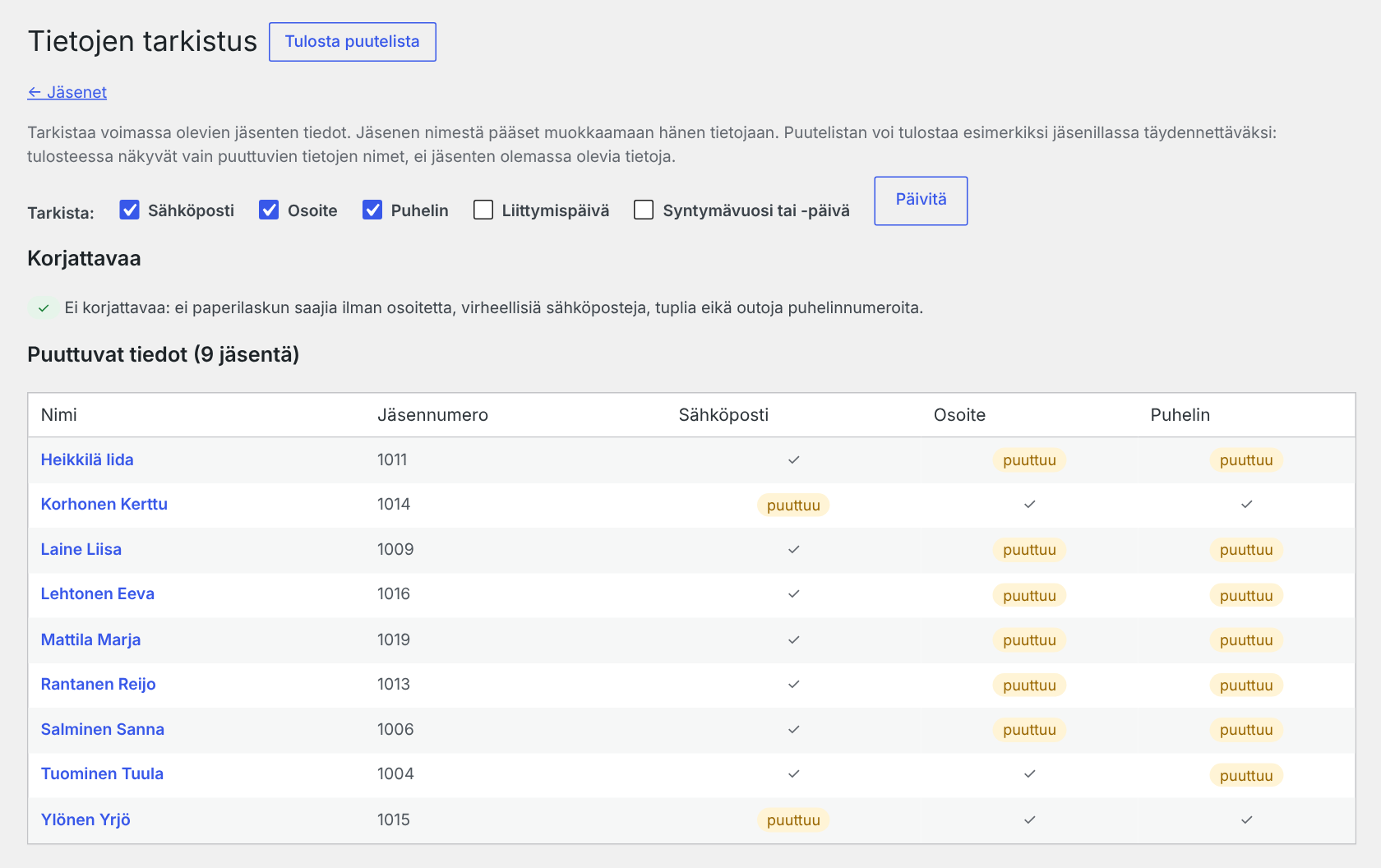
- Data check: missing email addresses, postal addresses and phone numbers, paper-invoice recipients without an address, invalid email addresses and phone numbers, and possible duplicates. The list of missing details can be printed for a club evening – it shows only what is missing, never anyone’s existing details.
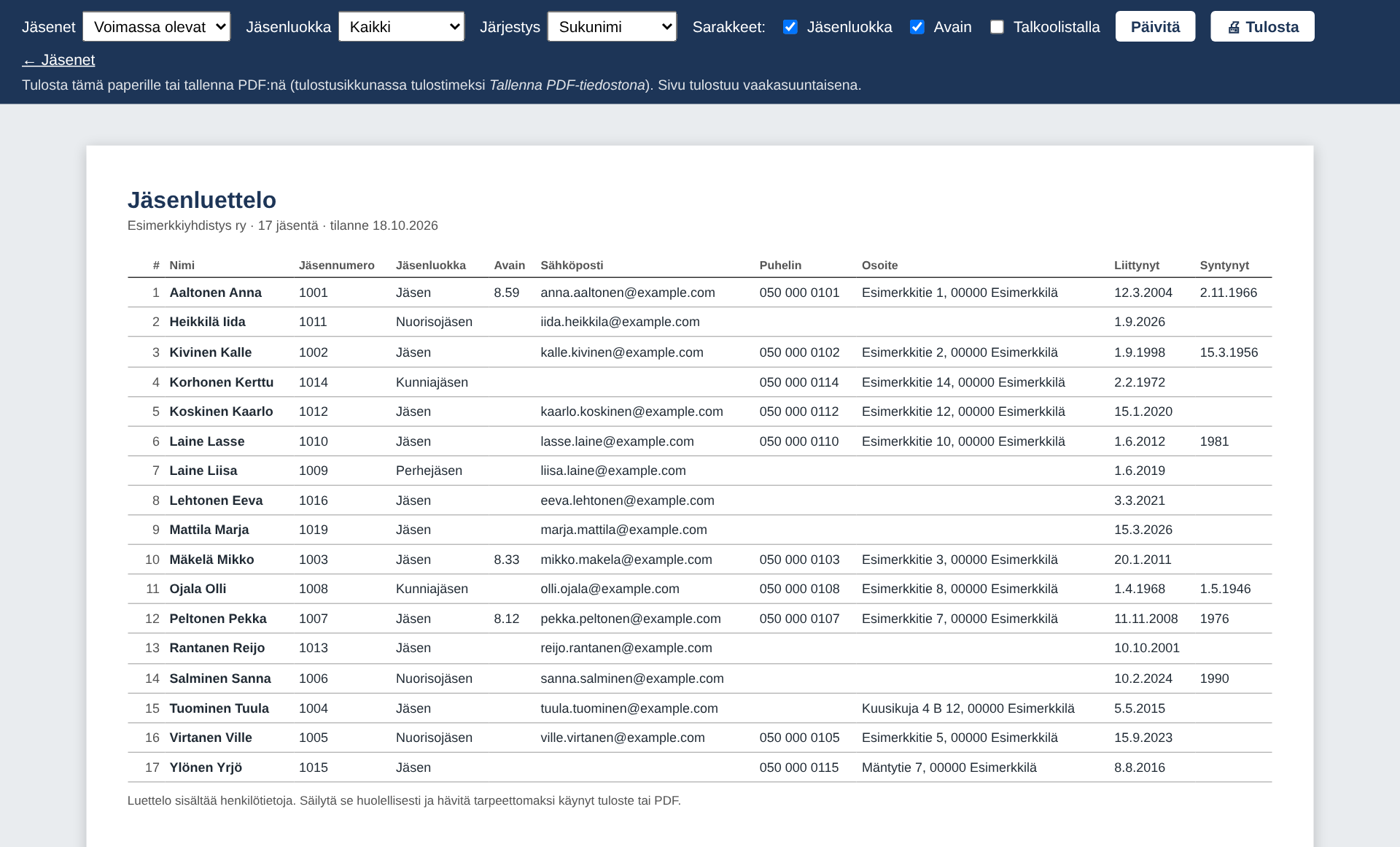
- Printable member list (A4 landscape, paper or PDF): name, member ID, chosen custom fields, email, phone, address, joining date and year or date of birth.
- Export everything to Excel: one workbook with a summary, members, each custom field (e.g. keys), membership classes, invoices, every invoice row with payments, open payments and the audit log.
Invoicing
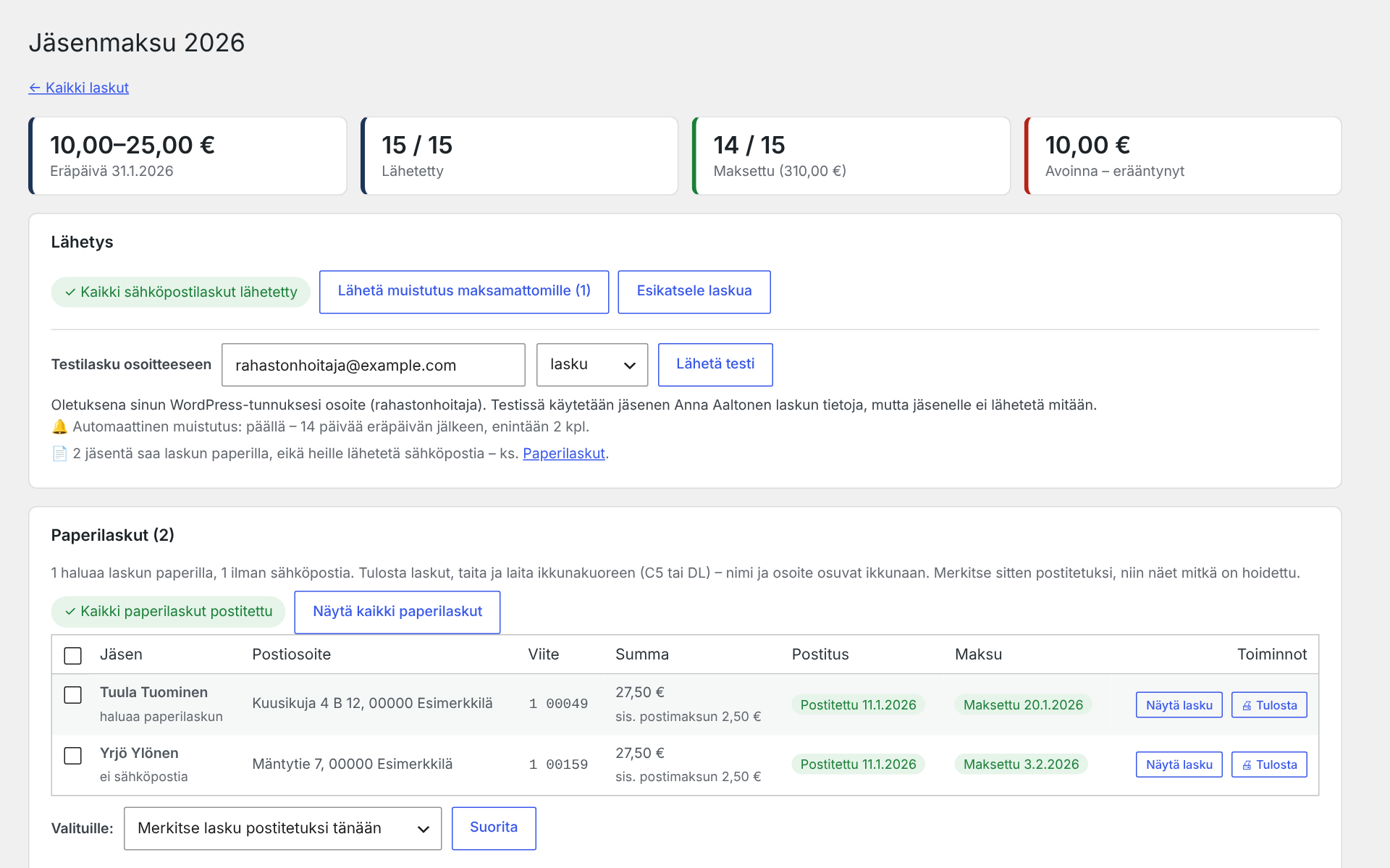
- One click sends every member an individual invoice by email, with a unique Finnish reference number (viitenumero, 7-3-1 check digit).
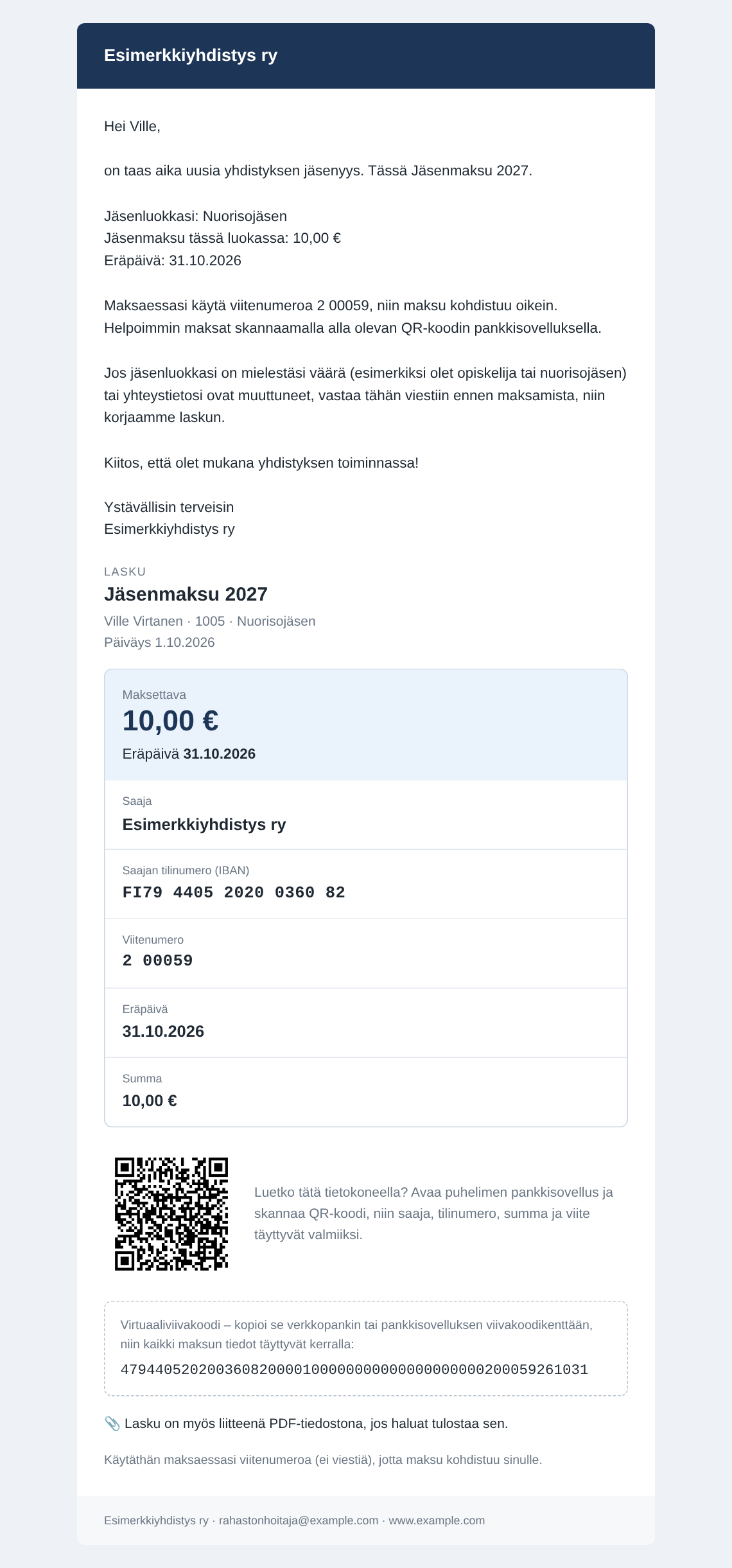
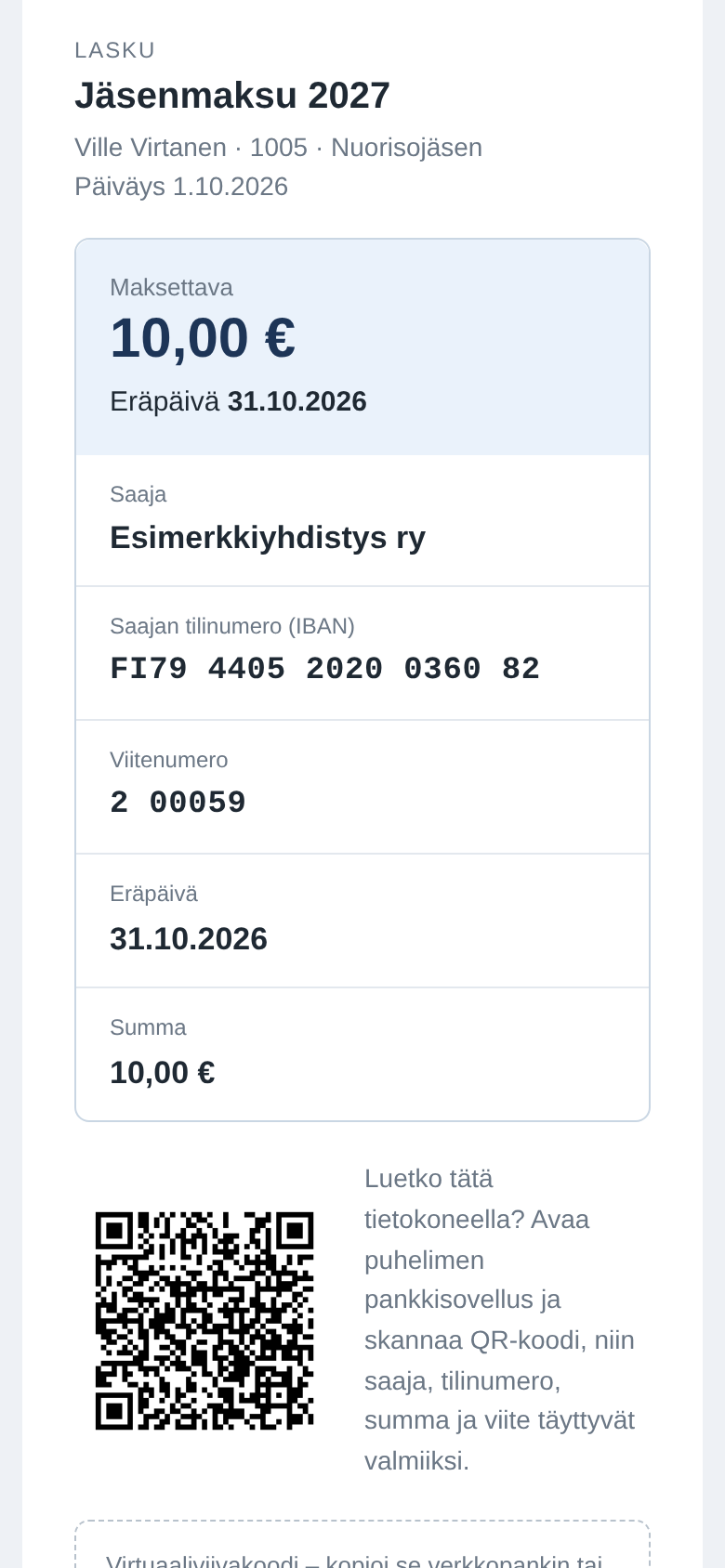
- Email invoices show a clear payment card that works on phones and computers: amount and due date, copyable payment details, a virtual barcode and an optional EPC QR code. The same A4 invoice as on paper can be attached as a PDF.
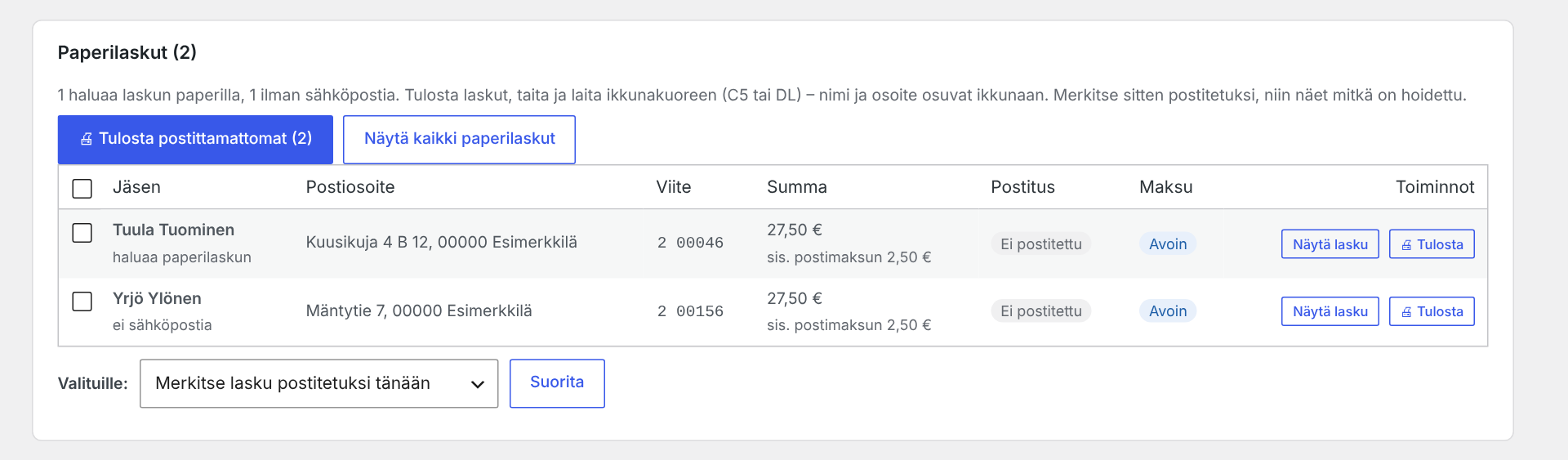
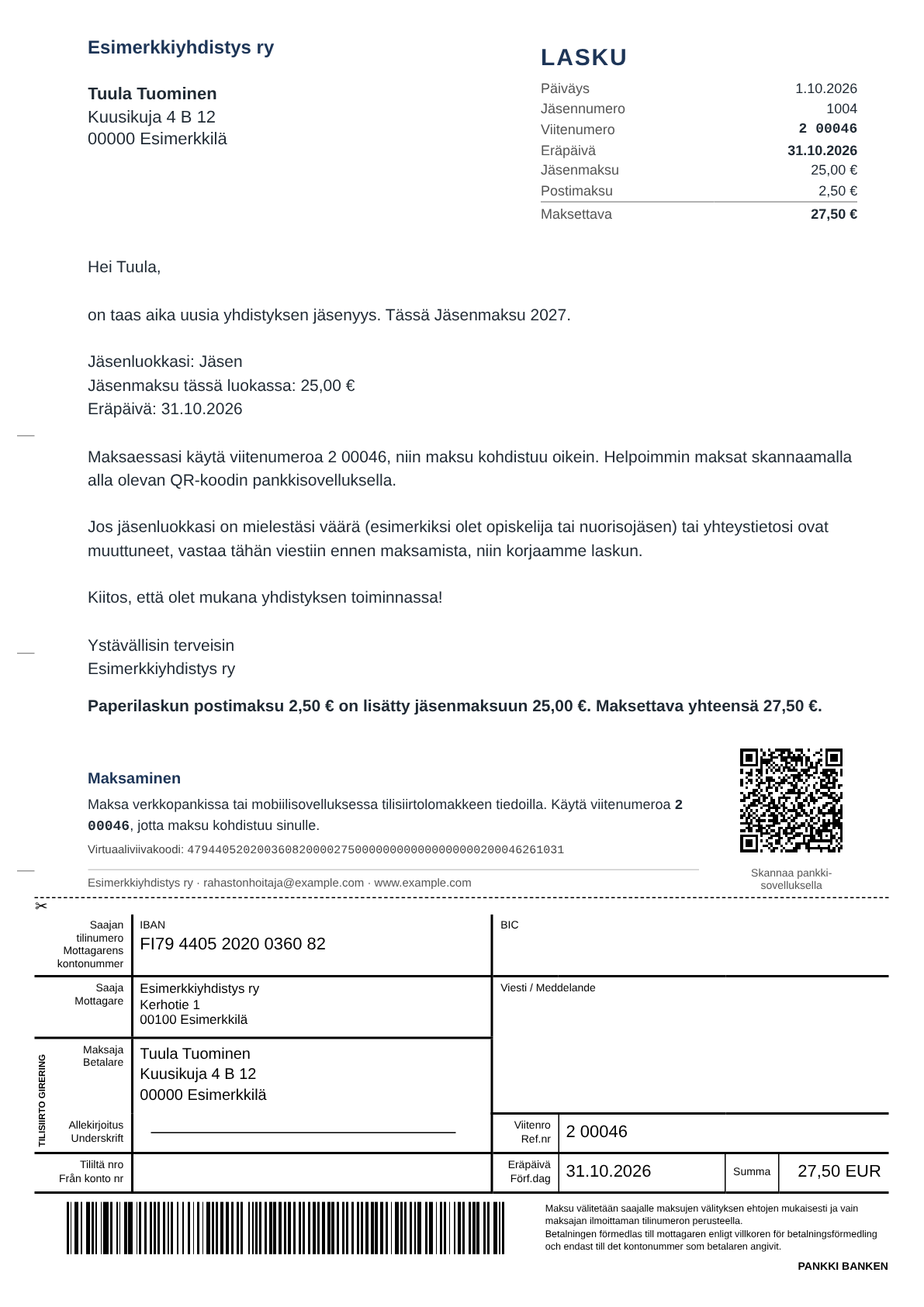
- Members who prefer paper, or have no email address, get a printable A4 invoice that fits a window envelope (C5/DL), with a traditional Finnish bank transfer form (tilisiirtolomake) and bank barcode at the bottom of the page, or a simpler standard layout. An optional postage fee can be added to paper invoices only.
- If a member loses an email invoice, the same A4 invoice can be printed or saved as PDF from the invoice page.
- Sending runs in small batches with a progress bar, so large member lists do not time out. Test invoices and previews before sending.
- Manual or automatic payment reminders.
- Members who join mid-season can be added to an invoice that has already been sent, with their own due date.
Payments
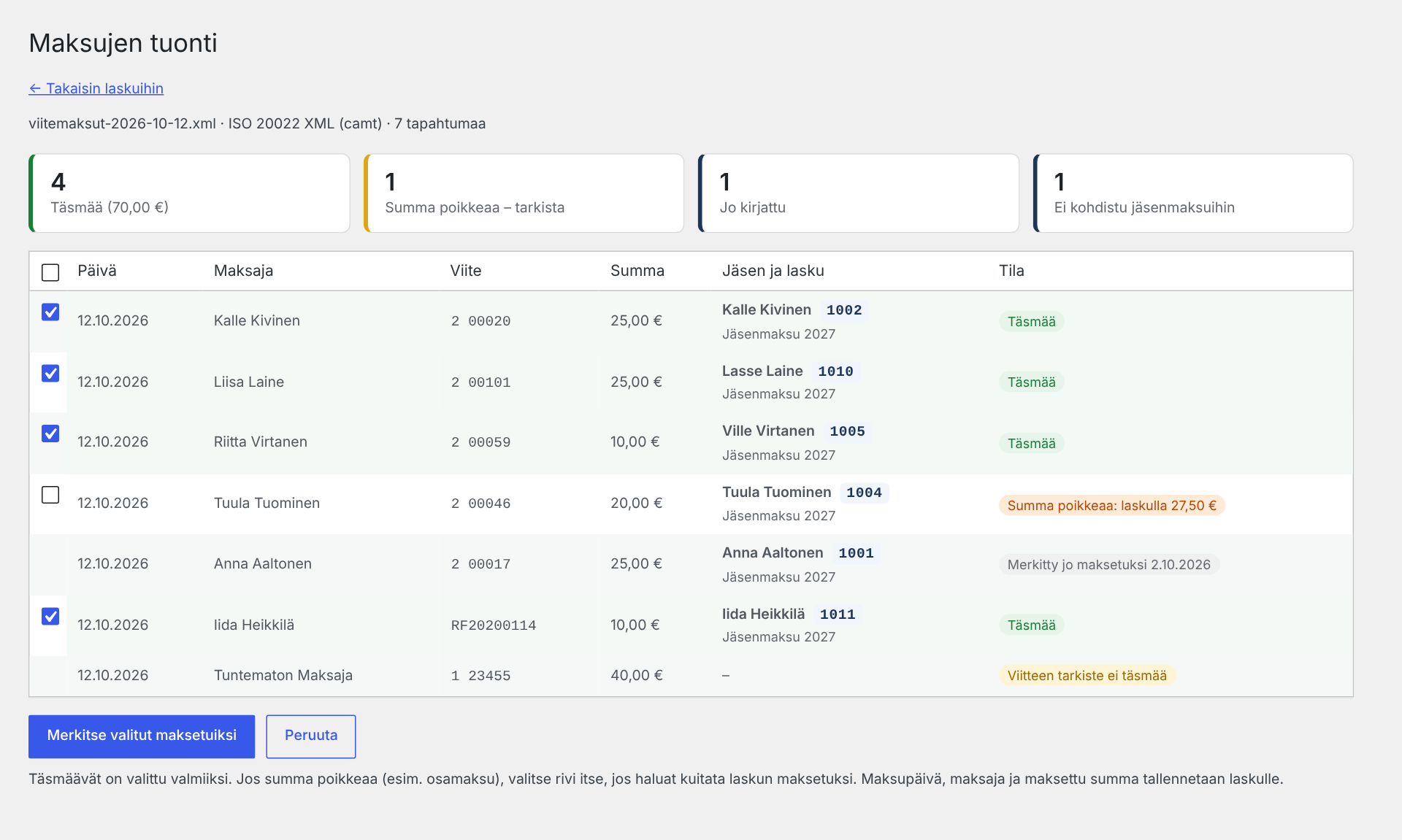
- Import payments from the bank: Finnish reference payment file (KTL), ISO 20022 camt.054 / camt.053 XML, or a bank statement CSV. Payments are matched by reference number, including RF references.
- A preview shows matching payments, differing amounts and unknown references before anything is saved. The same payment is never recorded twice.
- Optional payment confirmation: members get a short thank-you email when their payment is recorded from the bank file or marked as paid. Switched off by default; the text is editable and every send can be skipped with a checkbox.
- Excel export of all invoices: a summary, all open payments and one sheet per invoice.
Reports for the general meeting and the accountant
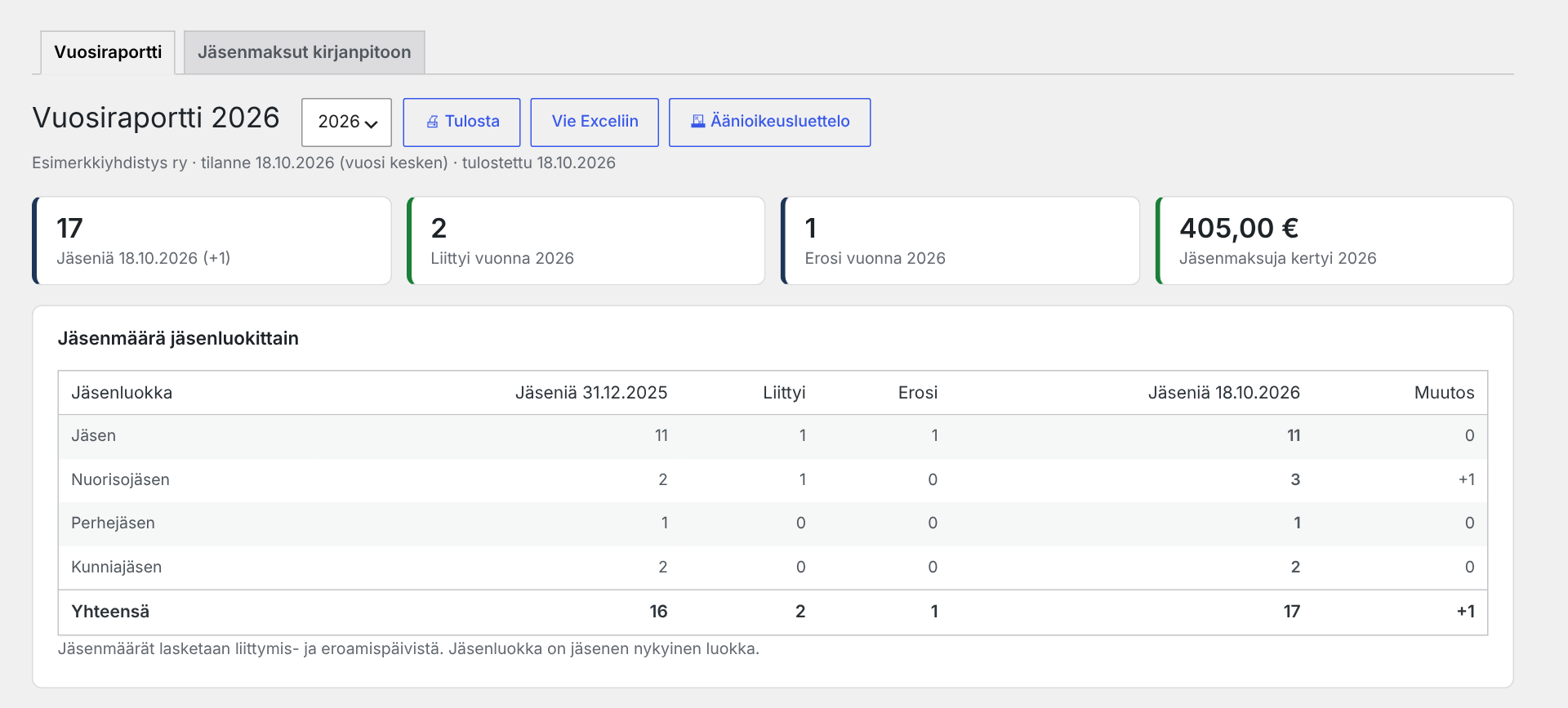
- Annual report for the general meeting: member counts per class at the start and end of the year, joined and resigned members, invoiced, paid and open fees, and fees received during the year. Printable and exportable to Excel.
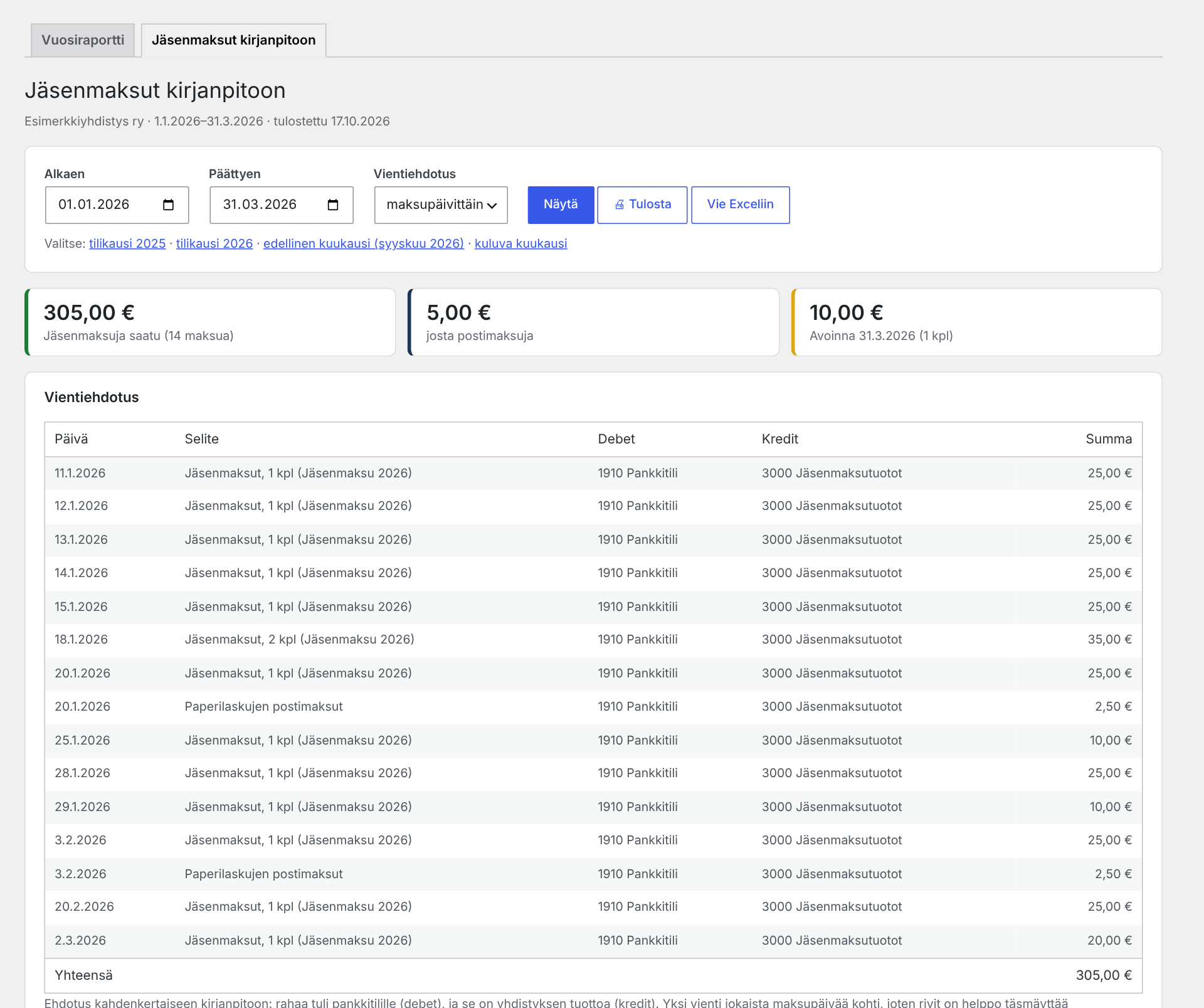
- Membership fees for bookkeeping: a ready posting proposal for the accountant (debit bank account / credit membership fee income) per payment day or per month for any period, a breakdown by membership class, postage fees separately, payments that differ from the invoice, and open fees at the end of the period. Printable and exportable to Excel with every payment by member. The plugin does not do the bookkeeping itself – it gives the accountant what is needed, whatever bookkeeping software they use.
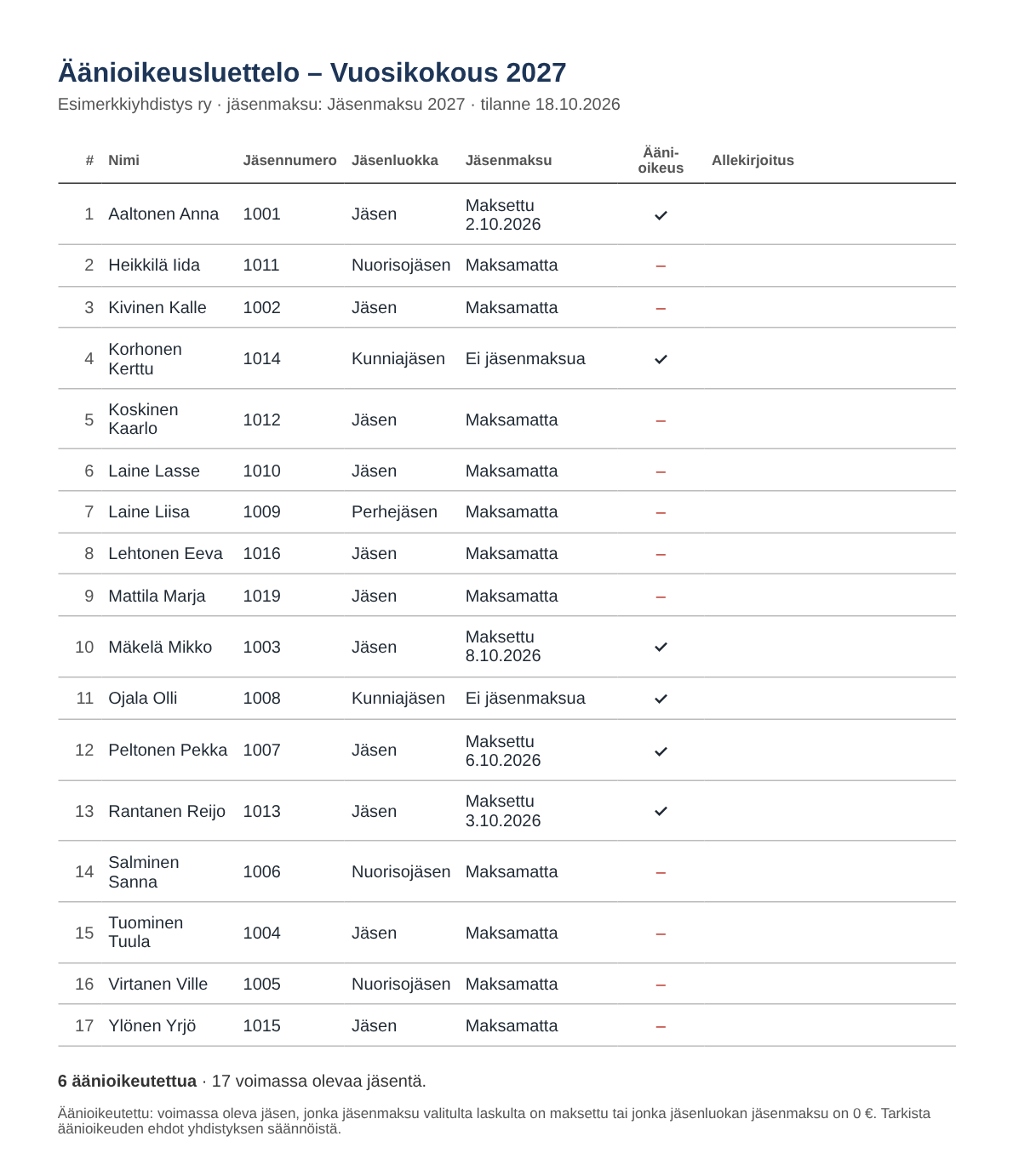
- Voting register for the general meeting: printable list of members entitled to vote (fee paid or fee-exempt class) with a signature column.
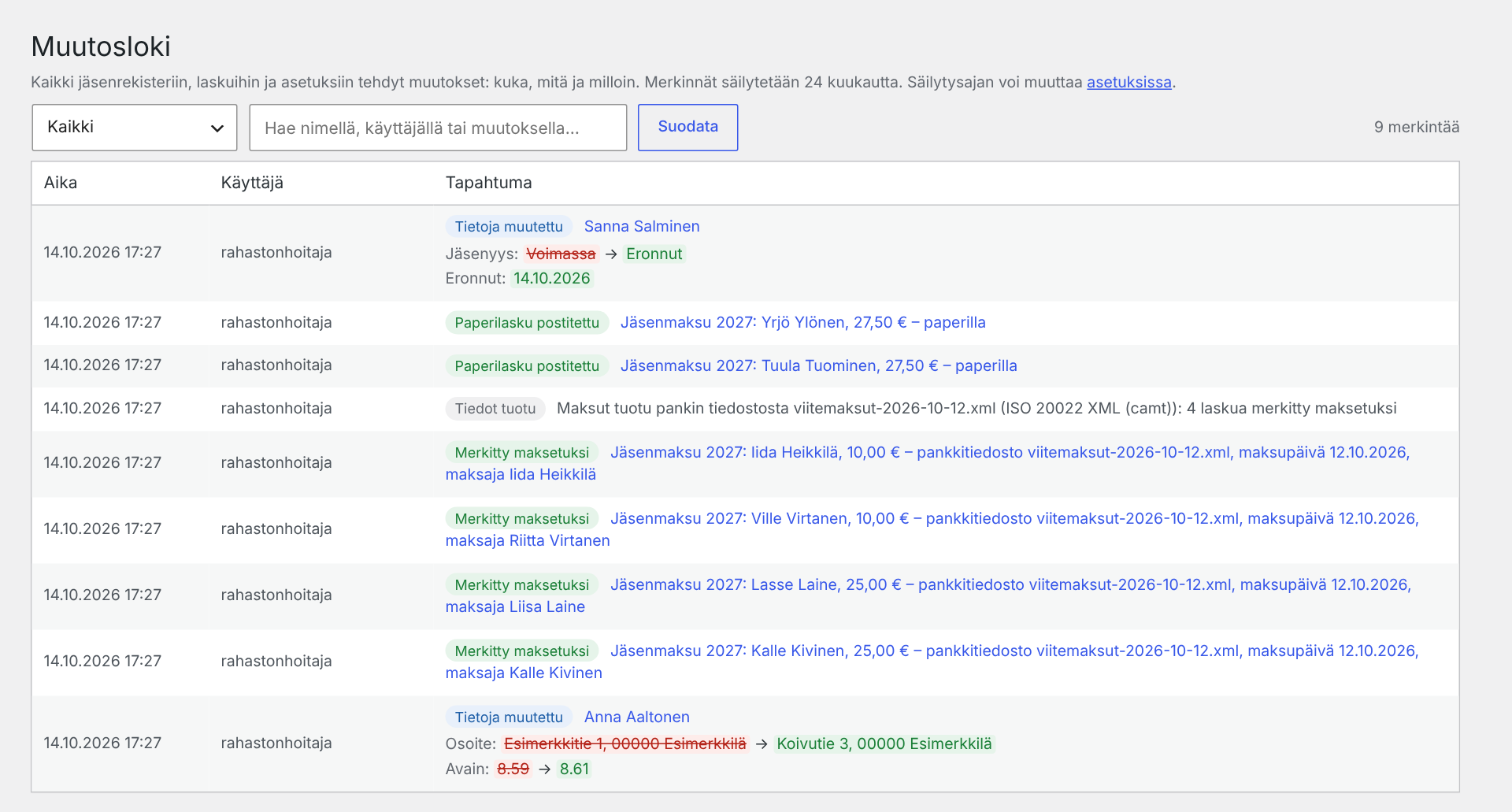
- Audit log: who changed what and when, including old and new values of member data, payments, sending, settings and exports. The retention period is configurable.
Privacy, backup and moving
- Privacy (GDPR): a pre-filled privacy notice template for the member register, and support for the WordPress personal data export and erase tools (members are found by email address; erasing anonymises the member and keeps the fee amounts for bookkeeping).
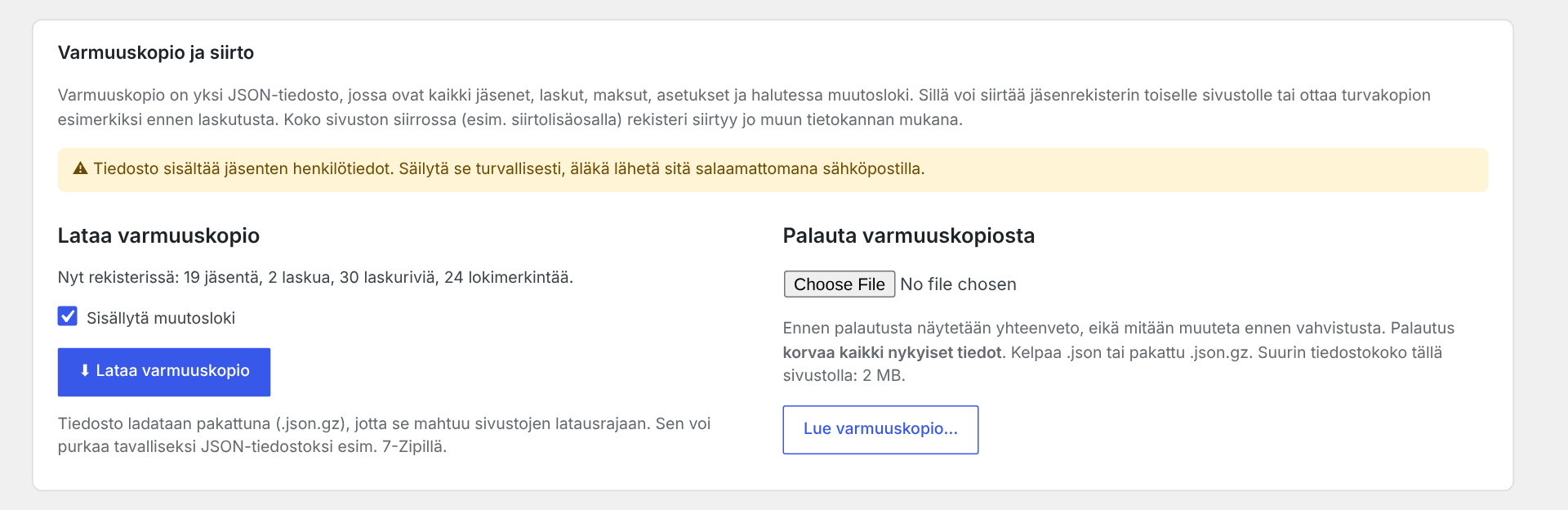
- Full backup in one file (JSON, compressed): members, invoices, payments, settings and optionally the audit log. Restore it on the same or another site, for example when the register moves to a new website. A summary is shown before restoring, the file is checked before anything is changed, and the previous state is kept so a restore can be undone.
- Optional automatic backup by email: weekly, monthly or quarterly, at a rough time of day (night, morning, midday or evening), to one or more addresses. Switched off by default.
Newsletters
- Email to all members, one membership class, members with unpaid invoices, or members missing a postal address or phone number. Placeholders such as {etunimi} (first name) personalise every message.
- Ready-made “Data check request” message: every member receives only their own details in a table, with missing ones highlighted, and replies with corrections. Preview with a randomly picked member before sending. The details can also be included in the invoice text.
Admin only – nothing is published on the website
The plugin adds nothing to the public site: no pages, forms, shortcodes or blocks, and member data is never shown to visitors. The register lives in the WordPress admin and only administrators can use it.
WordPress does the heavy lifting: user login and roles (add two-factor authentication with a separate plugin if you like), automatic plugin updates, and your host’s backups and HTTPS. The association gets a member register without a separate service, monthly fees or new accounts – it runs behind the website you already have.
Developed by Jarno Jaskari (oh6kw) together with Claude, an AI assistant made by Anthropic.
The plugin does not use any external services. All data stays in your own WordPress database. QR codes, barcodes, PDF and Excel files are generated locally without extra PHP extensions. Bundled libraries: qrcode-generator by Kazuhiko Arase (MIT) and FPDF by Olivier Plathey (permissive FPDF license), both GPL-compatible.
Source code, issue tracker and full Finnish documentation: github.com/oh6kw/oh6kw-jasenrekisteri
Screenshots
Installation
- Install the plugin from Plugins Add New, or upload the zip file, and activate it.
- Open Jäsenrekisteri Asetukset (Settings) and enter the association name, bank account (IBAN) and sender email address.
- Add membership classes and their fees in the settings.
- Add members manually or import them from a CSV file (Jäsenet Tuo CSV).
- Install an SMTP plugin (for example WP Mail SMTP or FluentSMTP) so that invoices are sent through the association’s real email account and do not end up in spam.
- Create an invoice (Laskutus Uusi lasku), send a test invoice to yourself and then send the invoices.
FAQ
-
Is it really free?
-
Yes. Every feature is included: no paid version, no subscription, no limit on members or invoices, and no external service to pay for. If the plugin is useful to your association, you can buy the developer a coffee on Ko-fi, but that is entirely voluntary.
-
Does the plugin show anything on the website?
-
No. It works only in the WordPress admin. It adds no pages, forms, shortcodes or blocks, and visitors never see member data.
-
Does it do the association’s bookkeeping?
-
No. The plugin keeps the member register and membership fees. For the accountant it produces the “Membership fees for bookkeeping” report: a posting proposal, a breakdown and open fees, printable and in Excel. The bookkeeping and the financial statements are done in the association’s own bookkeeping software or by its accountant.
-
Does it work outside Finland?
-
The plugin is designed for Finnish associations: it uses Finnish reference numbers, the Finnish bank barcode and Finnish bank file formats, and the user interface is in Finnish. The EPC QR code works with SEPA banks in general.
-
Who can use the plugin?
-
Only administrators (users with the manage_options capability). Members never see the register.
-
Is the member data sent anywhere?
-
No. All data stays in your WordPress database. Emails are sent through your site’s own email settings. The only outgoing message the plugin can send to the developer is the optional feedback form on the “Tietoja ja palaute” page, and only when you fill it in and press send yourself.
-
What happens to the data if I delete the plugin?
-
When you deactivate the plugin you are asked whether the data should be kept or removed when the plugin is deleted. By default all data is kept. The choice can also be changed in the settings.
-
Can I print address labels for letters?
-
Yes. The Print address labels button (Tulosta osoitetarrat) on the Members page (Jäsenet) prints address labels on ordinary A4 label sheets (24 labels 70 × 36 mm and other common sizes, or your own dimensions) for paper-invoice recipients, all members, a membership class or selected members. You can start from any label on a partly used sheet, and sender labels with the association’s address are also available.
-
Which bank files are supported?
-
The Finnish reference payment file (KTL / viitesiirtoaineisto), ISO 20022 camt.054 and camt.053 XML files, and bank statement CSV files with reference and amount columns.
Reviews
There are no reviews for this plugin.
Contributors & Developers
“OH6KW Jäsenrekisteri” is open source software. The following people have contributed to this plugin.
Contributors
“OH6KW Jäsenrekisteri” has been translated into 2 locales. Thank you to the translators for their contributions.
Translate “OH6KW Jäsenrekisteri” into your language.
Interested in development?
Browse the code, check out the SVN repository, or subscribe to the development log by RSS.
Changelog
4.8.9
- New (optional): payment confirmation email to the member when a payment is imported from the bank file or marked as paid on the invoice page; a single confirmation can also be sent from the invoice row. Off by default; subject and text are editable in the settings. Sent in the background in small batches, only to members with an email address.
- New (optional): automatic backup by email – weekly, monthly or quarterly, at a rough time of day, to one or more addresses (default: the site admin). The attachment is the same compressed backup file that can be restored in the settings. “Send backup now” button, last successful send and any error are shown in the settings. Off by default.
- New: the Email page has two tabs, “Newsletter” (Tiedote, empty as before) and “Data check request” (Tietojentarkistuspyyntö) with a ready-made message. The new placeholder {omat_tiedot} inserts the member’s own details as a table, highlighting a missing address, phone or email. New recipient group: members missing a postal address or phone number. The Data check page links straight to it.
- New: Preview button on both tabs shows the message as a randomly picked recipient would receive it; nothing is sent. The test email now uses a randomly picked recipient’s real details and says whose.
- New: choose in the settings which details {omat_tiedot} shows (name, member ID, class, address, phone, email, joining date, birth year and each custom field).
- New: {omat_tiedot} can also be used in the invoice text: a table in email invoices, compact text lines on paper and PDF invoices.
- Scheduled tasks and queued confirmations are removed when the plugin is deactivated or deleted.
4.8.8
- Fix: after restoring a backup on MySQL/MariaDB, new members and invoices continue numbering right after the restored ones. Previously the database kept counting from the old highest number, so a cleaned-up backup did not start from 1.
- Backup, Excel and CSV file names now include the date and time of the download (e.g. jasenrekisteri-kaikki_2026-10-19_16-02.xlsx), so several files are easy to tell apart.
- Fix: names are sorted in Finnish alphabetical order (Å, Ä and Ö after Z) in the member list, printouts, labels, invoices and exports. Previously the database treated Å and Ä as A.
- The description and the About page now say clearly that the plugin is completely free, and a new FAQ answers “Is it really free?”.
4.8.7
- New: Data check page (from the new “members with missing details” card on the Members page): paper-invoice recipients without an address, invalid email addresses and phone numbers, possible duplicates, and a table of current members missing an email address, postal address or phone number (optionally joining date and year of birth). The list of missing details can be printed for members to fill in – it shows only the names of the missing details, never anyone’s existing contact details.
- The FAQ about address labels now names the button and page in English with the Finnish name in brackets.
4.8.6
- New: “Print address labels” button on the Members page and a bulk action for selected members. Address labels for common A4 label sheets (24 labels 70 × 36 mm, 70 × 37 mm, 21 labels 70 × 42.3 mm and more) or your own dimensions: paper-invoice recipients, all current members, a membership class, resigned, all or selected members. Postal code and town in capitals as recommended by the Finnish postal service. Start from any label on a partly used sheet, fine-tune the printer offset in millimetres; the choices are remembered. Members without an address are listed and skipped.
- New: sender labels with the association’s name and return address.
4.8.5
- New: “Print member list” button on the Members page. A tidy A4 landscape list for paper or PDF: name, member ID, chosen custom fields, membership class, email, phone, address, joining date and year or date of birth. Choose current, resigned or all members, a membership class and the sort order.
- The voter list now shows the same print/PDF instruction as the other printable pages.
4.8.4
- New: “Export everything to Excel” button on the Members page. One workbook with a summary, all members (current and resigned), each custom field on its own sheet (e.g. keys), membership classes, invoices, every invoice row with payment details, open payments and the audit log. For reading and archiving; restoring still uses the backup.
4.8.3
- Fix: CSV import no longer merges two different people who share an email address (e.g. a parent and a youth member). An email address alone now identifies an existing member only if the first name matches too.
- Fix: CSV import no longer merges people with the same name but a different member ID (e.g. call sign or member number).
4.8.2
- New: “Membership fees for bookkeeping” report (Annual report second tab) for the treasurer and the accountant: a posting proposal (debit bank account / credit membership fee income) per payment day or per month for any period, breakdown by membership class, postage fees separately, payments that differ from the invoice, and open membership fees at the end of the period. Printable and exportable to Excel (including every payment by member). Account names or numbers are set in the settings. The plugin does not do bookkeeping itself.
4.8.1
- Email invoice: the bank transfer form layout is replaced by a payment card that works on phones and computers (amount and due date, copyable payment details, virtual barcode, QR code). Sites that used the old layout switch automatically.
- Invoice page: the PDF button for email recipients is now a Print button that opens the same print view as paper invoices (print or save as PDF). Overdue unpaid invoices get a reminder version.
- Live preview on WordPress.org (WordPress Playground) with fictional demo members.
4.8.0
- New: optional PDF attachment for email invoices and reminders – the same A4 invoice as the paper invoice, with the bank transfer form, QR code and bank barcode.
- The member identifier setting (member number / call sign) moved to Settings association details, with a shortcut from the member form.
4.7.2
- New: separate official association address (Settings association details), used for the payee on the bank transfer form and in the privacy notice. The envelope return address stays a separate setting.
- Paper invoice: the bank transfer form no longer extends past its area at the bottom of the page; long payee and payer addresses no longer stretch the form.
- Paper invoice: the return address is shown on up to two lines and shrinks to fit; a warning is shown if an address does not fit the envelope window.
4.7.1
- Email invoice with the bank transfer form now includes the bank barcode (and QR code) according to the payment code setting, and is wider.
4.7.0
- New: full backup and restore (Settings Backup and moving), for example for moving the register to another site. The previous state is kept so a restore can be undone.
- New: optional paper invoice layout with the traditional Finnish bank transfer form at the bottom of the page.
- New: optional email invoice layout with the same bank transfer form as HTML, without attachments or images (QR code optional).
- New: privacy notice template and support for the WordPress personal data export and erase tools.
4.6.5
- Renamed to OH6KW Jäsenrekisteri (slug oh6kw-jasenrekisteri).
- Print pages load their styles and scripts with wp_register_style / wp_print_styles instead of inline tags.
- Works without the PHP mbstring extension.
- New: voting register for the general meeting.
- New: optional milestones (round birthdays and membership anniversaries) with configurable years; optional birth year or date for members; new custom field type Date.
4.6.4
- Paper invoice: no empty trailing page with Letter paper or large print margins.
4.6.3
- Paper invoice: fixed an empty second page when printing, and a more compact invoice details box.
4.6.2
- Paper invoices: the membership fee and the postage fee are itemised in the invoice header and after the cover text. {summa} is now the membership fee without postage, and the new {maksettava} placeholder is the total amount payable.
- Optional return address for window envelopes.
- Prepared for the WordPress.org plugin directory: unique jasrek_ prefix (settings are migrated automatically), English readme, stricter escaping and prepared SQL queries.
4.6.1
- Optional postage fee added to paper invoices only.
4.6.0
- Paper invoices for window envelopes, custom member fields, audit log and annual report.
The full Finnish changelog is in CHANGELOG.md.