Description
InsertCart Print Designer for WooCommerce lets customers personalize photo-printing and T-shirt products before adding them to the cart. Configure the printing service for each product, show a live preview, and receive the customer’s original images and adjusted artwork with the order.
Documentation and first setup
Read the full documentation and screenshot guides for installation, photo sheets, T-shirts, image editing, order artwork, and printing.
After activation, open WooCommerce > Print Designer for the built-in setup guide. It is included in the plugin and works without opening an external website. A one-time welcome notice links to it, and Setup guide / Documentation links are available in the Plugins list. The Product data > InsertCart Print Designer tab also links to the setup guide and product-settings documentation.
Photo-sheet printing
- Choose the total prints and the maximum number of different uploaded photos.
- Configure sheet size, photo size, columns, margins, and gaps in millimetres.
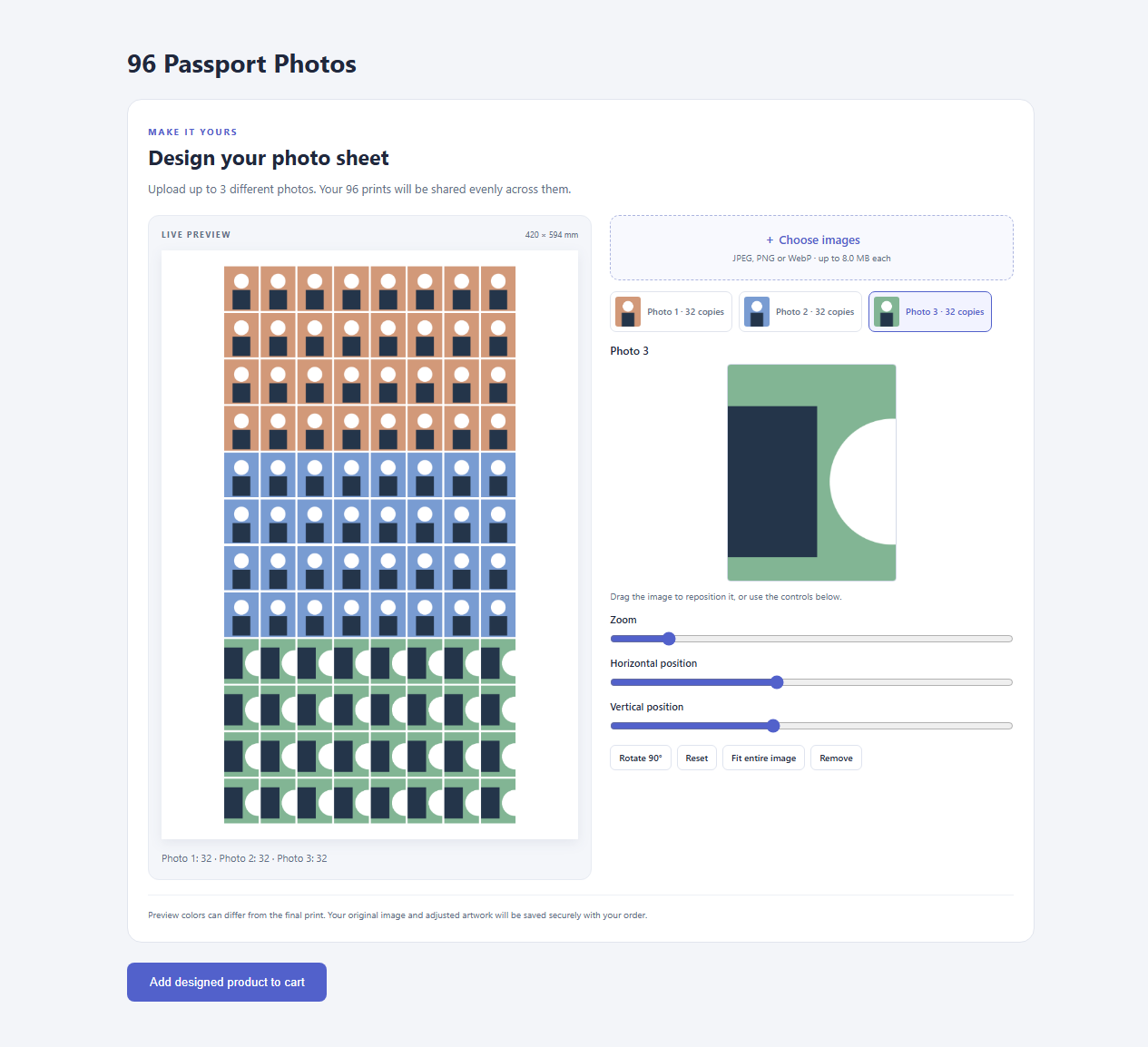
- Split prints evenly across uploaded photos, with any remainder assigned to the first photos.
- Show the complete sheet layout while customers crop and position their photos.
For a 96-photo product, one uploaded photo produces 96 copies, two produce 48 each, and three produce 32 each. The default layout uses A2 paper, eight columns, and 35 x 45 mm photos. These 96 photos cannot fit on A4 at that size. Invalid layouts are highlighted in the product editor and cannot be ordered.
T-shirt printing
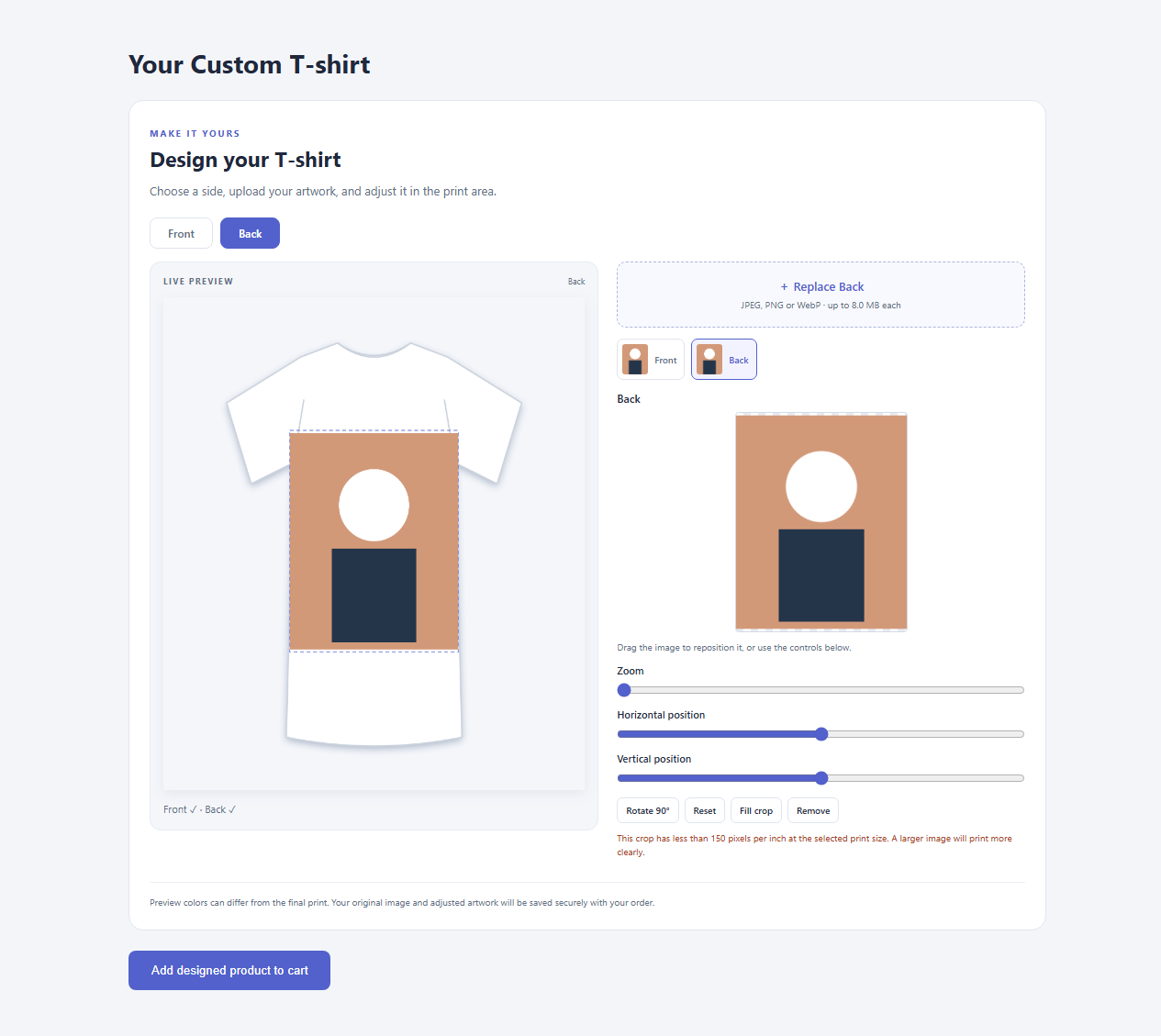
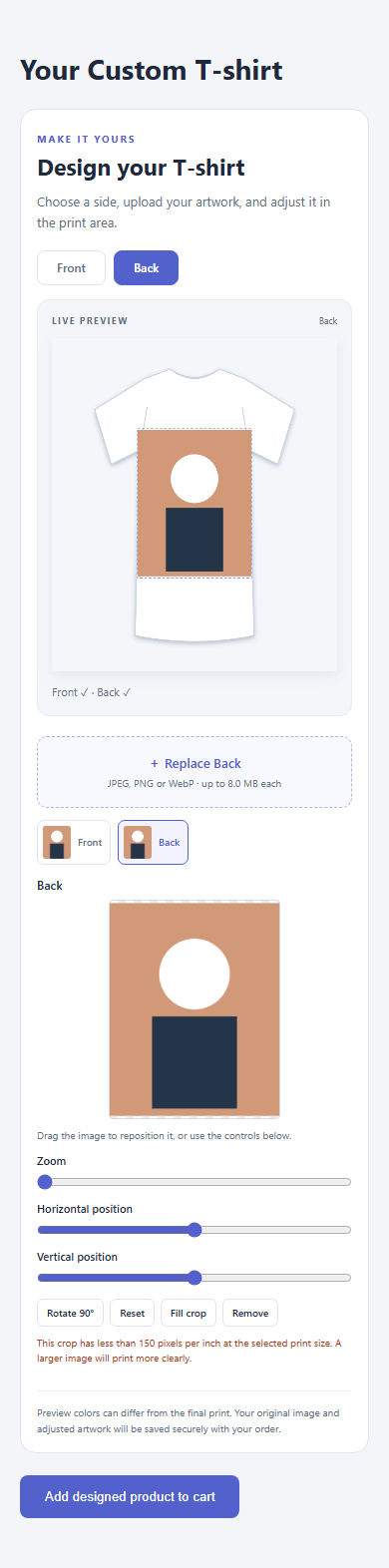
- Allow artwork on the front, the back, or both sides.
- Use the built-in shirt preview or select your own front/back mockup images.
- Configure the printable area using percentage coordinates and physical artwork dimensions.
- Preserve PNG transparency in adjusted shirt artwork.
Customers can zoom, rotate, drag to reposition, use horizontal/vertical sliders, and choose fit or fill. Low-resolution crops show a warning to help customers choose a suitable source image.
Product pages and orders
- Optional Hide product image setting removes the gallery/placeholder and expands the designer to full width on that product page.
- Supports simple and variable products using standard WooCommerce product forms.
- Design information appears in classic carts and WooCommerce Cart and Checkout blocks.
- Order storage supports WooCommerce High-Performance Order Storage (HPOS).
- Shop administrators can download originals, adjusted artwork, and preview proofs from each order item.
- Photo-sheet orders include an authenticated printable sheet page with browser print/save-as-PDF support.
Product prices and quantities follow WooCommerce settings. Additional sides and uploaded photos do not automatically add fees. Each ordered quantity is another copy of the complete design.
Compatibility and limitations
WooCommerce 8.2 or newer is required. Use the standard WooCommerce product editor and single-product add-to-cart form. Product-page Add to Cart blocks, the new product editor, variation-specific mockups, and third-party quick-view/add-to-cart replacements are not integrated. A custom template can use [insertcart_print_designer] alongside the standard product form; the designer renders once per page.
Use aligned front/back mockups because both sides share the same print-area coordinates. Mockups loaded from a different origin must allow CORS; otherwise the built-in shirt preview is used.
Adjusted artwork targets 300 pixels per inch and is capped at 4,096 pixels on the longest side. Set the saved physical dimensions in your print software; embedded DPI metadata is not added. Large artwork or small source images may have a lower effective resolution. Preview proofs are layout references. Color management and automatic printer integration are not included.
Privacy and storage
Customer images are stored as private binary records in the site’s pswc_assets database table. They are not added to the public media library. Only users with the manage_woocommerce capability can download ordered artwork after nonce and order checks. WooCommerce sessions bind temporary uploads to the customer who uploaded them.
Temporary artwork expires after three days and is removed by a daily WordPress scheduled cleanup. Order artwork is retained, including after order deletion. Shop owners must arrange an appropriate retention policy, backups, and manual cleanup or customer data requests. Deactivation and uninstall preserve artwork and product settings.
JPEG, PNG, and WebP files are accepted. SVG and executable uploads are rejected. Upload limits are 8 MB per asset (or the server’s lower limit), 30 megapixels, and 12,000 pixels per side. Temporary storage limits protect the upload endpoint: 80 assets/128 MB per customer session, 120 uploads per IP address per hour, and 1 GB of pending artwork across the shop. The IP address is hashed for the temporary rate-limit counter; the raw address is not saved by this plugin. Developers can adjust the global pending limit with the pswc_temporary_storage_limit filter.
Image storage can significantly increase database and backup sizes. The plugin does not send customer images to InsertCart or an external printing service, and includes no analytics, tracking, or external executable downloads. Custom mockup URLs cause the customer’s browser to request those images from the configured host.
Translations and license
Interface strings use the insertcart-print-designer-for-woocommerce text domain. A translation template is included in languages/insertcart-print-designer-for-woocommerce.pot. PHP and JavaScript strings support WordPress translations, including plural forms for copy counts.
This free edition is licensed under GNU GPL version 2 or, at your option, any later version. The complete license is included in LICENSE.txt. All included functionality is available without a license key, paid upgrade, or trial period.
InsertCart Print Designer is an independent plugin and is not affiliated with or endorsed by WooCommerce or Automattic.
Developed by Sandy (@sandy786) at InsertCart.
Screenshots
Installation
- Install and activate WooCommerce.
- Upload the plugin ZIP through Plugins > Add New > Upload Plugin, or place the insertcart-print-designer-for-woocommerce folder in wp-content/plugins.
- Activate InsertCart Print Designer for WooCommerce.
- Open WooCommerce > Print Designer for the built-in setup guide, or follow the welcome notice.
- Edit a simple or variable product and open Product data > InsertCart Print Designer.
- Select Photo sheet or T-shirt, configure the layout, and set the product price.
- Optionally enable Hide product image for a full-width designer on standard WooCommerce gallery templates.
- Update the product and open its product page to test the upload and ordering flow.
FAQ
-
Can a customer upload fewer photos than the configured maximum?
-
Yes. At least one image is required. Photo-sheet products accept any number up to the configured maximum. T-shirt products with both sides available require artwork on at least one side.
-
Can I print directly from an order?
-
Open the photo-sheet order item and select Open printable photo sheet / save PDF. Wait for every image to load, print at 100%/actual size, select matching paper, and disable browser headers/footers. Browser support for custom paper sizes varies; verify dimensions before production. For T-shirts, download the adjusted artwork and use your print software.
-
Can I hide the featured product image?
-
Yes. Enable Hide product image under Product data > InsertCart Print Designer. It hides the gallery and placeholder on the single product page. Catalog/cart images remain available, and changing visibility does not invalidate existing print designs.
-
Why does an upload fail after the product page has been open for a long time?
-
Refresh the page to obtain a current security nonce, then choose the images again. Exclude personalized product pages from full-page caching if expired nonces recur. Also check PHP upload limits and available database capacity.
-
Is there a Pro version?
-
A separate premium add-on is planned. It is not included in this release. The features in this free edition are fully available without an upgrade.
Reviews
There are no reviews for this plugin.
Contributors & Developers
“InsertCart Print Designer for WooCommerce” is open source software. The following people have contributed to this plugin.
Contributors
Translate “InsertCart Print Designer for WooCommerce” into your language.
Interested in development?
Browse the code, check out the SVN repository, or subscribe to the development log by RSS.
Changelog
1.0.4
- Added an included setup guide under WooCommerce > Print Designer and a one-time welcome notice.
- Added Setup guide and Documentation links to the Plugins list and printing-product editor tab.
- Added full documentation links to the directory description and installation instructions.
- Updated the product-editor help text to use the current designer shortcode.
1.0.3
- Renamed the plugin and text domain to InsertCart Print Designer for WooCommerce.
- Loaded printable-sheet CSS and JavaScript through WordPress asset APIs.
- Registered dynamic page dimensions and photo positions with wp_add_inline_style.
- Moved product-editor mockup styles into an enqueued stylesheet.
1.0.2
- Added Sandy/InsertCart author details, directory metadata, and the full GPLv2 license.
- Added product-form nonce validation and hardened upload input handling.
- Prepared SQL table identifiers and cached private asset metadata with invalidation.
- Completed interface translation coverage and plural handling; added a translation template.
- Removed development-only files from the distributable plugin folder.
1.0.1
- Added the per-product Hide product image setting and full-width single-product layout.
1.0.0
- Initial photo-sheet and T-shirt designers, private order artwork, and printable sheets.