
Description
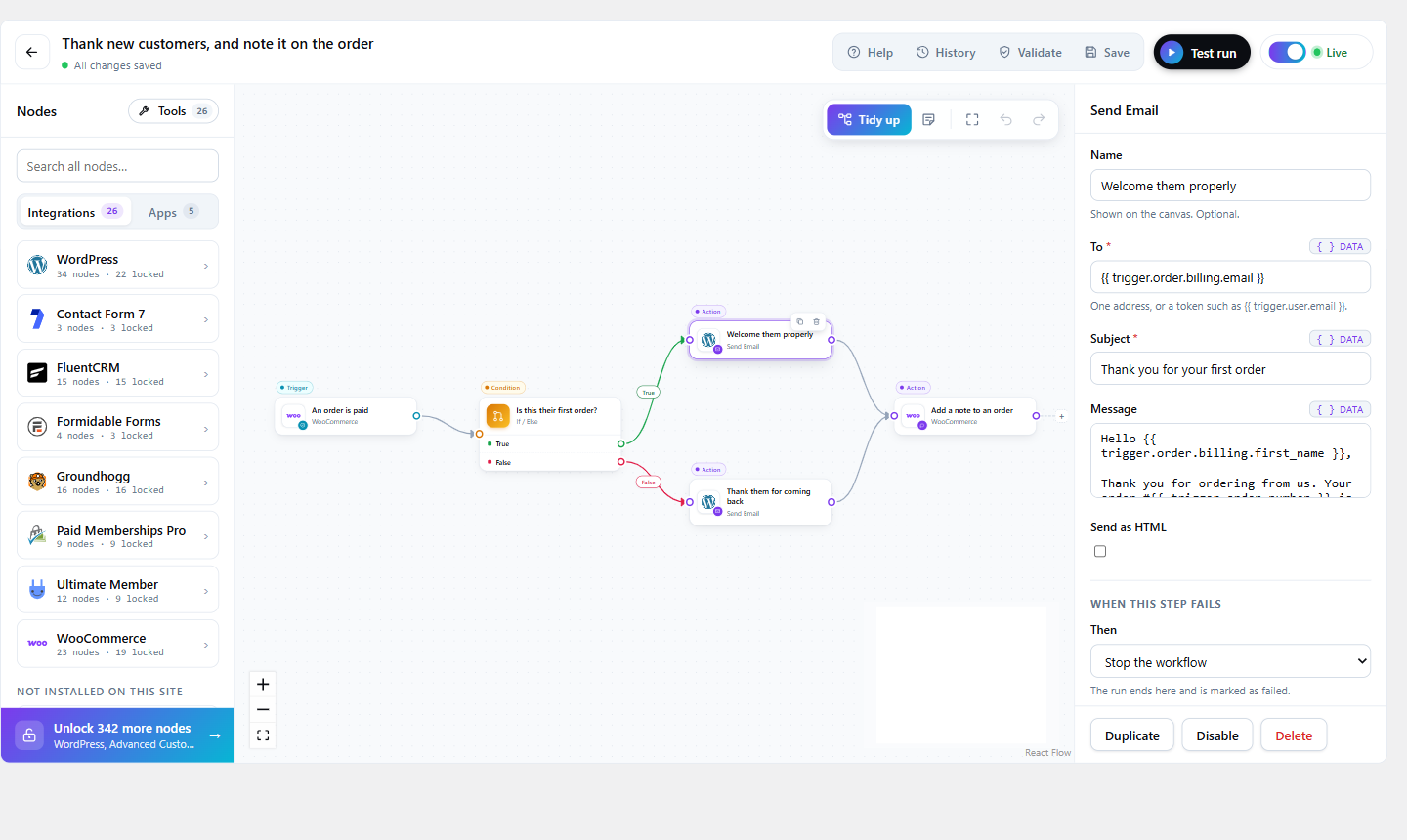
FlowWP watches for things happening on your site — an order, a form submission, a new member, a published post — and does what you would otherwise have done yourself. You build it by dragging steps onto a canvas and joining them up. Nothing runs until you activate it.
It runs inside WordPress. There is no external service in the middle, no per-task pricing, and no account to create: your workflows execute on your own site, on WordPress’ own hooks, using Action Scheduler for anything that needs to happen later.
What you can build
- When something happens — a WooCommerce order is paid, a form is submitted, a user registers or changes role, a post is published, a comment arrives, or a webhook is called. The paid plans add scheduled times and more triggers.
- Decide what to do about it — branch on any value with If, or stop a run that does not qualify with Filter, with as many AND / OR rules as you need. The paid plans add Switch, to split several ways.
- Then do it — send an email, call an external API, update a custom field, add a note to an order, or use one of the steps a plugin you already have contributes. The paid plans add creating and updating posts, changing roles, and more.
Every value produced by an earlier step is available to a later one as a token — {{ trigger.order.email }}, {{ nodes.lookup.output.name }} — with a picker so you do not have to remember them.
You can see what happened
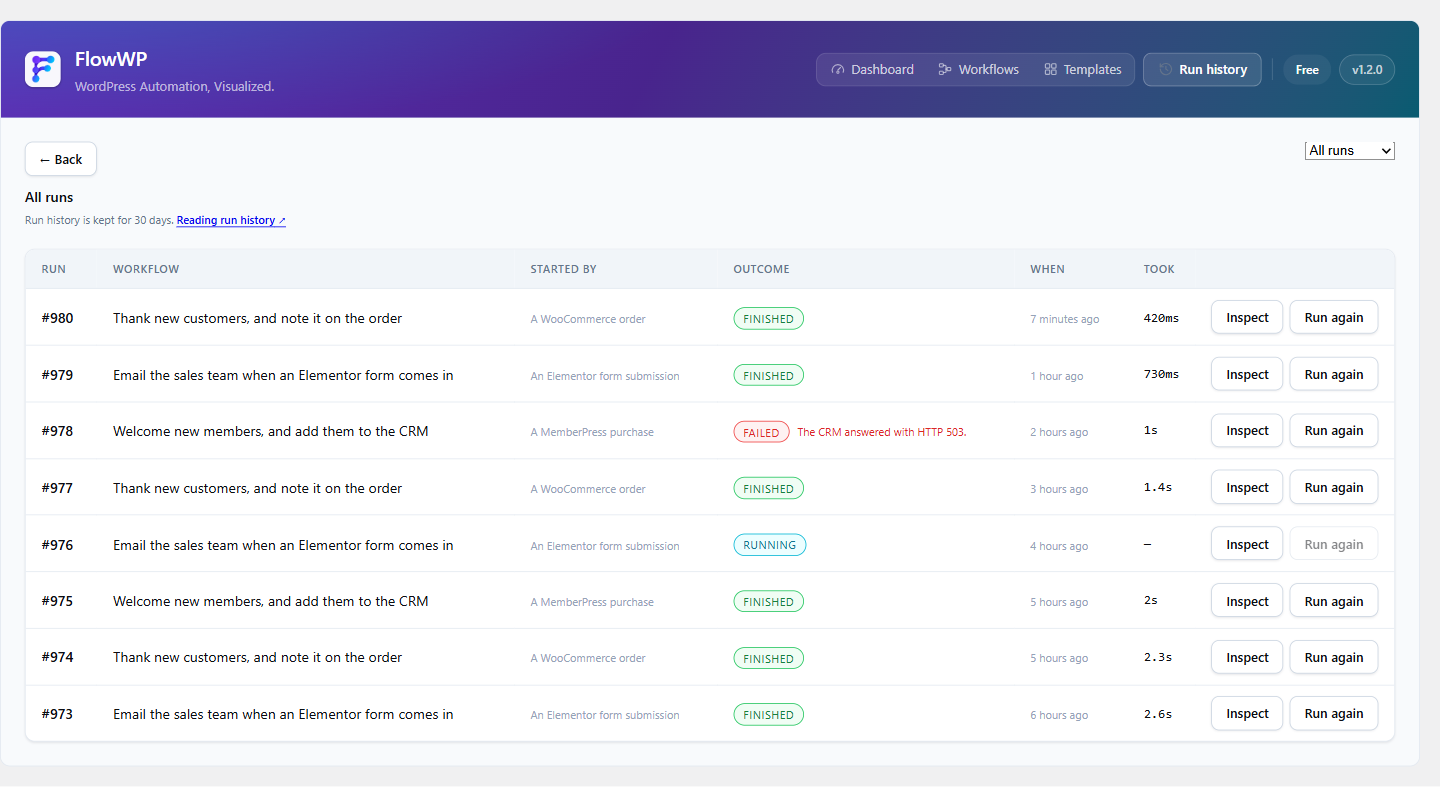
Every run is recorded: which steps ran, what each was given, what each returned, and where it stopped if it stopped. A failed step can be retried on its own rather than re-running the whole thing. This is usually the difference between an automation you trust and one you turn off.
What the free version includes
- As many workflows as you want, with as many steps as each one needs
- Unlimited runs, webhooks and HTTP requests — nothing stops at a monthly count
- Every free step, including If, Filter, AND / OR conditions, On error paths and retries
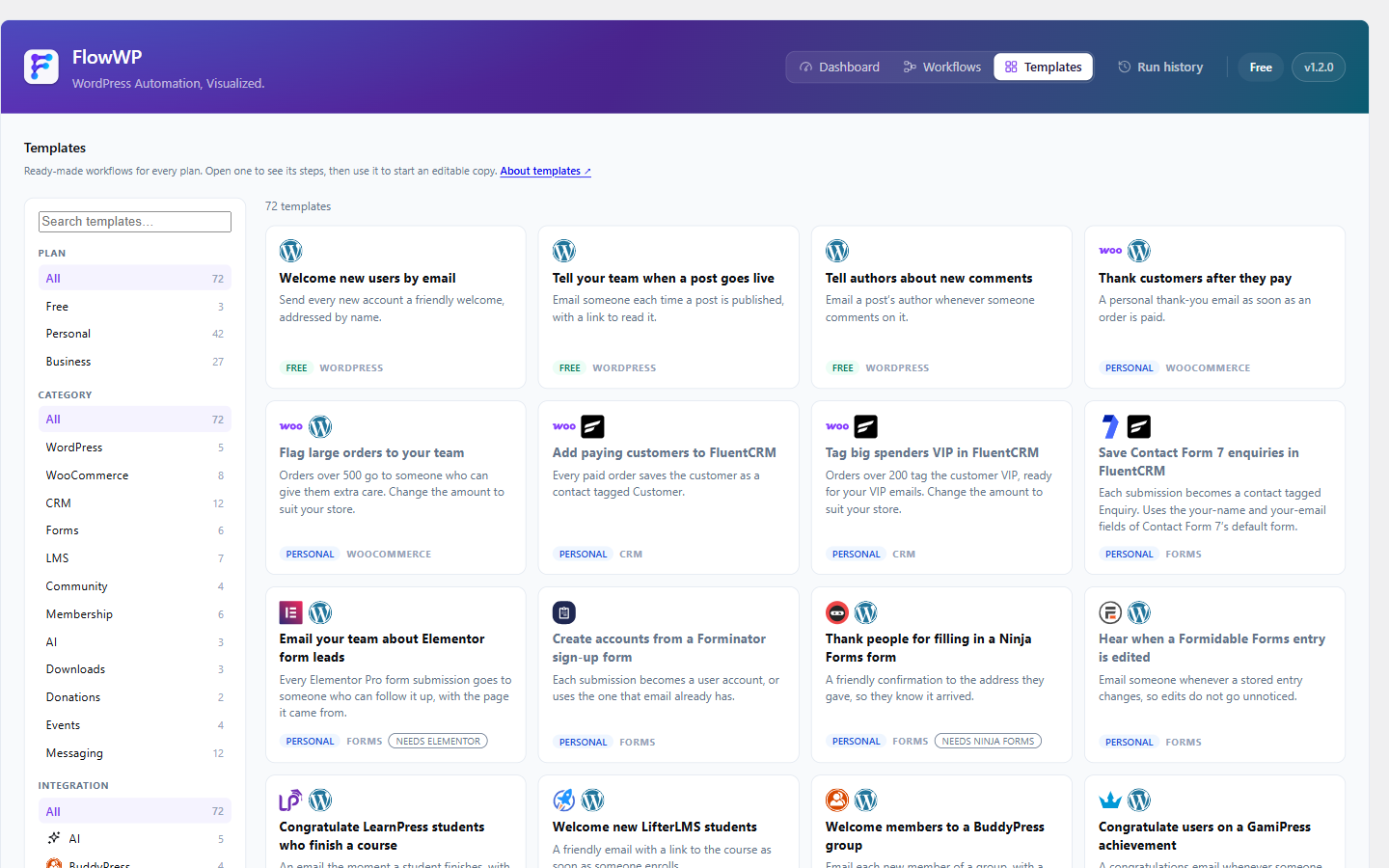
- Every ready-made template built from those steps
- 30 days of run history
- The visual editor and the run inspector
There are no caps in the free version and nothing in it is a trial: it does not count down, expire, or stop after a number of runs.
Works with what you already have
FlowWP adds steps for the plugins it finds installed, and says so plainly when one is missing rather than hiding it:
WooCommerce, WPForms, Gravity Forms, Fluent Forms, Formidable Forms, Ninja Forms, Forminator, Contact Form 7, Elementor, Advanced Custom Fields, LearnDash, Tutor LMS, LearnPress, LifterLMS, MemberPress, Paid Memberships Pro, Ultimate Member, BuddyPress, GamiPress, FluentCRM, Groundhogg, MailPoet, Easy Digital Downloads, GiveWP, The Events Calendar. FlowWP Pro adds Slack, Discord, Telegram, WhatsApp, Mailchimp and the major AI providers, which need a connection rather than a plugin.
Built to be extended
Node types, triggers, conditions and actions are all registered through a documented contract, so another plugin can contribute its own steps without touching FlowWP. Registered functions let a developer expose a PHP function to workflow authors safely.
Source code
The editor and the pricing page are JavaScript, shipped minified in admin/dist and assets/freemius-pricing. Their full source is included in the plugin: admin/src (TypeScript and React, built with Vite) and pricing-app/src (React, built with webpack), with the package.json and lock files that pin every dependency.
To rebuild both from the plugin’s folder, with Node.js 24 or later:
npm ci
npm run build

npm ci installs the dependencies for both, and `npm run build` type-checks the editor and writes `admin/dist` and `assets/freemius-pricing`.
Premium
FlowWP has paid plans that add steps and features the free version does not include — loops, delays, Switch, scheduled triggers, more condition operators, the messaging and marketing integrations, the AI steps and the AI workflow builder, file imports, workflow import and export — and keep run history for longer on the Business and Agency plans. They add to the free version rather than lifting limits on it: everything listed under “what the free version includes” keeps working, unchanged, whether or not you ever upgrade.
External services
Apart from Freemius, below, the plugin contacts no outside service on its own and loads no analytics. It has no connections to one either: the connections to Slack, Discord, Telegram, WhatsApp, Mailchimp and the AI providers are part of FlowWP Pro and are not included in it.
Freemius (freemius.com, including api.freemius.com, checkout.freemius.com, img.freemius.com and wp.freemius.com) runs FlowWP’s plans, checkout and licences. FlowWP talks to it only in these cases:
- If you opt in when activating FlowWP. Nothing is sent if you skip. If you allow it, Freemius receives your WordPress user’s first and last name and email address; the site’s homepage address and title, WordPress and PHP versions and language; the FlowWP and Freemius SDK versions, and whether FlowWP is active or uninstalled; and, if you leave that option on, the names, slugs and versions of your plugins and themes. Freemius uses it to send security and product updates and to keep FlowWP compatible with your site.
- When you open the Pricing page. The site asks Freemius for FlowWP’s current plans and prices, identifying FlowWP and, if this site has opted in, the site’s Freemius account. The page shows Freemius’s loading image, from img.freemius.com.
- When you buy a plan. Choosing a plan opens Freemius’s checkout, at checkout.freemius.com, which receives the plan you chose and what you enter there, such as your name, email address and payment details.
- When you activate a licence key. The key is sent to Freemius with the site’s homepage address, the FlowWP version and the SDK version, so the licence can be checked and kept to the sites you allow.
- When you write to us through FlowWP’s Contact page. The form is Freemius’s, from wp.freemius.com, and it receives what you type into it.
Freemius: Terms of service · Privacy policy
The HTTP Request step sends data to whatever address you give it. That address is yours, not ours, and FlowWP neither chooses it nor sees the response.
Screenshots
Installation
- Install and activate the plugin.
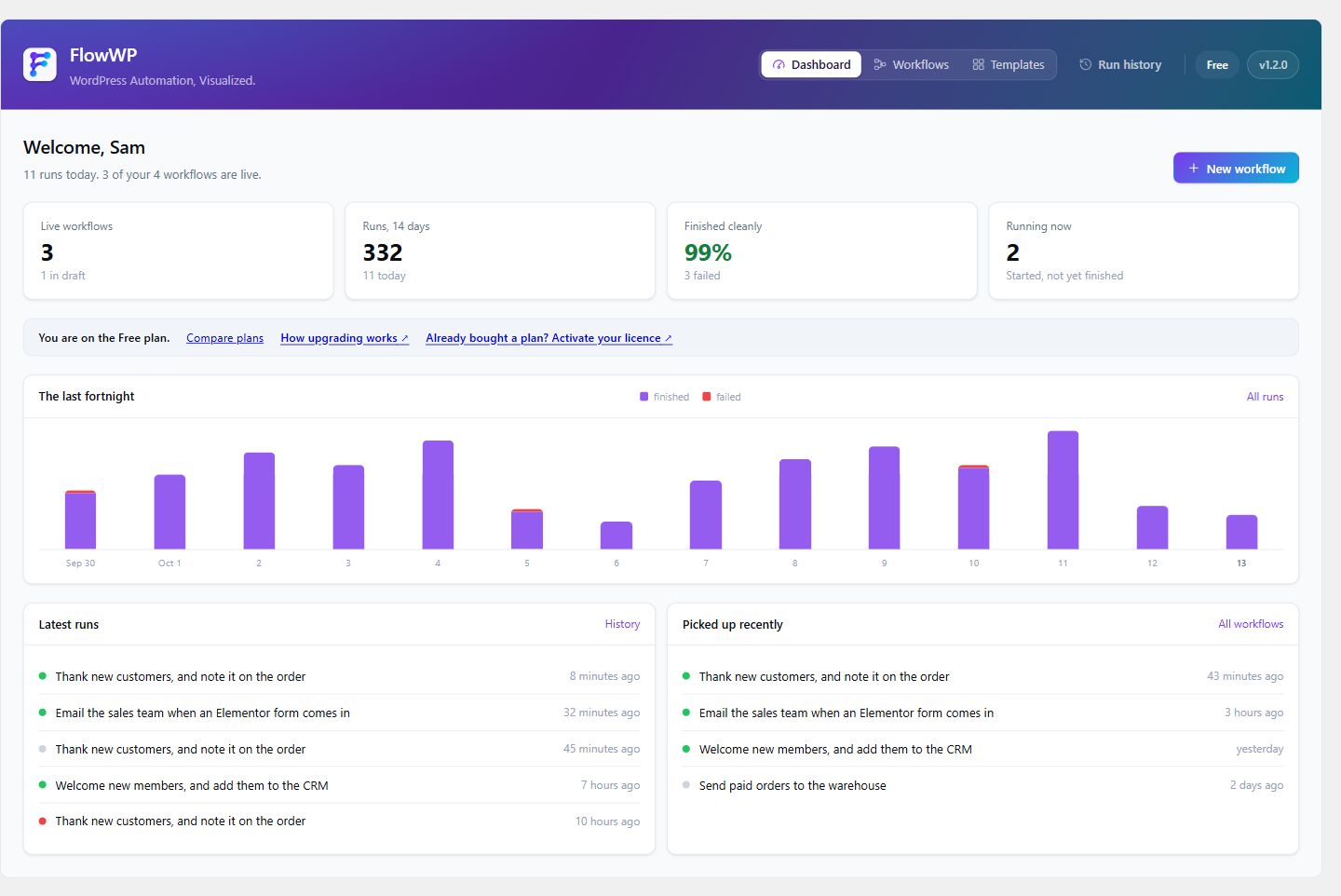
- Open FlowWP in the admin menu. The dashboard offers two ways to start: a ready-made template or a blank canvas.
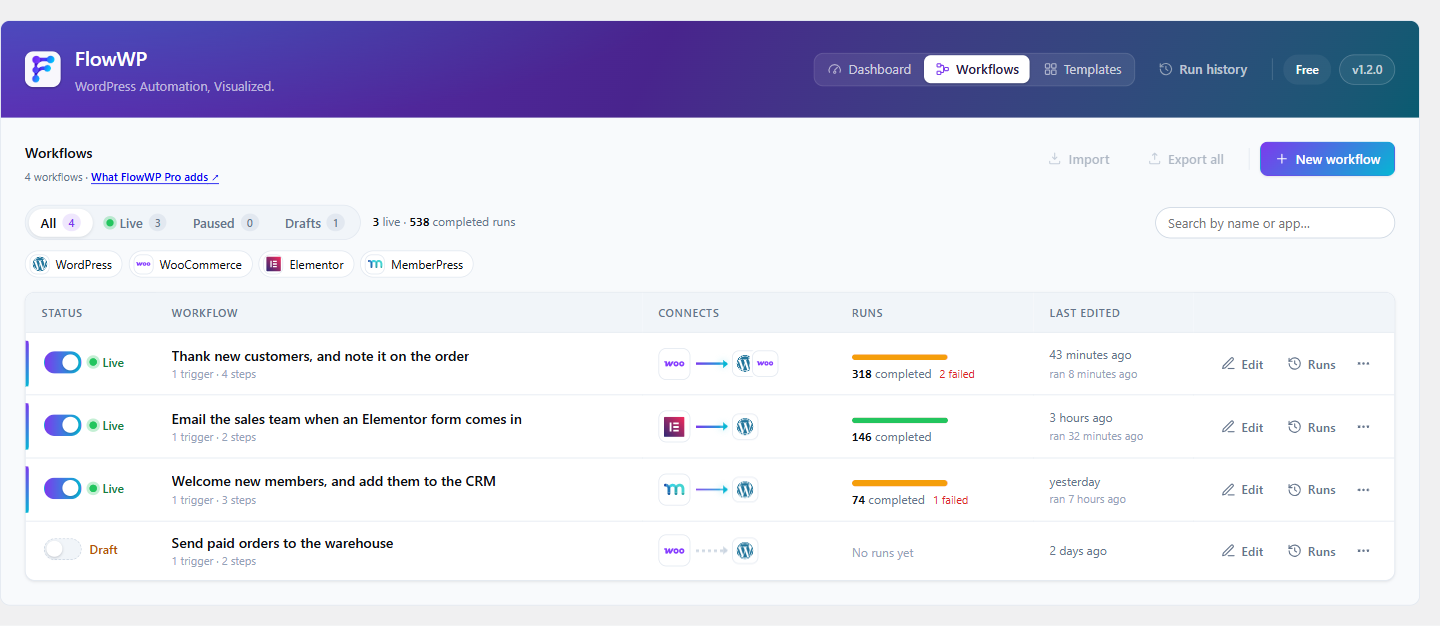
- Build a workflow, then press Activate. Nothing runs until you do.
- Watch the first few runs under Run history to see exactly what happened.
FlowWP needs WordPress 6.5 or newer and PHP 8.1 or newer.
FAQ
-
Does this send my site’s data to a third party?
-
No. Workflows run on your own server, and the plugin contacts no outside service on its own. It sends something elsewhere only when a workflow uses the HTTP Request step, to the address you give it, or through Freemius: when you open the Pricing page, or if you opt in to anonymous usage data when activating — see “External services” above.
-
Does anything run before I want it to?
-
No. A new workflow is a draft. It does nothing at all until you activate it, and deactivating it stops it immediately.
-
What happens when a step fails?
-
The run stops and is recorded with the step that failed and why. You can retry that step on its own, and steps that would be unsafe to repeat — a sent message, a created order — are marked so the engine never retries them for you.
-
Can it handle things that take a while?
-
Yes. Retries — and, on the paid plans, delays and scheduled workflows — go through Action Scheduler, which WordPress plugins have used for this for years. A workflow waiting three days does not hold a request open.
-
Is the free version limited?
-
No. There is no cap on workflows, steps, runs, webhooks or HTTP requests, and nothing in it is a trial. The paid plans add steps and features the free version does not contain; they never lift a limit on what it already does.
-
Will my workflows survive deactivating the plugin?
-
Yes. Deactivating stops workflows running and changes nothing else. Deleting the plugin only removes your data if you explicitly ask it to — the default is to leave everything where it is.
-
Someone has asked me to export or delete their data. Does FlowWP help?
-
Yes. FlowWP registers with WordPress’ own Tools Export Personal Data and Erase Personal Data, so a request made there covers FlowWP’s run history alongside everything else.
Two things it deliberately does not delete, and tells you about rather than hiding: a run still in progress, which the ordinary history sweep removes once it finishes, and a workflow whose own setup contains that address — deleting that would stop an automation working, so FlowWP names the workflow and leaves the decision to you.
-
Can I add my own steps?
-
Yes. Nodes are registered through a documented contract, so a plugin or a site’s own code can add triggers, conditions and actions that behave exactly like the built-in ones.
Reviews
There are no reviews for this plugin.
Contributors & Developers
“FlowWP – Visual Workflow Automation” is open source software. The following people have contributed to this plugin.
Contributors
Translate “FlowWP – Visual Workflow Automation” into your language.
Interested in development?
Browse the code, check out the SVN repository, or subscribe to the development log by RSS.
Changelog
1.2.2
- The Pricing page no longer loads Google Analytics, which came with the Freemius pricing page it is built on, or reviewers’ pictures from Gravatar.
- External services describes exactly what Freemius receives and when.
- Every REST route checks the user’s capability where the route is registered.
1.2.1
- No file in the plugin mentions a tracking parameter any more, including the build configuration and an unused script from the Freemius SDK.
1.2.0
- Renamed to FlowWP – Visual Workflow Automation.
- Nothing in the plugin is counted or limited: no caps on workflows, steps, runs, webhooks or HTTP requests, and AND / OR conditions, retries and On error paths work on every site, whatever its licence.
- Run history is kept for 30 days. Developers can change that with the
flowwp_history_retention_daysfilter. - Links to flowwp.net no longer carry tracking parameters.
- The connections to Slack, Discord, Telegram, WhatsApp, Mailchimp and the AI providers, and the AI workflow builder, are now part of FlowWP Pro only. The plugin contacts no outside service on its own.
- Updated Action Scheduler to 4.2.0.
- Translations load the way WordPress loads them for every plugin in the directory.
1.1.2
- The plugin’s homepage link now points to the FlowWP plugin page; the author link stays on flowwp.net.
1.1.1
- The JavaScript source now ships with the plugin:
admin/srcandpricing-app/src, with the build files and lock files that rebuild the minified editor and pricing page. See “Source code” above.
1.1.0
The free version has no caps.
- Unlimited workflows, steps per workflow, runs, webhooks and HTTP requests. Nothing stops at a monthly count.
- AND / OR conditions, On error paths and retry policies are now part of the free version.
- Every ready-made template built from free steps can be used, not just three.
- Run history is kept for 30 days on every plan in the free version, up from 7. The Business and Agency plans still keep it for 90 and 180 days.
- The paid plans add steps and features the free version does not include; they no longer lift limits on what it does.
1.0.0
First public release.
- Build automations on a canvas: a trigger, conditions, and the actions that follow, joined up by dragging.
- 395 steps across 36 integrations — WooCommerce, the form plugins, the LMS and membership plugins, the CRMs, Slack, Telegram, Discord, WhatsApp, Mailchimp, MailPoet and WordPress itself — each one appearing only when the plugin it belongs to is active, and saying so plainly when it is not.
- 72 ready-made templates, filtered by what the site actually has installed.
- Every value an earlier step produced is available to a later one as a token, with a picker so you do not have to remember them.
- Test a workflow before it goes live: it runs once with sample data, and emails, HTTP requests and other side effects are simulated rather than sent.
- Every run is recorded — which steps ran, what each was given, what each returned, and where it stopped. A failed step can be retried on its own.
- Connections are stored encrypted, and a workflow exported for someone else leaves its secrets behind.
- Workflows run on your own site, on WordPress’ own hooks, through Action Scheduler. No external service, no per-task pricing, no account.
- Triggers, actions, conditions and formatters are all registered through a documented contract, so another plugin can add its own without touching FlowWP. See docs/SDK.md.
- Answers personal-data export and erasure requests for the data FlowWP stores about a person.
- Translation-ready throughout, PHP and the editor both.