

Description
Dr. Criativo Consent adds a cookie notice built for Brazil’s LGPD
(Lei Geral de Proteção de Dados):
- Real blocking: Google Analytics, the Meta Pixel, ads and the like only run
after the visitor accepts the matching category. - Google Consent Mode v2 already configured.
- Proof of consent: every choice is stored with the date, the policy version
and the categories accepted. - YouTube videos and Google Maps only load after consent, with a placeholder
in their place. - Texts, colors and the cookie list are managed in the platform dashboard, with
no need to touch the site’s code.
This plugin is the bridge between your WordPress and the Dr. Criativo Consent
platform. It requires an account, and the Free plan (free forever, 1 site)
works. Create one at https://opt.drcriativo.com.br/.
External services
This plugin depends on the Dr. Criativo Consent service, operated by Dr.
Criativo (David Weingärtner – Sistemas e Softwares, CNPJ 31.650.257/0001-12),
at https://opt.drcriativo.com.br/. Without it, the notice does not appear.
What is sent, and when:
- On every page of the site, the visitor’s browser loads the notice script
fromhttps://opt.drcriativo.com.br/c/<identifier>.js. As with any file loaded
from the internet, the server receives the visitor’s IP address and browser
(user agent). - When the visitor makes a choice in the notice, the browser sends to
https://opt.drcriativo.com.br/api/log.php the random consent identifier, the
accepted or rejected categories, the policy version, the date, the page and the
browser (user agent). The IP address is stored only as a hash with a
site-specific salt, never in plain text. - On paid plans with the scanner enabled, the browser occasionally sends the
names of the cookies and third-party services present on the page — never
their values. - When an administrator opens the plugin settings screen, WordPress calls
https://opt.drcriativo.com.br/api/verificar.php with the identifier and the
site address, to show whether the installation is correct.
The plugin sends nothing about logged-in users, orders, forms or any other
WordPress data.
This plugin does not contact Google, Meta, Hotjar, Microsoft Clarity, TikTok,
Pinterest, LinkedIn, Smartlook, RD Station, HubSpot, Trustindex, JivoChat or
Tawk.to. Those names appear only as labels: when a tracking tag is found on the
site, the plugin shows its name in the settings screen and in the cookie list,
so the site owner knows what is on the page and can decide what should wait for
consent. No request is ever made to those services by this plugin.
- Terms of Use: https://opt.drcriativo.com.br/termos
- Privacy Notice: https://opt.drcriativo.com.br/privacidade
- Data Processing Addendum: https://opt.drcriativo.com.br/tratamento-de-dados
Screenshots
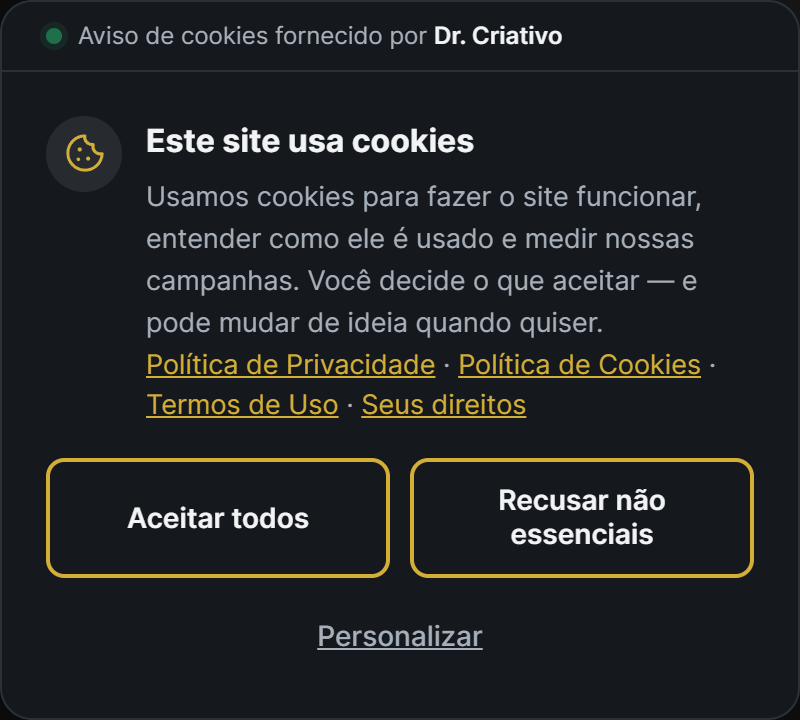


Installation
- Create an account at https://opt.drcriativo.com.br/ (the Free plan works).
- Install and activate the plugin.
- Under the Dr. Criativo Consent menu, paste the site identifier shown in the platform dashboard.
- Save. The screen itself checks whether the notice is loading before the tracking tags and shows the result.
FAQ
-
Do I need to pay?
-
No. The Free plan is free forever, for 1 site. Paid plans add the cookie scanner,
your brand colors, a data-subject rights page and more sites. -
Does it work with a caching plugin?
-
Yes. The plugin tells LiteSpeed Cache not to defer or combine the notice script,
which must be the first one to run on the page. -
What if the platform goes down?
-
The site keeps working normally. Without the script, the blocked tags simply do
not run — the site never tracks without consent. -
Does it work with Elementor and other page builders?
-
Yes. The plugin catches the tracking tags pasted into a page builder’s custom
code field, which never go through a plugin and would otherwise escape the
block. Embedded YouTube videos and Google Maps are also replaced by a
“click to load” box until the visitor accepts. -
Does it work with WooCommerce?
-
Yes. The cookies WooCommerce needs to keep the cart and the checkout working are
treated as necessary and never blocked. The notice does not touch the checkout
flow. -
What does the plugin store about my visitors?
-
The choice itself: the categories accepted or rejected, the date, the policy
version and a random identifier. The IP address is stored only as a hash, never
in plain text. No name, e-mail, order or form data is ever sent.
Reviews
There are no reviews for this plugin.
Contributors & Developers
“Dr. Criativo Consent” is open source software. The following people have contributed to this plugin.
Contributors
Translate “Dr. Criativo Consent” into your language.
Interested in development?
Browse the code, check out the SVN repository, or subscribe to the development log by RSS.
Changelog
1.9.2
- The notice script is now loaded with wp_enqueue_script, printed early so it still runs before tracking tags; its attributes come from script_loader_tag.
- The settings screen CSS and JavaScript use wp_add_inline_style() and wp_add_inline_script().
- Every setting passed to register_setting() is sanitized.
- The output buffers that rewrite the page are now explicitly closed at shutdown.
- Readme: the external services section explains that the plugin never contacts Google, Meta or the other providers it labels.
1.9.1
- First release in the official WordPress repository.
- Blocks tracking tags before consent, including the ones that ignore Google Consent Mode (Meta Pixel, Hotjar, Microsoft Clarity, TikTok, Pinterest, LinkedIn and Smartlook).
- Google Consent Mode v2.
- YouTube videos and Google Maps only load after consent.
- Stores proof of every visitor’s choice.