
Description
Note: the admin interface of this plugin is currently in Japanese.
Most llms.txt plugins stop at writing the file. This one is built around the question that comes next: did any AI actually come and read it?
It keeps a lightweight log of AI crawler visits (no database tables, no human visits, no IP addresses), charts them by crawler and by page, and lets you fetch your own site as GPTBot to see whether the text is really in the HTML. llms.txt is included so the whole loop — publish, measure, check — lives in one place.
1. Files for AI, generated on the fly
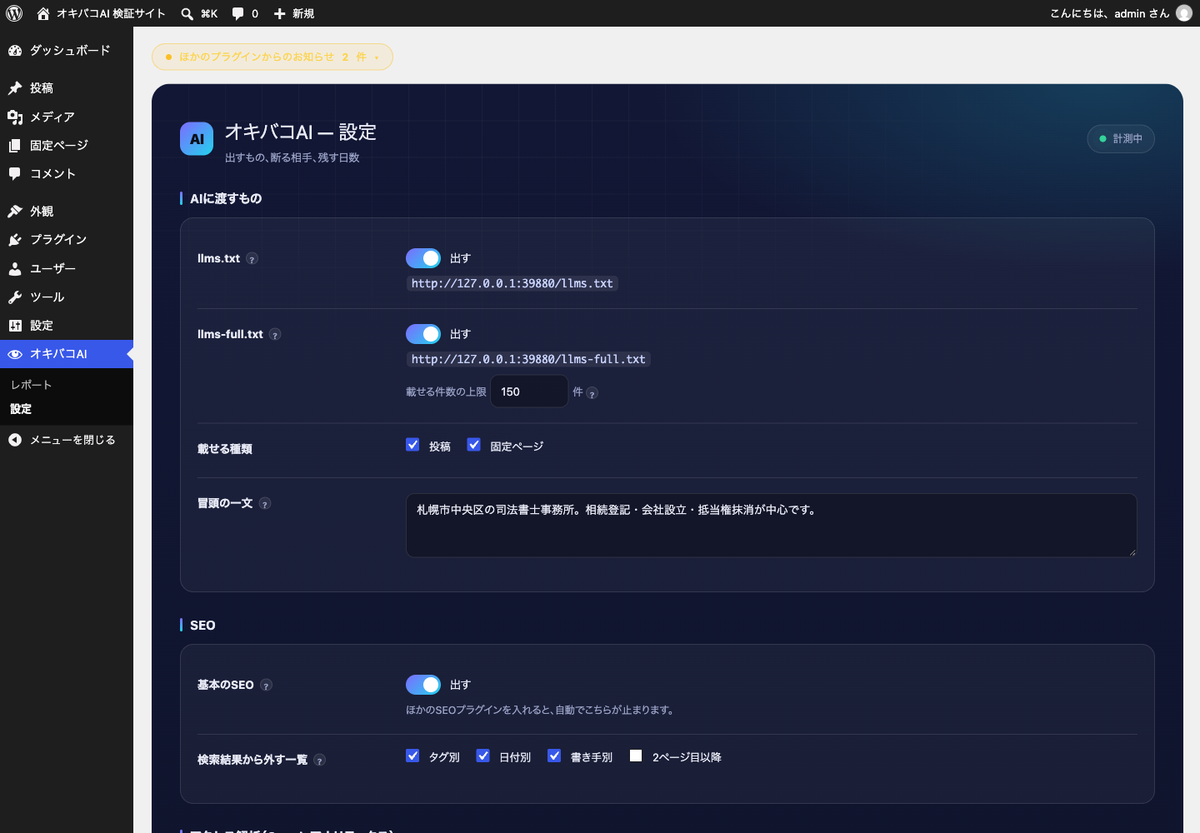
- llms.txt — a map of the site: what the business is, and what is on each page.
- llms-full.txt — the body text of every post and page in one file, each entry carrying its URL and last-modified date so an AI can cite the source.
- robots.txt — AI crawlers listed by name, so refusing one later is a single click.
Nothing is written to disk. The files are built when they are requested, so they match the site the moment you edit a post. There is no “generate” button and no sync setting to remember.
2. Measurement: is anything actually reading it?
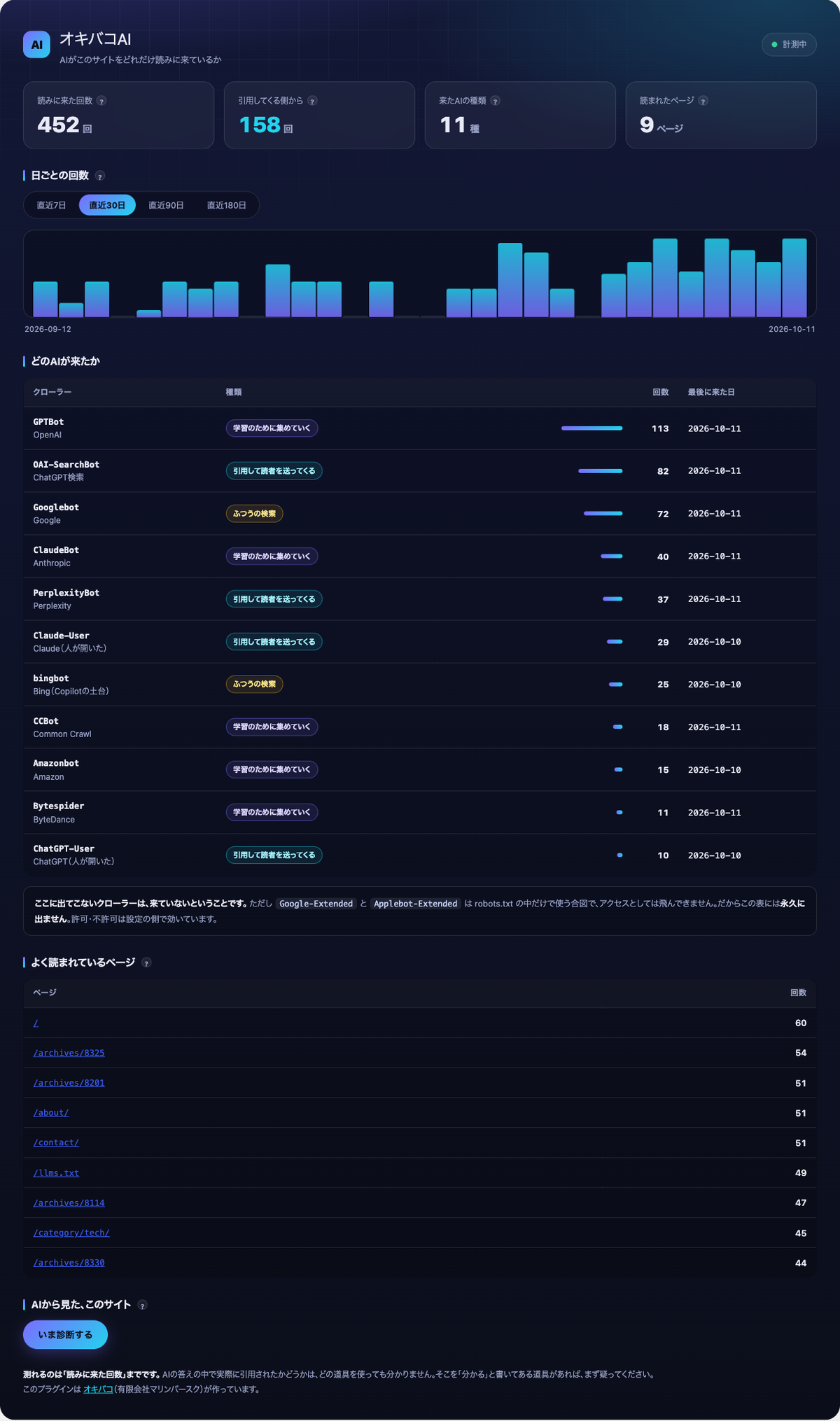
The plugin records visits from 19 crawlers — GPTBot, OAI-SearchBot, ChatGPT-User, ClaudeBot, Claude-User, PerplexityBot, Googlebot, bingbot and others — and charts them by day, by crawler and by page.
- Human visits are never recorded. A line is written only when the User-Agent matches a known AI crawler.
- No IP addresses are stored.
- No database tables are created. One file per day under
wp-content/uploads/.
If a page cache is active, cached responses never run PHP, so visits go uncounted. The plugin detects this and tells you exactly which user agents to exclude in your cache plugin.
3. See your site the way an AI sees it
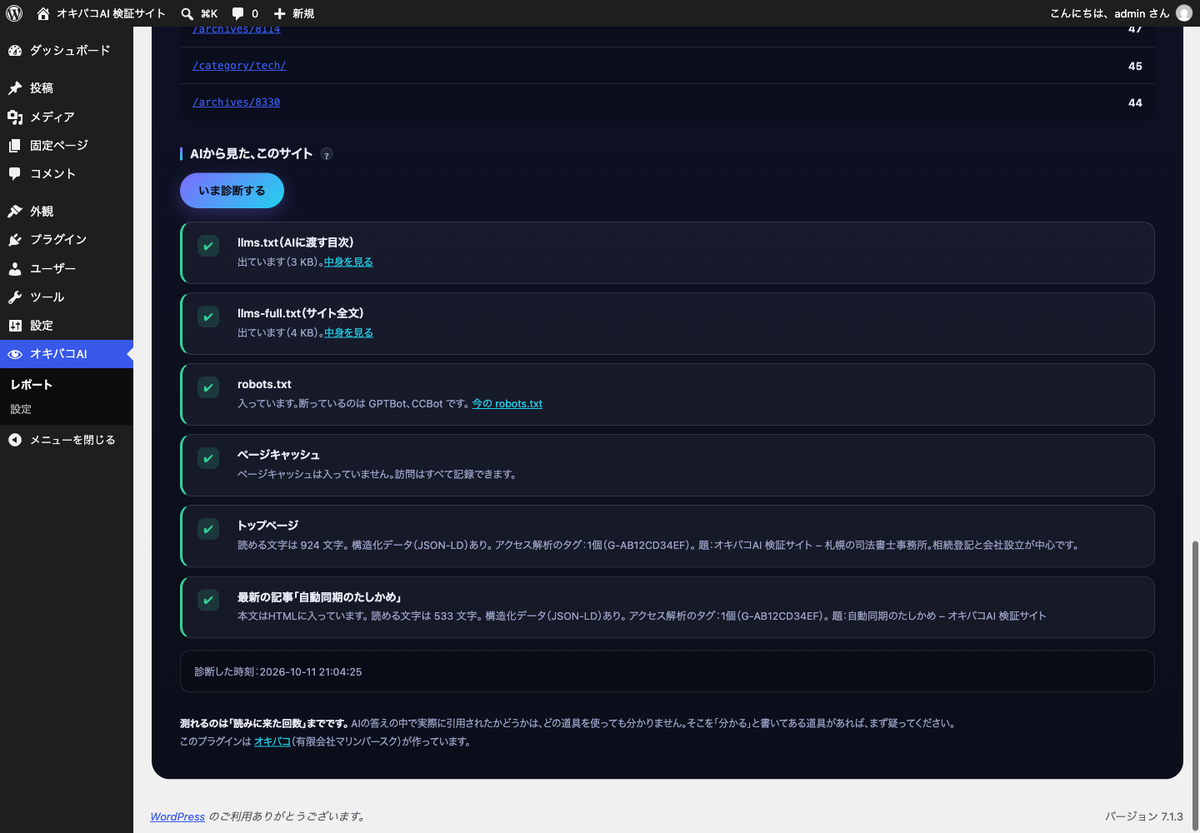
One button fetches your own site while identifying as GPTBot, and reports:
- Whether the body text is actually in the HTML. Page builders and lazy loading routinely leave text visible to people but absent from the HTML, which is easy to miss when you only look at the page in a browser.
- Whether structured data (JSON-LD),
h1andtitleare present. - Whether
llms.txtandrobots.txtare really being served, or shadowed by a real file on disk. - Whether canonical, description, og:title or the analytics tag appear twice — a common and quietly destructive conflict between a theme and a plugin.
4. SEO and analytics basics
Title, meta description, canonical, Open Graph, and JSON-LD (Organization, WebSite, BlogPosting, BreadcrumbList). Optional noindex for thin archive pages. A field for a Google Analytics 4 measurement ID.
If another SEO or analytics plugin is active, these parts switch themselves off. Yoast SEO, Rank Math, All in One SEO, SEO SIMPLE PACK, The SEO Framework, Slim SEO, SEOPress, Site Kit by Google, MonsterInsights and others are detected. Emitting a second canonical tag or a second analytics tag does real damage, so the plugin yields. llms.txt and the measurement keep running either way, because they do not conflict with those plugins.
What this plugin cannot tell you
It counts fetches. It does not show whether an AI quoted your page in an answer; a crawler visit is not the same as a citation.
Placing an llms.txt file is also no guarantee of being picked up by anything. What this plugin does is prepare the content properly and measure what actually arrives.
External services
This plugin can load one external service, and only if you turn it on.
Google Analytics (gtag.js)
- What it is: Google Analytics 4, a web analytics service provided by Google LLC. It is used to measure visits by people, separately from the AI crawler log.
- When: only if you enter a Google Analytics measurement ID in the settings. With the field empty, nothing is loaded.
- What is sent: visitors’ browsers load
https://www.googletagmanager.com/gtag/jsand send Google the usual page-view data (page URL, referrer, browser and device information, IP address, and Google Analytics cookies). The plugin itself sends nothing from your server. - Options: logged-in editors can be excluded, and browsers sending “Do Not Track” can be skipped.
- Google Terms of Service: https://policies.google.com/terms
- Google Analytics Terms of Service: https://marketingplatform.google.com/about/analytics/terms/us/
- Google Privacy Policy: https://policies.google.com/privacy
No other external service is contacted. The diagnose button fetches only your own site, from your own server.
Privacy
The AI crawler log stays on your own server and is never sent anywhere.
What is recorded
When an AI crawler requests a page, four fields are appended to a file on your own server: the time (UTC), the crawler name, the HTTP status, and the request path with the query string removed. Files live at wp-content/uploads/okibako-ai/YYYY-MM-DD.tsv, protected by an .htaccess file.
Human visits, IP addresses and cookies are not involved, and no database table is created.
Outbound connections
- Pressing the diagnose button fetches your own site from your own server. The result is not sent anywhere.
- Google Analytics is loaded only if you enter a measurement ID. See “External services” above.
Screenshots
Installation
- Upload and activate the plugin.
- Open オキバコAI 設定 and write one line describing what the site is.
- Open オキバコAI レポート and press the diagnose button. Every row should come back green.
Numbers only become readable after about two weeks. Crawlers do not visit every day.
FAQ
-
llms.txt returns 404
-
Open Settings Permalinks and save without changing anything. If it still fails, a real
llms.txtfile exists in your web root; delete it. -
My robots.txt does not include the AI lines
-
A real
robots.txtfile on disk overrides the one WordPress generates. The diagnose screen detects this. Note also that some SEO plugins rebuild robots.txt and drop comment lines while keeping the rules. -
I have several hundred posts. Will this slow the site down?
-
llms-full.txt is streamed rather than held in memory, and the number of entries is configurable. llms.txt is cached for a day and rebuilt only when a post changes.
-
Does uninstalling delete my measurements?
-
Settings and per-post fields are removed. Measurement files are kept. Delete
wp-content/uploads/okibako-ai/yourself if you do not want them. -
Google-Extended never appears in the report
-
Correct, and it never will.
Google-ExtendedandApplebot-Extendedare robots.txt tokens only; they are never sent as a User-Agent. Allowing or refusing them still works from the settings screen.
Reviews
There are no reviews for this plugin.
Contributors & Developers
“Okibako AI” is open source software. The following people have contributed to this plugin.
Contributors
Translate “Okibako AI” into your language.
Interested in development?
Browse the code, check out the SVN repository, or subscribe to the development log by RSS.
Changelog
1.0.0
- First release.