

Description
TSI Visitor Blocker protects your WordPress site from unwanted visitors, spam, and brute-force attacks.
Who Is This For?
- Website owners who want to stop spam form submissions
- E-commerce stores that want to block fraudulent email addresses
- Agencies managing multiple sites that need consistent blocking rules
- Anyone dealing with spam comments, fake registrations, and bot traffic
Key Features
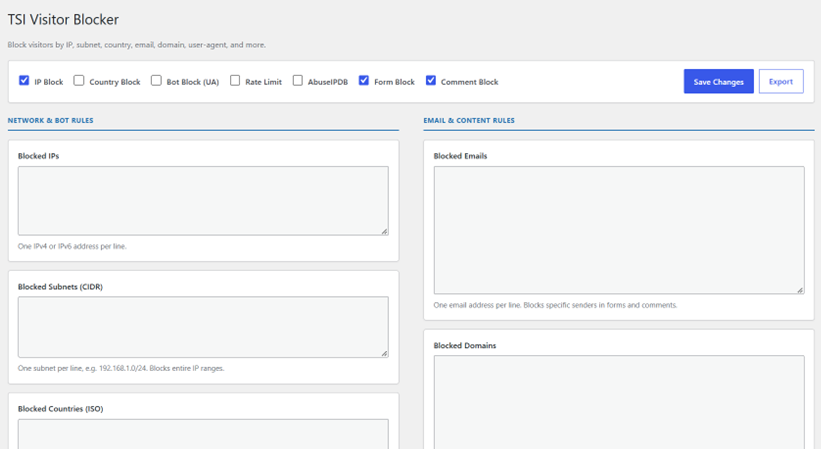
IP & Subnet Blocking
- Block specific IP addresses (IPv4 and IPv6 support)
- Block entire subnets using CIDR notation (e.g., 192.168.1.0/24)
- Useful for blocking entire hosting ranges from known spam providers
Country Blocking
- Block visitors from specific countries using two-letter ISO codes
- Uses ip-api.com for geolocation (cached for 24 hours for performance)
Email & Domain Blocking
- Block specific email addresses (e.g., spammer@example.com)
- Block entire email domains (e.g., tempmail.com)
- Blocks emails in contact forms, registration forms, and comments
Bot & User-Agent Blocking
- Block known bad bots by user-agent string
- Protects your site from scrapers and crawlers
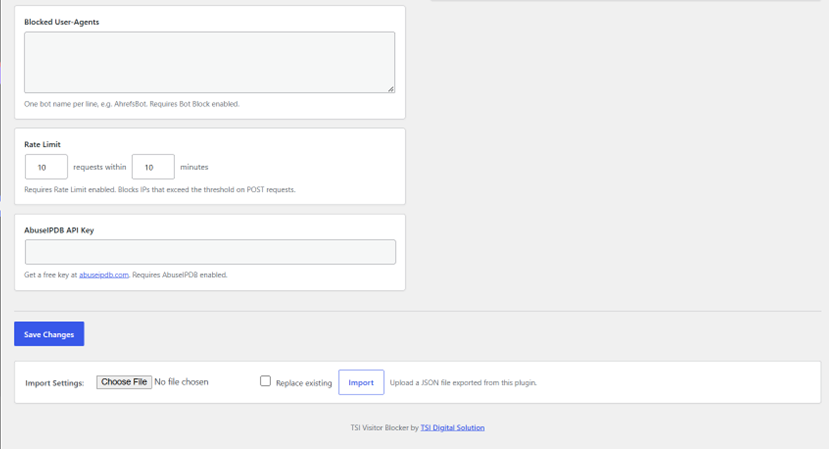
Rate Limiting
- Limit the number of POST requests per IP address
- Configurable max requests and time window
- Prevents brute-force attacks and automated form submissions
AbuseIPDB Integration
- Optionally check incoming IPs against AbuseIPDB’s reputation database
- Requires a free API key from abuseipdb.com
- Automatically blocks IPs with an abuse confidence score above 50
Form & Comment Blocking
- Block form submissions containing blocked emails or domains
- Prevent comments from blocked email addresses or domains
- Works with any WordPress form plugin (Contact Form 7, WPForms, etc.)
Export & Import Settings
- Export all blocking rules to a JSON file
- Import rules on other sites – useful for managing multiple installations
Security
- All input is sanitized and validated
- Nonce verification for all admin operations
- Logged-in editors and admins are always exempt from blocking
How It Works
- Install & Activate – Get started in seconds
- Enable Features – Toggle on the blocking features you need
- Add Your Block Lists – IPs, emails, domains, user-agents, countries
- Set Rate Limits – Configure max requests per IP
- Optional AbuseIPDB – Add your free API key for automated blocking
External Services
This plugin connects to the following third-party services:
ip-api.com
When country blocking is enabled, the visitor’s IP address is sent to ip-api.com to determine their country code. The result is cached for 24 hours using WordPress transients. No data is sent when country blocking is disabled.
- Service: https://ip-api.com
- Terms of Service / Legal: https://ip-api.com/docs/legal
- Privacy Policy: https://ip-api.com/docs/legal
AbuseIPDB
When AbuseIPDB integration is enabled and a valid API key has been entered, the visitor’s IP address is sent to the AbuseIPDB API to check its reputation. The result is cached for 24 hours using WordPress transients. No data is sent when this feature is disabled or no API key is configured.
- Service: https://www.abuseipdb.com
- Terms of Service: https://www.abuseipdb.com/legal
- Privacy Policy: https://www.abuseipdb.com/privacy
Additional Resources
- Plugin Website: https://tsidigitalsolution.com/tsi-visitor-blocker
- Support Forum: https://wordpress.org/support/plugin/tsi-visitor-blocker
Credits
Developed and maintained by TSI Digital Solution.
Website: https://tsidigitalsolution.com
Screenshots
Installation
- Upload the
tsi-visitor-blockerfolder to the/wp-content/plugins/directory - Activate the plugin through the ‘Plugins’ menu in WordPress
- Go to the ‘Visitor Blocker’ menu in the WordPress admin sidebar
- Configure your blocking rules and enable the features you need
- Save your settings – the plugin is now active
Manual Installation 1. Download the plugin ZIP file from WordPress.org 2. Go to Plugins Add New Upload Plugin 3. Upload the ZIP file and click “Install Now” 4. Activate the plugin and follow the configuration steps
FAQ
-
How do I block a country?
-
Enable “Country Block” at the top of the settings page, then add the two-letter ISO country code (e.g., RU for Russia, CN for China) to the “Blocked Countries” list, one per line.
-
How do I block an email domain?
-
Enable “Form Block” and/or “Comment Block”, then add the domain (e.g., tempmail.com) to the “Blocked Domains” list, one per line. Any form submission or comment using an email from that domain will be blocked.
-
Does this plugin work with Contact Form 7?
-
Yes. The plugin intercepts POST requests before they reach any form plugin, so it is compatible with Contact Form 7, WPForms, Gravity Forms, and others.
-
What is AbuseIPDB and do I need an API key?
-
AbuseIPDB is a database of IP addresses reported for malicious activity. You can get a free API key at abuseipdb.com. It is entirely optional.
-
Will this slow down my site?
-
The plugin is lightweight. All external API calls (country lookup, AbuseIPDB) are cached using WordPress transients for 24 hours, so each IP is only checked once per day.
-
Can I import/export my blocking rules?
-
Yes. Use the export button to download your rules as a JSON file, and the import section to load them on another site.
-
I’m getting blocked by my own rules. What should I do?
-
Logged-in users with the “edit_posts” capability (editors and admins) are always exempt from blocking. If you are still being blocked, temporarily disable the relevant feature, save, then re-enable.
-
How do I uninstall the plugin?
-
Deactivate and delete the plugin from the WordPress admin. The uninstall routine removes all stored settings automatically.
Reviews
There are no reviews for this plugin.
Contributors & Developers
“TSI Visitor Blocker” is open source software. The following people have contributed to this plugin.
Contributors
Translate “TSI Visitor Blocker” into your language.
Interested in development?
Browse the code, check out the SVN repository, or subscribe to the development log by RSS.
Changelog
1.4.1
- Fixed: Inline admin CSS moved to enqueued stylesheet (wp_enqueue_style)
- Fixed: Admin menu position changed to 80 to avoid conflict with core items
- Fixed: Sanitize callbacks now validate content type per field (IP format, email format, ISO country codes, plain text)
- Fixed: Contributors field updated to WordPress.org username
- Updated: External services (ip-api.com, AbuseIPDB) documented in readme
- Updated: Version bump to reflect review fixes
1.4.0
- Added: Recursive POST scanning – catches blocked emails/domains in nested arrays
- Added: AbuseIPDB integration – automatically block known malicious IPs
- Added: Rate limiting for POST requests – prevents brute-force attacks
- Added: Export/Import settings functionality
- Added: Two-column admin UI for better usability
- Added: Extensibility hooks for Pro version
- Improved: Admin AJAX exemption
- Improved: IPv6 support
- Improved: Country blocking with caching
- Fixed: All input is sanitized and escaped
- Fixed: wp_redirect() replaced with wp_safe_redirect()
- Fixed: date() replaced with gmdate()
1.3.0
- Added: User-agent bot blocking
- Added: Rate limiting for POST requests
- Improved: Recursive POST scanning for nested arrays
- Fixed: Admin exemption logic
1.2.0
- Added: Export/Import settings functionality
- Added: A-Z sorting of all block lists on save
- Improved: Country blocking with caching
1.1.0
- Added: AbuseIPDB integration
- Added: Rate limiting
- Fixed: Various security fixes
1.0.0
- Initial release: IP and subnet blocking, country blocking, email and domain blocking, comment blocking, form blocking