
Description
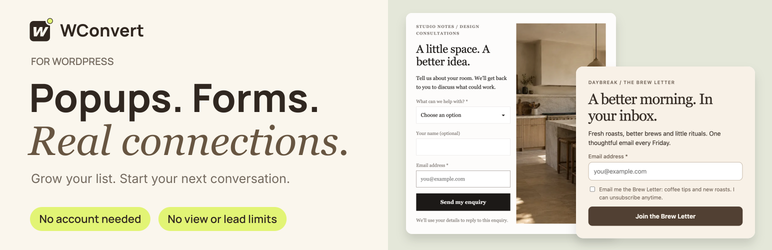
WConvert is a popup builder and optin form plugin for WordPress. Collect email addresses, phone numbers and enquiries with popups and inline forms that look like they belong on your site.
Tell WConvert what you want, such as more newsletter subscribers, more enquiries or more downloads of your guide. It hands you a ready-made campaign with the words, fields and timing already filled in. Change anything you like, then publish. It’s a head start, not a blank canvas.
No account to create. No limit on views or leads. Your leads stay in your own WordPress database.
Website · Documentation · Design library · WConvert Pro
Why WConvert?
- Start from a goal, not a blank canvas. Pick what you want to achieve and get a working campaign, words included, in a few clicks.
- Forms are built in. Email, phone and enquiry fields, consent checkboxes and multistep signups come with the plugin. You don’t need a separate form plugin.
- No caps. Free has no limit on campaign views, signups or leads, and there is no monthly plan to outgrow.
- Your leads stay on your site. Every submission is saved in your WordPress database, with CSV export. WConvert never sends your leads to us.
- Light on your pages. With no campaign published, WConvert adds nothing to your pages. With one published, it loads a single plain-JavaScript file of about 17 KB, compressed, with no jQuery.
- Polite to your visitors. Built-in frequency limits stop a popup from showing again and again, and can stop all campaigns once someone signs up.
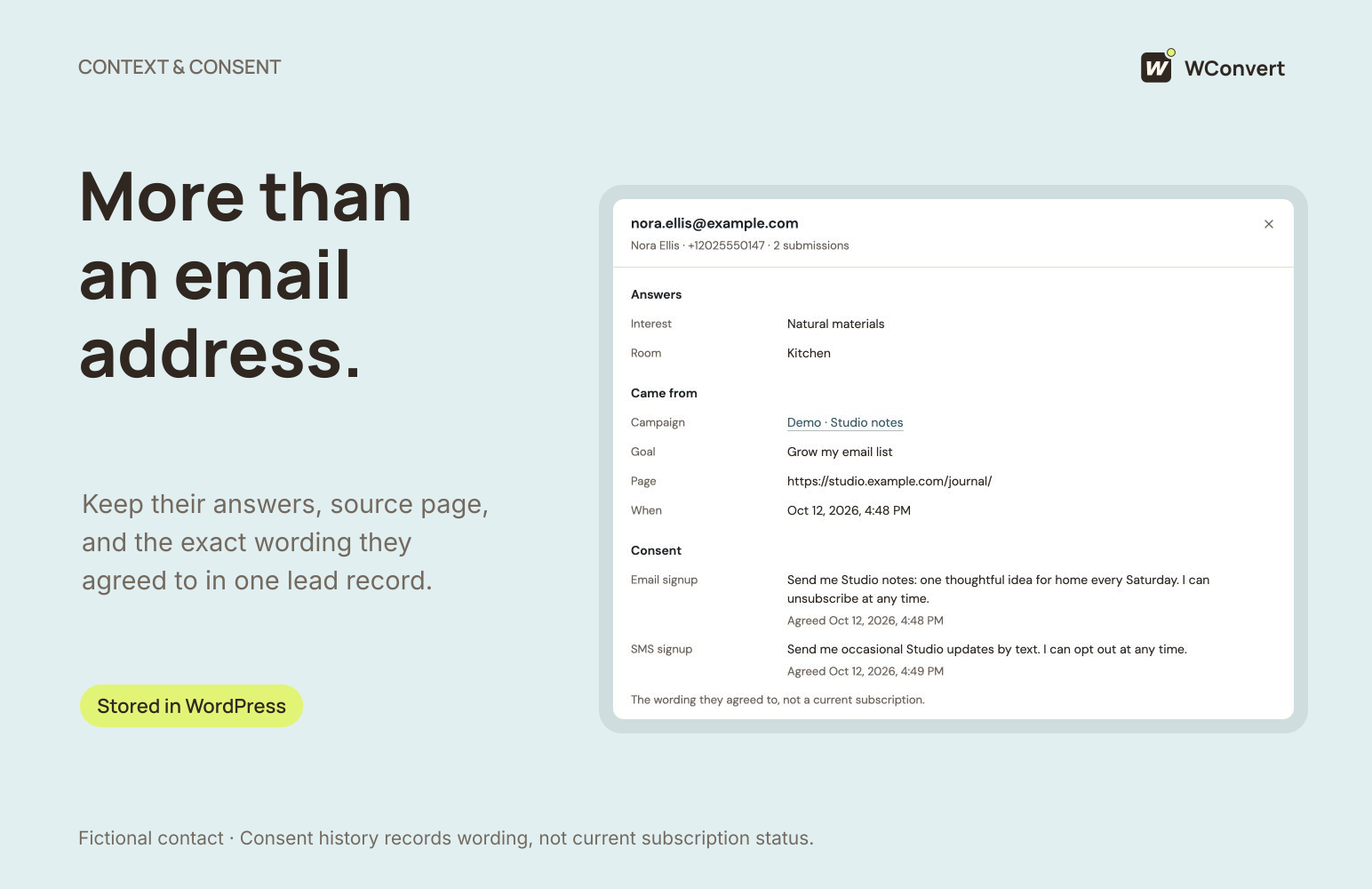
- Privacy built in. WConvert uses no visitor tracking IDs and stores no IP addresses. It records the exact consent wording each visitor saw.
How WConvert compares
OptinMonster is a hosted service. You build campaigns in its app, you need an OptinMonster account, and every plan comes with a monthly allowance of campaign views. WConvert runs entirely inside WordPress. It needs no account, and neither Free nor Pro has a view limit.
Popup Maker is a well-loved popup plugin that leaves forms to other plugins. For phone fields, enquiry forms or multistep signups, you add a separate form plugin. WConvert builds those in, along with a lead log and CSV export.
Checked October 2026. Other products change, so see their own sites for current details. Full comparisons are at wconvert.io/compare.
Start from a goal
Choose what you want to achieve, and WConvert suggests ready-made setups that do it:
- Grow my email list. Collect email addresses for your newsletter with an email popup or signup form.
- Grow my SMS list. Collect phone numbers for text messages, with a proper international phone field.
- Collect enquiries. Get quote requests, bookings and questions, along with contact details.
- Deliver a lead magnet. Email a guide, checklist or PDF download automatically when someone signs up.
- Promote an offer or content. Send visitors to a sale, a coupon, a page or a post.
Every setup comes with copy written for that goal. You fill in your own brand and details.
Popups and inline forms
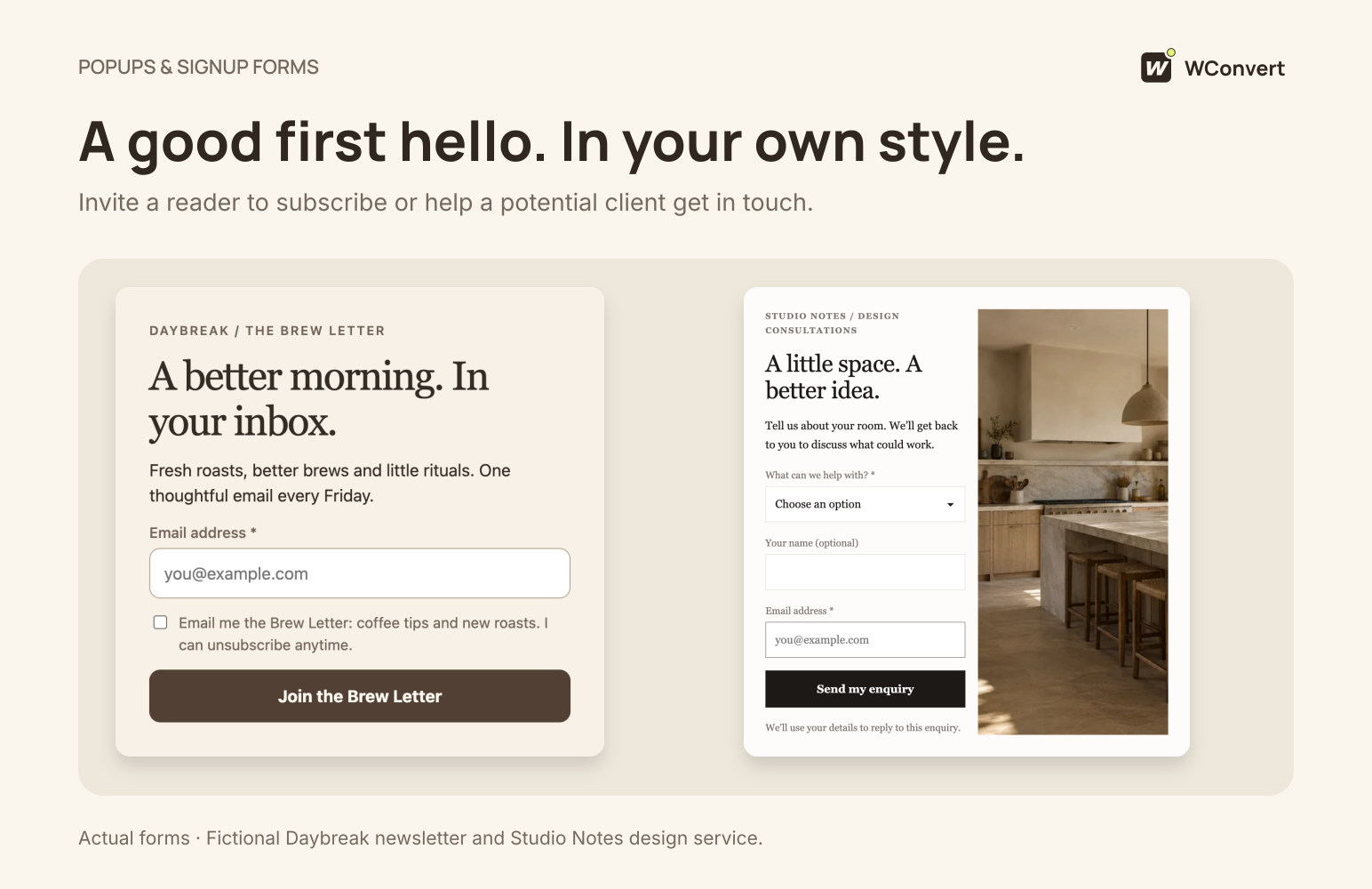
- Popups that open on top of the page and match any theme.
- Inline forms inside your posts and pages. Add the WConvert campaign block, or paste a shortcode into any page builder, widget or theme file.
- Multistep signups. Ask for an email first, then a phone number or a question on the next step.
- Mobile-friendly. Every design works on phones as well as on desktop, and you can preview both before you publish.
150+ ready-made designs
- Over 150 designs cover newsletters, coupons, lead magnets, enquiries, bookings and announcements. All the artwork is original and drawn in the page, so no image is loaded from another site.
- More than 50 designs ship inside the plugin and work offline from day one.
- The rest come from the online WConvert library, which you can turn off in Settings. Add a design with a click, and it then works offline like the rest. Some designs need WConvert Pro.
- Click any part of a design to change it: words, colours, fields and buttons, right beside a live preview.
- Move designs between sites. Export a design to a file and import it on another site.
Show it to the right people, at the right time
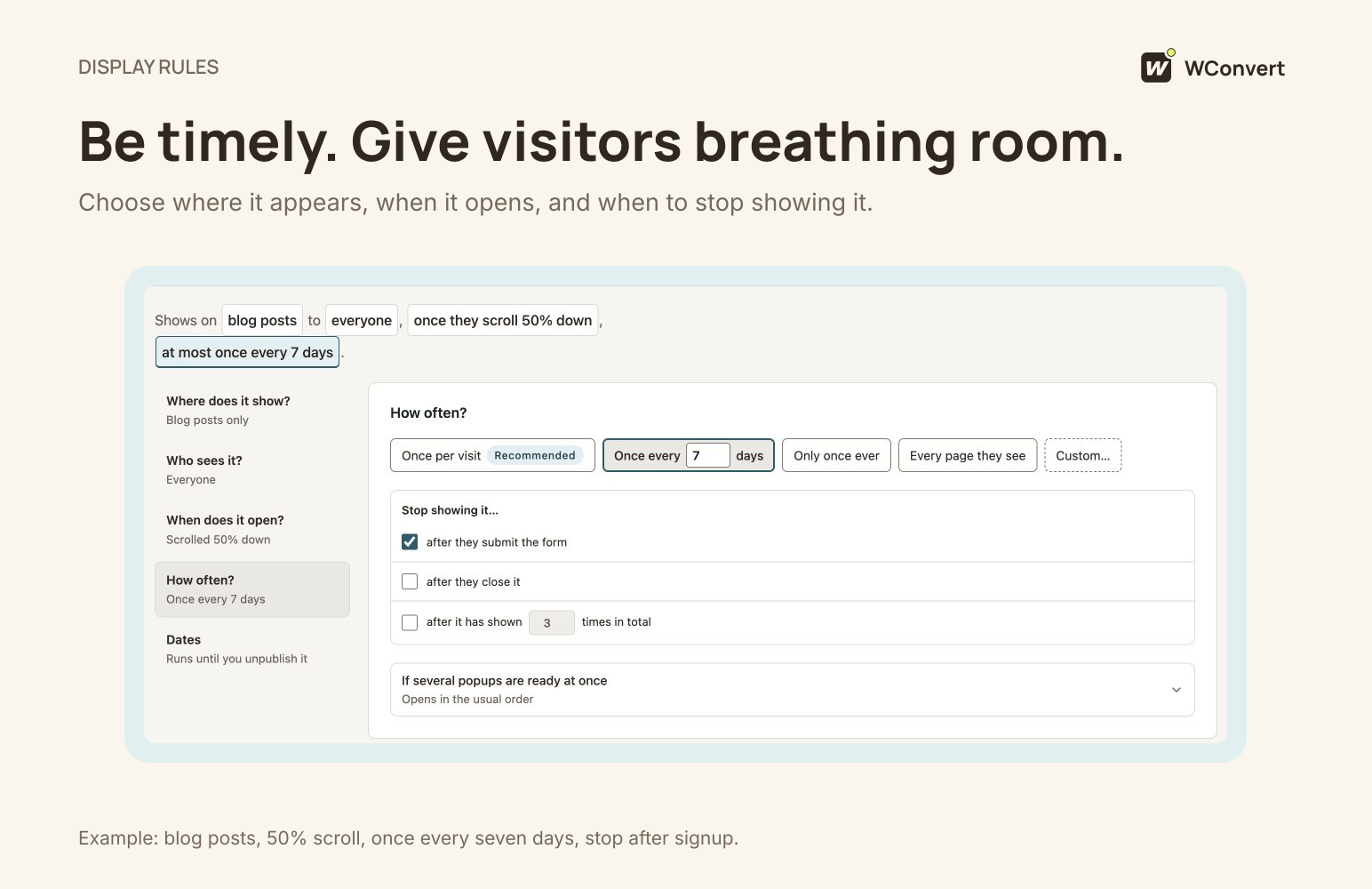
- When it opens: as the page loads, after a few seconds, after the visitor scrolls, or when they stop moving for a while.
- Where it shows: every page, or only the posts, pages, categories or addresses you pick, or everywhere except those.
- Who sees it: everyone, logged-in visitors, guests, or particular user roles such as customers or members.
- Phones or desktop only, and opening hours, so it shows only during the times you choose.
- Start and end dates, so a sale campaign switches itself off on time.
- Don’t annoy anyone: limit how often each visitor sees a campaign, and set one rule for the whole site, for example “nothing more once they sign up”.
- Find out why a popup didn’t show: add
?wconvert-inspect=1to any page address while logged in as an admin, and WConvert tells you which rule held it back.
See what works
- One screen for what WConvert brought to your site: leads captured, clicks and times shown.
- Results by goal and by campaign, with a chart of each day.
- Compare with the previous period to see if you’re growing.
- Monthly targets, for example 100 new subscribers this month.
Everything is counted on your own site. There is no tracking service and no visitor ID.
Your leads, in one place
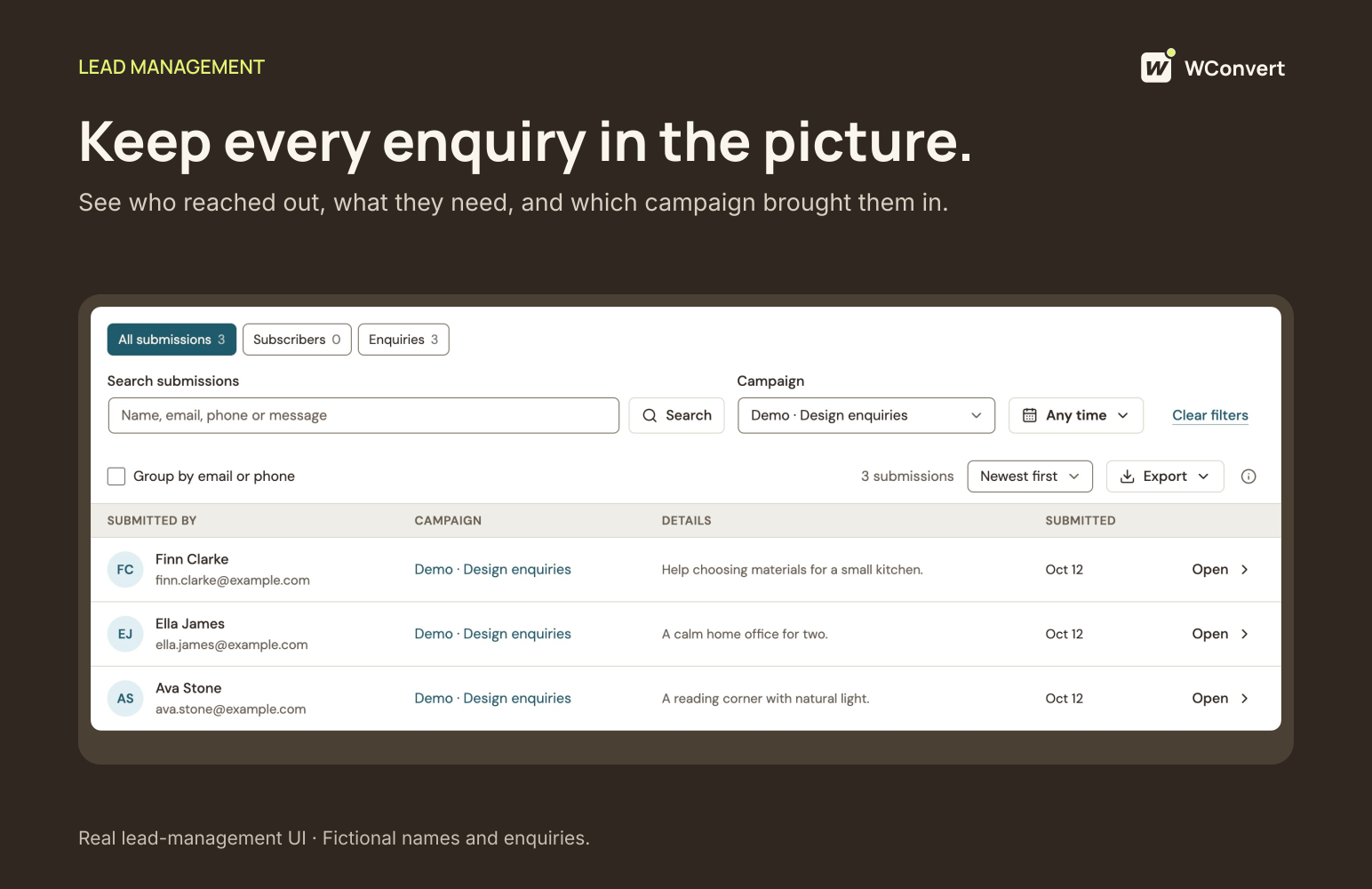
- Every submission in a lead log, with search, filters and CSV export.
- Send email signups to MailPoet if you use it. Mailchimp, Brevo and webhooks for Zapier and Make come with Pro.
- Lead magnet delivery: email a download link automatically, with no extra service.
Privacy and GDPR tools
- The consent each visitor gave is saved with their submission, using the exact words they saw on the form.
- WordPress’s own personal-data export and erasure tools find and remove a person’s submissions.
- A retention period you choose, after which old submissions are deleted.
- Suggested text for your privacy policy, added to WordPress’s privacy policy guide.
- No IP addresses stored, and no visitor tracking. Nothing is loaded from other sites unless you turn it on.
These tools help you meet GDPR and similar laws. How you use them on your site is up to you.
Spam protection
Hidden-field checks and submission limits are built in and on by default. For extra protection, turn on Cloudflare Turnstile, Google reCAPTCHA or hCaptcha with your own keys.
Build campaigns with your AI app
WConvert works with AI apps such as Claude, ChatGPT and Cursor through the WordPress Abilities API and MCP. Ask “make me a newsletter popup for my blog posts” or “how did my campaigns do last month?”, and your AI app can find designs, draft campaigns and read results.
Publishing is off for AI apps by default. Drafts wait for you to check them, until you allow more. Requires WordPress 6.9 or later. Guide: Connect an AI agent.
WConvert Pro
WConvert Free is complete on its own. It is not a trial, and it never expires. When you want more, the separate WConvert Pro plugin adds:
- More formats: floating bars, slide-ins, fullscreen popups, click-to-open popups and content locks that reveal the rest of a post after signup
- Automatic placement of inline forms inside your posts
- More triggers: exit-intent popups, scroll-up and on-click
- More targeting: where visitors came from, page address parameters and ad blockers
- Quizzes with questions, branching paths and personalised results
- A/B testing to compare versions of a campaign
- WooCommerce: cart recovery campaigns, product recommendations and quiz-based product picks
- Integrations: Mailchimp, Brevo, Mailtrap, and webhooks for Zapier, Make and n8n
- Analytics events for Google Analytics 4, Google Tag Manager and Plausible
- Advanced spam filters
Every Pro plan includes every Pro feature; plans differ only in how many sites they cover. See WConvert Pro plans.
Who makes WConvert
WConvert is made by VeronaLabs, the team behind WP Statistics and WSMS, building WordPress plugins since 2010.
Guides and support
Step-by-step guides for every feature are at wconvert.io/docs, starting with Create your first campaign. Short videos are at wconvert.io/docs/videos. Inside WordPress, open WConvert Help.
Questions about the free plugin are welcome in the support forum here. For anything else, contact our team.
Source code
The admin screens, the visitor-facing loader and the editor block are built with React, TypeScript and Vite. The compiled files in public/ are generated from the readable sources in the resources/ folder of the plugin’s GitHub repository, which also holds the build tools:
public/loader/andpublic/inspector/come fromresources/loader/srcpublic/admin/comes fromresources/admin/srcpublic/blocks/comes fromresources/blocks/inline-optin/srcpublic/phone/comes fromresources/phone/srcpublic/protection/comes fromresources/protection/src
To rebuild them, run npm ci && npm run build:free in a clone of the repository, using Node.js 22.
External services
WConvert works without an account or any external service. The online design library below is WConvert’s own service and is on by default; it is contacted only when an administrator opens the design picker. Nothing else below is contacted unless an administrator turns it on.
Online design library. The designs included in the plugin work offline and
need nothing else. The online WConvert library at https://templates.wconvert.io
is on by default. It is contacted when an administrator opens the design
picker or follows a link to a design, and can be turned off at any time in Settings Data & privacy, after
which nothing is fetched. Nothing is fetched on activation, from cron, on the
dashboard or on your site’s pages. While the picker is open, WConvert checks
for new designs at most twice a day.
What is fetched: JSON design and setup data and PNG, JPEG or WebP images. Every
file is checked against a SHA-256 checksum, and nothing executable or any font
is downloaded. A design you add is stored under wp-content/uploads/ and keeps
working offline. Your browser loads design thumbnails from the same address with
no referrer, so the service sees your browser’s IP address.
What is sent: requests from the free plugin carry no licence key, site address,
campaign, lead or visitor data; the server’s IP address, the requested address
and a fixed user agent are all the service sees. When a design is previewed or added, the
service counts that download for that design, with no site or visitor
identifier. WConvert Pro also sends its licence key and your site’s domain to
the same service when you add a Pro design, and the service asks the WConvert
licence server (Nexus, at https://my.wconvert.io) to issue a five-minute pass for
those files.
The service runs on Cloudflare, which processes these requests for us. Its
request logs are kept for at most 7 days and download counts for 3 months.
To turn the library off for the whole site, add
define( ‘WCONVERT_TEMPLATE_CATALOG’, false ); to wp-config.php, or return
false from the wconvert_template_catalog filter. An operator can also point
it at another catalogue address; the trusted recipient of a Pro licence key does
not change with it.
Service terms: https://wconvert.io/terms/
Privacy policy: https://wconvert.io/privacy/
Bot verification. Hidden-field checks and submission limits are built in.
In Settings Spam protection, administrators may enable one verification
service using their own account and keys: Cloudflare Turnstile Managed, Google
reCAPTCHA v2 checkbox, or hCaptcha. No service is selected by default. Provider
charges and quotas are separate from WConvert.
The selected service loads when a form needs verification or an administrator
runs Test saved setup. Its script receives browser and network information,
including the visitor’s IP address. WConvert sends the verification token and
required credentials from the server to that service; it does not forward the
form’s email, phone or other captured answers. The server also checks the
provider response before accepting a protected form. Visitors can retry failed
verification without losing their entered fields. Administrators should review
the selected service’s terms and their site’s privacy notice before enabling it.
- Cloudflare Turnstile: https://www.cloudflare.com/products/turnstile/
Terms: https://www.cloudflare.com/website-terms/
Privacy: https://www.cloudflare.com/turnstile-privacy-policy/ - Google reCAPTCHA: https://www.google.com/recaptcha/about/
Terms: https://policies.google.com/terms
Privacy: https://policies.google.com/privacy - hCaptcha: https://www.hcaptcha.com/
Terms: https://www.hcaptcha.com/terms
Privacy: https://www.hcaptcha.com/privacy
Optional Google Fonts. Remote Google Fonts are disabled by default. In Settings Data & privacy,
the site owner can enable them after acknowledging the browser connection.
When an eligible campaign is shown, WConvert requests only its declared, used
fonts that are not provided by the site’s font list. The active editor preview
also loads these fonts when enabled. Selecting or importing a design does not
enable this setting. Gallery cards do not initiate font requests.
Stylesheets are requested from fonts.googleapis.com and font files from
fonts.gstatic.com. Google receives the browser’s IP address and HTTP request
information. WConvert sends no form answers to this service. Installing fonts
in the WordPress Font Library is the locally hosted alternative. Disabling
remote delivery prevents new requests on freshly served pages; clear host/CDN
page caches after changing the setting. Existing browser caches may retain fonts.
Service: https://fonts.google.com/
Terms: https://policies.google.com/terms
Privacy: https://policies.google.com/privacy
Queued resource emails are limited to one successful send per recipient and
resource within ten minutes. Separate submissions remain separate leads.
Third-party libraries
The built JavaScript and CSS bundle these open-source libraries. Their sources
are installed by npm ci from package-lock.json.
- React and ReactDOM 19 — MIT. The admin screens bundle their own React 19
rather than using the copy WordPress provides, because WordPress 6.8 ships
React 18. It runs only on WConvert’s own admin screens; the visitor-facing
loader and the block editor bundle use no React of their own. - Radix UI (
radix-ui) — MIT - React Flow (
@xyflow/react) — MIT - dagre (
@dagrejs/dagre) — MIT - React Flow Smart Edge (
@tisoap/react-flow-smart-edge) — MIT - react-colorful — MIT
- tailwind-merge — MIT
- clsx — MIT
- Tailwind CSS and tw-animate-css (generated CSS) — MIT
- lite-phone-input — MIT; its notice ships in
resources/phone/ - Lucide icons (
lucide-react) — ISC - class-variance-authority — Apache-2.0
- Pragmatic drag and drop (
@atlaskit/pragmatic-drag-and-drop) — Apache-2.0 - DM Sans font — SIL Open Font License 1.1; its licence ships as
public/admin/fonts/OFL-DM-Sans.txt
PHP:
- Action Scheduler (
woocommerce/action-scheduler), installed by Composer into
vendor/ — GPL-3.0-or-later, which is compatible with this plugin’s
GPL-2.0-or-later licence when distributed together.
Template artwork: every illustration in the design library is original work
made for WConvert, drawn as inline SVG, and licensed GPL-2.0-or-later with the
rest of the plugin. The library contains no photographs and no third-party
logos.
Screenshots



Blocks
This plugin provides 1 block.
- WConvert campaign Place a published inline campaign in a page, post, sidebar, or footer.
Installation
- In your WordPress admin, go to Plugins Add New, search for WConvert, and click Install Now, then Activate.
- Open WConvert in the admin menu and click Create campaign.
- Pick a goal, choose a ready-made setup, change anything you like, and publish.
Guide: Create your first campaign.
WConvert Pro: install it alongside the free plugin. Pro adds to WConvert and does not replace it.
Multisite: activate WConvert on each site on its own. Network activation is not supported and is refused with a message.
FAQ
-
Is WConvert really free? Is it a trial?
-
Yes, it’s free, and no, it isn’t a trial. The free plugin is complete on its own and never expires. It has no limit on campaigns’ views, signups or leads, and no account to create. WConvert Pro is an optional add-on for more formats, triggers and integrations.
-
Do I need an account or another service?
-
No. Everything works inside WordPress, with nothing else installed. MailPoet is used only if you already have it. The online design library loads when you open the design picker and can be turned off in Settings; see External services.
-
How is WConvert different from OptinMonster or Popup Maker?
-
OptinMonster is a hosted service that needs an account and limits campaign views by plan. WConvert runs inside WordPress, with no account and no view limits. Popup Maker relies on a separate form plugin for phone, enquiry and multistep forms. WConvert builds them in, with a lead log. See the full comparisons.
-
How do I put a form inside a post?
-
In the block editor, add the WConvert campaign block and pick your campaign by name. Not using the block editor? The block shows a shortcode you can paste anywhere, such as a page builder, a widget or a theme file:
[wconvert_optin id="YOUR_CAMPAIGN_ID"]Popups don’t need this. They show on the pages you choose by themselves.
Guide: Add an inline campaign with a block or shortcode. -
Does it work with my theme or page builder?
-
Popups are added by WConvert itself, so they appear on top of any theme. For inline forms, page builders such as Elementor, Divi and Beaver Builder take the shortcode in their shortcode element. In the block editor and block themes, use the WConvert campaign block.
-
Can I show a popup when someone is about to leave (exit intent)?
-
Exit-intent and scroll-up triggers are part of WConvert Pro. In the free plugin you can open a campaign after a delay, after scrolling, or when the visitor stops moving for a while. That last option often reaches the same people.
Guide: Exit-intent and scroll-up triggers. -
How do I stop a popup from showing again and again?
-
Each campaign has its own limits, for example once per visit, or never again after someone signs up. Under Settings you can also set a limit for the whole site, so visitors never see too many campaigns.
Guide: Limit how often visitors see campaigns. -
Can I show a popup only on some pages?
-
Yes. Pick the posts, pages, categories or page addresses where it should show, or where it should not.
Guide: Show a campaign on selected pages. -
Can I collect phone numbers for SMS marketing?
-
Yes. Add a phone field to any form. It formats international numbers and checks them as visitors type. The numbers are kept in your lead log, and you can export them to CSV for your SMS service. With WConvert Pro, a webhook can send them to your SMS service as each person signs up.
-
How do I send signups to Mailchimp, MailPoet or my CRM?
-
MailPoet connects in the free plugin. Mailchimp, Brevo and Mailtrap connect with WConvert Pro, and so do webhooks, which reach Zapier, Make, n8n and most CRMs. Every signup is also saved in your lead log.
Guide: Choose where submissions go. -
How do I give away a PDF, guide or checklist?
-
Pick the Deliver a lead magnet goal. WConvert emails a download link to each person who signs up, using your site’s own email. No extra service is needed.
-
Will it slow down my site?
-
If no campaign is published, WConvert adds nothing to your pages. When one is, it loads a small plain-JavaScript file of about 17 KB, compressed, with no jQuery. Forms with a phone field add a small helper for phone numbers. Nothing is loaded from other sites unless you turn on a bot-verification service or remote fonts.
-
Is it GDPR friendly? Does it store IP addresses or track visitors?
-
WConvert gives you the tools: it saves the consent wording each visitor saw, works with WordPress’s personal-data export and erasure, deletes old submissions after a period you choose, and suggests privacy policy text.
It uses no visitor ID and does no tracking across pages; results are daily totals for each campaign. To slow down spam, a scrambled, one-way code made from the visitor’s network address is kept for a few minutes. The address itself is never saved.
Guide: What WConvert stores, sends and counts. -
Does it work with WooCommerce?
-
Yes. The free plugin can show campaigns on shop, product and category pages, for example a first-order coupon for new customers. WConvert Pro adds cart recovery campaigns, product recommendations and quizzes that suggest products.
-
My popup isn’t showing. What do I check?
-
Open the page while logged in as an admin and add
?wconvert-inspect=1to its address. WConvert lists every rule and shows which one held the campaign back. A caching plugin may also need its cache cleared after you publish.
Guide: Popup not showing. -
Where do my leads go?
-
Into your own WordPress database, and also to MailPoet or a Pro integration if you set one up. WConvert never sends your leads to us or to anyone else.
-
How do I delete someone’s data?
-
Use WordPress’s own tools under Tools Erase Personal Data. They delete that person’s submissions. To remove a phone number only, search for it in WConvert Leads and delete the matching submissions there. Copies in other services, in downloaded files and in backups need removing there too.
Under WConvert Settings Data & privacy you can see where visitor data goes and set how long submissions are kept.
Guide: Erase someone’s personal data. -
What happens if I delete the plugin?
-
Deactivating changes nothing, and everything is still there when you turn it back on. Deleting the plugin removes all of its data, including your leads, and this cannot be undone. Export your leads to CSV from WConvert Leads first if you want to keep them.
Guide: Deactivate or uninstall WConvert.
Reviews
There are no reviews for this plugin.
Contributors & Developers
“WConvert – Popup Builder, Email Optin Forms & Lead Capture” is open source software. The following people have contributed to this plugin.
Contributors


Translate “WConvert – Popup Builder, Email Optin Forms & Lead Capture” into your language.
Interested in development?
Browse the code, check out the SVN repository, or subscribe to the development log by RSS.
Changelog
1.0.0
- First public release: a popup builder and inline optin forms created goal-first, 150+ ready-made designs, design import and export, multistep signups, a lead log with consent records and CSV export, analytics by goal with monthly targets, a MailPoet integration, and abilities for AI agents.