
Description
Turn Visitors into Buyers with High-Impact Product Videos
Did you know that over 73% of online shoppers are significantly more likely to make a purchase after watching a real product video?
Static product images only tell half the story. Shoppers want to see your products in action—how clothes fit in motion, how jewelry sparkles under natural light, how gadgets operate, and what comes inside the unboxing package.
Nexura Product Video Media Gallery for WooCommerce is the ultra-lightweight, conversion-focused video gallery engine built specifically to boost conversions, eliminate buyer hesitation, and slash costly product returns by up to 35%—all while keeping your website lightning-fast!
⚡ Why Is Nexura Product Video Media Gallery the Fastest in the Market?
The number one fear of every WooCommerce store owner is: “Will adding videos destroy my mobile Google PageSpeed score and hurt my search rankings?”
With ordinary video plugins, the answer is sadly yes—they immediately download heavy YouTube and Vimeo <iframe> scripts on initial page load, causing mobile PageSpeed scores to tank from 95 down to 40.
Nexura Product Video Media Gallery solves this completely with our zero-bloat architecture:
- Poster-First Facade Architecture: Heavy video players are never loaded until the visitor actually clicks the play button. Your initial page loads instantly with zero unnecessary HTTP requests.
- Instant Largest Contentful Paint (LCP): The primary hero product image loads with native
fetchpriority="high"anddecoding="async", ensuring your store passes Google Core Web Vitals with flying colors. - Non-Blocking Deferred Scripts: All gallery JavaScript is automatically deferred, ensuring zero render-blocking resources.
- Smart Mobile Bandwidth Saver: Inactive slide videos use
preload="none"to preserve precious mobile cellular data. - Zero External Slider Bloat: Unlike competitors that bundle heavy 200KB third-party slider libraries (like Slick or Swiper), our gallery is powered by native, hardware-accelerated JavaScript for butter-smooth 60fps touch scrolling.
- Zero Cumulative Layout Shift (CLS): Built-in CSS aspect-ratio containment guarantees zero page jumping or content shifting during load.
🌟 Free Features (Everything You Need to Sell More)
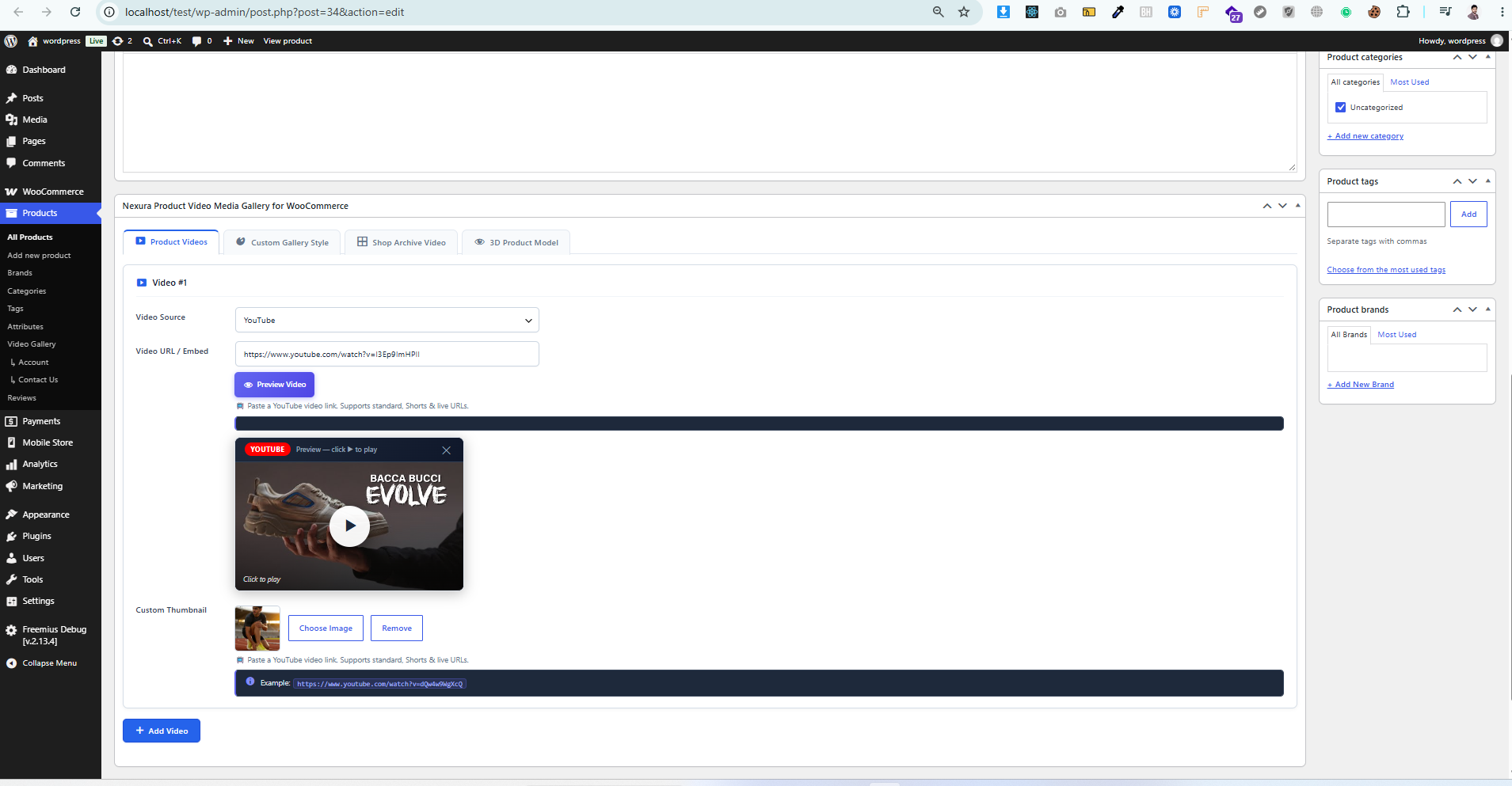
- Multi-Source Product Video: Choose any one source via radio — YouTube & Shorts, Vimeo, TikTok, Facebook, custom iframe, or self-hosted MP4/WebM — and add a single product video.
- Multiple Videos per Product (Pro): Add tutorials, unboxings, demos, and more on one product (Pro package).
- VideoObject SEO Schema: Optional Schema.org VideoObject JSON-LD for richer Google Search results (toggle under Video Options).
- Auto-Generated High-Resolution Posters: Automatically fetches high-definition YouTube cover posters (
hqdefault.jpg) without requiring manual image uploads. - Modern Gallery Presentation Layouts:
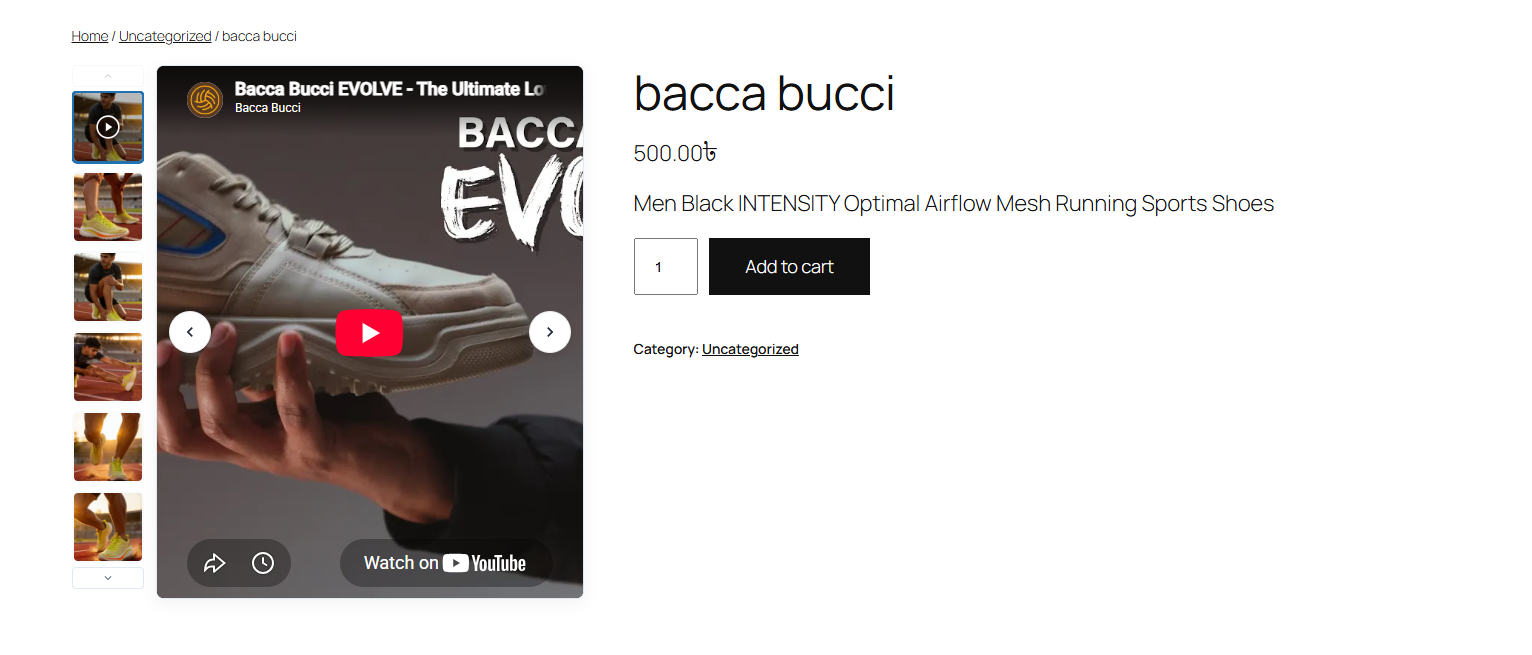
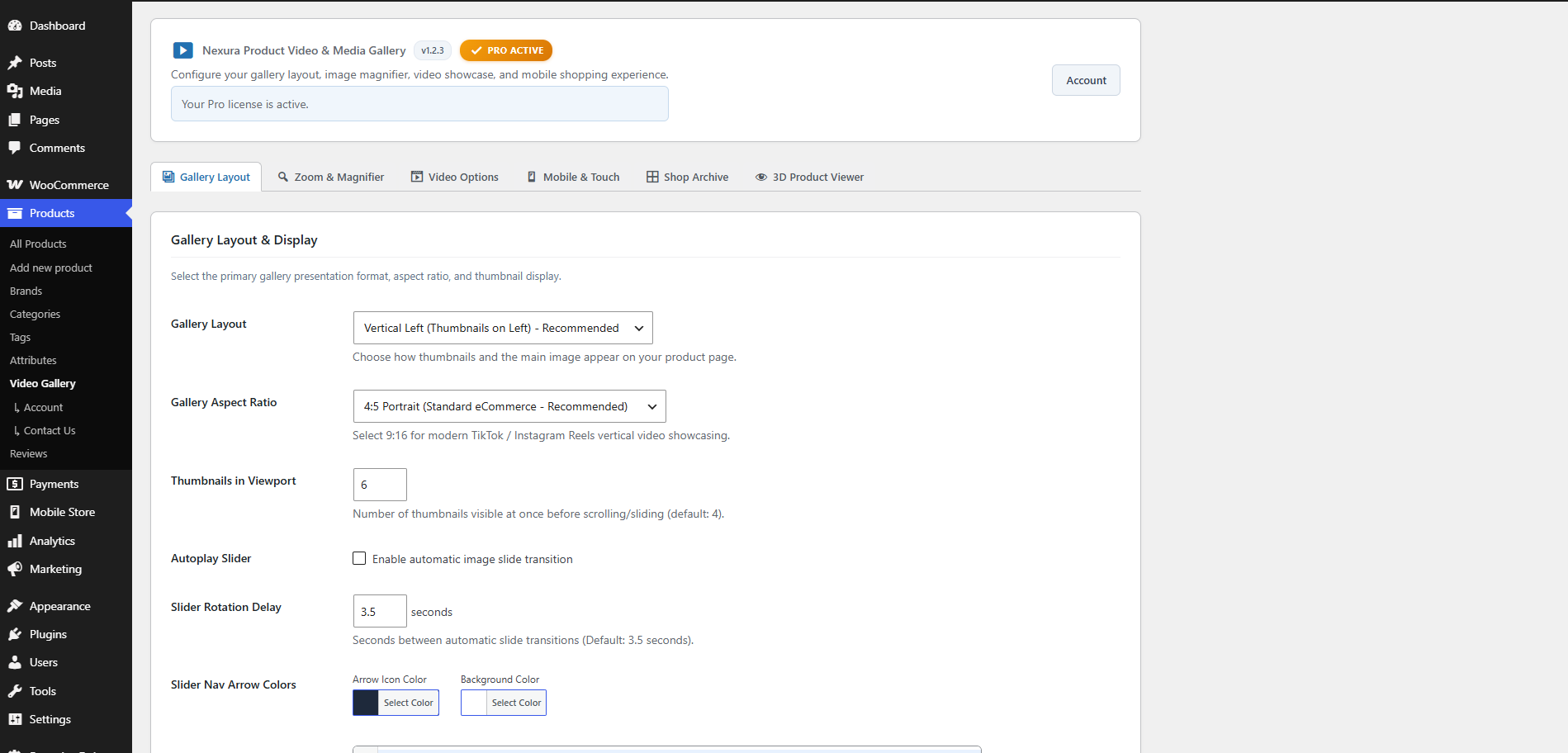
- Vertical Left Layout: Classic luxury e-commerce vertical thumbnail strip aligned to the left of the main stage.
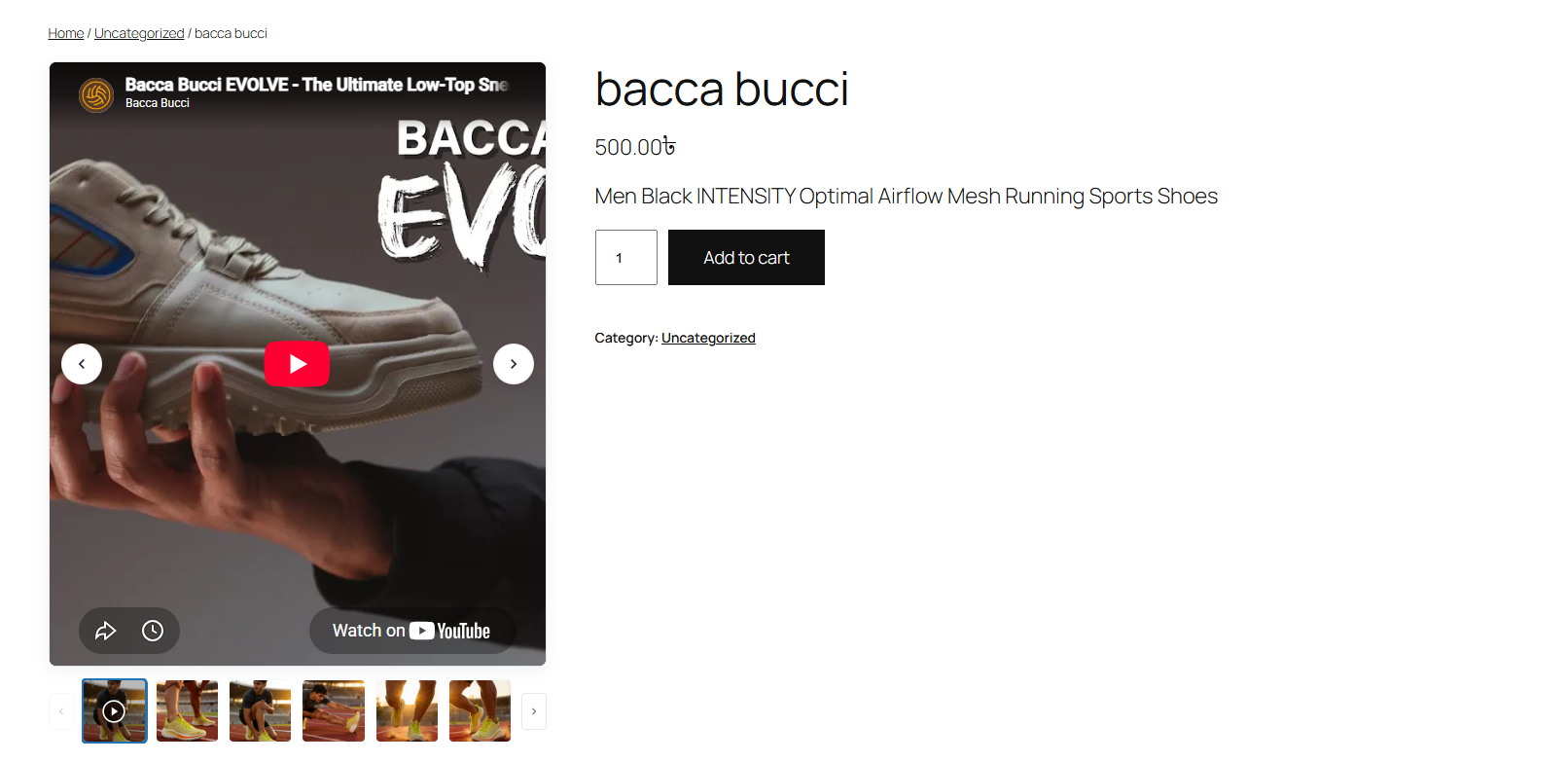
- Horizontal Bottom Layout: Clean, modern thumbnail carousel beneath the product hero display.
- Aspect Ratio Flexibility:
- Portrait 4:5: The industry gold standard for fashion, apparel, footwear, and jewelry.
- Square 1:1: Classic, clean format for electronics, accessories, and packaged goods.
- Smooth Inner Pan-and-Zoom Magnifier: High-definition pan-and-zoom directly inside the product stage so customers can inspect fine textures, stitching, and material quality.
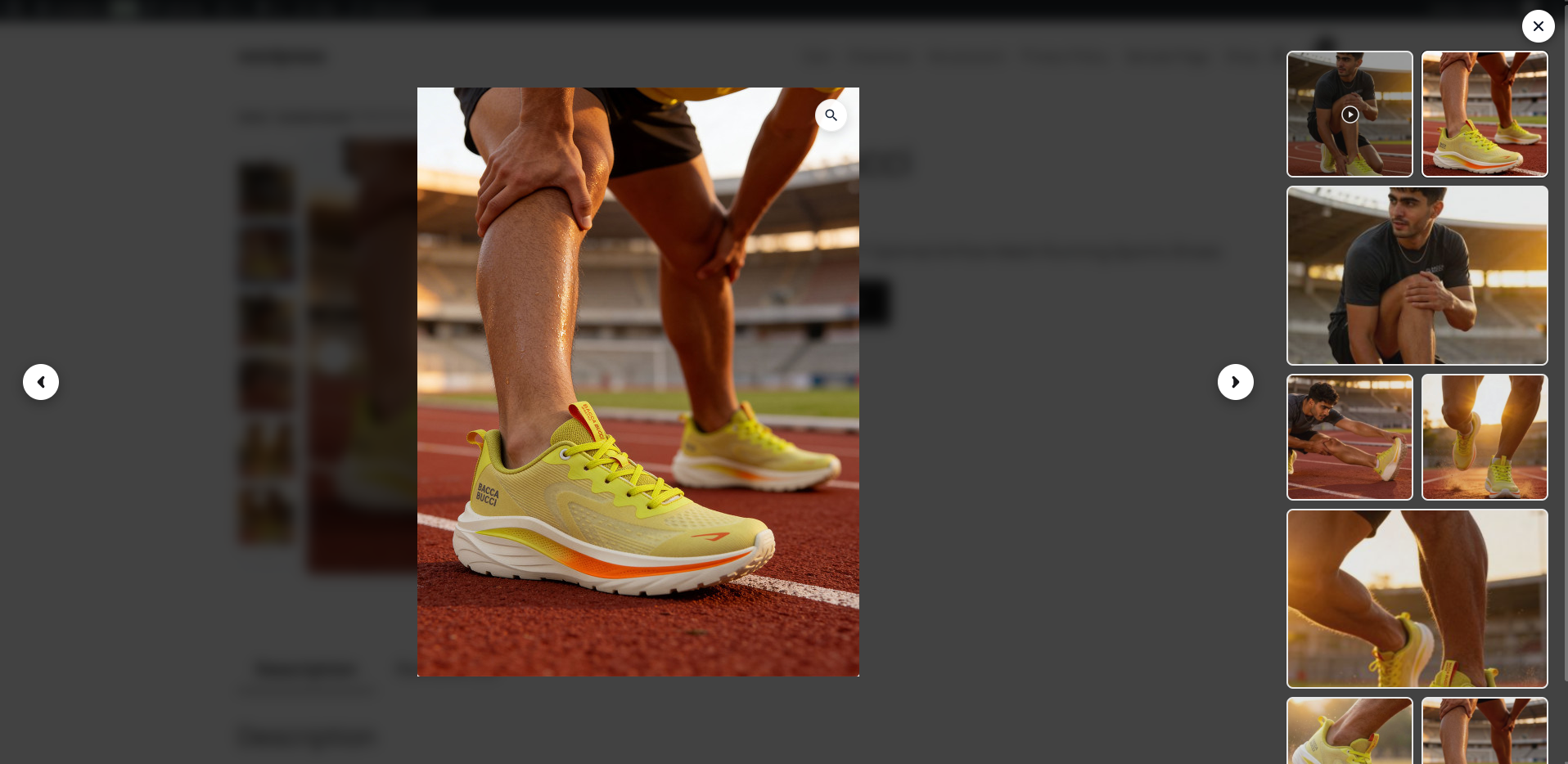
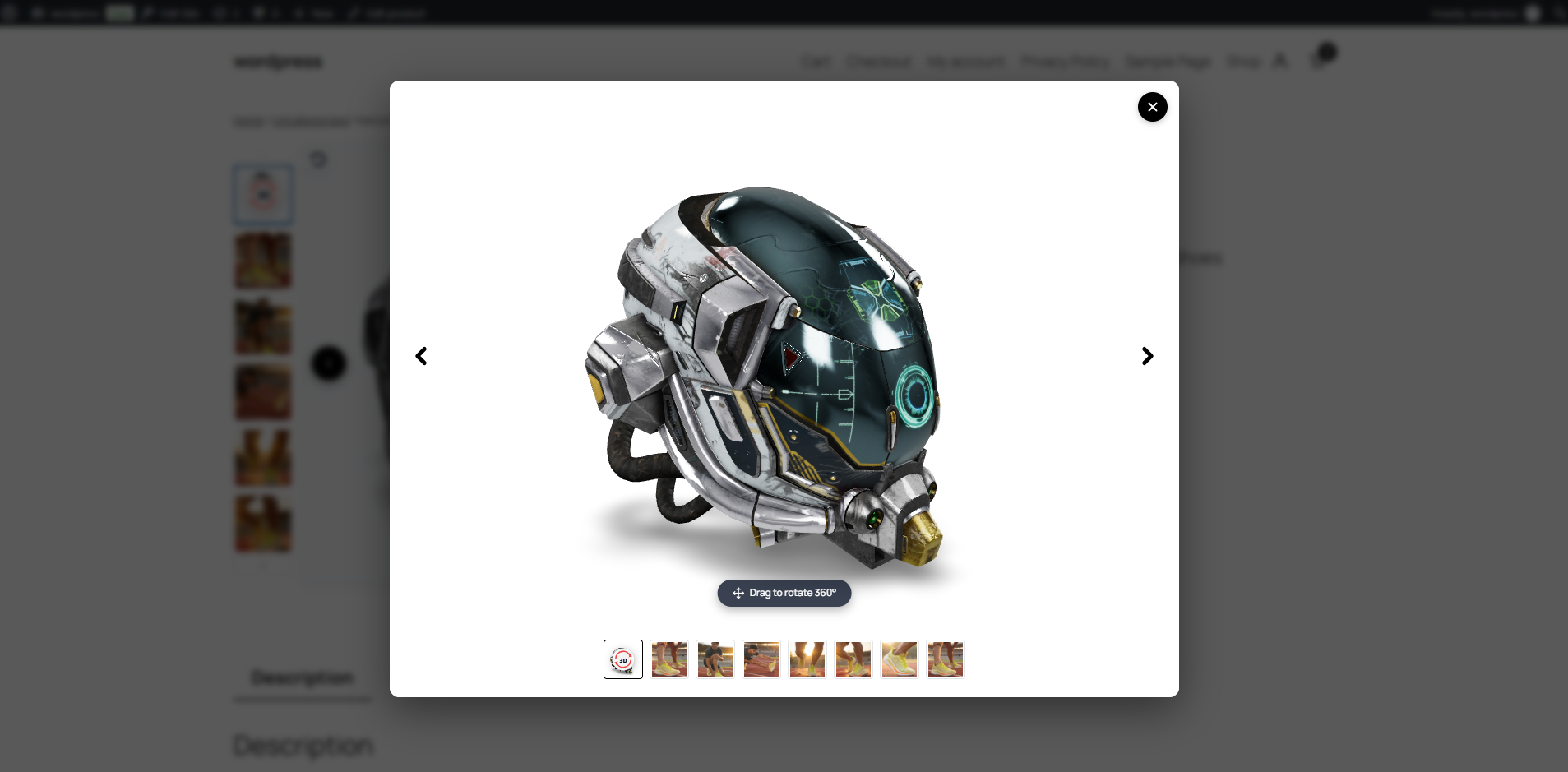
- Fullscreen Split Lightbox Modal: Modern Etsy-style fullscreen modal overlay featuring zoom magnification on one side and thumbnail navigation on the other.
- WooCommerce Variable Product Video Support: Attach unique YouTube, Vimeo, or self-hosted videos to individual variations.
- Smart Audio & Slider Sync:
- Autoplay Pause: The gallery slider automatically pauses the moment a video plays—no awkward auto-advancing while your customer is watching.
- Browser Policy Compliant: Automatically adapts to Chrome and Safari autoplay policies so playback never fails or gets blocked.
- Mobile-First Touch Architecture:
- Touch swipe gestures with passive event listeners for silky smooth mobile performance.
- Customizable mobile breakpoint (default 768px).
- Smart mobile toggle to disable hover-zoom on touchscreens to prevent scrolling lockups.
- Option to hide arrows and show clean navigation dots on smartphones.
- Universal Shortcode
[nexura_product_video_gallery]: Display the gallery anywhere on custom product landing pages, popups, or custom templates. - Page Builder Ready: Full compatibility with Elementor, Divi Theme Builder, Gutenberg / WooCommerce Blocks (FSE), Bricks Builder, Oxygen, and WPBakery.
- 100% WooCommerce HPOS Compatible: Fully declared and tested with High-Performance Order Storage (HPOS).
Pro Features (Supercharge Your Revenue)
Unlock maximum sales potential with advanced enterprise capabilities:
- Shop Archive & Catalog Video Previews: Engage shoppers directly on Shop, Category, and Tag listing pages before they even click into a product:
- Hover Autoplay Preview: Plays muted preview on card hover.
- Instant Popup Lightbox: Opens a quick video modal overlay right from the shop card.
- Inline Card Player: Plays video directly inside the shop product card.
- Interactive Catalog Pagination Dots: Allows shoppers to cycle between multiple product videos directly on category catalog cards.
- Luxury Gallery Layouts:
- Vertical Right: Thumbnails aligned on the right.
- Mosaic Grid (2-1-2-1): High-fashion alternating editorial grid.
- 2-Column Grid: Prominent hero image with clean 2-column supporting grid.
- 1-Column Luxury Stack: Continuous scroll layout favored by high-end luxury fashion brands.
- Smartphone Vertical Video (9:16 & 16:9): Native vertical video support for TikTok, Instagram Reels, and YouTube Shorts without ugly black sidebars.
- Advanced Magnifying Lenses:
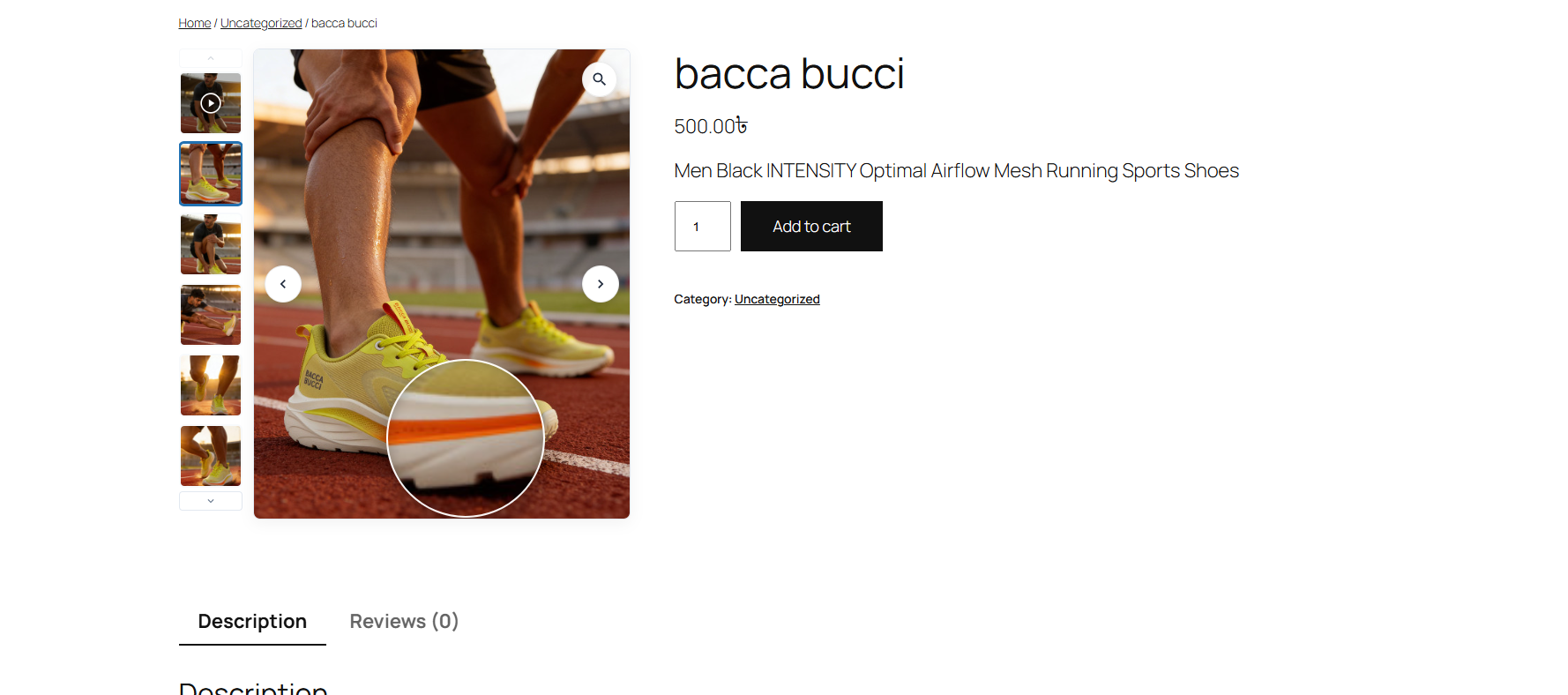
- Circular & Square Lens Zoom: Interactive magnifying glass lens following the cursor (ideal for watches, diamonds, and jewelry).
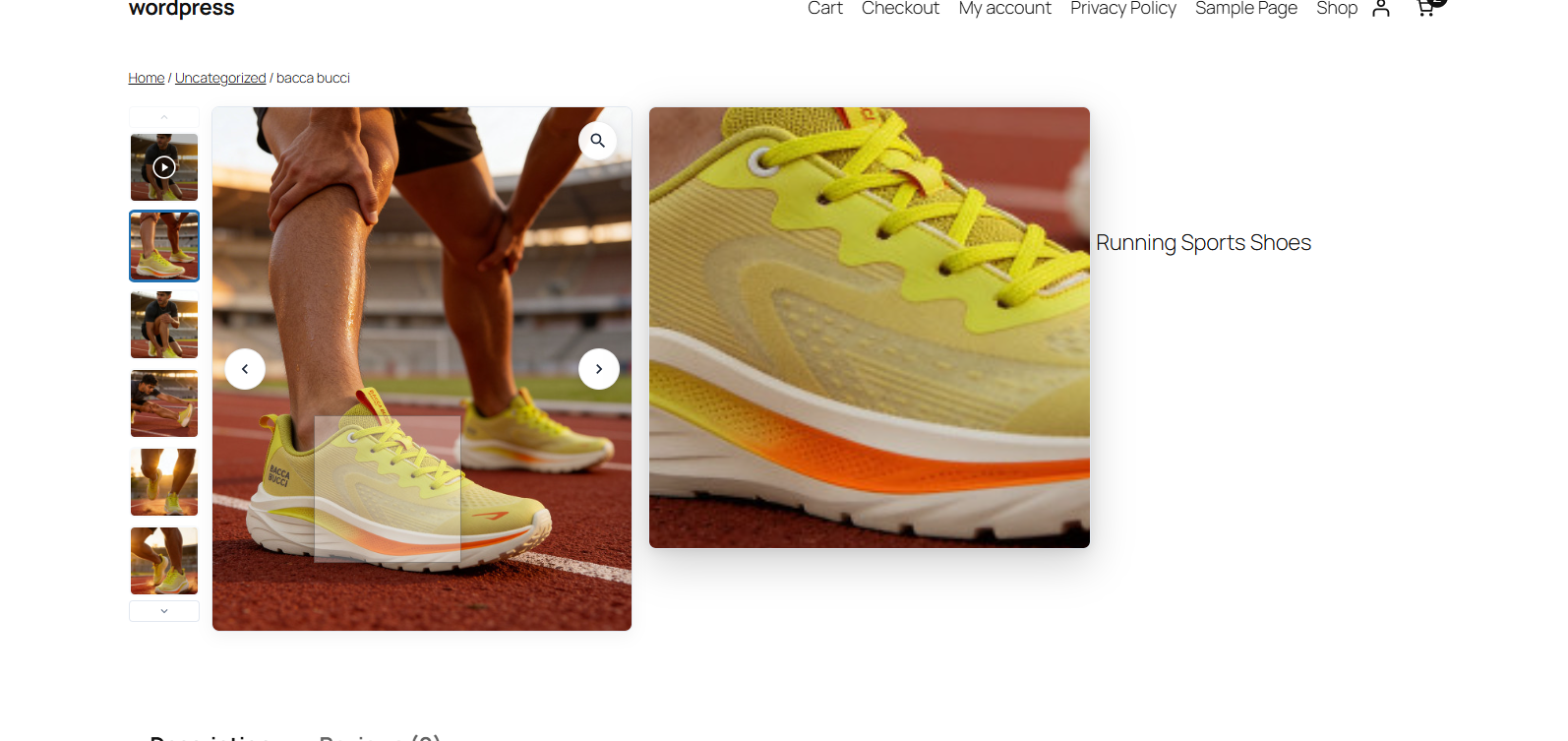
- Amazon-Style Side Window Zoom: High-definition floating inspection window with configurable position and dimensions.
- Per-Product & Category Style Overrides: Override layouts, aspect ratios, and magnifier modes individually for specific products or entire categories.
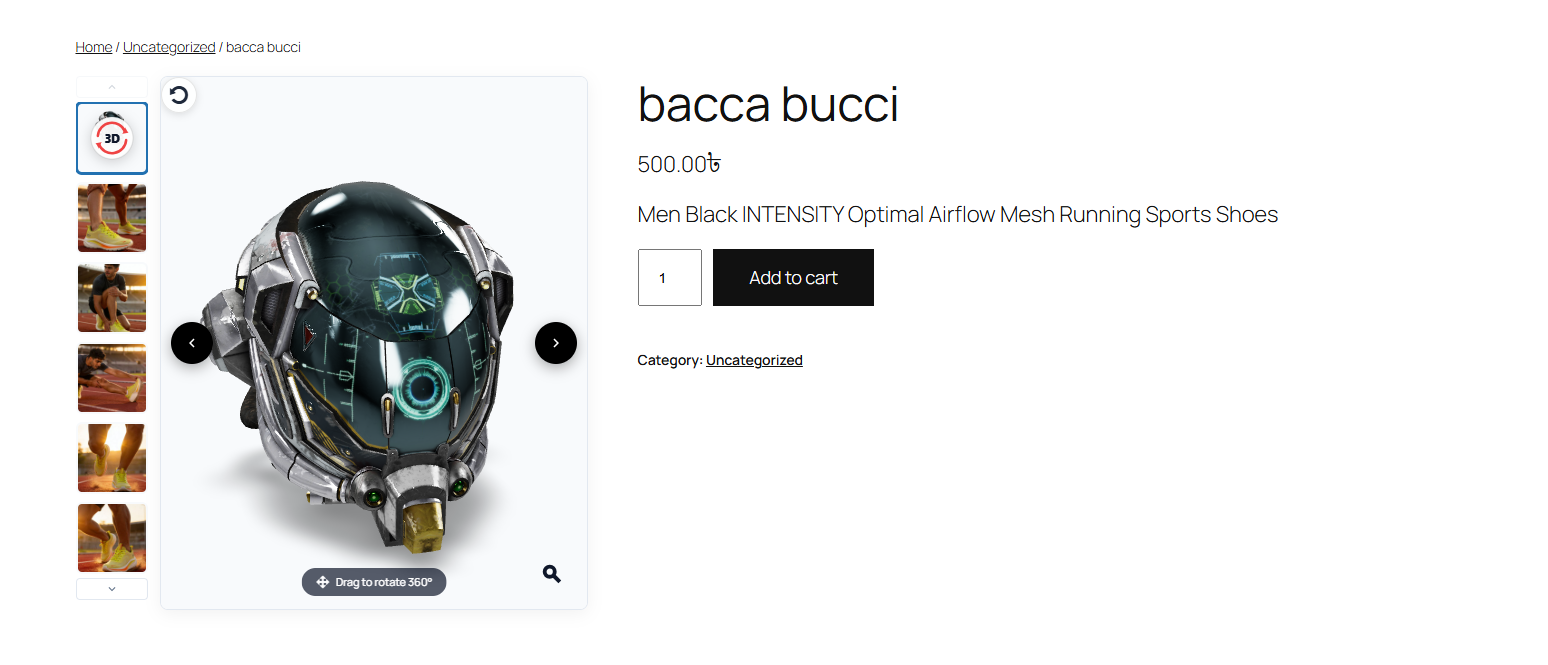
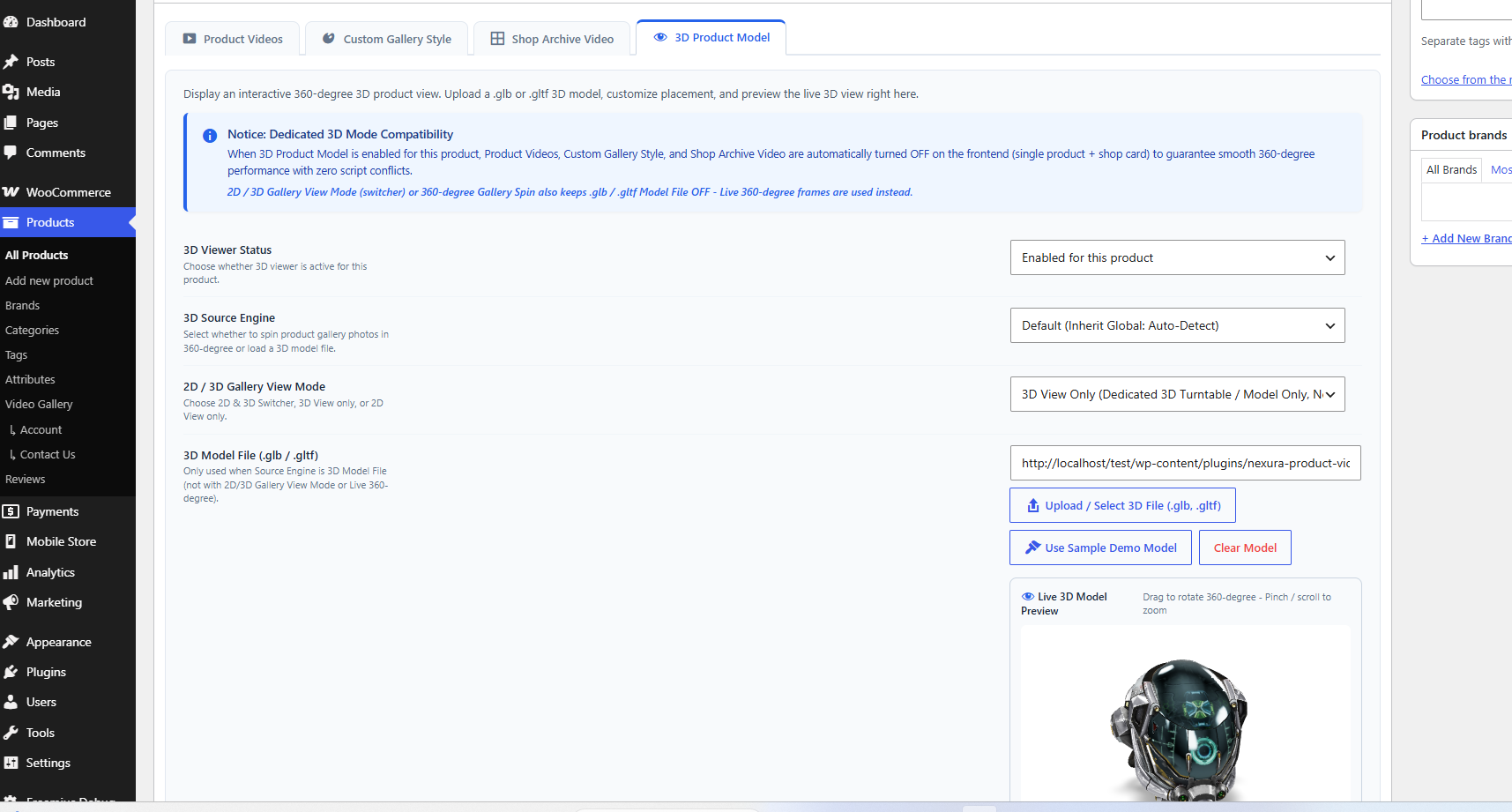
- Interactive 3D / 360° Product Viewer: GLB/GLTF models and gallery-image turntables with 2D/3D switcher (Pro package).
🎨 100% Universal Theme Compatibility
Engineered to respect your theme’s native CSS grid without forcing rigid column widths. Tested and verified with thousands of WooCommerce themes:
* Storefront (including sidebar & full-width)
* Astra & Astra Pro
* Flatsome
* OceanWP
* GeneratePress
* Kadence
* Hello Elementor
* Divi Theme
* Twenty Twenty-Four & all modern Full Site Editing (FSE) block themes
🧩 Shortcode & Page Builder Integration
Easily display your product video gallery anywhere:
-
Current Product Gallery (Auto-Detect):
[nexura_product_video_gallery] -
Specific Product with Layout Override:
[nexura_product_video_gallery id=”123″ layout=”horizontal”] -
Constrain Width:
[nexura_product_video_gallery id=”123″ width=”650px”]
External services
This plugin connects to third-party / external services to render embedded product videos (when a store owner configures a video URL) and for optional Pro licensing. No account with these services is required to install or use the free gallery with local settings only.
-
TikTok (
https://www.tiktok.comandhttps://www.tiktok.com/embed/v2/):- What it is and what it is used for: TikTok hosts short-form videos. When a product (or admin preview) is configured with a TikTok video URL, the plugin builds an embed player pointing at TikTok’s embed endpoint (
/embed/v2/{video_id}) so the video can appear in the product gallery or admin preview. - What data is sent and when: Only when that TikTok embed is loaded or played in the visitor’s or admin’s browser. The browser then sends standard request data to TikTok (IP address, user-agent, and referrer). No TikTok API keys are stored; the plugin does not send store customer personal data to TikTok on its own.
- Terms and Privacy: Provided by TikTok Pte. Ltd. Terms of Service | Privacy Policy.
- What it is and what it is used for: TikTok hosts short-form videos. When a product (or admin preview) is configured with a TikTok video URL, the plugin builds an embed player pointing at TikTok’s embed endpoint (
-
YouTube (
https://www.youtube.com,https://www.youtube-nocookie.com, andhttps://i.ytimg.com):- What it is and what it is used for: YouTube hosts product videos. The plugin loads cover posters from
i.ytimg.comand embeds YouTube / YouTube Shorts players for products configured with YouTube URLs. - What data is sent and when: Poster images may load when the gallery is shown. Player iframes/scripts use a poster-first facade and load only after the visitor clicks play; the browser then sends IP address, user-agent, and referrer to YouTube/Google.
- Terms and Privacy: Provided by Google LLC. Terms of Service | Privacy Policy.
- What it is and what it is used for: YouTube hosts product videos. The plugin loads cover posters from
-
Vimeo (
https://player.vimeo.com,https://vimeo.com,https://vimeo.com/api/v2/video/, andhttps://i.vimeocdn.com):- What it is and what it is used for: Vimeo hosts product videos. The plugin embeds the Vimeo player for configured Vimeo URLs, may DNS-prefetch Vimeo CDN hosts on product pages that include Vimeo links, and in wp-admin may request a public Vimeo API thumbnail for staff previews.
- What data is sent and when: Player load on visitor click (or admin preview) sends IP address, user-agent, and referrer to Vimeo. Admin thumbnail fetch sends the video ID to Vimeo’s public API when a Vimeo URL is previewed.
- Terms and Privacy: Provided by Vimeo.com, Inc. Terms of Service | Privacy Policy.
-
Facebook / Meta (
https://www.facebook.comandhttps://www.facebook.com/plugins/video.php):- What it is and what it is used for: Facebook hosts videos. When a product is configured with a Facebook video URL, the plugin embeds Facebook’s video plugin player in the gallery or admin preview.
- What data is sent and when: When that embed loads or plays, the browser sends IP address, user-agent, and referrer to Facebook/Meta servers.
- Terms and Privacy: Provided by Meta Platforms, Inc. Terms of Service | Privacy Policy.
-
Freemius (
https://freemius.com):- What it is and what it is used for: Freemius provides optional opt-in usage tracking, account management, Pro licensing, and premium updates. WordPress.org free installs receive plugin updates from WordPress.org.
- What data is sent and when: Only after the site administrator opts in or activates a Pro license. May include site URL, WordPress/PHP/plugin versions, and administrator email. No store customer payment data is sent by this plugin to Freemius.
- Terms and Privacy: Provided by Freemius, Inc. Terms of Service | Privacy Policy.
No third-party registration or payment is required for the free core YouTube product video gallery.
Screenshots
Installation
- Upload the
nexura-product-video-media-gallery-for-woocommercefolder to your/wp-content/plugins/directory, or install it from Plugins Add New. - Activate the plugin under Plugins Installed Plugins.
- Make sure WooCommerce is installed and active (required).
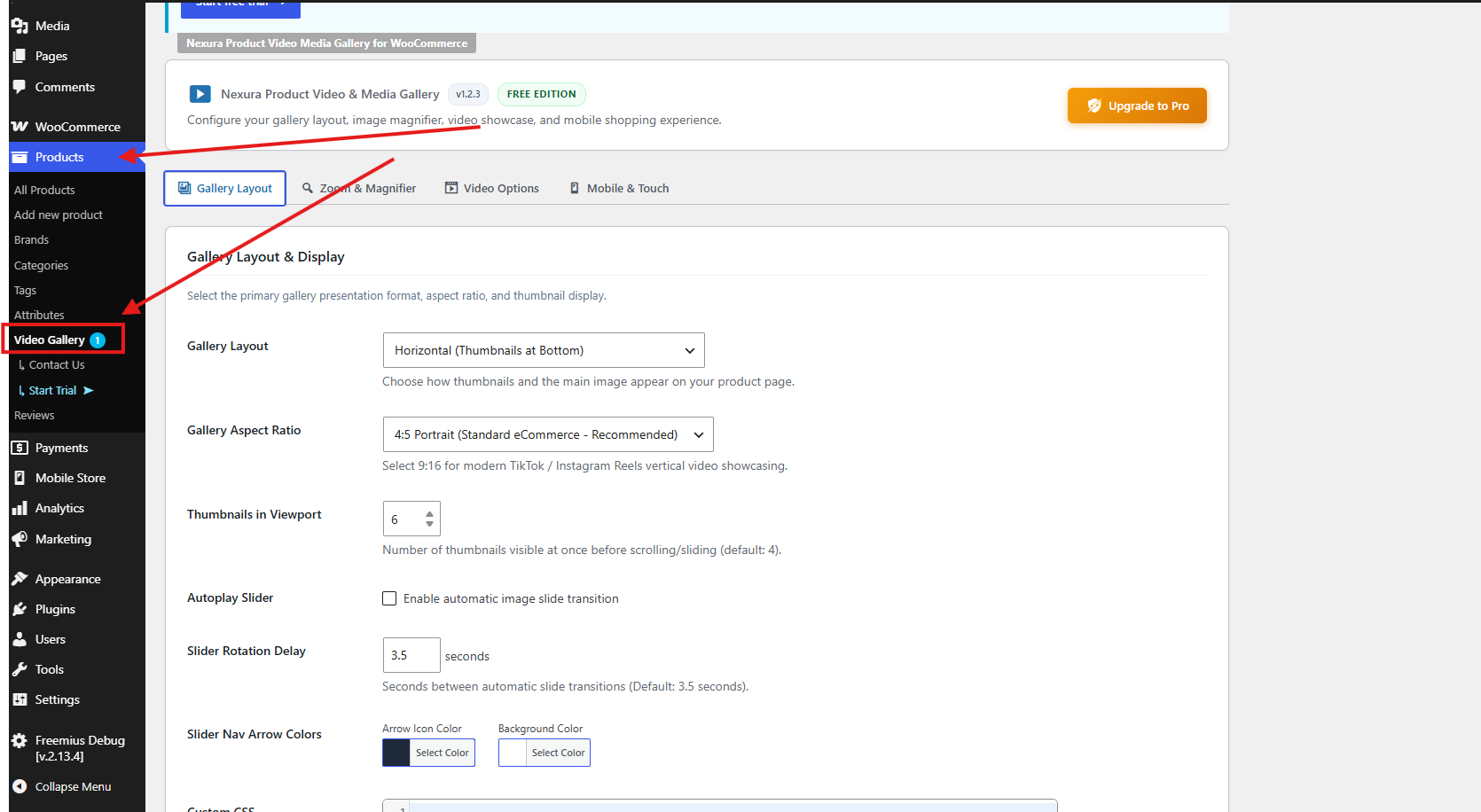
- After activation, open global settings at Products Video Gallery (left admin menu under Products).
- Optionally click Settings on the plugin row under Plugins Installed Plugins — that link opens the same page.
- Edit any product (Products All Products Edit) and use the Nexura Product Video Media Gallery for WooCommerce metabox to add YouTube videos. For variable products, also check the Variations tab for per-variation video fields.
FAQ
-
Where do I find the plugin settings after I activate it?
-
After activation, settings are under WooCommerce Products — not a top-level menu:
-
Global settings (main admin page)
Go to Products Video Gallery in the WordPress admin sidebar.
Direct URL path:wp-admin/edit.php?post_type=product&page=wpvg-video-gallery-settings
Tabs include Gallery Layout, Zoom & Magnifier, Video Options, and Mobile & Touch. Pro adds Shop Archive and 3D when installed. -
Quick link from the Plugins screen
Plugins Installed Plugins find Nexura Product Video Media Gallery for WooCommerce click Settings. -
Per-product videos
Products All Products Edit a product scroll to the metabox Nexura Product Video Media Gallery for WooCommerce (below the main product editor). -
Variable products
On the same product edit screen, open the Variations tab each variation can have its own video URL/type. -
Account / upgrade (Freemius)
From Products Video Gallery, use Upgrade to Pro (Free) or Account (when Pro is active). Freemius may also add Account / Pricing under the same Products menu area.
Tip: If you do not see Video Gallery, confirm WooCommerce is active and your user can manage WooCommerce (
manage_woocommercecapability, e.g. Administrator / Shop Manager). -
-
How does this plugin help increase my store sales?
-
Video is the highest-converting medium in e-commerce. When shoppers see real product dimensions, material movement, and unboxing details in motion, their confidence increases dramatically. Stores adding product videos consistently experience 20% to 35% fewer returns and up to 73% higher conversion rates because shoppers know exactly what they are receiving.
-
Will this plugin slow down my WooCommerce website?
-
No! Nexura Product Video Media Gallery is engineered specifically for Google Core Web Vitals and PageSpeed:
1. Video iframes are never loaded on page load; they only initiate when the visitor clicks play (Poster-First Architecture).
2. The primary product image loads with high fetchpriority (fetchpriority="high") and async decoding for the fastest Largest Contentful Paint (LCP).
3. Background slide videos usepreload="none"to preserve mobile cellular bandwidth.
4. All JavaScript is deferred to eliminate render-blocking resources. -
Will this plugin break my theme’s single product page layout?
-
Not at all. Poorly coded gallery plugins hardcode fixed column widths in pixels, causing product titles, prices, and Add to Cart buttons to drop awkwardly below the gallery. Nexura Product Video Media Gallery uses Universal Theme Compatibility—it conforms naturally to whatever column width your theme provides (Astra, Flatsome, Storefront, Kadence, OceanWP, etc.), ensuring flawless side-by-side display on desktop and clean stacking on mobile.
-
Does this plugin support YouTube Shorts?
-
Yes! You can paste standard YouTube URLs, short links (
youtu.be), or YouTube Shorts URLs (e.g.https://www.youtube.com/shorts/VIDEO_ID). The plugin automatically extracts the video ID, fetches high-resolution posters, and renders responsive playback. -
Does this plugin support WooCommerce Variable Products?
-
Yes! You can assign specific video URLs to each product variation (e.g. Red, Blue, Large). When a shopper selects a variation dropdown on your store, the gallery automatically switches to display that variation’s video or image, and resets seamlessly when cleared.
-
What image magnifier zoom modes are available?
-
You can choose from 3 different magnifier types in the Zoom & Magnifier admin tab:
1. Inner Zoom (Free): Smooth pan-and-zoom directly inside the main image box.
2. Lens Zoom (Pro): A circular or square magnifying lens moves with your cursor across the product image (perfect for jewelry, apparel, and watches).
3. Side Window Zoom (Pro): An Amazon-style popup window appears to the right or left of the product, displaying high-definition magnified details. -
Does it support Elementor, Divi, and other Page Builders?
-
Yes! The plugin works natively with Elementor’s Product Images widget and Shortcode widget, Divi Theme Builder, WPBakery, Bricks Builder, Oxygen, and Gutenberg WooCommerce Blocks in Full Site Editing (FSE). You can also use
[nexura_product_video_gallery]anywhere. -
What happens on mobile touchscreens?
-
Nexura Product Video Media Gallery includes dedicated mobile controls:
* Touch swipe gestures with passive listeners for lag-free 60fps scrolling.
* Configurable mobile breakpoint (default 768px).
* Smart toggle to disable hover-zoom on touch devices to ensure customers can scroll freely without getting stuck.
* Mobile thumbnail row or clean dots navigation. -
Is it compatible with WooCommerce HPOS?
-
Yes, the plugin is 100% compatible and officially declared with WooCommerce High-Performance Order Storage (HPOS).
Reviews
There are no reviews for this plugin.
Contributors & Developers
“Nexura Product Video Media Gallery for WooCommerce” is open source software. The following people have contributed to this plugin.
Contributors

Translate “Nexura Product Video Media Gallery for WooCommerce” into your language.
Interested in development?
Browse the code, check out the SVN repository, or subscribe to the development log by RSS.
Changelog
1.0.0
- Initial official release for WordPress.org.
- Multi-provider video support (YouTube & Shorts, Vimeo, TikTok, Facebook, custom embed iframe, and self-hosted MP4/WebM).
- VideoObject Schema.org JSON-LD support for Google Search SEO.
- Responsive carousel layouts (Vertical Left, Horizontal Bottom).
- Aspect ratio engine (1:1 Square, 4:5 Portrait).
- Smooth inner pan-and-zoom image magnifier.
- Split fullscreen lightbox modal.
- Dedicated mobile breakpoint and touch swipe controls.
- WooCommerce Variable Product video support.
- Universal Shortcode [nexura_product_video_gallery] and Page Builder support.
- Core Web Vitals and PageSpeed optimizations with poster-first facade architecture.
- WooCommerce HPOS (High-Performance Order Storage) full compatibility.