
Description
Presslyte Page Check brings image review and a separate, user-started saved-link check together beside the page. It is a standalone free checker for business owners making manual corrections through WordPress.
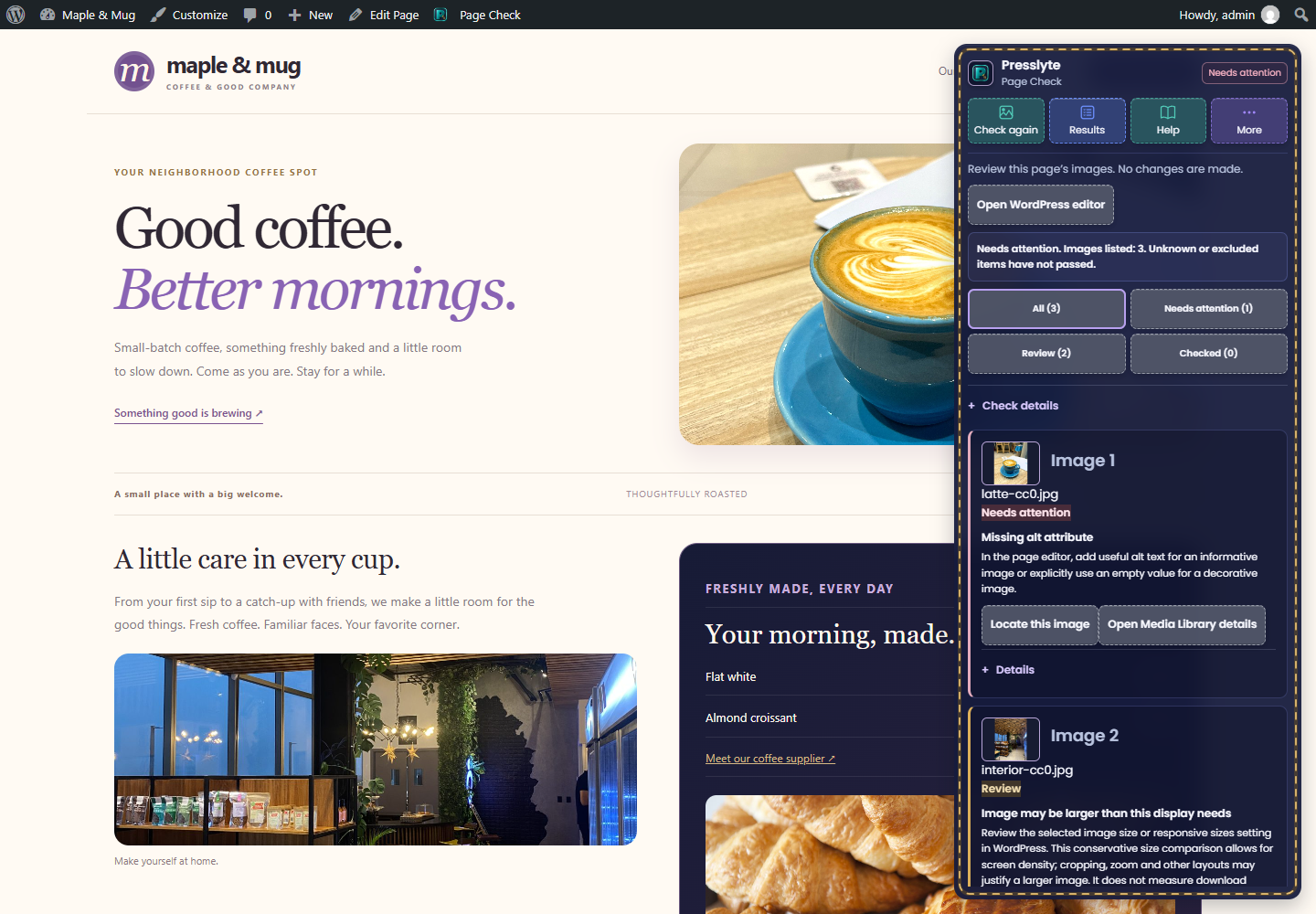
Check the images on a WordPress page you can edit. Find missing alt text attributes, review empty alt text, inspect image loading and safely matched local image file sizes. Each image check explains the finding and a manual next step.
Use the checker to review accessibility-related image descriptions and potentially oversized images before making corrections in WordPress. Existing alt text still needs a human accuracy check; an empty alt value may be correct for a decorative image. This plugin does not certify accessibility compliance or measure download savings.
There are no paid unlocks, accounts, API keys or check quotas. No automatic edits, image compression, AI service, telemetry or ongoing site crawl.
This is an independent plugin. The Presslyte editor and other free tools are not required. Review results live only in the current browser session. Starting a check requests authorized attachment details from the same WordPress installation. The plugin does not send your content to Presslyte. Poppins fonts and the Presslyte icon are bundled locally.
Move the floating toolbar by dragging its header. Its focused header also supports arrow keys, Home to reset and Escape to cancel a drag. More contains Reset position and other toolbar controls. Results can be closed without losing the current check.
Image review tools
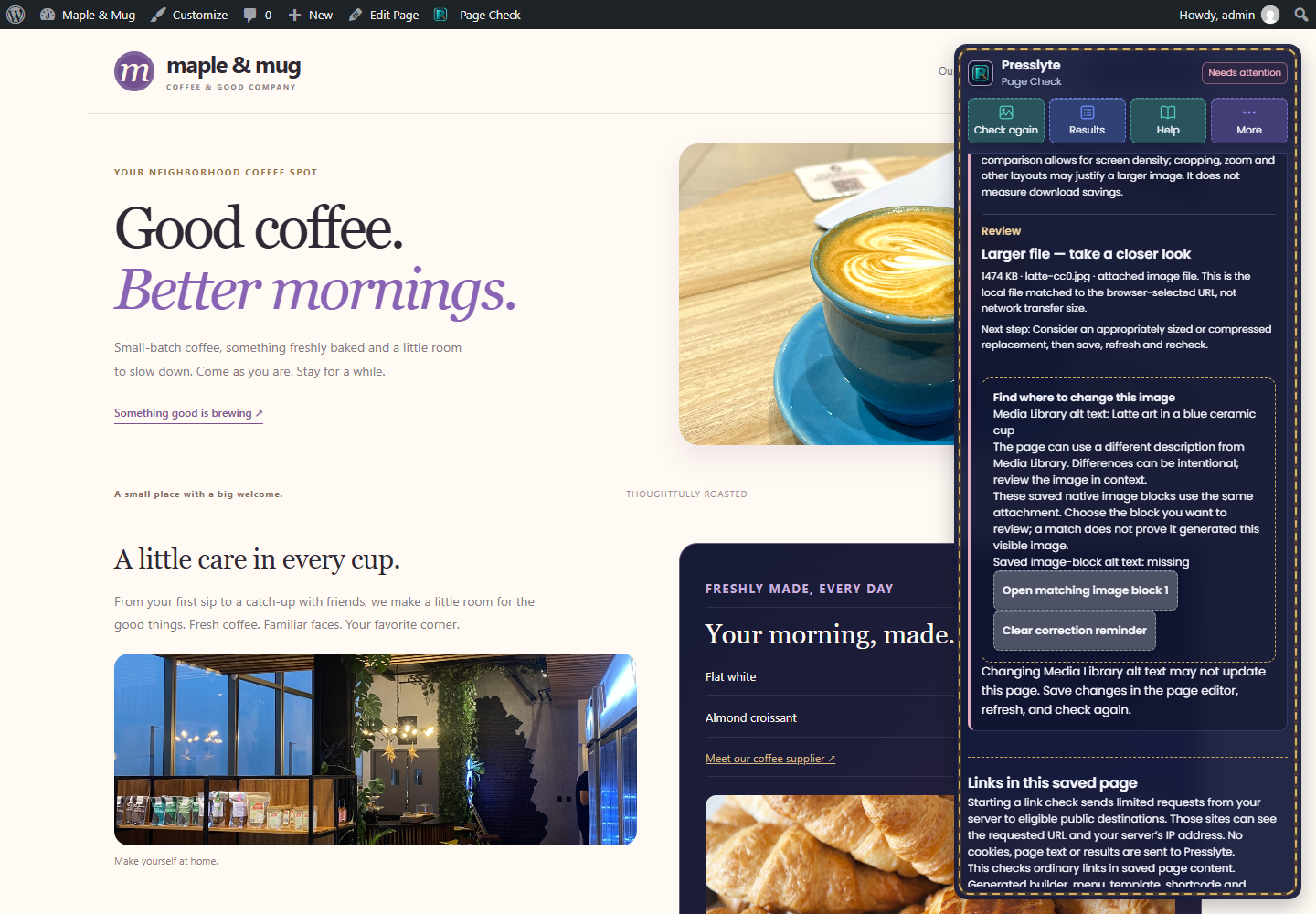
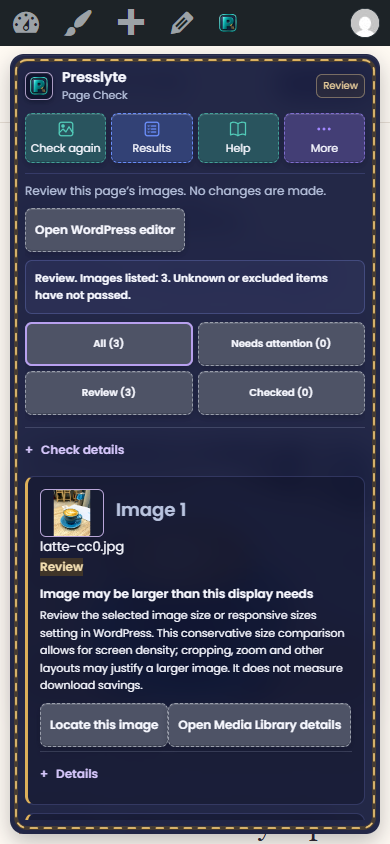
Results include previews drawn from already-loaded page images without separate thumbnail requests. Locate this image scrolls to the original. A conservative intrinsic-versus-displayed size comparison allows for device pixel density and labels potential oversizing for review, not guaranteed savings. Loading failures remain unverified rather than being presented as confirmed broken URLs.
Scope and limits
The checker reviews HTML image elements in the current supported content area, without a fixed per-page image cutoff. Any whole-page fallback and hidden images are identified. CSS backgrounds and embedded-frame contents are excluded. Existing alt text needs human accuracy review; empty alt can be correct for decorative images. A 500 KB threshold prompts review and is not a universal performance rule. Local file size is not network transfer size. CDN transformations, query URLs, unreadable or unmatched local files remain unknown. No metadata request changes page content or attachments.
Local metadata is processed in small requests with permission checks, payload limits, timeouts and a Stop checking control. These protect each request; they are not paid upgrade limits.
Saved link checks
An administrator can choose Start link check after reading the visible request disclosure. Ordinary links in saved published page/post content are considered; generated builder, shortcode, menu, shared template and unsaved links are excluded. Link destinations may receive your server IP address and requested URL. No cookies, credentials, page text or scan results are sent to Presslyte.
Only eligible public HTTP/HTTPS destinations on standard ports are requested. Query/action URLs, private/reserved hosts and other excluded destinations are skipped. Requests retain public-IP pinning, TLS, redirect, timeout and response limits. Stop prevents additional checks after the current bounded request. Repeated 404/410 responses are flagged; blocked, rate-limited, failed and incomplete requests remain unverified. Host policy may prevent checks. The 200 KB saved-content guard is a resource safeguard; there are no paid unlocks or quotas. IPv6-only/proxy destinations, fragments and soft-error pages are outside scope. No scheduled or background crawl is added.
Credits
Saved-link extraction and protected transport adapted from Presslyte Broken Link Checker 0.1.0, GPLv2 or later, preserving authorization and network boundaries.
Page scope, permission pattern, highlighting and panel styles adapted from Presslyte AI Search Check 0.1.3, GPLv2 or later. Presslyte dashboard design reused with independent styling and namespace. Presslyte code and icons are distributed under GPLv2 or later.
Poppins is bundled under SIL Open Font License 1.1; see assets/fonts/OFL.txt. Official source: https://github.com/google/fonts/tree/main/ofl/poppins
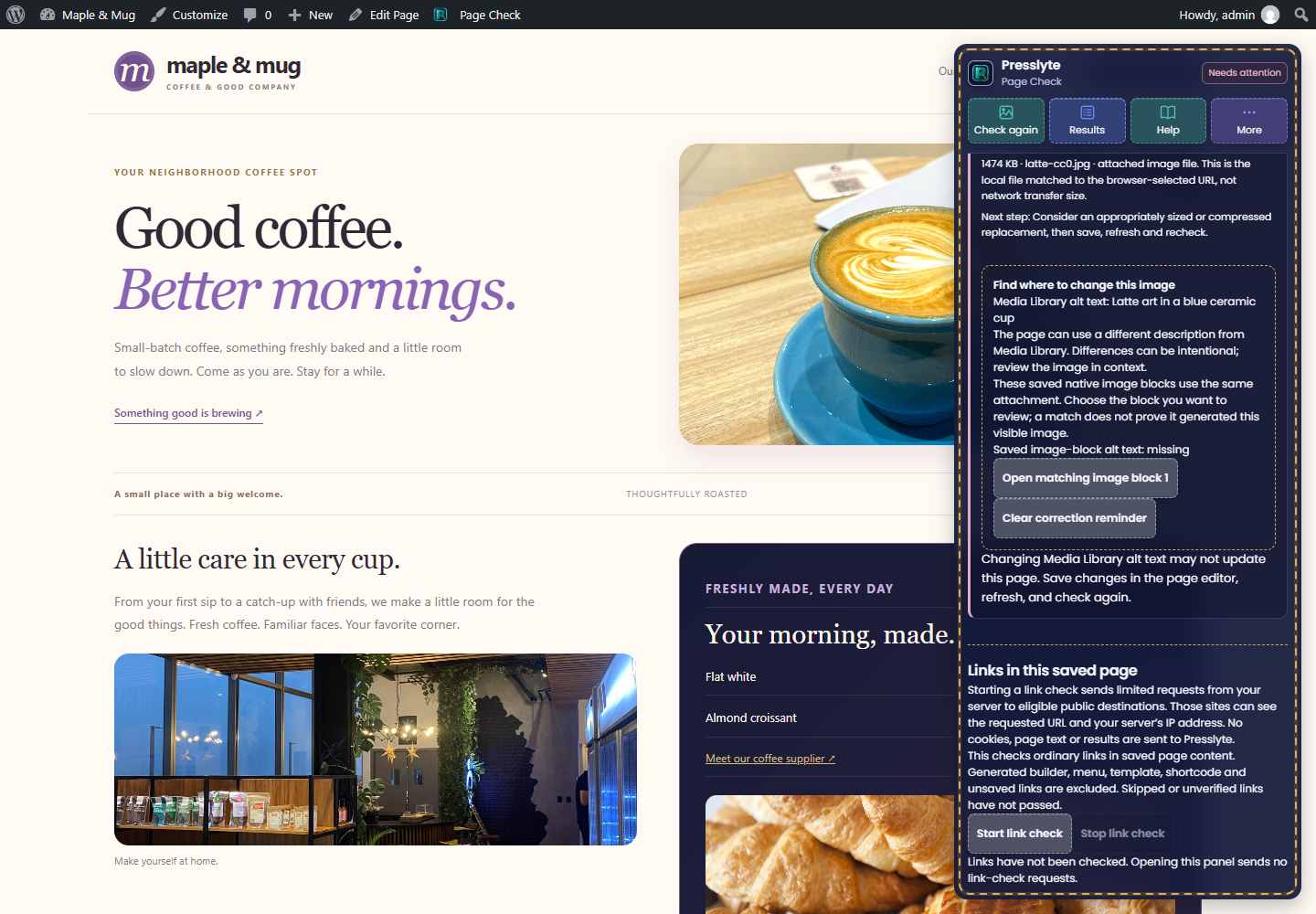
Find the saved image block
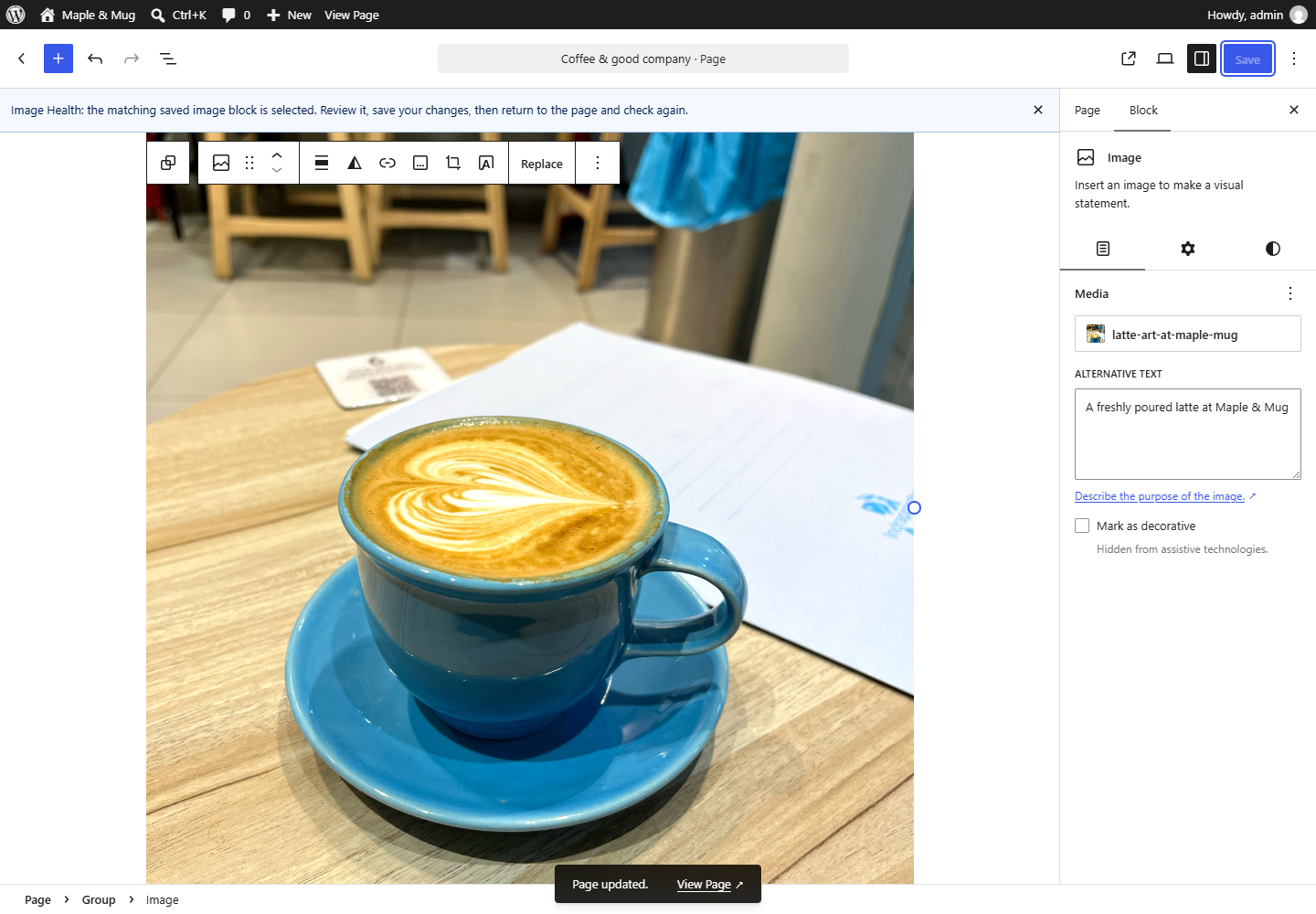
For a safely matched local attachment, compare page alt text, Media Library alt text and matching saved native image blocks. Choose a matching block to open it in the WordPress block editor. Matches identify saved uses of the attachment; they do not prove that a block generated a visible image. Repeated uses are listed separately. Classic content, builders, shared patterns, templates and unsupported containers require manual investigation.
Opening a matching block stores a correction reminder in this tab’s session storage. After saving through WordPress, return to the page, refresh and check again to compare the saved description with the page value. Different descriptions can be intentional. Missing or removed matches are not confirmed corrections. Clear correction reminder removes it; it also ends when the browser session ends. No scan or reminder is sent to Presslyte.
On-page workspace
A floating Presslyte box appears for authorized signed-in users. Check images starts a review and changes to Stop checking while it runs. Results shows or hides existing findings without starting another check. Help explains the workflow. More contains Dashboard, Move, Reset position and Minimize. Expand restores the minimized toolbar. Compatible installed Presslyte free tools share a selector; only the selected tool controls are shown. No other Presslyte plugin is required.
Screenshots
Installation
Upload the plugin folder to wp-content/plugins and activate it from Plugins, or install the ZIP through Plugins > Add Plugin > Upload Plugin. Open Page Check in the admin menu for the built-in guide. While signed in with permission to edit a published page, open that page and choose Page Check in the toolbar. Recheck after saving and refreshing page content.
JavaScript is required for the front-end checker. The WordPress toolbar must be enabled for your account. The dashboard lists up to 100 published pages/posts alphabetically; other editable pages can be opened directly. This is a selected-page review, not a whole-site audit.
FAQ
-
Does the checker change my images or alt text?
-
No. Make corrections through your normal page editor or Media Library, save, refresh the page and check again. Changing Media Library alt text does not necessarily change markup already saved in a page or builder.
-
Does empty alt text always need fixing?
-
No. Empty alternative text may be correct for decorative images. Review the image’s purpose. Existing alt text is detected but its accuracy is not evaluated.
-
Why is file size unknown?
-
Only authorized, readable local attachment files matched to the browser-selected URL can be measured. Hidden or unloaded images, external/CDN files, query URLs, unsupported mappings and changed sources can remain unknown. No remote image download is attempted.
-
What happens when I stop?
-
Completed findings stay visible; unfinished file details remain unknown. Use Stop checking to cancel. Hiding Results or minimizing the floating toolbar keeps the current findings available. Results are not stored and disappear on reload.
Reviews
There are no reviews for this plugin.
Contributors & Developers
“Presslyte Page Check – Images & Links” is open source software. The following people have contributed to this plugin.
Contributors
Translate “Presslyte Page Check – Images & Links” into your language.
Interested in development?
Browse the code, check out the SVN repository, or subscribe to the development log by RSS.
Changelog
0.1.1
- Bring image review and separately authorized saved-link checks into one page workspace.
- Compare page, attachment and saved native image-block descriptions.
- Open a selected matching image block with permission and revision checks.
- Recheck descriptions after manual correction, with an optional local reminder.
0.1.0
Selected-page image review with bounded local metadata checks, cancellation, source-specific guidance and the shared Presslyte design.