
Description
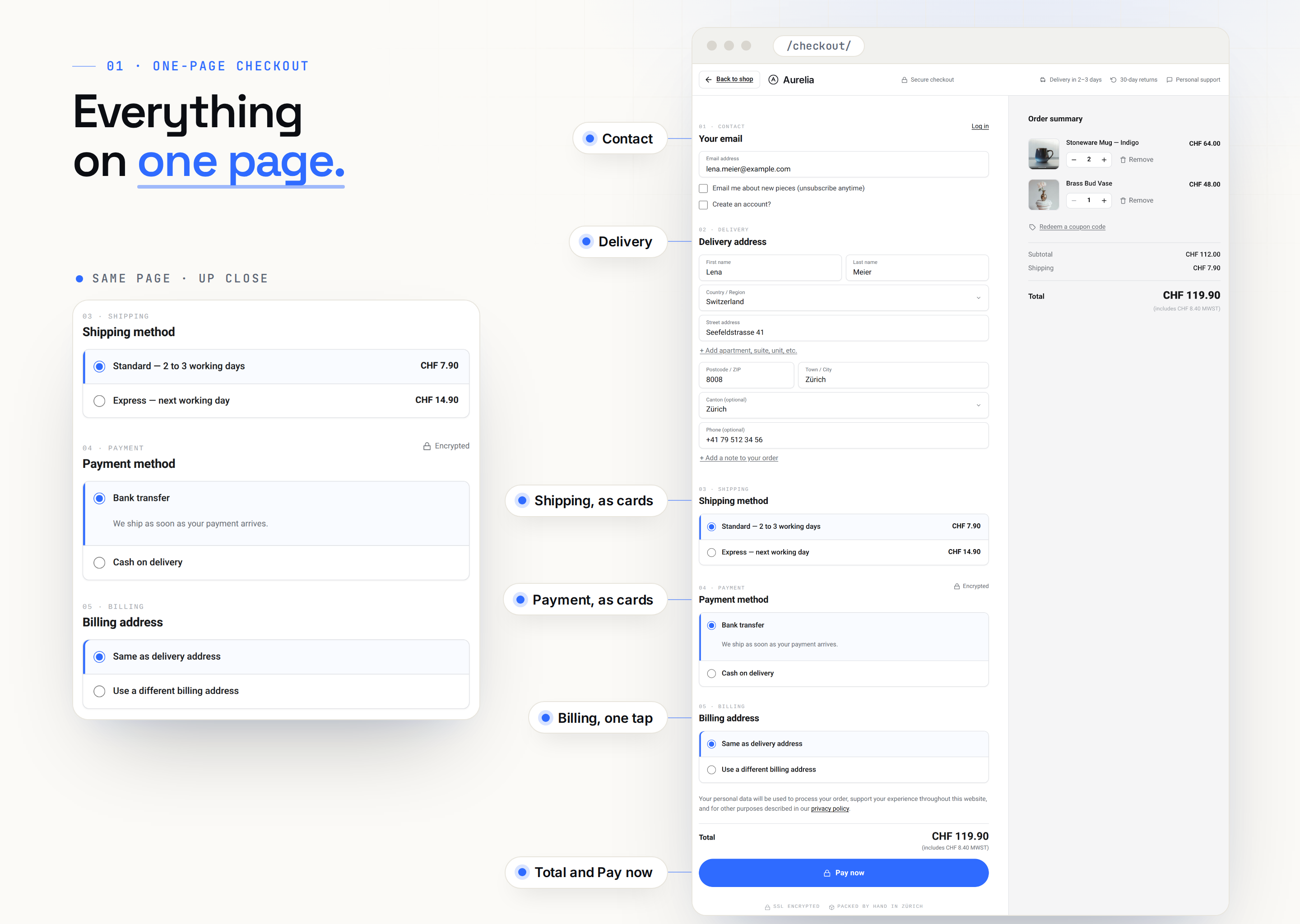
OnePageCheckout puts the whole WooCommerce checkout on one page. Contact details, delivery, shipping, payment and the order summary all sit together, and nothing reloads along the way.
Want to see it first? Try the live demo. The demo runs OnePageCheckout Pro with address suggestions turned on, and the free checkout looks and works the same.
What it does
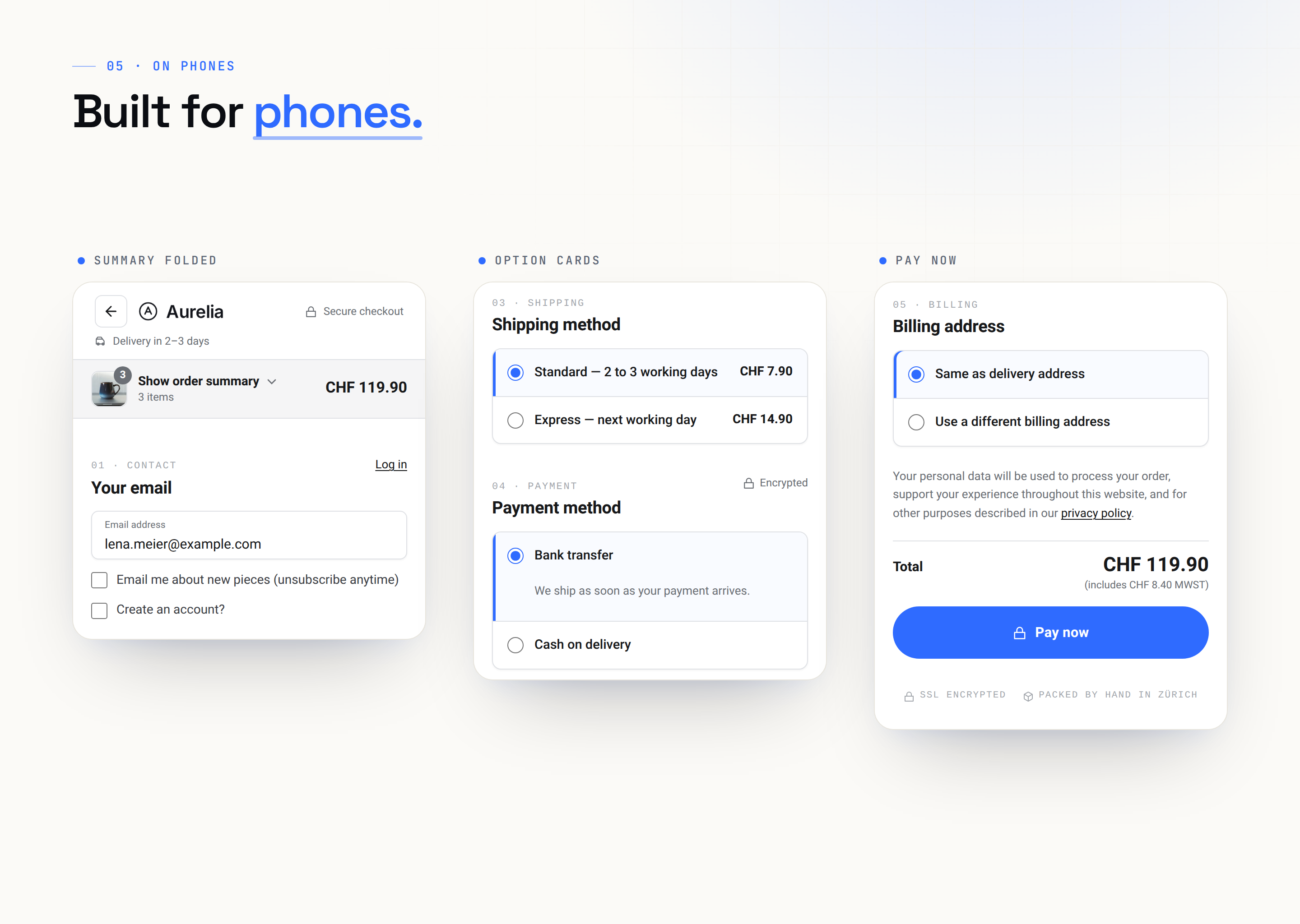
- One page, no reloads. Every step stays in view, and shipping and payment options appear as clear cards.
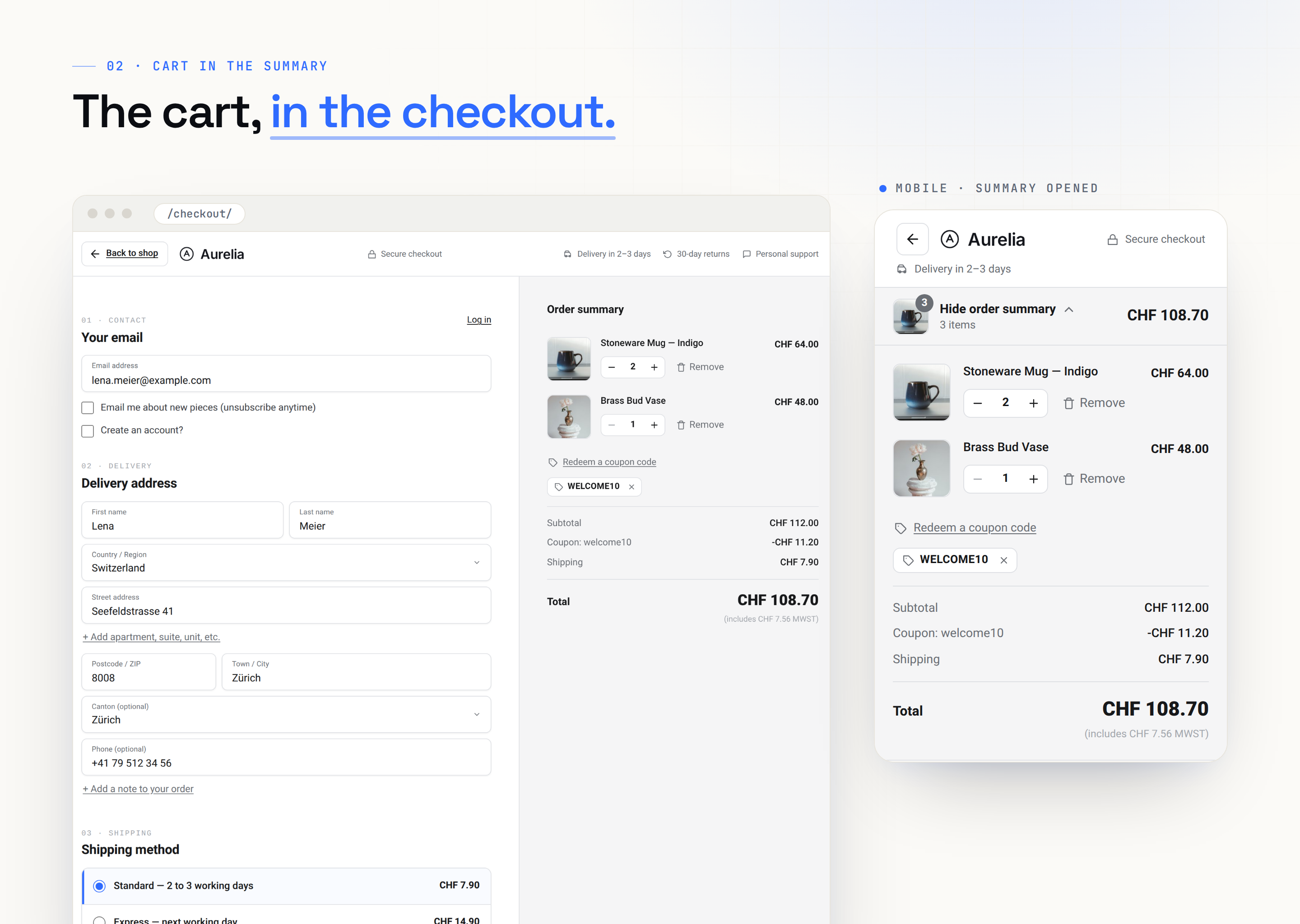
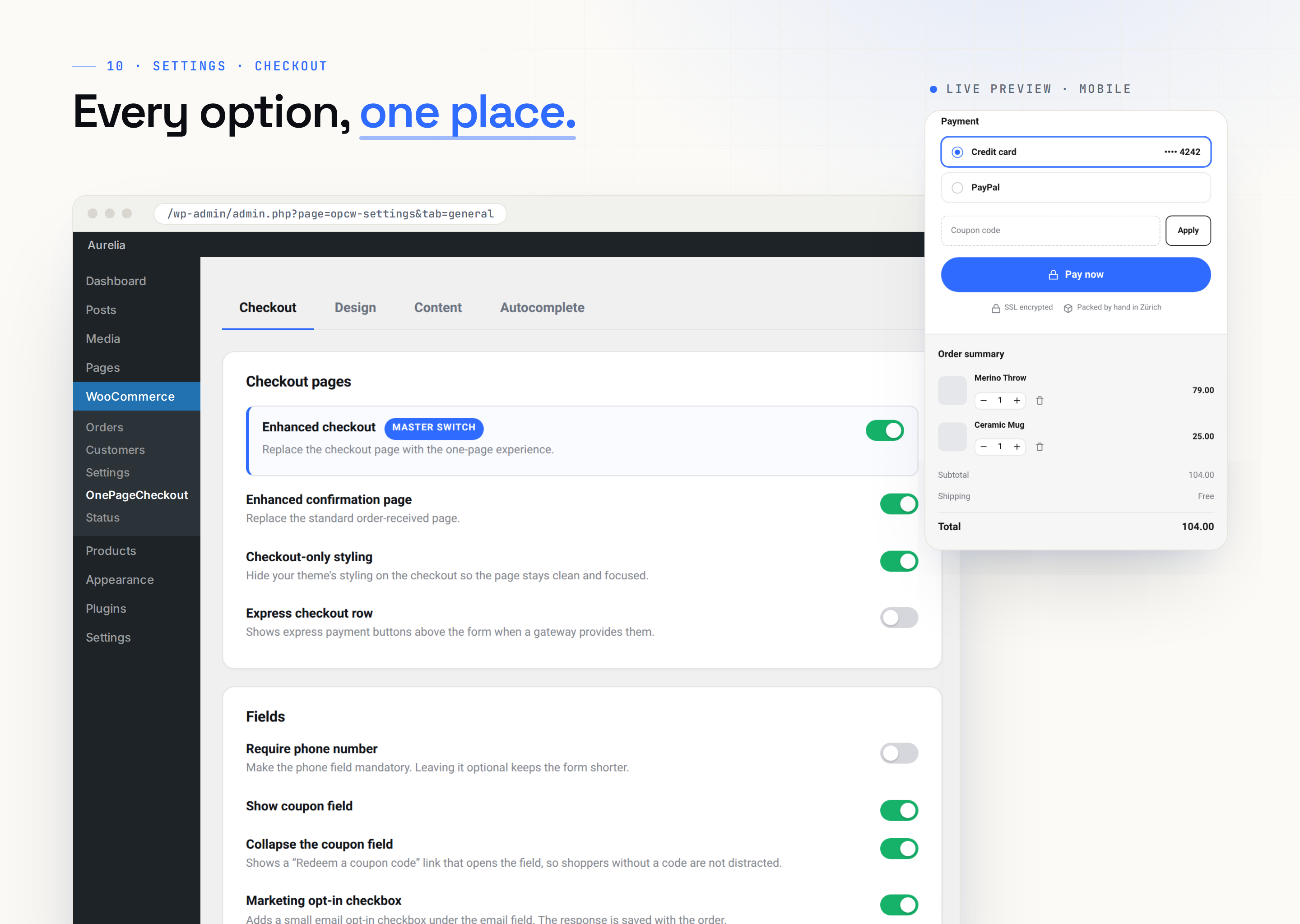
- The cart lives in the checkout. Shoppers change quantities, remove items and apply coupons right there, so they can skip the cart page.
- No distractions. The checkout drops your theme’s header, menus and footer, so nothing pulls shoppers away.
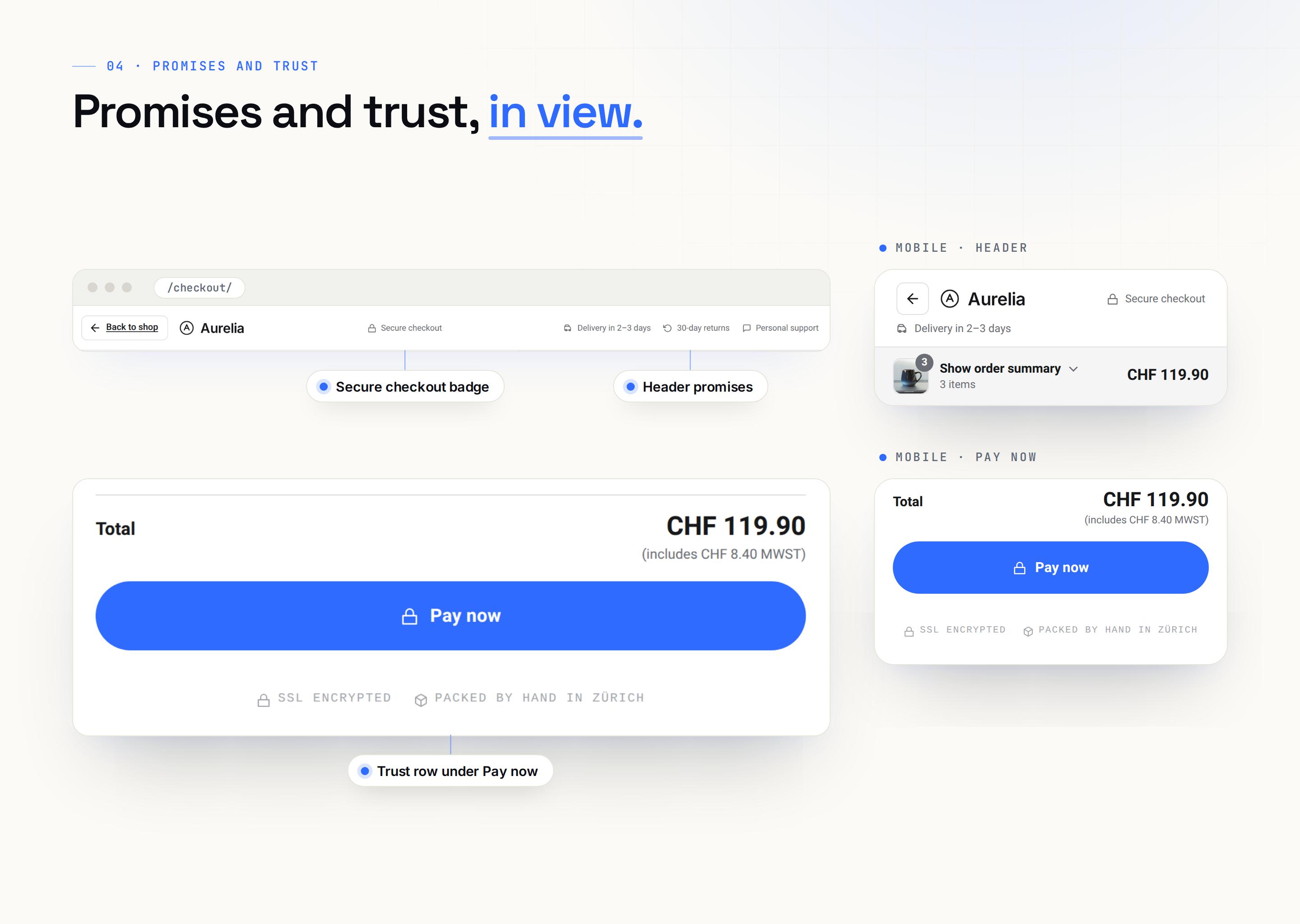
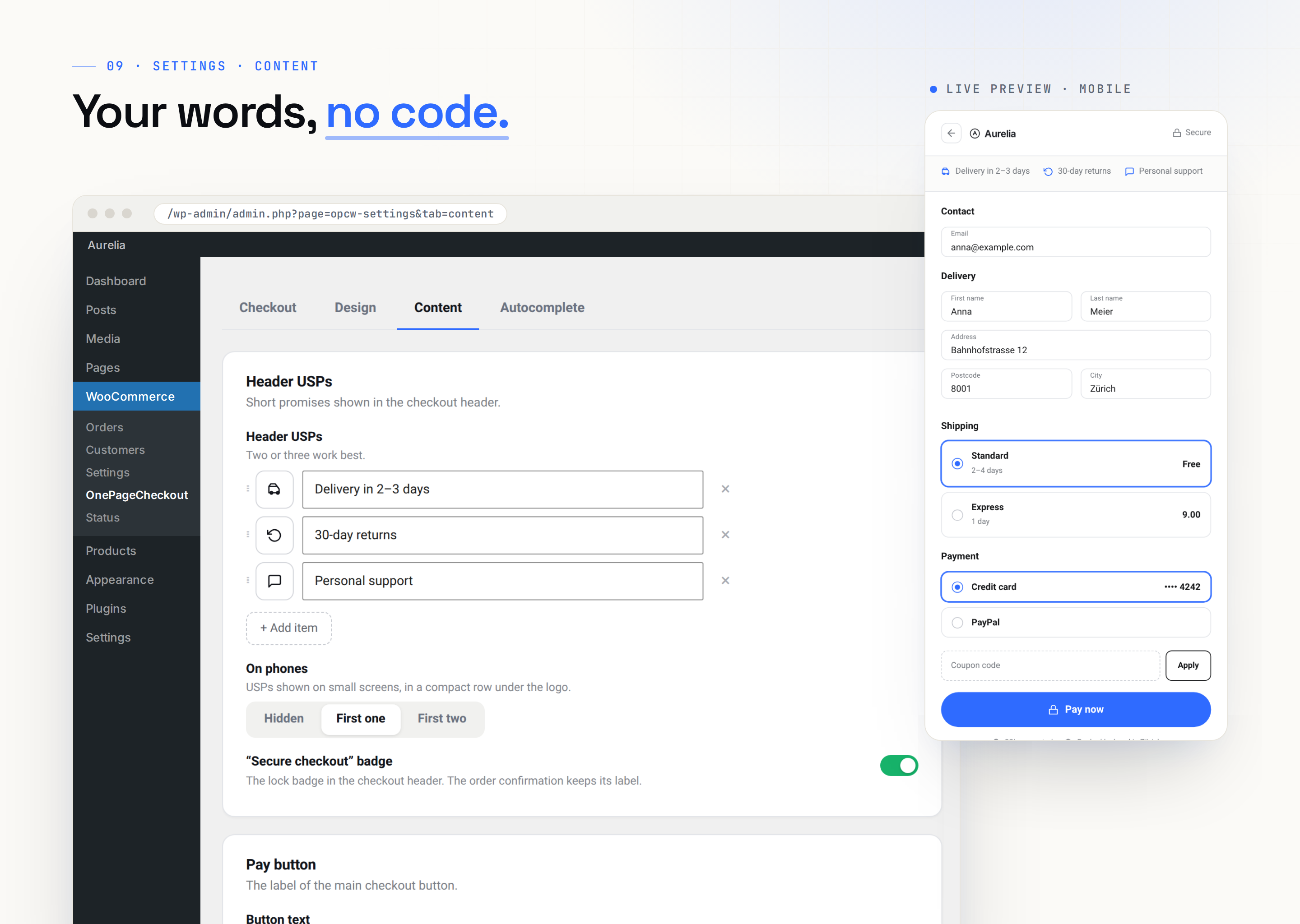
- Selling points and trust. Show your selling points in the header, a “Secure checkout” badge, and a trust row right under the Pay now button.
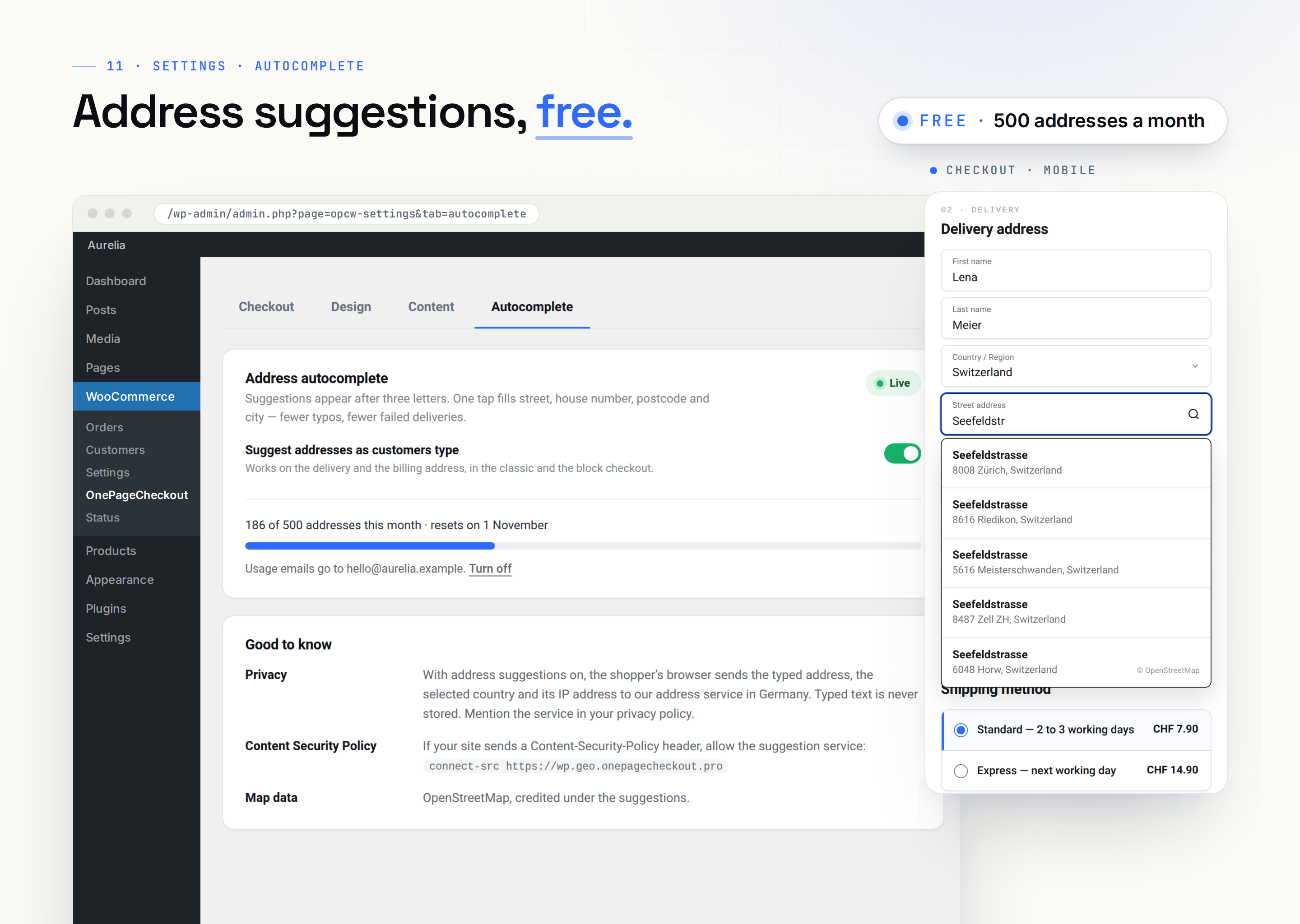
- Address autocomplete. Addresses are suggested as shoppers type. The first 500 lookups each month are free, and one click turns them on.
- Built for phones. On small screens, the order summary folds into a single bar above the form.
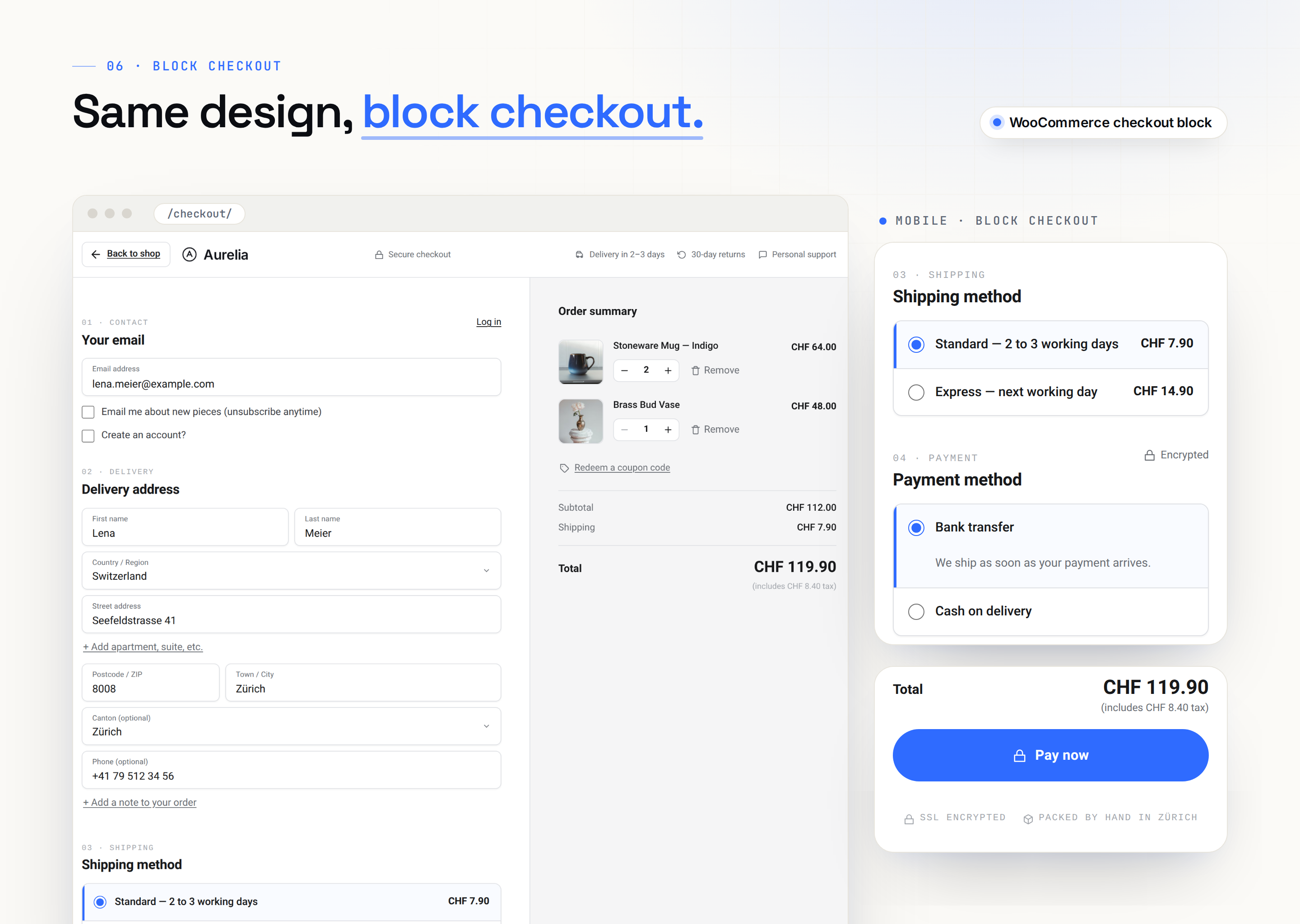
- Classic and block checkout. Both get the same design.
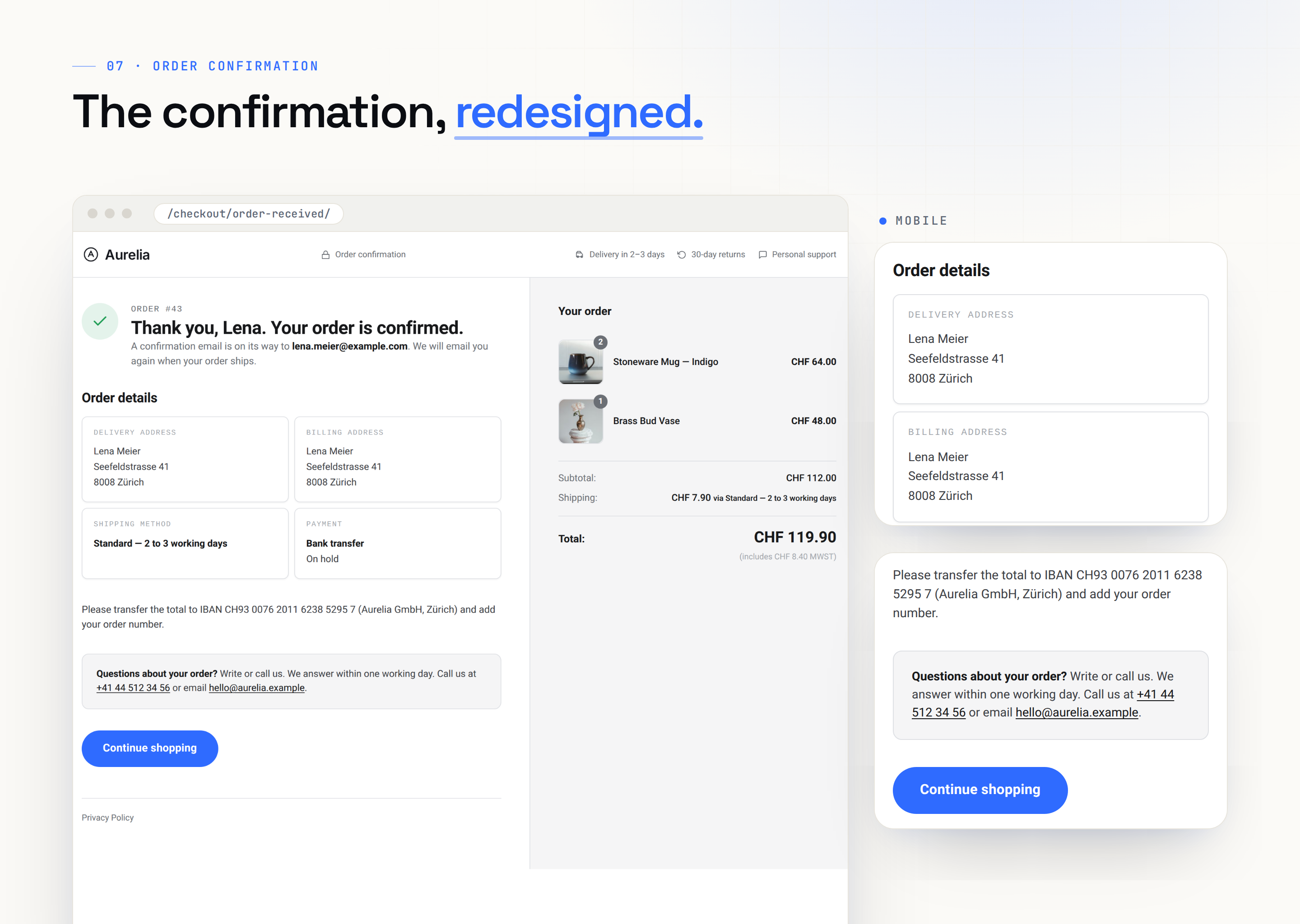
- A clearer confirmation page. Shoppers see their order at a glance, along with your own help contact.
- And a few extras. Shoppers can log in without leaving the checkout, express payment buttons get their own row, and multilingual shops on WPML or Polylang are supported. Translations of the checkout page run the one-page checkout too, as long as they use the same checkout type (block or shortcode).
Same store underneath
Your payment gateways, shipping, taxes, coupons and fields from other plugins keep running through WooCommerce itself. If you deactivate the plugin, the standard checkout comes back and no data is changed. The free plugin contacts our service only once you turn on address suggestions.
Make it yours
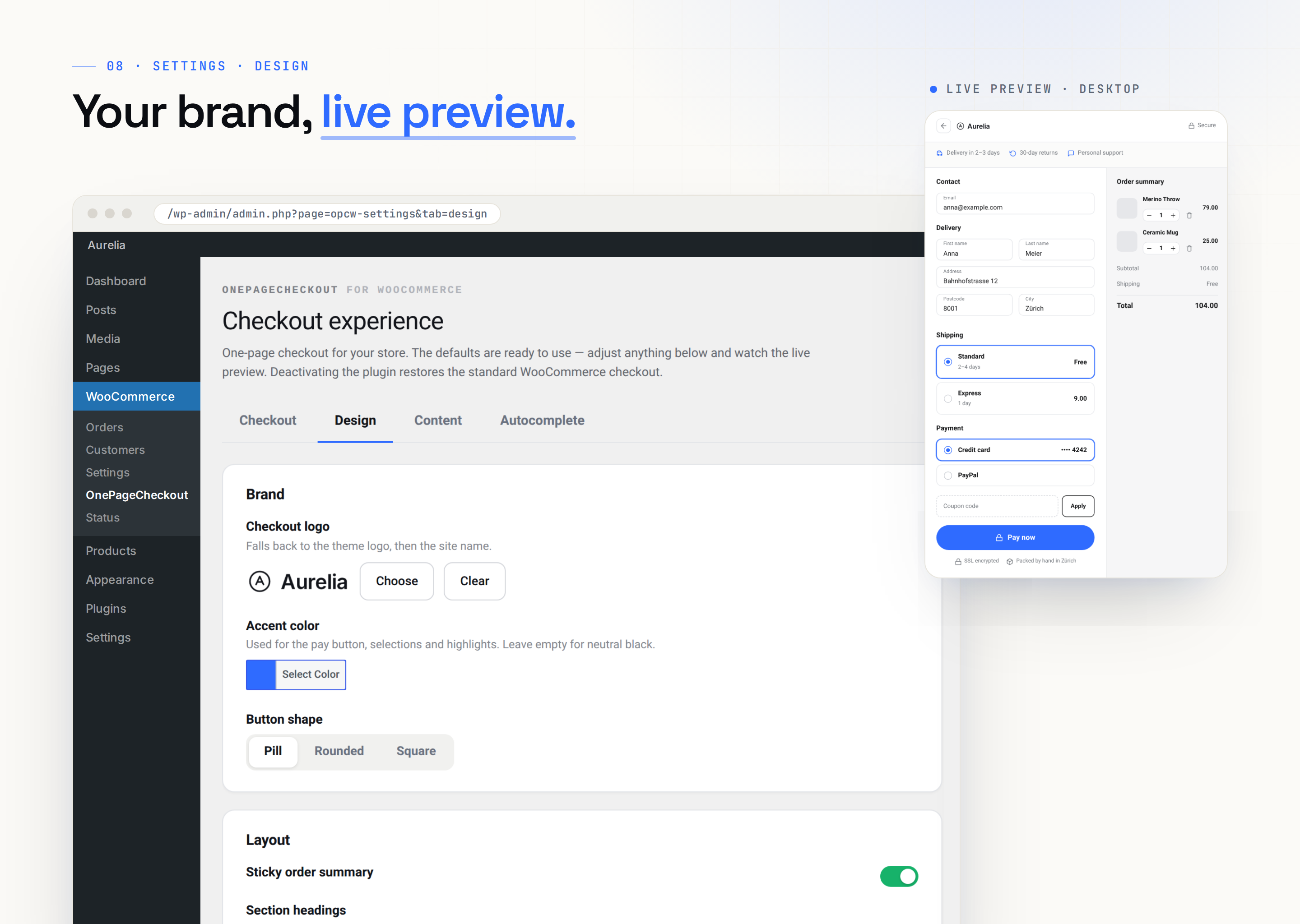
Set your logo, accent color, selling points, trust row and pay-button text, and watch every change in a live preview. No code needed.
Who builds it
OnePageCheckout is made by TrafficFlow GmbH, an agency in Zurich, Switzerland. The same checkout already runs in production on high-revenue shops in Switzerland and across Europe.
OnePageCheckout Pro
Need more than 500 address lookups a month, or want to use your own Google key? That’s what OnePageCheckout Pro is for. It’s a separate paid plugin that replaces this one and keeps all your settings. On top of everything above, Pro adds:
- More address suggestions: 5,000 to 100,000 lookups a month depending on your plan, or your own Google key
- An order bump, a free-shipping bar, design presets and custom CSS
- An order tracker, legal pages in an overlay, and priority support
See the plans and try the demo at onepagecheckout.pro.
External services
This plugin uses the OnePageCheckout address service, run by TrafficFlow GmbH, the maker of this plugin. Nothing is sent until an administrator clicks Turn on in the Autocomplete tab. After that, your server registers the site (site URL, install ID, notice email and consent) and fetches the monthly lookup count. At checkout, the shopper’s browser sends the typed address text, the selected country and the shopper’s IP address. Typed text is never stored. The service runs on wp.geo.onepagecheckout.pro and onepagecheckout.pro. For details, see our terms of service and privacy policy.
Screenshots


Installation
- Install and activate WooCommerce, then this plugin.
- Open WooCommerce OnePageCheckout and set your logo and accent color. The live preview shows the result.
- Place one test order with your own payment method and check the confirmation page.
FAQ
-
Is the free version enough for a live shop?
-
Yes. Use it on as many shops as you like, with no limit on orders or products and no account needed. There’s no branding of ours on your checkout and no banners across your admin; Pro is mentioned only on the plugin’s own settings pages, its Plugins-screen row and, in a month when your free lookups run out, one dismissible notice. Your checkout is complete without Pro.
-
Is there a demo?
-
Yes: onepagecheckout.pro/?opc_demo=1. It runs Pro. The free plugin’s checkout looks and works the same, address suggestions included once you turn them on.
-
Will it break my payment gateways?
-
No. The plugin keeps WooCommerce’s own payment area and checkout events, so Stripe, PayPal, bank transfer and others behave as before.
-
Does it work with my theme?
-
Yes. The checkout renders its own page; the rest of the shop keeps your theme. Tested with Storefront, Astra, Kadence, GeneratePress, Blocksy and block themes.
-
Classic or block checkout?
-
Both. The plugin detects which one your checkout page uses. The block checkout needs WooCommerce 9.8 or later; on older versions the settings offer a one-click switch to classic.
-
Does the block checkout work with checkout extensions?
-
Yes. Extensions made for the WooCommerce checkout block (additional checkout fields, consent and legal checkboxes, captchas, order summary notes) appear in the one-page layout. Not available there: extensions that replace the list of shipping options, and scripts or styles written for the block checkout’s own markup; for those, use the classic checkout.
-
What if another plugin runs my checkout?
-
When CartFlows, FunnelKit or Fluid Checkout runs the checkout page, OnePageCheckout steps back on that page and says so on its settings screen. Turn that plugin’s checkout off to use the one-page checkout.
-
Does address autocomplete need a Google API key?
-
No. On the Autocomplete tab, click Turn on: 500 lookups a month for free, hosted by us and built on OpenStreetMap. Nothing is sent anywhere before that click. After 500 lookups, customers type their address as usual until the 1st of the next month; the checkout keeps working. Your own Google key works in Pro, which also has 5,000 to 100,000 lookups a month.
-
What counts as a lookup?
-
One address a customer enters, counted when the first suggestions appear. Each pause in typing sends one search; a typical address takes 5 to 10, and one lookup covers up to 30. A longer search counts one more lookup for each further 30 searches, and a search that never finds anything counts once at 30. The Autocomplete tab shows how many of the month’s 500 are used.
-
Can I turn address suggestions off again?
-
Yes. Click Turn off on the Autocomplete tab, and our service removes this site’s registration and email address. Deleting the plugin also clears them from your site.
-
What about privacy?
-
The checkout sets no cookies, and WooCommerce saves orders as usual. With address suggestions off, nothing leaves your site. With them on, shoppers’ browsers send address searches to our service (see External services); mention it in your shop’s privacy policy.
-
Where do I get help?
-
In the support forum. We answer there.
-
How do I report a security issue?
-
Privately, by email to support@onepagecheckout.pro, not in the public forum.
-
Where is the source code of the block checkout script?
-
In the plugin folder.
assets/js/blocks/index.jsis built from the readable source insrc/with@wordpress/scriptsand thewebpack.config.jsnext to it. To rebuild it, runnpm installand thennpm run buildin the plugin folder (Node.js 20 or later). All other scripts and styles ship unminified.
Reviews
There are no reviews for this plugin.
Contributors & Developers
“TrafficFlow OnePageCheckout for WooCommerce” is open source software. The following people have contributed to this plugin.
Contributors

“TrafficFlow OnePageCheckout for WooCommerce” has been translated into 1 locale. Thank you to the translators for their contributions.
Translate “TrafficFlow OnePageCheckout for WooCommerce” into your language.
Interested in development?
Browse the code, check out the SVN repository, or subscribe to the development log by RSS.
Changelog
4.5.0 · 2026-10-31
- Improvement: Block Mode · works with checkout block extensions: additional checkout fields, consent and legal checkboxes, captchas and other plugins’ blocks
- Improvement: Block Mode · WooCommerce’s checkout events and filters work as on the stock checkout, so Google Analytics sends begin_checkout again, also on iPhones
- Improvement: Block Mode · typing in the checkout fields is faster
- Improvement: Other checkouts · OnePageCheckout steps back where CartFlows, FunnelKit, Fluid Checkout or another plugin runs the checkout page, and the settings screen says so
- Improvement: Other checkouts · only the shop’s checkout page and its Polylang or WPML translations (listed on the settings screen) are taken over; other checkout pages keep WooCommerce’s behaviour
- Improvement: Settings screen · explains what Block Mode supports, says when WooCommerce needs an update and when the checkout page holds content the checkout does not show
- Improvement: Order summary · the quantity can be typed
- Improvement: Order summary · fits short laptop windows without scrolling inside, the totals always in view
- Improvement: Addresses · shops that ship to the billing address only and digital-only carts ask for one address
- Improvement: Shipping · free shipping is selected by itself once the cart qualifies; a rate the shopper picked stays
- Improvement: Accessibility · small text such as section labels, the trust row, “Free” and the tax note has stronger contrast
- Improvement: Translations · default checkout texts follow the shop language, and Block Mode uses WooCommerce’s translations where the plugin has none
- Improvement: Texts · no more dashes in the plugin’s texts: asides are rephrased and separators are a middle dot
- Improvement: Thank-you page · personal details are masked in session recordings (Microsoft Clarity, Hotjar)
- Improvement: Plugins screen · a note says when own-key address suggestions stopped with 4.3, with a link to the Autocomplete tab
- Improvement: Developers · new filters and theme upgrade notes, see “Upgrading to 4.5” in EXTENDING.md
- Fix: Pay button · a click right after typing in a field is no longer lost: the order is placed once the checkout has refreshed, with the updated total
- Fix: Order summary · a removed item or a changed quantity is no longer lost: during a refresh, on two lines in a row, or while other plugins send requests
- Fix: Order summary · a typed quantity is capped at 999 or the product’s maximum
- Fix: Order summary · the quantity field keeps its look on themes, and the phone stepper keeps its size
- Fix: Order summary · the focus stays on the quantity control after a change
- Fix: Order summary · no longer scrolls for a few pixels, and no longer floods error trackers with ResizeObserver messages
- Fix: Themes · WooCommerce’s and Elementor’s styles no longer change fields, checkboxes and radios, and Elementor add-ons no longer cause script errors
- Fix: Themes · theme footer overlays and OceanWP’s step list no longer show on the checkout
- Fix: Notices · error notices stay a readable list with Royal Elementor Addons, and block themes show the plugin’s notice card on the classic checkout
- Fix: Fields · no second arrow under the country select; labels stay centred, and a plugin’s own city field lines up with the postcode
- Fix: Right-to-left · the checkout, the summary column and the settings screen mirror correctly
- Fix: Classic checkout · field defaults show again, and other plugins’ fields, opt-ins, consent boxes and notices show where those plugins put them
- Fix: Classic checkout · Germanized’s legal checkbox sits above the Buy button; field editors no longer add a stray select or a doubled “(optional)”
- Fix: Classic checkout · runs WooCommerce’s cart checks: a discount that stopped applying goes at once, cart errors show “Return to cart”, notices match the cart
- Fix: Classic checkout · other plugins’ summary rows sit flush, the terms box scrolls in its frame again and skip cart works with plain permalinks
- Fix: Germanized · on its default settings the classic checkout no longer stays blank, and its delivery time, unit and description show in the summary
- Fix: Required fields · an empty Pay no longer lists hidden billing fields, and the phone field follows “Require phone number”, PayPal’s buttons included
- Fix: Payment · switching the payment method no longer makes the Pay button jump
- Fix: Block Mode · required additional checkout fields no longer block every order
- Fix: Block Mode · Germanized, MailPoet, Klaviyo and cart recovery plugins show their checkboxes and notices, and a checkout without terms shows no terms box
- Fix: Block Mode · Cloudflare Turnstile shows and orders go through; Payrexx hides Apple Pay and Google Pay where they cannot pay; express wallets are no longer refused
- Fix: Block Mode · the inline login shows its errors and captchas, links to “Lost your password?” and fills in the saved address
- Fix: Block Mode · after a quantity change the total and Pay show what will be charged; a plugin’s refusal shows its reason; a failed Pay focuses the field to fix
- Fix: Block Mode · coupon discounts read “-CHF3.90”, and a coupon retried after a stalled request no longer says “already applied”
- Fix: Block Mode · no shop state or canton on addresses in countries without one, and a saved different billing address is preselected
- Fix: Block Mode · accented country names, plugin labels on Pay and item details show cleanly
- Fix: Block Mode · the totals and the item count stay right with Google Translate and TranslatePress, and Flexible Shipping’s description stays
- Fix: Block Mode · “Back to shop” on the empty cart leads to the shop, and a plugin’s own city field survives a country change
- Fix: Guest checkout · with guest checkout and account creation off, shoppers are asked to log in and no guest order is accepted
- Fix: Thank-you page · bank transfer details show again
- Fix: Thank-you page · a one-address order shows its address once, item names with markup show cleanly, plugin text stays in the sub-line and the help box no longer repeats its title
4.4.0
- Thank-you page: pickup orders show “Being prepared” and “Ready for pickup” and the pickup location instead of shipping steps and a delivery address; downloads show “Downloads available”.
- Thank-you page: cash on delivery, bank transfer and cheque never say “charged”; the order (items and total) now shows on phones; the footer carries the checkout’s footer links.
- Password managers can fill name and address fields again; the “Log in” link reads “Cancel” while the login box is open.
- A long order summary scrolls inside its column, and the “Sticky order summary” setting works on every checkout.
- German: “Free” now reads “Kostenlos”, the free-shipping bar “Fortschritt bis zum kostenlosen Versand”. The settings screen keeps its right margin on mid-size screens; “Save changes” sits on the left.
- For developers: filters for the thank-you steps, sub-line, payment line and fulfilment type, the contact details, password-manager fields, a context argument for the footer links, heading-size tokens, and a slot right after each section heading.
4.3.0
- New: free address suggestions. Click Turn on (Autocomplete tab) and customers get address suggestions as they type: 500 lookups a month. Nothing contacts our service before that click.
- New: this month’s lookups as a bar on the Autocomplete tab and in the sidebar, and one dismissible notice when the month’s lookups are used up.
- Changed: your own Google Places key now works in OnePageCheckout Pro only. If your checkout used one, turn on the free suggestions to keep them; the key stays saved.
4.2.0
- Fix: with “log in during checkout” on, guest checkout could fail on some themes, and logging in at checkout did not work. The login box is now its own form above the checkout.
- Fix: block checkout, a tap on a shipping option right after an address field now selects it.
- Fix: on shops under several domains, the header logo links to the domain the customer is on.
- New: the order total with its tax note right above the pay button, on by default (also after this update).
- New: the coupon field between items and totals, behind a “Redeem a coupon code” link on new installs (updated shops keep it open); applied coupons as removable chips.
- New: optional unit prices, a clearer summary bar on phones, three section-heading styles.
- New: header promises on phones and a switch for the “Secure checkout” badge (Content tab).
- Checkout fields from other plugins render as declared.
- Classic checkout: errors right under the field; a missing delivery address is filled from the saved billing address.
- Address autocomplete: a magnifier in the street field while suggestions are available; with your own Google key, suggestions come in your site’s language.
- The “+ Add company name” links read naturally in every language.
- For developers: new filters for the footer links, the shipping list, the total row, company and VAT behind one toggle, the prefill and the autocomplete icon;
opcw_footnav_linksnow also works on the block checkout.
Earlier versions
- 4.1.0: new name and folder; coming from the 4.0 download, activate this plugin, then delete the old one (settings stay). 4.0.0: the free edition. 1.0 to 3.0.6: released on onepagecheckout.pro.