
Description
RankX SEO is the AI SEO plugin built for WooCommerce products, not blog posts. It writes product descriptions, meta titles, meta descriptions, image ALT text, FAQs and tags for your whole catalog, shows you a before/after preview, and then proves the result with your own Google Search Console data: where each product ranked before it was optimized, and where it ranks now.
Most SEO plugins give you a score and a checklist. RankX SEO does the work on every product page, and only writes to your store when you approve it (or when you turn on Auto mode yourself). Every change is backed up and can be undone in one click.
It works for any WooCommerce store, in the US, the UK, the Gulf or anywhere else, in English and native Arabic.
Why store owners choose RankX SEO
- ✔ Made for products – product descriptions, meta, ALT text and FAQs for hundreds of products at once, plus category and brand pages.
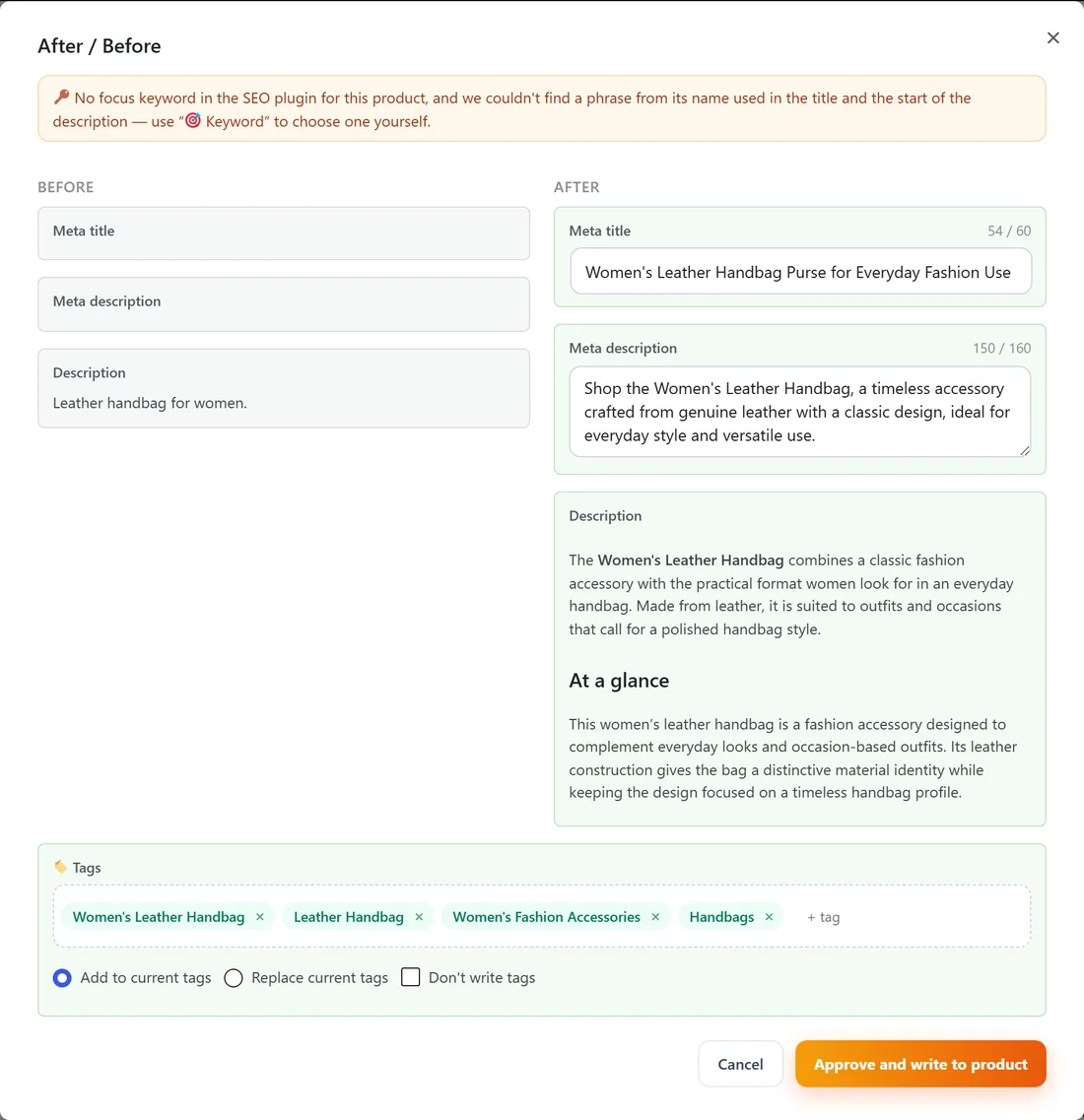
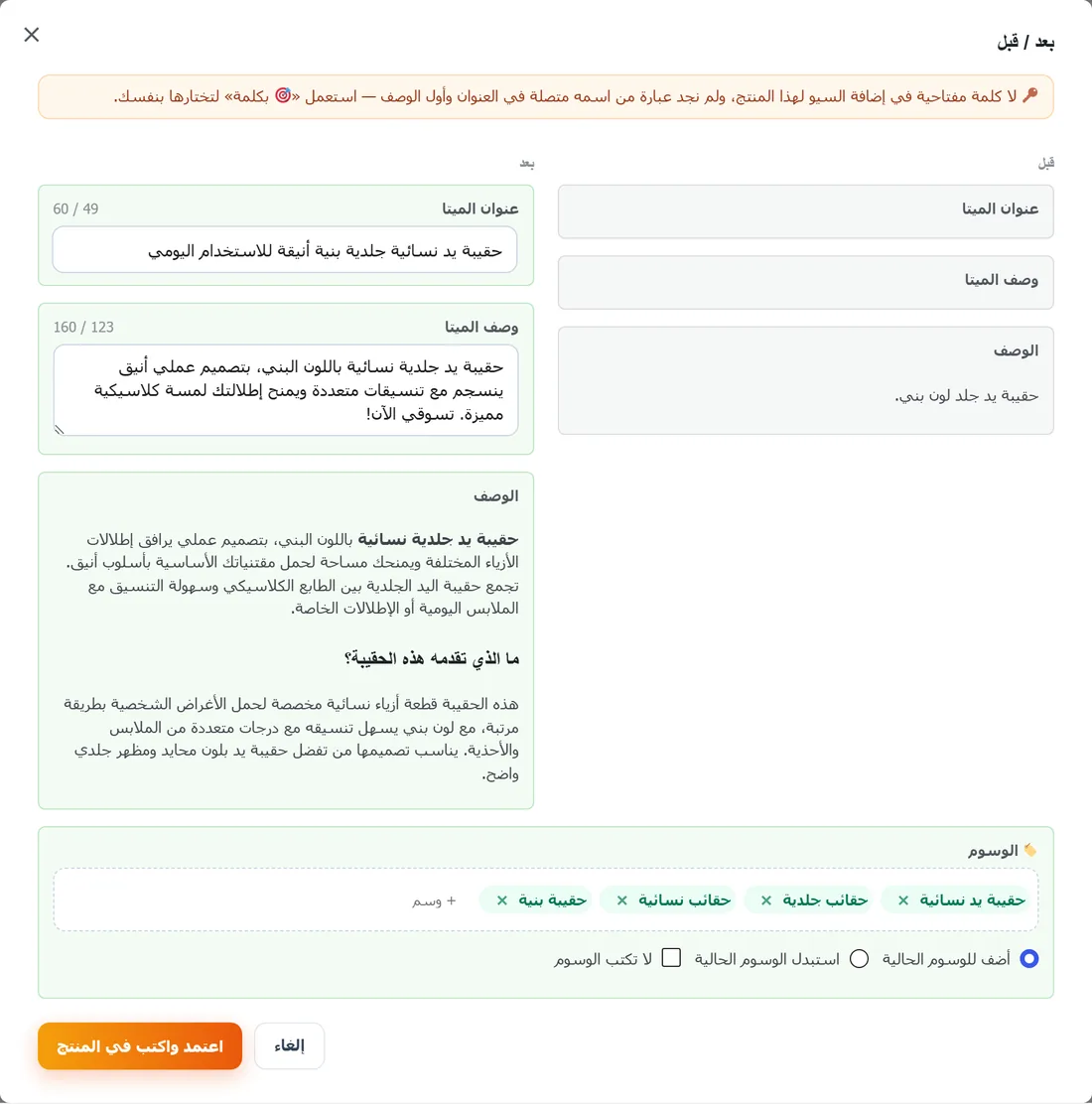
- ✔ Review before anything is written – a clear before/after for every product, with a backup and one-click undo.
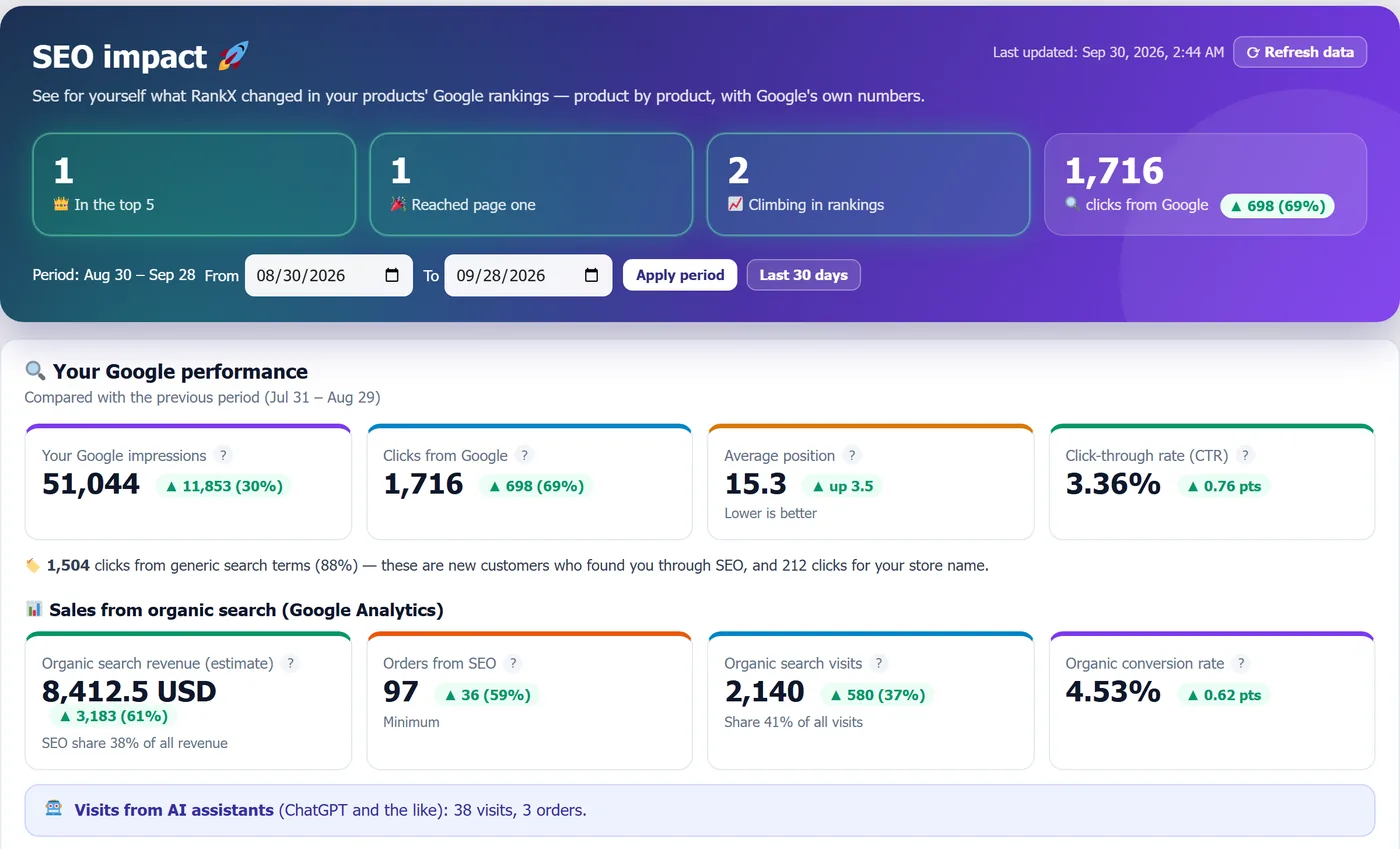
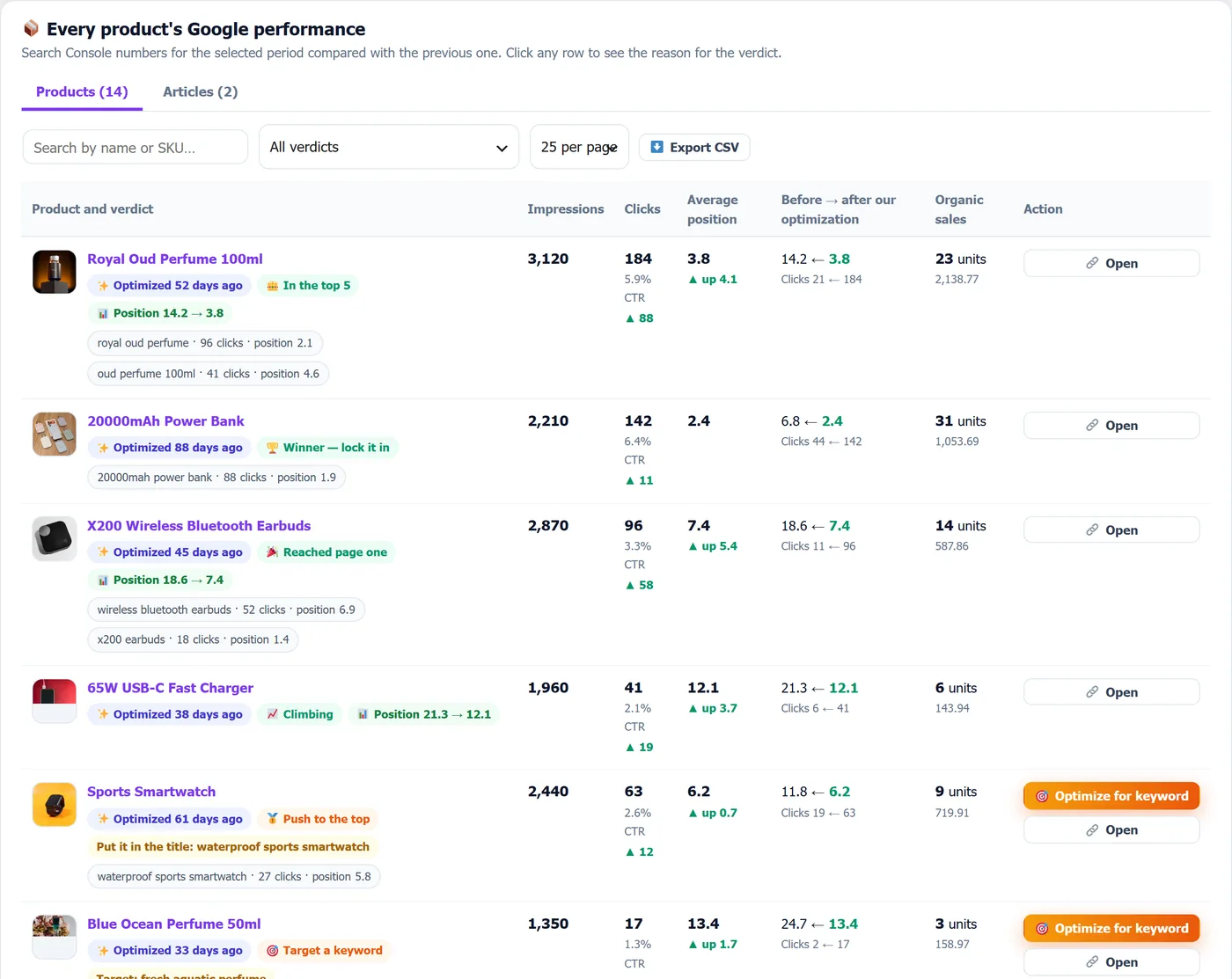
- ✔ Proof, not promises – SEO impact connects Google Search Console and Analytics and shows clicks, impressions, position and organic sales before and after each optimization, product by product.
- ✔ Ready for AI search (AEO / GEO) – visible FAQ sections with FAQPage schema, direct-answer descriptions and llms.txt, so ChatGPT, Google AI Overviews, Gemini and Perplexity can quote your products.
- ✔ No API key to manage – no OpenAI account, no prompts to write. Connect your store and start with 10 free AI optimizations.
- ✔ Works with Yoast SEO and Rank Math – writes into their own fields, or runs on its own.
- ✔ Native Arabic, not machine-translated – RankX was built Arabic-first, so Arabic product content reads like a real Gulf copywriter wrote it.
AI product optimization
- AI product description generator – SEO product descriptions with clear headings, benefits and specifications, written in your store’s language and voice.
- Meta title and meta description – click-worthy, within Google’s length limits, written into Yoast SEO or Rank Math when they are active.
- Target keyword mode – optimize a product for a keyword using live Google search data for it.
- AEO mode – descriptions and FAQs written to be quoted by AI answers.
- AI ALT text for product images – for every product image that is missing it.
- Product FAQs with FAQPage schema – questions shoppers really ask, shown on the page and marked up for Google.
- Product tags, categories and brands – descriptions, meta and FAQs for category and brand pages too.
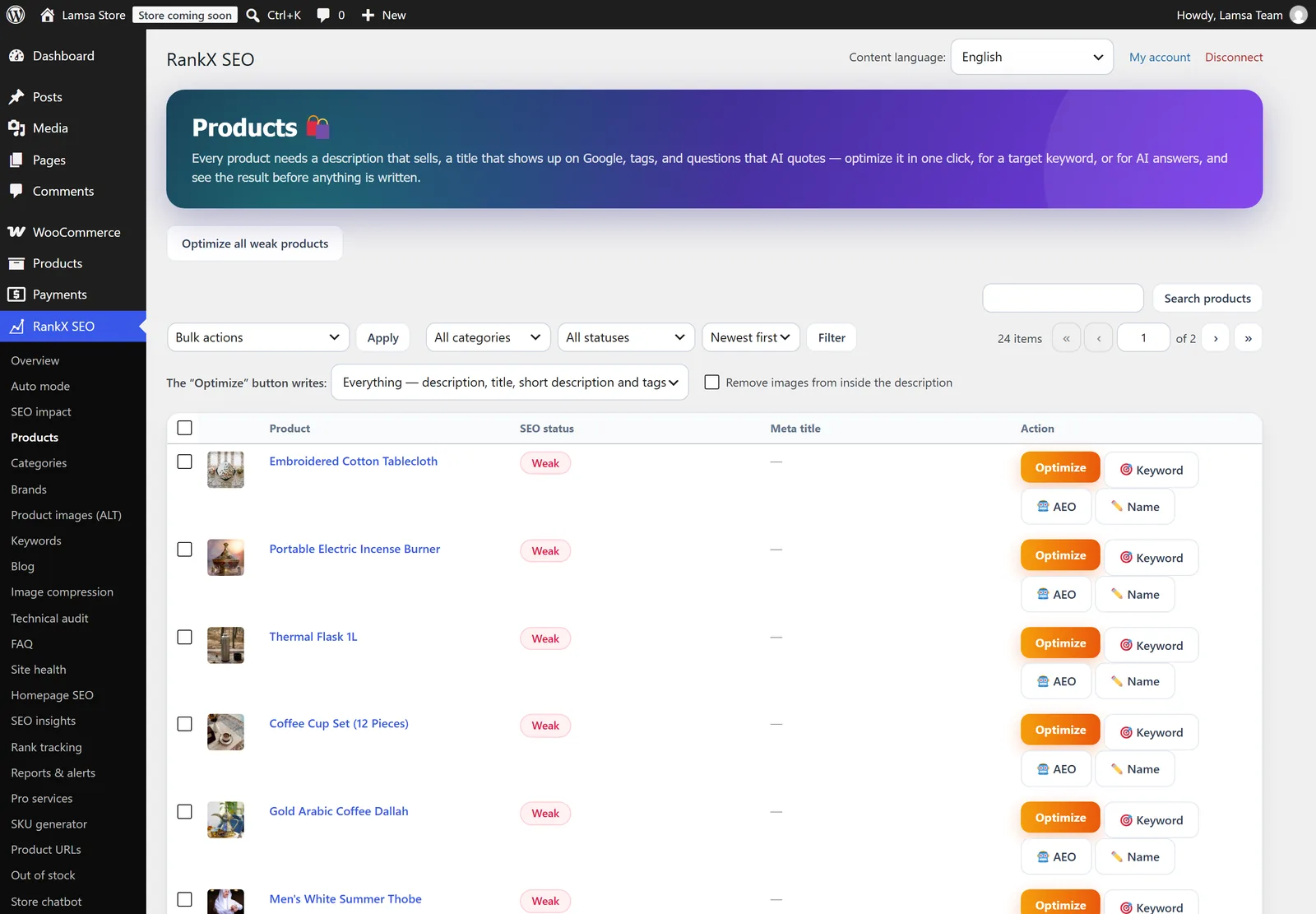
- Bulk optimization – select up to 1,000 products and let them run in the background, with a live progress bar.
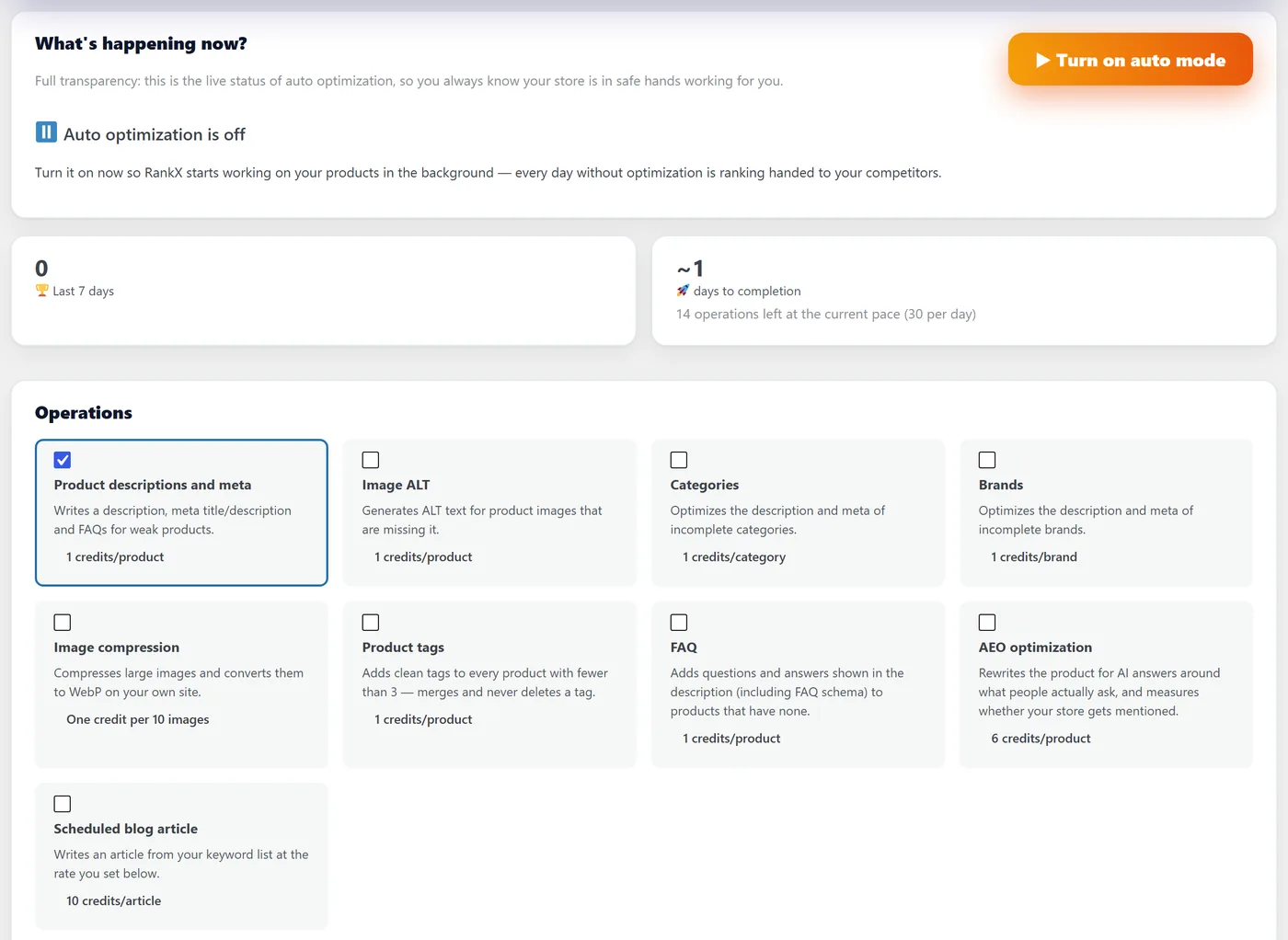
- Auto mode – improves new and incomplete products in the background, within the daily limit and run window you set, with a first-batch review.
Measure your SEO impact
- Before/after for every product – Google position, clicks and impressions before and after each optimization, with a clear verdict and the next step.
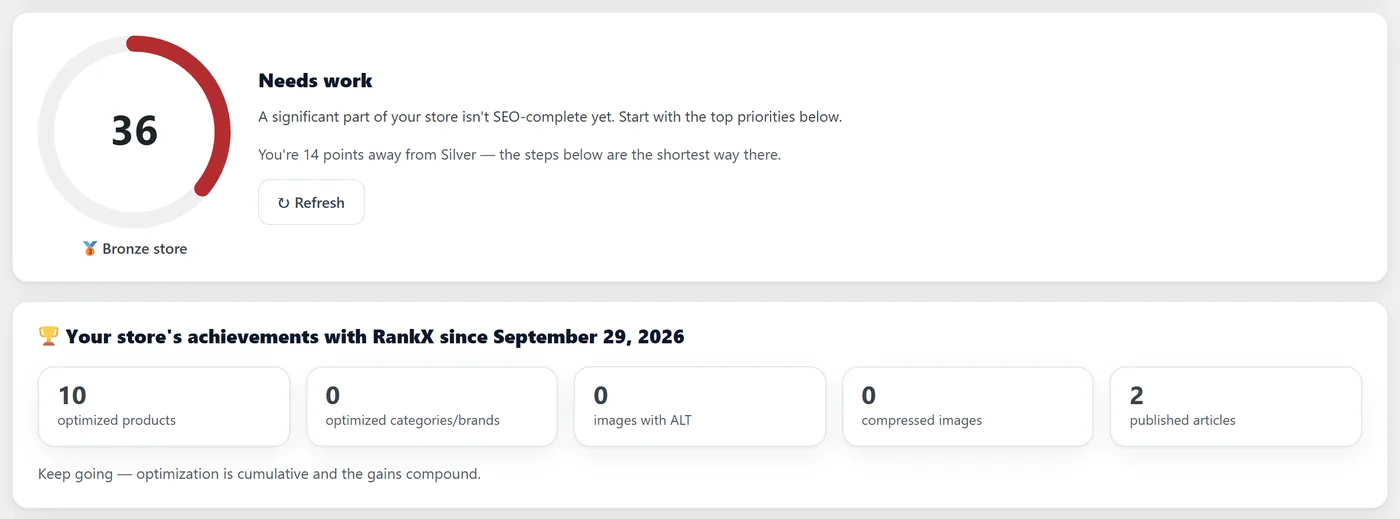
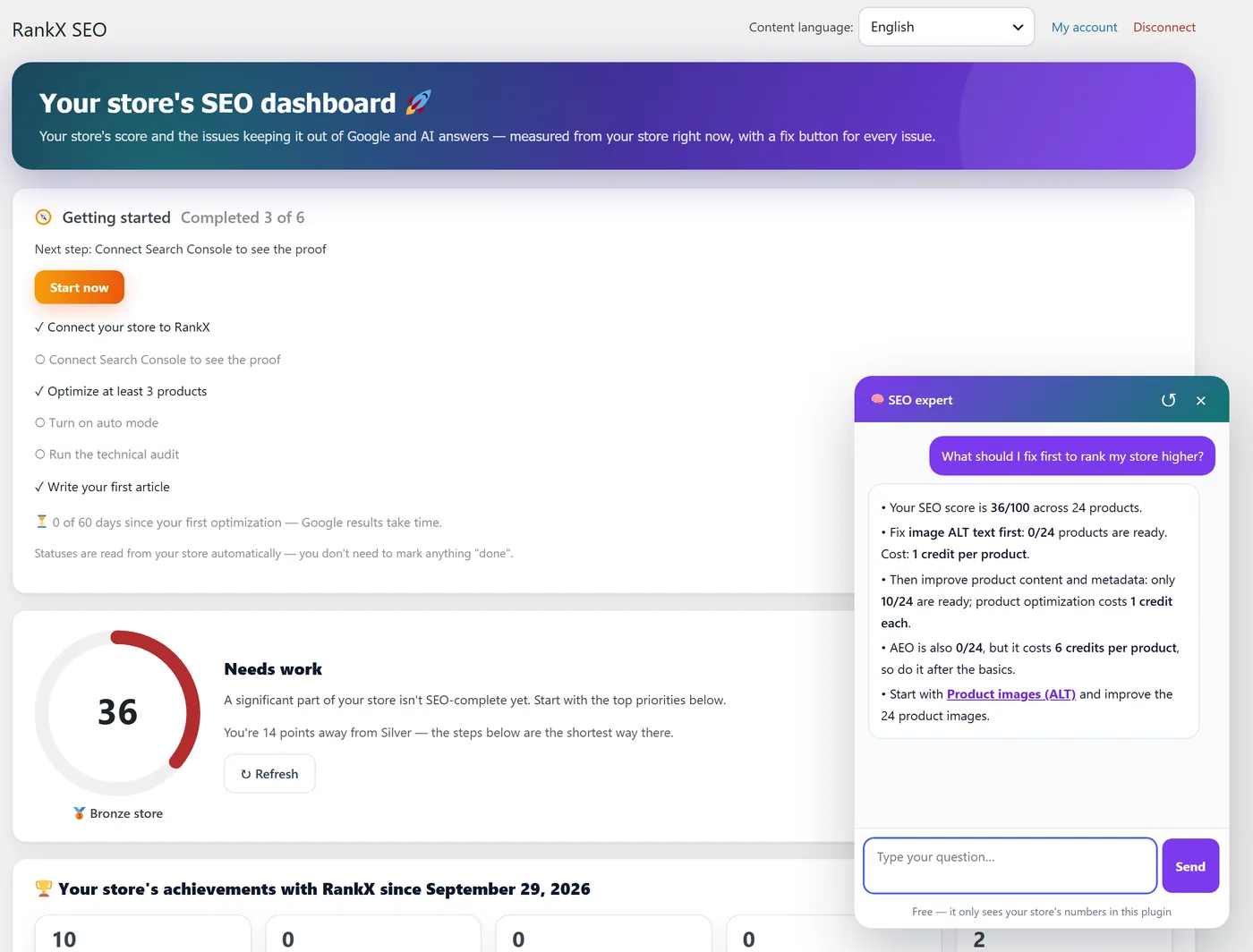
- Store dashboard – products in the top 5 and on page one, organic clicks and organic sales.
- Rank tracking – weekly position checks for the keywords that matter to you.
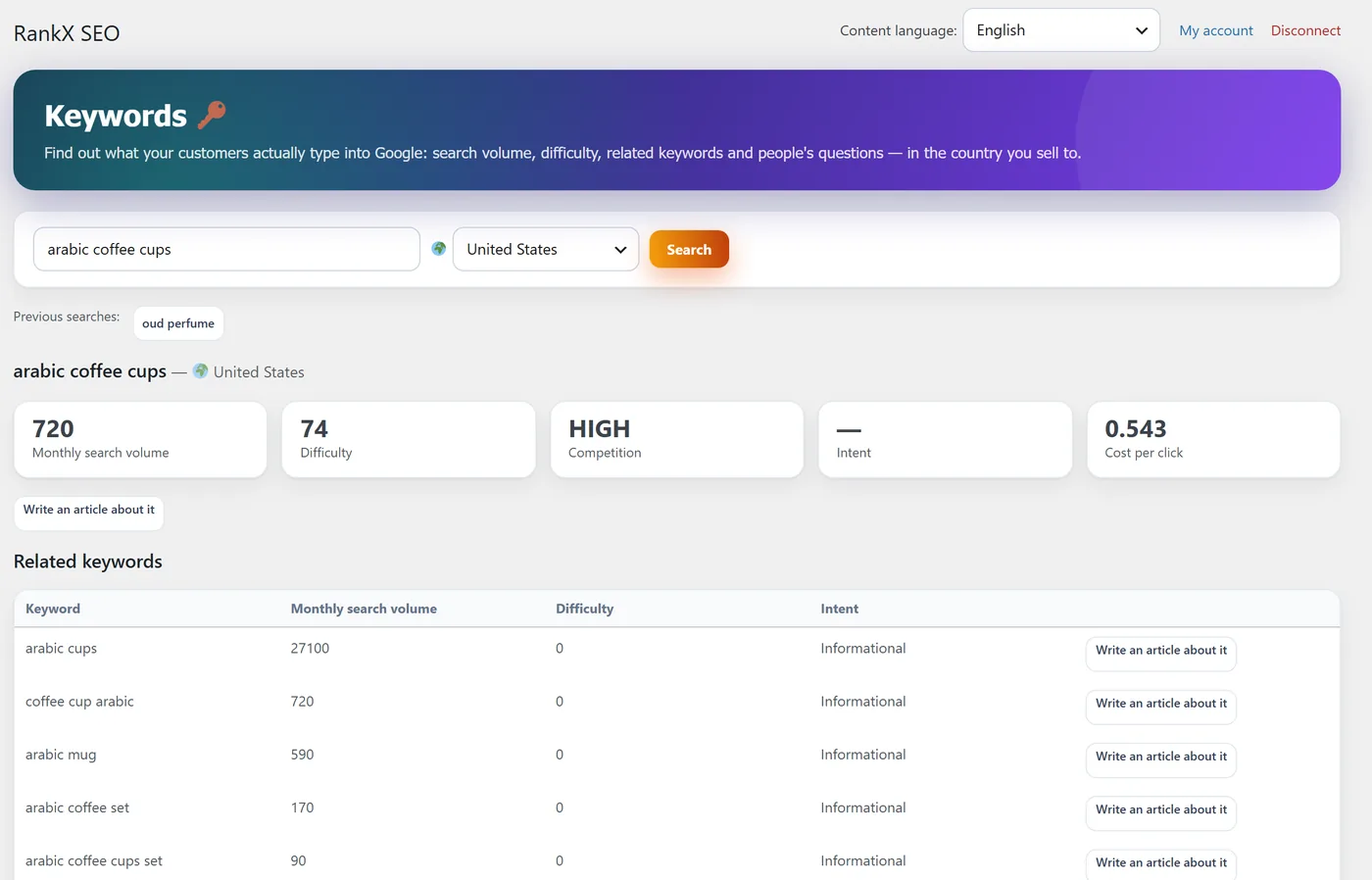
- Keyword research and competitor gap – search volume, difficulty and the keywords your competitors rank for.
- AI visibility – check whether AI assistants mention your store.
- SEO assistant – ask questions in plain words and get answers from your store’s own numbers.
Content and growth
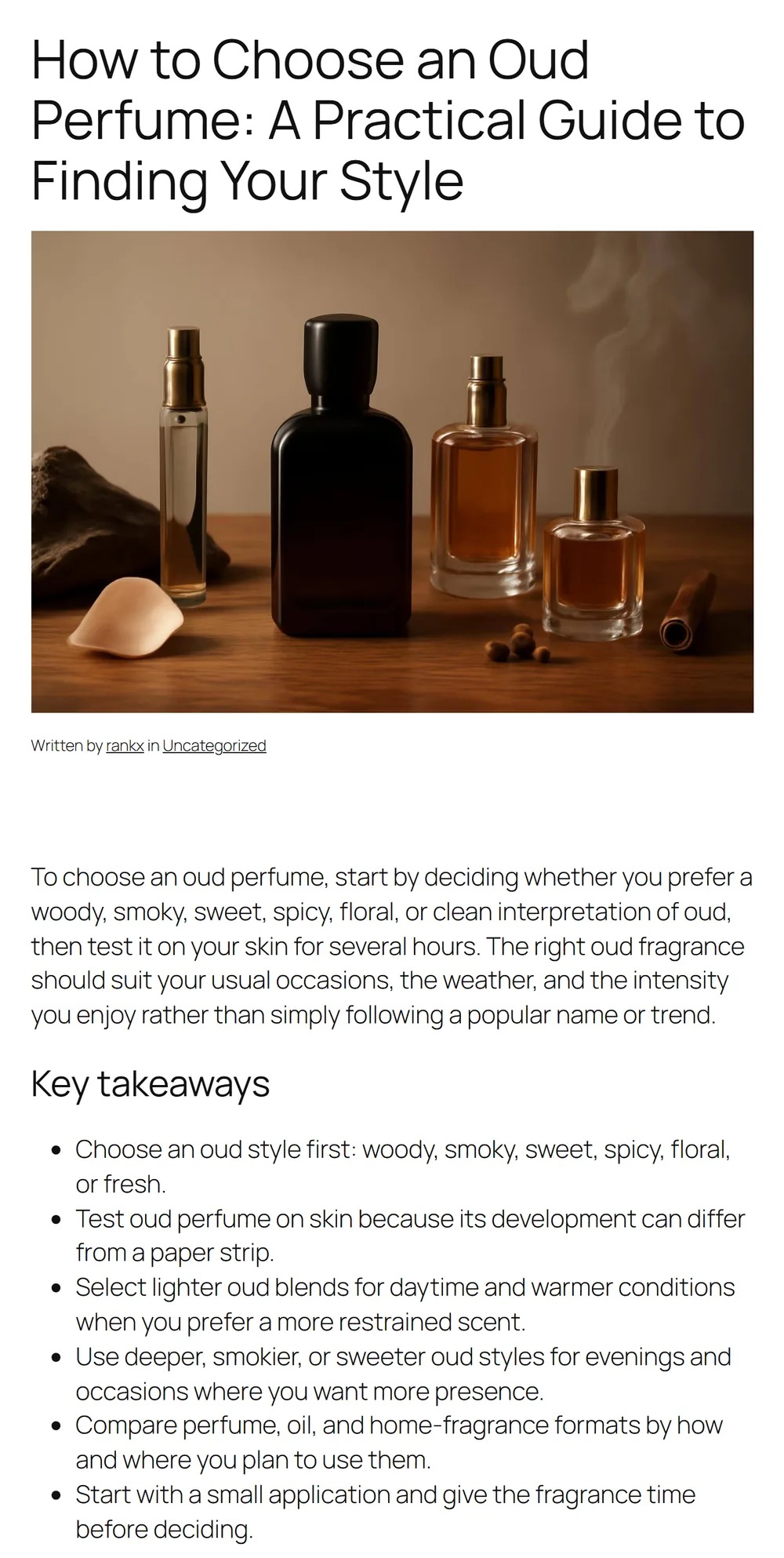
- AI blog writer – full articles for keywords people search, with a featured image and links to your products.
- Store chatbot (optional, off by default) – answers your shoppers about your products, stock and your own shipping and returns policies.
Free local SEO tools (no account needed)
These run on your own hosting, are free without limits and need no account:
- Image compression and WebP conversion, with backups and one-click restore
- Product and category schema, Open Graph and canonical tags
- Redirects (301/302/410) and 404 monitoring
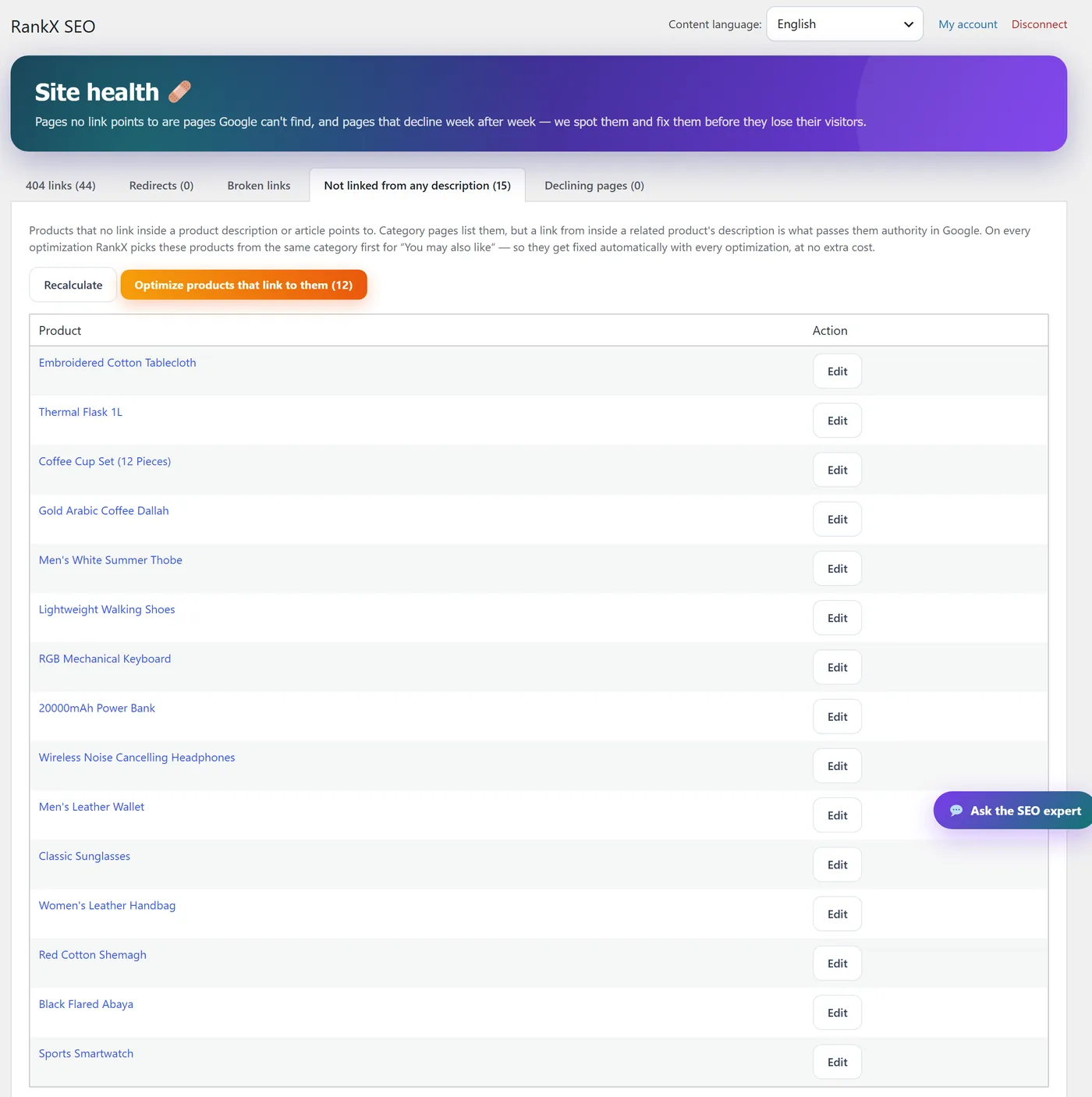
- Internal links and orphan products (products no page links to)
- Out-of-stock handling
- Site health, reports, alerts and a weekly email
- SKU generator, FAQ import from CSV and manual FAQs
- llms.txt, AI-crawler rules and noindex for system pages
- Broken-link checks (opt-in)
How pricing works
Only the AI features use credits, because they run on the RankX service (content generation, research, audits, rank tracking, the assistant and the store chatbot). Connecting your store gives you 10 free optimizations. More credits can be bought from inside the plugin; payment is completed on rankxseo.com by secure online payment. Credits never expire. Nothing that runs on your own site uses credits.
بالعربية: إضافة سيو ووكومرس المبنية بالعربي
RankX SEO إضافة سيو لمتاجر ووكومرس بُنيت عربيةً من أول يوم، لمتاجر السعودية والخليج والعالم العربي، وتعمل بالإنجليزية لأي متجر في العالم.
- كتابة وصف المنتجات بالذكاء الاصطناعي بعربية سليمة كأن كاتب محتوى خليجي كتبها، لا ترجمة آلية.
- عنوان الميتا ووصف الميتا ضمن حدود جوجل، وتُكتب في حقول Yoast أو Rank Math إن كانت مفعّلة.
- نص ALT للصور، والأسئلة الشائعة مع سكيما FAQPage، والوسوم، والأقسام والماركات.
- تحسين بالجملة وتلقائي لكل الكتالوج، مع معاينة قبل/بعد ونسخة احتياطية وتراجع بضغطة.
- أثر السيو الحقيقي: ترتيب كل منتج في جوجل ونقراته قبل التحسين وبعده من بيانات Search Console الخاصة بك.
- جاهزة لإجابات الذكاء الاصطناعي (ChatGPT وAI Overviews وGemini) عبر الأسئلة الشائعة الظاهرة وllms.txt.
- أدوات محلية مجانية بلا حساب: ضغط الصور وWebP، السكيما، التحويلات و404، الروابط الداخلية، مولّد SKU.
الواجهة بلغة لوحة كل مستخدم (عربي أو إنجليزي)، والمحتوى المولَّد بلغة متجرك. مع الربط تحصل على 10 تحسينات مجانية.
External services
This plugin connects to the following services. No request is made to any of them before you take the action described.
RankX API (rankxseo.com)
The RankX service generates the content and runs the analyses behind the AI features.
- When: only after you connect your store (“Connect your store”), and then only when you use a feature that needs it (optimize, research, audit, blog writer, insights, SEO impact, assistant) or when you turn on a scheduled job yourself (Auto mode, weekly rank tracking, the weekly report’s balance check).
- What is sent: when connecting — your site URL, site name and the email you enter. For each feature — the content it works on: product names, descriptions, short descriptions, categories, tags, regular prices, attributes and image URLs; category/brand names and descriptions; the keyword and market country you choose; your site URL and public page URLs for audits; the site language and the admin’s interface language. The store chatbot sends the shopper’s question, the short conversation history and matching product data. Your connection key is sent with every request.
- Terms of use: https://rankxseo.com/en/terms
- Privacy policy: https://rankxseo.com/en/privacy
Google (Search Console, Analytics)
Used by “SEO impact” to show clicks, impressions, position and organic sales before and after each optimization.
- When: only if you click “Connect Search Console and Analytics”. You sign in with Google and grant read-only access; the connection is handled by the RankX service, and you can disconnect at any time.
- What is read: Search Console performance data and Analytics reports for the property you select, for the pages RankX optimized.
- Google Terms of Service: https://policies.google.com/terms
- Google Privacy Policy: https://policies.google.com/privacy
IndexNow (api.indexnow.org)
Tells search engines that support IndexNow (such as Bing) when a product, category or post is published or updated.
- When: only if you turn on “IndexNow” in RankX SEO Technical settings (off by default), and not when Rank Math already does it.
- What is sent: the public URLs that changed, your site’s host name and the IndexNow key file URL.
- Terms and documentation: https://www.indexnow.org/terms
Your own links (broken-link check)
The daily broken-link check is off by default. Only if you turn it on in Technical settings does your site send a HEAD request to the links found inside your product descriptions and posts, to see whether they still work. No site data is sent.
Payments
Buying credits or chatbot packs opens a checkout page on rankxseo.com; the plugin itself never talks to a payment provider. See the RankX terms and privacy policy above.
Screenshots
Installation
- Install and activate WooCommerce.
- In Plugins Add New, search for “RankX SEO”, install and activate it (or upload the
rankx-seofolder to/wp-content/plugins/). - Open the “RankX SEO” menu and click “Connect your store”. Nothing is sent to the RankX service before this step.
- Optimize a product, review the before/after, and approve it.
FAQ
-
Does this plugin require WooCommerce?
-
Yes, WooCommerce must be installed and active.
-
Is it free?
-
The local SEO tools listed above are free and run on your own hosting. AI features (writing and research) run on the RankX service and use credits; connecting your store gives you 10 free optimizations to start.
-
Do I need an OpenAI or ChatGPT API key?
-
No. RankX SEO runs the AI for you, so there is no API key, no model to choose and no prompt to write.
-
Can I generate product descriptions in bulk?
-
Yes. Select products (or every product that matches a filter, up to 1,000 at a time) and RankX SEO optimizes them in the background with a live progress bar. You can also turn on Auto mode to handle new and incomplete products every day.
-
Does it write image ALT text?
-
Yes. It writes ALT text for every product image that is missing it, describing what is actually in the image.
-
Will it help my products appear in ChatGPT and Google AI Overviews?
-
It prepares them for it: visible FAQ sections with FAQPage schema, descriptions that answer the question directly, llms.txt and AI-crawler rules. No tool can promise a mention, so SEO impact and AI visibility checks show you what actually changed.
-
How do I know the optimization worked?
-
Connect Google Search Console and Analytics in SEO impact. For every optimized product you see its position, clicks and impressions before and after, with a verdict and the next step.
-
Does it work in English and Arabic?
-
Yes. The interface follows each admin’s WordPress profile language (English or Arabic), and generated content follows your site’s language, so an English-speaking admin on an Arabic store still gets Arabic content. You can also pin the content language from the header.
-
What happens to my previous product content?
-
Before writing new content, the plugin backs up the previous description and meta fields to post meta (
_rankx_backup) so it can be restored with one click. The backups are kept if you uninstall the plugin. -
Does it work with Yoast SEO or Rank Math?
-
Yes. If either plugin is active, RankX SEO writes the meta title/description and focus keyword into that plugin’s own fields and steps aside where they already output schema or redirects. If neither is active, RankX SEO outputs the meta tags itself.
-
Is anything written to my store without my approval?
-
No. Manual optimization always shows a before/after preview first. Auto mode only runs if you turn it on, and its first batch waits for your review.
Reviews
There are no reviews for this plugin.
Contributors & Developers
“RankX SEO – AI Product Descriptions, Meta & ALT Text for WooCommerce” is open source software. The following people have contributed to this plugin.
Contributors
Translate “RankX SEO – AI Product Descriptions, Meta & ALT Text for WooCommerce” into your language.
Interested in development?
Browse the code, check out the SVN repository, or subscribe to the development log by RSS.
Changelog
0.30.1
- Security: the products-per-page preference is saved only from the plugin’s own form (nonce and capability checked).
0.30.0
- Everything that runs on your site is now free and needs no account: image compression, SKU codes, product URL changes and FAQ import no longer use credits, and their screens open before you connect.
- The broken-link check is now opt-in (off by default).
- Security hardening: nonce and permission checks on every action, sanitized input, escaped output, and all scripts loaded through WordPress.
- Translations are delivered by translate.wordpress.org.
0.29.0
- New: «Report a problem» in the header of every RankX screen — describe the issue, attach a screenshot if you like, and we reply by email. You see exactly what technical details are sent with it.
0.28.4
- Phones: the plugin header wraps and site-health tables stack as cards, so no screen scrolls sideways.
0.28.3
- Site health: long URLs no longer push the screen sideways — paths and referrers are shown decoded and wrap inside their cell.
0.28.2
- One name everywhere: Full optimization = description + product SEO (meta title and description); “SEO only” replaces “Meta only”.
0.28.1
- Pay in your currency: Saudi riyal, US dollar, euro, British pound or UAE dirham — Arabic admins start in riyal, others in dollars, and your choice is remembered. The packs window is now “Buy credits” (one-time packs, credits never expire).
0.28.0
- Product optimization in three: Full (description + meta + FAQ + tags), Description only, Meta only — each its own button in the products list and its own bulk action. Meta only costs half of Full.
- New credit unit: packs give twice the credits for the same price, and every balance was doubled so nothing loses value.
- A meta-only run never touches the description, and a description-only run never clears the meta.
0.27.9
- llms.txt: lists in-stock best sellers (newest breaks ties), headings in your content language, category intros, a store-pages section (shipping, returns, contact), clean names and summaries that never stop mid-word.
- Category SEO: a short intro with the keyword and 2-3 internal links (the questions show under the products).
0.27.8
- Categories screen: a stray code comment no longer shows above the list.
0.27.7
- Categories and brands: the description at the top of the page keeps only the introduction (with its paragraphs), and the questions show in their own section under the products. Descriptions already written with the questions glued on top are repaired automatically.
0.27.6
- Background bulk runs work on hosts that stop a request once its sender disconnects: each background step handles one product within the host’s limit.
0.27.5
- Everything you start keeps going after you leave the page: a blog article becomes a post and a site audit saves its report in the background, and no request is cut off when you close the tab.
0.27.4
- Bulk runs keep their full speed after you close the page: the server runs its own three lanes, a product being written is never cut off by closing the tab, and an interrupted product is retried right away instead of the next time the page is opened.
0.27.3
- Products list: show 20, 50 or 100 products per page (remembered), and select every product that matches your filters across all pages for a bulk run.
0.27.2
- Bulk optimization runs three products at a time, with a progress card at the bottom of the screen showing what is being worked on now, what is done and what is left.
- Before a bulk run starts you are told if your balance cannot cover every selected item.
0.27.1
- Links you added from “Internal links” stay when the product is optimized again (shown in the preview, kept on save) — unless the linked product can no longer be bought.
- The SEO-impact verdict in the product box is shown in your admin language.
0.27.0
- New “RankX for this product” box under the product editor: the product’s Google numbers and verdict, its candidate keyword, its internal links, and its RankX state (optimized, FAQs, ALT, focus keyword, AEO) — read-only, with buttons to the right RankX screen.
0.26.4
- Internal links: each product in “Sells but nothing links to it” and “Two positions away” shows which pages already link to it.
0.26.3
- Internal links: both suggested destinations of a product can be added — the row stays with the second one after you add the first. Each added link now says which product’s description holds it, with a link to that page.
0.26.2
- Internal links: a product in “Description without links” keeps its second suggested destination after you add the first.
0.26.1
- Internal links: after adding or fixing a link every tab updates in place — no reload needed. “Description without links” lists only products that are a good source for a neighbor; the rest are counted in one line.
0.26.0
- New “Internal links” screen (free): products that sell but nothing links to, products two positions from page one, links to unavailable products, broken, wasted and dense links, descriptions without links — with a suggested source and a one-click “Add link”. Links you add are watched and measured (Google position 28 days before vs 14 days after).
0.25.9
- Auto mode shows the remaining work per operation with the credits each needs, and always says whether your balance covers it.
0.25.8
- Auto mode logs an out-of-credits stop once per pause instead of on every run.
0.25.7
- Tags: an apostrophe inside a word is kept (“Women’s Handbag” no longer becomes “Women s Handbag”), in generated tags and in tags you type.
0.25.6
- Auto mode: once credits run out it really stops — no paid call on each tick until the balance is back (a top-up resumes it on the next tick), an item refused for credits keeps its turn instead of waiting a week, a blog keyword is no longer lost, and every “Skipped” row in the log says why.
0.25.5
- Products table: a “✨ Optimized … ago” stamp under the SEO status tells apart the products RankX wrote (hover for the date and count); the Optimize button stays for a second pass.
0.25.4
- Bulk optimize: the batch is driven from the open admin page instead of waiting for WP-Cron (one product every ~15-20 seconds instead of one per minute), a reply lost in transit is fetched again at no cost, and a product whose background action was killed is retried once.
0.25.3
- Content language: a dropdown in the header lets you pin generated content to Arabic or English (default: the site language). The FAQ heading written into descriptions follows it.
0.25.2
- Auto mode history now shows actual image compression credit charges and before/after sizes, with clearer skip reasons. Activity and IndexNow histories show ten entries per page.
0.25.1
- Directory readiness: no request to the RankX service before the store is connected, IndexNow is now opt-in, safer file handling, input sanitization, and a complete readme with the external services disclosure.
0.25.0
- Full English interface; Arabic is now a bundled translation. The admin language follows each user’s WordPress profile language, and generated content keeps following the site language.
0.24.0 – 0.24.3
- Pay-as-you-go credits for local batch features, a working product/category schema switch, one FAQPage per page, and rank tracking with a free weekly check.
0.19.0 – 0.23.1
- Market country for all research, keyword volume in the blog writer, one visual identity across sections, a motivating overview, rank tracking as its own section, tags/FAQs/AEO as Auto mode operations, store chatbot conversation packs, and a clearer Auto mode switch.
0.14.0 – 0.18.6
- “Ask the SEO expert” assistant, Reports & alerts with a weekly email, store chatbot for shoppers, sold-out product alternatives, pro services, removing images from descriptions, and many chatbot fixes.
0.9.0 – 0.13.1
- SEO insights (Google position, competitor gap, keyword radar, AI visibility, rank tracking), tags, clearer product names, optimization modes, AEO optimization, SKU generator, and product table filters.
0.5.0 – 0.7.1
- SEO impact verdicts and recommendations, optimization for a target keyword, and FAQs written into the visible description with schema read from it.
0.4.0 – 0.4.3
- Full SEO overview report, Auto mode with gradual trust mode, first-run wizard, ten free local technical features, PNG to WebP conversion, and orphan products.
0.3.0
- SEO impact with Google Search Console and Analytics, free local image compression with backups, the technical audit, and credit packs.
0.2.0
- Categories, brands, image ALT text, keyword research and the blog writer; background bulk optimization; FAQPage and article schema.
0.1.0
- Initial release.