
Description
DesignCrate is a free product designer for WooCommerce. It adds a live
design canvas to your product page, so customers can personalise t-shirts,
hoodies, mugs, tote bags, caps and any other custom product: add text, upload
a logo or photo, choose the product colour, and see the result on your mockup
before they buy. Every order arrives with a print-ready file at the
resolution you set.
Everything runs on your own WordPress site. There is no SaaS, no account to
create, no API key and no per-order fee.
Why store owners choose DesignCrate
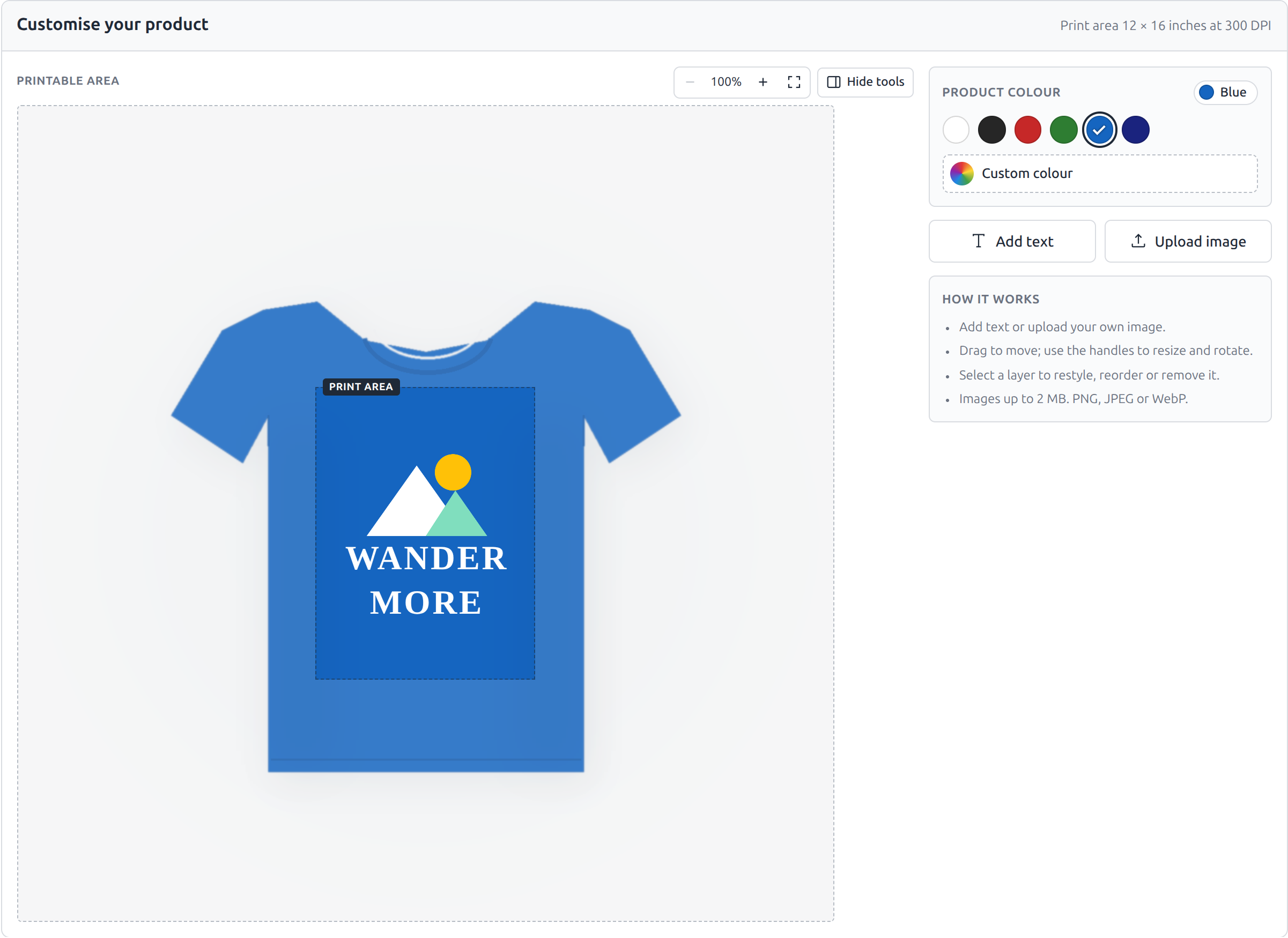
- Live product colours. Offer red, green, blue or any colours you list,
plus an optional custom colour picker. The mockup recolours instantly,
with folds and shading intact. - Print-ready files. Set the print area in inches, centimetres or pixels
with a DPI. A 12 x 16 inch area at 300 DPI downloads as a 3600 x 4800 PNG,
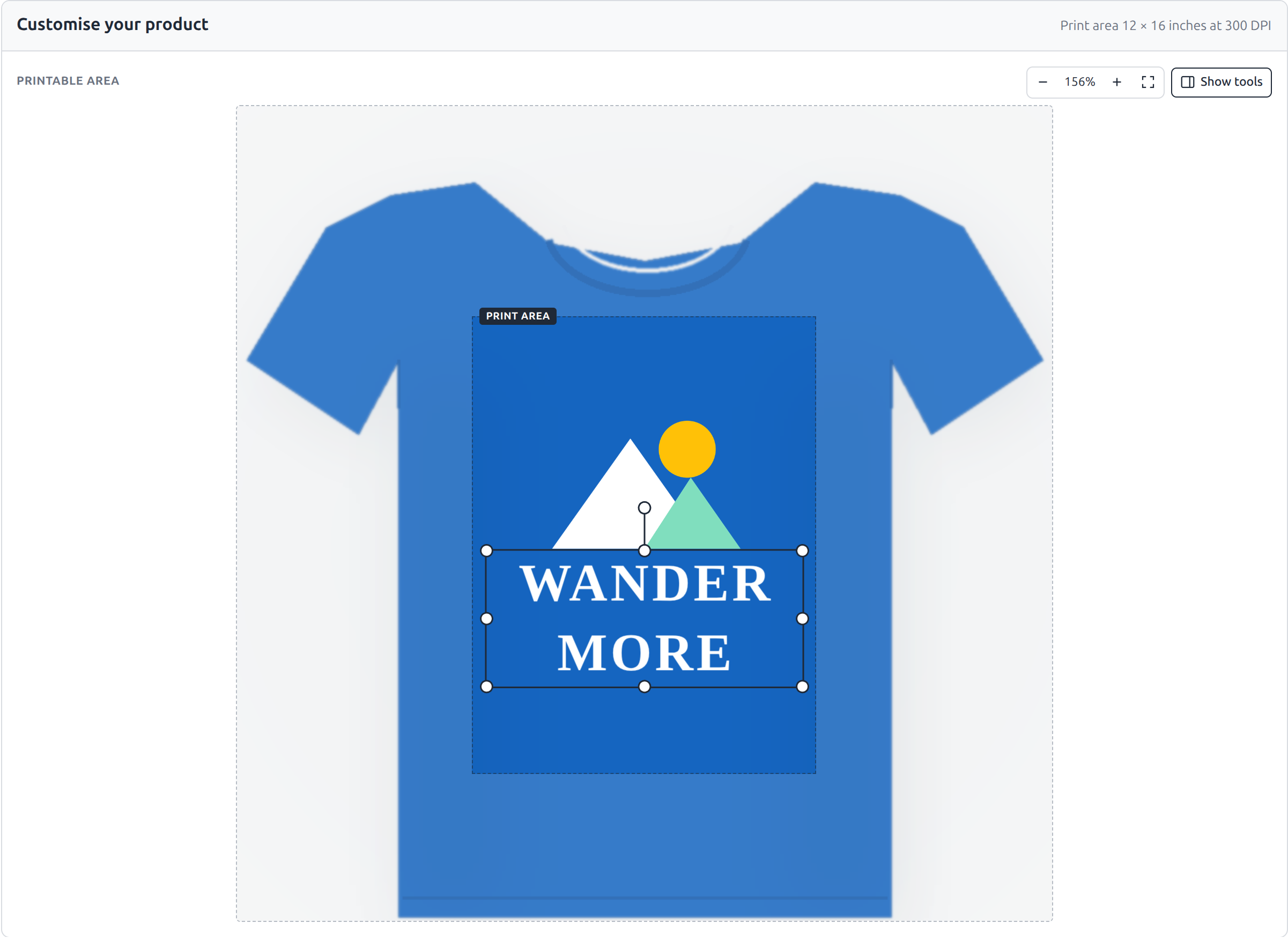
artwork only, on transparency. - Easy for customers. Text and image layers, zoom up to 400%, and a
full-width layout that gives the canvas room on any screen. - Built for modern WooCommerce. Block and classic cart and checkout,
High-Performance Order Storage (HPOS), and no custom database tables. - Lightweight and private. Loads only on products that use it, makes no
external requests, and keeps customer artwork on your server.
Perfect for
- Custom t-shirt and apparel shops: tees, hoodies, sweatshirts, caps.
- Print-on-demand stores that print in-house or send files to a print
partner. - Personalised gifts: mugs, tote bags, phone cases, cushions, posters.
- Team, club, school and event merchandise.
- Promotional products and branded merchandise.
How it works
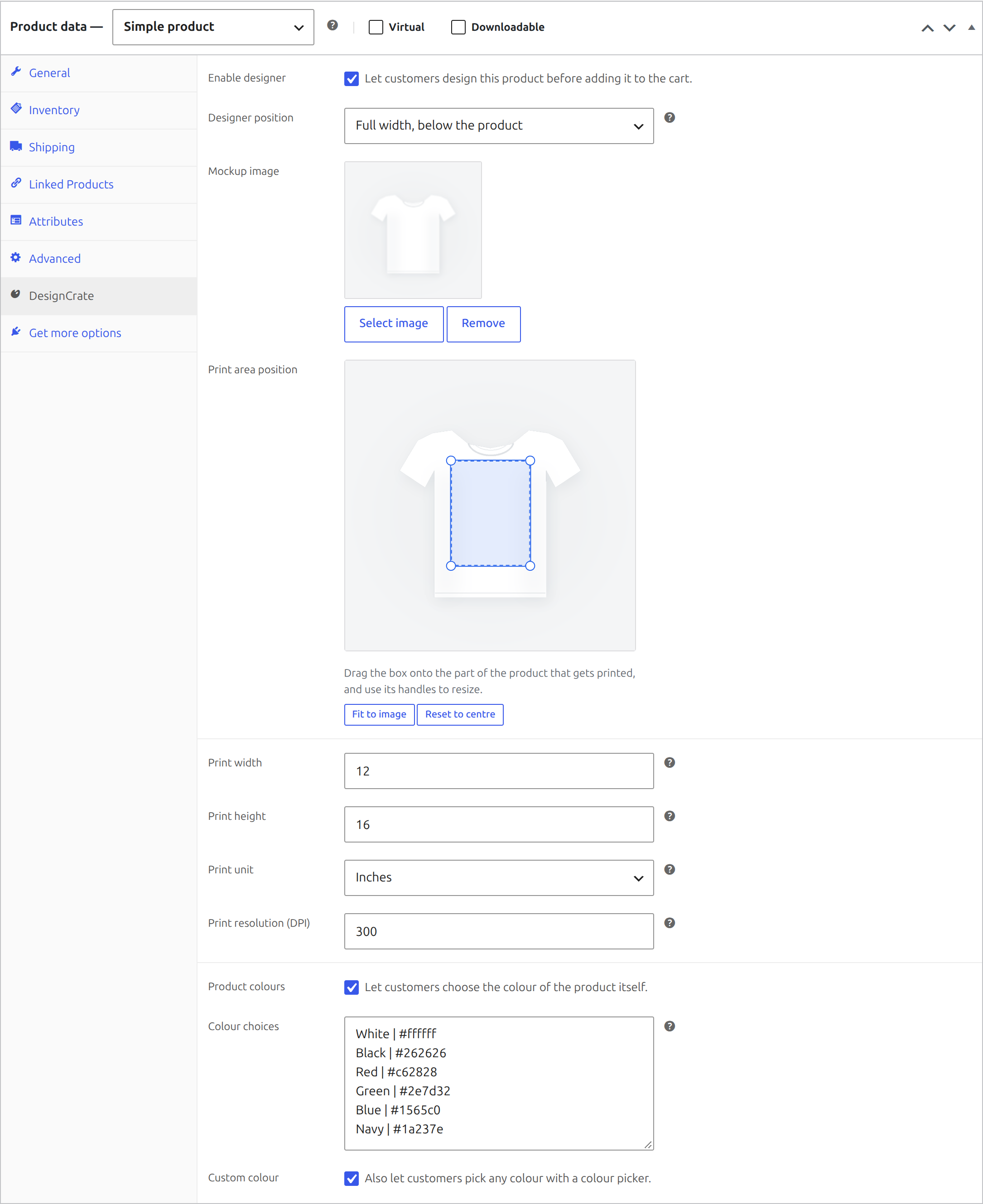
- Open a product, tick Enable designer on the DesignCrate tab, choose a
mockup image and set the print size. - Drag the print area onto the part of the product that actually gets
printed — the chest of a shirt, the face of a mug. - Optionally turn on Product colours and list the colours you sell.
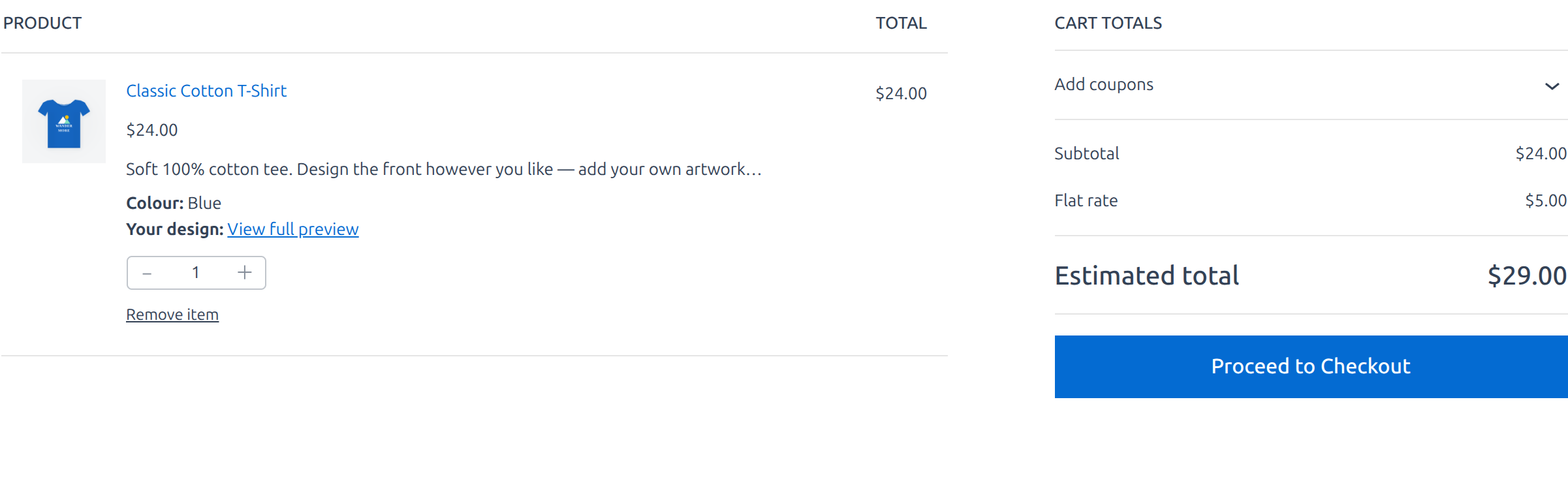
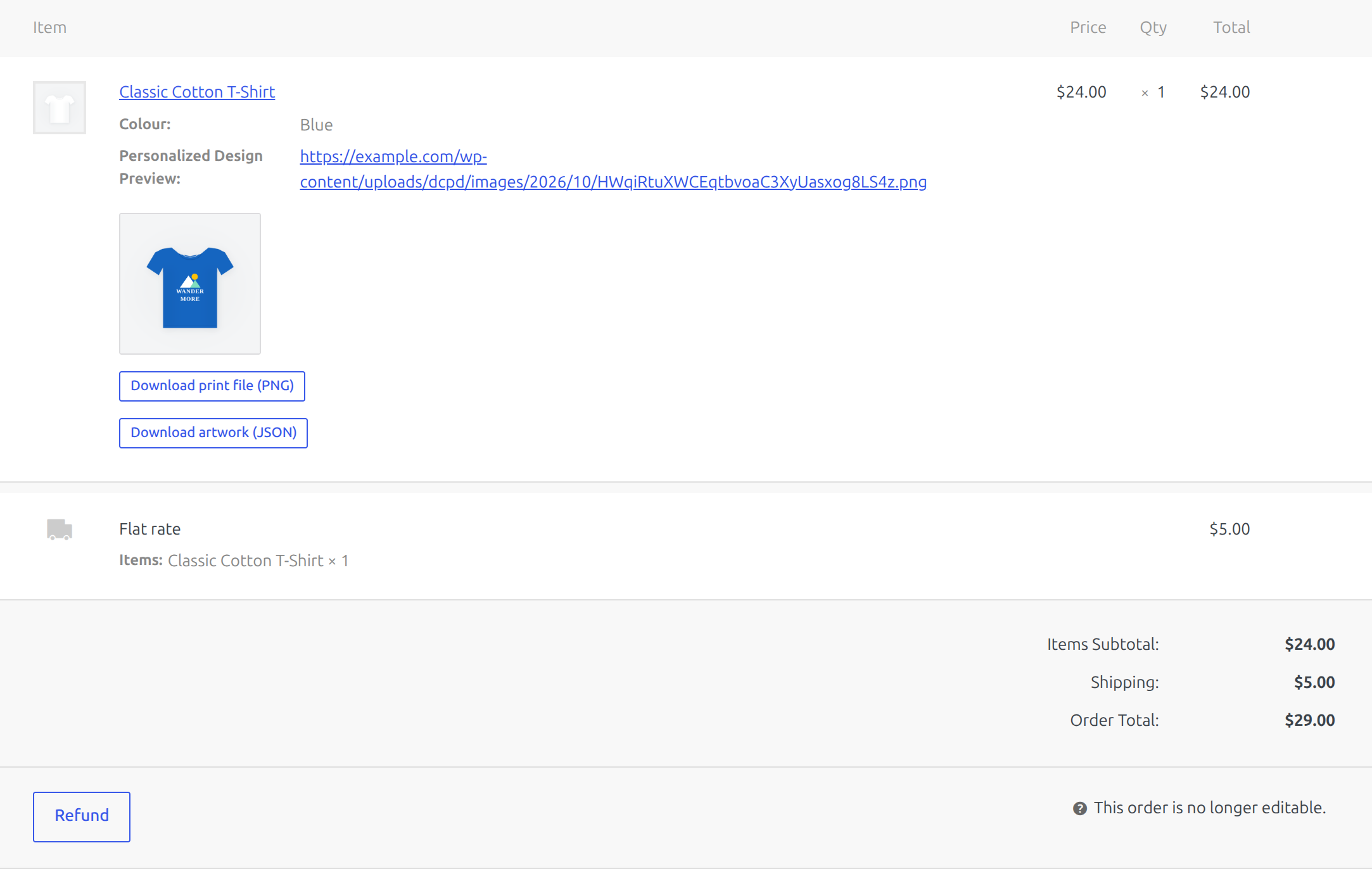
- Customers design on the product page. The design follows the order, with
a preview in the cart, at checkout, on the order and in the confirmation
email. - Download the print file from the order screen when you are ready to
print.
What customers can do
- Choose the colour of the product itself, from your list or a custom
colour picker. - Add text and restyle it: font, size, colour, alignment, bold, italic,
underline and strikethrough. - Outline, letter spacing, line height, highlight and drop shadow.
- Style individual letters differently within the same line.
- Upload their own PNG, JPEG, WebP or GIF image.
- Move, resize, rotate and reorder layers, and set their opacity.
- Zoom in up to 400%, pan around, and hide the tools panel for a bigger
canvas. - Everything stays inside the printable area, so nothing is lost at print.
Print-ready output
The print file is the customer’s artwork alone, on a transparent
background, cropped to the printable area at full resolution. The product
mockup and colour are never part of it, so you can send the file straight to
a printer.
The preview shown in the cart and on the order is a separate render that
does include the mockup and the chosen colour, so you see the design on the
product.
Privacy
DesignCrate stores the images customers upload and the designs they create in
your own wp-content/uploads/dcpd/ folder, and nowhere else. It sends no data
to any external service. Designs that never reach an order are deleted
automatically after two days; designs attached to orders are kept with the
order. Mention customer uploads in your store’s privacy policy.
Credits
The canvas is powered by Fabric.js 7.4.0, MIT
licensed, bundled with the plugin.
Screenshots
Installation
- In your WordPress admin, go to Plugins > Add New, search for DesignCrate, then install and activate it. WooCommerce must be active.
- Edit a product and open the DesignCrate tab in the Product data box.
- Tick Enable designer, choose a mockup image and set the print size and print area.
- Optionally turn on Product colours, and choose a Designer position.
- Update the product and visit its page to see the designer.
For the best results, use a mockup of a white or light product, ideally on a transparent background.
FAQ
-
Is DesignCrate free?
-
Yes. Every feature described here is in the free plugin, with no limits on
products, orders or designs. -
Which products can customers personalise?
-
Any WooCommerce product with a mockup image: t-shirts, hoodies, mugs, bags,
caps, posters, signs and more. You set the printable area per product. -
Do I need a print-on-demand service?
-
No. DesignCrate gives you the print-ready file for each order. Print it
yourself, or send it to any printer or print partner you work with. -
Does it work with my theme?
-
Yes. It works with classic themes such as Astra and with block themes. On
block themes the designer always sits beside the add to cart button. -
Does it work on mobile?
-
Yes. The designer resizes to the screen, the handles are sized for touch, and
customers can zoom in with the zoom buttons. -
Does it work with the block cart and checkout?
-
Yes. Both the classic templates and the Store API are supported.
-
Does this send anything to an external service?
-
No. Artwork is stored in your own uploads folder and never leaves your server.
-
Where is customer artwork stored?
-
Under
wp-content/uploads/dcpd/. Design files are blocked from direct web
access; only the preview images are publicly readable, because the cart and
your emails need to display them. Filenames are random, so nothing can be
guessed or enumerated. -
What happens to artwork if I uninstall the plugin?
-
Product settings are removed. Artwork attached to orders is deliberately kept,
because deleting something a customer paid for would be data loss. Remove the
uploads/dcpd folder yourself if you are certain you no longer need it. -
Designs that were never ordered pile up. Are they cleaned?
-
Yes. A daily task removes designs and uploads that were never completed, two
days after they were last touched. Anything attached to an order is never
touched. -
Can I change how large an image customers may upload?
-
Yes, with the
dcpd_max_upload_bytesfilter. The plugin never accepts more
than your server’s own upload limit. -
Why is the print area locked to one shape?
-
Because the exported file has to match the size the product declares. A square
print area on a 12 x 16 inch product would export a square file, and the print
would come out wrong. The box keeps the shape of the print size you set, so
you position and resize it without ever producing a mismatched file. -
What file do I send to the printer?
-
Use Download print file (PNG) on the order screen. It is the artwork only,
at the full print resolution, with a transparent background. The JSON download
beside it is the editable design data, not something a printer can use. -
What happens to a design left in a cart?
-
It is kept for as long as the cart is alive, and swept two days after it was
last touched if the customer never checks out. Anything attached to an order
is never swept. -
How does the product colour picker work?
-
Tick Product colours on the DesignCrate tab and list the colours you
offer, one per line asName | #hex. Tick Custom colour to also offer a
colour picker. The designer recolours the product in your mockup, and the
chosen colour is shown in the cart and saved on the order, so you know which
blank to print on. It works best with a white product on a transparent
background; on an opaque mockup the backdrop is detected from the image
edges and left untouched. The print file is never coloured. -
Can the designer be bigger?
-
Yes. Set Designer position on the DesignCrate tab to Full width, below
the product to give the canvas the full page width. Customers can also hide
the tools panel and zoom in. Block themes always show the designer beside add
to cart.
Reviews
There are no reviews for this plugin.
Contributors & Developers
“DesignCrate Product Designer for WooCommerce” is open source software. The following people have contributed to this plugin.
Contributors
Translate “DesignCrate Product Designer for WooCommerce” into your language.
Interested in development?
Browse the code, check out the SVN repository, or subscribe to the development log by RSS.
Changelog
1.1.1
- Tested with WooCommerce 11.2.
1.1.0
- Customers can choose the product colour from your list or a custom colour picker.
- Zoom, pan and a tools panel that collapses to give the canvas more room.
- New full-width designer position below the product images.
- Fixed an unclosed tag in the designer template that could break theme layouts.
1.0.0
- Initial release.