
Description
Linformatique Néophyte Affiliate Product Grid adds a “Gift” content type to your WordPress admin — despite the name inherited from its original use case (gift guides), it works just as well for any kind of affiliate product card: tech picks, deals round-ups, “best of” lists, etc. For each product, you fill in:
- A title
- An image (featured image, or direct URL)
- A price
- An affiliate link (Amazon or any other program)
You can group your products into separate grids (e.g. “Christmas gift guide”, “Best headphones”, “Deals of the week”) using a dedicated taxonomy, then display the grid of your choice in any post or page with:
[liapg_grid grid="christmas"]
The plugin is affiliate-program agnostic: the button label on every product card is generic and fully customisable (“View product” by default) — it does not assume or claim you are using Amazon specifically.
Features
- Dedicated “Gift” content type with image, price and link
- Multiple grids (the “Grid” taxonomy)
- Shortcode with filtering by grid, by specific IDs, or a display limit
- Generic, customisable product button label — works with any affiliate program, not just Amazon
- Price display that can be toggled globally or per grid
- Built-in responsive design (auto-adapting grid), no external dependencies, no third-party image service
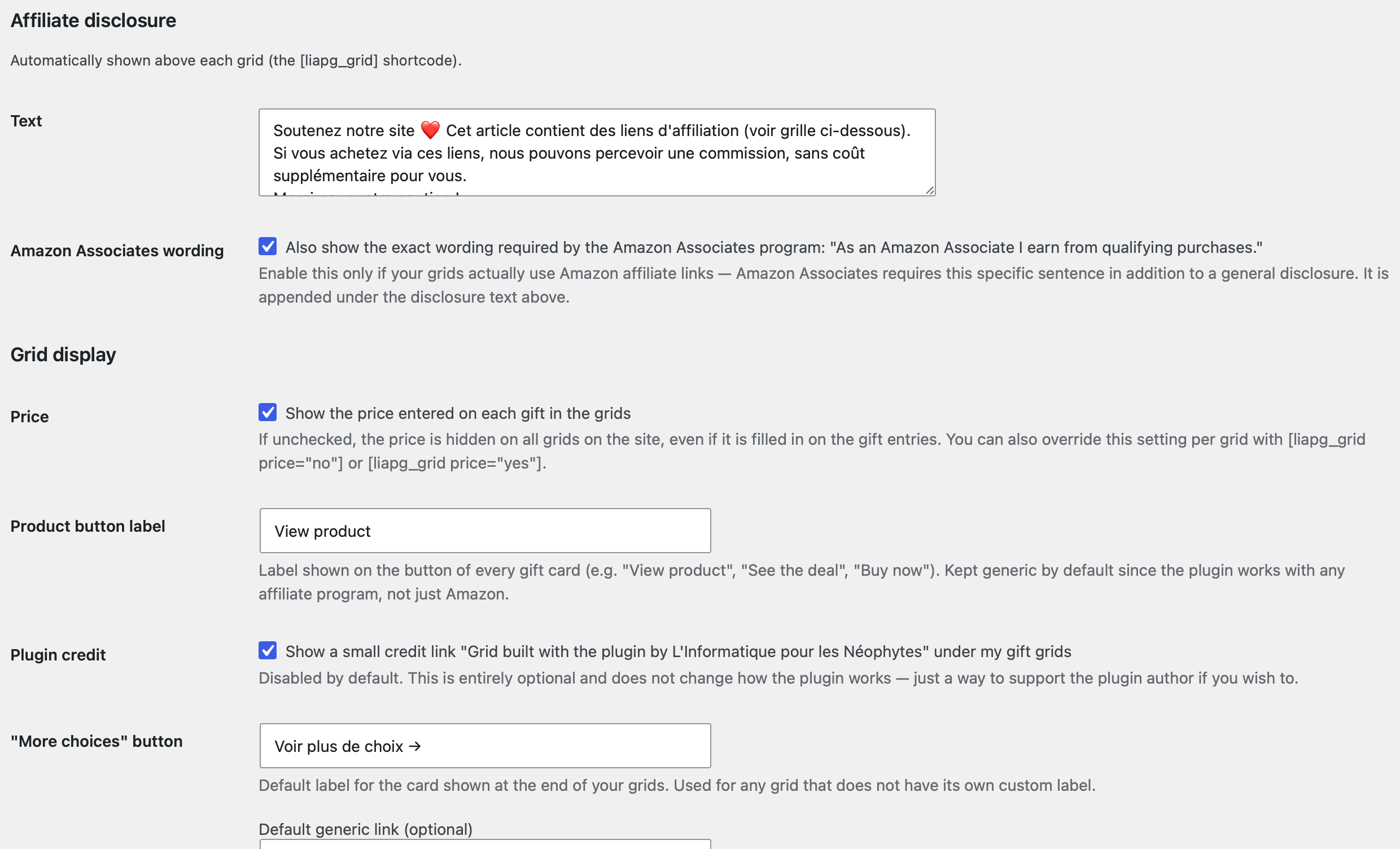
- Configurable affiliate disclosure banner, shown automatically above each grid, plus an optional separate toggle for the exact wording required by the Amazon Associates program
- All outbound links use
rel="nofollow sponsored noopener" - Bulk import of a product list (copy/paste), assignable to an existing or new grid
- Export of the list (all grids or a single one) in the same format, to re-import on another site
- Optional “more choices” card at the end of a grid, enabled per grid, with a customisable label and link
- Translation-ready (text domain
linformatique-neophyte-affiliate-product-grid), translations are provided through translate.wordpress.org - No third-party data collection, no tracking by us, no external HTTP request at display time (the fallback placeholder image is generated locally as an inline SVG — nothing is fetched from an outside service)
Show or hide the price
In “Gift Grids > Settings”, a checkbox lets you show or hide the price across all grids on the site. This setting can also be overridden per grid directly in the shortcode:
[liapg_grid grid="christmas" price="no"]
[liapg_grid grid="birthday" price="yes"]
“More choices” button at the end of a grid
You can add a final card at the end of a grid, pointing to a generic link (e.g. an affiliate category page, your storefront, etc.).
- In “Gift Grids > Settings”, set a default label (e.g. “See more choices ”) and, if you want, a default generic link.
- In “Gift Grids > Grids”, edit the grid of your choice: check “Show a more choices button”, and customise its label and link for that specific grid if needed (otherwise the default values from Settings are used).
This button only appears when the shortcode targets a specific grid ([liapg_grid grid="christmas"]) and that grid has explicitly enabled it — it stays invisible everywhere else by default.
Export and transfer to another site
In “Gift Grids > Export List”, choose a grid (or all of them) and download a .txt file. Then paste that file into the import screen (“Gift Grids > Import a List”) of another site using the same plugin: grids are automatically recreated if they don’t already exist, with the same titles, links, prices and images.
Generated format (5 fields): Title | Link | Price | Image | Grid.
Bulk import
In “Gift Grids > Import a List”, paste a list in the following format (one line per product):
Title | Affiliate link | Price | Image URL (optional) | Grid (optional)
Example:
Just One|https://example.com/product-1|$15.99
Toy Battle|https://example.com/product-2|$22.50
Then choose a destination grid (existing, new, or none), and a status (published or draft). Incomplete lines (missing title or link) are skipped and reported after the import.
⚠️ Legal obligations resting on the plugin’s user
This plugin is a display tool. It is your responsibility, as the site owner, to comply with the rules applicable to affiliate marketing. This plugin does not and cannot guarantee legal compliance on your behalf, in any country or for any affiliate program — it only provides configurable tools to help you disclose your affiliate relationship. In particular:
- Disclosure of the affiliate relationship: in most countries (FTC rules in the United States, fair commercial practice obligations in the EU/France, etc.), you must clearly inform your visitors that some links are paid affiliate links. The plugin displays an automatic disclosure banner above each grid — you need to check that it works and that its wording matches your local obligations and adapt it if needed in “Gift Grids > Settings”.
- Amazon Associates specifically: if you use Amazon affiliate links, Amazon’s current operating agreement requires the specific wording “As an Amazon Associate I earn from qualifying purchases.” to be shown clearly near your affiliate links, in addition to a general disclosure. This plugin includes a separate, opt-in setting in “Gift Grids > Settings” to display this exact sentence — it is off by default since the plugin also supports non-Amazon affiliate programs for which this sentence would not apply. Review Amazon’s current Associates Program Operating Agreement yourself, as its requirements can change.
- Displayed prices: the price is entered manually and is not synchronised in real time with Amazon or any other merchant. Most affiliate programs (including Amazon Associates) require displayed prices to come from an official, real-time API. If you choose to display the price, check the specific rules of the affiliate program(s) you participate in — you can also fully disable price display in the settings if you’d rather stay cautious.
- Images and other third-party content: only use an image (or any other content) you have the rights to use, or that is supplied under the terms of your affiliate program (for example, official product images provided by that program). The plugin lets you set any image URL, but it is your responsibility to make sure you are allowed to use that image.
- Reviews and ratings: this plugin does not include, generate or display any review, rating or testimonial system. If you add this type of content yourself elsewhere on your site, make sure it is genuine — publishing fake reviews is prohibited by law in many jurisdictions and by the terms of use of affiliate platforms.
- Compliance with the affiliate program’s terms: this plugin is a generic display tool. It is not affiliated with, endorsed by, or associated with Amazon or any other brand or e-commerce platform. Make sure your use complies with the terms of the affiliate program you use.
The plugin author provides this tool “as is”, without warranty, in accordance with the GPL license. The author cannot be held responsible for how the plugin’s users make use of it.
Optional credit
In “Gift Grids > Settings”, a checkbox (unchecked by default) lets you display a small credit link to the plugin author’s website under your grids. This is entirely optional and does not affect how the plugin works — in line with the WordPress.org directory rules, no such link is ever shown without your explicit action.
External services
This plugin does not connect to any external service and sends no data anywhere.
Screenshots

Installation
- Upload the
linformatique-neophyte-affiliate-product-gridfolder to/wp-content/plugins/, or install the .zip directly via Plugins > Add New > Upload Plugin. - Activate the plugin from the Plugins menu.
- A new “Gift Grids” menu appears in the admin.
- First create one or more “Grids” (Gift Grids > Grids), then add your products and assign them to a grid.
- Customise the affiliate disclosure text, the Amazon Associates wording (if relevant), the product button label and other display options in Gift Grids > Settings.
- Insert
[liapg_grid grid="your-slug"]into the post or page of your choice.
FAQ
-
Is the price updated automatically?
-
No. The price is entered manually for each product.
-
Can I hide the price on my grids?
-
Yes, via “Gift Grids > Settings” (global setting), or directly in the shortcode with
price="yes"/price="no"for a specific grid. -
Does this plugin only work with Amazon?
-
No. It works with any affiliate program. The product button label is generic and customisable (“View product” by default, changeable in Settings), and the affiliate link field accepts any URL. A separate, optional setting lets you add the specific wording required by Amazon Associates if that’s the program you use.
-
Go to “Gift Grids > Grids”, edit the grid you want, and check the corresponding box. The default label and link are configured in “Gift Grids > Settings”; each grid can also have its own label and link.
-
Does the plugin send data to an external service?
-
No. The plugin makes no external request. The fallback placeholder image is generated locally as an inline SVG. Your product image URLs are only loaded by your visitors’ browsers from wherever you point them to.
-
Is the plugin translated?
-
The plugin is fully translation-ready. Translations can be contributed on translate.wordpress.org.
Reviews
There are no reviews for this plugin.
Contributors & Developers
“Affiliate Product Grid – Linformatique Néophyte” is open source software. The following people have contributed to this plugin.
Contributors
Translate “Affiliate Product Grid – Linformatique Néophyte” into your language.
Interested in development?
Browse the code, check out the SVN repository, or subscribe to the development log by RSS.
Changelog
1.0.0
- Initial public release.