
Description
Connect WooCommerce to an active Clickwise merchant program. The plugin captures Clickwise click IDs from referral links, associates them with orders and sends sales, cancellations and refunds to Clickwise in the background.
- Recognizes Clickwise referral links (cwclk parameter).
- Uses a signed first-party cookie; no third-party cookies or remote browser scripts.
- Supports classic checkout, checkout blocks and High-Performance Order Storage (HPOS).
- Adjusts commission proportionally for partial refunds; full refunds and cancellations reverse the original sale.
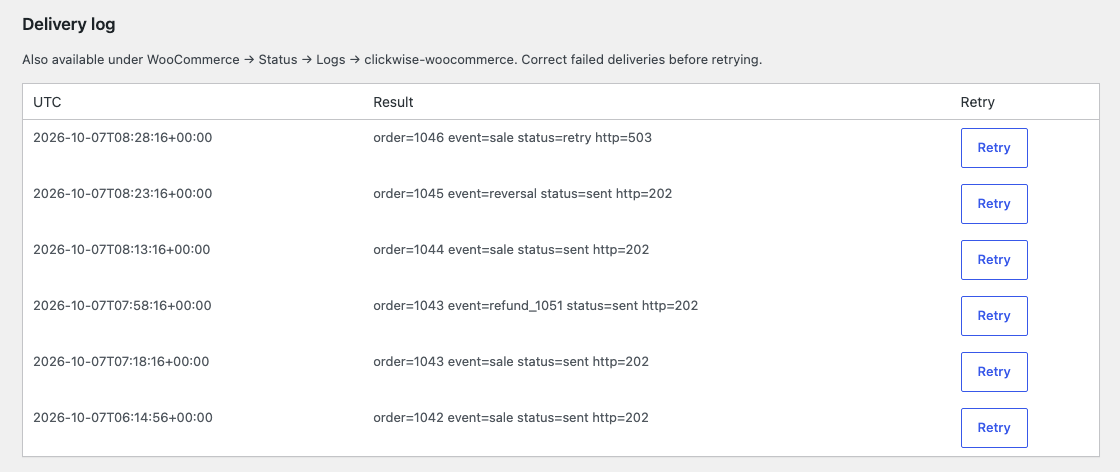
- Uses durable delivery intents, retries and an administrator delivery log.
- Tracking is disabled until an administrator explicitly enables it and configures the service.
Requires WooCommerce 8.0+, PHP 8.0+ and a Clickwise merchant program with a tracking pixel, campaign and shared secret. Clickwise provides the external attribution and commission service under the Clickwise terms for merchants. The plugin itself is GPLv2 or later.
Attribution
A Clickwise referral redirect adds cwclk to the merchant URL. Accepted aliases are click_id, clickid, cw_clickid and clickId. The newest valid Clickwise click replaces earlier clicks. Ordinary visits do not renew the cookie’s window. Orders without a valid Clickwise click are not reported.
External services
This plugin connects to the Clickwise API, an affiliate attribution and commission service, at the HTTPS origin entered by the store administrator (default: https://panel-v2.clickwise.net). Clickwise uses the reports to attribute sales to the referring affiliate, calculate commissions and reconcile cancellations and refunds. Nothing is sent until an administrator enables tracking and saves the program credentials.
When the administrator chooses Test connection, the plugin sends an authenticated GET to /api/v1/merchant-tracking/woocommerce/config/ with the public pixel_id to verify the program and retrieve its attribution window. Saving settings alone does not test the connection. The shared secret is sent in the X-CW-Secret header, never in a URL.
When an attributed order reaches a configured sale status (processing or completed by default), is cancelled or is refunded, the background worker sends an authenticated POST to /api/v1/merchant-tracking/woocommerce/conversions/. Data sent: public pixel_id, installation-scoped order_id, order amount, currency, event_name and the Clickwise click ID (cwclk). Refund reports additionally contain refund_id, refund_amount and cumulative refund_total. Failed or ambiguous delivery can cause the same immutable report to be retried.
The plugin does not send the buyer’s name, email, address, telephone, IP address, browser user agent or purchased product details. The API and hosting infrastructure necessarily receive the merchant server’s connection IP and HTTP request metadata. Clickwise also keeps its own click record when a buyer follows a Clickwise referral link.
- Terms of service: Clickwise terms for merchants
- Privacy policy (API and conversion reports): Clickwise v2 privacy policy
- Privacy notice (referral link tracking): Clickwise tracking privacy notice
The plugin stores a signed clickwise_wc_click attribution cookie on the merchant domain for the configured program window. It is HttpOnly, SameSite=Lax and Secure on HTTPS. Attribution and delivery state are stored with WooCommerce orders. Disabling tracking stops capture and sending; it does not erase existing cookies, orders or reports. The merchant must describe this use in its own privacy notice and integrate shopper consent where required. Administrator opt-in is not a shopper consent manager; no CMP adapter is included.
Screenshots
Installation
- Obtain an active Clickwise merchant pixel, campaign ID and shared secret from Clickwise.
- Install and activate WooCommerce, then install and activate this plugin (Plugins > Add New, or upload the ZIP).
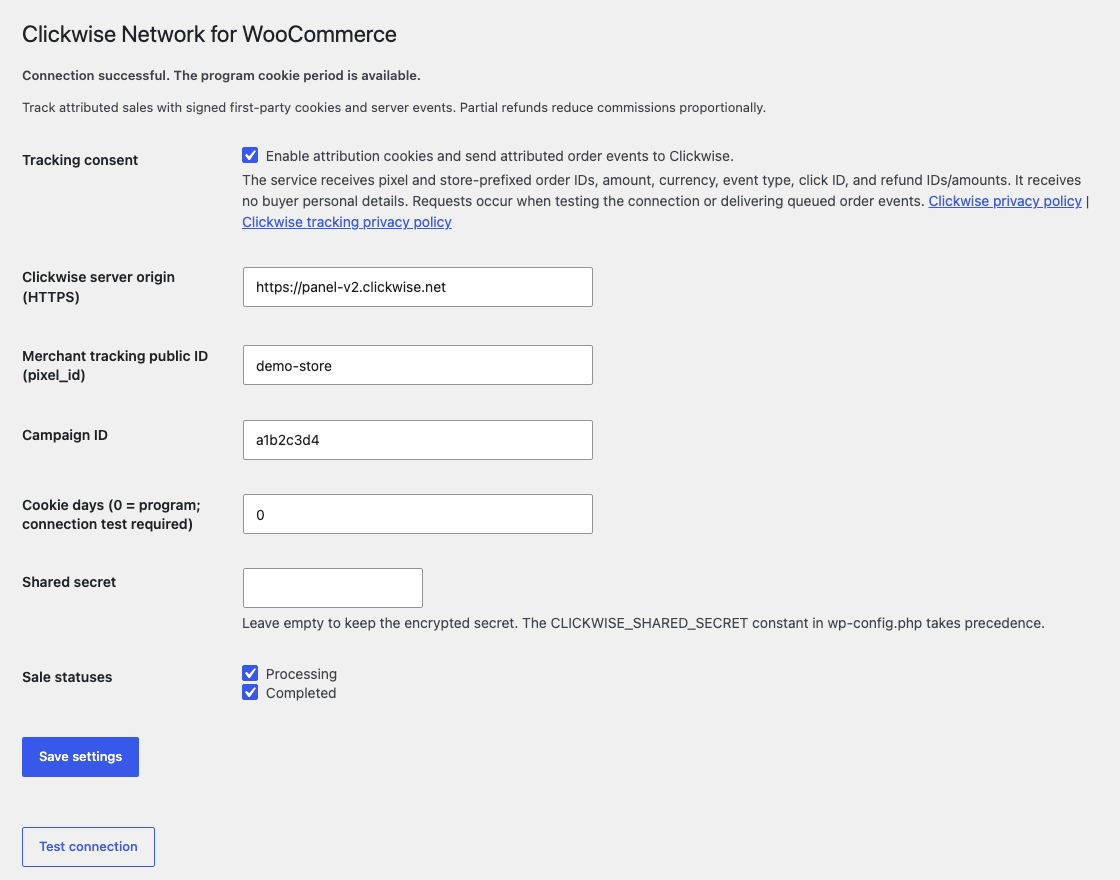
- Open WooCommerce > Clickwise. Enter the HTTPS server origin, public pixel ID, campaign ID and secret. Keep cookie days at 0 to use the program window.
- Read the external-service notice, explicitly enable tracking, save settings and use Test connection. Automatic capture with the program window needs a successful connection test.
- Test an attributed order, a partial refund and a cancellation in staging. Inspect the delivery log and WooCommerce > Status > Logs > clickwise-woocommerce.
Keep credentials out of links, screenshots and source control. WordPress salts protect the encrypted stored secret; save it again if salts are rotated. A hosting secret manager may supply CLICKWISE_SHARED_SECRET in wp-config.php instead.
FAQ
-
How do partial refunds affect commission?
-
Refunds reduce commission in proportion to the cumulative refunded amount, capped at the original sale amount. For a 100.00 sale with a 10.00 commission, refunding 25.00 leaves 7.50 commission. Separate refund reports and retries do not apply the same adjustment twice. Do not delete refund records to undo a reported adjustment; automatic restoration of reversed orders is not supported.
-
Does processing/completed approve the affiliate commission?
-
No. payment_approved reports a sale that creates a pending commission. Final approval belongs to the Clickwise program workflow.
-
Why is an attributed visit not captured?
-
Check tracking opt-in, program window, same-domain checkout and cookie acceptance. Configure page caches/CDNs to let WordPress process the cwclk query parameter and preserve it through redirects. This plugin does not attribute across merchant domains.
-
Can background sending survive an API outage?
-
Retryable transport and server failures use backoff. Permanent failures need correction and manual Retry. Keep the plugin enabled while work is pending and run WordPress cron regularly on low-traffic stores.
-
Where can I get help?
-
Contact your Clickwise merchant onboarding contact with the plugin version, WordPress/WooCommerce versions and the fixed delivery-log result code. Do not include shared secrets or buyer data.
Reviews
There are no reviews for this plugin.
Contributors & Developers
“Clickwise Network for WooCommerce” is open source software. The following people have contributed to this plugin.
Contributors
Translate “Clickwise Network for WooCommerce” into your language.
Interested in development?
Browse the code, check out the SVN repository, or subscribe to the development log by RSS.
Changelog
0.4.0
- Renamed to Clickwise Network for WooCommerce (slug clickwise-network-for-woocommerce). No functional changes.
0.3.1
- Main plugin file renamed to match the plugin folder (clickwise-network-for-woocommerce.php).
- Request, cookie and form input is sanitized as soon as it is read, before validation.
- Deactivation clears the hourly recovery event.
0.3.0
- First public release on WordPress.org.
- First-party Clickwise click attribution with a signed cookie, classic and block checkout, and HPOS support.
- Durable asynchronous delivery of sales, cancellations and proportional cumulative partial refunds, with retries and a delivery log.
- Explicit administrator opt-in, encrypted shared secret, translated interface strings and external-service documentation.