

Description
Tell your AI assistant what you want changed on your Divi 5 website, in your own words, and it makes the change for you. A built-in checker tests every change the AI makes before it is saved.
How it works (in plain words)
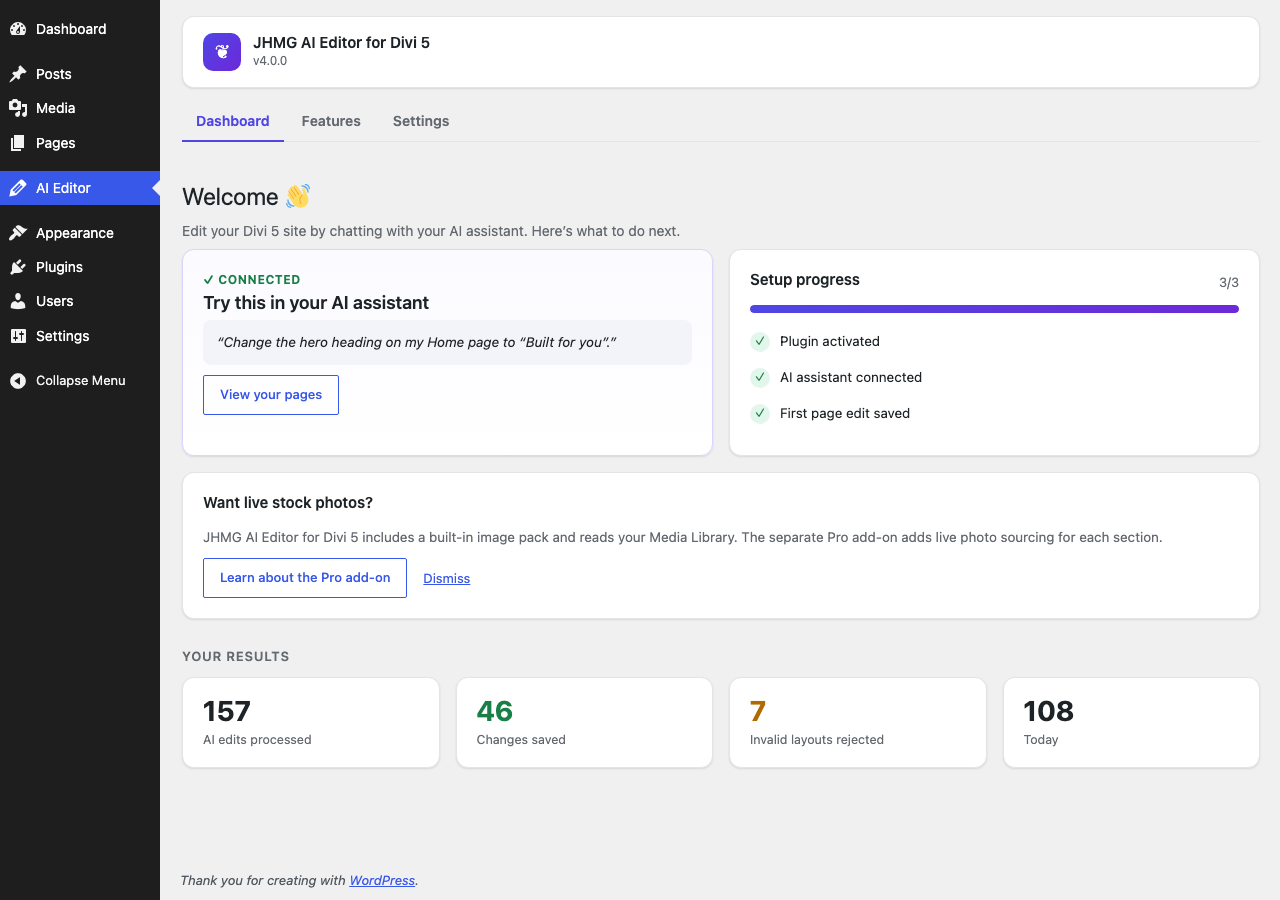
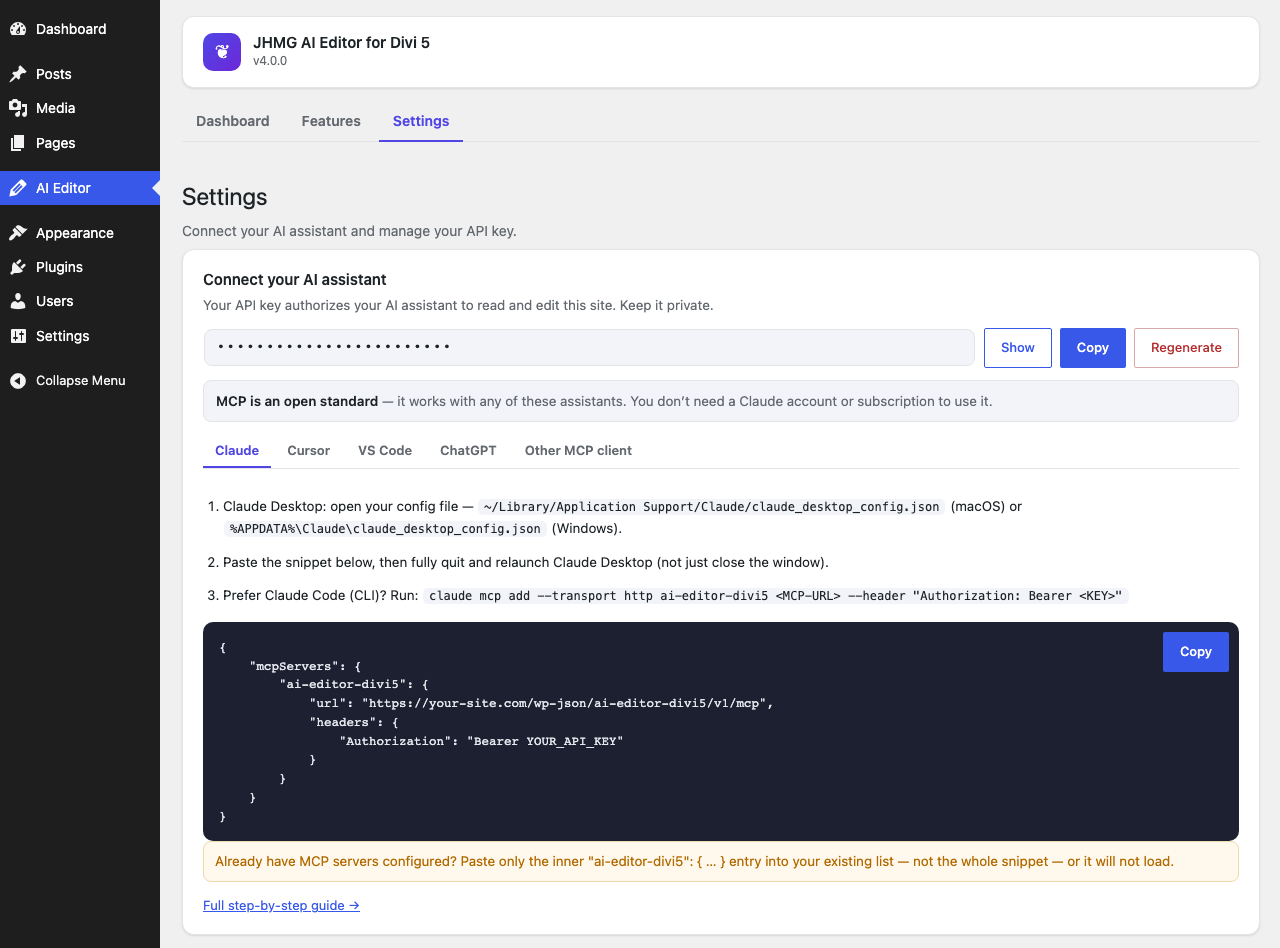
- Connect your own AI assistant (Claude, ChatGPT, Cursor or Copilot) to your site with one key. It is copy and paste, and takes about two minutes.
- Tell it what you want in plain English, for example “change the phone number on the Contact page” or “build me a landing page for my dental clinic”.
- The plugin’s built-in guides and proven section patterns steer the AI, so it builds real, good-looking Divi 5 pages instead of guessing. It uses your own Media Library images when it can.
- Before anything is saved, a built-in checker tests the page against fixed rules. If something is wrong, the change is refused with the exact reason and the AI fixes it. If it is fine, it is saved, and the previous version is kept so you can undo.
What makes it smart
- The checker is not AI. It follows fixed rules: same page in, same verdict out. The AI can be creative, but every save it makes is checked first, so a broken page is never saved by an AI edit.
- It knows Divi 5 well. The checker knows more than 80 Divi 5 block types (modules, sections, rows and columns) and which ones are allowed inside which.
- Rules come from real Divi 5, not guesses. The rules come from real Divi 5 page exports and, for 24 newer modules (and their child items), from Divi’s own module definitions, verified by rendering them in real Divi 5.14.
- Small changes stay small. Changing one phone number replaces just that text. The rest of the page is not rebuilt or touched.
- Preview before saving. Your AI can ask what a change would do before it saves anything. It gets a list of the blocks and settings that would change, and the checker’s verdict. Nothing is saved until it repeats the request for real.
- Matches your site. Your AI can look up your site’s own Divi colors and presets and reuse them, and it is told when a page uses one your site does not have. It cannot create or change presets or colors: that stays in Divi’s Visual Builder.
- Proven building blocks. 17 ready-made section patterns (heroes, feature grids, testimonials, contact forms and more), each one tested against the checker, plus landing-page guidance on the order of sections, headlines and calls to action.
- Sensible images. The AI looks in your Media Library first. When nothing there fits, it uses a built-in pack of 44 original images that ships with the plugin.
- One-click undo. The previous version of each page the AI changes is kept (up to the last 10). Restore it from the plugin’s Dashboard with one click, or just ask your AI to undo.
- Works with the AI assistant you already use. Claude, ChatGPT, Cursor, VS Code Copilot, or any assistant that supports MCP.
- Nothing leaves your site through the plugin. It uses no third-party services. Your AI assistant talks directly to your own site.
Examples to try
- “Change the phone number on the Contact page to 555-0142.”
- “Make the main heading on the Home page say ‘Fresh bread every morning’.”
- “Build me a landing page for my dental clinic, with a booking button and three patient reviews.”
- “Add a section with our opening hours under the hero on the About page.”
- “Undo the last change you made to the Services page.”
What your AI assistant can do (16 tools)
Read and check:
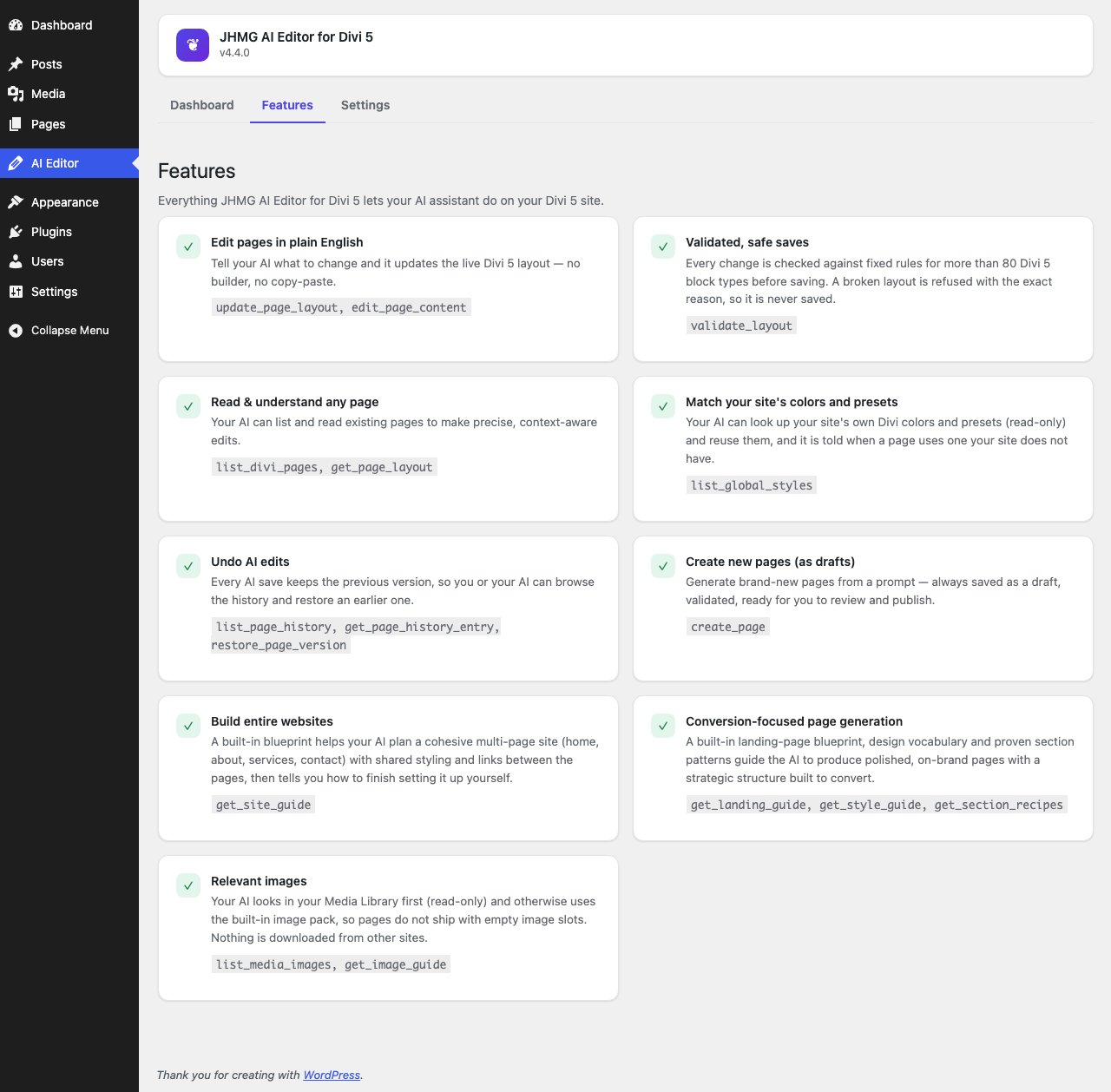
list_divi_pages: list the pages built with Divi 5 that you can edit.get_page_layout: read a page’s current layout.list_global_styles: list your site’s own Divi colors and presets so the AI can reuse them (read-only).validate_layout: check a layout without saving anything.
Edit and create:
edit_page_content: change one piece of text (an email, phone number, price or sentence) without rebuilding the page. Adddry_runto preview the change without saving it.update_page_layout: save a new layout for a page, after the checker approves it. Adddry_runto preview what would change without saving it.create_page: create a new page. It is always saved as a draft for you to review and publish.
Undo:
list_page_history,get_page_history_entry,restore_page_version: see the saved earlier versions of a page and bring one back.
Guides that help the AI build good pages:
get_style_guide: how to build styled Divi 5 layouts, using real Divi 5 settings.get_landing_guide: how to build a landing page that turns visitors into customers.get_site_guide: how to plan a site with several pages that link to each other.get_section_recipes: the 17 ready-made section patterns.get_image_guide: how to pick the right image for each section, including the built-in image pack.
Images:
list_media_images: look through the images already in your Media Library (read-only; nothing is uploaded, changed or deleted).
Images
The plugin includes a pack of 44 original images (hero backgrounds, card and section images, people placeholders and logo placeholders) made for this plugin and bundled inside it. Your AI uses your own Media Library images first and the built-in pack when nothing fits. Nothing is downloaded from other websites.
Add-on
A separate Pro add-on is planned (details and waitlist at https://divi5lab.com/plugins/divi-5-ai-editor) and will add live stock-photo sourcing.
Compatible AI assistants
- Claude (Desktop and Claude Code), through MCP
- Cursor and Windsurf, through MCP
- VS Code with GitHub Copilot, through MCP
- ChatGPT, through a custom GPT Action (OpenAPI)
- Any other MCP client, or any HTTP client through the REST API
Works with Divi 5. Divi is a trademark of Elegant Themes. This plugin is not affiliated with, endorsed by, or sponsored by Elegant Themes.
Privacy
The plugin stores these things in your own WordPress database:
- The API key (and which user it belongs to).
- An activity log of AI actions: the action, the page ID, the result, the assistant’s name (or, when it is not recognised, the first 80 characters of its user-agent string) and a hashed IP address (hashed with your site’s own secret key, so the IP itself is not stored). You can clear it from the Settings screen.
- Page history for undo: up to the last 10 previous versions of each page the AI changes (fewer for very large pages, about 768 KB per page at most). It is kept in a table in your own database.
Nothing is sent anywhere by the plugin. All of this is removed when you delete the plugin.
External services
This plugin does not connect to any external service. Your AI assistant connects to your own site using the API key you generate; no data passes through the plugin author’s servers.
Screenshots
Installation
- In your WordPress admin, go to Plugins Add New, search for “JHMG AI Editor for Divi 5”, then install and activate it. (Or upload the
jhmg-ai-editor-for-divi-5folder to/wp-content/plugins/and activate it on the Plugins screen.) - Open AI Editor in your WordPress admin sidebar.
- Go to Settings, choose your AI assistant and copy the ready-made setup into it.
- Ask your assistant to list your Divi 5 pages to check that it is connected.
Requirements
- WordPress 6.0 or later
- PHP 8.1 or later
- The Divi 5 theme (Divi 4 and its shortcode format are not supported)
- Pretty permalinks (Settings Permalinks, any option except “Plain”)
- For ChatGPT: your site must be reachable over public HTTPS
FAQ
-
Does the AI get administrator access to my site?
-
No. The API key works as the WordPress user who created it, and the AI can only use this plugin’s tools. Every request checks that this user can still edit pages, and every page listing, read or change, every new page and every Media Library lookup re-checks that user’s WordPress permissions (pages they cannot edit are not even listed). The tools can only list, read, check, edit and undo the content of pages, create pages (as drafts), read Media Library images (read-only), and read your site’s Divi presets and colors (read-only). They cannot install plugins, change users, settings, menus or the front page, or run PHP or other server-side code.
-
Can the AI add custom CSS, JavaScript or PHP to my site?
-
No. The checker refuses any layout that contains custom CSS, a Divi Code module, script, style or iframe markup, a javascript: link or an event attribute, and the plugin has no tool that saves CSS, JavaScript or PHP or changes site settings. Anything already on a page, for example custom CSS you added in the Visual Builder, is kept: the AI cannot add or change code (it can only remove it).
-
Where do images come from?
-
From your own Media Library first. When nothing there fits, the AI uses the built-in image pack that ships inside the plugin. Nothing is downloaded from third-party websites.
-
Is my data sent anywhere?
-
No. The plugin does not send your data anywhere and uses no third-party services. Your AI assistant connects directly to your site with your key. The page content your assistant reads is handled by the AI service you chose (for example Anthropic or OpenAI), under that service’s own terms.
-
Can the AI break my pages?
-
The AI can make mistakes, but a broken page is never saved by an AI edit. The checker runs before every save. If a layout breaks a rule, it is refused, nothing is saved, and the AI gets the exact reason so it can fix it. If you do not like a change that was saved, restore the previous version from the Dashboard: undo puts back your own earlier version exactly as it was, and when your AI assistant does the restore it is told whether that version passes the checker.
-
Is the API key safe?
-
The key is a long random code stored in your WordPress database and shown only to administrators on the plugin’s Settings screen. Keep it private, like a password. You can make a new one at any time with the Regenerate button, which stops the old one from working.
-
Does this work with Divi 4?
-
No. Divi 4 stores pages as shortcodes. This plugin is made for the Divi 5 page format.
-
Does it work on staging sites or multisite?
-
It works on any standard WordPress site, including staging sites. Multisite is not officially supported yet.
-
Will this slow down my site?
-
No. The plugin adds no scripts or styles to your public pages. It only adds its admin screen and the connection endpoints your AI assistant uses.
Reviews

Contributors & Developers
“JHMG AI Editor for Divi 5” is open source software. The following people have contributed to this plugin.
Contributors
Translate “JHMG AI Editor for Divi 5” into your language.
Interested in development?
Browse the code, check out the SVN repository, or subscribe to the development log by RSS.
Changelog
4.5.0
- Fixed: the “Recent AI edits” list on the dashboard now shows only pages you can restore. Edits to other kinds of layouts, such as a header or footer saved by an add-on, no longer appear there with a Restore button that cannot work.
4.4.0
- Safer: your AI assistant can no longer save custom CSS, JavaScript or PHP through a page layout. The checker refuses custom-CSS fields, Divi Code modules, script, style and iframe markup, javascript: links and event attributes, and says exactly where. Code already on a page, for example custom CSS you added in the Visual Builder, stays as it is.
- New: your AI assistant can look up your site’s own Divi colors and presets, so the pages it builds can match your site. A new read-only tool,
list_global_styles, lists them. - New: when a page uses a color or preset your site does not have, the save and preview results now say so. The save still goes ahead, and Divi shows that part of the page with its default look.
- It cannot create or change presets or colors.
4.2.0
- New: preview before saving.
update_page_layoutandedit_page_contentacceptdry_run: they return the checker’s verdict and a short list of the blocks and settings that would change, and save nothing.
4.1.0
- Undo history is now kept in its own table in your database instead of in each page’s custom fields. Pages and the front end no longer load it, and copying or exporting a page no longer carries its history along.
- Existing undo history is moved over automatically. Nothing changes in how undo works or in what your AI assistant sees.
- Going back to version 4.0.0 afterwards is not supported: it would not find the moved history.
- Deleting a page still deletes its undo history.
4.0.0
- Renamed to JHMG AI Editor for Divi 5 (plugin folder and slug:
jhmg-ai-editor-for-divi-5). create_pageis part of this plugin: create new pages, always saved as drafts.- New:
list_media_imageslets your AI reuse the images already in your Media Library (read-only). - New: a built-in pack of 44 original images. Section patterns and guides now use it, so no images are loaded from other websites.
- Undo history (
list_page_history,get_page_history_entry,restore_page_version) is part of this plugin. - Removed every tool that changed site settings or saved CSS or PHP code, and all licensing code, from this plugin.
- The plugin makes no calls to external services and loads no remote files.
- Dashboard: one card about the separate add-on, which you can dismiss.
3.5.0
- Undo for AI edits: the previous version of a page is kept when the AI saves it, and can be restored by the AI or from the Dashboard.
3.4.0
- Support for 24 more Divi 5 modules, each verified to render on Divi 5.14.
- A notice when your Divi is newer than the newest version this plugin was verified on.
3.3.0
- Prepared for the WordPress.org directory. Verified on WordPress 7.1 and Divi 5.14.
3.2.0
- Surgical edits: change one piece of text without rebuilding the page (
edit_page_content).
3.1.0
- A guided connection screen for Claude, Cursor, VS Code, ChatGPT and other MCP clients.
2.0.0 to 3.0.0
- MCP server and REST API, OpenAPI spec for ChatGPT, the deterministic Divi 5 checker, the style, site, landing and image guides, the section pattern library and the admin screens.
1.0.0
- Initial release.